Windows 11 doesn't remember folder settings


artem3232

New member
Local time
4:46 PM
Posts
9
OS
win 11
I'm using Windows 11, and I want all my files and folders to be displayed as General items and always sorted by date modified with detailed view. However, the usual methods through file options are not working. The system doesn't remember the settings I save, and I'm looking for a way or a registry file to permanently set these preferences without them being changed.

Additionally, when I press Win+E to open the File Explorer, it opens to the Home folder with many items, which slows down the process. There is an option to change it to open My Computer, but it keeps reverting back.

Another issue is when I click on the saved shortcuts/favorites on the left side of the Quick Access toolbar. It jumps down in the navigation panel to the folder it's in, causing me to scroll up again and again each time I click a favorite.

Lastly, when I need to select a file to upload somewhere, the settings are not saved, and I have to manually change the view each time.

I would greatly appreciate your help in resolving these problems. Thank you!
 
Windows Build/Version
win 11 latest

My Computer My Computer

At a glance

win 11
OS
win 11
chat gpt gave me a powershell script, for not not sure if it works, testing

# Specify the view mode and sorting options
$viewMode = 1 # 1 for Details view
$sortColumn = "System.DateModified"
$sortOrder = 1 # 1 for ascending order, 0 for descending order

# Function to update the view settings for a folder
function UpdateFolderView($folderPath) {
# Path to the desktop.ini file
$desktopIniPath = Join-Path -Path $folderPath -ChildPath "desktop.ini"

# Check if the desktop.ini file exists
if (!(Test-Path -Path $desktopIniPath)) {
# Create the desktop.ini file
New-Item -Path $desktopIniPath -ItemType File | Out-Null
}

# Set the attributes of the desktop.ini file to be hidden and system
(Get-Item -Path $desktopIniPath).Attributes = 'Hidden', 'System'

# Update the content of the desktop.ini file
@"
[ViewState]
Mode=$viewMode
Vid=$sortColumn
Sort=$sortOrder
"@ | Out-File -FilePath $desktopIniPath -Encoding ASCII
}

# Specify the drive letters to target
$driveLetters = 'C', 'F'

# Loop through each drive
foreach ($driveLetter in $driveLetters) {
$drivePath = "$($driveLetter):\"

# Get all folders, including hidden ones, on the drive
$folders = Get-ChildItem -Path $drivePath -Directory -Recurse -Force -ErrorAction SilentlyContinue

# Loop through each folder and update the view settings
foreach ($folder in $folders) {
$folderPath = $folder.FullName

try {
UpdateFolderView -folderPath $folderPath
} catch [System.UnauthorizedAccessException] {
Write-Warning "Skipping folder: $folderPath. Access denied."
} catch {
Write-Warning "An error occurred while processing folder: $folderPath."
}
}
}
 

My Computer My Computer

At a glance

win 11
OS
win 11
Maybe the setting you're looking for at Folder Options.

2023-05-18_10-30-18.png
 

My Computer My Computer

At a glance

Windows 11AMD Ryzen 7 5700GMicron Technology DDR4-3200 16GBNVIDIA GeForce RTX 3060
OS
Windows 11
Computer type
PC/Desktop
Manufacturer/Model
HP Pavilion
CPU
AMD Ryzen 7 5700G
Motherboard
Erica6
Memory
Micron Technology DDR4-3200 16GB
Graphics Card(s)
NVIDIA GeForce RTX 3060
Sound Card
Realtek ALC671
Monitor(s) Displays
Samsung SyncMaster U28E590
Screen Resolution
3840 x 2160
Hard Drives
SAMSUNG MZVLQ1T0HALB-000H1
Have you tried changing the folder view of root of C: partition and then applying the changes to all folders from Folders Options.
 

My Computer My Computer

At a glance

Windows 11AMD Ryzen 7 5700GMicron Technology DDR4-3200 16GBNVIDIA GeForce RTX 3060
OS
Windows 11
Computer type
PC/Desktop
Manufacturer/Model
HP Pavilion
CPU
AMD Ryzen 7 5700G
Motherboard
Erica6
Memory
Micron Technology DDR4-3200 16GB
Graphics Card(s)
NVIDIA GeForce RTX 3060
Sound Card
Realtek ALC671
Monitor(s) Displays
Samsung SyncMaster U28E590
Screen Resolution
3840 x 2160
Hard Drives
SAMSUNG MZVLQ1T0HALB-000H1
Have you tried changing the folder view of root of C: partition and then applying the changes to all folders from Folders Options.
good idea ill try but I think I did something like that
 

My Computer My Computer

At a glance

win 11
OS
win 11
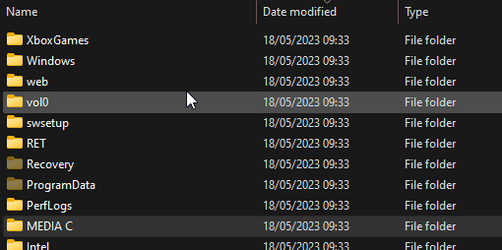
why for example I have Media folder in C drive, I sort everything by date modified, and I change something inside the media folder, but it does not shows up in the list, and the date change don't change
 

Attachments

  • why 1.png
    why 1.png
    5.1 KB · Views: 4
  • why 2.png
    why 2.png
    8.5 KB · Views: 4

My Computer My Computer

At a glance

win 11
OS
win 11
maybe you also know, how to make it drag and drop by name, I mean when I drag and drop files from folder to software like izotope rx, it opens in in random way and not in the 1 2 3 4 5
 

My Computer My Computer

At a glance

win 11
OS
win 11
So you have changed view options for C drive and the apply the settings to all folders?

The Media folder is not Windows 11 folder, either you created the folder or program you are using.

Drag and drop using left-click on your mouse.
 

My Computer My Computer

At a glance

Windows 11AMD Ryzen 7 5700GMicron Technology DDR4-3200 16GBNVIDIA GeForce RTX 3060
OS
Windows 11
Computer type
PC/Desktop
Manufacturer/Model
HP Pavilion
CPU
AMD Ryzen 7 5700G
Motherboard
Erica6
Memory
Micron Technology DDR4-3200 16GB
Graphics Card(s)
NVIDIA GeForce RTX 3060
Sound Card
Realtek ALC671
Monitor(s) Displays
Samsung SyncMaster U28E590
Screen Resolution
3840 x 2160
Hard Drives
SAMSUNG MZVLQ1T0HALB-000H1
the media folder is inside c drive , so it should change
So you have changed view options for C drive and the apply the settings to all folders?

The Media folder is not Windows 11 folder, either you created the folder or program you are using.

Drag and drop using left-click on your mouse.
this does not work, the media folder is inside the c drive, and when I change something in media folder, the outside look at it, date modified do not change, which does not move it to the up
 

My Computer My Computer

At a glance

win 11
OS
win 11
I don't know what you are trying to explain in your video, i thought you want to apply same folder template to all folder within Root of C: drive.

The Apply to Folders option will be grayed out unless you open Folder Options from within the same folder window in File Explorer that you want to have applied to other folders using the same folder template.
 

My Computer My Computer

At a glance

Windows 11AMD Ryzen 7 5700GMicron Technology DDR4-3200 16GBNVIDIA GeForce RTX 3060
OS
Windows 11
Computer type
PC/Desktop
Manufacturer/Model
HP Pavilion
CPU
AMD Ryzen 7 5700G
Motherboard
Erica6
Memory
Micron Technology DDR4-3200 16GB
Graphics Card(s)
NVIDIA GeForce RTX 3060
Sound Card
Realtek ALC671
Monitor(s) Displays
Samsung SyncMaster U28E590
Screen Resolution
3840 x 2160
Hard Drives
SAMSUNG MZVLQ1T0HALB-000H1

My Computer My Computer

At a glance

Windows 11AMD Ryzen 7 5700GMicron Technology DDR4-3200 16GBNVIDIA GeForce RTX 3060
OS
Windows 11
Computer type
PC/Desktop
Manufacturer/Model
HP Pavilion
CPU
AMD Ryzen 7 5700G
Motherboard
Erica6
Memory
Micron Technology DDR4-3200 16GB
Graphics Card(s)
NVIDIA GeForce RTX 3060
Sound Card
Realtek ALC671
Monitor(s) Displays
Samsung SyncMaster U28E590
Screen Resolution
3840 x 2160
Hard Drives
SAMSUNG MZVLQ1T0HALB-000H1
@Brink do you have a tutorial that explains "Apply to Folders" and "Reset Folders" buttons?
 

My Computer My Computer

At a glance

Windows 11AMD Ryzen 7 5700GMicron Technology DDR4-3200 16GBNVIDIA GeForce RTX 3060
OS
Windows 11
Computer type
PC/Desktop
Manufacturer/Model
HP Pavilion
CPU
AMD Ryzen 7 5700G
Motherboard
Erica6
Memory
Micron Technology DDR4-3200 16GB
Graphics Card(s)
NVIDIA GeForce RTX 3060
Sound Card
Realtek ALC671
Monitor(s) Displays
Samsung SyncMaster U28E590
Screen Resolution
3840 x 2160
Hard Drives
SAMSUNG MZVLQ1T0HALB-000H1
@Brink do you have a tutorial that explains "Apply to Folders" and "Reset Folders" buttons?

Hello mate, :-)

Here you go:


My Computers My Computers

  • At a glance

    Windows 11 Pro for WorkstationsIntel i7-8700K 5 GHz64 GB (4x16GB) G.SKILL TridentZ RGB DDR4 3600...ASUS ROG-STRIX-GTX1080TI-O11G-GAMING (11GB GD...
    OS
    Windows 11 Pro for Workstations
    Computer type
    PC/Desktop
    Manufacturer/Model
    Custom self build
    CPU
    Intel i7-8700K 5 GHz
    Motherboard
    ASUS ROG Maximus XI Formula Z390
    Memory
    64 GB (4x16GB) G.SKILL TridentZ RGB DDR4 3600 MHz (F4-3600C18D-32GTZR)
    Graphics Card(s)
    ASUS ROG-STRIX-GTX1080TI-O11G-GAMING (11GB GDDR5X)
    Sound Card
    Integrated Digital Audio (S/PDIF)
    Monitor(s) Displays
    2 x Samsung Odyssey G75 27"
    Screen Resolution
    2560x1440
    Hard Drives
    1TB Samsung 990 PRO M.2,
    4TB Samsung 990 PRO M.2,
    TerraMaster F8 SSD Plus NAS
    PSU
    Seasonic Prime Titanium 850W
    Case
    Thermaltake Core P3 wall mounted
    Cooling
    Corsair Hydro H115i
    Keyboard
    Amazon Basics Wired Full Keyboard MD005
    Mouse
    Logitech MX Master 4
    Internet Speed
    2 Gbps Download and 100 Mbps Upload
    Browser
    Chrome and Edge
    Antivirus
    Microsoft Defender
    Other Info
    Logitech Z625 speaker system,
    Logitech BRIO 4K Pro webcam,
    HP Color LaserJet Pro MFP M477fdn,
    CyberPower CP1500PFCLCD
    Galaxy S23 Plus phone
  • At a glance

    Windows 11 ProSnapdragon X Elite (12 core) 3.42 GHz16 GB LPDDR5x-7467 MHz
    Operating System
    Windows 11 Pro
    Computer type
    Laptop
    Manufacturer/Model
    Surface Laptop 7 Copilot+ PC
    CPU
    Snapdragon X Elite (12 core) 3.42 GHz
    Memory
    16 GB LPDDR5x-7467 MHz
    Monitor(s) Displays
    15" HDR
    Screen Resolution
    2496 x 1664
    Hard Drives
    1 TB SSD
    Internet Speed
    Wi-Fi 7 and Bluetooth 5.4
    Browser
    Chrome and Edge
    Antivirus
    Microsoft Defender
Thank you!
 

My Computer My Computer

At a glance

Windows 11AMD Ryzen 7 5700GMicron Technology DDR4-3200 16GBNVIDIA GeForce RTX 3060
OS
Windows 11
Computer type
PC/Desktop
Manufacturer/Model
HP Pavilion
CPU
AMD Ryzen 7 5700G
Motherboard
Erica6
Memory
Micron Technology DDR4-3200 16GB
Graphics Card(s)
NVIDIA GeForce RTX 3060
Sound Card
Realtek ALC671
Monitor(s) Displays
Samsung SyncMaster U28E590
Screen Resolution
3840 x 2160
Hard Drives
SAMSUNG MZVLQ1T0HALB-000H1
I think I remember a chronic Windows issue that folder settings would only remain in effect for some limited time. Something to do with "bags"

Perhaps this link will help.

If not search tutorials on the various Windows version sites related to this forum. I seem to remember messing around with it on Vista and/or W7.

Edit: I see Brink provided the answers with precision. (y)
 

My Computers My Computers

  • At a glance

    Windows 10 S Mode (with S disabled)Celeron2906 MBytesLC116LF3L01 (1920x1080@59Hz) Intel HD Graphic...
    OS
    Windows 10 S Mode (with S disabled)
    Computer type
    Laptop
    Manufacturer/Model
    EV00
    CPU
    Celeron
    Motherboard
    WEIBU
    Memory
    2906 MBytes
    Graphics Card(s)
    LC116LF3L01 (1920x1080@59Hz) Intel HD Graphics (Intel)
    Sound Card
    Realtek High Definition Audio
    Monitor(s) Displays
    11.6" LCD
    Screen Resolution
    1920x1080P
    Hard Drives
    Interface SD
    Capacity 28.8 GB
    Real size 30,937,186,304 bytes
    RAID Type None
    Keyboard
    Integrated Laptop
    Mouse
    USB wired optical
    Internet Speed
    28 Mbs down 35 Mbs up on a good day
    Browser
    Opera/Edge both chromium based
    Antivirus
    none
    Other Info
    I purchased this for $109 because it is the only Laptop I have seen with 1920x1080 resolution for the money. OK for streaming, email, etc..
  • At a glance

    Windows 11 Home 64-bit (22H2 Build 22621.1413)AMD K198 GB DDR4AMD Radeon Graphics 2 GB DDR4
    Operating System
    Windows 11 Home 64-bit (22H2 Build 22621.1413)
    Computer type
    Laptop
    Manufacturer/Model
    Lenovo Ideapad 5
    CPU
    AMD K19
    Motherboard
    LNVNB161216 (FP6)
    Memory
    8 GB DDR4
    Graphics card(s)
    AMD Radeon Graphics 2 GB DDR4
    Sound Card
    Realtek High Definition Audio
    Monitor(s) Displays
    Generic PnP Monitor on AMD Radeon Graphics
    Screen Resolution
    2560 x 1600
    Hard Drives
    512 GB SKHynix_HFS512GDE9X084N (SSD)
    Keyboard
    backlit
    Mouse
    has touchpad but I use USB wired optical wheel mouse
    Internet Speed
    100 Mb/s
    Browser
    Edge
    Antivirus
    none
    Other Info
    Windows firewall disabled
If you haven't already, you could see if increasing the cache memory size below may help.


My Computers My Computers

  • At a glance

    Windows 11 Pro for WorkstationsIntel i7-8700K 5 GHz64 GB (4x16GB) G.SKILL TridentZ RGB DDR4 3600...ASUS ROG-STRIX-GTX1080TI-O11G-GAMING (11GB GD...
    OS
    Windows 11 Pro for Workstations
    Computer type
    PC/Desktop
    Manufacturer/Model
    Custom self build
    CPU
    Intel i7-8700K 5 GHz
    Motherboard
    ASUS ROG Maximus XI Formula Z390
    Memory
    64 GB (4x16GB) G.SKILL TridentZ RGB DDR4 3600 MHz (F4-3600C18D-32GTZR)
    Graphics Card(s)
    ASUS ROG-STRIX-GTX1080TI-O11G-GAMING (11GB GDDR5X)
    Sound Card
    Integrated Digital Audio (S/PDIF)
    Monitor(s) Displays
    2 x Samsung Odyssey G75 27"
    Screen Resolution
    2560x1440
    Hard Drives
    1TB Samsung 990 PRO M.2,
    4TB Samsung 990 PRO M.2,
    TerraMaster F8 SSD Plus NAS
    PSU
    Seasonic Prime Titanium 850W
    Case
    Thermaltake Core P3 wall mounted
    Cooling
    Corsair Hydro H115i
    Keyboard
    Amazon Basics Wired Full Keyboard MD005
    Mouse
    Logitech MX Master 4
    Internet Speed
    2 Gbps Download and 100 Mbps Upload
    Browser
    Chrome and Edge
    Antivirus
    Microsoft Defender
    Other Info
    Logitech Z625 speaker system,
    Logitech BRIO 4K Pro webcam,
    HP Color LaserJet Pro MFP M477fdn,
    CyberPower CP1500PFCLCD
    Galaxy S23 Plus phone
  • At a glance

    Windows 11 ProSnapdragon X Elite (12 core) 3.42 GHz16 GB LPDDR5x-7467 MHz
    Operating System
    Windows 11 Pro
    Computer type
    Laptop
    Manufacturer/Model
    Surface Laptop 7 Copilot+ PC
    CPU
    Snapdragon X Elite (12 core) 3.42 GHz
    Memory
    16 GB LPDDR5x-7467 MHz
    Monitor(s) Displays
    15" HDR
    Screen Resolution
    2496 x 1664
    Hard Drives
    1 TB SSD
    Internet Speed
    Wi-Fi 7 and Bluetooth 5.4
    Browser
    Chrome and Edge
    Antivirus
    Microsoft Defender
chat gpt gave me a powershell script, for not not sure if it works, testing

There's a tool that's purpose built for your request: WinSetView

The code ChatGPT has provided is almost certainly some code that was posted by Keith Miller. Nothing wrong with that except taken out of context, you might have difficulty getting the desired results. WinSetView will make the same registry changes (i.e. similar code) but you just have to point and click instead of modifying and debugging a script.
 

My Computer My Computer

At a glance

Windows 10/11
OS
Windows 10/11
Computer type
Laptop
Manufacturer/Model
Acer
Back
Top Bottom