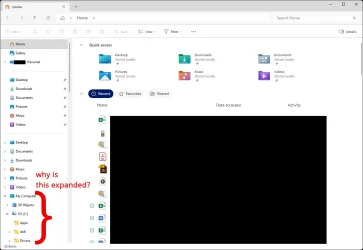
Windows 11 File Explorer opens with user folder expanded in navigation pane. How to collapse by default?


indiecognition

New member
Local time
3:18 AM
Posts
2
OS
Windows 11
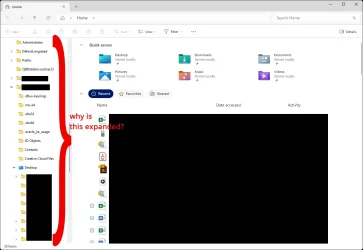
I'm helping someone set up their computer, and when I open File Explorer, the navigation pane opens with the user folder expanded. It's within the This PC item. This adds a lot of clutter and is unhelpful.

I've attached two screenshots.

How can I get it to open with everything collapsed in the navigation menu? I've already toggled the folder options to "Expand to open folder" and "Show all folders" on and back off. And I've restored defaults for the folder view options.

I can't figure out why it won't stay collapsed.

Thanks for the help!
 
Windows Build/Version
Windows 11 Pro 25H2 build 26200.7462

Attachments
  • anydesk00004.webp
    anydesk00004.webp
    38.1 KB · Views: 4
  • anydesk00005.webp
    anydesk00005.webp
    39.2 KB · Views: 4
Last edited:

My Computer My Computer

At a glance

Windows 11
OS
Windows 11
I setup a scheduled task to run when I log on, and every two minutes thereafter, to delete the registry value where this expansion data is stored.

program/script: C:\Windows\System32\conhost.exe
arguments: --headless reg.exe delete HKCU\Software\Microsoft\Windows\CurrentVersion\Explorer\Modules\NavPane /v ExpandedState /f
 

My Computer My Computer

At a glance

Windows 11 Pro 25H2 (in a VM)12th Gen Core i7-1260P64 GB Micron PC4-25600Intel Iris Xe Graphics
OS
Windows 11 Pro 25H2 (in a VM)
Computer type
PC/Desktop
Manufacturer/Model
Intel NUC12WSHi7
CPU
12th Gen Core i7-1260P
Motherboard
NUC12WSBi7
Memory
64 GB Micron PC4-25600
Graphics Card(s)
Intel Iris Xe Graphics
Sound Card
on-board Realtek HD Audio
Monitor(s) Displays
Dell U3219Q
Screen Resolution
3840 x 2160
Hard Drives
Samsung SSD 990 PRO 1TB
Crucial MX500 2 TB
Keyboard
CODE 104-Key mechanical with Cherry MX Clears
Antivirus
Microsoft Defender
I setup a scheduled task to run when I log on, and every two minutes thereafter, to delete the registry value where this expansion data is stored.

program/script: C:\Windows\System32\conhost.exe
arguments: --headless reg.exe delete HKCU\Software\Microsoft\Windows\CurrentVersion\Explorer\Modules\NavPane /v ExpandedState /f

So this script deletes the ExpandedState binary item? Do you know why it would repopulate with the same expansion data? What caused the user folder to be expanded in the first place?

I just want to double-check before deleting the ExpandedState item manually, to see what happens from there.

Thanks!
 

My Computer My Computer

At a glance

Windows 11
OS
Windows 11
Explorer's been doing this for a while, keeping track of which folders you have expanded in the navigation pane. I have Server 2019 machines that do this also. I don't know of a way to turn it off completely, other than hacky permission shenanigans on that NavPane key, which I'm not willing to do.
 

My Computer My Computer

At a glance

Windows 11 Pro 25H2 (in a VM)12th Gen Core i7-1260P64 GB Micron PC4-25600Intel Iris Xe Graphics
OS
Windows 11 Pro 25H2 (in a VM)
Computer type
PC/Desktop
Manufacturer/Model
Intel NUC12WSHi7
CPU
12th Gen Core i7-1260P
Motherboard
NUC12WSBi7
Memory
64 GB Micron PC4-25600
Graphics Card(s)
Intel Iris Xe Graphics
Sound Card
on-board Realtek HD Audio
Monitor(s) Displays
Dell U3219Q
Screen Resolution
3840 x 2160
Hard Drives
Samsung SSD 990 PRO 1TB
Crucial MX500 2 TB
Keyboard
CODE 104-Key mechanical with Cherry MX Clears
Antivirus
Microsoft Defender
Whatever state File Explorer is closed in last, it will reopen in the same way the next time it is opened, usually.

So, if all directories are not expanded when you close File Explorer, the next time you open it, it should look the same.
 

My Computer My Computer

At a glance

Windows 11 Pro Insider 64 bit 25H2 26200.5742Intel Core i7 9700K 3.6016 GBnVidia GEForce RTX 2060 Super
OS
Windows 11 Pro Insider 64 bit 25H2 26200.5742
Computer type
PC/Desktop
Manufacturer/Model
Gigabyte Z390 UD
CPU
Intel Core i7 9700K 3.60
Motherboard
Gigabyte Z390 UD
Memory
16 GB
Graphics Card(s)
nVidia GEForce RTX 2060 Super
Sound Card
onboard
Monitor(s) Displays
Two 27" Dell 4K monitors
Screen Resolution
3840 x 2160
Hard Drives
M.2 NVME SSD, 500 GB; Two 2TB Mechanical HDD's
PSU
850w PSU
Case
Cyberpower PC
Cooling
Water cooled
Keyboard
Backlit Cyberpower gaming keyboard
Mouse
Backlit Cyberpower gaming mouse
Internet Speed
1 GB mbps
Browser
Brave
Antivirus
Windows Security
Do you have File Explorer set to open at 'Home'?
FE Home2.webp
 

My Computers My Computers

  • At a glance

    Windows 11 ProAMD Ryzen 9 8945HS32GB DDR5 SO-DIMMIntegrated AMD Radeon 780M (4.00 GHz)
    OS
    Windows 11 Pro
    Computer type
    PC/Desktop
    Manufacturer/Model
    GMKtec K11
    CPU
    AMD Ryzen 9 8945HS
    Memory
    32GB DDR5 SO-DIMM
    Graphics Card(s)
    Integrated AMD Radeon 780M (4.00 GHz)
    Monitor(s) Displays
    Benq 2250HM
    Screen Resolution
    1920 x 1080
    Hard Drives
    1 TB PCIe 4.0 NVMe M.2 SSD
  • At a glance

    Windows 11 HomeIntel® Core™ Ultra 7 - 255H processor16 GB LPDDR5 SDRAMIntel Arc 140T onboard graphics
    Operating System
    Windows 11 Home
    Computer type
    Laptop
    Manufacturer/Model
    ASUS Zenbook 14 OLED 14" Laptop - UX3405CA-QL192W
    CPU
    Intel® Core™ Ultra 7 - 255H processor
    Memory
    16 GB LPDDR5 SDRAM
    Graphics card(s)
    Intel Arc 140T onboard graphics
    Screen Resolution
    1920 x 1200 (16:10 WUXGA resolution) OLED Touchscreen
    Hard Drives
    1TB SSD

Latest Support Threads

Back
Top Bottom