Windows 11 home local user account confusion


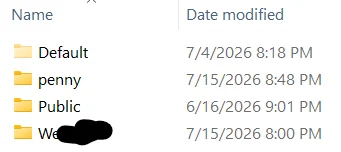
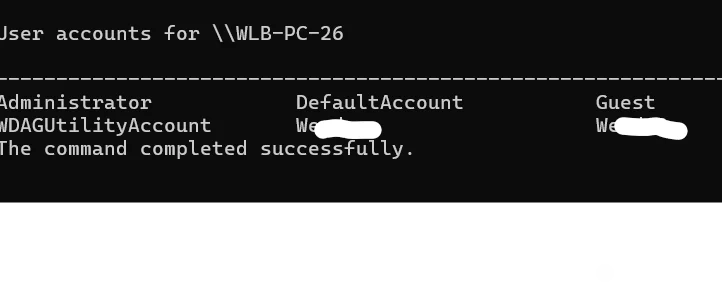
Penny is not there. I didn't think I SWITCHED to a local account. I was under the impression i ADDED a local acocunt.

Here it is
1789354348451.webp

1789354462302.webp
 

My Computers My Computers

  • At a glance

    Windows 11 ProIntel Ultra 516GB
    OS
    Windows 11 Pro
    Computer type
    PC/Desktop
    Manufacturer/Model
    Dell Pro Slim QCS1250
    CPU
    Intel Ultra 5
    Memory
    16GB
  • At a glance

    Windows 7 UltimateI78GB
    Operating System
    Windows 7 Ultimate
    Computer type
    PC/Desktop
    Manufacturer/Model
    Dell XPS 8000 Studio
    CPU
    I7
    Memory
    8GB
  • Windows 10 Dell Inspiron laptop (personal mostly unused)
    Windows 11 Home Lenova Ideapad Flex 5 25H2 (ex-Work)
I was under the impression i ADDED a local acocunt.
"Added", as in created another/extra account, or created in the first instance on setup?
 

My Computers My Computers

  • At a glance

    Windows 11 2xH2 (latest update ... forever anal)Intel i5-124008GBNVIDIA GeForce GT730
    OS
    Windows 11 2xH2 (latest update ... forever anal)
    Computer type
    PC/Desktop
    Manufacturer/Model
    HP Slim S01
    CPU
    Intel i5-12400
    Memory
    8GB
    Graphics Card(s)
    NVIDIA GeForce GT730
    Sound Card
    OOBE
    Monitor(s) Displays
    Acer 32"
    Screen Resolution
    1920x1080
    Hard Drives
    512GB KIOXIA NVMe
    1TB SATA SSD
    PSU
    OOBE
    Case
    OOBE
    Cooling
    OOBE
    Keyboard
    BT
    Mouse
    BT
    Browser
    Brave FFox Chrome Opera
    Antivirus
    KIS
  • At a glance

    Windows 11 Pro 2xH2 (latest update ... 4ever ...i7-1165G7 @ 2.80GHzIntel Iris Xe Graphics
    Operating System
    Windows 11 Pro 2xH2 (latest update ... 4ever anal)
    Computer type
    Laptop
    Manufacturer/Model
    HP Pavillion 15
    CPU
    i7-1165G7 @ 2.80GHz
    Graphics card(s)
    Intel Iris Xe Graphics
    Hard Drives
    Samsung NVMe 512GB
    + numerous/multiple SSD Type C USB enclosures
    Internet Speed
    NBN FTTN 50
    Browser
    Brave
    Antivirus
    KIS
Added", as in created another/extra account, or created in the first instance on setup?
Created another account. During setup I created the MS account. Looked really hard to opt out of that but could not find any choice.
 

My Computers My Computers

  • At a glance

    Windows 11 ProIntel Ultra 516GB
    OS
    Windows 11 Pro
    Computer type
    PC/Desktop
    Manufacturer/Model
    Dell Pro Slim QCS1250
    CPU
    Intel Ultra 5
    Memory
    16GB
  • At a glance

    Windows 7 UltimateI78GB
    Operating System
    Windows 7 Ultimate
    Computer type
    PC/Desktop
    Manufacturer/Model
    Dell XPS 8000 Studio
    CPU
    I7
    Memory
    8GB
  • Windows 10 Dell Inspiron laptop (personal mostly unused)
    Windows 11 Home Lenova Ideapad Flex 5 25H2 (ex-Work)
trying to think back to the sequence...
0. purchased new PC
1. activated W11 (ms account)
2. created local user account
3. purchased Office 2024 (ms account)
4. began the unwinding of ms account usage... ugh.
5. just today created a new secondary user admin account for the heck of it

about a few weeks between each step. The process to migrate my W7 machine to W11 was so daunting with 17 years of stuff, the new one sat on the dining room table and I procrastinated and very very slowly moved through the steps. Still not fully migrated either!
 

My Computers My Computers

  • At a glance

    Windows 11 ProIntel Ultra 516GB
    OS
    Windows 11 Pro
    Computer type
    PC/Desktop
    Manufacturer/Model
    Dell Pro Slim QCS1250
    CPU
    Intel Ultra 5
    Memory
    16GB
  • At a glance

    Windows 7 UltimateI78GB
    Operating System
    Windows 7 Ultimate
    Computer type
    PC/Desktop
    Manufacturer/Model
    Dell XPS 8000 Studio
    CPU
    I7
    Memory
    8GB
  • Windows 10 Dell Inspiron laptop (personal mostly unused)
    Windows 11 Home Lenova Ideapad Flex 5 25H2 (ex-Work)
During setup I created the MS account.
Then MS has you in its sights. You're on record, no matter what you do subsequent, it knows!! That's the way MS works.
 

My Computers My Computers

  • At a glance

    Windows 11 2xH2 (latest update ... forever anal)Intel i5-124008GBNVIDIA GeForce GT730
    OS
    Windows 11 2xH2 (latest update ... forever anal)
    Computer type
    PC/Desktop
    Manufacturer/Model
    HP Slim S01
    CPU
    Intel i5-12400
    Memory
    8GB
    Graphics Card(s)
    NVIDIA GeForce GT730
    Sound Card
    OOBE
    Monitor(s) Displays
    Acer 32"
    Screen Resolution
    1920x1080
    Hard Drives
    512GB KIOXIA NVMe
    1TB SATA SSD
    PSU
    OOBE
    Case
    OOBE
    Cooling
    OOBE
    Keyboard
    BT
    Mouse
    BT
    Browser
    Brave FFox Chrome Opera
    Antivirus
    KIS
  • At a glance

    Windows 11 Pro 2xH2 (latest update ... 4ever ...i7-1165G7 @ 2.80GHzIntel Iris Xe Graphics
    Operating System
    Windows 11 Pro 2xH2 (latest update ... 4ever anal)
    Computer type
    Laptop
    Manufacturer/Model
    HP Pavillion 15
    CPU
    i7-1165G7 @ 2.80GHz
    Graphics card(s)
    Intel Iris Xe Graphics
    Hard Drives
    Samsung NVMe 512GB
    + numerous/multiple SSD Type C USB enclosures
    Internet Speed
    NBN FTTN 50
    Browser
    Brave
    Antivirus
    KIS
no big deal. I just want to know if I can remove the MS account that I see and do not plan to use. Why might I need it in the future? And its still in the cloud if necessary, right?
 

My Computers My Computers

  • At a glance

    Windows 11 ProIntel Ultra 516GB
    OS
    Windows 11 Pro
    Computer type
    PC/Desktop
    Manufacturer/Model
    Dell Pro Slim QCS1250
    CPU
    Intel Ultra 5
    Memory
    16GB
  • At a glance

    Windows 7 UltimateI78GB
    Operating System
    Windows 7 Ultimate
    Computer type
    PC/Desktop
    Manufacturer/Model
    Dell XPS 8000 Studio
    CPU
    I7
    Memory
    8GB
  • Windows 10 Dell Inspiron laptop (personal mostly unused)
    Windows 11 Home Lenova Ideapad Flex 5 25H2 (ex-Work)
Back
Top Bottom