
Windows 11 Home - TPM Encryption


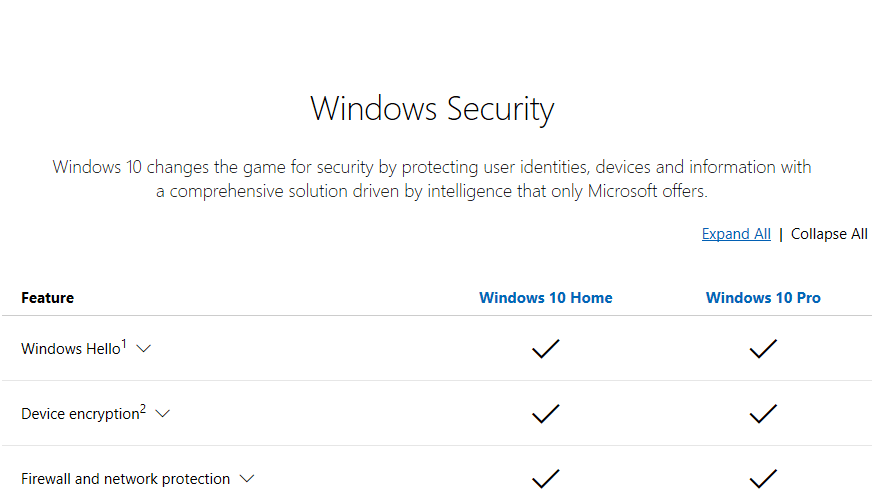
Here is my article that shows how to use bitlocker on Win10/11 Home despite the lack of "modern standby" or whatever MS thinks is needed:
Thank you for the comprehensive information.
I followed all your steps to the letter.
After the cmd command "manage-bd -on c: -used",
I had the "Used Space Only encryption is now in progress" come up in the same cmd window.
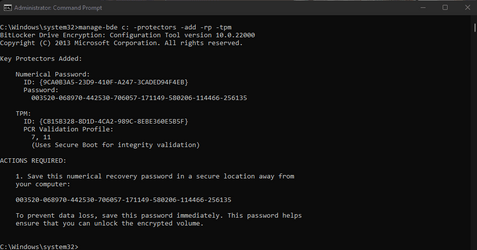
I then rebooted to Win11 Home, and ran the cmd command "manage-bde c: -protectors -add -rp -tpm".
The following cmd line came up, showing an error:
Microsoft Windows [Version 10.0.22000.613]
(c) Microsoft Corporation. All rights reserved.

C:\Windows\system32>manage-bde c: -protectors -add -rp -tpm
BitLocker Drive Encryption: Configuration Tool version 10.0.22000
Copyright (C) 2013 Microsoft Corporation. All rights reserved.

Key Protectors Added:

ERROR: An error occurred (code 0x8031005a):
This version of Windows does not support this feature of BitLocker Drive Encryption. To use this feature, upgrade the operating system.

C:\Windows\system32>


Would this have anything to with the fact that I'm running Windows 11 Home?
Bear in mind, I have just added a "GC-TPM2.0_S 2.0" module to my existing Gigabyte board.
Apparently I didn't need it, as my system shows TPM is active, and the above cmd of yours verified it was active and working.
But it's the correct module for my board (Z390-UD rev.1).
Any hints on the error message would be greatly appreciated.
Even tho I got the error, would my drive be encrypted (as per the cmd message)?
I assume not, as there'es no LOCK showing over the Drive icon in Folder view.
 

Attachments

  • After Successful encryption and reboot.png
    After Successful encryption and reboot.png
    31.4 KB · Views: 5

My Computer My Computer

At a glance

Windows 11 HomeIntel Core i5 p400FKingston HyperX Fury 16GB (2x8) DDR4-2400NVidia GeForce GTX 1050 Ti (4GB)
OS
Windows 11 Home
Computer type
PC/Desktop
Manufacturer/Model
Homebuilt
CPU
Intel Core i5 p400F
Motherboard
Gigabyte Z390-UD rev.1
Memory
Kingston HyperX Fury 16GB (2x8) DDR4-2400
Graphics Card(s)
NVidia GeForce GTX 1050 Ti (4GB)
Sound Card
Onboard
Monitor(s) Displays
27" Samsung
Screen Resolution
1920 x 1080
Hard Drives
Samsun SSD 970 EVO 500GB
PSU
450W Corsair
Case
Coolermaster Masterbox MB530P
Cooling
Fans x 6
Keyboard
Logitech wireless
Mouse
Logitech wireless
Internet Speed
25mbps
Browser
Edge, Opera
Antivirus
Windows Defender, Malwarebytes (free)
Also, when I Shift/Restarted and picked "Troubleshoot/Advanced Op/Command Prompt", it didn't ask me for a Admin account password.
Maybe this is because I auto login?
But it took the following "manage-bde -on c: -used" command no problem.
Everything up to adding "Protectors" command went no problems, but produced ther "error" message above.
 

My Computer My Computer

At a glance

Windows 11 HomeIntel Core i5 p400FKingston HyperX Fury 16GB (2x8) DDR4-2400NVidia GeForce GTX 1050 Ti (4GB)
OS
Windows 11 Home
Computer type
PC/Desktop
Manufacturer/Model
Homebuilt
CPU
Intel Core i5 p400F
Motherboard
Gigabyte Z390-UD rev.1
Memory
Kingston HyperX Fury 16GB (2x8) DDR4-2400
Graphics Card(s)
NVidia GeForce GTX 1050 Ti (4GB)
Sound Card
Onboard
Monitor(s) Displays
27" Samsung
Screen Resolution
1920 x 1080
Hard Drives
Samsun SSD 970 EVO 500GB
PSU
450W Corsair
Case
Coolermaster Masterbox MB530P
Cooling
Fans x 6
Keyboard
Logitech wireless
Mouse
Logitech wireless
Internet Speed
25mbps
Browser
Edge, Opera
Antivirus
Windows Defender, Malwarebytes (free)
That is weird. As indicated, it works on the current version of Win11 home, tested yesterday. I see no reason, why it would work differently on your machine, since Bitlocker (not device encryption, but Bitlocker) does not care for your hardware capabilities. Please see which TPM is active and see what state it is in: open tpm.msc and share a screenshot.
 

My Computer My Computer

At a glance

Win11
OS
Win11
1651221740109.png
 

My Computer My Computer

At a glance

Windows 11 HomeIntel Core i5 p400FKingston HyperX Fury 16GB (2x8) DDR4-2400NVidia GeForce GTX 1050 Ti (4GB)
OS
Windows 11 Home
Computer type
PC/Desktop
Manufacturer/Model
Homebuilt
CPU
Intel Core i5 p400F
Motherboard
Gigabyte Z390-UD rev.1
Memory
Kingston HyperX Fury 16GB (2x8) DDR4-2400
Graphics Card(s)
NVidia GeForce GTX 1050 Ti (4GB)
Sound Card
Onboard
Monitor(s) Displays
27" Samsung
Screen Resolution
1920 x 1080
Hard Drives
Samsun SSD 970 EVO 500GB
PSU
450W Corsair
Case
Coolermaster Masterbox MB530P
Cooling
Fans x 6
Keyboard
Logitech wireless
Mouse
Logitech wireless
Internet Speed
25mbps
Browser
Edge, Opera
Antivirus
Windows Defender, Malwarebytes (free)
Looks good. I will install win11 home on hardware (that is unsupported for device encryption) now and test again, hang on.
 

My Computer My Computer

At a glance

Win11
OS
Win11
thx, will check back later. Have to go out.
Wouldn't be because my hardware is a few years old? (Z390-UD)
 

My Computer My Computer

At a glance

Windows 11 HomeIntel Core i5 p400FKingston HyperX Fury 16GB (2x8) DDR4-2400NVidia GeForce GTX 1050 Ti (4GB)
OS
Windows 11 Home
Computer type
PC/Desktop
Manufacturer/Model
Homebuilt
CPU
Intel Core i5 p400F
Motherboard
Gigabyte Z390-UD rev.1
Memory
Kingston HyperX Fury 16GB (2x8) DDR4-2400
Graphics Card(s)
NVidia GeForce GTX 1050 Ti (4GB)
Sound Card
Onboard
Monitor(s) Displays
27" Samsung
Screen Resolution
1920 x 1080
Hard Drives
Samsun SSD 970 EVO 500GB
PSU
450W Corsair
Case
Coolermaster Masterbox MB530P
Cooling
Fans x 6
Keyboard
Logitech wireless
Mouse
Logitech wireless
Internet Speed
25mbps
Browser
Edge, Opera
Antivirus
Windows Defender, Malwarebytes (free)
I found the glitch.
Took a USB stick to install windows and left it plugged in when entering the recovery environment (as you'll see, that makes a diefference), did manage-bde -on d: -used (since windows PE sees c: as d: when you install in MBR partitioning as I did)
Booted to windows, tried manage-bde -protectors -add c: -rp -tpm and got the same error like you, BUT: the USB stick (d:) was being encrypted :)
So I found what the problem was: winPE and windows had different associations what d: was. Repeated the same without the stick being plugged in - all works.

Please see if that solves it for you.
 

My Computer My Computer

At a glance

Win11
OS
Win11
Yep, this just works as indicated in the tutorial, when UEFI partitioning is used (this is a requirement for TPM2.0 as described). With UEFI (=GPT) partioning, c: is seen as c: on WInPE as well and when booting into windows, this problem of yours does not occur, AT LEAST NOT WITH a SINGLE DISK!

When MBR partitioning is used (only possible with TPM 1.2), when no stick (or 2nd hard drive that occupies volume d is attached, it will work as well. Your situation must have occured because c: on WinPE was not the windows OS drive.
So all you need to do is retry and use dir c:/dir d: / dir e: on WinPE to ensure which drive is which.
 
Last edited:

My Computer My Computer

At a glance

Win11
OS
Win11
Thank you so much for your time and effort, very much appreciated.
I won't get to try it out until tomorrow late, but will get back to you with the outcome.
 

My Computer My Computer

At a glance

Windows 11 HomeIntel Core i5 p400FKingston HyperX Fury 16GB (2x8) DDR4-2400NVidia GeForce GTX 1050 Ti (4GB)
OS
Windows 11 Home
Computer type
PC/Desktop
Manufacturer/Model
Homebuilt
CPU
Intel Core i5 p400F
Motherboard
Gigabyte Z390-UD rev.1
Memory
Kingston HyperX Fury 16GB (2x8) DDR4-2400
Graphics Card(s)
NVidia GeForce GTX 1050 Ti (4GB)
Sound Card
Onboard
Monitor(s) Displays
27" Samsung
Screen Resolution
1920 x 1080
Hard Drives
Samsun SSD 970 EVO 500GB
PSU
450W Corsair
Case
Coolermaster Masterbox MB530P
Cooling
Fans x 6
Keyboard
Logitech wireless
Mouse
Logitech wireless
Internet Speed
25mbps
Browser
Edge, Opera
Antivirus
Windows Defender, Malwarebytes (free)
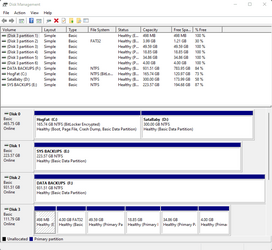
Well, I found H: drive to be my System drive, on running Dir command. (I have a few extra disks and partitions mounted)
So then I tried the "manage-bde -on h: -used" command and received an error saying:
"Bitlocker cannot be enabled on the Volume because it contains a Volume Shadow Copy".
Amongst other text, it then said to use "-RemoveVolumeShadowCopies".
I tried the "H: -RemoveVolumeShadowCopies" syntax, but that isnt the correct way.
Any ideas on how to remove Volume Shadow Copies?
Seem to be getting further now, anyway :)
 

My Computer My Computer

At a glance

Windows 11 HomeIntel Core i5 p400FKingston HyperX Fury 16GB (2x8) DDR4-2400NVidia GeForce GTX 1050 Ti (4GB)
OS
Windows 11 Home
Computer type
PC/Desktop
Manufacturer/Model
Homebuilt
CPU
Intel Core i5 p400F
Motherboard
Gigabyte Z390-UD rev.1
Memory
Kingston HyperX Fury 16GB (2x8) DDR4-2400
Graphics Card(s)
NVidia GeForce GTX 1050 Ti (4GB)
Sound Card
Onboard
Monitor(s) Displays
27" Samsung
Screen Resolution
1920 x 1080
Hard Drives
Samsun SSD 970 EVO 500GB
PSU
450W Corsair
Case
Coolermaster Masterbox MB530P
Cooling
Fans x 6
Keyboard
Logitech wireless
Mouse
Logitech wireless
Internet Speed
25mbps
Browser
Edge, Opera
Antivirus
Windows Defender, Malwarebytes (free)
Got rid of Volume Shadow Copies, and ran commands again.
It worked this time. Thanks for all your help !!!
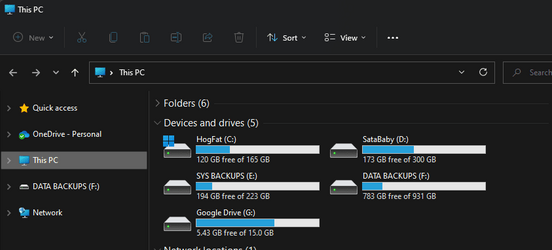
Only problem now is, the C: Drive does NOT show the LOCK icon in Folder Explorer View.
1651274634158.png
 
Last edited:

My Computer My Computer

At a glance

Windows 11 HomeIntel Core i5 p400FKingston HyperX Fury 16GB (2x8) DDR4-2400NVidia GeForce GTX 1050 Ti (4GB)
OS
Windows 11 Home
Computer type
PC/Desktop
Manufacturer/Model
Homebuilt
CPU
Intel Core i5 p400F
Motherboard
Gigabyte Z390-UD rev.1
Memory
Kingston HyperX Fury 16GB (2x8) DDR4-2400
Graphics Card(s)
NVidia GeForce GTX 1050 Ti (4GB)
Sound Card
Onboard
Monitor(s) Displays
27" Samsung
Screen Resolution
1920 x 1080
Hard Drives
Samsun SSD 970 EVO 500GB
PSU
450W Corsair
Case
Coolermaster Masterbox MB530P
Cooling
Fans x 6
Keyboard
Logitech wireless
Mouse
Logitech wireless
Internet Speed
25mbps
Browser
Edge, Opera
Antivirus
Windows Defender, Malwarebytes (free)
The only place I can find that tells me I have Encryption on System Drive:
Note the lack of Lock icon on File manager snapshot.
1651301217086.png1651301447179.png
 

My Computer My Computer

At a glance

Windows 11 HomeIntel Core i5 p400FKingston HyperX Fury 16GB (2x8) DDR4-2400NVidia GeForce GTX 1050 Ti (4GB)
OS
Windows 11 Home
Computer type
PC/Desktop
Manufacturer/Model
Homebuilt
CPU
Intel Core i5 p400F
Motherboard
Gigabyte Z390-UD rev.1
Memory
Kingston HyperX Fury 16GB (2x8) DDR4-2400
Graphics Card(s)
NVidia GeForce GTX 1050 Ti (4GB)
Sound Card
Onboard
Monitor(s) Displays
27" Samsung
Screen Resolution
1920 x 1080
Hard Drives
Samsun SSD 970 EVO 500GB
PSU
450W Corsair
Case
Coolermaster Masterbox MB530P
Cooling
Fans x 6
Keyboard
Logitech wireless
Mouse
Logitech wireless
Internet Speed
25mbps
Browser
Edge, Opera
Antivirus
Windows Defender, Malwarebytes (free)
Is this enough to show I have Encryption on?
And should Lock Status show "Unlocked" ?
Still not able to work out why System Drive C: doesn't show Lock icon, tho.
1651306361280.png
 

My Computer My Computer

At a glance

Windows 11 HomeIntel Core i5 p400FKingston HyperX Fury 16GB (2x8) DDR4-2400NVidia GeForce GTX 1050 Ti (4GB)
OS
Windows 11 Home
Computer type
PC/Desktop
Manufacturer/Model
Homebuilt
CPU
Intel Core i5 p400F
Motherboard
Gigabyte Z390-UD rev.1
Memory
Kingston HyperX Fury 16GB (2x8) DDR4-2400
Graphics Card(s)
NVidia GeForce GTX 1050 Ti (4GB)
Sound Card
Onboard
Monitor(s) Displays
27" Samsung
Screen Resolution
1920 x 1080
Hard Drives
Samsun SSD 970 EVO 500GB
PSU
450W Corsair
Case
Coolermaster Masterbox MB530P
Cooling
Fans x 6
Keyboard
Logitech wireless
Mouse
Logitech wireless
Internet Speed
25mbps
Browser
Edge, Opera
Antivirus
Windows Defender, Malwarebytes (free)
That's alright, then. Never saw explorer not showing a lock, though. Did you restart since then?
 

My Computer My Computer

At a glance

Win11
OS
Win11
yes, a few times
is it because I don't actually have Bitlocker?
or I don't actually have Modern Standby?
And it is Win11 Home
 

My Computer My Computer

At a glance

Windows 11 HomeIntel Core i5 p400FKingston HyperX Fury 16GB (2x8) DDR4-2400NVidia GeForce GTX 1050 Ti (4GB)
OS
Windows 11 Home
Computer type
PC/Desktop
Manufacturer/Model
Homebuilt
CPU
Intel Core i5 p400F
Motherboard
Gigabyte Z390-UD rev.1
Memory
Kingston HyperX Fury 16GB (2x8) DDR4-2400
Graphics Card(s)
NVidia GeForce GTX 1050 Ti (4GB)
Sound Card
Onboard
Monitor(s) Displays
27" Samsung
Screen Resolution
1920 x 1080
Hard Drives
Samsun SSD 970 EVO 500GB
PSU
450W Corsair
Case
Coolermaster Masterbox MB530P
Cooling
Fans x 6
Keyboard
Logitech wireless
Mouse
Logitech wireless
Internet Speed
25mbps
Browser
Edge, Opera
Antivirus
Windows Defender, Malwarebytes (free)
The only place I can find that tells me I have Encryption on System Drive:
Note the lack of Lock icon on File manager snapshot.
View attachment 28014View attachment 28016
That is because this method is bypassing the gui based method for doing encryption.

In the end, you have to recognise this is an unsupported way of using device encryption.

I do not really see point of using encryption on a desktop. It is more geared to laptops.
yes, a few times
is it because I don't actually have Bitlocker?
or I don't actually have Modern Standby?
And it is Win11 Home
Boot from a windows installation drive, press shift+f10 to get to command prompt at first screen, the see of you can access C drive by typing

dir c:

If it is encrypted, it will not display directory
 

My Computer My Computer

At a glance

Windows 11 Pro + Win11 Canary VM.I9 13th gen i9-13900H 2.60 GHZ16 GB solderedIntegrated Intel Iris XE
OS
Windows 11 Pro + Win11 Canary VM.
Computer type
Laptop
Manufacturer/Model
ASUS Zenbook 14
CPU
I9 13th gen i9-13900H 2.60 GHZ
Motherboard
Yep, Laptop has one.
Memory
16 GB soldered
Graphics Card(s)
Integrated Intel Iris XE
Sound Card
Realtek built in
Monitor(s) Displays
laptop OLED screen
Screen Resolution
2880x1800 touchscreen
Hard Drives
1 TB NVME SSD (only weakness is only one slot)
PSU
Internal + 65W thunderbolt USB4 charger
Case
Yep, got one
Cooling
Stella Artois (UK pint cans - 568 ml) - extra cost.
Keyboard
Built in UK keybd
Mouse
Bluetooth , wireless dongled, wired
Internet Speed
900 mbs (ethernet), wifi 6 typical 350-450 mb/s both up and down
Browser
Edge
Antivirus
Defender
Other Info
TPM 2.0, 2xUSB4 thunderbolt, 1xUsb3 (usb a), 1xUsb-c, hdmi out, 3.5 mm audio out/in combo, ASUS backlit trackpad (inc. switchable number pad)

Macrium Reflect Home V8
Office 365 Family (6 users each 1TB onedrive space)
Hyper-V (a vm runs almost as fast as my older laptop)
I've done a WInPE boot, and with an elevated command prompt, it tells me it is Encrypted.
Also a "Dir" shows Folders, which is how I verified it was my System Disc, which is H: drive under WinPE boot.
Also with WinPE boot, and UNelevated command prompt, it says "It's locked with Bitlocker Encryption" and does NOT show drive contents.
Which I guess, is what you were referring to.
 
Last edited:

My Computer My Computer

At a glance

Windows 11 HomeIntel Core i5 p400FKingston HyperX Fury 16GB (2x8) DDR4-2400NVidia GeForce GTX 1050 Ti (4GB)
OS
Windows 11 Home
Computer type
PC/Desktop
Manufacturer/Model
Homebuilt
CPU
Intel Core i5 p400F
Motherboard
Gigabyte Z390-UD rev.1
Memory
Kingston HyperX Fury 16GB (2x8) DDR4-2400
Graphics Card(s)
NVidia GeForce GTX 1050 Ti (4GB)
Sound Card
Onboard
Monitor(s) Displays
27" Samsung
Screen Resolution
1920 x 1080
Hard Drives
Samsun SSD 970 EVO 500GB
PSU
450W Corsair
Case
Coolermaster Masterbox MB530P
Cooling
Fans x 6
Keyboard
Logitech wireless
Mouse
Logitech wireless
Internet Speed
25mbps
Browser
Edge, Opera
Antivirus
Windows Defender, Malwarebytes (free)
I've done a WInPE boot, and with an elevated command prompt, it tells me it is Encrypted.
Also a "Dir" shows Folders, which is how I verified it was my System Disc, which is H: drive under WinPE boot.
Also with WinPE boot, and UNelevated command prompt, it says "It's locked with Bitlocker Encryption" and does NOT show drive contents.
Which I guess, is what you were referring to.
Did you boot from a usb drive, not via the menus?

I could be wrong but I would be surprised if you could access a bitlocked drive from a usb drive.
 

My Computer My Computer

At a glance

Windows 11 Pro + Win11 Canary VM.I9 13th gen i9-13900H 2.60 GHZ16 GB solderedIntegrated Intel Iris XE
OS
Windows 11 Pro + Win11 Canary VM.
Computer type
Laptop
Manufacturer/Model
ASUS Zenbook 14
CPU
I9 13th gen i9-13900H 2.60 GHZ
Motherboard
Yep, Laptop has one.
Memory
16 GB soldered
Graphics Card(s)
Integrated Intel Iris XE
Sound Card
Realtek built in
Monitor(s) Displays
laptop OLED screen
Screen Resolution
2880x1800 touchscreen
Hard Drives
1 TB NVME SSD (only weakness is only one slot)
PSU
Internal + 65W thunderbolt USB4 charger
Case
Yep, got one
Cooling
Stella Artois (UK pint cans - 568 ml) - extra cost.
Keyboard
Built in UK keybd
Mouse
Bluetooth , wireless dongled, wired
Internet Speed
900 mbs (ethernet), wifi 6 typical 350-450 mb/s both up and down
Browser
Edge
Antivirus
Defender
Other Info
TPM 2.0, 2xUSB4 thunderbolt, 1xUsb3 (usb a), 1xUsb-c, hdmi out, 3.5 mm audio out/in combo, ASUS backlit trackpad (inc. switchable number pad)

Macrium Reflect Home V8
Office 365 Family (6 users each 1TB onedrive space)
Hyper-V (a vm runs almost as fast as my older laptop)
I did a Shift/Restart from Win11 Start menu, then picked Troubleshoot/Advanced Options/Command Prompt.
It asked for Recovery key to get Elevated Command Prompt, but last reboot I skipped that, and got normal Command Prompt.
 

My Computer My Computer

At a glance

Windows 11 HomeIntel Core i5 p400FKingston HyperX Fury 16GB (2x8) DDR4-2400NVidia GeForce GTX 1050 Ti (4GB)
OS
Windows 11 Home
Computer type
PC/Desktop
Manufacturer/Model
Homebuilt
CPU
Intel Core i5 p400F
Motherboard
Gigabyte Z390-UD rev.1
Memory
Kingston HyperX Fury 16GB (2x8) DDR4-2400
Graphics Card(s)
NVidia GeForce GTX 1050 Ti (4GB)
Sound Card
Onboard
Monitor(s) Displays
27" Samsung
Screen Resolution
1920 x 1080
Hard Drives
Samsun SSD 970 EVO 500GB
PSU
450W Corsair
Case
Coolermaster Masterbox MB530P
Cooling
Fans x 6
Keyboard
Logitech wireless
Mouse
Logitech wireless
Internet Speed
25mbps
Browser
Edge, Opera
Antivirus
Windows Defender, Malwarebytes (free)
The overlay symbol ought to be present. Never seen without. But doesn't make a difference after all
 

My Computer My Computer

At a glance

Win11
OS
Win11

Latest Support Threads

Back
Top Bottom




