Insider Windows 11 Insider Beta Build 22621.1 (ni_release) Version 22H2 - May 11


UPDATE 6/9:

Hello Windows Insiders, today we are releasing Windows 11 Insider Preview Build 22621 to the Beta Channel.

TL;DR

  • We are releasing ISOs for this build – they can be downloaded here.
  • This build includes a small set of fixes that will improve the overall experience for Windows Insiders on their devices.

Changes and Improvements

[General]
  • [REMINDER] The build watermark at the lower right-hand corner of the desktop is no longer present in this build. This doesn’t mean we’re done, and the watermark will return to Insiders in a future build.

Fixes

[General]

  • Updated the underlying speech platform to improve voice activity detection for voice access, live captions, and voice typing, as well as address some issues with how punctuation is recognized.

[File Explorer]

  • Fixed an issue leading to Insiders seeing error 0x800703E6 when copying files from Google Drive.
  • Fixed an issue where if you had ever opened the context menu, doing CTRL + ALT + DEL and cancelling would lead to explorer.exe crashing.

[Taskbar]

  • Fixed an issue related to loading the system tray icons in Settings > Personalization > Taskbar which could cause Settings to crash when opening that page recently. This issue may have also led to some explorer.exe crashes for impacted Insiders.

[Windows Security]

  • Fixed an issue which could result in Smart App Control unexpectedly blocking correctly signed applications.

Known issues

[Live captions]

  • Certain apps in full screen (e.g., video players) prevent live captions from being visible.
  • Certain apps positioned near the top of the screen and closed before live captions is run will re-launch behind the live captions window positioned at top. Use the system menu (ALT + Spacebar) while the app has focus to move the app’s window further down.

For developers

You can download the latest Windows Insider SDK at aka.ms/windowsinsidersdk.

SDK NuGet packages are now also flighting at NuGet Gallery | WindowsSDK which include:
These NuGet packages provide more granular access to the SDK and better integrate in CI/CD pipelines.

About the Beta Channel

The Beta Channel will be the place we preview experiences that are closer to what we will ship to our general customers. However, this does not mean every feature we try out in the Beta Channel will ship. We encourage Insiders to read this blog post from last month that outlines the ways we’ll try things out with Insiders in both the Dev and Beta Channels.

The desktop watermark you see at the lower right corner of your desktop is normal for these pre-release builds.

Important Insider Links

Thanks,
Amanda & Brandon


Source:

Check Windows Updates


Build 22621 ISO from Microsoft:


UUP Dump:

64-bit ISO download:
Select language for Windows 11 Insider Preview 22621.1 (ni_release) amd64

ARM64 ISO download: Select language for Windows 11 Insider Preview 22621.1 (ni_release) arm64

 
Last edited:

My Computer My Computer

At a glance

Windows 11 Pro Beta, 11 Dev, W11 CanaryAMD Ryzen™ 9 5900HX32GBNVIDIA® GeForce RTX™ 3070 8GB GDDR6
OS
Windows 11 Pro Beta, 11 Dev, W11 Canary
Computer type
Laptop
Manufacturer/Model
Dell Alienware M15 Ryzen Edition R6
CPU
AMD Ryzen™ 9 5900HX
Memory
32GB
Graphics Card(s)
NVIDIA® GeForce RTX™ 3070 8GB GDDR6
Hard Drives
1 x Samsung 980 Pro 1TB
1 x Samsung 970 Evo Plus 1TB
creating a Pro Edu version from UUPD would do the trick or only the Edu version is required for this to remove the recommendation?
I said /asked that because I read that ppl running the Edu edition, are able to enable that GP.

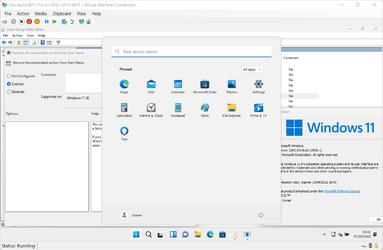
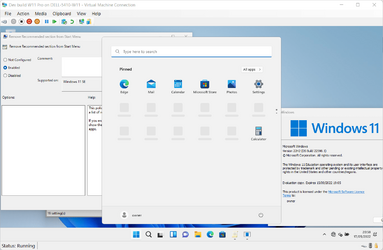
Well, there's really only one way to check - install Education Pro and Education in a VM and try each one. Apparently the answer is yes, both work....

Education Pro
1652817711909.png

Education
1652817736681.png
 

My Computers My Computers

  • At a glance

    Windows 11 HomeAMD Athlon Silver 3050U8GBRadeon Graphics
    OS
    Windows 11 Home
    Computer type
    Laptop
    Manufacturer/Model
    Acer Aspire 3 A315-23-R9VY
    CPU
    AMD Athlon Silver 3050U
    Memory
    8GB
    Graphics Card(s)
    Radeon Graphics
    Monitor(s) Displays
    laptop screen
    Screen Resolution
    1366x768 native resolution, up to 2560x1440 with Radeon Virtual Super Resolution
    Hard Drives
    1TB Samsung EVO 870 SSD (from April 2026: 250GB EVO 850)
    Internet Speed
    150 Mbps
    Browser
    Edge, Firefox
    Antivirus
    Defender
    Other Info
    fully 'Windows 11 ready' laptop. Windows 10 C: partition migrated from my old unsupported 'main machine' then upgraded to 11. A test migration ran Insider builds for 2 months. When 11 was released on 5th October 2021 it was re-imaged back to 10 and was offered the upgrade in Windows Update on 20th October. Windows Update offered the 22H2 Feature Update on 20th September 2022. It got the 23H2 Feature Update on 4th November 2023 through Windows Update, 24H2 on 3rd October 2024 through Windows Update by setting the Target Release Version for 24H2, and 25H2 on 30th September 2025 through Windows Update by setting the Target Release Version for 25H2.

    UPDATE - 11 April 2026: due to mechanical deterioration this PC has been retired from active duty. The OS with all software and files has been migrated to my System Seven in 'Other systems' to carry on as my general purpose 'main machine'.

    I've now clean installed 25H2 and used Garlin's scripts to update Secure Boot to CA 2023 and revoke the PCA 2011 certificates. It's new role is to test secure boot issues.
  • At a glance

    Windows 11 ProIntel® Core™ i5-520M8GB(integrated graphics) Intel HD Graphics
    Operating System
    Windows 11 Pro
    Computer type
    Laptop
    Manufacturer/Model
    Dell Latitude E4310
    CPU
    Intel® Core™ i5-520M
    Motherboard
    0T6M8G
    Memory
    8GB
    Graphics card(s)
    (integrated graphics) Intel HD Graphics
    Screen Resolution
    1366x768
    Hard Drives
    500GB Crucial MX500 SSD
    Browser
    Firefox, Edge
    Antivirus
    Defender
    Other Info
    unsupported machine: Legacy bios, MBR, TPM 1.2, upgraded from W10 to W11 using W10/W11 hybrid install media workaround.

    In-place upgrade to 22H2 using ISO and a workaround.
    Feature Update to 23H2 by manually installing the Enablement Package.
    In-place upgrade to 24H2 using hybrid 23H2/24H2 install media.
    Upgraded to 25H2 by Enablement Package.

    Also running Insider Dev, and Canary builds and Windows 10 as native boot .vhdx.
  • My SYSTEM THREE is a Dell Latitude 5410, i7-10610U, 32GB RAM, 512GB NVMe ssd, supported device running Windows 11 Pro.

    My SYSTEM FOUR is a 2-in-1 convertible Lenovo Yoga 11e 20DA, Celeron N2930, 8GB RAM, 256GB ssd. Unsupported device: currently running Win10 Pro, plus Win11 Pro RTM and Insider Dev, Beta, and RP 24H2 as native boot vhdx.

    My SYSTEM FIVE is a Dell Latitude 3190 2-in-1, Pentium Silver N5030, 8GB RAM, 1TB NVMe ssd, supported device running Windows 11 Pro, plus Insider Beta, Dev, and Canary builds (and a few others) as a native boot .vhdx.

    My SYSTEM SIX is a Dell Latitude 5550, Core Ultra 7 165H, 64GB RAM, 1TB NVMe SSD, supported device, Windows 11 Pro 24H2, Hyper-V host machine. Updated to 25H2 on 30th September 2025.

    My SYSTEM SEVEN is a Lenovo Thinkpad T580, Intel Core i7-8650U, 16GB RAM, 512GB NVMe SSD + 2nd 512GB NVMe SSD, a supported device for Windows 11. This is my current general purpose 'main machine'. The installed Windows 11 Home from my System One has been migrated to this machine.

My Computers My Computers

Well, there's really only one way to check - install Education Pro and Education in a VM and try each one. Apparently the answer is yes, both work....

Education Pro
View attachment 29369

Education
View attachment 29370
nice, thanks for confirming, so I guess I can download the Pro EDU version of 22621.1 to remove the recommendation part.

Can you confirm one more thing from your VM, in that Pro EDU edition of W11, if you remove the recommendation by GPO, then is it possible to use that area for pinning more icons in START?
 

My Computers My Computers

  • At a glance

    Windows 11 Pro Latest Retail BuildIntel 13th Gen i5-13600KFG-Skill Trident Z5 RGB 32GB Kit (F5-7200J3445...Nvidia GeForce RTX 4060 Ti 16GB OC
    OS
    Windows 11 Pro Latest Retail Build
    Computer type
    PC/Desktop
    Manufacturer/Model
    Gaming-Rig (Intel 13th Gen based Self-Assembled)
    CPU
    Intel 13th Gen i5-13600KF
    Motherboard
    MSI PRO Z790-A WIFI DDR5
    Memory
    G-Skill Trident Z5 RGB 32GB Kit (F5-7200J3445G16GX2-TZ5RK) @7200 MT/s CL34
    Graphics Card(s)
    Nvidia GeForce RTX 4060 Ti 16GB OC
    Sound Card
    Motherboard Realtek UDA DTS Audio
    Monitor(s) Displays
    Hisense 43" 4K QLED
    Screen Resolution
    4096 * 2160 (4K)
    Hard Drives
    1. SSD1: NVME PCI-e Gen4x4 Kingstone KC3000 [500 GB]
    2. SSD2: NVME PCI-e Gen4x4 Adata XPG S70 Blade [1 TB]
    3. HDD 1: Seagate BarraCuda 4TB 5400 RPM
    4. HDD 2: Seagate SkyHawk 4TB 7200 RPM
    PSU
    Deepcool 750W Gold Full Modular
    Case
    Deepcool CH510 MESH DIGITAL
    Cooling
    Deepcool AK400 Zero Dark Edition CPU Cooler + 5x Arctic Chassis 120mm PWM PST CO Pressure-Optimized Fans
    Keyboard
    Razer Cynosa V2 RGB Gaming Keyboard
    Mouse
    Logitech G304 LIGHTSPEED Wireless Gaming Mouse
    Internet Speed
    100 Mbps Fiber Broadband
    Browser
    Chrome+Firefox (Latest always)
    Antivirus
    Eset Security Ultimate (Latest)
    Other Info
    My Gaming Configurations
  • At a glance

    Windows 11 Pro Latest BuildIntel 12th Gen i5-12400Crucial Ballistix DDR4 32GB [16x2 Dual Channe...Integrated Intel UHD 720 iGPU
    Operating System
    Windows 11 Pro Latest Build
    Computer type
    PC/Desktop
    Manufacturer/Model
    Work Desktop (Intel 12th Gen based Self-Assembled)
    CPU
    Intel 12th Gen i5-12400
    Motherboard
    MSI MAG B760 Tomahawk WIFI
    Memory
    Crucial Ballistix DDR4 32GB [16x2 Dual Channel] @3600 CL:16
    Graphics card(s)
    Integrated Intel UHD 720 iGPU
    Sound Card
    Motherboard Realtek UDA DTS Audio
    Monitor(s) Displays
    Sony Bravia 32" LED TV
    Screen Resolution
    1920 * 1080 (Full HD)
    Hard Drives
    1. SSD: NVME M.2 2280 Gen3x4 WD Blue SN570 250GB
    2. HDD: WD Blue 1TB @5400
    PSU
    Cooler Master MWE V2 750W Gold Fully Modular
    Case
    Cooler Master MasterBox MB540 ARGB
    Cooling
    Intel Stock CPU Cooler FAN+ 5x Arctic Chassis 120mm PWM PST CO Pressure-Optimized Fans
    Keyboard
    Logitech K295 Wireless M&K Combo
    Mouse
    Logitech K295 Wireless M&K Combo
    Internet Speed
    100 Mbps Optical Fiber Broadband
    Browser
    Google+Firefox (Latest)
    Antivirus
    Eset Security Ultimate (Latest)
    Other Info
    My Workbench Configuration
nice, thanks for confirming, so I guess I can download the Pro EDU version of 22621.1 to remove the recommendation part.

Can you confirm one more thing from your VM, in that Pro EDU edition of W11, if you remove the recommendation by GPO, then is it possible to use that area for pinning more icons in START?
Why not try it yourself? It will take less time to set up vms than wait for a reply.
 

My Computer My Computer

At a glance

Windows 11 Pro + Win11 Canary VM.I9 13th gen i9-13900H 2.60 GHZ16 GB solderedIntegrated Intel Iris XE
OS
Windows 11 Pro + Win11 Canary VM.
Computer type
Laptop
Manufacturer/Model
ASUS Zenbook 14
CPU
I9 13th gen i9-13900H 2.60 GHZ
Motherboard
Yep, Laptop has one.
Memory
16 GB soldered
Graphics Card(s)
Integrated Intel Iris XE
Sound Card
Realtek built in
Monitor(s) Displays
laptop OLED screen
Screen Resolution
2880x1800 touchscreen
Hard Drives
1 TB NVME SSD (only weakness is only one slot)
PSU
Internal + 65W thunderbolt USB4 charger
Case
Yep, got one
Cooling
Stella Artois (UK pint cans - 568 ml) - extra cost.
Keyboard
Built in UK keybd
Mouse
Bluetooth , wireless dongled, wired
Internet Speed
900 mbs (ethernet), wifi 6 typical 350-450 mb/s both up and down
Browser
Edge
Antivirus
Defender
Other Info
TPM 2.0, 2xUSB4 thunderbolt, 1xUsb3 (usb a), 1xUsb-c, hdmi out, 3.5 mm audio out/in combo, ASUS backlit trackpad (inc. switchable number pad)

Macrium Reflect Home V8
Office 365 Family (6 users each 1TB onedrive space)
Hyper-V (a vm runs almost as fast as my older laptop)
Ed Pro works -- at least in a VM it does -- If you though download and create iso from UUPDUMP and use dism.exe /Apply-Image then check for the correct index number as it's unlikely to be the default 1 if no /index: parameter is given.

If you use standard setup then just do what you normally do when installing windows, I find the /Apply-Image method a lot quicker and seems to usually work when sometimes std install fail for no specific reason.

Cheers
jimbo
 

My Computer My Computer

At a glance

Windows XP,11 Linux Fedora Rawhide pre-releas...2 X Intel i7
OS
Windows XP,11 Linux Fedora Rawhide pre-release 45
Computer type
PC/Desktop
CPU
2 X Intel i7
Screen Resolution
4KUHD X 2
Can you confirm one more thing from your VM, in that Pro EDU edition of W11, if you remove the recommendation by GPO, then is it possible to use that area for pinning more icons in START?
I'm sorry, I deleted those VMs straight after those tests. And anyway, the latest ISO I had available to do the install was for 22598.1.

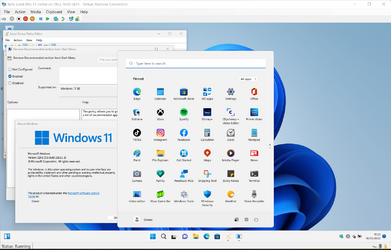
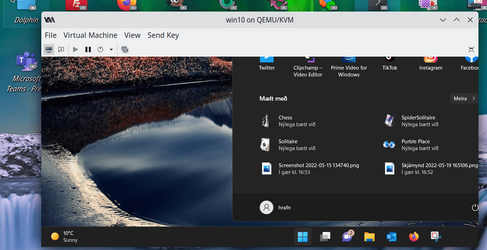
However, there's a far easier way to get an install of Education or Pro Education. If you disconnect from the internet (so that it cannot check if you have a digital licence) then you can upgrade just by changing the installed key to the apropriate generic key. Here I have upgraded my Beta build 22621.1 Home VM to Education, then filled Start with as many tiles as I could find.

1652870084322.png
 

My Computers My Computers

  • At a glance

    Windows 11 HomeAMD Athlon Silver 3050U8GBRadeon Graphics
    OS
    Windows 11 Home
    Computer type
    Laptop
    Manufacturer/Model
    Acer Aspire 3 A315-23-R9VY
    CPU
    AMD Athlon Silver 3050U
    Memory
    8GB
    Graphics Card(s)
    Radeon Graphics
    Monitor(s) Displays
    laptop screen
    Screen Resolution
    1366x768 native resolution, up to 2560x1440 with Radeon Virtual Super Resolution
    Hard Drives
    1TB Samsung EVO 870 SSD (from April 2026: 250GB EVO 850)
    Internet Speed
    150 Mbps
    Browser
    Edge, Firefox
    Antivirus
    Defender
    Other Info
    fully 'Windows 11 ready' laptop. Windows 10 C: partition migrated from my old unsupported 'main machine' then upgraded to 11. A test migration ran Insider builds for 2 months. When 11 was released on 5th October 2021 it was re-imaged back to 10 and was offered the upgrade in Windows Update on 20th October. Windows Update offered the 22H2 Feature Update on 20th September 2022. It got the 23H2 Feature Update on 4th November 2023 through Windows Update, 24H2 on 3rd October 2024 through Windows Update by setting the Target Release Version for 24H2, and 25H2 on 30th September 2025 through Windows Update by setting the Target Release Version for 25H2.

    UPDATE - 11 April 2026: due to mechanical deterioration this PC has been retired from active duty. The OS with all software and files has been migrated to my System Seven in 'Other systems' to carry on as my general purpose 'main machine'.

    I've now clean installed 25H2 and used Garlin's scripts to update Secure Boot to CA 2023 and revoke the PCA 2011 certificates. It's new role is to test secure boot issues.
  • At a glance

    Windows 11 ProIntel® Core™ i5-520M8GB(integrated graphics) Intel HD Graphics
    Operating System
    Windows 11 Pro
    Computer type
    Laptop
    Manufacturer/Model
    Dell Latitude E4310
    CPU
    Intel® Core™ i5-520M
    Motherboard
    0T6M8G
    Memory
    8GB
    Graphics card(s)
    (integrated graphics) Intel HD Graphics
    Screen Resolution
    1366x768
    Hard Drives
    500GB Crucial MX500 SSD
    Browser
    Firefox, Edge
    Antivirus
    Defender
    Other Info
    unsupported machine: Legacy bios, MBR, TPM 1.2, upgraded from W10 to W11 using W10/W11 hybrid install media workaround.

    In-place upgrade to 22H2 using ISO and a workaround.
    Feature Update to 23H2 by manually installing the Enablement Package.
    In-place upgrade to 24H2 using hybrid 23H2/24H2 install media.
    Upgraded to 25H2 by Enablement Package.

    Also running Insider Dev, and Canary builds and Windows 10 as native boot .vhdx.
  • My SYSTEM THREE is a Dell Latitude 5410, i7-10610U, 32GB RAM, 512GB NVMe ssd, supported device running Windows 11 Pro.

    My SYSTEM FOUR is a 2-in-1 convertible Lenovo Yoga 11e 20DA, Celeron N2930, 8GB RAM, 256GB ssd. Unsupported device: currently running Win10 Pro, plus Win11 Pro RTM and Insider Dev, Beta, and RP 24H2 as native boot vhdx.

    My SYSTEM FIVE is a Dell Latitude 3190 2-in-1, Pentium Silver N5030, 8GB RAM, 1TB NVMe ssd, supported device running Windows 11 Pro, plus Insider Beta, Dev, and Canary builds (and a few others) as a native boot .vhdx.

    My SYSTEM SIX is a Dell Latitude 5550, Core Ultra 7 165H, 64GB RAM, 1TB NVMe SSD, supported device, Windows 11 Pro 24H2, Hyper-V host machine. Updated to 25H2 on 30th September 2025.

    My SYSTEM SEVEN is a Lenovo Thinkpad T580, Intel Core i7-8650U, 16GB RAM, 512GB NVMe SSD + 2nd 512GB NVMe SSD, a supported device for Windows 11. This is my current general purpose 'main machine'. The installed Windows 11 Home from my System One has been migrated to this machine.
so I guess I can download the Pro EDU version of 22621.1 to remove the recommendation part.
No need, you should be able to upgrade an existing install of Pro to Pro Education just by changing the installed key.


My Computers My Computers

  • At a glance

    Windows 11 HomeAMD Athlon Silver 3050U8GBRadeon Graphics
    OS
    Windows 11 Home
    Computer type
    Laptop
    Manufacturer/Model
    Acer Aspire 3 A315-23-R9VY
    CPU
    AMD Athlon Silver 3050U
    Memory
    8GB
    Graphics Card(s)
    Radeon Graphics
    Monitor(s) Displays
    laptop screen
    Screen Resolution
    1366x768 native resolution, up to 2560x1440 with Radeon Virtual Super Resolution
    Hard Drives
    1TB Samsung EVO 870 SSD (from April 2026: 250GB EVO 850)
    Internet Speed
    150 Mbps
    Browser
    Edge, Firefox
    Antivirus
    Defender
    Other Info
    fully 'Windows 11 ready' laptop. Windows 10 C: partition migrated from my old unsupported 'main machine' then upgraded to 11. A test migration ran Insider builds for 2 months. When 11 was released on 5th October 2021 it was re-imaged back to 10 and was offered the upgrade in Windows Update on 20th October. Windows Update offered the 22H2 Feature Update on 20th September 2022. It got the 23H2 Feature Update on 4th November 2023 through Windows Update, 24H2 on 3rd October 2024 through Windows Update by setting the Target Release Version for 24H2, and 25H2 on 30th September 2025 through Windows Update by setting the Target Release Version for 25H2.

    UPDATE - 11 April 2026: due to mechanical deterioration this PC has been retired from active duty. The OS with all software and files has been migrated to my System Seven in 'Other systems' to carry on as my general purpose 'main machine'.

    I've now clean installed 25H2 and used Garlin's scripts to update Secure Boot to CA 2023 and revoke the PCA 2011 certificates. It's new role is to test secure boot issues.
  • At a glance

    Windows 11 ProIntel® Core™ i5-520M8GB(integrated graphics) Intel HD Graphics
    Operating System
    Windows 11 Pro
    Computer type
    Laptop
    Manufacturer/Model
    Dell Latitude E4310
    CPU
    Intel® Core™ i5-520M
    Motherboard
    0T6M8G
    Memory
    8GB
    Graphics card(s)
    (integrated graphics) Intel HD Graphics
    Screen Resolution
    1366x768
    Hard Drives
    500GB Crucial MX500 SSD
    Browser
    Firefox, Edge
    Antivirus
    Defender
    Other Info
    unsupported machine: Legacy bios, MBR, TPM 1.2, upgraded from W10 to W11 using W10/W11 hybrid install media workaround.

    In-place upgrade to 22H2 using ISO and a workaround.
    Feature Update to 23H2 by manually installing the Enablement Package.
    In-place upgrade to 24H2 using hybrid 23H2/24H2 install media.
    Upgraded to 25H2 by Enablement Package.

    Also running Insider Dev, and Canary builds and Windows 10 as native boot .vhdx.
  • My SYSTEM THREE is a Dell Latitude 5410, i7-10610U, 32GB RAM, 512GB NVMe ssd, supported device running Windows 11 Pro.

    My SYSTEM FOUR is a 2-in-1 convertible Lenovo Yoga 11e 20DA, Celeron N2930, 8GB RAM, 256GB ssd. Unsupported device: currently running Win10 Pro, plus Win11 Pro RTM and Insider Dev, Beta, and RP 24H2 as native boot vhdx.

    My SYSTEM FIVE is a Dell Latitude 3190 2-in-1, Pentium Silver N5030, 8GB RAM, 1TB NVMe ssd, supported device running Windows 11 Pro, plus Insider Beta, Dev, and Canary builds (and a few others) as a native boot .vhdx.

    My SYSTEM SIX is a Dell Latitude 5550, Core Ultra 7 165H, 64GB RAM, 1TB NVMe SSD, supported device, Windows 11 Pro 24H2, Hyper-V host machine. Updated to 25H2 on 30th September 2025.

    My SYSTEM SEVEN is a Lenovo Thinkpad T580, Intel Core i7-8650U, 16GB RAM, 512GB NVMe SSD + 2nd 512GB NVMe SSD, a supported device for Windows 11. This is my current general purpose 'main machine'. The installed Windows 11 Home from my System One has been migrated to this machine.
hi HideVolumeOSD 1.3 not functional with this version someone has found a fix to hide popup volume ? thanks advance.
 

My Computer My Computer

At a glance

Windows 11
OS
Windows 11
I'm sorry, I deleted those VMs straight after those tests. And anyway, the latest ISO I had available to do the install was for 22598.1.

However, there's a far easier way to get an install of Education or Pro Education. If you disconnect from the internet (so that it cannot check if you have a digital licence) then you can upgrade just by changing the installed key to the apropriate generic key. Here I have upgraded my Beta build 22621.1 Home VM to Education, then filled Start with as many tiles as I could find.

View attachment 29391
Thanks again, that's exactly what I am looking for.

No need, you should be able to upgrade an existing install of Pro to Pro Education just by changing the installed key.

Yeah IKTR, but currently am on the retail ring of W11 i.e. 22000.675 & after 24th May 2022, as rumoured MSFT will fix the RTM candidate, then am gonna make a fresh installation of W11 226xx 22H2 build (whatever that will be 22621.1 or higher) so that's why asking for the prepping to DL the ISO accordingly.
 

My Computers My Computers

  • At a glance

    Windows 11 Pro Latest Retail BuildIntel 13th Gen i5-13600KFG-Skill Trident Z5 RGB 32GB Kit (F5-7200J3445...Nvidia GeForce RTX 4060 Ti 16GB OC
    OS
    Windows 11 Pro Latest Retail Build
    Computer type
    PC/Desktop
    Manufacturer/Model
    Gaming-Rig (Intel 13th Gen based Self-Assembled)
    CPU
    Intel 13th Gen i5-13600KF
    Motherboard
    MSI PRO Z790-A WIFI DDR5
    Memory
    G-Skill Trident Z5 RGB 32GB Kit (F5-7200J3445G16GX2-TZ5RK) @7200 MT/s CL34
    Graphics Card(s)
    Nvidia GeForce RTX 4060 Ti 16GB OC
    Sound Card
    Motherboard Realtek UDA DTS Audio
    Monitor(s) Displays
    Hisense 43" 4K QLED
    Screen Resolution
    4096 * 2160 (4K)
    Hard Drives
    1. SSD1: NVME PCI-e Gen4x4 Kingstone KC3000 [500 GB]
    2. SSD2: NVME PCI-e Gen4x4 Adata XPG S70 Blade [1 TB]
    3. HDD 1: Seagate BarraCuda 4TB 5400 RPM
    4. HDD 2: Seagate SkyHawk 4TB 7200 RPM
    PSU
    Deepcool 750W Gold Full Modular
    Case
    Deepcool CH510 MESH DIGITAL
    Cooling
    Deepcool AK400 Zero Dark Edition CPU Cooler + 5x Arctic Chassis 120mm PWM PST CO Pressure-Optimized Fans
    Keyboard
    Razer Cynosa V2 RGB Gaming Keyboard
    Mouse
    Logitech G304 LIGHTSPEED Wireless Gaming Mouse
    Internet Speed
    100 Mbps Fiber Broadband
    Browser
    Chrome+Firefox (Latest always)
    Antivirus
    Eset Security Ultimate (Latest)
    Other Info
    My Gaming Configurations
  • At a glance

    Windows 11 Pro Latest BuildIntel 12th Gen i5-12400Crucial Ballistix DDR4 32GB [16x2 Dual Channe...Integrated Intel UHD 720 iGPU
    Operating System
    Windows 11 Pro Latest Build
    Computer type
    PC/Desktop
    Manufacturer/Model
    Work Desktop (Intel 12th Gen based Self-Assembled)
    CPU
    Intel 12th Gen i5-12400
    Motherboard
    MSI MAG B760 Tomahawk WIFI
    Memory
    Crucial Ballistix DDR4 32GB [16x2 Dual Channel] @3600 CL:16
    Graphics card(s)
    Integrated Intel UHD 720 iGPU
    Sound Card
    Motherboard Realtek UDA DTS Audio
    Monitor(s) Displays
    Sony Bravia 32" LED TV
    Screen Resolution
    1920 * 1080 (Full HD)
    Hard Drives
    1. SSD: NVME M.2 2280 Gen3x4 WD Blue SN570 250GB
    2. HDD: WD Blue 1TB @5400
    PSU
    Cooler Master MWE V2 750W Gold Fully Modular
    Case
    Cooler Master MasterBox MB540 ARGB
    Cooling
    Intel Stock CPU Cooler FAN+ 5x Arctic Chassis 120mm PWM PST CO Pressure-Optimized Fans
    Keyboard
    Logitech K295 Wireless M&K Combo
    Mouse
    Logitech K295 Wireless M&K Combo
    Internet Speed
    100 Mbps Optical Fiber Broadband
    Browser
    Google+Firefox (Latest)
    Antivirus
    Eset Security Ultimate (Latest)
    Other Info
    My Workbench Configuration
Does the hack for restoring the Classic File Explorer with Ribbon work for anyone when it comes to these Insider builds? I've tried the one suggested here and other ones as well, but none of them work for me. On the other hand, they do for the general releases.
 

My Computer My Computer

At a glance

Windows 11 25H2 Pro (RP Build 26200.8968)
OS
Windows 11 25H2 Pro (RP Build 26200.8968)
Computer type
PC/Desktop
Manufacturer/Model
Alienware
Does the hack for restoring the Classic File Explorer with Ribbon work for anyone when it comes to these Insider builds? I've tried the one suggested here and other ones as well, but none of them work for me. On the other hand, they do for the general releases.

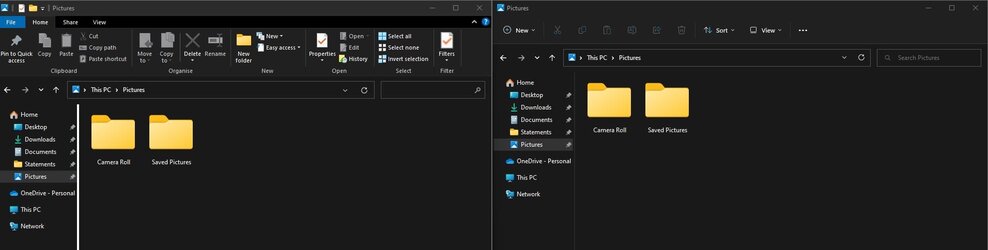
No, I've given up trying to get it to work. Sometimes, however, it suddenly appears. As posted elsewhere, I found I could have both old and new side-by-side at the same time so the code must still be there.

S4.jpg
 

My Computers My Computers

  • At a glance

    Windows 11 Home 24H2 RPIntel I3-1010016 GBNvidia GT 1030
    OS
    Windows 11 Home 24H2 RP
    Computer type
    PC/Desktop
    Manufacturer/Model
    Self-build
    CPU
    Intel I3-10100
    Motherboard
    MSI H410M-PRO
    Memory
    16 GB
    Graphics Card(s)
    Nvidia GT 1030
    Sound Card
    Motherboard default
    Monitor(s) Displays
    Philips 27 inch
    Screen Resolution
    1920x1080
    Hard Drives
    Samsung EVO 970 NVMe SSD 256 Gb
    Samsung QVO 870 SATA SSD 2 Tb
    PSU
    ATX 450W
    Keyboard
    Logitech
    Mouse
    Logitech Wireless
    Internet Speed
    930 Mb down / 120 Mb up
    Browser
    Edge
    Antivirus
    Windows Defender
    Other Info
    Microsoft Office 2021 Plus
  • At a glance

    Windows 11 HomeIntel i3-810016 GbNvidia GT 720
    Operating System
    Windows 11 Home
    Computer type
    PC/Desktop
    Manufacturer/Model
    Self-build
    CPU
    Intel i3-8100
    Motherboard
    Gigabyte Z370 D3
    Memory
    16 Gb
    Graphics card(s)
    Nvidia GT 720
    Sound Card
    Motherboard default
    Monitor(s) Displays
    Philips 27-inch
    Screen Resolution
    1920x1080
    Hard Drives
    Samsung 960 NVMe SSD 256 Gb
    Seagate 2 Tb HDD
    PSU
    ATX 450W
    Keyboard
    Microsoft
    Mouse
    Logitech Wireless
    Internet Speed
    930 Mb down / 120 Mb up
    Browser
    Edge
    Antivirus
    Windows Defender
Does the hack for restoring the Classic File Explorer with Ribbon work for anyone when it comes to these Insider builds? I've tried the one suggested here and other ones as well, but none of them work for me. On the other hand, they do for the general releases.

Best $5 you will spend...;) Works great with all of the Dev/Beta Win11 Insider builds. Guy keeps it updated constantly.
 

My Computer My Computer

At a glance

Win11 Experimental Channel for 26H2 buildsAMD R7 7800X3DGSkill 2x16GB @ 6400MT/sXFX 9070 XT SWIFT tri-fan (PCIe5.0)
OS
Win11 Experimental Channel for 26H2 builds
Computer type
PC/Desktop
Manufacturer/Model
a cherry-picked assembly
CPU
AMD R7 7800X3D
Motherboard
MSI x870 Tomahawk Wi-Fi, 8-layer, 2 oz copper, server PCB
Memory
GSkill 2x16GB @ 6400MT/s
Graphics Card(s)
XFX 9070 XT SWIFT tri-fan (PCIe5.0)
Sound Card
Creative Labs G8 USB External Sound device, Gaming DAC, Sound Card & Earphone AMP.. HIGHLY RECOMMENDED, btw. Totally changed my opinion of external USB sound. I like!...;)
Monitor(s) Displays
Philips 42" OLED @ 4k
Screen Resolution
3840x2160
Hard Drives
*Boot: Samsung 980 Pro 2 TB NVMe (PCIe4x4)
*Samsung 980 EVO NVMe 500GB (PCIe 4x4)
*Kingston SNV3S2000G 2TB NVMe (PCIe4x4)
*Samsung 960 EVO 250GB NVMe(PCIe3x2)
*8TB Toshiba x300 HDD
*ST4000DM004 S3 4TB HDD
PSU
Gigabyte 850W Gold, Rev 2
Case
Lian Li Lancool 217, white, with wood trim, very nice looking--tired of black, 5-fans standard
Cooling
Air coutesy Lian Li
Keyboard
Cherry MX 2.0S RGB
Mouse
Razer Basilisk V3 24k DPI
Internet Speed
~950Mbps down and up!
Browser
Firefox x64 DE
Antivirus
Defender
Other Info
Great New system. Exceeds my expectations by quite a bit, btw. I love the USB G8 SoundBlaster, it's quite an improvement over the G6!

My Computer My Computer

At a glance

Windows 11 Pro + Win11 Canary VM.I9 13th gen i9-13900H 2.60 GHZ16 GB solderedIntegrated Intel Iris XE
OS
Windows 11 Pro + Win11 Canary VM.
Computer type
Laptop
Manufacturer/Model
ASUS Zenbook 14
CPU
I9 13th gen i9-13900H 2.60 GHZ
Motherboard
Yep, Laptop has one.
Memory
16 GB soldered
Graphics Card(s)
Integrated Intel Iris XE
Sound Card
Realtek built in
Monitor(s) Displays
laptop OLED screen
Screen Resolution
2880x1800 touchscreen
Hard Drives
1 TB NVME SSD (only weakness is only one slot)
PSU
Internal + 65W thunderbolt USB4 charger
Case
Yep, got one
Cooling
Stella Artois (UK pint cans - 568 ml) - extra cost.
Keyboard
Built in UK keybd
Mouse
Bluetooth , wireless dongled, wired
Internet Speed
900 mbs (ethernet), wifi 6 typical 350-450 mb/s both up and down
Browser
Edge
Antivirus
Defender
Other Info
TPM 2.0, 2xUSB4 thunderbolt, 1xUsb3 (usb a), 1xUsb-c, hdmi out, 3.5 mm audio out/in combo, ASUS backlit trackpad (inc. switchable number pad)

Macrium Reflect Home V8
Office 365 Family (6 users each 1TB onedrive space)
Hyper-V (a vm runs almost as fast as my older laptop)
Nah - just for luddites.
For unknown reasons, Microsoft loves changing fundamental things that no one asks them to change, and often those changes move the GUI backwards, as opposed to forwards. Startallback addresses exactly that with Win11, imo. We got a taste of Microsoft's definition of "progress" in Win8, with tiles (always optional, but MS tried to hide that fact)--and there were other things that although the company was not asked to change, they decided to completely remove--only to have to put it all back in with Win10, due to popular demand. Customers, you know, those pesky people...;)

Now, they've done it again. Win11 features a dead taskbar which has had its functionality as a UI element removed from what it was in Win10, and that is one reason why programs like Startallback are now ubiquitous. Why on Earth would MS nail the taskbar to the bottom of the screen? That's not progress--that's backwards. MS looks to be the Luddite here, imo. Or worse than Luddites. The largest complaint thread of any kind in the Insider's HUB so far is the one about hobbling the desktop taskbar GUI function. Thousands of complaints--it's the largest thread in the Insider's HUB. Microsoft likes to pretend that people will adjust. Yawn...that's what Microsoft thought about Win8, too. You wonder how they can get something so obvious so wrong...

In an OS GUI there is no such thing as "progress"...there is only what people like, and what they don't, and Microsoft is frequently confused when it comes to listening to its customers who tell them, "No, Microsoft, change X is inferior to what went before. Please fix." That is difficult for the current Win11 GUI developers, for some reason. I thought Microsoft would have learned from the Win8 debacle. Guess not.
 

My Computer My Computer

At a glance

Win11 Experimental Channel for 26H2 buildsAMD R7 7800X3DGSkill 2x16GB @ 6400MT/sXFX 9070 XT SWIFT tri-fan (PCIe5.0)
OS
Win11 Experimental Channel for 26H2 builds
Computer type
PC/Desktop
Manufacturer/Model
a cherry-picked assembly
CPU
AMD R7 7800X3D
Motherboard
MSI x870 Tomahawk Wi-Fi, 8-layer, 2 oz copper, server PCB
Memory
GSkill 2x16GB @ 6400MT/s
Graphics Card(s)
XFX 9070 XT SWIFT tri-fan (PCIe5.0)
Sound Card
Creative Labs G8 USB External Sound device, Gaming DAC, Sound Card & Earphone AMP.. HIGHLY RECOMMENDED, btw. Totally changed my opinion of external USB sound. I like!...;)
Monitor(s) Displays
Philips 42" OLED @ 4k
Screen Resolution
3840x2160
Hard Drives
*Boot: Samsung 980 Pro 2 TB NVMe (PCIe4x4)
*Samsung 980 EVO NVMe 500GB (PCIe 4x4)
*Kingston SNV3S2000G 2TB NVMe (PCIe4x4)
*Samsung 960 EVO 250GB NVMe(PCIe3x2)
*8TB Toshiba x300 HDD
*ST4000DM004 S3 4TB HDD
PSU
Gigabyte 850W Gold, Rev 2
Case
Lian Li Lancool 217, white, with wood trim, very nice looking--tired of black, 5-fans standard
Cooling
Air coutesy Lian Li
Keyboard
Cherry MX 2.0S RGB
Mouse
Razer Basilisk V3 24k DPI
Internet Speed
~950Mbps down and up!
Browser
Firefox x64 DE
Antivirus
Defender
Other Info
Great New system. Exceeds my expectations by quite a bit, btw. I love the USB G8 SoundBlaster, it's quite an improvement over the G6!
For unknown reasons, Microsoft loves changing fundamental things that no one asks them to change, and often those changes move the GUI backwards, as opposed to forwards.
Indeed, Start in 8 being a great example, they removed it without any notice, I used Windows 8 Alfa, Beta, RC and in RTM, it was just gone. MS then called people luddites. A few years later, MS released 8.1 and promoted the great new feature - Start. :lmao:

History repeats itself, for example MS removed the ability to pin icons to taskbar. 22H2 partially adds it back, but you still can not pin documents. Well you are supposed to use MS 365, so it just another subtle way to push people to use some products.
 

My Computer My Computer

At a glance

Home26H2CanAMD Ryzen 5 8600G (07/24)2x32GB Kingston FURY DDR5 5600 MHz CL36 @5200...ASROCK Radeon RX 6600 Challenger D 8G @48FPS ...
OS
Home26H2Can
Computer type
PC/Desktop
CPU
AMD Ryzen 5 8600G (07/24)
Motherboard
ASROCK B650M-HDV/M.2 (07/24) BIOS 4.21 AGESA ComboAM5 1.3.0.1 (04/26)
Memory
2x32GB Kingston FURY DDR5 5600 MHz CL36 @5200 CL36 (07/24)
Graphics Card(s)
ASROCK Radeon RX 6600 Challenger D 8G @48FPS (08/24)
Sound Card
Creative Sound BlasterX AE-5 Plus (05/24)
Monitor(s) Displays
24" Philips 24M1N3200ZS/00 (05/24)
Screen Resolution
1920×1080@165Hz via DP1.4
Hard Drives
Kingston KC3000 NVMe 2TB (05/24)
ADATA XPG GAMMIX S11 Pro 512GB (07/19)
PSU
Seasonic Core GM 550 Gold (04/24)
Case
Fractal Design Define 7 Mini with 3x Noctua NF-P14s/12@555rpm (04/24)
Cooling
Noctua NH-U12S with Noctua NF-P12 (04/24)
Keyboard
HP Pavilion Wired Keyboard 300 (07/24) + Rabalux 76017 Parker (01/24)
Mouse
Logitech M330 Silent Plus (01/26)
Internet Speed
500/100 Mbps via RouterOS (05/21) & TCP Optimizer
Browser
Edge, Brave for YouTube, LibreWolf for FB
Antivirus
NextDNS blocking 1/3 Traffic
Other Info
Phone: Motorola Moto G86 (02/26)
Backup: Hasleo Backup Suite (PreOS)
Headphones: Sennheiser RS170 (09/10)
Chair: Huzaro Force 4.4 Grey Mesh (05/24)
Notifier: Xiaomi Mi Band 9 Milanese (10/24)
FlexCore USB-C 3.2 Gen 1 (M) to LAN (F) (08/25)
This build works so great that I wanted to keep it, first time moving to the next upgrade without a reinstall, but Windows has subtly suggested: You should clean install, no really, you should! And since my network adapter went from 1000 to 100, I guess I will. :weary:
 

My Computer My Computer

At a glance

Home26H2CanAMD Ryzen 5 8600G (07/24)2x32GB Kingston FURY DDR5 5600 MHz CL36 @5200...ASROCK Radeon RX 6600 Challenger D 8G @48FPS ...
OS
Home26H2Can
Computer type
PC/Desktop
CPU
AMD Ryzen 5 8600G (07/24)
Motherboard
ASROCK B650M-HDV/M.2 (07/24) BIOS 4.21 AGESA ComboAM5 1.3.0.1 (04/26)
Memory
2x32GB Kingston FURY DDR5 5600 MHz CL36 @5200 CL36 (07/24)
Graphics Card(s)
ASROCK Radeon RX 6600 Challenger D 8G @48FPS (08/24)
Sound Card
Creative Sound BlasterX AE-5 Plus (05/24)
Monitor(s) Displays
24" Philips 24M1N3200ZS/00 (05/24)
Screen Resolution
1920×1080@165Hz via DP1.4
Hard Drives
Kingston KC3000 NVMe 2TB (05/24)
ADATA XPG GAMMIX S11 Pro 512GB (07/19)
PSU
Seasonic Core GM 550 Gold (04/24)
Case
Fractal Design Define 7 Mini with 3x Noctua NF-P14s/12@555rpm (04/24)
Cooling
Noctua NH-U12S with Noctua NF-P12 (04/24)
Keyboard
HP Pavilion Wired Keyboard 300 (07/24) + Rabalux 76017 Parker (01/24)
Mouse
Logitech M330 Silent Plus (01/26)
Internet Speed
500/100 Mbps via RouterOS (05/21) & TCP Optimizer
Browser
Edge, Brave for YouTube, LibreWolf for FB
Antivirus
NextDNS blocking 1/3 Traffic
Other Info
Phone: Motorola Moto G86 (02/26)
Backup: Hasleo Backup Suite (PreOS)
Headphones: Sennheiser RS170 (09/10)
Chair: Huzaro Force 4.4 Grey Mesh (05/24)
Notifier: Xiaomi Mi Band 9 Milanese (10/24)
FlexCore USB-C 3.2 Gen 1 (M) to LAN (F) (08/25)
The easiest and quickest update yet -- Maybe Ms is finally learning -- however it seems strange to have a whole new build for a smidgen of "Mickey Mouse" features that we have seen publicly announced for this build. There has to be more hidden stuff under the hood -- boot times seem to be better and the whole thing seems a bit slicker performance wise.

I agree with loads of others though -- Task bar flexibility should be available -- why not also allow it at top of screen. Context menu should be much more customisable -- i.e when you right mouse click on the Windows logo . #

BUT : the main menu needs serious attention -- also why on earth does it show a lot of those individual files e,g especially screenshot / other .png stuff.

Screenshot_20220521_091015.png


@TairikuOkami

the problem some (including myself) have found on clean installing the latest builds from the DEV flighting branch is that some apps just don't work e.g when trying to access the security dashboard you get a message something like "This app needs another application to open xxxx.link or something like that and happens whether in a VM or installed on a physical machine. - Updating from previous build doesn't give the error. I generally try Clean first on a new build - powerful hardware makes it quick anyway but then after this error go back to previous working build and update.

cheers
jimbo
 

My Computer My Computer

At a glance

Windows XP,11 Linux Fedora Rawhide pre-releas...2 X Intel i7
OS
Windows XP,11 Linux Fedora Rawhide pre-release 45
Computer type
PC/Desktop
CPU
2 X Intel i7
Screen Resolution
4KUHD X 2
easiest and quickest update yet -- Maybe Ms is finally learning -- however it seems strange to have a whole new build for a smidgen of "Mickey Mouse" features that's been publicly announced for this build.

I agree with loads of others though -- Task bar flexibility should be available -- why not also allow it at top of screen. Context menu should be much more customisable -- i.e when you right mouse click on the Windows logo . #

BUT : the main menu needs serious attention -- also why on earth does it show a lot of those individual files e,g especially screenshot / other .png stuff.

View attachment 29643

cheers
jimbo
You can turn off recommend apps but you still get one line saying you can turn them on again.. Only student editions allow it to be removed entirely - now that is bovine excrement for rest of users.
 

My Computer My Computer

At a glance

Windows 11 Pro + Win11 Canary VM.I9 13th gen i9-13900H 2.60 GHZ16 GB solderedIntegrated Intel Iris XE
OS
Windows 11 Pro + Win11 Canary VM.
Computer type
Laptop
Manufacturer/Model
ASUS Zenbook 14
CPU
I9 13th gen i9-13900H 2.60 GHZ
Motherboard
Yep, Laptop has one.
Memory
16 GB soldered
Graphics Card(s)
Integrated Intel Iris XE
Sound Card
Realtek built in
Monitor(s) Displays
laptop OLED screen
Screen Resolution
2880x1800 touchscreen
Hard Drives
1 TB NVME SSD (only weakness is only one slot)
PSU
Internal + 65W thunderbolt USB4 charger
Case
Yep, got one
Cooling
Stella Artois (UK pint cans - 568 ml) - extra cost.
Keyboard
Built in UK keybd
Mouse
Bluetooth , wireless dongled, wired
Internet Speed
900 mbs (ethernet), wifi 6 typical 350-450 mb/s both up and down
Browser
Edge
Antivirus
Defender
Other Info
TPM 2.0, 2xUSB4 thunderbolt, 1xUsb3 (usb a), 1xUsb-c, hdmi out, 3.5 mm audio out/in combo, ASUS backlit trackpad (inc. switchable number pad)

Macrium Reflect Home V8
Office 365 Family (6 users each 1TB onedrive space)
Hyper-V (a vm runs almost as fast as my older laptop)
You can turn off recommend apps but you still get one line saying you can turn them on again.. Only student editions allow it to be removed entirely - now that is bovine excrement for rest of users.
Hi there

not 100% agree but 1000% agree. I also have a Windows Education system to test but it's not activated -- I'm only licensed for Windows PRO and Windows Workstation editions - not sure why students get the privilege of a feature that business users would surely value.

O.T but does anybody actually use W11/ W10 Enterprise these days -- all the clients I have been working for recently give their "Permies" laptops with W10 / W11 Pro or W10/W11 Workstation on it -- that's where I got my license for Workstation from -- a work client.

Cheers
jimbo
 

My Computer My Computer

At a glance

Windows XP,11 Linux Fedora Rawhide pre-releas...2 X Intel i7
OS
Windows XP,11 Linux Fedora Rawhide pre-release 45
Computer type
PC/Desktop
CPU
2 X Intel i7
Screen Resolution
4KUHD X 2
Back
Top Bottom