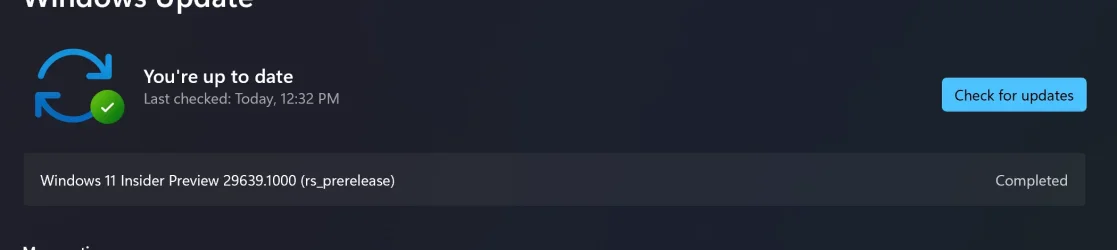
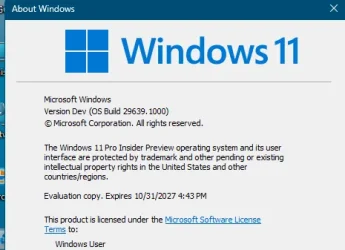
Insider Windows 11 Insider Experimental (Future Platforms) build 29639.1000 - July 31


 Windows Insider Blog:

Changes and improvements gradually being rolled out

[Windows Update]​

  • We're adding the ability to extend update pauses as many times as you need.

[Settings]​

  • The Bluetooth quick settings page is now navigable using gamepad input.

[Smart card removal policy]​

  • Administrators can now configure Azure Virtual Desktop (AVD) and Windows 365 sessions that use Microsoft Entra ID (RDS AAD Auth) authentication to automatically disconnect when a redirected smart card is removed. This extends smart card removal policy enforcement to Microsoft Entra authenticated remote sessions, helping organizations meet security and compliance requirements.

Reminder for Windows Insiders in the Experimental (Future Platforms) channel

  • These builds can be unstable and might be released with limited documentation.
  • The builds released to these channels represent the latest platform changes early in the development cycle and should not be seen as matched to any specific release of Windows. Features and experiences included in these builds might never get released as we try out different concepts and get feedback. Features might change over time, be removed, or replaced, and never get released beyond Windows Insiders. Some of these features and experiences could show up in future Windows releases when they are ready.
  • Many features are rolled out using Controlled Feature Rollout technology, starting with a subset of Insiders and ramping up over time. We monitor feedback to see how they land before pushing them out to everyone in this channel.
  • The desktop watermark shown at the lower right corner of the desktop is normal for Windows Insider pre-release builds.
  • For Windows Insiders who want to be the first to get features gradually rolled out to you, you can turn on the toggle to get the latest updates as they are available via Settings > Windows Update. Over time, we will increase the rollouts of features to everyone with the toggle turned on. Should you keep this toggle off, new features will gradually be rolled out to your PC over time once they are ready.
  • Some features in active development we preview with Windows Insiders might not be fully localized, and localization will happen over time as features are finalized. As you see issues with localization in your language, please report those issues to us via Feedback Hub.
Note: The author created this article with assistance from AI. Learn more


 Source:


Check Windows Updates


UUP Dump:

64-bit ISO download:

ARM64 ISO download:

 
Last edited:
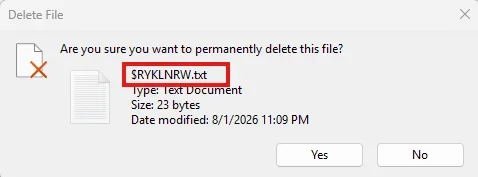
Recycle Bin still showing raw file names...

13210.webp
 

My Computers My Computers

  • At a glance

    Windows 11 Pro
    OS
    Windows 11 Pro
    Computer type
    PC/Desktop
    Manufacturer/Model
    ASUS ROG Strix
  • At a glance

    Windows 11 Pro
    Operating System
    Windows 11 Pro
    Computer type
    Laptop
    Manufacturer/Model
    ASUS VivoBook
  • ASUS VivoBook 'Lite' ~ Windows 11 Home
Appears they don’t want me to have it, now up to 40 minutes, so I restarted it and now the download has started all over and is at 2 %. The other computer is actually installing the build. Go figure.
Finally installed on both computers!
 

My Computers My Computers

  • At a glance

    windows 10 & 11AMD Ryzen 7X64GbRadeon RX 480 8Gb
    OS
    windows 10 & 11
    Computer type
    PC/Desktop
    Manufacturer/Model
    iBuyPower (special build)
    CPU
    AMD Ryzen 7X
    Motherboard
    Asus Prime x370 Pro
    Memory
    64Gb
    Graphics Card(s)
    Radeon RX 480 8Gb
    Monitor(s) Displays
    Samsung UHD 27 inch
    Screen Resolution
    UHD
    Hard Drives
    3 Samsung 1 TB SSD each; 1 Samsung PCIe M.2 at 2 TB
  • At a glance

    Windows 11 proAMD 9 5900X32 GbNvidia GeForce RTX 3080 Ti 12 GB GDDR6X
    Operating System
    Windows 11 pro
    Computer type
    PC/Desktop
    Manufacturer/Model
    IBuyPower
    CPU
    AMD 9 5900X
    Motherboard
    Asus x570 ROG Crosshair VIII Dark Hero WI-FI 6E ARGB
    Memory
    32 Gb
    Graphics card(s)
    Nvidia GeForce RTX 3080 Ti 12 GB GDDR6X
    Sound Card
    3D PREMIUM surround sound onboard
    Monitor(s) Displays
    Samsung 32 inch UHD curved monitor
    Screen Resolution
    UHD
    Hard Drives
    Samsung 980 pro 2 tb gen 4 NVMe ssd
    PSU
    850 watt consair RM850X
    Case
    Lian Li LANCOOL ONE tempered glass RGB gaming case
    Cooling
    DEEPCOOL GAMERSTORM RGB 240 mm CASTLE 240EX liquid cooler
    Keyboard
    Ares m.2 gaming keyboard
    Mouse
    Ares m.2 gaming optical mouse
    Internet Speed
    450
    Browser
    Firefox / Edge
    Antivirus
    Windows defender
    Other Info
    With all this gaming rig I am not a gamer!
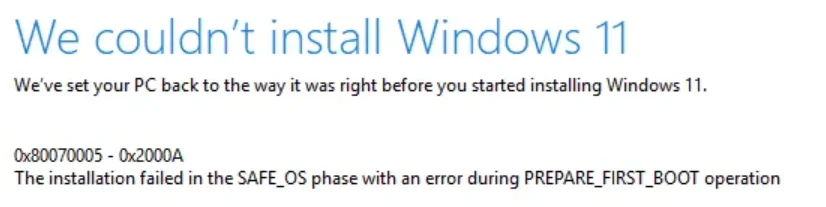
The update from 29617 to 29634 and 29639 kept failing with error 0x80070005 with W.U. or error 0x80070005 - 0x2000A trying to update with ISO on a specific machine GMKtec K3 Pro.
The only way around was by doing a clean install with 29639.1000.
After that I saved a backup and tried an update-in-place with the same ISO 29639.1000 and that worked correctly.
After 1st reboot It rebooted again at "30% Working on Updates", then continued up to "100% Working on updates" and rebooted one last time to come up correctly without the nasty error 0x80070005 - 0x2000A.
Note that the same process was failing when I tried the same type of update-in-place after a clean install with previous 29634.1000. It was getting to 29% Working on Updates and then it was just undoing the changes and come up with the message below.
Looks like the 29634 was the update the introduced the problem.
After the clean install of 29639.1000 it appears that the error is no longer happening.
I already wasted too much time on this nasty bug, I hope Microsoft really fixed it.
Only next Build update will confirm if that is the case or not. 🤞🤬🤷‍♂️


1785636728069.webp


This is it for now, we'll see what happens with next update. 😵‍💫
1785650771842.webp
 
Last edited:

My Computer My Computer

At a glance

Windows 11 Pro 25H2Intel I9-9900K64GBNVIDIA RTX 2060
OS
Windows 11 Pro 25H2
Computer type
PC/Desktop
Manufacturer/Model
Dell XPS 8930
CPU
Intel I9-9900K
Memory
64GB
Graphics Card(s)
NVIDIA RTX 2060
Sound Card
NVIDIA High Definition Audio
Monitor(s) Displays
4k Samsung
Screen Resolution
3840 x 2160
Hard Drives
512GB NVMe, ADATA SU 800, 2TB HDD

My Computer My Computer

At a glance

Windows 11 Pro 25H2Intel I9-9900K64GBNVIDIA RTX 2060
OS
Windows 11 Pro 25H2
Computer type
PC/Desktop
Manufacturer/Model
Dell XPS 8930
CPU
Intel I9-9900K
Memory
64GB
Graphics Card(s)
NVIDIA RTX 2060
Sound Card
NVIDIA High Definition Audio
Monitor(s) Displays
4k Samsung
Screen Resolution
3840 x 2160
Hard Drives
512GB NVMe, ADATA SU 800, 2TB HDD
Hi, long time looker first time poster.
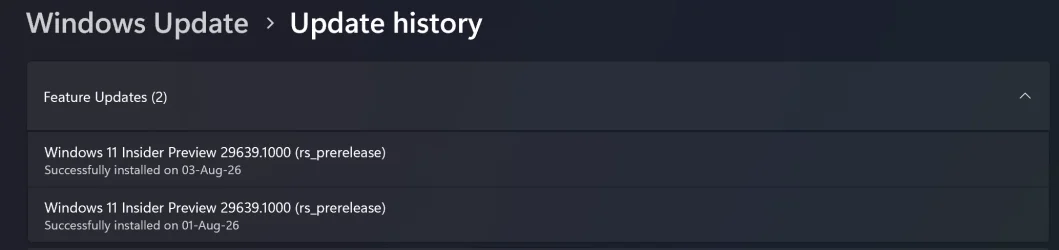
On my clean install 29639, Im having this issue: WU keep detecting and install 29639 every time I open the WU setting. Good thing that it only download a little and completed right away, so I guess a file somewhere is corrupted and WU keep thinking it didnt applied the update. And update history got 2 entries of 29639 update, weird. I tried every trick i can find, deleted catroot2/softwaredistribution, ran WU troubleshooter....Doesnt work. Can someone chime in and help me fix this issue?
Screenshot 2026-08-03 123918.webp
Screenshot 2026-08-03 123931.webp
 

My Computer My Computer

At a glance

W11
OS
W11
Computer type
Laptop
As you clean installed could there be an issue with the ISO you used?

To have to start hacking a clean install around is not good and all my instincts say reinstall it again before going further down the rabbit hole. Create a new ISO or use Microsoft's last ISO on the Insider site (I don't think this one is up yet) and clean install that and then update to this build.

That would be what I would do.
 

My Computer My Computer

At a glance

W11 Pro x64 ongoing Canary 29500 latest buildsIntel i58GbIntel HD Graphics
OS
W11 Pro x64 ongoing Canary 29500 latest builds
Computer type
Laptop
Manufacturer/Model
Dell 7760 Mobile Precision 17"
CPU
Intel i5
Motherboard
Unknown
Memory
8Gb
Graphics Card(s)
Intel HD Graphics
Sound Card
Realtek
Monitor(s) Displays
Internal
Hard Drives
2 x 256Gb SSD
PSU
Dell 240 watt
Mouse
Dell Premier Bluetooth
Internet Speed
50Mbps
Browser
Edge
Antivirus
Default Microsoft Security
Hi, long time looker first time poster.
On my clean install 29639, Im having this issue: WU keep detecting and install 29639 every time I open the WU setting. Good thing that it only download a little and completed right away, so I guess a file somewhere is corrupted and WU keep thinking it didnt applied the update. And update history got 2 entries of 29639 update, weird. I tried every trick i can find, deleted catroot2/softwaredistribution, ran WU troubleshooter....Doesnt work. Can someone chime in and help me fix this issue?
Have you tried resetting your WU components?
It still works in Windows 11.
 

My Computers My Computers

  • At a glance

    All Branches but ReleaseAMD Ryzen 7 7735HS 3200-4500 Mhz 8 cores x 232 GB DDR5Radeon Graphic / NVIDIA GeForce RTX 4060 8 GB...
    OS
    All Branches but Release
    Computer type
    Laptop
    Manufacturer/Model
    Acer Nitro ANV15-51
    CPU
    AMD Ryzen 7 7735HS 3200-4500 Mhz 8 cores x 2
    Motherboard
    Sportage_RBH
    Memory
    32 GB DDR5
    Graphics Card(s)
    Radeon Graphic / NVIDIA GeForce RTX 4060 8 GB GDDR6
    Sound Card
    AMD/Realtek(R) Audio
    Monitor(s) Displays
    Integrated Monitor (15.3"vis)
    Screen Resolution
    FHD 1920X1080 16:9 144Hz
    Hard Drives
    KINGSTON OM8SEP4512Q-AA 1TB
    Western Digital 256GB
    PSU
    19V DC 6.32 A 120 W
    Cooling
    Dual Fans
    Mouse
    MS Bluetooth
    Internet Speed
    Fiber 1GB Cox -us & 1GB Orange-fr
    Browser
    Edge Canary- Firefox Nightly-Chrome Dev-Chrome Dev
    Antivirus
    Windows Defender
  • At a glance

    Windows 11 BetaAMD A9-94208 GB of DDR4AMD Radeon R5
    Operating System
    Windows 11 Beta
    Computer type
    Laptop
    Manufacturer/Model
    Asus X751BP
    CPU
    AMD A9-9420
    Memory
    8 GB of DDR4
    Graphics card(s)
    AMD Radeon R5
    Screen Resolution
    1600x900
    Hard Drives
    Seagate 1 TB
Have you tried resetting your WU components?
It still works in Windows 11.
I tried this tool. After reboot, the first WU check run is okay, second run also okay. I closed Settings and open again, WU 3rd check run and the issue returns....
 

My Computer My Computer

At a glance

W11
OS
W11
Computer type
Laptop
I tried this tool. After reboot, the first WU check run is okay, second run also okay. I closed Settings and open again, WU 3rd check run and the issue returns....
OK, then what's left is : under Settings / System / Recovery / Fix problems using Windows Update.
It will be a full re-install without loss of files or settings but it will take a while. So be patient . :-)
 

My Computers My Computers

  • At a glance

    All Branches but ReleaseAMD Ryzen 7 7735HS 3200-4500 Mhz 8 cores x 232 GB DDR5Radeon Graphic / NVIDIA GeForce RTX 4060 8 GB...
    OS
    All Branches but Release
    Computer type
    Laptop
    Manufacturer/Model
    Acer Nitro ANV15-51
    CPU
    AMD Ryzen 7 7735HS 3200-4500 Mhz 8 cores x 2
    Motherboard
    Sportage_RBH
    Memory
    32 GB DDR5
    Graphics Card(s)
    Radeon Graphic / NVIDIA GeForce RTX 4060 8 GB GDDR6
    Sound Card
    AMD/Realtek(R) Audio
    Monitor(s) Displays
    Integrated Monitor (15.3"vis)
    Screen Resolution
    FHD 1920X1080 16:9 144Hz
    Hard Drives
    KINGSTON OM8SEP4512Q-AA 1TB
    Western Digital 256GB
    PSU
    19V DC 6.32 A 120 W
    Cooling
    Dual Fans
    Mouse
    MS Bluetooth
    Internet Speed
    Fiber 1GB Cox -us & 1GB Orange-fr
    Browser
    Edge Canary- Firefox Nightly-Chrome Dev-Chrome Dev
    Antivirus
    Windows Defender
  • At a glance

    Windows 11 BetaAMD A9-94208 GB of DDR4AMD Radeon R5
    Operating System
    Windows 11 Beta
    Computer type
    Laptop
    Manufacturer/Model
    Asus X751BP
    CPU
    AMD A9-9420
    Memory
    8 GB of DDR4
    Graphics card(s)
    AMD Radeon R5
    Screen Resolution
    1600x900
    Hard Drives
    Seagate 1 TB
The option for that is greyed out.
OK, then what's left is : under Settings / System / Recovery / Fix problems using Windows Update.
It will be a full re-install without loss of files or settings but it will take a while. So be patient . :-)
 

My Computer My Computer

At a glance

W11
OS
W11
Computer type
Laptop
The option for that is greyed out.
You have more serious issues on your system than a recursive offer to update the same build.
Good luck.
 

My Computers My Computers

  • At a glance

    All Branches but ReleaseAMD Ryzen 7 7735HS 3200-4500 Mhz 8 cores x 232 GB DDR5Radeon Graphic / NVIDIA GeForce RTX 4060 8 GB...
    OS
    All Branches but Release
    Computer type
    Laptop
    Manufacturer/Model
    Acer Nitro ANV15-51
    CPU
    AMD Ryzen 7 7735HS 3200-4500 Mhz 8 cores x 2
    Motherboard
    Sportage_RBH
    Memory
    32 GB DDR5
    Graphics Card(s)
    Radeon Graphic / NVIDIA GeForce RTX 4060 8 GB GDDR6
    Sound Card
    AMD/Realtek(R) Audio
    Monitor(s) Displays
    Integrated Monitor (15.3"vis)
    Screen Resolution
    FHD 1920X1080 16:9 144Hz
    Hard Drives
    KINGSTON OM8SEP4512Q-AA 1TB
    Western Digital 256GB
    PSU
    19V DC 6.32 A 120 W
    Cooling
    Dual Fans
    Mouse
    MS Bluetooth
    Internet Speed
    Fiber 1GB Cox -us & 1GB Orange-fr
    Browser
    Edge Canary- Firefox Nightly-Chrome Dev-Chrome Dev
    Antivirus
    Windows Defender
  • At a glance

    Windows 11 BetaAMD A9-94208 GB of DDR4AMD Radeon R5
    Operating System
    Windows 11 Beta
    Computer type
    Laptop
    Manufacturer/Model
    Asus X751BP
    CPU
    AMD A9-9420
    Memory
    8 GB of DDR4
    Graphics card(s)
    AMD Radeon R5
    Screen Resolution
    1600x900
    Hard Drives
    Seagate 1 TB
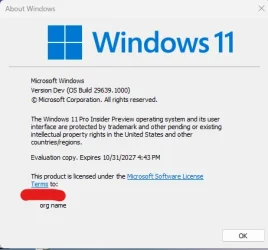
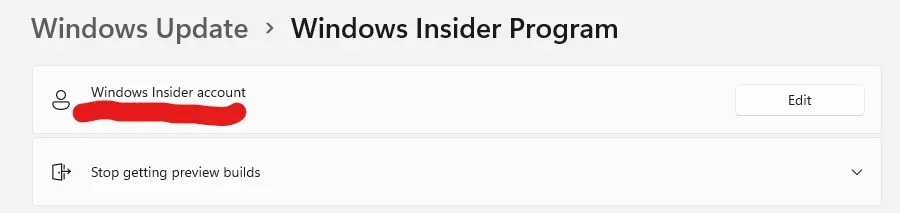
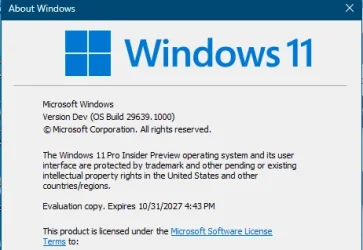
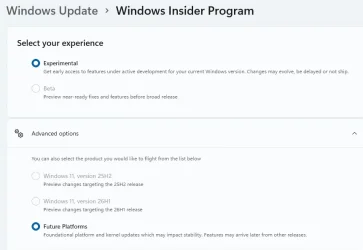
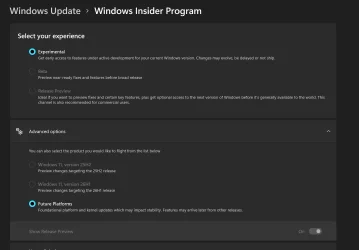
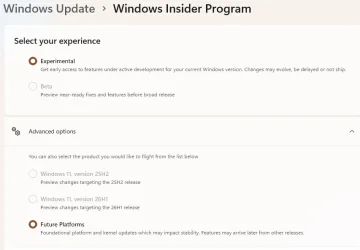
After a 29639.1000 clean install, there is no way to enroll on an insider channel. All I see is the Windows insider account, but there is no way to select the insider channel. I see the new expiration date on Winver, but the Windows Insider Program page is not showing any insider channel. No Experimental Future Platforms nor the old Canary channel. When I open the page, it may show for a second the old types of insider channels and then it disappears and shows just what you can see here below.
😵‍💫🤷‍♂️

1785802697166.webp

1785802827145.webp


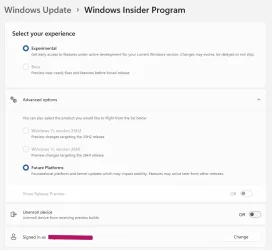
This other machine was updated from 29617 > 29634 >29639 and it shows the correct insider channel (Experimental with Future Platforms). 😵‍💫🤷‍♂️

1785806886746.webp

1785807011099.webp


Last edited:

My Computer My Computer

At a glance

Windows 11 Pro 25H2Intel I9-9900K64GBNVIDIA RTX 2060
OS
Windows 11 Pro 25H2
Computer type
PC/Desktop
Manufacturer/Model
Dell XPS 8930
CPU
Intel I9-9900K
Memory
64GB
Graphics Card(s)
NVIDIA RTX 2060
Sound Card
NVIDIA High Definition Audio
Monitor(s) Displays
4k Samsung
Screen Resolution
3840 x 2160
Hard Drives
512GB NVMe, ADATA SU 800, 2TB HDD
I see the new expiration date on Winver, but the Windows Insider Program page is not showing any insider channel.
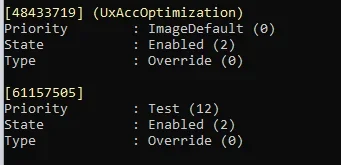
Try using ViveTool - 48433719 and 61157505.
 

My Computer My Computer

At a glance

Windows 11 Stable, Beta, Dev, CanaryAMD Ryzen 9 PRO 5950X128 GbIntel(R) Arc(TM) A380 Graphics (2 ГБ)
OS
Windows 11 Stable, Beta, Dev, Canary
Computer type
PC/Desktop
Manufacturer/Model
Micro-Star International Co., Ltd. MS-7D54
CPU
AMD Ryzen 9 PRO 5950X
Motherboard
MSI MAG X570S Tomahawk Max WiFi (MS-7D54) (2 PCI-E x1, 2 PCI-E x16, 2 M.2, 4 DDR4 DIMM, Audio, Video, 2.5GbE LAN, WiFi)
Memory
128 Gb
Graphics Card(s)
Intel(R) Arc(TM) A380 Graphics (2 ГБ)
Sound Card
Устройство с поддержкой High Definition Audio
Monitor(s) Displays
HP X34 [34" LCD] (6CM1300J5J) {2021}
Screen Resolution
3440x1440
Hard Drives
KINGSTON SFYRD2000G (2000 ГБ, PCI-E 4.0 x4)
PSU
Be Quiet! Dark Rock Pro 4
Case
Cooler Master HAF XB EVO
Internet Speed
1000 Mb/s
Browser
Chrome
Antivirus
Windows Defender
Try using ViveTool - 48433719 and 61157505.
@Dronix,
Weird, where did you find those?
The 1st one was already enabled by default, I enabled the second one and that fixed the missing insider settings page.
Thanks for the tip.
Experimental was unchecked, so I checked it manually to match the other machines with the same build.
Typical confusing Microsoft. 😵‍💫🤷‍♂️

1785823254645.webp

1785823330978.webp
 

My Computer My Computer

At a glance

Windows 11 Pro 25H2Intel I9-9900K64GBNVIDIA RTX 2060
OS
Windows 11 Pro 25H2
Computer type
PC/Desktop
Manufacturer/Model
Dell XPS 8930
CPU
Intel I9-9900K
Memory
64GB
Graphics Card(s)
NVIDIA RTX 2060
Sound Card
NVIDIA High Definition Audio
Monitor(s) Displays
4k Samsung
Screen Resolution
3840 x 2160
Hard Drives
512GB NVMe, ADATA SU 800, 2TB HDD
Try using ViveTool - 48433719 and 61157505.
I found this:

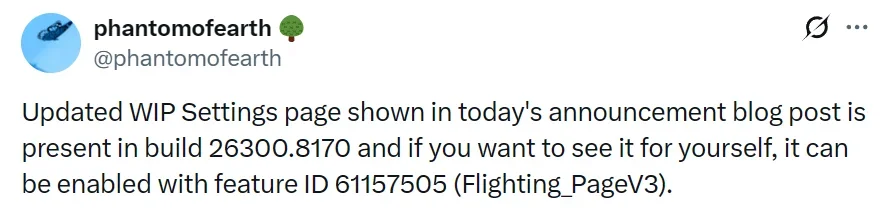
[61157505] (Flighting_PageV3 / Experimental and Beta Channel settings page)

ViveTool ID 61157505 enables the updated Flighting_PageV3 / Experimental and Beta Channel settings page within the Windows Insider Program settings on Windows 11. [1, 2]

Feature Details
    • Name: Flighting_PageV3 (New Insider Program Experimental and Beta Channel settings)
    • Function: Refreshes and updates the user interface for managing experimental and beta channel experiences inside the Windows Insider settings menu. [1, 2]
And this:
1785826785415.webp
 
Last edited:
My Computer My Computer

At a glance

Windows 11 Pro 25H2Intel I9-9900K64GBNVIDIA RTX 2060
OS
Windows 11 Pro 25H2
Computer type
PC/Desktop
Manufacturer/Model
Dell XPS 8930
CPU
Intel I9-9900K
Memory
64GB
Graphics Card(s)
NVIDIA RTX 2060
Sound Card
NVIDIA High Definition Audio
Monitor(s) Displays
4k Samsung
Screen Resolution
3840 x 2160
Hard Drives
512GB NVMe, ADATA SU 800, 2TB HDD
Weird, where did you find those?
 

My Computer My Computer

At a glance

Windows 11 Stable, Beta, Dev, CanaryAMD Ryzen 9 PRO 5950X128 GbIntel(R) Arc(TM) A380 Graphics (2 ГБ)
OS
Windows 11 Stable, Beta, Dev, Canary
Computer type
PC/Desktop
Manufacturer/Model
Micro-Star International Co., Ltd. MS-7D54
CPU
AMD Ryzen 9 PRO 5950X
Motherboard
MSI MAG X570S Tomahawk Max WiFi (MS-7D54) (2 PCI-E x1, 2 PCI-E x16, 2 M.2, 4 DDR4 DIMM, Audio, Video, 2.5GbE LAN, WiFi)
Memory
128 Gb
Graphics Card(s)
Intel(R) Arc(TM) A380 Graphics (2 ГБ)
Sound Card
Устройство с поддержкой High Definition Audio
Monitor(s) Displays
HP X34 [34" LCD] (6CM1300J5J) {2021}
Screen Resolution
3440x1440
Hard Drives
KINGSTON SFYRD2000G (2000 ГБ, PCI-E 4.0 x4)
PSU
Be Quiet! Dark Rock Pro 4
Case
Cooler Master HAF XB EVO
Internet Speed
1000 Mb/s
Browser
Chrome
Antivirus
Windows Defender
Thanks, again for the tip. 👍
 

My Computer My Computer

At a glance

Windows 11 Pro 25H2Intel I9-9900K64GBNVIDIA RTX 2060
OS
Windows 11 Pro 25H2
Computer type
PC/Desktop
Manufacturer/Model
Dell XPS 8930
CPU
Intel I9-9900K
Memory
64GB
Graphics Card(s)
NVIDIA RTX 2060
Sound Card
NVIDIA High Definition Audio
Monitor(s) Displays
4k Samsung
Screen Resolution
3840 x 2160
Hard Drives
512GB NVMe, ADATA SU 800, 2TB HDD
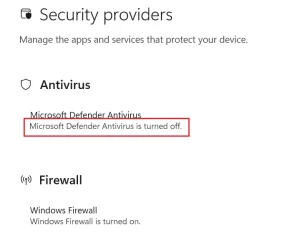
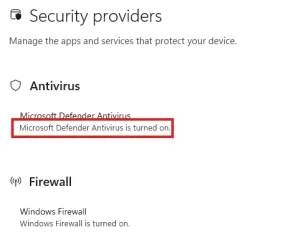
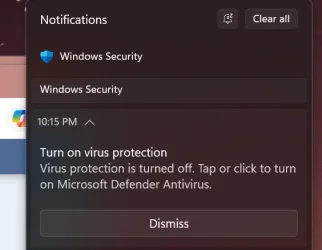
Looks like the problem with the false notification about turning defender antivirus on has been fixed on this build on Aug 6, 2026.
It now shows correctly in the "Security providers" page that it is on, and I have not seen the notification anymore. 🤞
The problem still happens on Builds 26H1 28120.2630 and 26H2 26300.9032 which show incorrectly that the defender is turned off.

1786078787589.webp

Edition Windows 11 Pro Insider Preview
Version Dev
Installed on ‎7/‎31/‎2026
Evaluation expires on ‎10/‎31/‎2027 4:43 PM
OS build 29639.1000
Experience Windows Feature Experience Pack 1000.26100.402.0

1786079110521.webp


The same "Security providers" page on Builds 28120.2630 and 26300.9032 show that Defender Antivirus is off and get the notification below.
Even if defender is actually on and working. 😵‍💫🤬🤷‍♂️

Note that Beta build 26220.9022 does not show this problem. 😵‍💫🤷‍♂️

1786080006413.webp

1786079840009.webp
 
Last edited:
My Computer My Computer

At a glance

Windows 11 Pro 25H2Intel I9-9900K64GBNVIDIA RTX 2060
OS
Windows 11 Pro 25H2
Computer type
PC/Desktop
Manufacturer/Model
Dell XPS 8930
CPU
Intel I9-9900K
Memory
64GB
Graphics Card(s)
NVIDIA RTX 2060
Sound Card
NVIDIA High Definition Audio
Monitor(s) Displays
4k Samsung
Screen Resolution
3840 x 2160
Hard Drives
512GB NVMe, ADATA SU 800, 2TB HDD
Hello Windows Insiders, heads up no flighting today! In the meantime, ensure you are up to date on the latest Preview Build for your channel so you have the latest Windows Insider flight certificates.


Last edited:
My Computers My Computers

  • At a glance

    Windows 11 Pro for WorkstationsIntel i7-8700K 5 GHz64 GB (4x16GB) G.SKILL TridentZ RGB DDR4 3600...ASUS ROG-STRIX-GTX1080TI-O11G-GAMING (11GB GD...
    OS
    Windows 11 Pro for Workstations
    Computer type
    PC/Desktop
    Manufacturer/Model
    Custom self build
    CPU
    Intel i7-8700K 5 GHz
    Motherboard
    ASUS ROG Maximus XI Formula Z390
    Memory
    64 GB (4x16GB) G.SKILL TridentZ RGB DDR4 3600 MHz (F4-3600C18D-32GTZR)
    Graphics Card(s)
    ASUS ROG-STRIX-GTX1080TI-O11G-GAMING (11GB GDDR5X)
    Sound Card
    Integrated Digital Audio (S/PDIF)
    Monitor(s) Displays
    2 x Samsung Odyssey G75 27"
    Screen Resolution
    2560x1440
    Hard Drives
    1TB Samsung 990 PRO M.2,
    4TB Samsung 990 PRO M.2,
    TerraMaster F8 SSD Plus NAS
    PSU
    Seasonic Prime Titanium 850W
    Case
    Thermaltake Core P3 wall mounted
    Cooling
    Corsair Hydro H115i
    Keyboard
    Amazon Basics Wired Full Keyboard MD005
    Mouse
    Logitech MX Master 4
    Internet Speed
    2 Gbps Download and 100 Mbps Upload
    Browser
    Chrome and Edge
    Antivirus
    Microsoft Defender
    Other Info
    Logitech Z625 speaker system,
    Logitech BRIO 4K Pro webcam,
    HP Color LaserJet Pro MFP M477fdn,
    CyberPower CP1500PFCLCD
    Galaxy S23 Plus phone
  • At a glance

    Windows 11 ProSnapdragon X Elite (12 core) 3.42 GHz16 GB LPDDR5x-7467 MHz
    Operating System
    Windows 11 Pro
    Computer type
    Laptop
    Manufacturer/Model
    Surface Laptop 7 Copilot+ PC
    CPU
    Snapdragon X Elite (12 core) 3.42 GHz
    Memory
    16 GB LPDDR5x-7467 MHz
    Monitor(s) Displays
    15" HDR
    Screen Resolution
    2496 x 1664
    Hard Drives
    1 TB SSD
    Internet Speed
    Wi-Fi 7 and Bluetooth 5.4
    Browser
    Chrome and Edge
    Antivirus
    Microsoft Defender
Edition Windows 11 Pro Insider Preview
Version Dev
Installed on ‎8/‎8/‎2026
Evaluation expires on ‎10/‎31/‎2027 6:43 PM
OS build 29639.1000
Experience Windows Feature Experience Pack 1000.26100.402.0
1786225240339.webp
 

My Computers My Computers

  • At a glance

    11 Pro5950XCORSAIR Vengeance RGB RT 32GB (4x16GB) DDR4 3...Zotac AMP Extreme Airo 4090/ Lian Li Vertical...
    OS
    11 Pro
    Computer type
    PC/Desktop
    Manufacturer/Model
    Me
    CPU
    5950X
    Motherboard
    ASUS DARK HERO X570
    Memory
    CORSAIR Vengeance RGB RT 32GB (4x16GB) DDR4 3733CL14x16GB
    Graphics Card(s)
    Zotac AMP Extreme Airo 4090/ Lian Li Vertical GPU PCI-E 5.0 v4
    Monitor(s) Displays
    TCL 55"646 Class 6-Series 4K QLED Dolby Vision HDR
    Screen Resolution
    4K
    Hard Drives
    SAMSUNG 980 PRO SSD 1TB/500GB M.2 and 2TB M.2
    PSU
    Seasonic Prime TX-1600 ATX3.1
    Case
    Fractal Meshify 2 XL /3-140X38 Silverstone/3 140x38 BGear
    Cooling
    The Arctic Liquid Freezer III 420 Push/pull x6 Noctua 14 3000rpm
    Mouse
    G502 HERO
    Internet Speed
    Mbps 350.00
    Other Info
    Two CyberPower CP1500PFCLCD PFC Sinewave UPS Battery Backup and Surge Protector, 1500VA/1000W
  • At a glance

    Win 11 pro2700XTRIDENT Z F-43600V15D-16GTZ /G.SKILL DDR4 380...1080Ti
    Operating System
    Win 11 pro
    Computer type
    PC/Desktop
    Manufacturer/Model
    Me
    CPU
    2700X
    Motherboard
    ASUS Prime 450M
    Memory
    TRIDENT Z F-43600V15D-16GTZ /G.SKILL DDR4 3800CL14 FASTEST PRESET 16GB /G-skill16Gb cl16/3600
    Graphics card(s)
    1080Ti
    Monitor(s) Displays
    50'
    Screen Resolution
    4K HDR
    Hard Drives
    M.2 500GB SABRENT / 3TB and 250GB SSD
    PSU
    FSP Hydro PTM PRO 1200W ATX 3.0 PCI-E GEN-5 80 Plus Platinum=EVGA 1300G2 /Corsairs 750w

Latest Support Threads

Back
Top Bottom