Microsoft Support:
Changes and improvements gradually being rolled out*
- This update includes a small set of general improvements and fixes that improve the overall experience for Insiders running this build on their PCs.
[Magnifier]
- A new contrast theme toggle for a lower-glare screen. If bright screens are uncomfortable, many people use color inversion to reduce glare. However, inversion changes everything on screen, including photos, charts, and videos. With this update, we're introducing a new contrast theme toggle in Magnifier.
- Reduce glare with a single toggle. Turn on a contrast theme directly from the Magnifier toolbar for a more comfortable viewing experience.
- Choose the contrast theme that works best for you. The dark theme is applied by default, and you can choose which contrast theme the toggle uses under Settings > Accessibility > Magnifier.
- Photos, videos, and charts keep their original colors. Unlike color inversion, the contrast theme recolors the interface without touching your photos, charts, or videos, so they keep their real colors.
- Color inversion is still here. This isn't a replacement. If you use inversion today, it works exactly as it always has. The contrast theme is a separate, purpose-built option to reduce glare when you want a darker interface without inverting colors.

Turn On or Off a High Contrast Theme in Windows 11
This tutorial will show you how to turn on or off using a high contrast theme for your account in Windows 11. Text with low contrast can be difficult to read for people with low vision. There are web sites that have, for example, poor color combinations such as blue links on black backgrounds... www.elevenforum.com
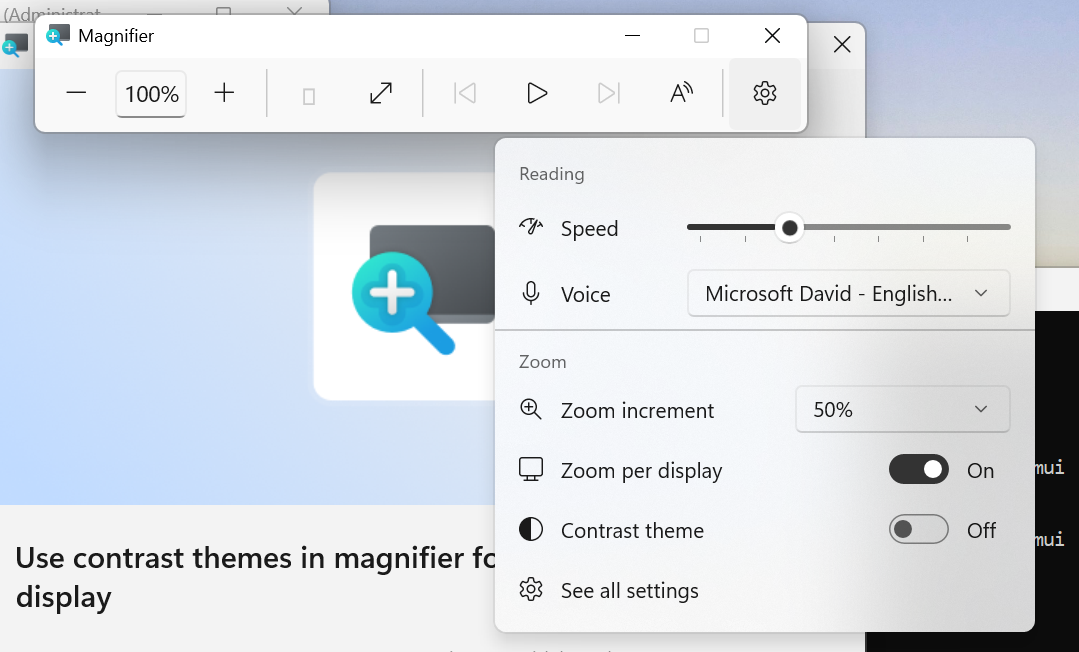
UI showing the new contrast theme toggle in Magnifier. Zoom per display isn't yet available in the Beta channel.
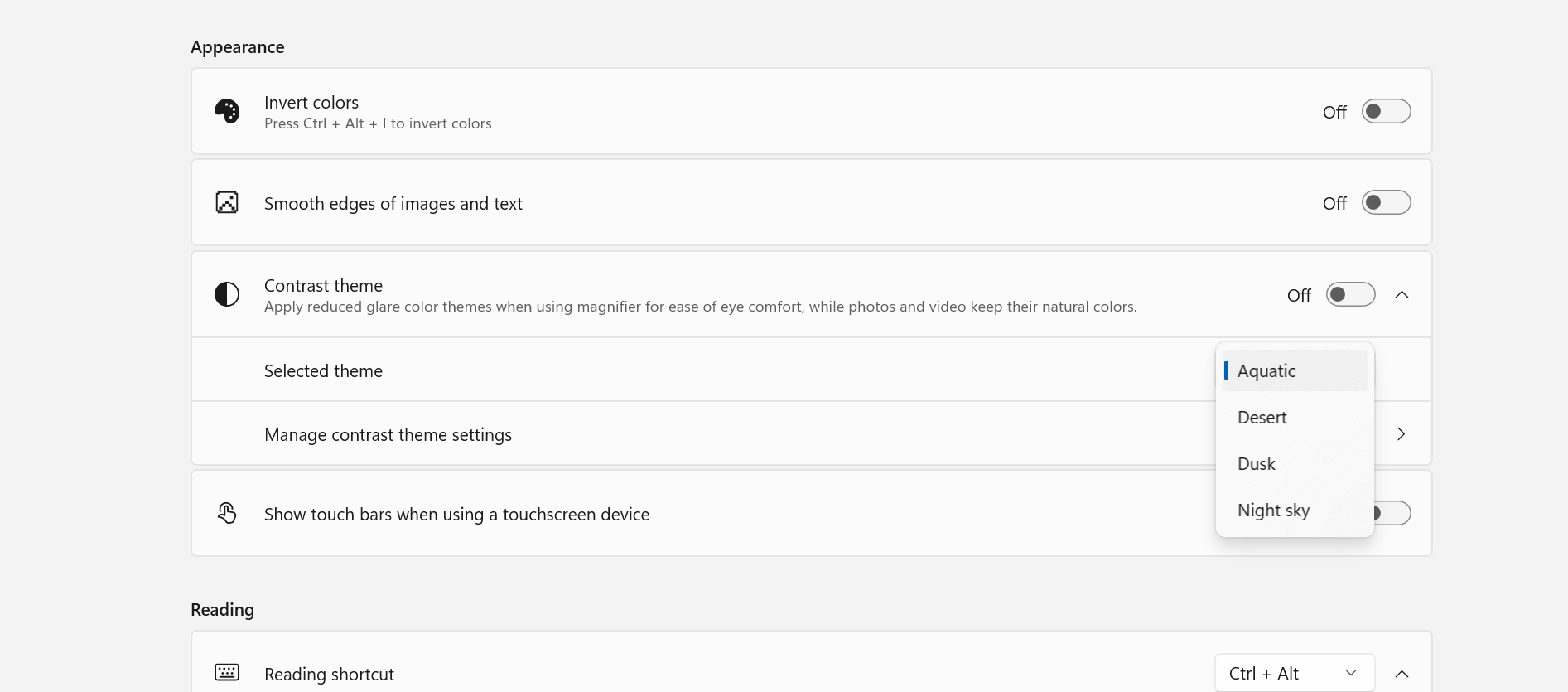
UI showing contrast theme settings for Magnifier.
[Family Safety]
- Improved family safety messaging when applications are blocked because of age-restricted parental controls.
[Windows setup]
- The digital safety of users and supporting families is central to how we think about the Windows experience. We're improving information on parental controls and their availability during Windows setup, so families can more easily understand available protections and make informed choices from the very beginning.
[Network]
- Fixed an issue causing internet access to stop working for some Insiders after the last two flights.
[Hyper-V]
- Fixed an issue where some applications that used HCS-managed virtual machines experienced issues when sharing host folders with Linux VMs using Plan9. Folders shared from the Windows host using Plan9 didn't appear or couldn't be accessed in the guest environment.
[Other]
- Fixed an issue causing some Insiders to see an unexpectedly high volume of ESENT events after the latest flights.
- Fixed an underlying issue in the latest flights causing Insiders using VMware to experience frequent green screen bugchecks with error PFN_SHARE_COUNT.
[Known Issues]
- We are aware that Recall may be missing or unable to launch on some Copilot+ PCs if performing a clean install on this build. We are working to resolve soon and will provide an update.
Reminder for Windows Insiders in the Experimental (Future Platforms) channel
- These builds can be unstable and might be released with limited documentation.
- The builds released to these channels represent the latest platform changes early in the development cycle and shouldn't be seen as matched to any specific release of Windows. Features and experiences included in these builds might never get released as we try out different concepts and get feedback. Features might change over time, be removed, or replaced, and never get released beyond Windows Insiders. Some of these features and experiences could show up in future Windows releases when they're ready.
- Many features are rolled out using Controlled Feature Rollout technology, starting with a subset of Insiders and ramping up over time. We monitor feedback to see how they land before pushing them out to everyone in this channel.
- The desktop watermark shown at the lower right corner of the desktop is normal for Windows Insider pre-release builds.
- Some features in active development we preview with Windows Insiders might not be fully localized, and localization will happen over time as features are finalized. As you see issues with localization in your language, report those issues to us via Feedback Hub.
Source:

Windows 11 Insider Experimental (Future Platforms) Preview Build 29695.1001 - Windows Insider Program
Release notes for Windows 11 Insider Experimental (Future Platforms) Preview Build 29695.1001
learn.microsoft.com
Check Windows Updates
ISO from Microsoft:

Download Official Windows 11 ISO file from Microsoft
This tutorial will show you how to download an official Windows Server or Windows 11 64-bit or ARM64 ISO file from Microsoft. Microsoft provides ISO files for Windows Server and Windows 11 to download. You can use these ISO files to clean install or in-place upgrade Windows 11. The Flight Hub...
www.elevenforum.com
UUP Dump:
64-bit ISO download:

Select language for Windows 11 Insider Preview 29695.1001 (rs_prerelease) amd64
Select language for Windows 11 Insider Preview 29695.1001 (rs_prerelease) amd64 on UUP dump. UUP dump lets you download Unified Update Platform files, like Windows Insider updates, directly from Windows Update.
uupdump.net
ARM64 ISO download:
Select language for Windows 11 Insider Preview 29695.1001 (rs_prerelease) arm64
Select language for Windows 11 Insider Preview 29695.1001 (rs_prerelease) arm64 on UUP dump. UUP dump lets you download Unified Update Platform files, like Windows Insider updates, directly from Windows Update.
uupdump.net

UUP Dump - Download Windows Insider ISO
UUP Dump is the most practical and easy way to get ISO images of any Insider Windows 10 or Windows 11 version, as soon as Microsoft has released a new build. UUP Dump creates a download configuration file according to your choices, downloads necessary files directly from Microsoft servers, and...
www.elevenforum.com
Last edited: