Windows 11 Insider Preview Dev Build 22458 (RS_PRERELEASE) - Sept. 15


UPDATE 9/22: Windows 11 Insider Preview Dev Build 22463 (RS_PRERELEASE) - Sept. 22

Hello Windows Insiders, today we are releasing Windows 11 Insider Preview Build 22458 to the Dev Channel.

TL;DR

  • [REMINDER] Build numbers are higher in the Dev Channel than the Windows 11 preview builds in the Beta Channel because we’ve moved the Dev Channel back to receiving builds from our active development branch (RS_PRERELEASE). This means the builds released to the Dev Channel no longer match the Windows 11 experience that will be released to customers on October 5th.
  • The desktop watermark you see at the lower right corner of your desktop is normal for these pre-release builds.
  • As mentioned previously, it will be a little while before major new features show up. However, this build includes a good set of improvements and bug fixes.
  • There is an issue impacting the Taskbar where icons appear misaligned and/or cut off – see the known issues below.
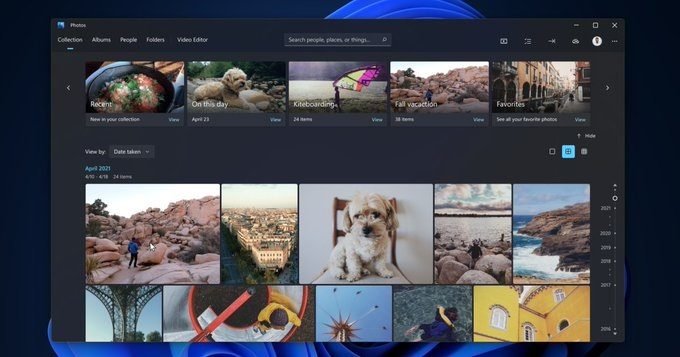
  • Try out the new Tips app for Windows 11 with a new design and over with 114 new tips!

Changes and Improvements

  • We added a link to the sign-in options under the power menu on Start.
A link to sign-in options has been added to the power menu on Start.

Fixes

[Start]
  • Fixed an underlying issue that was impacting Start reliability.
[Search]
  • Folders with # in folder name can now be added to indexing.
[Settings]
  • Addressed an issue that was causing Settings to crash sometimes when trying to open the Display page.
  • Clicking “More about refresh rate” in Advanced Display Settings now opens the support page it’s supposed to.
  • Fixed an issue where the Location page in Settings wasn’t showing warning text explaining why the location services setting was greyed out if it was greyed out.
  • Changes made to preferences under Manage App Execution Alias in Settings should now be preserved.
  • Fixed a couple typos in the output of dll (Issue #206).
[Windowing]
  • Mitigated an issue that could make certain games unexpectedly crash when using ALT + Enter (i.e., switch between full screen and windowed) during with Auto HDR enabled.
[Other]
  • Addressed an issue that was causing text truncation in the Encrypting File System window in certain cases.
  • Fixed a rare scenario that could result in an uninstalled in-box app unexpectedly reappearing after reboot.
  • Appx commandlets should now work with PowerShell 7.0+ (Issue #13138).
NOTE: Some fixes noted here in Insider Preview builds from the active development branch may make their way into the servicing updates for the released version of Windows 11 after general availability on October 5th.

Known issues

[General]
  • We’re working on a fix for an issue that is causing some Surface Pro X’s to bug check with a WHEA_UNCORRECTABLE_ERROR.
  • We’re working on a fix for an issue that is causing some devices to bug check with DRIVER_PNP_WATCHDOG error when attempting to update to a recent build.
[Start]
  • In some cases, you might be unable to enter text when using Search from Start or the Taskbar. If you experience the issue, press WIN + R on the keyboard to launch the Run dialog box, then close it.
  • System is missing when right-clicking on the Start button (WIN + X).
[Taskbar]
  • IMPORTANT: Icons on the Taskbar are shifted to the side when in the default center alignment, resulting in them getting cut off by the “show hidden icons” button when too many apps are open.
  • The Taskbar will sometimes flicker when switching input methods.
[Search]
  • After clicking the Search icon on the Taskbar, the Search panel may not open. If this occurs, restart the “Windows Explorer” process, and open the search panel again.
  • Search panel might appear as black and not display any content below the search box.
[File Explorer]
  • If you right click files in OneDrive locations in File Explorer, the context menu will unexpectedly dismiss when you hover over entries that open sub-menus, such as “Open with.”
[Widgets]
  • The widgets board may appear empty. To work around the issue, you can sign out and then sign back in again.
  • Widgets may be displayed in the wrong size on external monitors. If you encounter this, you can launch the widgets via touch or WIN + W shortcut on your actual PC display first and then launch on your secondary monitors.
[Windows Sandbox]
  • We’re investigating an issue in which Windows Sandbox may not launch for some Insiders after upgrading to this build.
[Microsoft Store]
  • We continue to work to improve search relevance in the Store.
[Windows Subsystem for Linx (WSL) & Hyper-V]
  • We’re investigating reports of both WSL2 and Hyper-V not working on this build on ARM64 PCs such as the Surface Pro X.

Try the Tips app for Windows 11

We’re introducing a refreshed Tips app for Windows 11 that reflects the new look and feel of Windows 11 (with acrylic material), plus additional UX updates. We’ve updated the Tips app with 100+ new tips to help you get started on Windows 11 and learn new things—discover keyboard shortcuts, find ways to optimize your PC, dive into productivity tips for Office, power up your gaming on Windows, and much more! We’re able to fine-tune and add new tips at anytime as we hear feedback from you.

The new Tips app for Windows 11 showing a tip for navigating with touch.

And it doesn’t quite stop there with the Tips app—you’ll notice tips appear throughout Windows 11 to help you discover new things as you go! Check out the new Tips widget on the widgets board, tips as First Run Experiences, and tips for specific experiences within Windows 11. You’ll find tips in 36 languages—tips around the globe! Be sure to do the Quests for the Tips app now live in Feedback Hub. We’ll release the new Tips app to Windows Insiders in the Beta and Release Preview Channels soon.

Important Insider Links

To learn how we made Windows 11, click here. You can check out our Windows Insider Program documentation here, including a list of all the new features and updates released in builds so far. Are you not seeing any of the features listed for this build? Check your Windows Insider Settings to make sure you’re in the Dev Channel. Submit feedback here to let us know if things weren’t working the way you expected.

If you want a complete look at what build is in which Insider channel, head over to Flight Hub. Please note, there will be a slight delay between when a build is flighted and when Flight Hub is updated.

Thanks,
Amanda & Brandon


Source: Announcing Windows 11 Insider Preview Build 22458


UUP Dump:

64-bit ISO download:
Select language for Windows 11 Insider Preview 22458.1000 (rs_prerelease) amd64

ARM64 ISO download: Select language for Windows 11 Insider Preview 22458.1000 (rs_prerelease) arm64

 
Last edited:

Hi there
If you have a Windows VM (or even a Windows machine download RUFUS. On the VM attach a Physical drive and the UUPDUMP ISO and then create from RUFUS a standard Windows installation --- use the "Show all usb drives. You can create a WindowstoGo version also if you like.

Once you've created the Windows file (standard Windows install) simply dd it / clone it to internal HDD.

Another way -- simply run WU on a VM -- then convert to Physical.

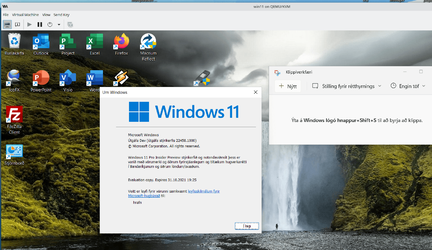
From a VM - WU working perfectly --- English translation where the cursor is -- "Installing" -- around 52% so far.

View attachment 8029


I'll mess around with "Convert to Physical" a bit later on -- should bypass the TPM stuff. I think though you'll still have to have sec boot (and certainly UEFI) on the target physical system if you do it that way

Incidentally this VM is running on a BIOS only MBR machine - just for a bit of extra(let's say by mounting a UUPDUMP ISO)
 

My Computer My Computer

At a glance

Fedora Silverblue Rawhide Debian 13 Ubuntu 25...AMD Ryzen 7 7800X3D 8-Core64GBNvidia
OS
Fedora Silverblue Rawhide Debian 13 Ubuntu 25.10,
Computer type
PC/Desktop
Manufacturer/Model
HomeBrew
CPU
AMD Ryzen 7 7800X3D 8-Core
Motherboard
Gigabyte
Memory
64GB
Graphics Card(s)
Nvidia
Monitor(s) Displays
Dell
Hard Drives
3 ssd 2 spinners configured as raid 0
Keyboard
Eluktronics
Mouse
Eluktronics
Browser
Firefox and Chromium
Other Info
Gnome 46
Thanks. But this is not quite what I am looking for. If I mount a UUPDUMP ISO (either one with install.wim or install.esd) is there a file I can delete or some edit that will allow me to boot the ISO or a usb key created by RUFUS, which will aloow me to bypass the, apparently new, requirements in this build
 

My Computer My Computer

At a glance

Fedora Silverblue Rawhide Debian 13 Ubuntu 25...AMD Ryzen 7 7800X3D 8-Core64GBNvidia
OS
Fedora Silverblue Rawhide Debian 13 Ubuntu 25.10,
Computer type
PC/Desktop
Manufacturer/Model
HomeBrew
CPU
AMD Ryzen 7 7800X3D 8-Core
Motherboard
Gigabyte
Memory
64GB
Graphics Card(s)
Nvidia
Monitor(s) Displays
Dell
Hard Drives
3 ssd 2 spinners configured as raid 0
Keyboard
Eluktronics
Mouse
Eluktronics
Browser
Firefox and Chromium
Other Info
Gnome 46
Thanks. But this is not quite what I am looking for. If I mount a UUPDUMP ISO (either one with install.wim or install.esd) is there a file I can delete or some edit that will allow me to boot the ISO or a usb key created by RUFUS, which will aloow me to bypass the, apparently new, requirements in this build
Hi there
simply use create bootable usb from the rufus standard menu. Should work.
Then try booting the USB from within the VM first == KVM for instance can boot from physical USB device.
If that works - try booting the USB on your physical machine. If it doesn't work then you will have to use the "Convert to Physical method" -- I wouldn't advise messing around or looking for anything within the .wim files to see if you could hack a hardware bypass check.

Note - Networking in File explorer "partially fixed" in thbis build -- to get individual files shown it works from the NET menu on the left hand side pane of Windows explorer -- on the right pane you just see computers and shared drives - you can't drill down any further

I also HATE the new snipping thing.

Screenshot_20210916_092429.png


Cheers
jimbo
 
Last edited:

My Computer My Computer

At a glance

Windows XP,11 Linux Fedora Rawhide pre-releas...2 X Intel i7
OS
Windows XP,11 Linux Fedora Rawhide pre-release 45
Computer type
PC/Desktop
CPU
2 X Intel i7
Screen Resolution
4KUHD X 2
Gah! Windows 11 while it is downloading the update goes ahead and changes the SATA driver BACK TO the non-functioning Intel SATA driver and then it reboots into the never-ending black screen with just the spinner (my USB ports are all off along with the black screen) due to me having several SATA SSDS plugged in.

The issue with the computer getting locked into the never-ending spinner just like the last few updates. So it was the same fix. First, I had to unplug all of my SATA drives (just leaving my NVME boot drive) and reboot. I then could download the update AGAIN and it would successfully install. I then had to go back into the device manager and ONCE AGAIN change the IDE ATA/ATAPI Controller to the generic SATA driver. I could then shut down, plug my SATA data cables back into my 3 SATA drives, and successfully reboot.

View attachment 8025
Does it affect the SSD read and write by apply "Standard SATA AHCI Controller?

I did try to install build 22454 and 22458, it does have same never-ending spinner issue when I updated HDC from "Standard SATA AHCI Controller.

There are one M2 NVME SSD and SATA Disk in my system, but, my boot disk is SATA disk.
 

My Computer My Computer

At a glance

windows 11 25H2 7623i5-1250016MBIntel UHD 770
OS
windows 11 25H2 7623
Computer type
PC/Desktop
Manufacturer/Model
Dell Optiplex 7400 AIO
CPU
i5-12500
Motherboard
DELL 00RG59
Memory
16MB
Graphics Card(s)
Intel UHD 770
Sound Card
REALTEK
Monitor(s) Displays
DEL940B
Screen Resolution
1920x1080
Hard Drives
Micron 3400 NVMe 512G (NVM Express 1.4)
Samsung 860 SSD 256G
Realtek RTL9210 NVMe SCSI 1TB Disk (NVM Express 2.0)
Realtek RTL9210 NVMe SCSI 2TB Disk (NVM Express 1.4)
For real now, they check for TPM or other system requirments on a damn virtual machine ?

I cannot install this build on VMware Workstation Pro because its asking for TPM 2.0 and 64 free space disk .....
 

My Computer My Computer

At a glance

Windows 11 Pro x64Intel core i5 13500 2.50GhzCorsair Vengance 32GB DDR5 5200MhzNvidia GIGABYTE GTX 5060Ti 16GB
OS
Windows 11 Pro x64
Computer type
PC/Desktop
Manufacturer/Model
GIGABYTE
CPU
Intel core i5 13500 2.50Ghz
Motherboard
B670M GAMING X AX Rev 1.0
Memory
Corsair Vengance 32GB DDR5 5200Mhz
Graphics Card(s)
Nvidia GIGABYTE GTX 5060Ti 16GB
Sound Card
Realtek
Monitor(s) Displays
GIGABYTE GS27S IPS 27'
Screen Resolution
1920x1080 @165hz
Hard Drives
Samsung 980 1TB NVMe M.2
2x Samsung 860 Evo 1TB SATA 3
Western Digital Blue 1TB 32 MB cache 7200 RPM
PSU
Deepcool 750w +80 Bronze
Case
Montech Airbase 903 Max
Cooling
Artic Freezer 36 ARGB PWM 2x120mm
Keyboard
Genesis Rhod 420
Mouse
Genesis Xenon 210
Internet Speed
1000 mb/s RDS RCS Fiber optics
Browser
Firefox
Antivirus
Bitdefender
For real now, they check for TPM or other system requirments on a damn virtual machine ?

I cannot install this build on VMware Workstation Pro because its asking for TPM 2.0 and 64 free space disk .....
MS has started to crack down on the requirements. I kind of suspected this would happen sooner or later and here we are, it's happening. From what I've read here you can remove a dll file and install it. But that information is contained in other parts of this thread. Edit: Post 52.. has it.
 

My Computer My Computer

At a glance

Windows 11 Home() - 25H2 -26220.8894AMD Ryzen 5 5600GG.SKILL Ripjaws V Series 64GB 4x16Nvidia geforce gtx titan x
OS
Windows 11 Home() - 25H2 -26220.8894
Computer type
PC/Desktop
Manufacturer/Model
Banana Junior 5600-G Series
CPU
AMD Ryzen 5 5600G
Motherboard
Asus ROG Strix B550-F
Memory
G.SKILL Ripjaws V Series 64GB 4x16
Graphics Card(s)
Nvidia geforce gtx titan x
Monitor(s) Displays
28" ASUS VP28U 4k
Screen Resolution
4K
Hard Drives
Primary SAMSUNG 970 EVO Plus
PSU
EVGA BQ 700w 80+ Bronze
Case
Zalman i3 NEO
Cooling
ARCTIC Freezer 7 X
Keyboard
Corsair
Mouse
Amazon Generic with Cord
Internet Speed
Download: 295.11 mbps Upload: 65.35 mbps T-Mobile Internet
Browser
Firefox and Edge
Antivirus
MS - Defender
Other Info
Speakers: Klipsch ProMedia 2.1
MS has started to crack down on the requirements. I kind of suspected this would happen sooner or later and here we are, it's happening. From what I've read here you can remove a dll file and install it. But that information is contained in other parts of this thread. Edit: Post 52.. has it.
Hi there

I know this is a Windows Forum but if you can handle Linux (even as a VM under HYPER-V) then install KVM/QEMU, TPM emulator libtpms and swtpm (from GIT-HUB) ) and ovmf (for sec boot etc) then you can create a VM even on an old MBR BIOS machine of the latest build. Then with a bit of effort convert the VM to a physical machine (V2P conversion) and you can run this again.

Not impossible --just a bit fiddly !!!

Cheers
jimbo
 

My Computer My Computer

At a glance

Windows XP,11 Linux Fedora Rawhide pre-releas...2 X Intel i7
OS
Windows XP,11 Linux Fedora Rawhide pre-release 45
Computer type
PC/Desktop
CPU
2 X Intel i7
Screen Resolution
4KUHD X 2
Hi there

I know this is a Windows Forum but if you can handle Linux (even as a VM under HYPER-V) then install KVM/QEMU, TPM emulator libtpms and swtpm (from GIT-HUB) ) and ovmf (for sec boot etc) then you can create a VM even on an old MBR BIOS machine of the latest build. Then with a bit of effort convert the VM to a physical machine (V2P conversion) and you can run this again.

Not impossible --just a bit fiddly !!!

Cheers
jimbo
No thanks.. I don't want to use Linux.
 

My Computer My Computer

At a glance

Windows 11 Home() - 25H2 -26220.8894AMD Ryzen 5 5600GG.SKILL Ripjaws V Series 64GB 4x16Nvidia geforce gtx titan x
OS
Windows 11 Home() - 25H2 -26220.8894
Computer type
PC/Desktop
Manufacturer/Model
Banana Junior 5600-G Series
CPU
AMD Ryzen 5 5600G
Motherboard
Asus ROG Strix B550-F
Memory
G.SKILL Ripjaws V Series 64GB 4x16
Graphics Card(s)
Nvidia geforce gtx titan x
Monitor(s) Displays
28" ASUS VP28U 4k
Screen Resolution
4K
Hard Drives
Primary SAMSUNG 970 EVO Plus
PSU
EVGA BQ 700w 80+ Bronze
Case
Zalman i3 NEO
Cooling
ARCTIC Freezer 7 X
Keyboard
Corsair
Mouse
Amazon Generic with Cord
Internet Speed
Download: 295.11 mbps Upload: 65.35 mbps T-Mobile Internet
Browser
Firefox and Edge
Antivirus
MS - Defender
Other Info
Speakers: Klipsch ProMedia 2.1
Somehow i managed to resolve the problem, i activated TPM on VMware, you can do this on Workstation version, but you need also :
1 EFI / Secure Boot BIOS , and GPT fomat style (i already did this when i set up this VM).
2. To be able to activate TPM , you also need to encrypt the VM first, then you will be able to add Trusted Platform Module to the VM .
3. Be sure to extend your VM HDD / SSD space up to 64 or 65 GB .

By doing this i no longer get that message, my VM is able to do the upgrade normally now, so no need to download another ISO and start from zero :D

Weird enough, my virtualized i3 7100 CPU didn't stop the upgrade process, or system check up requirments , maybe a sign that Microsoft might include Intel 7th gen to the supported CPU list ?
 

My Computer My Computer

At a glance

Windows 11 Pro x64Intel core i5 13500 2.50GhzCorsair Vengance 32GB DDR5 5200MhzNvidia GIGABYTE GTX 5060Ti 16GB
OS
Windows 11 Pro x64
Computer type
PC/Desktop
Manufacturer/Model
GIGABYTE
CPU
Intel core i5 13500 2.50Ghz
Motherboard
B670M GAMING X AX Rev 1.0
Memory
Corsair Vengance 32GB DDR5 5200Mhz
Graphics Card(s)
Nvidia GIGABYTE GTX 5060Ti 16GB
Sound Card
Realtek
Monitor(s) Displays
GIGABYTE GS27S IPS 27'
Screen Resolution
1920x1080 @165hz
Hard Drives
Samsung 980 1TB NVMe M.2
2x Samsung 860 Evo 1TB SATA 3
Western Digital Blue 1TB 32 MB cache 7200 RPM
PSU
Deepcool 750w +80 Bronze
Case
Montech Airbase 903 Max
Cooling
Artic Freezer 36 ARGB PWM 2x120mm
Keyboard
Genesis Rhod 420
Mouse
Genesis Xenon 210
Internet Speed
1000 mb/s RDS RCS Fiber optics
Browser
Firefox
Antivirus
Bitdefender
Hi there
simply use create bootable usb from the rufus standard menu. Should work.
Then try booting the USB from within the VM first == KVM for instance can boot from physical USB device.

Cheers
jimbo

A standard bootable ISO file from uupdump or directly from Microsoft is going to have checks in place to ensure that it meets the specified system requirements.

Therefore, with the 22458 built onward, if your VM or your physical machine doesn't have TPM2 and SecureBoot, from a clean install standpoint it's going to stop the Install right after you pick the OS version you want to install (home or pro) and say you don't meet the requirements.

I myself don't know what modifications you have to make to get a clean install to bypass these system checks. That's what the person is looking for.
 

My Computers My Computers

  • At a glance

    Windows 11 ProIntel Core i5-8279u32GB DDR4 2666MhzIntel Iris Plus 655
    OS
    Windows 11 Pro
    Computer type
    PC/Desktop
    Manufacturer/Model
    Beelink SEI8
    CPU
    Intel Core i5-8279u
    Motherboard
    AZW SEI
    Memory
    32GB DDR4 2666Mhz
    Graphics Card(s)
    Intel Iris Plus 655
    Sound Card
    Intel SST
    Monitor(s) Displays
    Asus ProArt PA278QV
    Screen Resolution
    2560x1440
    Hard Drives
    512GB NVMe
    PSU
    NA
    Case
    NA
    Cooling
    NA
    Keyboard
    NA
    Mouse
    NA
    Internet Speed
    500/50
    Browser
    Edge
    Antivirus
    Defender
    Other Info
    Mini PC used for testing Windows 11.
  • At a glance

    Windows 10 ProRyzen 9 5900x64GB DDR4-3600EVGA GeForce 3080 FT3 Ultra
    Operating System
    Windows 10 Pro
    Computer type
    PC/Desktop
    Manufacturer/Model
    Custom
    CPU
    Ryzen 9 5900x
    Motherboard
    Asus Rog Strix X570-E Gaming
    Memory
    64GB DDR4-3600
    Graphics card(s)
    EVGA GeForce 3080 FT3 Ultra
    Sound Card
    Onboard
    Monitor(s) Displays
    ASUS TUF Gaming VG27AQ. ASUS ProArt Display PA278QV 27” WQHD
    Screen Resolution
    2560x1440
    Hard Drives
    2TB WD SN850 PCI-E Gen 4 NVMe
    2TB Sandisk Ultra 2.5" SATA SSD
    PSU
    Seasonic Focus 850
    Case
    Fractal Meshify S2 in White
    Cooling
    Dark Rock Pro CPU cooler, 3 x 140mm case fans
    Keyboard
    Corsiar K65 RGB Lux
    Mouse
    Logitech G9 Laser Mouse
    Internet Speed
    500/50
    Browser
    Chrome
    Antivirus
    Defender.
MS has started to crack down on the requirements. I kind of suspected this would happen sooner or later and here we are, it's happening. From what I've read here you can remove a dll file and install it. But that information is contained in other parts of this thread. Edit: Post 52.. has it.
The removal of this file, /sources/appraiserres.dll ONLY works when you do an upgrade install from a previous OS. It does NOT work if you try to modify the ISO for use in a clean install scenario. Apparently there is some registry changes that also have to be made to the wim file on the disk to get around these new requirements. I'm not sure what that process is myself.
 

My Computers My Computers

  • At a glance

    Windows 11 ProIntel Core i5-8279u32GB DDR4 2666MhzIntel Iris Plus 655
    OS
    Windows 11 Pro
    Computer type
    PC/Desktop
    Manufacturer/Model
    Beelink SEI8
    CPU
    Intel Core i5-8279u
    Motherboard
    AZW SEI
    Memory
    32GB DDR4 2666Mhz
    Graphics Card(s)
    Intel Iris Plus 655
    Sound Card
    Intel SST
    Monitor(s) Displays
    Asus ProArt PA278QV
    Screen Resolution
    2560x1440
    Hard Drives
    512GB NVMe
    PSU
    NA
    Case
    NA
    Cooling
    NA
    Keyboard
    NA
    Mouse
    NA
    Internet Speed
    500/50
    Browser
    Edge
    Antivirus
    Defender
    Other Info
    Mini PC used for testing Windows 11.
  • At a glance

    Windows 10 ProRyzen 9 5900x64GB DDR4-3600EVGA GeForce 3080 FT3 Ultra
    Operating System
    Windows 10 Pro
    Computer type
    PC/Desktop
    Manufacturer/Model
    Custom
    CPU
    Ryzen 9 5900x
    Motherboard
    Asus Rog Strix X570-E Gaming
    Memory
    64GB DDR4-3600
    Graphics card(s)
    EVGA GeForce 3080 FT3 Ultra
    Sound Card
    Onboard
    Monitor(s) Displays
    ASUS TUF Gaming VG27AQ. ASUS ProArt Display PA278QV 27” WQHD
    Screen Resolution
    2560x1440
    Hard Drives
    2TB WD SN850 PCI-E Gen 4 NVMe
    2TB Sandisk Ultra 2.5" SATA SSD
    PSU
    Seasonic Focus 850
    Case
    Fractal Meshify S2 in White
    Cooling
    Dark Rock Pro CPU cooler, 3 x 140mm case fans
    Keyboard
    Corsiar K65 RGB Lux
    Mouse
    Logitech G9 Laser Mouse
    Internet Speed
    500/50
    Browser
    Chrome
    Antivirus
    Defender.
For real now, they check for TPM or other system requirments on a damn virtual machine ?

I cannot install this build on VMware Workstation Pro because its asking for TPM 2.0 and 64 free space disk .....
Yeah, they sure do.

I couldn't get it installed yesterday on Hyper-V even with Secure Boot enabled and TPM turned on. Problem turned out to be that I ALWAYS set my VM's up with 1 virtual CPU....and this doesn't meet the MS requirements of at least 2 cores for WIndows 11.

Once I changed my settings on my Hyper-V VM to have 2 CPU's, install went fine.
 

My Computers My Computers

  • At a glance

    Windows 11 ProIntel Core i5-8279u32GB DDR4 2666MhzIntel Iris Plus 655
    OS
    Windows 11 Pro
    Computer type
    PC/Desktop
    Manufacturer/Model
    Beelink SEI8
    CPU
    Intel Core i5-8279u
    Motherboard
    AZW SEI
    Memory
    32GB DDR4 2666Mhz
    Graphics Card(s)
    Intel Iris Plus 655
    Sound Card
    Intel SST
    Monitor(s) Displays
    Asus ProArt PA278QV
    Screen Resolution
    2560x1440
    Hard Drives
    512GB NVMe
    PSU
    NA
    Case
    NA
    Cooling
    NA
    Keyboard
    NA
    Mouse
    NA
    Internet Speed
    500/50
    Browser
    Edge
    Antivirus
    Defender
    Other Info
    Mini PC used for testing Windows 11.
  • At a glance

    Windows 10 ProRyzen 9 5900x64GB DDR4-3600EVGA GeForce 3080 FT3 Ultra
    Operating System
    Windows 10 Pro
    Computer type
    PC/Desktop
    Manufacturer/Model
    Custom
    CPU
    Ryzen 9 5900x
    Motherboard
    Asus Rog Strix X570-E Gaming
    Memory
    64GB DDR4-3600
    Graphics card(s)
    EVGA GeForce 3080 FT3 Ultra
    Sound Card
    Onboard
    Monitor(s) Displays
    ASUS TUF Gaming VG27AQ. ASUS ProArt Display PA278QV 27” WQHD
    Screen Resolution
    2560x1440
    Hard Drives
    2TB WD SN850 PCI-E Gen 4 NVMe
    2TB Sandisk Ultra 2.5" SATA SSD
    PSU
    Seasonic Focus 850
    Case
    Fractal Meshify S2 in White
    Cooling
    Dark Rock Pro CPU cooler, 3 x 140mm case fans
    Keyboard
    Corsiar K65 RGB Lux
    Mouse
    Logitech G9 Laser Mouse
    Internet Speed
    500/50
    Browser
    Chrome
    Antivirus
    Defender.
A standard bootable ISO file from uupdump or directly from Microsoft is going to have checks in place to ensure that it meets the specified system requirements.

Therefore, with the 22458 built onward, if your VM or your physical machine doesn't have TPM2 and SecureBoot, from a clean install standpoint it's going to stop the Install right after you pick the OS version you want to install (home or pro) and say you don't meet the requirements.

I myself don't know what modifications you have to make to get a clean install to bypass these system checks. That's what the person is looking for.
Hi there
that's why I suggested using a decent VM that allows a lot of hardware specification -- TPM emulation works as Windows picks it up as well as UEFI sec boot and some fiddling with CPU topography. Once you've got a VM running it's fiddly but there are all sorts of ways of doing a V2P ("Virtual to Physical" conversion") to load your W11 system on to a real machine. Initially things like video drivers etc will be very basic but once the system boots you can then update to proper necessary drivers. The real task in this effort is fixing the boot manager but that can be done via standard /bcd boot command from an install iso.

The same idea should be workable whether or not you are on a Windows host or Linux --if you've got a booted working VM then there are always methods of doing a V2P conversion to a real machine. The issue of course then becomes does the W11 boot on the real machine check for that hardware as well. I suspect probably not but I've got a laptop where I can disable the TPM so I can try this out.

BTW another idea - if you have problems on current boot problems with Windows -- e.g some people suggesting 64 GB boot needed -- seems excessive to me -- you can install stand alone GRUB (no need for a LINUX install) and use GRUB as the boot manager to load the Windows OS.

It's not "click and run" and there might be easier or better ways of doing it - but so far it works.

I Loathe the new "Snipping tool" so here's an image of the VM running perfectly well using a much easier snipping tool in Linux (spectacle) which I'm going to convert to a physical machine.

BTW this is running on an old Celeron machine with 2014 BIOS --MBR and no TPM or UEFI !! -- the VM can be created witout problem -- TPM emulator is the IBM one (swtpm in git-hub plus libtpms)

I did have 2 vCPU's set so whether that's another issue -- no idea. !!!

I think I might have been lucky as I always have run VM's with at least 2 vCPU's !!!

Cheers
jimbo

Screenshot_20210916_160250.png


Cheers
jimbo
 
Last edited:

My Computer My Computer

At a glance

Windows XP,11 Linux Fedora Rawhide pre-releas...2 X Intel i7
OS
Windows XP,11 Linux Fedora Rawhide pre-release 45
Computer type
PC/Desktop
CPU
2 X Intel i7
Screen Resolution
4KUHD X 2
I currently run Win11Pro 22000.184 on this machine without any serious problems. On it I have VirtualBox and a Win11 Insider Beta VM and a Win11 DEV VM. This update failed on the DEV VM with TPM and Secure Boot issues.

From within the DEV VM I downloaded Build 22458 from UUPDUMP. I then mounted the resulting ISO file and copied every folder and file to a folder on the C: drive. In that folder I removed the read-only attribute from SOURCES\appraiserres.dll and added .org to the files name (appraiserres.dll.org) so that it couldn't be read by the installer. I double clicked setup.exe and I was able to do an in-place upgrade with out any issues. The only extra thing I had to do was re-install the VirtualBox Guest Additions.
 

My Computer My Computer

At a glance

Windows 10/11
OS
Windows 10/11
Does it affect the SSD read and write by apply "Standard SATA AHCI Controller?

I did try to install build 22454 and 22458, it does have same never-ending spinner issue when I updated HDC from "Standard SATA AHCI Controller.

There are one M2 NVME SSD and SATA Disk in my system, but, my boot disk is SATA disk.
Hmmmm. I suspect that you might have to remove the NVME drive (if that is possible in your Dell AIO) and just have the boot SATA plugged in. Once you have just one device, try updating Win11 again. If successful, THEN plug your NVME back in with the generic SATA driver. Make sure to shut down your computer any time you change hardware or after the install (don't do two things at once with one shutdown.) That is just a wild assed guess using my kludge as a baseline tho.
 

My Computer My Computer

At a glance

Windows 11 version 26200Intel Core Ultra 7 Desktop Processor 265K64GBASUS TUF RTX 4090 OC card
OS
Windows 11 version 26200
Computer type
PC/Desktop
Manufacturer/Model
home built
CPU
Intel Core Ultra 7 Desktop Processor 265K
Motherboard
ASUS Rog Strix Z890-F Gaming
Memory
64GB
Graphics Card(s)
ASUS TUF RTX 4090 OC card
Sound Card
Alpha Wireless 5.1 Headphones
Monitor(s) Displays
Gigabyte M32U 32 inch 4k IPS 144Hz monitor
Screen Resolution
3340 by 2160 144 Hz with HDR 10
Hard Drives
4TB Samsung 9100 Pro NVME, 3X Samsung 4TB 860 EVO
PSU
Corsair RM850e modular
Case
Corsair Graphite 780T
Cooling
Cooler Master Hyper 3DHP air cooled 58C under full load.
Keyboard
Corsair K95 RGB
Mouse
Logitech G502 wired
Internet Speed
Frontier 990Mbps up/down Fiber to the home
Browser
Chrome
Antivirus
MS Defender
 

My Computers My Computers

  • At a glance

    Windows 11 Pro for WorkstationsIntel i7-8700K 5 GHz64 GB (4x16GB) G.SKILL TridentZ RGB DDR4 3600...ASUS ROG-STRIX-GTX1080TI-O11G-GAMING (11GB GD...
    OS
    Windows 11 Pro for Workstations
    Computer type
    PC/Desktop
    Manufacturer/Model
    Custom self build
    CPU
    Intel i7-8700K 5 GHz
    Motherboard
    ASUS ROG Maximus XI Formula Z390
    Memory
    64 GB (4x16GB) G.SKILL TridentZ RGB DDR4 3600 MHz (F4-3600C18D-32GTZR)
    Graphics Card(s)
    ASUS ROG-STRIX-GTX1080TI-O11G-GAMING (11GB GDDR5X)
    Sound Card
    Integrated Digital Audio (S/PDIF)
    Monitor(s) Displays
    2 x Samsung Odyssey G75 27"
    Screen Resolution
    2560x1440
    Hard Drives
    1TB Samsung 990 PRO M.2,
    4TB Samsung 990 PRO M.2,
    TerraMaster F8 SSD Plus NAS
    PSU
    Seasonic Prime Titanium 850W
    Case
    Thermaltake Core P3 wall mounted
    Cooling
    Corsair Hydro H115i
    Keyboard
    Amazon Basics Wired Full Keyboard MD005
    Mouse
    Logitech MX Master 4
    Internet Speed
    2 Gbps Download and 100 Mbps Upload
    Browser
    Chrome and Edge
    Antivirus
    Microsoft Defender
    Other Info
    Logitech Z625 speaker system,
    Logitech BRIO 4K Pro webcam,
    HP Color LaserJet Pro MFP M477fdn,
    CyberPower CP1500PFCLCD
    Galaxy S23 Plus phone
  • At a glance

    Windows 11 ProSnapdragon X Elite (12 core) 3.42 GHz16 GB LPDDR5x-7467 MHz
    Operating System
    Windows 11 Pro
    Computer type
    Laptop
    Manufacturer/Model
    Surface Laptop 7 Copilot+ PC
    CPU
    Snapdragon X Elite (12 core) 3.42 GHz
    Memory
    16 GB LPDDR5x-7467 MHz
    Monitor(s) Displays
    15" HDR
    Screen Resolution
    2496 x 1664
    Hard Drives
    1 TB SSD
    Internet Speed
    Wi-Fi 7 and Bluetooth 5.4
    Browser
    Chrome and Edge
    Antivirus
    Microsoft Defender
I'm also running Win11 in a VMware Workstation 16 virtual machine (on a Surface Pro 6) and:

View attachment 8018

Edited to add: Apparently VMware Workstation Pro supports TPM 2.0, but so far I can't find any way to enable it in the free version.
Yep, decided to buy Workstation Pro. Apparently Hyper-V does TPM but I haven't verified this.
 

My Computers My Computers

  • At a glance

    Windows 11 ProRyzen 9 3900xCorsair Dominator Platinum 32Gb@3600MHzAsus Strix 3080 Ti OC
    OS
    Windows 11 Pro
    Computer type
    PC/Desktop
    Manufacturer/Model
    Self Built
    CPU
    Ryzen 9 3900x
    Motherboard
    Asus Strix x570-E
    Memory
    Corsair Dominator Platinum 32Gb@3600MHz
    Graphics Card(s)
    Asus Strix 3080 Ti OC
    Monitor(s) Displays
    Samsung Odyssey G7 32" Curved Gaming Monitor, IIYAMA XUB2792QSU-W1 27"
    Screen Resolution
    2560x1440@240Hz, 2560x1440@70Hz
    Hard Drives
    Samsung 980 Pro 1 Tb (OS), Samsung 970 Pro 1 Tb (games), Samsung 860 Evo 1Tb (data), Samsung 860 Evo 4 Tb (games), Crucial MX500 1Tb (photos), Synology DS920+ 32 Tb NAS.
    PSU
    Corsair RM850x
    Case
    Corsair Crystal 680x
    Cooling
    Corsair H100i Se Platinum, 8 Corsair QL120/140 fans
    Keyboard
    Corsair K70 RGB Mk 2 SE Rapid Fire
    Mouse
    Corsair M65 Elite
    Internet Speed
    58/12 Mbps
    Browser
    Microsoft Edge
    Antivirus
    Windows Defender + Malwarebytes
    Other Info
    Astro a50 Headset, Samsung Galaxy Tab S3 Tablet.
    Creative T6300 5.1 Speakers. TPM 2.0 Module.
  • At a glance

    Arch Linux KDERyzen 5600xCorsair Vengeance 32Gb@3200MHzGigabyte RTX2070 Super Gaming OC
    Operating System
    Arch Linux KDE
    Computer type
    PC/Desktop
    Manufacturer/Model
    Self Built
    CPU
    Ryzen 5600x
    Motherboard
    Asus Strix B550-E
    Memory
    Corsair Vengeance 32Gb@3200MHz
    Graphics card(s)
    Gigabyte RTX2070 Super Gaming OC
    Sound Card
    Creative Soundblaster AE-5
    Monitor(s) Displays
    Asus Strix XG43VQ 43" Ultrawide
    Screen Resolution
    3840x1200 @ 120Mhz
    Hard Drives
    Aorus Gen 4 NVMe 1 Tb (Windows Insider), Samsung 850 Pro 512Gb (data), Samsung 850 Evo 1Tb (backups), Samsung 860 Evo 2Tb (Home folder), Blu-ray player
    PSU
    Corsair RM750i
    Case
    Fractal Define R6
    Cooling
    Scythe Mugen 5 rev B and Corsair QL fans
    Keyboard
    Corsair K70 RGB MK.2 Low Profile Rapidfire
    Mouse
    Glorious Model D
    Internet Speed
    58/12 Mbps
    Browser
    Microsoft Edge
    Antivirus
    Windows Defender + Malwarebytes
    Other Info
    Corsair Virtuoso Headset
Yep, decided to buy Workstation Pro. Apparently Hyper-V does TPM but I haven't verified this.
Yes, Hyper-v does do TPM and Secure Boot.
 

My Computers My Computers

  • At a glance

    Windows 11 ProIntel Core i5-8279u32GB DDR4 2666MhzIntel Iris Plus 655
    OS
    Windows 11 Pro
    Computer type
    PC/Desktop
    Manufacturer/Model
    Beelink SEI8
    CPU
    Intel Core i5-8279u
    Motherboard
    AZW SEI
    Memory
    32GB DDR4 2666Mhz
    Graphics Card(s)
    Intel Iris Plus 655
    Sound Card
    Intel SST
    Monitor(s) Displays
    Asus ProArt PA278QV
    Screen Resolution
    2560x1440
    Hard Drives
    512GB NVMe
    PSU
    NA
    Case
    NA
    Cooling
    NA
    Keyboard
    NA
    Mouse
    NA
    Internet Speed
    500/50
    Browser
    Edge
    Antivirus
    Defender
    Other Info
    Mini PC used for testing Windows 11.
  • At a glance

    Windows 10 ProRyzen 9 5900x64GB DDR4-3600EVGA GeForce 3080 FT3 Ultra
    Operating System
    Windows 10 Pro
    Computer type
    PC/Desktop
    Manufacturer/Model
    Custom
    CPU
    Ryzen 9 5900x
    Motherboard
    Asus Rog Strix X570-E Gaming
    Memory
    64GB DDR4-3600
    Graphics card(s)
    EVGA GeForce 3080 FT3 Ultra
    Sound Card
    Onboard
    Monitor(s) Displays
    ASUS TUF Gaming VG27AQ. ASUS ProArt Display PA278QV 27” WQHD
    Screen Resolution
    2560x1440
    Hard Drives
    2TB WD SN850 PCI-E Gen 4 NVMe
    2TB Sandisk Ultra 2.5" SATA SSD
    PSU
    Seasonic Focus 850
    Case
    Fractal Meshify S2 in White
    Cooling
    Dark Rock Pro CPU cooler, 3 x 140mm case fans
    Keyboard
    Corsiar K65 RGB Lux
    Mouse
    Logitech G9 Laser Mouse
    Internet Speed
    500/50
    Browser
    Chrome
    Antivirus
    Defender.

My Computers My Computers

  • At a glance

    windows 10 & 11AMD Ryzen 7X64GbRadeon RX 480 8Gb
    OS
    windows 10 & 11
    Computer type
    PC/Desktop
    Manufacturer/Model
    iBuyPower (special build)
    CPU
    AMD Ryzen 7X
    Motherboard
    Asus Prime x370 Pro
    Memory
    64Gb
    Graphics Card(s)
    Radeon RX 480 8Gb
    Monitor(s) Displays
    Samsung UHD 27 inch
    Screen Resolution
    UHD
    Hard Drives
    3 Samsung 1 TB SSD each; 1 Samsung PCIe M.2 at 2 TB
  • At a glance

    Windows 11 proAMD 9 5900X32 GbNvidia GeForce RTX 3080 Ti 12 GB GDDR6X
    Operating System
    Windows 11 pro
    Computer type
    PC/Desktop
    Manufacturer/Model
    IBuyPower
    CPU
    AMD 9 5900X
    Motherboard
    Asus x570 ROG Crosshair VIII Dark Hero WI-FI 6E ARGB
    Memory
    32 Gb
    Graphics card(s)
    Nvidia GeForce RTX 3080 Ti 12 GB GDDR6X
    Sound Card
    3D PREMIUM surround sound onboard
    Monitor(s) Displays
    Samsung 32 inch UHD curved monitor
    Screen Resolution
    UHD
    Hard Drives
    Samsung 980 pro 2 tb gen 4 NVMe ssd
    PSU
    850 watt consair RM850X
    Case
    Lian Li LANCOOL ONE tempered glass RGB gaming case
    Cooling
    DEEPCOOL GAMERSTORM RGB 240 mm CASTLE 240EX liquid cooler
    Keyboard
    Ares m.2 gaming keyboard
    Mouse
    Ares m.2 gaming optical mouse
    Internet Speed
    450
    Browser
    Firefox / Edge
    Antivirus
    Windows defender
    Other Info
    With all this gaming rig I am not a gamer!
Anyone else confirm UUP Dump is down? I've been unable to reach it for few hours now.
 

My Computer My Computer

At a glance

Windows 11 Pro 24H2AMD Ryzen™ 9 7940HS Processor, 8 Cores/16 Thr...32Gb DDR5 5600MHz SODIMMIntegrated AMD Radeon 780M
OS
Windows 11 Pro 24H2
Computer type
PC/Desktop
Manufacturer/Model
MinisForum / UM790-Pro
CPU
AMD Ryzen™ 9 7940HS Processor, 8 Cores/16 Threads
Motherboard
MinisForum
Memory
32Gb DDR5 5600MHz SODIMM
Graphics Card(s)
Integrated AMD Radeon 780M
Sound Card
Onboard
Monitor(s) Displays
LG 32" 4K
Screen Resolution
3840 X 2160
Hard Drives
1 Gb WD - Black SN850X PCIe Gen4 NVMe SSD
1 Gb Kingston OMPGP41024Q-A0 Gen4 NVMe SSD
Keyboard
Logitech K800
Mouse
Logitech MX Master 3

Latest Support Threads

Back
Top Bottom