Insider Windows 11 Insider Release Preview build 26300.9278 (26H2) - Aug. 27


 Windows Insider Blog:

Hello Windows Insiders!

Today, we are making this year’s annual feature update, Windows 11, version 26H2 (Build 26300.9278), available in the Release Preview Channel for customers to preview ahead of general availability later this calendar year.

Windows 11, version 26H2 will be delivered as an enablement package (eKB). This means that Windows 11, versions 24H2, 25H2, and 26H2 use a shared servicing branch. It also means that they share the same new features and enhancements delivered through our continuous innovation efforts. As a result, many of the features and improvements available in Windows 11, version 26H2 might already be familiar, as they have been gradually introduced through monthly updates.

To use the correct enablement package based on your currently installed build:

KB5122776 is the enablement package for the Insider Experimental Preview Build 26340. In the installed updates list, it shows up as “Feature Enablement for Windows (Ge) 26H2 Insider Refresh - KB5122776 - 2026.08 A - BuildNumber Update.”

KB5121794 is the enablement package for the retail 26H2 release, listed as “Feature Enablement for Windows (Ge) 26H2 - KB5121794 - 2026.07 D.”


KB5122776 Enablement Package for 64-bit Windows 11 26H2
Windows11.0-KB5122776-x64.msu (173 KB)​


OR​

KB5122776 Enablement Package for ARM64 Windows 11 26H2
Windows11.0-KB5122776-arm64.msu (172 KB)​


KB5121794 Enablement Package for 64-bit Windows 11 26H2
Windows11.0-KB5121794-x64.msu (174 KB)​


OR​

KB5121794 Enablement Package for ARM64 Windows 11 26H2
Windows11.0-KB5121794-arm64.msu (174 KB)​


For commercial customers, Windows 11, version 26H2 enables several experiences that were introduced in earlier releases but not previously enabled by default for commercial devices. This includes Windows settings backup, app-specific actions from the taskbar, and some File Explorer enhancements. For guidance on how to prepare for Windows 11, version 26H2 in your organization, see Get ready for Windows 11, version 26H2.

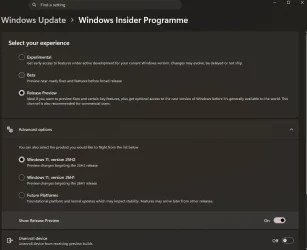
Windows Insiders in the Release Preview Channel can install Windows 11, version 26H2 via our “seeker” experience in Windows Update. This means if you are an Insider currently in the Release Preview Channel on a PC that meets the Windows 11 hardware requirements, you can go to Settings and Windows Update and choose to download and install Windows 11, version 26H2. Once you update your PC to Windows 11, version 26H2, you will continue to automatically receive new servicing updates through Windows Update (the typical monthly update process). For instructions on how to join the Windows Insider Program and enroll your PC in the Release Preview Channel, click here.


If you are a commercial customer enrolled in the Windows Insider Program for Business, you can deploy and begin validating Windows 11, version 26H2 on PCs in your organization using Windows Update client policies and Windows Server Update Services (WSUS). Azure Marketplace will be available later today. Should any issues arise, IT admins in organizations deploying Release Preview updates can request Microsoft Support.

And finally, ISOs are available for download for Windows 11, version 26H2 via the Windows Insider ISO download page.


Thanks,
Windows Insider Program Team


 Source:


Check Windows Updates


UUP Dump:

64-bit ISO download:

ARM64 ISO download:

 

Attachments

Last edited:
MS must have pulled the coding on some machines. This is up to you but this Registry hack should reenable them if you want to use it. It works on my 26300.9278 build:

Windows Registry Editor Version 5.00

[HKEY_LOCAL_MACHINE\SYSTEM\CurrentControlSet\Control\FeatureManagement\Overrides\14]

[HKEY_LOCAL_MACHINE\SYSTEM\CurrentControlSet\Control\FeatureManagement\Overrides\14\2439114895]
"EnabledState"=dword:00000002
"EnabledStateOptions"=dword:00000000


View attachment 181463
Hi, This almost ignorant has some questions:
1. I didn't have Overrides\14, so I created one.
Then I created 14\439114895.
Now, I don't know how to create those two lines:
"EnabledState"=dword:00000002
"EnabledStateOptions"=dword:00000000
Can you explain to me, please?
 

My Computer My Computer

At a glance

windows 11Intel Core i7 - 240H32 GB DDR4 SDRAMIntel UHD 620 / Ge Force RTX 3050 6GB
OS
windows 11
Computer type
PC/Desktop
Manufacturer/Model
Dell/Alienware 16 Aurora
CPU
Intel Core i7 - 240H
Motherboard
Dell AC16250
Memory
32 GB DDR4 SDRAM
Graphics Card(s)
Intel UHD 620 / Ge Force RTX 3050 6GB
Sound Card
M-Audio M-Track Duo
Monitor(s) Displays
Dell S2817Q
Screen Resolution
2560 x 1440
Hard Drives
1TB M.2 PCie NVMe
Keyboard
Microsoft
Mouse
Logitech G305
Internet Speed
700Mbps - Fiber
Browser
Chrome
Hi, This almost ignorant has some questions:
1. I didn't have Overrides\14, so I created one.
Then I created 14\439114895.
Now, I don't know how to create those two lines:
"EnabledState"=dword:00000002
"EnabledStateOptions"=dword:00000000
Can you explain to me, please?
Just an FYI if you copy this to notepad exactly and name it with a .reg extension vs .txt extension you can just click and install it straight to your registery. This must include the registry editor version first line.


Windows Registry Editor Version 5.00

[HKEY_LOCAL_MACHINE\SYSTEM\CurrentControlSet\Control\FeatureManagement\Overrides\14]

[HKEY_LOCAL_MACHINE\SYSTEM\CurrentControlSet\Control\FeatureManagement\Overrides\14\2439114895]
"EnabledState"=dword:00000002
"EnabledStateOptions"=dword:00000000
 

My Computers My Computers

  • At a glance

    Windows 11 25H2Intel Core Ultra 9 275HX (24-Core)64GB DDR5 6400MT/sNVIDIA GeForce RTX 5080 and Intel UHD Graphics
    OS
    Windows 11 25H2
    Computer type
    Laptop
    Manufacturer/Model
    Alienware 18 Area-51
    CPU
    Intel Core Ultra 9 275HX (24-Core)
    Motherboard
    Alienware
    Memory
    64GB DDR5 6400MT/s
    Graphics Card(s)
    NVIDIA GeForce RTX 5080 and Intel UHD Graphics
    Sound Card
    Onboard, Realtek high-performance Audio chips (ALC3329 & ALC1708))
    Monitor(s) Displays
    300HZ 18-inch QHD 500 nit Comfort View+
    Screen Resolution
    2560 x 1600
    Hard Drives
    2TB NVMe M.2 PCIe Gen 5 SSD
    Case
    Magnesium Alloy
    Cooling
    Advanced Cryo-Tech Quad-Fan Cooling system & large vapor chamber
    Keyboard
    Cherry MX ultra low profile mechanical keyboard with per key AlienFX RGB lighting
    Mouse
    Logitech MX Master 4
    Browser
    Vivaldi (main), Firefox, Chrome, Edge
    Antivirus
    MS Defender and Malwarebytes Free
  • At a glance

    Windows 11 26H2Qualcomm Snapdragon X Elite (12 Core) ARM bas...16GB LPDDR5Qualcomm Adreno X1-85
    Operating System
    Windows 11 26H2
    Computer type
    Laptop
    Manufacturer/Model
    Microsoft Surface Laptop 7
    CPU
    Qualcomm Snapdragon X Elite (12 Core) ARM based CPU
    Motherboard
    Microsoft Corp.
    Memory
    16GB LPDDR5
    Graphics card(s)
    Qualcomm Adreno X1-85
    Sound Card
    Omnisonic speakers with Dolby Atmos spatial sound
    Monitor(s) Displays
    120 Hz 13.8-inch 600 nit PixelSense Flow touchscreen
    Screen Resolution
    2304x1536
    Hard Drives
    1TB NVMe Gen 4 SSD
    Case
    Anodized Aluminum
    Cooling
    Traditional active cooling fan system
    Keyboard
    Mechanical QWERTY, backlit when in use
    Mouse
    Logitech MX Master 4 and Surface Arc Mouse
    Browser
    Vivaldi (main), Firefox, Chrome, Edge
    Antivirus
    MS Defender and Malwarebytes Free
I had the same experience with 26300.9278.... Locked on the Release Preview channel, it only shows up as 25H2. If I change the channel to Experimental and reboot, then it shows up properly as 25/26H2. But I noticed that 9278 doesn't support Feature Flags, which is an option I like very much. So I've moved off of 9278 and returned to 26340.9233 and all is well--got my Feature Flags plus all the options in 9278.
 

My Computer My Computer

At a glance

Win11 RP channel for 26H2 buildsAMD R7 7800X3DGSkill 2x16GB @ 6400MT/sXFX 9070 XT SWIFT tri-fan (PCIe5.0)
OS
Win11 RP channel for 26H2 builds
Computer type
PC/Desktop
Manufacturer/Model
a cherry-picked assembly
CPU
AMD R7 7800X3D
Motherboard
MSI x870 Tomahawk Wi-Fi, 8-layer, 2 oz copper, server PCB
Memory
GSkill 2x16GB @ 6400MT/s
Graphics Card(s)
XFX 9070 XT SWIFT tri-fan (PCIe5.0)
Sound Card
Creative Labs G8 USB External Sound device, Gaming DAC, Sound Card & Earphone AMP.. HIGHLY RECOMMENDED, btw. Totally changed my opinion of external USB sound. I like!...;)
Monitor(s) Displays
Philips 42" OLED @ 4k
Screen Resolution
3840x2160
Hard Drives
*Boot: Samsung 980 Pro 2 TB NVMe (PCIe4x4)
*Samsung 980 EVO NVMe 500GB (PCIe 4x4)
*Kingston SNV3S2000G 2TB NVMe (PCIe4x4)
*Samsung 960 EVO 250GB NVMe(PCIe3x2)
*8TB Toshiba x300 HDD
*ST4000DM004 S3 4TB HDD
PSU
Gigabyte 850W Gold, Rev 2
Case
Lian Li Lancool 217, white, with wood trim, very nice looking--tired of black, 5-fans standard
Cooling
Air coutesy Lian Li
Keyboard
Cherry MX 2.0S RGB
Mouse
Razer Basilisk V3 24k DPI
Internet Speed
~950Mbps down and up!
Browser
Firefox x64 DE
Antivirus
Defender
Other Info
Great New system. Exceeds my expectations by quite a bit, btw. I love the USB G8 SoundBlaster, it's quite an improvement over the G6!
Just an FYI if you copy this to notepad exactly and name it with a .reg extension vs .txt extension you can just click and install it straight to your registery. This must include the registry editor version first line.


Windows Registry Editor Version 5.00

[HKEY_LOCAL_MACHINE\SYSTEM\CurrentControlSet\Control\FeatureManagement\Overrides\14]

[HKEY_LOCAL_MACHINE\SYSTEM\CurrentControlSet\Control\FeatureManagement\Overrides\14\2439114895]
"EnabledState"=dword:00000002
"EnabledStateOptions"=dword:00000000
Hi FrancoDT, Thank you for your guidelines. It has finally worked.

1788356597490.webp
 

My Computer My Computer

At a glance

windows 11Intel Core i7 - 240H32 GB DDR4 SDRAMIntel UHD 620 / Ge Force RTX 3050 6GB
OS
windows 11
Computer type
PC/Desktop
Manufacturer/Model
Dell/Alienware 16 Aurora
CPU
Intel Core i7 - 240H
Motherboard
Dell AC16250
Memory
32 GB DDR4 SDRAM
Graphics Card(s)
Intel UHD 620 / Ge Force RTX 3050 6GB
Sound Card
M-Audio M-Track Duo
Monitor(s) Displays
Dell S2817Q
Screen Resolution
2560 x 1440
Hard Drives
1TB M.2 PCie NVMe
Keyboard
Microsoft
Mouse
Logitech G305
Internet Speed
700Mbps - Fiber
Browser
Chrome
I had the same experience with 26300.9278.... Locked on the Release Preview channel, it only shows up as 25H2. If I change the channel to Experimental and reboot, then it shows up properly as 25/26H2. But I noticed that 9278 doesn't support Feature Flags, which is an option I like very much. So I've moved off of 9278 and returned to 26340.9233 and all is well--got my Feature Flags plus all the options in 9278.
I don't use experimental builds so I've never had the feature flags although it sounds like a nice option. I did try enabling the feature flags page in my beta builds which does show the page but it'll never show any actual flags there on beta so no point to keeping the page enabled lol.
 

My Computers My Computers

  • At a glance

    Windows 11 25H2Intel Core Ultra 9 275HX (24-Core)64GB DDR5 6400MT/sNVIDIA GeForce RTX 5080 and Intel UHD Graphics
    OS
    Windows 11 25H2
    Computer type
    Laptop
    Manufacturer/Model
    Alienware 18 Area-51
    CPU
    Intel Core Ultra 9 275HX (24-Core)
    Motherboard
    Alienware
    Memory
    64GB DDR5 6400MT/s
    Graphics Card(s)
    NVIDIA GeForce RTX 5080 and Intel UHD Graphics
    Sound Card
    Onboard, Realtek high-performance Audio chips (ALC3329 & ALC1708))
    Monitor(s) Displays
    300HZ 18-inch QHD 500 nit Comfort View+
    Screen Resolution
    2560 x 1600
    Hard Drives
    2TB NVMe M.2 PCIe Gen 5 SSD
    Case
    Magnesium Alloy
    Cooling
    Advanced Cryo-Tech Quad-Fan Cooling system & large vapor chamber
    Keyboard
    Cherry MX ultra low profile mechanical keyboard with per key AlienFX RGB lighting
    Mouse
    Logitech MX Master 4
    Browser
    Vivaldi (main), Firefox, Chrome, Edge
    Antivirus
    MS Defender and Malwarebytes Free
  • At a glance

    Windows 11 26H2Qualcomm Snapdragon X Elite (12 Core) ARM bas...16GB LPDDR5Qualcomm Adreno X1-85
    Operating System
    Windows 11 26H2
    Computer type
    Laptop
    Manufacturer/Model
    Microsoft Surface Laptop 7
    CPU
    Qualcomm Snapdragon X Elite (12 Core) ARM based CPU
    Motherboard
    Microsoft Corp.
    Memory
    16GB LPDDR5
    Graphics card(s)
    Qualcomm Adreno X1-85
    Sound Card
    Omnisonic speakers with Dolby Atmos spatial sound
    Monitor(s) Displays
    120 Hz 13.8-inch 600 nit PixelSense Flow touchscreen
    Screen Resolution
    2304x1536
    Hard Drives
    1TB NVMe Gen 4 SSD
    Case
    Anodized Aluminum
    Cooling
    Traditional active cooling fan system
    Keyboard
    Mechanical QWERTY, backlit when in use
    Mouse
    Logitech MX Master 4 and Surface Arc Mouse
    Browser
    Vivaldi (main), Firefox, Chrome, Edge
    Antivirus
    MS Defender and Malwarebytes Free
Feature Flags is another way to use experimental tools without outside software..
 

My Computer My Computer

At a glance

Windows 11 Pro 26H2Intel® Core™ i9-13900K Desktop Processor 16 (...G.Skill Ripjaws V Series 32gb (2x16gb) DDR4 3...Asus Dual Geforce Rtx™ 3060 TI Edition 8gb Gddr6
OS
Windows 11 Pro 26H2
Computer type
PC/Desktop
CPU
Intel® Core™ i9-13900K Desktop Processor 16 (8P+8E)
Motherboard
Asus TUF Gaming Z790-PLUS WIFI D4
Memory
G.Skill Ripjaws V Series 32gb (2x16gb) DDR4 3600mhz
Graphics Card(s)
Asus Dual Geforce Rtx™ 3060 TI Edition 8gb Gddr6
Monitor(s) Displays
BenQ EW3270U 31.5” 3840x2160 UHD 16:9 HDR LED 4K LG 27UK850-W 27'' 4K UHD IPS LED Monitor with HDR10
Screen Resolution
3840x2160
Hard Drives
Samsung 990 with heatsink PRO PCIe 4.0 Gen 4 NVMe® SSD 1TB
WD_BLACK SN850X NVMe M.2 2280 1TB PCI-Express 4.0
Crucial T500 2TB Gen4
Samsung 970 Evo M.2 2280 2tb Pcie Gen3. X4
PSU
Corsair AXi Series AX860i Digital 860W 80 PLUS PSU
Case
Fractal Meshify C ATX Mid Tower Case
Keyboard
Logi MX Keys
Mouse
Logi M705
Internet Speed
400 mbs
Browser
Firefox
Antivirus
Eset NOD32
Other Info
Love fast boots
Feature Flags is another way to use experimental tools without outside software..
I always look at the new features in the 26340 experimental builds as I have found most of that same coding has been placed in the beta builds as well and can be enabled with vivetool.
 

My Computers My Computers

  • At a glance

    Windows 11 25H2Intel Core Ultra 9 275HX (24-Core)64GB DDR5 6400MT/sNVIDIA GeForce RTX 5080 and Intel UHD Graphics
    OS
    Windows 11 25H2
    Computer type
    Laptop
    Manufacturer/Model
    Alienware 18 Area-51
    CPU
    Intel Core Ultra 9 275HX (24-Core)
    Motherboard
    Alienware
    Memory
    64GB DDR5 6400MT/s
    Graphics Card(s)
    NVIDIA GeForce RTX 5080 and Intel UHD Graphics
    Sound Card
    Onboard, Realtek high-performance Audio chips (ALC3329 & ALC1708))
    Monitor(s) Displays
    300HZ 18-inch QHD 500 nit Comfort View+
    Screen Resolution
    2560 x 1600
    Hard Drives
    2TB NVMe M.2 PCIe Gen 5 SSD
    Case
    Magnesium Alloy
    Cooling
    Advanced Cryo-Tech Quad-Fan Cooling system & large vapor chamber
    Keyboard
    Cherry MX ultra low profile mechanical keyboard with per key AlienFX RGB lighting
    Mouse
    Logitech MX Master 4
    Browser
    Vivaldi (main), Firefox, Chrome, Edge
    Antivirus
    MS Defender and Malwarebytes Free
  • At a glance

    Windows 11 26H2Qualcomm Snapdragon X Elite (12 Core) ARM bas...16GB LPDDR5Qualcomm Adreno X1-85
    Operating System
    Windows 11 26H2
    Computer type
    Laptop
    Manufacturer/Model
    Microsoft Surface Laptop 7
    CPU
    Qualcomm Snapdragon X Elite (12 Core) ARM based CPU
    Motherboard
    Microsoft Corp.
    Memory
    16GB LPDDR5
    Graphics card(s)
    Qualcomm Adreno X1-85
    Sound Card
    Omnisonic speakers with Dolby Atmos spatial sound
    Monitor(s) Displays
    120 Hz 13.8-inch 600 nit PixelSense Flow touchscreen
    Screen Resolution
    2304x1536
    Hard Drives
    1TB NVMe Gen 4 SSD
    Case
    Anodized Aluminum
    Cooling
    Traditional active cooling fan system
    Keyboard
    Mechanical QWERTY, backlit when in use
    Mouse
    Logitech MX Master 4 and Surface Arc Mouse
    Browser
    Vivaldi (main), Firefox, Chrome, Edge
    Antivirus
    MS Defender and Malwarebytes Free
I don't use experimental builds so I've never had the feature flags although it sounds like a nice option. I did try enabling the feature flags page in my beta builds which does show the page but it'll never show any actual flags there on beta so no point to keeping the page enabled lol.
Yes, the feature flags give you control over newer features, which you can enable or disable, as well as showing which past feature flags have made it into the OS permanently and so are no longer available as a selectable feature. I enable the ones I like and disable the features I don't care for atm. Here's a partial screen shot of the controls for it--the whole thing wouldn't fit...;)
Feature Flags Screenshot 2026-09-02 104616.webp
 

My Computer My Computer

At a glance

Win11 RP channel for 26H2 buildsAMD R7 7800X3DGSkill 2x16GB @ 6400MT/sXFX 9070 XT SWIFT tri-fan (PCIe5.0)
OS
Win11 RP channel for 26H2 builds
Computer type
PC/Desktop
Manufacturer/Model
a cherry-picked assembly
CPU
AMD R7 7800X3D
Motherboard
MSI x870 Tomahawk Wi-Fi, 8-layer, 2 oz copper, server PCB
Memory
GSkill 2x16GB @ 6400MT/s
Graphics Card(s)
XFX 9070 XT SWIFT tri-fan (PCIe5.0)
Sound Card
Creative Labs G8 USB External Sound device, Gaming DAC, Sound Card & Earphone AMP.. HIGHLY RECOMMENDED, btw. Totally changed my opinion of external USB sound. I like!...;)
Monitor(s) Displays
Philips 42" OLED @ 4k
Screen Resolution
3840x2160
Hard Drives
*Boot: Samsung 980 Pro 2 TB NVMe (PCIe4x4)
*Samsung 980 EVO NVMe 500GB (PCIe 4x4)
*Kingston SNV3S2000G 2TB NVMe (PCIe4x4)
*Samsung 960 EVO 250GB NVMe(PCIe3x2)
*8TB Toshiba x300 HDD
*ST4000DM004 S3 4TB HDD
PSU
Gigabyte 850W Gold, Rev 2
Case
Lian Li Lancool 217, white, with wood trim, very nice looking--tired of black, 5-fans standard
Cooling
Air coutesy Lian Li
Keyboard
Cherry MX 2.0S RGB
Mouse
Razer Basilisk V3 24k DPI
Internet Speed
~950Mbps down and up!
Browser
Firefox x64 DE
Antivirus
Defender
Other Info
Great New system. Exceeds my expectations by quite a bit, btw. I love the USB G8 SoundBlaster, it's quite an improvement over the G6!
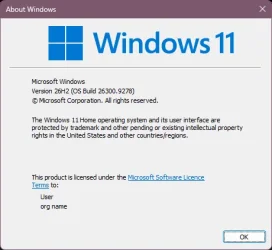
I just noticed this weird setting too, which mentions Windows 11 25H2 but the current build is 26300 and... 26H2.

1788369064877.webp

It's also partially translated
 

My Computers My Computers

  • At a glance

    Windows 11 Pro 25H2Intel i9-9900kCorsair Vengeance LPX 32GB (2 x 16GB)MSI Suprim X RTX 3080
    OS
    Windows 11 Pro 25H2
    Computer type
    PC/Desktop
    Manufacturer/Model
    Multi
    CPU
    Intel i9-9900k
    Motherboard
    Gigabyte Z390 Aorus Master
    Memory
    Corsair Vengeance LPX 32GB (2 x 16GB)
    Graphics Card(s)
    MSI Suprim X RTX 3080
    Sound Card
    Realtek
    Monitor(s) Displays
    Samsung LC32HGQ 144Hz
    Screen Resolution
    2560x1440
    Hard Drives
    Samsung 970 Evo Plus 1 TB
    Crucial MX100 512 GB
    Samsung 840 Pro 256 GB
    Seagate ST4000DM000-1F2168 4 TB
    PSU
    Seasonic P-860 Platinium
    Case
    Corsair Graphite 780T
    Cooling
    Noctua NH-U14S
    Keyboard
    Corsair K70 MK.2 Low profile
    Mouse
    Logitech G Pro HERO
    Internet Speed
    200 Mb/s
    Browser
    Mozilla Firefox
    Antivirus
    Windows Defender
    Other Info
    BIOS version F13a
  • At a glance

    Windows 11 Home 25H2AMD Ryzen 7 250Samsung 16GB DDR5 5600MHz PC5-44800 CL46Nvidia GeForce RTX 5060
    Operating System
    Windows 11 Home 25H2
    Computer type
    Laptop
    Manufacturer/Model
    Lenovo LOQ 15AHP10
    CPU
    AMD Ryzen 7 250
    Motherboard
    Lenovo LNVNB161216
    Memory
    Samsung 16GB DDR5 5600MHz PC5-44800 CL46
    Graphics card(s)
    Nvidia GeForce RTX 5060
    Sound Card
    Realtek
    Monitor(s) Displays
    CSOT T3 MNF601BA1-4
    Screen Resolution
    1920x1080
    Hard Drives
    Micron SSD 1 TB
    Browser
    Mozilla Firefox
    Antivirus
    Windows Defender
    Other Info
    BIOS version R8CN25WW

My Computer My Computer

At a glance

Windows 11i7-13650HX (Raptor Lake-HX)32 Gb (16x2)RTX 5060 Laptop
OS
Windows 11
Computer type
Laptop
Manufacturer/Model
Lenovo LOQ 17IRX10 - Type 83JH
CPU
i7-13650HX (Raptor Lake-HX)
Motherboard
Lenovo LOQ 17IRX10 (Intel Raptor Lake-HX IMC / Raptor Point-S HM770)
Memory
32 Gb (16x2)
Graphics Card(s)
RTX 5060 Laptop
Monitor(s) Displays
17"
Hard Drives
1 Tb NVMe (WD PC SN7100S SDFPMSL-1T00-1101)

My Computer My Computer

At a glance

Windows 11 25H2 ProAMD Ryzen 5 4600H32 GBNVIDIA GTX 1650
OS
Windows 11 25H2 Pro
Computer type
Laptop
Manufacturer/Model
HP
CPU
AMD Ryzen 5 4600H
Memory
32 GB
Graphics Card(s)
NVIDIA GTX 1650
Sound Card
Realtek Audio
Monitor(s) Displays
AMD Radeon (TM) Graphics
Hard Drives
INTEL SSD
Mouse
Rival 5
Will this version fix the issue where icons disappear from the taskbar when the system wakes from sleep?
I have never encountered this issue. Perhaps you need to perform a Repair install to make sure everything is functioning correctly.
 

My Computer My Computer

At a glance

Windows 11 Pro 26H2AMD Ryzen 9 9950X3D 16-Core Processor64GB Corsair DDR5 RAM @ 6000 MT/sASUS TUF Gaming GeForce RTX 4090 OC Edition 2...
OS
Windows 11 Pro 26H2
Computer type
PC/Desktop
Manufacturer/Model
Skytech / Central Computers
CPU
AMD Ryzen 9 9950X3D 16-Core Processor
Motherboard
Gigabyte X870E AORUS PRO ICE
Memory
64GB Corsair DDR5 RAM @ 6000 MT/s
Graphics Card(s)
ASUS TUF Gaming GeForce RTX 4090 OC Edition 24GB GDDR6X
Sound Card
Sound Blaster Audigy Fx V2
Monitor(s) Displays
Sony SDMU27M90 (DP HDR), Acer KA272, ASUS VG328QA1A
Screen Resolution
3840x2160 HDR
Hard Drives
Samsung SSD 990 PRO 4TB, Samsung SSD 860 EVO 1TB, Seagate ST8000DM004-2CX88 8TB
Case
Fractal Meshify 2
Cooling
Arctic Freezer III 360mm
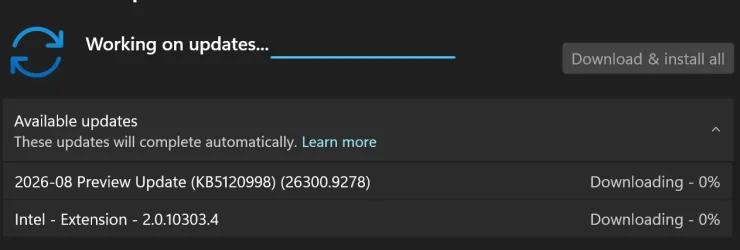
Another update today.

Screenshot 2026-09-02 235302.webp
 
Last edited:

My Computer My Computer

At a glance

Windows 11Intel 13th96GBRTX 4050 6GB
OS
Windows 11
Computer type
Laptop
Manufacturer/Model
Acer Nitro V15
CPU
Intel 13th
Memory
96GB
Graphics Card(s)
RTX 4050 6GB
Monitor(s) Displays
amazon fire tv 50"
Screen Resolution
3840x2160
What is this update? And it failed .

IMG_7054.webpIMG_7055.webp
 

My Computer My Computer

At a glance

Wind 11 Pro 24H2 (Dev Channel)/23H2Beta (offl...2 Intel Xeon 5680120 GbMSI(Nvidia) GeForce GTX 970
OS
Wind 11 Pro 24H2 (Dev Channel)/23H2Beta (offline)
Computer type
PC/Desktop
Manufacturer/Model
DELL T7500
CPU
2 Intel Xeon 5680
Memory
120 Gb
Graphics Card(s)
MSI(Nvidia) GeForce GTX 970
Monitor(s) Displays
Dell S2719DGF
Screen Resolution
2560 x 1440 (155Hz)
Hard Drives
Samsung 2TB 870 (24H2 Device)
Samsung 1TB 860 (23H2 Beta)
PSU
Dell 1100W
Antivirus
Premium Malwarebyte, AdwCleaner (Malwarebyte)
Here's just what mine shows.. I don't know how you got that if you got the 26H2.
Q: Is your device Win 11 26H2 complaint?
View attachment 181453
this is what mine shows as i moved from build 26340.9233 from the Experimental channel to the rp channel
 

Attachments

  • image_2026-09-03_153512280.webp
    image_2026-09-03_153512280.webp
    38 KB · Views: 1
  • image_2026-09-03_153756507.webp
    image_2026-09-03_153756507.webp
    19.3 KB · Views: 1

My Computers My Computers

  • At a glance

    windows 11 HomeIntel 12th gen i7 12700KF 3.6GhzCorsair Vengence LPX 32GB 3600MHz (2x 16GB)𝙰𝚂𝚄𝚂 𝙰𝙼𝙳 𝙿𝚁𝙸𝙼𝙴 𝟿𝟶𝟽𝟶 𝚇𝚃 𝟷𝟼𝙶𝙱 𝙾𝙲
    OS
    windows 11 Home
    Computer type
    PC/Desktop
    Manufacturer/Model
    Asus
    CPU
    Intel 12th gen i7 12700KF 3.6Ghz
    Motherboard
    Asus Prime Z790-P Wifi D4 DDR4
    Memory
    Corsair Vengence LPX 32GB 3600MHz (2x 16GB)
    Graphics Card(s)
    𝙰𝚂𝚄𝚂 𝙰𝙼𝙳 𝙿𝚁𝙸𝙼𝙴 𝟿𝟶𝟽𝟶 𝚇𝚃 𝟷𝟼𝙶𝙱 𝙾𝙲
    Monitor(s) Displays
    𝙰𝚂𝚄𝚂 𝚁𝙾𝙶 𝚂𝚝𝚛𝚒𝚡 𝚇𝙶𝟸𝟽𝙰𝙲𝚂 𝟸𝟽" 𝟸𝟻𝟼𝟶𝚡𝟷𝟺𝟺𝟶, 𝟷𝟾𝟶𝙷𝚣
    Screen Resolution
    𝟸𝟻𝟼𝟶𝚡𝟷𝟺𝟺𝟶, 𝟷𝟾𝟶𝙷𝚣
    Hard Drives
    SSD 𝙽𝖾𝗍𝚊𝖼 𝙽𝚅𝟽𝟶𝟶𝟶-𝚃 𝙼.𝟸 𝙶𝚎𝚗 𝟺 𝙽𝚅𝙼𝚎 𝟺𝚃𝙱 x2 and WD Black SN850X 2TB M.2 Gen 4 NVMe x1
    PSU
    Asus TUF Gaming 1000W 80+ Gold
    Case
    Lian Li 011 Dynamic XL ROG Black
    Cooling
    Asus ROG Strix LC II 360 ARGB
    Mouse
    Razer Death Adder V2 Pro Wireless
    Browser
    Opera GX firefox and some times edge
    Antivirus
    Bitdefender Internet Security
  • At a glance

    Windows 11 homeIntel Core I7 4700HQ 2.4 ghz8GB DDR3 1600MHzNvidia Geforce 750M
    Operating System
    Windows 11 home
    Computer type
    Laptop
    Manufacturer/Model
    Asus
    CPU
    Intel Core I7 4700HQ 2.4 ghz
    Memory
    8GB DDR3 1600MHz
    Graphics card(s)
    Nvidia Geforce 750M
    Screen Resolution
    1920:1080
    Hard Drives
    V Series 480GB SATA SSD
Back
Top Bottom