Windows 11 keeps changing my brightness setting


if I close the lid and it goes to sleep, when I open the lid and continue using the machine, after about a minute, the system randomly restarts.
That is yet another typical symptom of a non-oem driver.
 

My Computers My Computers

  • At a glance

    Win11 Pro 25H2 (RTM+)Intel i7-14650HX32 GBNo GPU - Built-in Intel Graphics
    OS
    Win11 Pro 25H2 (RTM+)
    Computer type
    PC/Desktop
    Manufacturer/Model
    Acemagic
    CPU
    Intel i7-14650HX
    Memory
    32 GB
    Graphics Card(s)
    No GPU - Built-in Intel Graphics
    Sound Card
    Integrated
    Monitor(s) Displays
    Varies as machine will often be moved to locations with different monitors
    Screen Resolution
    Varies
    Hard Drives
    1 x 1TB Gen 4 NVMe SSD
    PSU
    120W Power Brick
    Keyboard
    Corsair K70 Max RGB Magnetic Keyboard
    Mouse
    Logitech MX Master 3
    Internet Speed
    1Gb Up / 1 Gb Down
    Browser
    Edge
    Antivirus
    Windows Defender
  • At a glance

    Win11 Pro 25H2 (RTM+)Intel i7-1255U16 GBIntel Iris Xe Graphics
    Operating System
    Win11 Pro 25H2 (RTM+)
    Computer type
    Laptop
    Manufacturer/Model
    Lenovo ThinkBook 13x Gen 2
    CPU
    Intel i7-1255U
    Memory
    16 GB
    Graphics card(s)
    Intel Iris Xe Graphics
    Sound Card
    Realtek® ALC3306-CG codec
    Monitor(s) Displays
    13.3-inch IPS Display
    Screen Resolution
    WQXGA (2560 x 1600)
    Hard Drives
    2 TB 4 x 4 NVMe SSD
    PSU
    USB-C / Thunderbolt 4 Power / Charging
    Keyboard
    Backlit, spill resistant keyboard
    Mouse
    Buttonless Glass Precision Touchpad
    Internet Speed
    1Gb Up / 1Gb Down
    Browser
    Edge
    Antivirus
    Windows Defender
    Other Info
    WiFi 6e / Bluetooth 5.1 / Facial Recognition / Fingerprint Sensor / ToF (Time of Flight) Human Presence Sensor
I've also gone into the Intel Graphics Command Centre and disabled Display Power Savings under Plugged In/Power.
That should not be there anymore (Version 1.100.5688.0). There is no such feature setting in the latest Intel Graphics Command Center. It seems to have been integrated in to Windows settings, power plans etc.
Update the App.
Apps > Intel GCC > Advanced options > Reset/Repair.

Depending on the Power Plans supplied by the Laptop manufacturer, it might be there or not, check all the plans.

Another place to look is in the Manufacturers App look for ambient light/content detection altering brightness.

"Wallpaper Engine" If that is some mod it could interfere with Intel graphics profiles loading up.

Mine is a different brand but almost identical hardware, Same CPU and Intel integrated graphics. No problem, no system mods.
 

My Computer My Computer

At a glance

Windows 11
OS
Windows 11
I have that in Intel Graphics command centre too :unsure:
 

My Computers My Computers

  • At a glance

    Windows 11 Home 25H2Core i5-1035G132gb
    OS
    Windows 11 Home 25H2
    Computer type
    Laptop
    Manufacturer/Model
    HP Pavilion 14-ce3606sa
    CPU
    Core i5-1035G1
    Memory
    32gb
    Hard Drives
    Samsung 870 evo sata ssd
    Cooling
    Could be better
    Internet Speed
    50 mbps Starlink
    Browser
    Firefox
    Other Info
    Originally came installed with a 500gb H10 Optane ssd
  • At a glance

    Windows 11 HomeIntel Core i5-1035G116gb
    Operating System
    Windows 11 Home
    Computer type
    Laptop
    Manufacturer/Model
    HP Pavilion ce3606sa
    CPU
    Intel Core i5-1035G1
    Memory
    16gb
    Hard Drives
    Hynix Gold P31 2TB
    Internet Speed
    200mbps Starlink
    Browser
    Firefox
    Antivirus
    Defender
Also check, if Display Policy Service is running.
 

My Computer My Computer

At a glance

Home26H2CanAMD Ryzen 5 8600G (07/24)2x32GB Kingston FURY DDR5 5600 MHz CL36 @5200...ASROCK Radeon RX 6600 Challenger D 8G @48FPS ...
OS
Home26H2Can
Computer type
PC/Desktop
CPU
AMD Ryzen 5 8600G (07/24)
Motherboard
ASROCK B650M-HDV/M.2 (07/24) BIOS 4.21 AGESA ComboAM5 1.3.0.1 (04/26)
Memory
2x32GB Kingston FURY DDR5 5600 MHz CL36 @5200 CL36 (07/24)
Graphics Card(s)
ASROCK Radeon RX 6600 Challenger D 8G @48FPS (08/24)
Sound Card
Creative Sound BlasterX AE-5 Plus (05/24)
Monitor(s) Displays
24" Philips 24M1N3200ZS/00 (05/24)
Screen Resolution
1920×1080@165Hz via DP1.4
Hard Drives
Kingston KC3000 NVMe 2TB (05/24)
ADATA XPG GAMMIX S11 Pro 512GB (07/19)
PSU
Seasonic Core GM 550 Gold (04/24)
Case
Fractal Design Define 7 Mini with 3x Noctua NF-P14s/12@555rpm (04/24)
Cooling
Noctua NH-U12S with Noctua NF-P12 (04/24)
Keyboard
HP Pavilion Wired Keyboard 300 (07/24) + Rabalux 76017 Parker (01/24)
Mouse
Logitech M330 Silent Plus (01/26)
Internet Speed
500/100 Mbps via RouterOS (05/21) & TCP Optimizer
Browser
Edge, Brave for YouTube, LibreWolf for FB
Antivirus
NextDNS blocking 1/3 Traffic
Other Info
Phone: Motorola Moto G86 (02/26)
Backup: Hasleo Backup Suite (PreOS)
Headphones: Sennheiser RS170 (09/10)
Chair: Huzaro Force 4.4 Grey Mesh (05/24)
Notifier: Xiaomi Mi Band 9 Milanese (10/24)
FlexCore USB-C 3.2 Gen 1 (M) to LAN (F) (08/25)

My Computer My Computer

At a glance

Windows 11i7-12700H16GBRTX 3070
OS
Windows 11
Computer type
Laptop
Manufacturer/Model
ASUS TUF F15
CPU
i7-12700H
Motherboard
ASUS FX507ZR
Memory
16GB
Graphics Card(s)
RTX 3070
Sound Card
Intel Alder Lake-P PCH - cAVS
Screen Resolution
2560x1440
Okay, so far, it hasn't changed. I've booted it back up and it's still at 50%. So fingers crossed. 🤞
 

My Computer My Computer

At a glance

Windows 11i7-12700H16GBRTX 3070
OS
Windows 11
Computer type
Laptop
Manufacturer/Model
ASUS TUF F15
CPU
i7-12700H
Motherboard
ASUS FX507ZR
Memory
16GB
Graphics Card(s)
RTX 3070
Sound Card
Intel Alder Lake-P PCH - cAVS
Screen Resolution
2560x1440
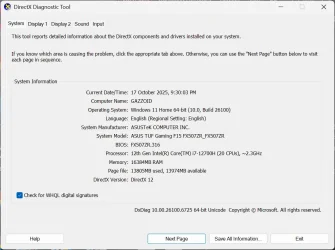
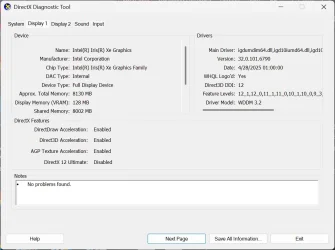
Have a look in DirectX,to access it type in ---dxdiag ---in the Search box and run as admin.
In the System page,the WHQL box should be checked and the DirectX version should be 12.
Then check the Display page and the entries match drivers etc. installed.
Look through all the remaining pages.
Bear in mind that DirectX is essential for gaming.
 

My Computer My Computer

At a glance

win 10amd ryzen 5-2600ng skill sniper x 16gbnvidea gtx 1050
OS
win 10
Computer type
PC/Desktop
Manufacturer/Model
home built
CPU
amd ryzen 5-2600
Motherboard
gigabyte b450m-ds3h
Memory
ng skill sniper x 16gb
Graphics Card(s)
nvidea gtx 1050
Monitor(s) Displays
benq fp 92
Hard Drives
samsung 860 evo 500gb m2 ssd
PSU
antec ea550g
Case
nzxt noctis 450
Browser
edge
Hi. First post here. I seem to be having a weird issue where Windows 11 keeps changing my brightness from what I set it to. I'm using Windows 11 Home 24H2 on a laptop. An ASUS TUF Gaming F15 to be exact.

I've tried a few options I've read online, but I think it's still doing it. I usually put it to about 50%. And then sometimes when I next boot the machine, it's either at 100% or around 70-80%. There doesn't appear to be an option to toggle Adaptive Brightness or anything in the Power Options. Change Brightness Based on Content is disabled. I've disabled Game Mode, too. I've also gone into the Intel Graphics Command Centre and disabled Display Power Savings under Plugged In/Power. I thought that had solved the issue, but I don't think it has.

Was just wondering if anyone else has a similar problem or knows of others things to try?

Thanks

That's the NVIDIA driver brightness bug.
I have it on my laptop too. Sadly, they don't seem interested in fixing it.

It was introduced in 580.88. Reverting back to 577.00 fixes the problem, but that's not a long term solution.
 

My Computers My Computers

  • At a glance

    Windows 11 ProIntel Core i9-10900XCorsair 64 GB (4 x 16 GB) CMW64GX4M4C3000C15 ...GIGABYTE GeForce GTX 1660 Super Mini ITX 6 GB OC
    OS
    Windows 11 Pro
    Computer type
    PC/Desktop
    Manufacturer/Model
    Stigg's Build
    CPU
    Intel Core i9-10900X
    Motherboard
    GIGABYTE X299X DESIGNARE 10G
    Memory
    Corsair 64 GB (4 x 16 GB) CMW64GX4M4C3000C15 Vengeance RGB Pro 3000Mhz DDR4
    Graphics Card(s)
    GIGABYTE GeForce GTX 1660 Super Mini ITX 6 GB OC
    Sound Card
    Realtek ALC1220
    Monitor(s) Displays
    Samsung 27" FHD LED FreeSync Gaming Monitor (LS27F350FHEXXY)
    Screen Resolution
    1920 x 1080
    Hard Drives
    Samsung 970 Pro Series 1TB M.2 2280 NVMe SSD
    Western Digital Red Pro WD8003FFBX-68B9AN0 8 TB, 7200 RPM, SATA-III
    Western Digital Red Pro WD8003FFBX-68B9AN0 8 TB, 7200 RPM, SATA-III
    PSU
    Corsair HX1200 1200W 80 Plus Platinum
    Case
    Fractal Design Define 7 Black Solid Case
    Cooling
    Noctua NH-D15 Chromax Black
    Keyboard
    Razer Ornata V2
    Mouse
    Razer DeathAdder Essential
    Internet Speed
    FTTN 100Mbps / 40Mbps
    Browser
    Mozilla Firefox
    Antivirus
    N/A
    Other Info
    Logitech BRIO 4k Ultra HD USB-C Webcam
  • At a glance

    Windows 10 ProCore i7-8750HSK Hynix 32 GB (2 x 16 GB) HMA82GS6CJR8N-VK 1...NVIDIA GeForce GTX 1070
    Operating System
    Windows 10 Pro
    Computer type
    Laptop
    Manufacturer/Model
    ASUS ROG Zephyrus M GM501GS
    CPU
    Core i7-8750H
    Motherboard
    Zephyrus M GM501GS
    Memory
    SK Hynix 32 GB (2 x 16 GB) HMA82GS6CJR8N-VK 16 GB DDR4-2666 DDR4 SDRAM
    Graphics card(s)
    NVIDIA GeForce GTX 1070
    Sound Card
    Realtek ALC294
    Monitor(s) Displays
    AU Optronics B156HAN07.1 [15.6" LCD]
    Screen Resolution
    1920 x 1080
    Hard Drives
    Samsung MZVKW512HMJP-00000 512 GB, PCI-E 3.0 x4
    Samsung SSD 860 QVO 4TB 4 TB, SATA-III
    PSU
    N/A
    Case
    N/A
    Cooling
    N/A
    Keyboard
    PC/AT Enhanced PS2 Keyboard (101/102-Key)
    Mouse
    Razer DeathAdder Essential
    Internet Speed
    FTTN 100Mbps / 40Mbps
    Browser
    Mozilla Firefox
    Antivirus
    N/A
    Other Info
    USB2.0 HD UVC Webcam
That's the NVIDIA driver brightness bug.
I have it on my laptop too. Sadly, they don't seem interested in fixing it.

It was introduced in 580.88. Reverting back to 577.00 fixes the problem, but that's not a long term solution.
Ohh. Okay. I don't remember off the top of my head what version I have installed. I'll have to check later.
 

My Computer My Computer

At a glance

Windows 11i7-12700H16GBRTX 3070
OS
Windows 11
Computer type
Laptop
Manufacturer/Model
ASUS TUF F15
CPU
i7-12700H
Motherboard
ASUS FX507ZR
Memory
16GB
Graphics Card(s)
RTX 3070
Sound Card
Intel Alder Lake-P PCH - cAVS
Screen Resolution
2560x1440

My Computers My Computers

  • At a glance

    Windows11 Pro 25H2i732GBnVidia
    OS
    Windows11 Pro 25H2
    Computer type
    PC/Desktop
    Manufacturer/Model
    Asus
    CPU
    i7
    Motherboard
    z97k
    Memory
    32GB
    Graphics Card(s)
    nVidia
    Sound Card
    Realtek
    Hard Drives
    3
    Cooling
    air
    Browser
    Edge
    Antivirus
    ESET
  • At a glance

    Windows11 ProIntel i516GBIntel
    Operating System
    Windows11 Pro
    Computer type
    PC/Desktop
    Manufacturer/Model
    ASUS
    CPU
    Intel i5
    Motherboard
    ASUS Basic
    Memory
    16GB
    Graphics card(s)
    Intel
    Sound Card
    Realtek
    Monitor(s) Displays
    Samsung
    Hard Drives
    one intern , 0ne extern, OS on SSD
    Cooling
    air
    Keyboard
    wireless Logitech
    Mouse
    wireless Logitech
    Internet Speed
    1GB
    Browser
    Edge
    Antivirus
    ESET

My Computer My Computer

At a glance

Windows 11i7-12700H16GBRTX 3070
OS
Windows 11
Computer type
Laptop
Manufacturer/Model
ASUS TUF F15
CPU
i7-12700H
Motherboard
ASUS FX507ZR
Memory
16GB
Graphics Card(s)
RTX 3070
Sound Card
Intel Alder Lake-P PCH - cAVS
Screen Resolution
2560x1440
Yeah, sadly, it hasn't been resolved yet. Loaded up just and it's crept up to 71 from 50. So I need to try some of the other suggestions given.
 

My Computer My Computer

At a glance

Windows 11i7-12700H16GBRTX 3070
OS
Windows 11
Computer type
Laptop
Manufacturer/Model
ASUS TUF F15
CPU
i7-12700H
Motherboard
ASUS FX507ZR
Memory
16GB
Graphics Card(s)
RTX 3070
Sound Card
Intel Alder Lake-P PCH - cAVS
Screen Resolution
2560x1440
run the powershell script i attached here... it'll unlock all power options

I'm a bit confused with this one. How do I run this script exactly? I don't have much experience with PowerShell, to be honest. I know with Regedit scripts I can usually double click on them and it applies the settings.
 

My Computer My Computer

At a glance

Windows 11i7-12700H16GBRTX 3070
OS
Windows 11
Computer type
Laptop
Manufacturer/Model
ASUS TUF F15
CPU
i7-12700H
Motherboard
ASUS FX507ZR
Memory
16GB
Graphics Card(s)
RTX 3070
Sound Card
Intel Alder Lake-P PCH - cAVS
Screen Resolution
2560x1440
Do you have Armoury Crate installed?

There is a setting in it that can change brightness.

Look for Optimal Display Brightness or Display Power Saving and turn it off.
 

My Computer My Computer

At a glance

Windows 11 Pro
OS
Windows 11 Pro
I'm a bit confused with this one. How do I run this script exactly? I don't have much experience with PowerShell, to be honest. I know with Regedit scripts I can usually double click on them and it applies the settings.
right click your start button > windows terminal (admin) > make sure powershell is the open tab (if not, use the down arrow at the top to list profiles and choose powershell)

leave that open

on the .ps1 file > Shift+Right Click > Copy as Path

back on powershell > just right click to paste the path. press enter
 

My Computer My Computer

At a glance

Windows 11 Pro
OS
Windows 11 Pro
right click your start button > windows terminal (admin) > make sure powershell is the open tab (if not, use the down arrow at the top to list profiles and choose powershell)

leave that open

on the .ps1 file > Shift+Right Click > Copy as Path

back on powershell > just right click to paste the path. press enter
Okay, thanks. I'll give it a try now.

Also, came back on the laptop and the brightness is now up to 100% :cool:
 

My Computer My Computer

At a glance

Windows 11i7-12700H16GBRTX 3070
OS
Windows 11
Computer type
Laptop
Manufacturer/Model
ASUS TUF F15
CPU
i7-12700H
Motherboard
ASUS FX507ZR
Memory
16GB
Graphics Card(s)
RTX 3070
Sound Card
Intel Alder Lake-P PCH - cAVS
Screen Resolution
2560x1440
Do you have Armoury Crate installed?

There is a setting in it that can change brightness.

Look for Optimal Display Brightness or Display Power Saving and turn it off.
I did at one point, I think. Unless I'm thinking of my last laptop. I got rid of it though as it was causing some other problem.
 

My Computer My Computer

At a glance

Windows 11i7-12700H16GBRTX 3070
OS
Windows 11
Computer type
Laptop
Manufacturer/Model
ASUS TUF F15
CPU
i7-12700H
Motherboard
ASUS FX507ZR
Memory
16GB
Graphics Card(s)
RTX 3070
Sound Card
Intel Alder Lake-P PCH - cAVS
Screen Resolution
2560x1440
right click your start button > windows terminal (admin) > make sure powershell is the open tab (if not, use the down arrow at the top to list profiles and choose powershell)

leave that open

on the .ps1 file > Shift+Right Click > Copy as Path

back on powershell > just right click to paste the path. press enter
Just tried it and even restarted, but it doesn't appear to have worked. 😕

rundll32_RxBfh5mi9h.webp
 

My Computer My Computer

At a glance

Windows 11i7-12700H16GBRTX 3070
OS
Windows 11
Computer type
Laptop
Manufacturer/Model
ASUS TUF F15
CPU
i7-12700H
Motherboard
ASUS FX507ZR
Memory
16GB
Graphics Card(s)
RTX 3070
Sound Card
Intel Alder Lake-P PCH - cAVS
Screen Resolution
2560x1440
That's the NVIDIA driver brightness bug.
I have it on my laptop too. Sadly, they don't seem interested in fixing it.

It was introduced in 580.88. Reverting back to 577.00 fixes the problem, but that's not a long term solution.
Funnily enough, I just checked what version I have on and it's 572.42. 😅
 

My Computer My Computer

At a glance

Windows 11i7-12700H16GBRTX 3070
OS
Windows 11
Computer type
Laptop
Manufacturer/Model
ASUS TUF F15
CPU
i7-12700H
Motherboard
ASUS FX507ZR
Memory
16GB
Graphics Card(s)
RTX 3070
Sound Card
Intel Alder Lake-P PCH - cAVS
Screen Resolution
2560x1440
Have a look in DirectX,to access it type in ---dxdiag ---in the Search box and run as admin.
In the System page,the WHQL box should be checked and the DirectX version should be 12.
Then check the Display page and the entries match drivers etc. installed.
Look through all the remaining pages.
Bear in mind that DirectX is essential for gaming.
This is my DxDiag:

dxdiag_x2sX3ykpJM.webp

dxdiag_mjhozwSqPr.webp

dxdiag_lVT0okRqYG.webp
 

Attachments

  • dxdiag_x2sX3ykpJM.webp
    dxdiag_x2sX3ykpJM.webp
    68.2 KB · Views: 0
  • dxdiag_mjhozwSqPr.webp
    dxdiag_mjhozwSqPr.webp
    55 KB · Views: 1

My Computer My Computer

At a glance

Windows 11i7-12700H16GBRTX 3070
OS
Windows 11
Computer type
Laptop
Manufacturer/Model
ASUS TUF F15
CPU
i7-12700H
Motherboard
ASUS FX507ZR
Memory
16GB
Graphics Card(s)
RTX 3070
Sound Card
Intel Alder Lake-P PCH - cAVS
Screen Resolution
2560x1440

Latest Support Threads

Back
Top Bottom