Solved Windows 11 Laptop Taking 4 Minutes to Connect to Wireless Network


Fast Startup is disabled on my laptop because hibernate is disabled. There is no place in device manager for me to allow or prohibit Windows from powering down the driver when Windows sleeps. Moreover, in my power settings, I've prohibited Windows from going to sleep.

I've installed "different" drivers 3 times now. I guess I'll try again with that.

I went to the link you posted above. My problem is not the same as the one reported there. In particular, I only have a problem with wifi on startup, and during this long period, I don't have a wifi connection and windows has not identified any available wifi networks. The reported issue above suggests that wifi is connected and working, but available networks are not shown. (Or I've misinterpreted that link.)
What type of security are you using to log into your network? If you try to log in with Wifi security disabled in the router, does it connect faster? Do you have your network SSID hidden?
 

My Computer My Computer

At a glance

Windows 11 25H2Broadwell-e 6850K 4.5ghz @1.36v32GB Corsair LPM 3600 C16EVGA RTX 3080Ti FTW
OS
Windows 11 25H2
Computer type
PC/Desktop
Manufacturer/Model
EVGA home brew
CPU
Broadwell-e 6850K 4.5ghz @1.36v
Motherboard
EVGA X99 FTW K
Memory
32GB Corsair LPM 3600 C16
Graphics Card(s)
EVGA RTX 3080Ti FTW
Sound Card
Asus Centurion true 7.1 headset. (5 speakers in each earpeice)
Monitor(s) Displays
LG C4 55"
Screen Resolution
4K 144hz
Hard Drives
Various models of SSDs ~10TB No HDDs installed.
PSU
be quiet! BN516 Straight Power 12-1000w 80 Plus Platinum
Case
Corsair 780T modified to dual 200mm intake fans
Cooling
Corsair H110i
Keyboard
Corsair K95 Platinum
Mouse
Corsair M65 RGB Elite
Internet Speed
50Mbs
What type of security are you using to log into your network? If you try to log in with Wifi security disabled in the router, does it connect faster? Do you have your network SSID hidden?
I'm not sure I understand your question, but I think the answer is WPA2. I've set two passwords - one for the 2.4G network and one for the 5G network. Please note that I've changed nothing about the login process in years. All was well with network connection until quite recently; i.e., things went bad about 2-4 weeks ago.
 

My Computer My Computer

At a glance

Windows 11Processor Intel(R) Core(TM) i7-8565U CPU @ 1....Installed Physical Memory (RAM) 16.0 GB
OS
Windows 11
Computer type
Laptop
Manufacturer/Model
Dell
CPU
Processor Intel(R) Core(TM) i7-8565U CPU @ 1.80GHz, 199
Motherboard
BaseBoard Manufacturer Dell Inc. BaseBoard Product 08YRWT BaseBoard Version A00
Memory
Installed Physical Memory (RAM) 16.0 GB
I'm not sure I understand your question, but I think the answer is WPA2. I've set two passwords - one for the 2.4G network and one for the 5G network. Please note that I've changed nothing about the login process in years. All was well with network connection until quite recently; i.e., things went bad about 2-4 weeks ago.
What I was suggesting is to temporarily disable network security on your router in an attempt to see if your issue is related to authentication. That's what this issue reads like. For some reason your system is having an issue being discovered automatically on your network.
 

My Computer My Computer

At a glance

Windows 11 25H2Broadwell-e 6850K 4.5ghz @1.36v32GB Corsair LPM 3600 C16EVGA RTX 3080Ti FTW
OS
Windows 11 25H2
Computer type
PC/Desktop
Manufacturer/Model
EVGA home brew
CPU
Broadwell-e 6850K 4.5ghz @1.36v
Motherboard
EVGA X99 FTW K
Memory
32GB Corsair LPM 3600 C16
Graphics Card(s)
EVGA RTX 3080Ti FTW
Sound Card
Asus Centurion true 7.1 headset. (5 speakers in each earpeice)
Monitor(s) Displays
LG C4 55"
Screen Resolution
4K 144hz
Hard Drives
Various models of SSDs ~10TB No HDDs installed.
PSU
be quiet! BN516 Straight Power 12-1000w 80 Plus Platinum
Case
Corsair 780T modified to dual 200mm intake fans
Cooling
Corsair H110i
Keyboard
Corsair K95 Platinum
Mouse
Corsair M65 RGB Elite
Internet Speed
50Mbs
What I was suggesting is to temporarily disable network security on your router in an attempt to see if your issue is related to authentication. That's what this issue reads like. For some reason your system is having an issue being discovered automatically on your network.
But it's not just my system. It's every system in the neighborhood. It takes 4 minutes to see the neighbors' SSIDs.
 
Last edited:

My Computer My Computer

At a glance

Windows 11Processor Intel(R) Core(TM) i7-8565U CPU @ 1....Installed Physical Memory (RAM) 16.0 GB
OS
Windows 11
Computer type
Laptop
Manufacturer/Model
Dell
CPU
Processor Intel(R) Core(TM) i7-8565U CPU @ 1.80GHz, 199
Motherboard
BaseBoard Manufacturer Dell Inc. BaseBoard Product 08YRWT BaseBoard Version A00
Memory
Installed Physical Memory (RAM) 16.0 GB
But it's not just my system. It's every system in the neighborhood. It takes 4 minutes to see the neighbors' SSIDs.

are you really sure about that, Jim?
kindly ask your neighbors to check their computer systems if they are experiencing the same wifi network problems as you are having
 

My Computer My Computer

At a glance

windows 10 ltsc
OS
windows 10 ltsc
are you really sure about that, Jim?
kindly ask your neighbors to check their computer systems if they are experiencing the same wifi network problems as you are having
I've probably misunderstood your previous question. I thought you meant for me to disable security on my gateway/router to see if I could then see those SSIDs on my laptop. My response was to say that, not only can I not see my gateway's SSIDs, I can't see my neighbors' either. Relaxing my security won't affect that. Have I misinterpreted what you were saying?
 

My Computer My Computer

At a glance

Windows 11Processor Intel(R) Core(TM) i7-8565U CPU @ 1....Installed Physical Memory (RAM) 16.0 GB
OS
Windows 11
Computer type
Laptop
Manufacturer/Model
Dell
CPU
Processor Intel(R) Core(TM) i7-8565U CPU @ 1.80GHz, 199
Motherboard
BaseBoard Manufacturer Dell Inc. BaseBoard Product 08YRWT BaseBoard Version A00
Memory
Installed Physical Memory (RAM) 16.0 GB
Post #55 It takes a lot longer than 30 mins for my suggestion, and way more than several Apps. More like 20-30 Apps over several days, even weeks. Though certain Apps would be more suss than others.
 

My Computer My Computer

At a glance

Windows 11
OS
Windows 11
please try static addressing for this wifi connection
IP address
subnet mask
gateway IP
DNS

this will bypass DHCP
see if this gives any improvement on the startup connection time.

best of luck Steve ..
 

My Computers My Computers

  • At a glance

    Debian 13 KDE .. Windows 11 HomeRyzen 7 5825u64GB DDR4 3200Ryzen 7 5825u
    OS
    Debian 13 KDE .. Windows 11 Home
    Computer type
    PC/Desktop
    Manufacturer/Model
    HP 24" AiO
    CPU
    Ryzen 7 5825u
    Motherboard
    HP
    Memory
    64GB DDR4 3200
    Graphics Card(s)
    Ryzen 7 5825u
    Sound Card
    RealTek
    Monitor(s) Displays
    24" HP AiO
    Screen Resolution
    1920 x 1080 @60 Hz
    Hard Drives
    1TB WD Blue SN580 M2 SSD Partitioned.
    2x 1TB USB HDD External Backup/Storage.
    PSU
    90W external power brick
    Case
    24" All in One
    Cooling
    Default Air Cooling
    Keyboard
    HP WiFi UK extended
    Mouse
    HP WiFi 3 Button
    Internet Speed
    1GB full fibre
    Browser
    Edge & Firefox
    Antivirus
    AVG Internet Security/Windows Defender
    Other Info
    Mainly Open Source Software
  • At a glance

    Ubuntu 22.04.5 LTSi5 7200u16GB DDR4Intel
    Operating System
    Ubuntu 22.04.5 LTS
    Computer type
    Laptop
    Manufacturer/Model
    Dell 13" Latitude 2017
    CPU
    i5 7200u
    Motherboard
    Dell
    Memory
    16GB DDR4
    Graphics card(s)
    Intel
    Sound Card
    Intel
    Monitor(s) Displays
    13" Dell Laptop
    Hard Drives
    250GB Crucial 2.5" SSD
    Mouse
    Generic WiFi 3 button
    Internet Speed
    WiFi only
    Browser
    Firefox
    Antivirus
    ClamAV TK
    Other Info
    Mainly Open Source Software
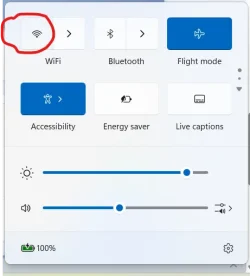
Turn on Flight mode or airplane mode and leave it on. Then reenable just the wifi and see what happens.

1778048429390.webp
 

My Computers My Computers

  • At a glance

    Windows 11 Pro 25H2 26200.8655AMD Ryzen 7 5825U with Radeon Graphics16GB
    OS
    Windows 11 Pro 25H2 26200.8655
    Computer type
    Laptop
    Manufacturer/Model
    Acemagic LX15PRO
    CPU
    AMD Ryzen 7 5825U with Radeon Graphics
    Motherboard
    BIOS CT_BI_AMI_LX15PRO_AB8139_A-004
    Memory
    16GB
    Screen Resolution
    1920 x 1080
    Hard Drives
    SSD 2TB
    Internet Speed
    30 Mbps
    Browser
    Brave
    Antivirus
    Defender/Windows Security
    Other Info
    System 3

    Acer Swift SF114-34 laptop
    OS Windows 11 Pro 26200.8655
    CPU Pentium Silver N6000
    RAM 4GB
    BIOS v1.17
    SSD Samsung 970 EVO Plus SSD 2TB (an upgrade)
  • At a glance

    Windows 11 Pro 23H2 22631.2506Atom N450 1.66GHz2GB
    Operating System
    Windows 11 Pro 23H2 22631.2506
    Computer type
    Laptop
    Manufacturer/Model
    HP Mini 210-1090NR PC (bought in late 2009!)
    CPU
    Atom N450 1.66GHz
    Memory
    2GB
    Browser
    Brave
    Antivirus
    Webroot
Download and launch this script and then restart your machine after a few minutes and wait a bit:

This will collect network info for us all here to take a look and troubleshoot and dump it on the desktop which you can then upload the zip file.

I am still leaning on it being a driver problem or something though. Not an issue with windows or the router.

It will include your network information so be wary of this. Though I made attempts to exclude IP information, You can always edit out the IP addresses if any are there before uploading.

If you don't feel comfortable, In addition to this as well:


Attachments

My Computers My Computers

  • At a glance

    Windows 11 ProRyzen 7 5700 X3D64 GB DDR4 3600mhz Gskill Ripjaws VRTX 4070 Super , 12GB VRAM Asus EVO Overclock
    OS
    Windows 11 Pro
    Computer type
    PC/Desktop
    Manufacturer/Model
    Custom Built
    CPU
    Ryzen 7 5700 X3D
    Motherboard
    MSI MPG B550 GAMING PLUS
    Memory
    64 GB DDR4 3600mhz Gskill Ripjaws V
    Graphics Card(s)
    RTX 4070 Super , 12GB VRAM Asus EVO Overclock
    Monitor(s) Displays
    Gigabyte M27Q (rev. 2.0) 2560 x 1440 @ 170hz HDR
    Hard Drives
    2TB Samsung nvme ssd
    4TB Western Digital nvme ssd
    PSU
    CORSAIR RMx SHIFT Series™ RM750x 80 PLUS Gold Fully Modular ATX Power Supply
    Case
    CORSAIR 3500X ARGB Mid-Tower ATX PC Case – Black
    Cooling
    ID-COOLING FROSTFLOW X 240 CPU Water Cooler
    Keyboard
    Logitech G213
    Mouse
    Logitech G203
    Internet Speed
    1.2gbps Fiber 😎
  • At a glance

    Chrome OSIntel Pentium Quad Core4GB LPDDR4
    Operating System
    Chrome OS
    Computer type
    Laptop
    Manufacturer/Model
    HP Chromebook
    CPU
    Intel Pentium Quad Core
    Memory
    4GB LPDDR4
    Monitor(s) Displays
    14 Inch HD SVA anti glare micro edge display
    Hard Drives
    64 GB emmc
Turn on Flight mode or airplane mode and leave it on. Then reenable just the wifi and see what happens.

View attachment 170676
I did this earlier this morning. There was no impact. Then I started a very long ChatGPT session (see summary below)
 

My Computer My Computer

At a glance

Windows 11Processor Intel(R) Core(TM) i7-8565U CPU @ 1....Installed Physical Memory (RAM) 16.0 GB
OS
Windows 11
Computer type
Laptop
Manufacturer/Model
Dell
CPU
Processor Intel(R) Core(TM) i7-8565U CPU @ 1.80GHz, 199
Motherboard
BaseBoard Manufacturer Dell Inc. BaseBoard Product 08YRWT BaseBoard Version A00
Memory
Installed Physical Memory (RAM) 16.0 GB
Download and launch this script and then restart your machine after a few minutes and wait a bit:

This will collect network info for us all here to take a look and troubleshoot and dump it on the desktop which you can then upload the zip file.

I am still leaning on it being a driver problem or something though. Not an issue with windows or the router.

It will include your network information so be wary of this. Though I made attempts to exclude IP information, You can always edit out the IP addresses if any are there before uploading.

If you don't feel comfortable, In addition to this as well:

I received this suggestion after getting knee-deep into a ChatGPT session. See below for a summary.
 

My Computer My Computer

At a glance

Windows 11Processor Intel(R) Core(TM) i7-8565U CPU @ 1....Installed Physical Memory (RAM) 16.0 GB
OS
Windows 11
Computer type
Laptop
Manufacturer/Model
Dell
CPU
Processor Intel(R) Core(TM) i7-8565U CPU @ 1.80GHz, 199
Motherboard
BaseBoard Manufacturer Dell Inc. BaseBoard Product 08YRWT BaseBoard Version A00
Memory
Installed Physical Memory (RAM) 16.0 GB
Well, I decided to take a plunge into ChatGPT today. I started around 10:00 am CDT and just finished up around 16:00 CDT. It was a long and very winding road, with the end result being diagnosed as a "partially corrupted network stack" (I don't know what this means) which I was told to "fix" by running DISM. Unfortunately, DISM could not find fix content on my PC and, by this time, I had no internet connectivity at all. Running
Code:
netsh wlan show interfaces
in a PowerShell window produced the helpful response "there is no wireless interface on the system".

At this point, ChatGPT suggested running Windows Reset. That took over an hour to run and I'm just finishing up now re-installing my programs.

But the good news is that I now have no delay in connecting to the SSID.

I wish I actually knew what went wrong and if I had any role in causing the problem (so I don't do it again), but I guess I'm going to have to be satisfied in the knowledge that the computer is running just fine now.

Thanks to everyone here for lending your expertise, support, and encouragement.
 

My Computer My Computer

At a glance

Windows 11Processor Intel(R) Core(TM) i7-8565U CPU @ 1....Installed Physical Memory (RAM) 16.0 GB
OS
Windows 11
Computer type
Laptop
Manufacturer/Model
Dell
CPU
Processor Intel(R) Core(TM) i7-8565U CPU @ 1.80GHz, 199
Motherboard
BaseBoard Manufacturer Dell Inc. BaseBoard Product 08YRWT BaseBoard Version A00
Memory
Installed Physical Memory (RAM) 16.0 GB
Hi Jim,

Glad to hear that you resolved your issue with the delayed recognition of your wifi adapter/wifi networks after boot, but sorry to hear that it took a full "Windows Reset" to resolve it! :-(

I'm having the exact same issue (about 4-minute delay before the network status tray icon even indicates that the wifi adapter is enabled and there are available networks), not with my own laptop, but with a neighbor's Dell Inspiron 15 3511 running Windows 11. This behavior "appeared suddenly," but I'm not sure exactly when that was. Everything else boots up quickly. It's just that when clicking on the network status tray icon after boot, it doesn't even show the wifi adapter as present (just BlueTooth), for about four minutes, then it finally updates to show the wifi adapter and immediately connects to the remembered network.

Based upon your experience, I'm suspecting that a recent Windows Update actually *caused/started* the problem, and that your Windows Reset backed out that update, and got you working again.

So now I'm curious if your computer is going to "revert" to the bad/4-minute-delay behavior once it re-installs all of the Windows Updates that probably got uninstalled by the "reset."

Please keep us posted if your delay behavior reverts again, and also if you're ever able to figure out exactly *why* it happened in the first place.

Thanks!

Tom
 

My Computer My Computer

At a glance

Windows 11 Pro 25H2Intel Core Ultra 7 165U 1.7GHz32GBNone (motherboard graphics)
OS
Windows 11 Pro 25H2
Computer type
Laptop
Manufacturer/Model
Lenovo ThinkPad T16 Gen 3 Type 21MN-005QUS
CPU
Intel Core Ultra 7 165U 1.7GHz
Motherboard
???
Memory
32GB
Graphics Card(s)
None (motherboard graphics)
Sound Card
None (motherboard sound)
Monitor(s) Displays
HP Pavilion 25bw
Screen Resolution
1920 x 1080
Hard Drives
SK Hynix HFS001TEJ9X162N 1TB
PSU
Whatever came with the Lenovo laptop
Case
Whatever came with the Lenovo laptop
Cooling
Whatever came with the Lenovo laptop
Keyboard
Dell wired keyboard
Mouse
HP wired mouse
Internet Speed
Variable (BrightSpeed 1GB fiber)
Browser
Chrome
Antivirus
AVAST Basic (free)
Hi Jim,

Glad to hear that you resolved your issue with the delayed recognition of your wifi adapter/wifi networks after boot, but sorry to hear that it took a full "Windows Reset" to resolve it! :-(

I'm having the exact same issue (about 4-minute delay before the network status tray icon even indicates that the wifi adapter is enabled and there are available networks), not with my own laptop, but with a neighbor's Dell Inspiron 15 3511 running Windows 11. This behavior "appeared suddenly," but I'm not sure exactly when that was. Everything else boots up quickly. It's just that when clicking on the network status tray icon after boot, it doesn't even show the wifi adapter as present (just BlueTooth), for about four minutes, then it finally updates to show the wifi adapter and immediately connects to the remembered network.

Based upon your experience, I'm suspecting that a recent Windows Update actually *caused/started* the problem, and that your Windows Reset backed out that update, and got you working again.

So now I'm curious if your computer is going to "revert" to the bad/4-minute-delay behavior once it re-installs all of the Windows Updates that probably got uninstalled by the "reset."

Please keep us posted if your delay behavior reverts again, and also if you're ever able to figure out exactly *why* it happened in the first place.

Thanks!

Tom
I actually kept my ChatGPT session up throughout the day today and decided to pursue what likely happened in more detail with it. Here is an excerpt from that session:

Most likely sequence:
  1. Dell utility updated or interacted with networking/power components
  2. A network binding or service dependency became inconsistent
  3. WLAN AutoConfig began hanging during startup
  4. Timeout eventually released it after ~5 minutes
  5. Over time, networking metadata/bindings became increasingly corrupted
  6. Deep reset attempts exposed how damaged the stack had become
Thus the working hypothesis was not it was caused by Windows Update, but rather by a Dell utility that gradually corrupted networking metadata and bindings. I noted for ChatGPT that I had run Dell SupportAssist not too long ago and that became an immediate potential cause. ChatGPT advised me to uninstall SupportAssist and all related Dell software, which I did. I'm hopeful now, having done that, the problem won't recur.

By the way, your experience sounds almost exactly the same as mine. Do you have SupportAssist installed? Do you let it run?

The ChatGPT process I went through was actually quite extensive. I needed two computers to carry on because of the frequent restarts needed on the laptop. Only after I was advised to do a "network reset" was the main problem exposed. The network reset was never completed properly and left me with "no wireless interfaces", even though Windows saw the wifi adapter.

Good luck to you as well. The reset process is very time consuming, especially as it relates to re-installing software. But it actually solved the problem I was having, when various incremental approaches, going very deep into the Windows environment, didn't.
 

My Computer My Computer

At a glance

Windows 11Processor Intel(R) Core(TM) i7-8565U CPU @ 1....Installed Physical Memory (RAM) 16.0 GB
OS
Windows 11
Computer type
Laptop
Manufacturer/Model
Dell
CPU
Processor Intel(R) Core(TM) i7-8565U CPU @ 1.80GHz, 199
Motherboard
BaseBoard Manufacturer Dell Inc. BaseBoard Product 08YRWT BaseBoard Version A00
Memory
Installed Physical Memory (RAM) 16.0 GB
@Jim Rockford

Here's ten points for filling out most of your computer specs. :-)
 

My Computers My Computers

  • At a glance

    Win 11 Home ♦♦♦26200.8655 ♦♦♦♦♦♦♦25H2AMD Ryzen 7 3700XG.Skill (F4-3200C14D-16GTZKW)EVGA RTX 2070 (08G-P4-2171-KR)
    OS
    Win 11 Home ♦♦♦26200.8655 ♦♦♦♦♦♦♦25H2
    Computer type
    PC/Desktop
    Manufacturer/Model
    Built by Ghot® [May 2020]
    CPU
    AMD Ryzen 7 3700X
    Motherboard
    Asus Pro WS X570-ACE (BIOS 5302)
    Memory
    G.Skill (F4-3200C14D-16GTZKW)
    Graphics Card(s)
    EVGA RTX 2070 (08G-P4-2171-KR)
    Sound Card
    Realtek ALC1220P / ALC S1220A
    Monitor(s) Displays
    Dell U3011 30"
    Screen Resolution
    2560 x 1600
    Hard Drives
    2x Samsung 860 EVO 500GB,
    WD 4TB Black FZBX - SATA III,
    WD 8TB Black FZBX - SATA III,
    DRW-24B1ST CD/DVD Burner
    PSU
    PC Power & Cooling 750W Quad EPS12V
    Case
    Cooler Master ATCS 840 Tower
    Cooling
    CM Hyper 212 EVO (push/pull)
    Keyboard
    Ducky DK9008 Shine II Blue LED
    Mouse
    Logitech Optical M-100
    Internet Speed
    300/300
    Browser
    Firefox (latest)
    Antivirus
    Bitdefender Total Security
    Other Info
    Speakers: Klipsch Pro Media 2.1
  • At a glance

    Windows XP Pro 32bit w/SP3AMD Athlon 64 X2 5000+ (OC'd @ 3.2Ghz)TWIN2X2048-6400C4DHX (2 x 1GB, DDR2 800)EVGA 256-P2-N758-TR GeForce 8600GT SSC
    Operating System
    Windows XP Pro 32bit w/SP3
    Computer type
    PC/Desktop
    Manufacturer/Model
    Built by Ghot® (not in use)
    CPU
    AMD Athlon 64 X2 5000+ (OC'd @ 3.2Ghz)
    Motherboard
    ASUS M2N32-SLI Deluxe Wireless Edition
    Memory
    TWIN2X2048-6400C4DHX (2 x 1GB, DDR2 800)
    Graphics card(s)
    EVGA 256-P2-N758-TR GeForce 8600GT SSC
    Sound Card
    Onboard
    Monitor(s) Displays
    ViewSonic G90FB Black 19" Professional (CRT)
    Screen Resolution
    up to 2048 x 1536
    Hard Drives
    WD 36GB 10,000rpm Raptor SATA
    Seagate 80GB 7200rpm SATA
    Lite-On LTR-52246S CD/RW
    Lite-On LH-18A1P CD/DVD Burner
    PSU
    PC Power & Cooling Silencer 750 Quad EPS12V
    Case
    Generic Beige case, 80mm fans
    Cooling
    ZALMAN 9500A 92mm CPU Cooler
    Keyboard
    Logitech Classic Keybooard 200
    Mouse
    Logitech Optical M-BT96a
    Internet Speed
    300/300
    Browser
    Firefox 3.x ??
    Antivirus
    Symantec (Norton)
    Other Info
    Still assembled, still runs. Haven't turned it on for 15 years?

My Computer My Computer

At a glance

Windows 11Processor Intel(R) Core(TM) i7-8565U CPU @ 1....Installed Physical Memory (RAM) 16.0 GB
OS
Windows 11
Computer type
Laptop
Manufacturer/Model
Dell
CPU
Processor Intel(R) Core(TM) i7-8565U CPU @ 1.80GHz, 199
Motherboard
BaseBoard Manufacturer Dell Inc. BaseBoard Product 08YRWT BaseBoard Version A00
Memory
Installed Physical Memory (RAM) 16.0 GB

My Computers My Computers

  • At a glance

    Win 11 Home ♦♦♦26200.8655 ♦♦♦♦♦♦♦25H2AMD Ryzen 7 3700XG.Skill (F4-3200C14D-16GTZKW)EVGA RTX 2070 (08G-P4-2171-KR)
    OS
    Win 11 Home ♦♦♦26200.8655 ♦♦♦♦♦♦♦25H2
    Computer type
    PC/Desktop
    Manufacturer/Model
    Built by Ghot® [May 2020]
    CPU
    AMD Ryzen 7 3700X
    Motherboard
    Asus Pro WS X570-ACE (BIOS 5302)
    Memory
    G.Skill (F4-3200C14D-16GTZKW)
    Graphics Card(s)
    EVGA RTX 2070 (08G-P4-2171-KR)
    Sound Card
    Realtek ALC1220P / ALC S1220A
    Monitor(s) Displays
    Dell U3011 30"
    Screen Resolution
    2560 x 1600
    Hard Drives
    2x Samsung 860 EVO 500GB,
    WD 4TB Black FZBX - SATA III,
    WD 8TB Black FZBX - SATA III,
    DRW-24B1ST CD/DVD Burner
    PSU
    PC Power & Cooling 750W Quad EPS12V
    Case
    Cooler Master ATCS 840 Tower
    Cooling
    CM Hyper 212 EVO (push/pull)
    Keyboard
    Ducky DK9008 Shine II Blue LED
    Mouse
    Logitech Optical M-100
    Internet Speed
    300/300
    Browser
    Firefox (latest)
    Antivirus
    Bitdefender Total Security
    Other Info
    Speakers: Klipsch Pro Media 2.1
  • At a glance

    Windows XP Pro 32bit w/SP3AMD Athlon 64 X2 5000+ (OC'd @ 3.2Ghz)TWIN2X2048-6400C4DHX (2 x 1GB, DDR2 800)EVGA 256-P2-N758-TR GeForce 8600GT SSC
    Operating System
    Windows XP Pro 32bit w/SP3
    Computer type
    PC/Desktop
    Manufacturer/Model
    Built by Ghot® (not in use)
    CPU
    AMD Athlon 64 X2 5000+ (OC'd @ 3.2Ghz)
    Motherboard
    ASUS M2N32-SLI Deluxe Wireless Edition
    Memory
    TWIN2X2048-6400C4DHX (2 x 1GB, DDR2 800)
    Graphics card(s)
    EVGA 256-P2-N758-TR GeForce 8600GT SSC
    Sound Card
    Onboard
    Monitor(s) Displays
    ViewSonic G90FB Black 19" Professional (CRT)
    Screen Resolution
    up to 2048 x 1536
    Hard Drives
    WD 36GB 10,000rpm Raptor SATA
    Seagate 80GB 7200rpm SATA
    Lite-On LTR-52246S CD/RW
    Lite-On LH-18A1P CD/DVD Burner
    PSU
    PC Power & Cooling Silencer 750 Quad EPS12V
    Case
    Generic Beige case, 80mm fans
    Cooling
    ZALMAN 9500A 92mm CPU Cooler
    Keyboard
    Logitech Classic Keybooard 200
    Mouse
    Logitech Optical M-BT96a
    Internet Speed
    300/300
    Browser
    Firefox 3.x ??
    Antivirus
    Symantec (Norton)
    Other Info
    Still assembled, still runs. Haven't turned it on for 15 years?
Well, you should probably add whatever drives you have.
"Ten points" is a good thing. :-)
OK. Thanks. I thought you might be mocking me for some reason. Nothing wrong with that but I'd just want to know why. But you're not, so we're good.

I'll update my specs when I get some time! :-)
 

My Computer My Computer

At a glance

Windows 11Processor Intel(R) Core(TM) i7-8565U CPU @ 1....Installed Physical Memory (RAM) 16.0 GB
OS
Windows 11
Computer type
Laptop
Manufacturer/Model
Dell
CPU
Processor Intel(R) Core(TM) i7-8565U CPU @ 1.80GHz, 199
Motherboard
BaseBoard Manufacturer Dell Inc. BaseBoard Product 08YRWT BaseBoard Version A00
Memory
Installed Physical Memory (RAM) 16.0 GB
To Jim Rockford's question about the Dell "Support Assist" utility, yes, that has been run/is running on the computer in question (again, a Dell Inspiron 15 3511). It isn't my computer; it's a neighbor's/friends that I was recently helping with an SSD upgrade, and she indicated that it was "recent" that the computer started having this 4-minute delay when booting up, and I determined that it was just the wifi adapter/connection that was getting delayed. Again, everything else about the boot runs quickly. But it's just the network connection won't get established for an additional four minutes, and the computer doesn't even recognize that it has a wifi adapter (RealTek) in the system until those four minutes elapse. I used the services.msc utility to check the status of the WLAN Auto-Config service, and it was simply set to "auto" (and not the "auto-delayed start" setting), and I even checked it during that 4-minute interval on boot *before* the computer started recognizing the presence of the wifi adapter, and the WLAN service showed as enabled/running, despite no wifi adapter seeming to be present/recognized.

So it seems reasonable that the problem was introduced by a *DELL* update, as opposed to a Windows Update, but hard to be sure.

I've already tried a "network reset," with no impact. And I've turned off the "fast start" option as suggested elsewhere. And I've disabled just about all "startup" items.

I was thinking that something in AVAST Antivirus might be the culprit, but that seems to not have any impact either.

I'm still hoping that a future Dell (or Windows) update will resolve the issue. I'd rather not have to help my neighbor through a full Windows reset, and re-install of her apps.

Tom
 

My Computer My Computer

At a glance

Windows 11 Pro 25H2Intel Core Ultra 7 165U 1.7GHz32GBNone (motherboard graphics)
OS
Windows 11 Pro 25H2
Computer type
Laptop
Manufacturer/Model
Lenovo ThinkPad T16 Gen 3 Type 21MN-005QUS
CPU
Intel Core Ultra 7 165U 1.7GHz
Motherboard
???
Memory
32GB
Graphics Card(s)
None (motherboard graphics)
Sound Card
None (motherboard sound)
Monitor(s) Displays
HP Pavilion 25bw
Screen Resolution
1920 x 1080
Hard Drives
SK Hynix HFS001TEJ9X162N 1TB
PSU
Whatever came with the Lenovo laptop
Case
Whatever came with the Lenovo laptop
Cooling
Whatever came with the Lenovo laptop
Keyboard
Dell wired keyboard
Mouse
HP wired mouse
Internet Speed
Variable (BrightSpeed 1GB fiber)
Browser
Chrome
Antivirus
AVAST Basic (free)

Latest Support Threads

Back
Top Bottom