Windows 11 Pro and Webroot Secure Anywhere


EB2XR6

Active member
Member
VIP
Local time
2:17 PM
Posts
548
OS
Windows 11
Hi
I am runnning Windows 11 Pro 25H2 Build 26200.7171.
I have been a long time Webroor Secure Anywhere user and have had very few issues.
I noticed that Windows Defender was being reported as the Default Security App in Windows Securiy.
I shutdown the Computer, restarted , logged back in and noticed the Virus and Threat Protiection was scanning for a couple of minutes before it acknowledged Webroot as the default app.
Previously Webroot once installed would be listed in Windows Security straight after startup.
Ran DISM /Online /Cleanup-Image /CheckHealth, DISM /Online /Cleanup-Image /ScanHealth , SFC /Scannow in that order and no issues reported

I am hoping someone may have an idea of what is going on please?
Regards
EB2XR6
 

My Computer

System One

  • OS
    Windows 11
    Computer type
    PC/Desktop
    Manufacturer/Model
    Generic
    CPU
    AMD Ryzen 8700G
    Motherboard
    Gigabyte B650 UD AC
    Memory
    64 GB
    Graphics Card(s)
    Onboard
    Sound Card
    Onboard
    Monitor(s) Displays
    Del U2723QE
    Screen Resolution
    3840 x 2160
    Hard Drives
    Corsiar MP600 1TB
    PSU
    Silverstone 750 GOLD
    Case
    Silverstone FARA 513
Either do a repair or remove and reinstall Webroot. It should register with WSC which should signal Windows to disable Defender
 

My Computer

System One

  • OS
    Linux Mint
    Computer type
    Laptop
    Manufacturer/Model
    System76 Lemur Pro
I
Either do a repair or remove and reinstall Webroot. It should register with WSC which should signal Windows to disable Defender
I did an uninstall and reinstall of Webroot didn't help.
What ever is happening it is really slowing the system down.
I have lodged a support ticket, I forgot about the long weekend not being in the USA.
I will stick with Windows Defender for a few days.
 

My Computer

System One

  • OS
    Windows 11
    Computer type
    PC/Desktop
    Manufacturer/Model
    Generic
    CPU
    AMD Ryzen 8700G
    Motherboard
    Gigabyte B650 UD AC
    Memory
    64 GB
    Graphics Card(s)
    Onboard
    Sound Card
    Onboard
    Monitor(s) Displays
    Del U2723QE
    Screen Resolution
    3840 x 2160
    Hard Drives
    Corsiar MP600 1TB
    PSU
    Silverstone 750 GOLD
    Case
    Silverstone FARA 513
I used to use webroot for years too. To fully uninstall it, you have to do this:


open command prompt as Admin:

c:\program files\webroot\wrsa.exe -uninstall

------------------------------------------------------


BOOT INTO SAFE MODE
------------------------------------------------------

sc delete WRSkyClient
sc delete WRCoreService
sc delete WRSVC
------------------------------------------------------

FIND THESE & ANY OHTER REALTED IN DIRECTORIES:

C:\windows\system32\drivers\wrkrn.sys
C:\windows\system32\wruser.dll
C:\program files\webroot
C:\Program Files (x86)\Webroot
C:\ProgramData\WRCore
C:\ProgramData\WRData
------------------------------------------------------

REGISTRY ENTRIES TO DELETE & FIND ANY RELATED:

HKLM\SOFTWARE\Microsoft\Windows\CurrentVersion\WRUNINST
HKLM\SOFTWARE\WRData
HKLM\SYSTEM\ControlSet001\services\WRSVC
HKLM\SYSTEM\ControlSet002\services\WRSVC
HKLM\SYSTEM\CurrentControlSet\services\WRSVC
HKLM\SOFTWARE\WOW6432Node\Webroot

------------------------------------------------------

Remove Webroot from Windows Management Instrumentation because otherwise your RMM will think it is still there and it will cause issues with new AV's you use:

open PowerShell as Admin:

Get-WmiObject -Namespace "root\SecurityCenter2" -Class AntiVirusProduct
*Annotate Webroot's GUID

Remove-WmiObject -path \\localhost\ROOT\SecurityCenter2:AntiVirusProduct.instanceGuid="{WEBROOT-GUID-HERE}"
 

My Computer

System One

  • OS
    Windows 11 Pro
I used to use webroot for years too. To fully uninstall it, you have to do this:


open command prompt as Admin:

c:\program files\webroot\wrsa.exe -uninstall

------------------------------------------------------


BOOT INTO SAFE MODE
------------------------------------------------------

sc delete WRSkyClient
sc delete WRCoreService
sc delete WRSVC
------------------------------------------------------

FIND THESE & ANY OHTER REALTED IN DIRECTORIES:

C:\windows\system32\drivers\wrkrn.sys
C:\windows\system32\wruser.dll
C:\program files\webroot
C:\Program Files (x86)\Webroot
C:\ProgramData\WRCore
C:\ProgramData\WRData
------------------------------------------------------

REGISTRY ENTRIES TO DELETE & FIND ANY RELATED:

HKLM\SOFTWARE\Microsoft\Windows\CurrentVersion\WRUNINST
HKLM\SOFTWARE\WRData
HKLM\SYSTEM\ControlSet001\services\WRSVC
HKLM\SYSTEM\ControlSet002\services\WRSVC
HKLM\SYSTEM\CurrentControlSet\services\WRSVC
HKLM\SOFTWARE\WOW6432Node\Webroot

------------------------------------------------------

Remove Webroot from Windows Management Instrumentation because otherwise your RMM will think it is still there and it will cause issues with new AV's you use:

open PowerShell as Admin:

Get-WmiObject -Namespace "root\SecurityCenter2" -Class AntiVirusProduct
*Annotate Webroot's GUID

Remove-WmiObject -path \\localhost\ROOT\SecurityCenter2:AntiVirusProduct.instanceGuid="{WEBROOT-GUID-HERE}"
Thank you, Dracone, I wiped the system and reinstalled Windows. Just found it easier than mucking around.
There is a not lot on the system Windows, Microsoft 365, a couple of graphics programs and few other things.
 

My Computer

System One

  • OS
    Windows 11
    Computer type
    PC/Desktop
    Manufacturer/Model
    Generic
    CPU
    AMD Ryzen 8700G
    Motherboard
    Gigabyte B650 UD AC
    Memory
    64 GB
    Graphics Card(s)
    Onboard
    Sound Card
    Onboard
    Monitor(s) Displays
    Del U2723QE
    Screen Resolution
    3840 x 2160
    Hard Drives
    Corsiar MP600 1TB
    PSU
    Silverstone 750 GOLD
    Case
    Silverstone FARA 513
I used to use webroot for years too. To fully uninstall it, you have to do this:


open command prompt as Admin:

c:\program files\webroot\wrsa.exe -uninstall

------------------------------------------------------


BOOT INTO SAFE MODE
------------------------------------------------------

sc delete WRSkyClient
sc delete WRCoreService
sc delete WRSVC
------------------------------------------------------

FIND THESE & ANY OHTER REALTED IN DIRECTORIES:


Remove Webroot from Windows Management Instrumentation because otherwise your RMM will think it is still there and it will cause issues with new AV's you use:

open PowerShell as Admin:

Get-WmiObject -Namespace "root\SecurityCenter2" -Class AntiVirusProduct
*Annotate Webroot's GUID

Remove-WmiObject -path \\localhost\ROOT\SecurityCenter2:AntiVirusProduct.instanceGuid="{WEBROOT-GUID-HERE}"
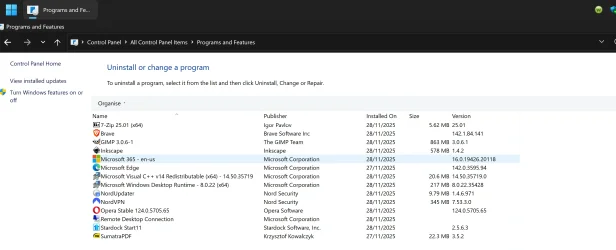
Further to this Webroot Support got back to me to run tests, so I installed Webroot and now it is not showing up in Control Panel Programs and Features.
I have bit locker on the System so its a pain in the arse to uninstall.
 

Attachments

  • No Webroot.webp
    No Webroot.webp
    190.8 KB · Views: 2

My Computer

System One

  • OS
    Windows 11
    Computer type
    PC/Desktop
    Manufacturer/Model
    Generic
    CPU
    AMD Ryzen 8700G
    Motherboard
    Gigabyte B650 UD AC
    Memory
    64 GB
    Graphics Card(s)
    Onboard
    Sound Card
    Onboard
    Monitor(s) Displays
    Del U2723QE
    Screen Resolution
    3840 x 2160
    Hard Drives
    Corsiar MP600 1TB
    PSU
    Silverstone 750 GOLD
    Case
    Silverstone FARA 513
I used to use webroot for years too. To fully uninstall it, you have to do this:

I used to use webroot for years too. To fully uninstall it, you have to do this:


open command prompt as Admin:

c:\program files\webroot\wrsa.exe -uninstall

------------------------------------------------------


BOOT INTO SAFE MODE
------------------------------------------------------

sc delete WRSkyClient
sc delete WRCoreService
sc delete WRSVC
------------------------------------------------------

FIND THESE & ANY OHTER REALTED IN DIRECTORIES:

C:\windows\system32\drivers\wrkrn.sys
Dacrone Thank you again for your help.
Webroot sent me some software to run logs and after they examined the logs they said it was running despite Windows spending a couple of minutes acknowledging Webroot in Virus and Threat Protection. When I told them about Webroot not showing up in Control Panel Programs and Features or Appwiz they sent me a link to another version to install. I ran it for an hour, did a few reboots and it Windows still spemt a couple of minutes scanning to list Webroot as the Virus and Malware App.
This time I uninstalled using Revo and I searched for all the settings you sent me and I could not find anything.
I also ran the two powershell commands as well.
 

My Computer

System One

  • OS
    Windows 11
    Computer type
    PC/Desktop
    Manufacturer/Model
    Generic
    CPU
    AMD Ryzen 8700G
    Motherboard
    Gigabyte B650 UD AC
    Memory
    64 GB
    Graphics Card(s)
    Onboard
    Sound Card
    Onboard
    Monitor(s) Displays
    Del U2723QE
    Screen Resolution
    3840 x 2160
    Hard Drives
    Corsiar MP600 1TB
    PSU
    Silverstone 750 GOLD
    Case
    Silverstone FARA 513
Back
Top Bottom