Windows 11 problems after system recovery, can't connect to network, USB won't work, stuck on error screen


Veritas54

New member
Local time
11:39 AM
Posts
2
OS
Window 11
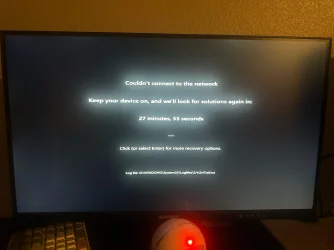
I used system recovery on my computer. When I turn the computer on, it gives a message saying "trying to connect to network" until I get a "cannot connect to network" error and a notice to check the srtrail.txt file.

Mouse and keyboard will not work. USB stick with Windows 11 installation will not work either. USB worked fine before the system recovery. I do not have a CD drive on my computer.

Thanks in advance.
 
Windows Build/Version
11
Last edited:

My Computer

System One

  • OS
    Window 11
    Computer type
    PC/Desktop
    Motherboard
    ASRock
I used system recovery on my computer
Welcome to the forum. Could your give a little more information than that so we can know what you're working with..
First, in your forum profile your specs are not complete. Please give as much about your device as possible, version of windows 11, cpu, amount of ram, motherboard model.

Then tell us what problems you were having that led up to you using recovery. What action did you actually do in recovery. Does Windows boot properly now. You say stuck on error screen. What is the error?
 

My Computers

System One System Two

  • OS
    Windows 11 Pro 25H2
    Computer type
    PC/Desktop
    Manufacturer/Model
    Dell Optiplex 7080
    CPU
    i9-10900 10 core 20 threads
    Motherboard
    DELL 0J37VM
    Memory
    32 gb
    Graphics Card(s)
    none-Intel UHD Graphics 630
    Sound Card
    Integrated Realtek
    Monitor(s) Displays
    Benq 27
    Screen Resolution
    2560x1440
    Hard Drives
    2x1tb Solidigm m.2 nvme /External drives 512gb Samsung m.2 sata+2tb Kingston m2.nvme
    PSU
    500w
    Case
    MT
    Cooling
    Dell Premium
    Keyboard
    Logitech wired
    Mouse
    Logitech wireless
    Internet Speed
    so slow I'm too embarrassed to tell
    Browser
    #1 Edge #2 Firefox
    Antivirus
    Defender+MWB Premium
  • Operating System
    Windows 11 Pro 24H2 26200.8457
    Computer type
    PC/Desktop
    Manufacturer/Model
    Beelink Mini PC SER5
    CPU
    AMD Ryzen 7 6800U
    Memory
    32 gb
    Graphics card(s)
    integrated
    Sound Card
    integrated
    Monitor(s) Displays
    Benq 27
    Screen Resolution
    2560x1440
    Hard Drives
    1TB Crucial nvme
    Keyboard
    Logitech wired
    Mouse
    Logitech wireless
    Internet Speed
    still too embarrassed to tell
    Browser
    Firefox
    Antivirus
    Defender
    Other Info
    System 3 is non compliant Dell 9020 i7-4770/24gb ram Win11 PRO 26200.8457
Do you recall if Windows Update installed the Out of Band (emergency) Update KB5070773?

The normal Oct. 2025 monthly update (KB5066835) broke USB support in Windows Recovery. USB devices stopped working, including USB-based keyboards and mice. KB5070773 was released as an emergency fix to repair the USB problem, but not everyone may have installed it.

Are you able to boot into normal Windows? If you can, then search Windows Update and install the latest Monthly Update to fix WinRE.
 

My Computer

System One

  • OS
    Windows 7
Do you recall if Windows Update installed the Out of Band (emergency) Update KB5070773?

The normal Oct. 2025 monthly update (KB5066835) broke USB support in Windows Recovery. USB devices stopped working, including USB-based keyboards and mice. KB5070773 was released as an emergency fix to repair the USB problem, but not everyone may have installed it.

Are you able to boot into normal Windows? If you can, then search Windows Update and install the latest Monthly Update to fix WinRE.


PC started doing this on October 16.

I cannot boot into normal Windows.

As mouse and keyboard do not work I cannot do anything but watch it countdown and restart over and over. My PC does not have PS/2 ports either.
 

Attachments

  • eenyffits6wf1.webp
    eenyffits6wf1.webp
    601.5 KB · Views: 5

My Computer

System One

  • OS
    Window 11
    Computer type
    PC/Desktop
    Motherboard
    ASRock
KB5066835 was rolled out on Oct. 14. You're going to need to download another copy of 24H2 or 25H2, using MediaCreationTool on another working PC. then you can follow instructions to overwrite the current WinRE.

I haven't done it myself, but I believe there's another ElevenForum thread where folks have figured out how to get it working again. They'll have more specifics on what needs to be done. Maybe @glasskuter knows which thread.
 

My Computer

System One

  • OS
    Windows 7
Maybe @glasskuter knows which thread.
No I know of no workaround. If there is one, I missed the thread that gave it. I just know about the OOB update on 10/20 that fixed it.


My Computers

System One System Two

  • OS
    Windows 11 Pro 25H2
    Computer type
    PC/Desktop
    Manufacturer/Model
    Dell Optiplex 7080
    CPU
    i9-10900 10 core 20 threads
    Motherboard
    DELL 0J37VM
    Memory
    32 gb
    Graphics Card(s)
    none-Intel UHD Graphics 630
    Sound Card
    Integrated Realtek
    Monitor(s) Displays
    Benq 27
    Screen Resolution
    2560x1440
    Hard Drives
    2x1tb Solidigm m.2 nvme /External drives 512gb Samsung m.2 sata+2tb Kingston m2.nvme
    PSU
    500w
    Case
    MT
    Cooling
    Dell Premium
    Keyboard
    Logitech wired
    Mouse
    Logitech wireless
    Internet Speed
    so slow I'm too embarrassed to tell
    Browser
    #1 Edge #2 Firefox
    Antivirus
    Defender+MWB Premium
  • Operating System
    Windows 11 Pro 24H2 26200.8457
    Computer type
    PC/Desktop
    Manufacturer/Model
    Beelink Mini PC SER5
    CPU
    AMD Ryzen 7 6800U
    Memory
    32 gb
    Graphics card(s)
    integrated
    Sound Card
    integrated
    Monitor(s) Displays
    Benq 27
    Screen Resolution
    2560x1440
    Hard Drives
    1TB Crucial nvme
    Keyboard
    Logitech wired
    Mouse
    Logitech wireless
    Internet Speed
    still too embarrassed to tell
    Browser
    Firefox
    Antivirus
    Defender
    Other Info
    System 3 is non compliant Dell 9020 i7-4770/24gb ram Win11 PRO 26200.8457

Latest Support Threads

Back
Top Bottom