- Local time
- 9:17 AM
- Posts
- 727
- OS
- Windows 11 Pro build 26200.8524
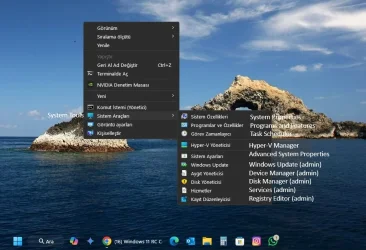
Desktop Right-Click context menu -> New menu, when expanding downwards, is positioned correctly. Starts from top side of the New menu box. Reference white line in below screenshot.
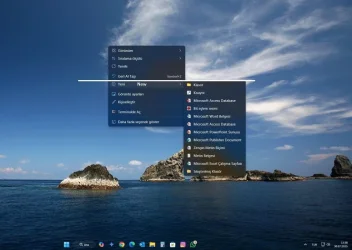
Desktop Right-Click context menu -> More options -> New menu, when expanding downwards, is positioned correctly. Starts from top side of the New menu box. Reference white line in below screenshot.
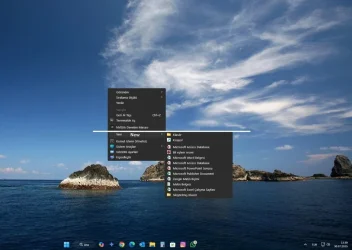
Desktop Right-Click context menu -> New menu, when expanding upwards, is positioned incorrectly. Starts from top side of the New menu box. Should start from bottom side of the New menu box. Reference yellow line in below screenshot.
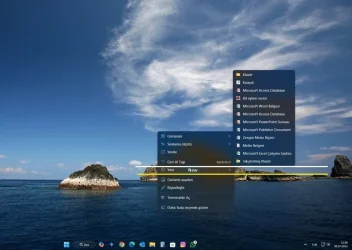
Desktop Right-Click context menu -> More options -> New menu, when expanding upwards, is positioned correctly. Starts from bottom side of the New menu box. Reference white line in below screenshot.
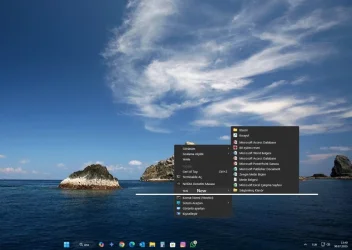
Does anyone else have this nuisance ?
Desktop Right-Click context menu -> More options -> New menu, when expanding downwards, is positioned correctly. Starts from top side of the New menu box. Reference white line in below screenshot.
Desktop Right-Click context menu -> New menu, when expanding upwards, is positioned incorrectly. Starts from top side of the New menu box. Should start from bottom side of the New menu box. Reference yellow line in below screenshot.
Desktop Right-Click context menu -> More options -> New menu, when expanding upwards, is positioned correctly. Starts from bottom side of the New menu box. Reference white line in below screenshot.
Does anyone else have this nuisance ?
My Computers
-
At a glance
Windows 11 Pro build 26200.8524Intel i7-4790Teams DDR3-1600 4x4 GBMSI Nvidia GeForce GTX 1050Ti- OS
- Windows 11 Pro build 26200.8524
- Computer type
- PC/Desktop
- Manufacturer/Model
- Home Built
- CPU
- Intel i7-4790
- Motherboard
- Asus H97 Pro Gamer with add-on TPM1.2 module
- Memory
- Teams DDR3-1600 4x4 GB
- Graphics Card(s)
- MSI Nvidia GeForce GTX 1050Ti
- Sound Card
- Realtek ALC1150
- Monitor(s) Displays
- Dell P2425D
- Screen Resolution
- 2560 by 1440 pixels
- Hard Drives
- Corsair NVMe M.2 Core XT 1000 GB (Windows 11 v.25H2); Samsung SATA Evo 870 500 GB (Windows 11 v.25H2);
- PSU
- Corsair HX850
- Case
- Gigabyte Solo 210
- Cooling
- Zalman CNPS7X Tower
- Keyboard
- Microsoft AIO Wireless (includes touchpad)
- Mouse
- HP S1000 Plus Wireless
- Internet Speed
- 500 Mb fiber optic
- Browser
- Chrome; MS Edge
- Antivirus
- Windows Defender
-
At a glance
MacOS 12 MontereyIntel Core i58 GBIntel integrated- Operating System
- MacOS 12 Monterey
- Computer type
- Laptop
- Manufacturer/Model
- Apple Macbook Air
- CPU
- Intel Core i5
- Memory
- 8 GB
- Graphics card(s)
- Intel integrated
- Screen Resolution
- 1440 by 900 pixels
- Hard Drives
- 128 GB
- Keyboard
- Built-in
- Mouse
- Microsoft Wireless
- Internet Speed
- 802.11 ac
- Browser
- Chrome; Safari
- Antivirus
- N/A