Windows 11 Recovery Tools - Bootable Rescue Disk


Prince Akai

Active member
Local time
12:13 AM
Posts
2
OS
Windows 11
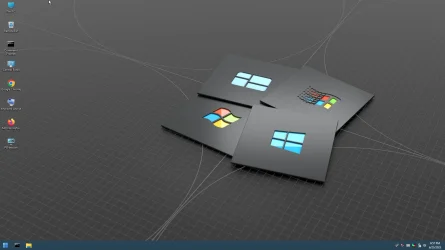
Windows 11 Recovery Tools - Bootable PE Rescue Disk
Created a Custom Windows 11 Recovery Tools and Bootable Rescue Disk in ISO format
Based on the Win10XPE project found on TheOven.org - Thanks to those that contributed..
It allows you access to any non-working system and provides you a visual means to repair that system.
You would have to download the ISO and then burn it to USB or CD to create a bootable WinPE disk.
Win10TestPE-2025-06-23-18-57-25.webp
 

My Computer

System One

  • OS
    Windows 11
    Computer type
    PC/Desktop
    Manufacturer/Model
    2022 Custom Built
    CPU
    Ryzen 5 3600
    Motherboard
    MSI A520M-A PRO
    Memory
    16GB DDR4
    Graphics Card(s)
    NVIDIA GTX 1650
    Sound Card
    Onboard
    Monitor(s) Displays
    3
    Screen Resolution
    1920x1080 x2 1680x1050 portrait x1
    Hard Drives
    1TB M.2 512gb sata
    PSU
    460W
    Case
    Zalman T6
    Cooling
    Id cooling
    Keyboard
    Kb216
    Mouse
    Gaming mouse
    Internet Speed
    Good
    Browser
    Chrome
    Antivirus
    Defender
KYHI Rescue media is well known by the online community and has been used by thousands of people. Running across this post gives me the opportunity to personally thank you @KYHI for your hard work that you freely shared with us. Like so many others, I used your rescue media multiple times over the years.
 

My Computers

System One System Two

  • OS
    Windows 11 Pro 25H2 26200.8655
    Computer type
    PC/Desktop
    Manufacturer/Model
    Dell Optiplex 7080
    CPU
    i9-10900 10 core 20 threads
    Motherboard
    DELL 0J37VM
    Memory
    32 gb
    Graphics Card(s)
    none-Intel UHD Graphics 630
    Sound Card
    Integrated Realtek
    Monitor(s) Displays
    Benq 27
    Screen Resolution
    2560x1440
    Hard Drives
    2x1tb Solidigm m.2 nvme /External drives 512gb Samsung m.2 sata+2tb Kingston m2.nvme
    PSU
    500w
    Case
    MT
    Cooling
    Dell Premium
    Keyboard
    Logitech wired
    Mouse
    Logitech wireless
    Internet Speed
    so slow I'm too embarrassed to tell
    Browser
    #1 Edge #2 Firefox
    Antivirus
    Defender+MWB Premium
  • Operating System
    Windows 11 Pro 24H2 26200.8457
    Computer type
    PC/Desktop
    Manufacturer/Model
    Beelink Mini PC SER5
    CPU
    AMD Ryzen 7 6800U
    Memory
    32 gb
    Graphics card(s)
    integrated
    Sound Card
    integrated
    Monitor(s) Displays
    Benq 27
    Screen Resolution
    2560x1440
    Hard Drives
    1TB Crucial nvme
    Keyboard
    Logitech wired
    Mouse
    Logitech wireless
    Internet Speed
    still too embarrassed to tell
    Browser
    Firefox
    Antivirus
    Defender
    Other Info
    System 3 is non compliant Dell 9020 i7-4770/24gb ram Win11 PRO 26200.8457
KYHI Rescue media is well known by the online community and has been used by thousands of people. Running across this post gives me the opportunity to personally thank you @KYHI for your hard work that you freely shared with us. Like so many others, I used your rescue media multiple times over the years.
These days I'd suggest a better less contraversial method (KYHI's disk was great a few years ago but technology moves on). It's simple to make a fully blown Windows2GO bootable system - especially with cheap external 1TB NvMe (SSD type) devices available with small enclosures about as thick as a cuban cigar so really portable.

You can even have several different windows versions on it, a Macrium PE bootable rescue system, other Windows PE system(s) Windows server,several Linux distros etc etc.

The easiest way to get started is to do do the following using your existing system.

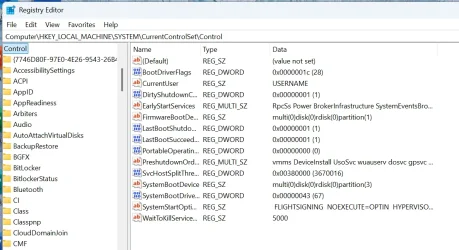
1) set the portable OS reg key to Hex '1' (don't forget to set it again to '0' after cloning) !!!! -- If the key doesn't exist then OK just go to step 2).


Screenshot 2025-06-24 111411.webp

2) clone to the external device

3) boot the external device

4) customize to your hearts content. Add other windows versions, other OS's (Linux distros), stand alone bootable software, WinPE system, etc.

To create from scratch simply on the external device create a decent size efi partition (I'd suggest of around 400mb - depending on the number of bootable systems you want the boot loader to handle, then create a number of partitions for your OS'es. Then install an initial windows system by booting a windows install device -->repair system .-->command mode. Then in diskpart assume Partition W for Windows and S for the EFI partition (formatted fat32)

(you can assign these letters for this process in diskpart by list vol and select the relevant volume with assign letter=<letter>

just run dism /Apply-Image /ImageFile:install.wim /Index:<nr of image -- usually 1> /ApplyDir:W:\

when that's run now cd W:\cd\Windows\system32, cd W, bcdboot W:\windows /s S: /f UEFI

before running the apply image ensure you have by cd command entered the directory where your install / boot.wim file is e.g cd c:\sources, cd c:

then reboot into the external device and you should see the Windows OOBE start up for the graphical part of the install as normal.

Really simple , useful and indespensible.

(note if you clone a windows system from this device back to your HDD remember to set the portable OS to '0' or Windows will think the internal disk is a USB device and will restrict all sorts of things !!!!

@KYHI

Loved your stuff in the past -- thanks -- but I think my way to do it is much better and easier now with current hardware - plus you don't have to spend any time on your own maintaining it other than just applying updates via WU for Windows or updates via the Linux package managers from the Linux distro sites. The main ones - Debian, ArchLinux,Fedora, Ubuntu, OpenSuse are all pretty good these days with stable offerings and reliable updates.

If you use the cloning method and it doesn't boot -- very rare - it's probably because there's no portable OS key in the registry. Simply boot a windows install disk and go through the steps to install just the bootloader (bcdboot) to the external device which will create the appropriate registry entry - and it will boot.

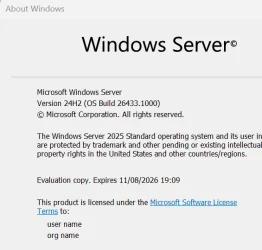
I'm also running a "trial 180 day version" of Windows 2025 LTSC server -- you can extend the trial up to 5 times so a nice long period !!! on this stick. I;ve also cloned the whole stick to a 2nd one (always good for backup) via a Linux simple DD command.


Cheers
jimbo

 
Last edited:

My Computer

System One

  • OS
    Windows XP,11 Linux Fedora Rawhide pre-release 45
    Computer type
    PC/Desktop
    CPU
    2 X Intel i7
    Screen Resolution
    4KUHD X 2
Hi folks

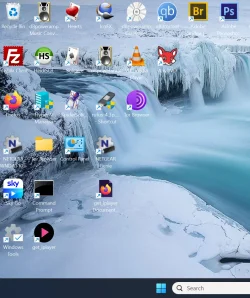
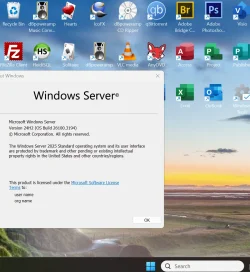
Here's an addendum to my previous post -- on my "All purpose" stick here's Windows 2025 LTSC server -- which I've frigged around a bit so it's actually a FANTASTIC bloat free fast desktop OS!!!! - needs a bit of work but blows bog standard Windows to shame!! And it gives the best from W10 and W11 (a sort of hybrid).


Capture.webp

server.webp


and a Canary preview version (all on the same stick)

Capture.webp

Cheers
jimbo
 

Attachments

  • Capture.webp
    Capture.webp
    31.9 KB · Views: 4
Last edited:

My Computer

System One

  • OS
    Windows XP,11 Linux Fedora Rawhide pre-release 45
    Computer type
    PC/Desktop
    CPU
    2 X Intel i7
    Screen Resolution
    4KUHD X 2
Windows 11 Recovery Tools - Bootable PE Rescue Disk
Created a Custom Windows 11 Recovery Tools and Bootable Rescue Disk in ISO format
Based on the Win10XPE project found on TheOven.org - Thanks to those that contributed..
It allows you access to any non-working system and provides you a visual means to repair that system.
You would have to download the ISO and then burn it to USB or CD to create a bootable WinPE disk.
View attachment 137633
So where is the link ?
 

My Computer

System One

  • OS
    Windows 7, Windows 10, Windows 11
    Computer type
    PC/Desktop
    Manufacturer/Model
    Dell
You do not have to download an iso to have a recovery drive although an iso can get you into recovery options, but then so can this..

Screenshot 2026-02-13 160633.webp
 

My Computers

System One System Two

  • OS
    Windows 11 Pro 25H2 26200.8655
    Computer type
    PC/Desktop
    Manufacturer/Model
    Dell Optiplex 7080
    CPU
    i9-10900 10 core 20 threads
    Motherboard
    DELL 0J37VM
    Memory
    32 gb
    Graphics Card(s)
    none-Intel UHD Graphics 630
    Sound Card
    Integrated Realtek
    Monitor(s) Displays
    Benq 27
    Screen Resolution
    2560x1440
    Hard Drives
    2x1tb Solidigm m.2 nvme /External drives 512gb Samsung m.2 sata+2tb Kingston m2.nvme
    PSU
    500w
    Case
    MT
    Cooling
    Dell Premium
    Keyboard
    Logitech wired
    Mouse
    Logitech wireless
    Internet Speed
    so slow I'm too embarrassed to tell
    Browser
    #1 Edge #2 Firefox
    Antivirus
    Defender+MWB Premium
  • Operating System
    Windows 11 Pro 24H2 26200.8457
    Computer type
    PC/Desktop
    Manufacturer/Model
    Beelink Mini PC SER5
    CPU
    AMD Ryzen 7 6800U
    Memory
    32 gb
    Graphics card(s)
    integrated
    Sound Card
    integrated
    Monitor(s) Displays
    Benq 27
    Screen Resolution
    2560x1440
    Hard Drives
    1TB Crucial nvme
    Keyboard
    Logitech wired
    Mouse
    Logitech wireless
    Internet Speed
    still too embarrassed to tell
    Browser
    Firefox
    Antivirus
    Defender
    Other Info
    System 3 is non compliant Dell 9020 i7-4770/24gb ram Win11 PRO 26200.8457
As @glasskuter mentions,:


My Computers

System One System Two

  • OS
    Windows 11 Pro 25H2 Build 26200.8655
    Computer type
    PC/Desktop
    Manufacturer/Model
    Sin-built 2013
    CPU
    Intel(R) Core(TM) i7-4770K CPU @ 3.50GHz
    Motherboard
    ASUS ROG Maximus VI Formula
    Memory
    32.0 GB of I forget and the box is in storage.
    Graphics Card(s)
    Gigabyte nVidia GeForce GTX 1660 Super OC 6GB
    Sound Card
    Onboard thingy
    Monitor(s) Displays
    5 x LG 25MS500-B - 1 x 24MK430H-B - 1 x Wacom Pro 22" Touch Screen Tablet
    Screen Resolution
    All over the place
    Hard Drives
    Too many to list.
    OS on Samsung 1TB 870 QVO SATA
    PSU
    Silverstone 1500
    Case
    NZXT Phantom 820 Full-Tower Case
    Cooling
    Noctua NH-D15 Elite Class Dual Tower CPU Cooler / 6 x EziDIY 120mm / 2 x Corsair 140mm somethings / 1 x 140mm Thermaltake something / 2 x 200mm Corsair.
    Keyboard
    Corsair K95 / Logitech diNovo Edge Wireless
    Mouse
    Logitech: G402 / G502 / Mx Masters / Mx Air Cordless
    Internet Speed
    2000/500Mbps
    Browser
    All sorts
    Antivirus
    Kaspersky Premium
    Other Info
    ㅤㅤㅤㅤㅤㅤㅤㅤㅤㅤㅤㅤㅤㅤㅤㅤㅤㅤㅤㅤㅤㅤㅤㅤㅤㅤㅤㅤㅤㅤㅤㅤㅤㅤㅤㅤㅤㅤㅤㅤ⠀⠀⠀⠀⠀⠀⠀⠀⠀⠀
    TP-Link BE9300 WiFi 7 Bluetooth 5.4 (Archer TBE550E)
    TP-Link TX201 V1 2.5GB Lan

    Grandstream HT812 - VoIP
    ASUS DSL-AX82U - Mesh
    ASUS RT-AC68U - Mesh
    ASUS RT-BE88U Router

    Brother MFC-L2880DW Printer

    I’m on a horse.
  • Operating System
    Windows 11 Pro 25H2 Build 26200.8655
    Computer type
    Laptop
    Manufacturer/Model
    LENOVO Yoga 7 14IRL8 - 7i EVO OLED 14" Touchscreen i5 12 Core 16GB/512GB
    CPU
    Intel Core 12th Gen i5-1240P Processor (1.7 - 4.4GHz)
    Memory
    16GB LPDDR5 RAM
    Graphics card(s)
    Intel Iris Xe Graphics Processor
    Sound Card
    Optimized with Dolby Atmos®
    Screen Resolution
    QHD 2880 x 1800 OLED
    Hard Drives
    M.2 512GB
    Antivirus
    Defender / Malwarebytes
    Other Info
    …still on a horse.
These days I'd suggest a better less contraversial method (KYHI's disk was great a few years ago but technology moves on). It's simple to make a fully blown Windows2GO bootable system - especially with cheap external 1TB NvMe (SSD type) devices available with small enclosures about as thick as a cuban cigar so really portable.

You can even have several different windows versions on it, a Macrium PE bootable rescue system, other Windows PE system(s) Windows server,several Linux distros etc etc.

The easiest way to get started is to do do the following using your existing system.

1) set the portable OS reg key to Hex '1' (don't forget to set it again to '0' after cloning) !!!! -- If the key doesn't exist then OK just go to step 2).


View attachment 137662

2) clone to the external device

3) boot the external device

4) customize to your hearts content. Add other windows versions, other OS's (Linux distros), stand alone bootable software, WinPE system, etc.

To create from scratch simply on the external device create a decent size efi partition (I'd suggest of around 400mb - depending on the number of bootable systems you want the boot loader to handle, then create a number of partitions for your OS'es. Then install an initial windows system by booting a windows install device -->repair system .-->command mode. Then in diskpart assume Partition W for Windows and S for the EFI partition (formatted fat32)

(you can assign these letters for this process in diskpart by list vol and select the relevant volume with assign letter=<letter>

just run dism /Apply-Image /ImageFile:install.wim /Index:<nr of image -- usually 1> /ApplyDir:W:\

when that's run now cd W:\cd\Windows\system32, cd W, bcdboot W:\windows /s S: /f UEFI

before running the apply image ensure you have by cd command entered the directory where your install / boot.wim file is e.g cd c:\sources, cd c:

then reboot into the external device and you should see the Windows OOBE start up for the graphical part of the install as normal.

Really simple , useful and indespensible.

(note if you clone a windows system from this device back to your HDD remember to set the portable OS to '0' or Windows will think the internal disk is a USB device and will restrict all sorts of things !!!!

@KYHI

Loved your stuff in the past -- thanks -- but I think my way to do it is much better and easier now with current hardware - plus you don't have to spend any time on your own maintaining it other than just applying updates via WU for Windows or updates via the Linux package managers from the Linux distro sites. The main ones - Debian, ArchLinux,Fedora, Ubuntu, OpenSuse are all pretty good these days with stable offerings and reliable updates.

If you use the cloning method and it doesn't boot -- very rare - it's probably because there's no portable OS key in the registry. Simply boot a windows install disk and go through the steps to install just the bootloader (bcdboot) to the external device which will create the appropriate registry entry - and it will boot.

I'm also running a "trial 180 day version" of Windows 2025 LTSC server -- you can extend the trial up to 5 times so a nice long period !!! on this stick. I;ve also cloned the whole stick to a 2nd one (always good for backup) via a Linux simple DD command.


Cheers
jimbo
I easily created a Windows2Go SSD drive by cloning using Reflect. However I discovered you need to be careful which USB to SATA cable to use to boot to the external SATA drive via a USB cable when using older PCs. A cable having UASP support only failed to boot the Windows2Go drive on two of my older laptops but another cable having the ASM1153E chipset works.
 
Last edited:

My Computer

System One

  • OS
    Windows 11 Pro
    Computer type
    PC/Desktop
    Manufacturer/Model
    Self build
    CPU
    Core i7-13700K
    Motherboard
    Asus TUF Gaming Plus WiFi Z790
    Memory
    64 GB Kingston Fury Beast DDR5
    Graphics Card(s)
    Gigabyte GeForce RTX 2060 Super Gaming OC 8G
    Sound Card
    Realtek S1200A
    Monitor(s) Displays
    Viewsonic VP2770 & Dell (secondary)
    Screen Resolution
    2560 x 1440
    Hard Drives
    Kingston KC3000 2TB NVME SSD & SATA HDDs & SSD
    PSU
    EVGA SuperNova G2 850W
    Case
    Nanoxia Deep Silence 1
    Cooling
    Noctua NH-D14
    Keyboard
    Microsoft Digital Media Pro
    Mouse
    Logitech Wireless
    Internet Speed
    80 Mb / s
    Browser
    Chrome
    Antivirus
    Defender, Malwarebytes Free & AdwCleaner

Latest Support Threads

Back
Top Bottom