Solved Windows 11 refuses to mount an .iso file


mmo

Member
Local time
9:43 PM
Posts
8
OS
Windows 11
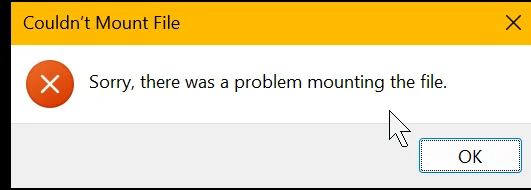
I am trying to mount a specific .iso file but Windows 11 - after like 60:seconds or so - returns "Sorry, there was a problem mounting the file":
1783434993935.webp

I searched left and right (in this forum and elsewhere) but I can't get this darn file mounted! >:-(

What I tried so far:
1. I ensured that I had all current Windows updates installed.
2. I restarted my system
3. I verified that I had unblocked the downloaded file (i.e. I removed the "mark of the web").
4. I checked for file's integrity calculating and verifying the expected hash using PowerShell and "Get-FileHash <filepath>": BAAEB6C90DD51648154B64C40C9E0C14D93A427F611A1BB49C8077FA2FF73364 is the expected hash for that file!
This, BTW, also proves that the file is fully readable and not corrupted.
5. I tried to open the file not via "Right-click -> Mount" (as I tried initially) but also via "Open with..." and selecting "Internet Explorer" and option "Always". I even verified the mount context is properly specified in the registry as:
Code:
...
[HKEY_CLASSES_ROOT\Windows.IsoFile\shell\mount]
  "CommandStateSync"=""
  "ExplorerCommandHandler"="{9ab3b1c9-3225-4bb4-93b6-bfb3c0d93743}"
  "MultiSelectModel"="Document"

[HKEY_CLASSES_ROOT\Windows.IsoFile\shell\mount\command]
  @=hex(2):25,00,53,00,79,00,73,00,74,00,65,00,6d,00,52,00,6f,00,6f,00,74,00,25,\
  00,5c,00,45,00,78,00,70,00,6c,00,6f,00,72,00,65,00,72,00,2e,00,65,00,78,00,\
  65,00,00,00   [this corresponds to "%SystemRoot%\Explorer.exe"]
  "DelegateExecute"="{9ab3b1c9-3225-4bb4-93b6-bfb3c0d93743}"
...
6. I made sure that the service "vds" service ("Virtual Disk" - C:\WINDOWS\System32\vds.exe) is running.
7. I ran SFC /scannow (just so that I can check this off - since that suggestion otherwise always comes up).
8. I tried to mount the file via a PowerShell command-window:
Code:
mountdiskimage -imagepath "<image-path>\Win11_25H2_EnglishInternational_x64.iso"
(of course I replaced <image-path> with the actual path when doing so). That yielded at least an error message:
Code:
"Mount-DiskImage: The semaphore timeout period has expired."
Any idea what that semaphore msg. is supposed to teach me - i.e. how I can unlock that semaphore?

9. I tried to mount other .iso-s (two images of former install-CDs that I happened to have on my system: office and visio). Same result: "Sorry, there was a problem mounting the file".

What else could I possibly check, do, or verify to get this darn .iso mounted?


PS.: The file I am trying to mount is actually the Windows 11 installation .iso (which I had used to upgrade from Windows 10 to Windows 11 back in last fall). From that .iso I need to copy out the "winre.wim"-file and "bootx64.efi" to update my laptop's recovery partition. As I recently had to learn my recovery partition contains code that is still signed with the old MS certificate (whose validity ended recently) which means it would most likely even fail to boot when needed.
To be able to recover also when things get bad on my laptop I wanted to update said files, so I can at least reliably boot from the recovery partition.
If MS would have properly gotten their act together the Windows updates re. the required certificate updates would also have taken care to properly update any recovery partitions being found and then users could have spared themselves such nuissance! :-(
 
Windows Build/Version
25H2 (OS Build 26200.8655)
Last edited:

My Computer My Computer

At a glance

Windows 11Intel 11th Gen (i7-1185G7)32 GB---
OS
Windows 11
Computer type
Laptop
Manufacturer/Model
MS
CPU
Intel 11th Gen (i7-1185G7)
Motherboard
It's a tablet...
Memory
32 GB
Graphics Card(s)
---
Sound Card
built-in
Monitor(s) Displays
built-in LCD & and ext. BENQ 4K
Screen Resolution
2880x1920 & 3840x2160
Hard Drives
SSD / 1TB
Browser
Brave
Antivirus
none/Windows Defender

My Computers My Computers

  • At a glance

    Windows 11 Pro 23H2 (5699), 25H2 (8737)Mobile DualCore Intel Core 2 Duo T7250, 2000 MHz4GBMobile Intel(R) GMA 4500M (Mobile 4 series)
    OS
    Windows 11 Pro 23H2 (5699), 25H2 (8737)
    Computer type
    Laptop
    Manufacturer/Model
    Acer Extensa 5630EZ
    CPU
    Mobile DualCore Intel Core 2 Duo T7250, 2000 MHz
    Motherboard
    Acer Extensa 5630
    Memory
    4GB
    Graphics Card(s)
    Mobile Intel(R) GMA 4500M (Mobile 4 series)
    Sound Card
    Realtek ALC268 @ Intel 82801IB ICH9 - High Definition Audio Controller
    Monitor(s) Displays
    1
    Screen Resolution
    1280x800
    Hard Drives
    Samsung SSD 850 EVO 250GB SATA Device (250 GB, SATA-III)
    Internet Speed
    VDSL 50 Mbps
    Browser
    MICROSOFT EDGE
    Antivirus
    WINDOWS DEFENDER
    Other Info
    Legacy MBR installation, no TPM, no Secure Boot, no WDDM 2.0 graphics drivers, no SSE4.2, cannot get more unsupported ;) This is only my test laptop. I had installed Windows 11 here before upgrading my main PC. For my main PC I use everyday see my 2nd system specs.
  • At a glance

    Windows 11 Pro v25H2 (build 26200.8737)Intel Core-i7 3770 3.40GHz s1155 (3rd generat...2x Kingston Hyper-X Blu 8GB DDR3-1600GIGABYTE GeForce RTX 3050 WINDFORCE OC V2 6GB...
    Operating System
    Windows 11 Pro v25H2 (build 26200.8737)
    Computer type
    PC/Desktop
    Manufacturer/Model
    Custom-built PC
    CPU
    Intel Core-i7 3770 3.40GHz s1155 (3rd generation)
    Motherboard
    Asus P8H61 s1155 ATX
    Memory
    2x Kingston Hyper-X Blu 8GB DDR3-1600
    Graphics card(s)
    GIGABYTE GeForce RTX 3050 WINDFORCE OC V2 6GB (GV-N3050WF2OCV2-6GD)
    Sound Card
    Realtek HD audio (ALC887)
    Monitor(s) Displays
    Sony Bravia KDL-19L4000 19" LCD TV via VGA
    Screen Resolution
    1440x900 32-bit 60Hz
    Hard Drives
    WD Blue SA510 2.5 1000GB SSD as system disk, Western Digital Caviar Purple 4TB SATA III (WD40PURZ) as second
    PSU
    Thermaltake Litepower RGB 550W Full Wired
    Case
    SUPERCASE MIDI-TOWER
    Cooling
    Deepcool Gamma Archer CPU cooler, 1x 8cm fan at the back
    Keyboard
    Mitsumi 101-key PS/2
    Mouse
    Sunnyline OptiEye PS/2
    Internet Speed
    100Mbps
    Browser
    Microsoft Edge, Mozilla Firefox
    Antivirus
    Microsoft Windows Defender
    Other Info
    Legacy BIOS (MBR) installation, no TPM, no Secure Boot, WDDM 3.0 graphics drivers, WEI score 7.4
Forgive the 'obvious' question.. can you mount any other iso file?

And are you using the default Windows context menu to do so?

More:
 

My Computer My Computer

At a glance

Windows 11 Proi7-8650U16GBIntel UHD 620
OS
Windows 11 Pro
Computer type
Laptop
Manufacturer/Model
Lenovo t480s
CPU
i7-8650U
Memory
16GB
Graphics Card(s)
Intel UHD 620
Screen Resolution
1920x1080
Hard Drives
C SN810 SDCPNRY-512G-1006
Browser
Edge, Firefox
Antivirus
Defender
Do you have a 3rd-party security product? I imagine Windows would immediately fail in mounting a corrupted ISO file, but it wouldn't take a minute.

One workaround I've seen online is to copy (not move) the file to a different folder. And mount the copied version.
 

My Computer My Computer

At a glance

Windows 7
OS
Windows 7
Hello @mmo and welcome to Eleven Forum. :-)


A while back, I had problems mounting ISO files.
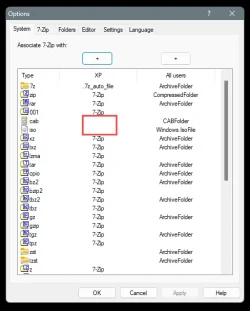
In my case this was caused because .iso had been associated with 7zip.

After undoing that in 7zip, and double checking that .iso was now associated with Windows Explorer... mounting was then possible. 7zip had associated itself with .iso and .cab files by default. I had to undo that (RED box).

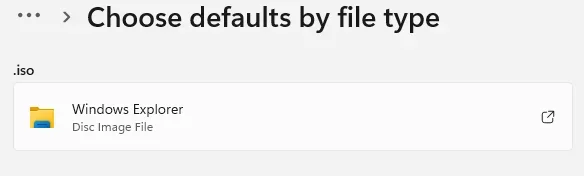
In other words, you need to go to: Settings > Apps > Default apps > Choose defaults by file type ...and make sure the ISO files are associated with Windows Explorer.

Image1.webp Image2.webp
 

My Computers My Computers

  • At a glance

    Win 11 Home ♦♦♦26200.8737 ♦♦♦♦♦♦♦25H2AMD Ryzen 7 3700XG.Skill (F4-3200C14D-16GTZKW)EVGA RTX 2070 (08G-P4-2171-KR)
    OS
    Win 11 Home ♦♦♦26200.8737 ♦♦♦♦♦♦♦25H2
    Computer type
    PC/Desktop
    Manufacturer/Model
    Built by Ghot® [May 2020]
    CPU
    AMD Ryzen 7 3700X
    Motherboard
    Asus Pro WS X570-ACE (BIOS 5302)
    Memory
    G.Skill (F4-3200C14D-16GTZKW)
    Graphics Card(s)
    EVGA RTX 2070 (08G-P4-2171-KR)
    Sound Card
    Realtek ALC1220P / ALC S1220A
    Monitor(s) Displays
    Dell U3011 30"
    Screen Resolution
    2560 x 1600
    Hard Drives
    2x Samsung 860 EVO 500GB,
    WD 4TB Black FZBX - SATA III,
    WD 8TB Black FZBX - SATA III,
    DRW-24B1ST CD/DVD Burner
    PSU
    PC Power & Cooling 750W Quad EPS12V
    Case
    Cooler Master ATCS 840 Tower
    Cooling
    CM Hyper 212 EVO (push/pull)
    Keyboard
    Ducky DK9008 Shine II Blue LED
    Mouse
    Logitech Optical M-100
    Internet Speed
    300/300
    Browser
    Firefox (latest)
    Antivirus
    Bitdefender Total Security
    Other Info
    Speakers: Klipsch Pro Media 2.1
  • At a glance

    Windows XP Pro 32bit w/SP3AMD Athlon 64 X2 5000+ (OC'd @ 3.2Ghz)TWIN2X2048-6400C4DHX (2 x 1GB, DDR2 800)EVGA 256-P2-N758-TR GeForce 8600GT SSC
    Operating System
    Windows XP Pro 32bit w/SP3
    Computer type
    PC/Desktop
    Manufacturer/Model
    Built by Ghot® (not in use)
    CPU
    AMD Athlon 64 X2 5000+ (OC'd @ 3.2Ghz)
    Motherboard
    ASUS M2N32-SLI Deluxe Wireless Edition
    Memory
    TWIN2X2048-6400C4DHX (2 x 1GB, DDR2 800)
    Graphics card(s)
    EVGA 256-P2-N758-TR GeForce 8600GT SSC
    Sound Card
    Onboard
    Monitor(s) Displays
    ViewSonic G90FB Black 19" Professional (CRT)
    Screen Resolution
    up to 2048 x 1536
    Hard Drives
    WD 36GB 10,000rpm Raptor SATA
    Seagate 80GB 7200rpm SATA
    Lite-On LTR-52246S CD/RW
    Lite-On LH-18A1P CD/DVD Burner
    PSU
    PC Power & Cooling Silencer 750 Quad EPS12V
    Case
    Generic Beige case, 80mm fans
    Cooling
    ZALMAN 9500A 92mm CPU Cooler
    Keyboard
    Logitech Classic Keybooard 200
    Mouse
    Logitech Optical M-BT96a
    Internet Speed
    300/300
    Browser
    Firefox 3.x ??
    Antivirus
    Symantec (Norton)
    Other Info
    Still assembled, still runs. Haven't turned it on for 15 years?
To associate ISO files with File Explorer again, right-click on the file and select Open with. From the list don't select File Explorer or it will be done once. Select the last option on the list (Choose another application). When you see a new list of applications select File Explorer and then click on Always.
 

My Computers My Computers

  • At a glance

    Windows 11 Pro 23H2 (5699), 25H2 (8737)Mobile DualCore Intel Core 2 Duo T7250, 2000 MHz4GBMobile Intel(R) GMA 4500M (Mobile 4 series)
    OS
    Windows 11 Pro 23H2 (5699), 25H2 (8737)
    Computer type
    Laptop
    Manufacturer/Model
    Acer Extensa 5630EZ
    CPU
    Mobile DualCore Intel Core 2 Duo T7250, 2000 MHz
    Motherboard
    Acer Extensa 5630
    Memory
    4GB
    Graphics Card(s)
    Mobile Intel(R) GMA 4500M (Mobile 4 series)
    Sound Card
    Realtek ALC268 @ Intel 82801IB ICH9 - High Definition Audio Controller
    Monitor(s) Displays
    1
    Screen Resolution
    1280x800
    Hard Drives
    Samsung SSD 850 EVO 250GB SATA Device (250 GB, SATA-III)
    Internet Speed
    VDSL 50 Mbps
    Browser
    MICROSOFT EDGE
    Antivirus
    WINDOWS DEFENDER
    Other Info
    Legacy MBR installation, no TPM, no Secure Boot, no WDDM 2.0 graphics drivers, no SSE4.2, cannot get more unsupported ;) This is only my test laptop. I had installed Windows 11 here before upgrading my main PC. For my main PC I use everyday see my 2nd system specs.
  • At a glance

    Windows 11 Pro v25H2 (build 26200.8737)Intel Core-i7 3770 3.40GHz s1155 (3rd generat...2x Kingston Hyper-X Blu 8GB DDR3-1600GIGABYTE GeForce RTX 3050 WINDFORCE OC V2 6GB...
    Operating System
    Windows 11 Pro v25H2 (build 26200.8737)
    Computer type
    PC/Desktop
    Manufacturer/Model
    Custom-built PC
    CPU
    Intel Core-i7 3770 3.40GHz s1155 (3rd generation)
    Motherboard
    Asus P8H61 s1155 ATX
    Memory
    2x Kingston Hyper-X Blu 8GB DDR3-1600
    Graphics card(s)
    GIGABYTE GeForce RTX 3050 WINDFORCE OC V2 6GB (GV-N3050WF2OCV2-6GD)
    Sound Card
    Realtek HD audio (ALC887)
    Monitor(s) Displays
    Sony Bravia KDL-19L4000 19" LCD TV via VGA
    Screen Resolution
    1440x900 32-bit 60Hz
    Hard Drives
    WD Blue SA510 2.5 1000GB SSD as system disk, Western Digital Caviar Purple 4TB SATA III (WD40PURZ) as second
    PSU
    Thermaltake Litepower RGB 550W Full Wired
    Case
    SUPERCASE MIDI-TOWER
    Cooling
    Deepcool Gamma Archer CPU cooler, 1x 8cm fan at the back
    Keyboard
    Mitsumi 101-key PS/2
    Mouse
    Sunnyline OptiEye PS/2
    Internet Speed
    100Mbps
    Browser
    Microsoft Edge, Mozilla Firefox
    Antivirus
    Microsoft Windows Defender
    Other Info
    Legacy BIOS (MBR) installation, no TPM, no Secure Boot, WDDM 3.0 graphics drivers, WEI score 7.4
@mmo


Here's some other things that you may find useful...


My Computers My Computers

  • At a glance

    Win 11 Home ♦♦♦26200.8737 ♦♦♦♦♦♦♦25H2AMD Ryzen 7 3700XG.Skill (F4-3200C14D-16GTZKW)EVGA RTX 2070 (08G-P4-2171-KR)
    OS
    Win 11 Home ♦♦♦26200.8737 ♦♦♦♦♦♦♦25H2
    Computer type
    PC/Desktop
    Manufacturer/Model
    Built by Ghot® [May 2020]
    CPU
    AMD Ryzen 7 3700X
    Motherboard
    Asus Pro WS X570-ACE (BIOS 5302)
    Memory
    G.Skill (F4-3200C14D-16GTZKW)
    Graphics Card(s)
    EVGA RTX 2070 (08G-P4-2171-KR)
    Sound Card
    Realtek ALC1220P / ALC S1220A
    Monitor(s) Displays
    Dell U3011 30"
    Screen Resolution
    2560 x 1600
    Hard Drives
    2x Samsung 860 EVO 500GB,
    WD 4TB Black FZBX - SATA III,
    WD 8TB Black FZBX - SATA III,
    DRW-24B1ST CD/DVD Burner
    PSU
    PC Power & Cooling 750W Quad EPS12V
    Case
    Cooler Master ATCS 840 Tower
    Cooling
    CM Hyper 212 EVO (push/pull)
    Keyboard
    Ducky DK9008 Shine II Blue LED
    Mouse
    Logitech Optical M-100
    Internet Speed
    300/300
    Browser
    Firefox (latest)
    Antivirus
    Bitdefender Total Security
    Other Info
    Speakers: Klipsch Pro Media 2.1
  • At a glance

    Windows XP Pro 32bit w/SP3AMD Athlon 64 X2 5000+ (OC'd @ 3.2Ghz)TWIN2X2048-6400C4DHX (2 x 1GB, DDR2 800)EVGA 256-P2-N758-TR GeForce 8600GT SSC
    Operating System
    Windows XP Pro 32bit w/SP3
    Computer type
    PC/Desktop
    Manufacturer/Model
    Built by Ghot® (not in use)
    CPU
    AMD Athlon 64 X2 5000+ (OC'd @ 3.2Ghz)
    Motherboard
    ASUS M2N32-SLI Deluxe Wireless Edition
    Memory
    TWIN2X2048-6400C4DHX (2 x 1GB, DDR2 800)
    Graphics card(s)
    EVGA 256-P2-N758-TR GeForce 8600GT SSC
    Sound Card
    Onboard
    Monitor(s) Displays
    ViewSonic G90FB Black 19" Professional (CRT)
    Screen Resolution
    up to 2048 x 1536
    Hard Drives
    WD 36GB 10,000rpm Raptor SATA
    Seagate 80GB 7200rpm SATA
    Lite-On LTR-52246S CD/RW
    Lite-On LH-18A1P CD/DVD Burner
    PSU
    PC Power & Cooling Silencer 750 Quad EPS12V
    Case
    Generic Beige case, 80mm fans
    Cooling
    ZALMAN 9500A 92mm CPU Cooler
    Keyboard
    Logitech Classic Keybooard 200
    Mouse
    Logitech Optical M-BT96a
    Internet Speed
    300/300
    Browser
    Firefox 3.x ??
    Antivirus
    Symantec (Norton)
    Other Info
    Still assembled, still runs. Haven't turned it on for 15 years?
Hello @mmo and welcome to Eleven Forum. :-)


A while back, I had problems mounting ISO files.
In my case this was caused because .iso had been associated with 7zip.

After undoing that in 7zip, and double checking that .iso was now associated with Windows Explorer... mounting was then possible. 7zip had associated itself with .iso and .cab files by default. I had to undo that (RED box).

In other words, you need to go to: Settings > Apps > Default apps > Choose defaults by file type ...and make sure the ISO files are associated with Windows Explorer.

View attachment 176173 View attachment 176174

Thanks for the welcome! I have been in the tenforums for almost a decade, but it's indeed the first time I am in the elevenforum.

Re. your suggestion: Internet Explorer is the default app for both shown, i.e. for .cab-s as well as .iso-s.
While I do have 7-zip installed I had let it only grab .zip and .7z extensions.
 

My Computer My Computer

At a glance

Windows 11Intel 11th Gen (i7-1185G7)32 GB---
OS
Windows 11
Computer type
Laptop
Manufacturer/Model
MS
CPU
Intel 11th Gen (i7-1185G7)
Motherboard
It's a tablet...
Memory
32 GB
Graphics Card(s)
---
Sound Card
built-in
Monitor(s) Displays
built-in LCD & and ext. BENQ 4K
Screen Resolution
2880x1920 & 3840x2160
Hard Drives
SSD / 1TB
Browser
Brave
Antivirus
none/Windows Defender
To associate ISO files with File Explorer again, right-click on the file and select Open with. From the list don't select File Explorer or it will be done once. Select the last option on the list (Choose another application). When you see a new list of applications select File Explorer and then click on Always.

That exactly what I had done. Obviously I had described that not clear enough.
 

My Computer My Computer

At a glance

Windows 11Intel 11th Gen (i7-1185G7)32 GB---
OS
Windows 11
Computer type
Laptop
Manufacturer/Model
MS
CPU
Intel 11th Gen (i7-1185G7)
Motherboard
It's a tablet...
Memory
32 GB
Graphics Card(s)
---
Sound Card
built-in
Monitor(s) Displays
built-in LCD & and ext. BENQ 4K
Screen Resolution
2880x1920 & 3840x2160
Hard Drives
SSD / 1TB
Browser
Brave
Antivirus
none/Windows Defender
Forgive the 'obvious' question.. can you mount any other iso file?

And are you using the default Windows context menu to do so?

More:

Right, I should have thought of that test myself. I tried including various other .iso files that I happened to have lying around. These also did not mount. After like 2 minutes I finally got the same error popup.

I'll add that to my list above what I tried already, so - if someone doesn't read the entire thread - (s)he can easier spot what I tried already.
 

My Computer My Computer

At a glance

Windows 11Intel 11th Gen (i7-1185G7)32 GB---
OS
Windows 11
Computer type
Laptop
Manufacturer/Model
MS
CPU
Intel 11th Gen (i7-1185G7)
Motherboard
It's a tablet...
Memory
32 GB
Graphics Card(s)
---
Sound Card
built-in
Monitor(s) Displays
built-in LCD & and ext. BENQ 4K
Screen Resolution
2880x1920 & 3840x2160
Hard Drives
SSD / 1TB
Browser
Brave
Antivirus
none/Windows Defender
Thanks- do you see the Mount context menu option when you rt click the iso file? Is that what you're using?

Some good ideas if you click the link in my post.

Further: see
Option 2, iso
 

My Computer My Computer

At a glance

Windows 11 Proi7-8650U16GBIntel UHD 620
OS
Windows 11 Pro
Computer type
Laptop
Manufacturer/Model
Lenovo t480s
CPU
i7-8650U
Memory
16GB
Graphics Card(s)
Intel UHD 620
Screen Resolution
1920x1080
Hard Drives
C SN810 SDCPNRY-512G-1006
Browser
Edge, Firefox
Antivirus
Defender
Do you have a 3rd-party security product? I imagine Windows would immediately fail in mounting a corrupted ISO file, but it wouldn't take a minute.

One workaround I've seen online is to copy (not move) the file to a different folder. And mount the copied version.

No, no 3rd party-security thingy. Relying on Windows Defender only (exactly to avoid any interferences with OS operations).
I placed a copy of the .iso in the C:-drive's root folder and tried to mount that, but same result - or rather non-result. :-(
 

My Computer My Computer

At a glance

Windows 11Intel 11th Gen (i7-1185G7)32 GB---
OS
Windows 11
Computer type
Laptop
Manufacturer/Model
MS
CPU
Intel 11th Gen (i7-1185G7)
Motherboard
It's a tablet...
Memory
32 GB
Graphics Card(s)
---
Sound Card
built-in
Monitor(s) Displays
built-in LCD & and ext. BENQ 4K
Screen Resolution
2880x1920 & 3840x2160
Hard Drives
SSD / 1TB
Browser
Brave
Antivirus
none/Windows Defender

Thanks- do you see the Mount context menu option when you rt click the iso file? Is that what you're using?

Some good ideas if you click the link in my post.

Further: see
Option 2, iso

It *is* the default option. I see the Mount context menu option when right clicking. That's also why I mentioned the registry entry that I had double checked. The option *is* there for iso-s.
 

My Computer My Computer

At a glance

Windows 11Intel 11th Gen (i7-1185G7)32 GB---
OS
Windows 11
Computer type
Laptop
Manufacturer/Model
MS
CPU
Intel 11th Gen (i7-1185G7)
Motherboard
It's a tablet...
Memory
32 GB
Graphics Card(s)
---
Sound Card
built-in
Monitor(s) Displays
built-in LCD & and ext. BENQ 4K
Screen Resolution
2880x1920 & 3840x2160
Hard Drives
SSD / 1TB
Browser
Brave
Antivirus
none/Windows Defender

Again- have you looked at ALL the options in the first link I posted?

And have you used the tutorial in the above post?

Posts may actually include more than 1 suggestion.....
 

My Computer My Computer

At a glance

Windows 11 Proi7-8650U16GBIntel UHD 620
OS
Windows 11 Pro
Computer type
Laptop
Manufacturer/Model
Lenovo t480s
CPU
i7-8650U
Memory
16GB
Graphics Card(s)
Intel UHD 620
Screen Resolution
1920x1080
Hard Drives
C SN810 SDCPNRY-512G-1006
Browser
Edge, Firefox
Antivirus
Defender
  • Like
Reactions: mmo
Again- have you looked at ALL the options in the first link I posted?

And have you used the tutorial in the above post?

Posts may actually include more than 1 suggestion.....

@dalchina: I have to admit - I didn't follow all. So I did:

1. Restarted Explorer: done
2. Is it already mounted: No
3. Set to Read-Only: Interesting! I tried that but no change
4. Unblock the file (remove the "mark-of-the-web"): already done
5. Ran the check-command: the file is NOT sparse
6. Change drive letter: letters D..T are all free. I doubt that the mount will choose exactly "U:" and "Y:" (which I use for other purposes).
7: "Repair the diskimage driver": Interesting approach! I never saw a fix like that! So I created a system restore-point, deleted the reg-entry described in fix 7 on page "7 Solutions to “There Was a Problem Mounting the File”" (in my case I only had "UpperFilters", no "LowerFilters"), rebooted and tried again and- unbelievable - THAT did the trick!!! :D:thumbsup: 🤓

Since the description is rather terse: I'ld really appreciate a description of what exactly I did here and what this modified. What do these "UpperFilters" and "LowerFilters" entries control?

My entry had been:

Code:
"UpperFilters"=hex(7):47,00,45,00,41,00,52,00,41,00,73,00,70,00,69,00,57,00,44,\
  00,4d,00,00,00,00,00
Do you have any idea and can enlighten me?
 
Last edited:

My Computer My Computer

At a glance

Windows 11Intel 11th Gen (i7-1185G7)32 GB---
OS
Windows 11
Computer type
Laptop
Manufacturer/Model
MS
CPU
Intel 11th Gen (i7-1185G7)
Motherboard
It's a tablet...
Memory
32 GB
Graphics Card(s)
---
Sound Card
built-in
Monitor(s) Displays
built-in LCD & and ext. BENQ 4K
Screen Resolution
2880x1920 & 3840x2160
Hard Drives
SSD / 1TB
Browser
Brave
Antivirus
none/Windows Defender

7: "Repair the diskimage driver": Interesting approach! I never saw a fix like that! So I created a system restore-point, deleted the reg-entry described in fix 7 on page "7 Solutions to “There Was a Problem Mounting the File”", rebooted and tried again and- unbelievable - THAT did the trick!!! :D:thumbsup: 🤓

Since the description is rather terse: I'ld really appreciate a description of what exactly I did here and what this modified. What do these Upper- and Lower Filters control?
Do you have any idea and can enlighten me?
Kernel filter drivers work as a set of layers (or a "stack") so different system-level features can intercept a basic request (like reading and writing from a device or volume). Some common examples include security protections like real-time monitoring and scanning, and maintaining consistency for full image backups.

You don't make direct changes to filter drivers, but other high-level apps can install them. Sometimes those changes will break things. Your request to mount an ISO file has to pass through all of the layers before it gets processed. By resetting the reg entries, you are making this specific behavior return to the Windows default.

Browsers and desktop tools don't touch filter drivers. It has to be a security, backup or disk imaging tool that was installed before.
 

My Computer My Computer

At a glance

Windows 7
OS
Windows 7
Thanks for the welcome! I have been in the tenforums for almost a decade, but it's indeed the first time I am in the elevenforum.

Re. your suggestion: Internet Explorer is the default app for both shown, i.e. for .cab-s as well as .iso-s.
While I do have 7-zip installed I had let it only grab .zip and .7z extensions.


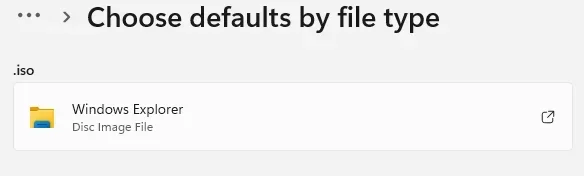
Then you need to go to: Settings > Apps > Default apps > and scroll down to: Choose defaults by file type ...and make sure that ISO files are associated with Windows Explorer (not Internet Explorer).

Image1.webp


Then you will be able to mount ISO files.
 

My Computers My Computers

  • At a glance

    Win 11 Home ♦♦♦26200.8737 ♦♦♦♦♦♦♦25H2AMD Ryzen 7 3700XG.Skill (F4-3200C14D-16GTZKW)EVGA RTX 2070 (08G-P4-2171-KR)
    OS
    Win 11 Home ♦♦♦26200.8737 ♦♦♦♦♦♦♦25H2
    Computer type
    PC/Desktop
    Manufacturer/Model
    Built by Ghot® [May 2020]
    CPU
    AMD Ryzen 7 3700X
    Motherboard
    Asus Pro WS X570-ACE (BIOS 5302)
    Memory
    G.Skill (F4-3200C14D-16GTZKW)
    Graphics Card(s)
    EVGA RTX 2070 (08G-P4-2171-KR)
    Sound Card
    Realtek ALC1220P / ALC S1220A
    Monitor(s) Displays
    Dell U3011 30"
    Screen Resolution
    2560 x 1600
    Hard Drives
    2x Samsung 860 EVO 500GB,
    WD 4TB Black FZBX - SATA III,
    WD 8TB Black FZBX - SATA III,
    DRW-24B1ST CD/DVD Burner
    PSU
    PC Power & Cooling 750W Quad EPS12V
    Case
    Cooler Master ATCS 840 Tower
    Cooling
    CM Hyper 212 EVO (push/pull)
    Keyboard
    Ducky DK9008 Shine II Blue LED
    Mouse
    Logitech Optical M-100
    Internet Speed
    300/300
    Browser
    Firefox (latest)
    Antivirus
    Bitdefender Total Security
    Other Info
    Speakers: Klipsch Pro Media 2.1
  • At a glance

    Windows XP Pro 32bit w/SP3AMD Athlon 64 X2 5000+ (OC'd @ 3.2Ghz)TWIN2X2048-6400C4DHX (2 x 1GB, DDR2 800)EVGA 256-P2-N758-TR GeForce 8600GT SSC
    Operating System
    Windows XP Pro 32bit w/SP3
    Computer type
    PC/Desktop
    Manufacturer/Model
    Built by Ghot® (not in use)
    CPU
    AMD Athlon 64 X2 5000+ (OC'd @ 3.2Ghz)
    Motherboard
    ASUS M2N32-SLI Deluxe Wireless Edition
    Memory
    TWIN2X2048-6400C4DHX (2 x 1GB, DDR2 800)
    Graphics card(s)
    EVGA 256-P2-N758-TR GeForce 8600GT SSC
    Sound Card
    Onboard
    Monitor(s) Displays
    ViewSonic G90FB Black 19" Professional (CRT)
    Screen Resolution
    up to 2048 x 1536
    Hard Drives
    WD 36GB 10,000rpm Raptor SATA
    Seagate 80GB 7200rpm SATA
    Lite-On LTR-52246S CD/RW
    Lite-On LH-18A1P CD/DVD Burner
    PSU
    PC Power & Cooling Silencer 750 Quad EPS12V
    Case
    Generic Beige case, 80mm fans
    Cooling
    ZALMAN 9500A 92mm CPU Cooler
    Keyboard
    Logitech Classic Keybooard 200
    Mouse
    Logitech Optical M-BT96a
    Internet Speed
    300/300
    Browser
    Firefox 3.x ??
    Antivirus
    Symantec (Norton)
    Other Info
    Still assembled, still runs. Haven't turned it on for 15 years?
...
Browsers and desktop tools don't touch filter drivers. It has to be a security, backup or disk imaging tool that was installed before.

Thanks for the description - it's still on a really high flight-level, so it doesn't explain much to me, but anyway.

Re. your remark: I have indeed installed "Macrium Reflect X" as a backup solution and "Paragon Harddisk Manager 17" (I used that to fiddle a few times with partition setups and sizes and also used it a few times to create me 1:1 disk images for backup purposes, too).
So, I have to assume that one of these two made that entry. No other, similar tools come to my mind.
 

My Computer My Computer

At a glance

Windows 11Intel 11th Gen (i7-1185G7)32 GB---
OS
Windows 11
Computer type
Laptop
Manufacturer/Model
MS
CPU
Intel 11th Gen (i7-1185G7)
Motherboard
It's a tablet...
Memory
32 GB
Graphics Card(s)
---
Sound Card
built-in
Monitor(s) Displays
built-in LCD & and ext. BENQ 4K
Screen Resolution
2880x1920 & 3840x2160
Hard Drives
SSD / 1TB
Browser
Brave
Antivirus
none/Windows Defender

Excellent progress.. good you made it thru.. presumably the Paragon program, being relatively uncommon...
 

My Computer My Computer

At a glance

Windows 11 Proi7-8650U16GBIntel UHD 620
OS
Windows 11 Pro
Computer type
Laptop
Manufacturer/Model
Lenovo t480s
CPU
i7-8650U
Memory
16GB
Graphics Card(s)
Intel UHD 620
Screen Resolution
1920x1080
Hard Drives
C SN810 SDCPNRY-512G-1006
Browser
Edge, Firefox
Antivirus
Defender
@dalchina: I have to admit - I didn't follow all. So I did:

1. Restarted Explorer: done
2. Is it already mounted: No
3. Set to Read-Only: Interesting! I tried that but no change
4. Unblock the file (remove the "mark-of-the-web"): already done
5. Ran the check-command: the file is NOT sparse
6. Change drive letter: letters D..T are all free. I doubt that the mount will choose exactly "U:" and "Y:" (which I use for other purposes).
7: "Repair the diskimage driver": Interesting approach! I never saw a fix like that! So I created a system restore-point, deleted the reg-entry described in fix 7 on page "7 Solutions to “There Was a Problem Mounting the File”" (in my case I only had "UpperFilters", no "LowerFilters"), rebooted and tried again and- unbelievable - THAT did the trick!!! :D:thumbsup: 🤓

Since the description is rather terse: I'ld really appreciate a description of what exactly I did here and what this modified. What do these "UpperFilters" and "LowerFilters" entries control?

My entry had been:

Code:
"UpperFilters"=hex(7):47,00,45,00,41,00,52,00,41,00,73,00,70,00,69,00,57,00,44,\
  00,4d,00,00,00,00,00
Do you have any idea and can enlighten me?
Amazing! I had a similar issue, none of my two DVD drives would work properly. A little research revealed that was because of some upper filters installed by Nero Burning ROM. Once I removed these filters and restarted my DVD drives worked fine again. However I didn't except to see that happening with ISO files. "I am getting old always learning", as ancient Greek have said.
 

My Computers My Computers

  • At a glance

    Windows 11 Pro 23H2 (5699), 25H2 (8737)Mobile DualCore Intel Core 2 Duo T7250, 2000 MHz4GBMobile Intel(R) GMA 4500M (Mobile 4 series)
    OS
    Windows 11 Pro 23H2 (5699), 25H2 (8737)
    Computer type
    Laptop
    Manufacturer/Model
    Acer Extensa 5630EZ
    CPU
    Mobile DualCore Intel Core 2 Duo T7250, 2000 MHz
    Motherboard
    Acer Extensa 5630
    Memory
    4GB
    Graphics Card(s)
    Mobile Intel(R) GMA 4500M (Mobile 4 series)
    Sound Card
    Realtek ALC268 @ Intel 82801IB ICH9 - High Definition Audio Controller
    Monitor(s) Displays
    1
    Screen Resolution
    1280x800
    Hard Drives
    Samsung SSD 850 EVO 250GB SATA Device (250 GB, SATA-III)
    Internet Speed
    VDSL 50 Mbps
    Browser
    MICROSOFT EDGE
    Antivirus
    WINDOWS DEFENDER
    Other Info
    Legacy MBR installation, no TPM, no Secure Boot, no WDDM 2.0 graphics drivers, no SSE4.2, cannot get more unsupported ;) This is only my test laptop. I had installed Windows 11 here before upgrading my main PC. For my main PC I use everyday see my 2nd system specs.
  • At a glance

    Windows 11 Pro v25H2 (build 26200.8737)Intel Core-i7 3770 3.40GHz s1155 (3rd generat...2x Kingston Hyper-X Blu 8GB DDR3-1600GIGABYTE GeForce RTX 3050 WINDFORCE OC V2 6GB...
    Operating System
    Windows 11 Pro v25H2 (build 26200.8737)
    Computer type
    PC/Desktop
    Manufacturer/Model
    Custom-built PC
    CPU
    Intel Core-i7 3770 3.40GHz s1155 (3rd generation)
    Motherboard
    Asus P8H61 s1155 ATX
    Memory
    2x Kingston Hyper-X Blu 8GB DDR3-1600
    Graphics card(s)
    GIGABYTE GeForce RTX 3050 WINDFORCE OC V2 6GB (GV-N3050WF2OCV2-6GD)
    Sound Card
    Realtek HD audio (ALC887)
    Monitor(s) Displays
    Sony Bravia KDL-19L4000 19" LCD TV via VGA
    Screen Resolution
    1440x900 32-bit 60Hz
    Hard Drives
    WD Blue SA510 2.5 1000GB SSD as system disk, Western Digital Caviar Purple 4TB SATA III (WD40PURZ) as second
    PSU
    Thermaltake Litepower RGB 550W Full Wired
    Case
    SUPERCASE MIDI-TOWER
    Cooling
    Deepcool Gamma Archer CPU cooler, 1x 8cm fan at the back
    Keyboard
    Mitsumi 101-key PS/2
    Mouse
    Sunnyline OptiEye PS/2
    Internet Speed
    100Mbps
    Browser
    Microsoft Edge, Mozilla Firefox
    Antivirus
    Microsoft Windows Defender

    Other Info
    Legacy BIOS (MBR) installation, no TPM, no Secure Boot, WDDM 3.0 graphics drivers, WEI score 7.4
Back
Top Bottom