
- Local time
- 6:23 PM
- Posts
- 179
- OS
- Windows 11 Home
Sadly BIG nopeDirty ports, perhaps?
My Computer
At a glance
Windows 11 Home
- OS
- Windows 11 Home
- Computer type
- Laptop
- Manufacturer/Model
- Lenovo Yoga 7 Slim 14I110

Follow along with the video below to see how to install our site as a web app on your home screen.
Note: This feature may not be available in some browsers.
Sadly BIG nopeDirty ports, perhaps?

Does it connect to any other devices?Sadly BIG nope

Sadly BIG nope
Could be a bad cable, unless it's the same cable you used on the A16.
Bring the working cable with you next time you go to a friends house, or sumpthin.We don't have extra laptops to test the problem phone on.
I'm mostly home, tough luck with taking usb cables.Bring the working cable with you next time you go to a friends house, or sumpthin.
Maybe there's a defective data pin on your S23.I'm mostly home, tough luck with taking usb cables.
don't know about data pins but all of the advice on google has already been tried and mentioned hereMaybe there's a defective data pin on your S23.
Time to save up for an S26 Ultra!!!all of the advice on google has already been tried and mentioned here

I keep checking back in developer options and usb settings, using the right option. And nothing changes. It looks like my phone will be stuck on Phone Link.@nocruoro
I'm all out of ideas, chief!
All I know is, all my devices have Transferring files set as the default, and Explorer recognizes each device immediately on all my machines!
And, I have Phones older than yours!
View attachment 164244
I'm done for tonight
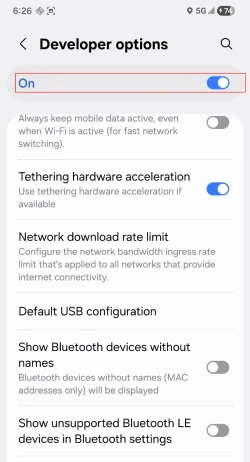
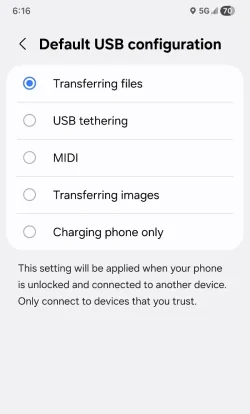
Same.In the Developer Settings, at the top I turned them ON.
Then I scrolled all the way down to: Default USB configuration and choose this...

Pssst, @Ghot Use Dark Mode, it saves your battery

I just tested for like 20th time and nothing i just get the Check your charger error. I just don't get why did this happen when it was fine the last years until sunday and now it doesn't recognize a usb to computer connection or repairs ?In the Developer Options, at the top I turned them ON.
View attachment 164265
Then I scrolled all the way down to: Default USB configuration and choose this...
View attachment 164264


-Just use quick share
Quick Share app: Android to Windows PC file transfer | Android
Use Quick Share to send files and photos from Android to PC. Discover how to connect your devices and transfer files from Android to PC wirelessly.www.android.com
or something else like
LocalSend Web
Share files between your browser and other devices running LocalSend.web.localsend.org
Take the cable that works with your A16, use it to plug your S23 into someone else's PC! Process of elimination!I still want to find out what is stopping my phone so i can fix it






