Windows 11 version 25H2 now available


 Windows IT Pro Blog:

Windows 11, version 25H2 is now available through Windows Autopatch and the Microsoft 365 admin center. It is also available for download from the Microsoft Software Download Service and Visual Studio Subscriptions. Windows 11, version 25H2 will become available via Windows Server Update Services (WSUS) on October 14, 2025, with the October security update.

Here is your guide to tools and resources to support your rollout of this update, plus some additional helpful information.

In this release​

Windows 11, version 25H2 includes the same new features and enhancements delivered through our Windows 11 continuous innovation efforts.

Some features that were behind temporary commercial control in Windows 11, version 24H2 are now enabled by default in version 25H2. These include:
The latest advances in update innovation also carry over with capabilities like quick machine recovery and hotpatching for Windows client available on version 25H2.

Version 25H2 includes Wi-Fi 7 for enterprise connectivity. It’s designed to address evolving security needs while helping support reliable connectivity in high-density, high-throughput scenarios. You can start deploying Wi-Fi 7 enterprise-grade access points to eligible devices to take advantage of the same benefits already available to consumer devices.

You also have the ability to remove select preinstalled Microsoft Store apps using policies on Windows 11 Enterprise and Windows 11 Education, version 25H2. By avoiding custom imaging and complex scripts, you’ll reduce operational overhead and create a cleaner, work-ready experience. This new capability is available via mobile device management (MDM) tools and Group Policy today, and it lights up in the Microsoft Intune Settings Catalog tomorrow!

Deploying Windows 11, version 25H2​

Windows 11, versions 24H2 and 25H2 use a shared servicing branch. That means that version 25H2 will be delivered as an enablement package, offering a fast, easy installation process like monthly Windows updates.

If you’re not familiar with enablement packages, the features in Windows 11, version 25H2 were included in the latest monthly update for version 24H2. However, they were in an inactive and dormant state. An enablement package works like a small switch that activates the features in version 25H2, so the update from Windows 11, version 24H2 to version 25H2 takes place in roughly the same time as typical monthly Windows updates.

As with all feature updates, you can use Windows Autopatch in Intune, or your preferred endpoint management solution, to roll out the update across your organization.

We recommend that commercial organizations begin targeted deployments to validate that their apps, devices, and infrastructure work as expected with this new release.

Tools and resources​

The deployment, security, and management tools you rely on have been refreshed for this update.
We’ve also updated the Windows release health hub with release information for Windows 11, version 25H2 as well as the pages for sharing information on known issues.

The Windows 11, version 25H2 update history page—where you’ll find release notes for monthly and out-of-band updates—will be available with the first monthly update for version 25H2 on October 14, 2025. Bookmark https://aka.ms/Windows11/25H2/UpdateHistory now for easy access to release notes.

Lifecycle information for Windows 11, version 25H2​

Today, September 30, 2025, marks the start of 36 months of servicing support for Enterprise and Education editions of Windows 11, version 25H2. Home and Pro editions receive 24 months of support. For more information, see the Windows 11 Lifecycle FAQ.

Where can I get help with deploying Windows 11 feature updates?​

If you want to lower the cost of managing updates for your IT team, benefit from built-in protections such as feature update safeguards, and get Windows security updates faster without a restart, get started with Windows Autopatch. Windows Autopatch is included with Windows Enterprise E3 (or higher), Windows A3 (or higher), F3, and Microsoft 365 Business Premium, and can help you easily deliver both feature and quality updates for Windows, as well as driver updates.

If you need additional help, tips, or best practices, join Windows Office Hours every third Thursday on the Windows Tech Community! We assemble experts from the Windows, Microsoft Intune, and Windows 365 product teams, as well as adoption and security specialists, to answer your questions in chat. Submit questions during the live one-hour event or post them in advance if that time doesn’t work for you. Our next event is Thursday, October 16, 2025.

It's also a good idea to follow the Windows IT Pro Blog—and follow us on LinkedIn or @MSWindowsITPro on X—to keep up with the latest Windows announcements and new feature releases!

Finally, if you’re interested in exploring new features in Windows 11 prior to release, join the Windows Insider Program. Access preview builds of Windows 11, provide feedback directly to Microsoft, and assess how your apps, hardware, and processes perform in early environments. Want to work directly with the Windows engineering teams to develop solutions that better meet your needs? Join the Customer Connection Program.


 Source:
 
Hi everyone,

Could someone please share the download link for Windows 11 LTSC 25H2 (Spanish version) from Visual Studio Subscriptions? I’d really appreciate it.

Thanks in advance and best regards!
 

My Computer My Computer

At a glance

windows 11
OS
windows 11
Computer type
PC/Desktop
Could someone please share the download link for Windows 11 LTSC 25H2 (Spanish version) from Visual Studio Subscriptions?
Currently there's no such thing there, only LTSC 2024 is available.
 

My Computers My Computers

  • At a glance

    Windows 11 25H2AMD 5700GG.Skill Flare X 32GB (2x16GB) 3200MHz CL14CPU Integrated
    OS
    Windows 11 25H2
    Computer type
    PC/Desktop
    CPU
    AMD 5700G
    Motherboard
    ASROCK B550 Steel Legend
    Memory
    G.Skill Flare X 32GB (2x16GB) 3200MHz CL14
    Graphics Card(s)
    CPU Integrated
    Monitor(s) Displays
    ASUS ProART HDR
    Screen Resolution
    2K
    Hard Drives
    SSD Samsung 860 240GB
    PSU
    CoolerMaster V550
  • At a glance

    Windows 11 25H2Intel N97DDR5 64GB SO-DIMMCPU Integrated
    Operating System
    Windows 11 25H2
    Computer type
    PC/Desktop
    CPU
    Intel N97
    Motherboard
    Hardkernel ODROID-H4+
    Memory
    DDR5 64GB SO-DIMM
    Graphics card(s)
    CPU Integrated
    Hard Drives
    SSD Samsung 860 240GB
Currently there's no such thing there, only LTSC 2024 is available.

That's correct, and even if it did exist @sylver77, we couldn't share a link. That would be against the terms of the Visual Studio site, and this forum probably.
 

My Computer My Computer

At a glance

I'm off Windows at home.
OS
I'm off Windows at home.
just wondering if I will get it on an unsupported machine, I have it on a different SSD. so, I can use it.
just curious to see if WU will offer it to me
 

My Computer My Computer

At a glance

WINDOWS 11 WINDOWS 10Intel(R) Core(TM) i7 -3770K CPU 3.50 GZ 3501 ...32.0 GB (31.9 GB usable)AMD RADEON TM R5240 INTELL HD GRAPHICS 4600 T...
OS
WINDOWS 11 WINDOWS 10
Computer type
PC/Desktop
Manufacturer/Model
HP H8 1360T
CPU
Intel(R) Core(TM) i7 -3770K CPU 3.50 GZ 3501 4 CORE
Motherboard
PEGATRON 2AD5
Memory
32.0 GB (31.9 GB usable)
Graphics Card(s)
AMD RADEON TM R5240 INTELL HD GRAPHICS 4600 TIGER 1+1 USB
Sound Card
AMD HD . IDT
Monitor(s) Displays
AOC WAL MART SPECIAL . HP 2311 IX IPS LED DELL 1708 FP
Screen Resolution
1920 X 1080 1600X900 1280X940
Hard Drives
1 FAXING S 100 512GB 1 KINGSTON 120 GB SSD 1 X12 SSD 512 GB
PSU
300 WATT HP
Case
FULL
Cooling
ON BOARD FAN
Keyboard
LOGITEC K 520 WIRELESS
Mouse
LOGITEC M 510 WIRELESS
Internet Speed
55 UP 11.2 DOWN
Browser
CHROME EDGE
Antivirus
WINDOWS SECUIRTY
Other Info
NON SUPPORTED HARDWARE FOR WINDOWS 11
just wondering if I will get it on an unsupported machine, I have it on a different SSD. so, I can use it.
just curious to see if WU will offer it to me
No. Windows Update will never offer Windows 11 on an unsupported device. You have to install/upgrade it yourself with an ISO and a workaround. Once running Windows 11 it will get all the cumulative updates for the version you're on, but will never offer a feature update to the next version. For that you will have to upgrade manually (again).

For 24H2>25H2 it's simply a matter of installing the enablement package, no workarounds needed for that. Downloads here:
 

My Computers My Computers

  • At a glance

    Windows 11 HomeAMD Athlon Silver 3050U8GBRadeon Graphics
    OS
    Windows 11 Home
    Computer type
    Laptop
    Manufacturer/Model
    Acer Aspire 3 A315-23-R9VY
    CPU
    AMD Athlon Silver 3050U
    Memory
    8GB
    Graphics Card(s)
    Radeon Graphics
    Monitor(s) Displays
    laptop screen
    Screen Resolution
    1366x768 native resolution, up to 2560x1440 with Radeon Virtual Super Resolution
    Hard Drives
    1TB Samsung EVO 870 SSD (from April 2026: 250GB EVO 850)
    Internet Speed
    150 Mbps
    Browser
    Edge, Firefox
    Antivirus
    Defender
    Other Info
    fully 'Windows 11 ready' laptop. Windows 10 C: partition migrated from my old unsupported 'main machine' then upgraded to 11. A test migration ran Insider builds for 2 months. When 11 was released on 5th October 2021 it was re-imaged back to 10 and was offered the upgrade in Windows Update on 20th October. Windows Update offered the 22H2 Feature Update on 20th September 2022. It got the 23H2 Feature Update on 4th November 2023 through Windows Update, 24H2 on 3rd October 2024 through Windows Update by setting the Target Release Version for 24H2, and 25H2 on 30th September 2025 through Windows Update by setting the Target Release Version for 25H2.

    UPDATE - 11 April 2026: due to mechanical deterioration this PC has been retired from active duty. The OS with all software and files has been migrated to my System Seven in 'Other systems' to carry on as my general purpose 'main machine'.
  • At a glance

    Windows 11 ProIntel® Core™ i5-520M8GB(integrated graphics) Intel HD Graphics
    Operating System
    Windows 11 Pro
    Computer type
    Laptop
    Manufacturer/Model
    Dell Latitude E4310
    CPU
    Intel® Core™ i5-520M
    Motherboard
    0T6M8G
    Memory
    8GB
    Graphics card(s)
    (integrated graphics) Intel HD Graphics
    Screen Resolution
    1366x768
    Hard Drives
    500GB Crucial MX500 SSD
    Browser
    Firefox, Edge
    Antivirus
    Defender
    Other Info
    unsupported machine: Legacy bios, MBR, TPM 1.2, upgraded from W10 to W11 using W10/W11 hybrid install media workaround.

    In-place upgrade to 22H2 using ISO and a workaround.
    Feature Update to 23H2 by manually installing the Enablement Package.
    In-place upgrade to 24H2 using hybrid 23H2/24H2 install media.
    Upgraded to 25H2 by Enablement Package.

    Also running Insider Dev, and Canary builds and Windows 10 as native boot .vhdx.
  • My SYSTEM THREE is a Dell Latitude 5410, i7-10610U, 32GB RAM, 512GB NVMe ssd, supported device running Windows 11 Pro.

    My SYSTEM FOUR is a 2-in-1 convertible Lenovo Yoga 11e 20DA, Celeron N2930, 8GB RAM, 256GB ssd. Unsupported device: currently running Win10 Pro, plus Win11 Pro RTM and Insider Dev, Beta, and RP 24H2 as native boot vhdx.

    My SYSTEM FIVE is a Dell Latitude 3190 2-in-1, Pentium Silver N5030, 8GB RAM, 1TB NVMe ssd, supported device running Windows 11 Pro, plus Insider Beta, Dev, and Canary builds (and a few others) as a native boot .vhdx.

    My SYSTEM SIX is a Dell Latitude 5550, Core Ultra 7 165H, 64GB RAM, 1TB NVMe SSD, supported device, Windows 11 Pro 24H2, Hyper-V host machine. Updated to 25H2 on 30th September 2025.

    My SYSTEM SEVEN is a Lenovo Thinkpad T580, Intel Core i7-8650U, 16GB RAM, 512GB NVMe SSD + 2nd 512GB NVMe SSD, a supported device for Windows 11. This is my current general purpose 'main machine'. The installed Windows 11 Home from my System One has been migrated to this machine.
awww i see well then i guess its 24h2 on the secondary ssd . i done made the 25h2 iso with the 2023 ca cert so now i know lol
 

My Computer My Computer

At a glance

WINDOWS 11 WINDOWS 10Intel(R) Core(TM) i7 -3770K CPU 3.50 GZ 3501 ...32.0 GB (31.9 GB usable)AMD RADEON TM R5240 INTELL HD GRAPHICS 4600 T...
OS
WINDOWS 11 WINDOWS 10
Computer type
PC/Desktop
Manufacturer/Model
HP H8 1360T
CPU
Intel(R) Core(TM) i7 -3770K CPU 3.50 GZ 3501 4 CORE
Motherboard
PEGATRON 2AD5
Memory
32.0 GB (31.9 GB usable)
Graphics Card(s)
AMD RADEON TM R5240 INTELL HD GRAPHICS 4600 TIGER 1+1 USB
Sound Card
AMD HD . IDT
Monitor(s) Displays
AOC WAL MART SPECIAL . HP 2311 IX IPS LED DELL 1708 FP
Screen Resolution
1920 X 1080 1600X900 1280X940
Hard Drives
1 FAXING S 100 512GB 1 KINGSTON 120 GB SSD 1 X12 SSD 512 GB
PSU
300 WATT HP
Case
FULL
Cooling
ON BOARD FAN
Keyboard
LOGITEC K 520 WIRELESS
Mouse
LOGITEC M 510 WIRELESS
Internet Speed
55 UP 11.2 DOWN
Browser
CHROME EDGE
Antivirus
WINDOWS SECUIRTY
Other Info
NON SUPPORTED HARDWARE FOR WINDOWS 11
No. Windows Update will never offer Windows 11 on an unsupported device. You have to install/upgrade it yourself with an ISO and a workaround. Once running Windows 11 it will get all the cumulative updates for the version you're on, but will never offer a feature update to the next version. For that you will have to upgrade manually (again).

For 24H2>25H2 it's simply a matter of installing the enablement package, no workarounds needed for that. Downloads here:
I had to install Windows 11 on my unsupported Dell laptop but I do get monthly updates.
 

My Computer My Computer

At a glance

Windows 11 ProCore i7-13700K64 GB Kingston Fury Beast DDR5Gigabyte GeForce RTX 2060 Super Gaming OC 8G
OS
Windows 11 Pro
Computer type
PC/Desktop
Manufacturer/Model
Self build
CPU
Core i7-13700K
Motherboard
Asus TUF Gaming Plus WiFi Z790
Memory
64 GB Kingston Fury Beast DDR5
Graphics Card(s)
Gigabyte GeForce RTX 2060 Super Gaming OC 8G
Sound Card
Realtek S1200A
Monitor(s) Displays
Viewsonic VP2770 & Dell (secondary)
Screen Resolution
2560 x 1440
Hard Drives
Kingston KC3000 2TB NVME SSD & SATA HDDs & SSD
PSU
EVGA SuperNova G2 850W
Case
Nanoxia Deep Silence 1
Cooling
Noctua NH-D14
Keyboard
Microsoft Digital Media Pro
Mouse
Logitech Wireless
Internet Speed
80 Mb / s
Browser
Chrome
Antivirus
Defender, Malwarebytes Free & AdwCleaner
Me, personally, would recommend a clean install with a 25H2 ISO. That should put us past the July and August patch-Tuesdays.
The July, 2025 patch-Tuesday, was an extremely stressful patch-Tuesday! It looked like the worst since '2033!

'6584 doesn't look that bad, in comparison. Well, not as buggy.
 

My Computers My Computers

  • At a glance

    Windows 11 Pro x64 24H2Ryzen 9 5900X64 GB G.Skill RipJaws V F4-3200C16D-64GVKASRock Steel Legend Arc B580 12 GB
    OS
    Windows 11 Pro x64 24H2
    Computer type
    PC/Desktop
    CPU
    Ryzen 9 5900X
    Motherboard
    ASRock B550 PG Velocita (UEFI-BIOS 3.90)
    Memory
    64 GB G.Skill RipJaws V F4-3200C16D-64GVK
    Graphics Card(s)
    ASRock Steel Legend Arc B580 12 GB
    Monitor(s) Displays
    Alienware AW3423DWF OLED ultrawide
    Hard Drives
    Samsung 990 Pro 1 TB NVMe SSD
    PSU
    eVGA Supernova 750 G3
    Case
    Corsair 275R
    Internet Speed
    VTel FTTH 1 Gb down and 1 Gb up
  • At a glance

    Windows 11 Home x64 25H2Ryzen 7 5800X3D32 GB (2x16 GB G.Skill TridentZ Neo)Sapphire Nitro+ Radeon RX 6750 XT
    Operating System
    Windows 11 Home x64 25H2
    Computer type
    PC/Desktop
    CPU
    Ryzen 7 5800X3D
    Motherboard
    Asus ROG Strix B550-F Gaming (UEFI-BIOS version 3636)
    Memory
    32 GB (2x16 GB G.Skill TridentZ Neo)
    Graphics card(s)
    Sapphire Nitro+ Radeon RX 6750 XT
    Hard Drives
    Samsung 970 Pro 512 GB NVMe SSD
    PSU
    Corsair RM850x
    Case
    Fractal Focus G
  • Like
Reactions: Gas
Does this update fix the annoying problem of context menu failure on desktop links whose target file has been replaced?
 

My Computers My Computers

  • At a glance

    Windows 11 Pro 25H2 Build 26200.7623Intel i5-1240016GBnone (INTEL UHD graphics 730 onboard)
    OS
    Windows 11 Pro 25H2 Build 26200.7623
    Computer type
    PC/Desktop
    Manufacturer/Model
    Gigabyte mainboard in FSC case
    CPU
    Intel i5-12400
    Motherboard
    Gigabyte H610 S2H V2 DDR4
    Memory
    16GB
    Graphics Card(s)
    none (INTEL UHD graphics 730 onboard)
    Sound Card
    none (7.1 channel Realtek HDA onboard)
    Monitor(s) Displays
    Panasonic TV
    Screen Resolution
    3840x2160
    Hard Drives
    KIOXIA-EXCERIA SSD 512GB
    TOSHIBA MQ01ABB200 2TB
    Case
    FSC SCALEO E
    Cooling
    ARCTIC CPU fan, 2 powersupply fans
    Keyboard
    various
    Mouse
    various
  • At a glance

    Windows 11 Pro 25H2 Build 26200.7623Intel(R) Core(TM) Ultra 7 165U (1.70 GHz)64.0 GB (63.5 GB usable)128 MB Intel Graphics
    Operating System
    Windows 11 Pro 25H2 Build 26200.7623
    Computer type
    Laptop
    Manufacturer/Model
    Lenovo X1 2-in-1
    CPU
    Intel(R) Core(TM) Ultra 7 165U (1.70 GHz)
    Motherboard
    Lenovo
    Memory
    64.0 GB (63.5 GB usable)
    Graphics card(s)
    128 MB Intel Graphics
    Sound Card
    none
    Monitor(s) Displays
    Philips 27B2U6903
    Screen Resolution
    3840x2160
    Hard Drives
    1 GB built-in SSD
    Mouse
    Kensington Expert Mouse (trackball)
    Browser
    Firefox
I haven't had it rollout to me yet, guessing that stuff is still happening?
 

My Computer My Computer

At a glance

Windows 1115GB RAM
OS
Windows 11
Computer type
Laptop
Manufacturer/Model
HP
Memory
15GB RAM
Hard Drives
SSD 1TB
Browser
Chrome
Me, personally, would recommend a clean install with a 25H2 ISO. That should put us past the July and August patch-Tuesdays.
The July, 2025 patch-Tuesday, was an extremely stressful patch-Tuesday! It looked like the worst since '2033!

'6584 doesn't look that bad, in comparison. Well, not as buggy.
'6584 fixed the bug where it thinks the file came from another computer. Or it did come from the internet, but, it doesn't acknowledge that you unblocked the file, in the right-click option for the file, when I checked the unblock option and applied. With that bug, you must move the file for the status to be acknowledged.
 

My Computers My Computers

  • At a glance

    Windows 11 Pro x64 24H2Ryzen 9 5900X64 GB G.Skill RipJaws V F4-3200C16D-64GVKASRock Steel Legend Arc B580 12 GB
    OS
    Windows 11 Pro x64 24H2
    Computer type
    PC/Desktop
    CPU
    Ryzen 9 5900X
    Motherboard
    ASRock B550 PG Velocita (UEFI-BIOS 3.90)
    Memory
    64 GB G.Skill RipJaws V F4-3200C16D-64GVK
    Graphics Card(s)
    ASRock Steel Legend Arc B580 12 GB
    Monitor(s) Displays
    Alienware AW3423DWF OLED ultrawide
    Hard Drives
    Samsung 990 Pro 1 TB NVMe SSD
    PSU
    eVGA Supernova 750 G3
    Case
    Corsair 275R
    Internet Speed
    VTel FTTH 1 Gb down and 1 Gb up
  • At a glance

    Windows 11 Home x64 25H2Ryzen 7 5800X3D32 GB (2x16 GB G.Skill TridentZ Neo)Sapphire Nitro+ Radeon RX 6750 XT
    Operating System
    Windows 11 Home x64 25H2
    Computer type
    PC/Desktop
    CPU
    Ryzen 7 5800X3D
    Motherboard
    Asus ROG Strix B550-F Gaming (UEFI-BIOS version 3636)
    Memory
    32 GB (2x16 GB G.Skill TridentZ Neo)
    Graphics card(s)
    Sapphire Nitro+ Radeon RX 6750 XT
    Hard Drives
    Samsung 970 Pro 512 GB NVMe SSD
    PSU
    Corsair RM850x
    Case
    Fractal Focus G
Me, personally, would recommend a clean install with a 25H2 ISO. That should put us past the July and August patch-Tuesdays.
The July, 2025 patch-Tuesday, was an extremely stressful patch-Tuesday! It looked like the worst since '2033!

'6584 doesn't look that bad, in comparison. Well, not as buggy.
Nope - what a pointless thing to do. If 24H2 works fine, the enablement package is tiny and takes no time at all!
 

My Computer My Computer

At a glance

Windows 11 Pro + Win11 Canary VM.I9 13th gen i9-13900H 2.60 GHZ16 GB solderedIntegrated Intel Iris XE
OS
Windows 11 Pro + Win11 Canary VM.
Computer type
Laptop
Manufacturer/Model
ASUS Zenbook 14
CPU
I9 13th gen i9-13900H 2.60 GHZ
Motherboard
Yep, Laptop has one.
Memory
16 GB soldered
Graphics Card(s)
Integrated Intel Iris XE
Sound Card
Realtek built in
Monitor(s) Displays
laptop OLED screen
Screen Resolution
2880x1800 touchscreen
Hard Drives
1 TB NVME SSD (only weakness is only one slot)
PSU
Internal + 65W thunderbolt USB4 charger
Case
Yep, got one
Cooling
Stella Artois (UK pint cans - 568 ml) - extra cost.
Keyboard
Built in UK keybd
Mouse
Bluetooth , wireless dongled, wired
Internet Speed
900 mbs (ethernet), wifi 6 typical 350-450 mb/s both up and down
Browser
Edge
Antivirus
Defender
Other Info
TPM 2.0, 2xUSB4 thunderbolt, 1xUsb3 (usb a), 1xUsb-c, hdmi out, 3.5 mm audio out/in combo, ASUS backlit trackpad (inc. switchable number pad)

Macrium Reflect Home V8
Office 365 Family (6 users each 1TB onedrive space)
Hyper-V (a vm runs almost as fast as my older laptop)
Nope - what a pointless thing to do. If 24H2 works fine, the enablement package is tiny and takes no time at all!
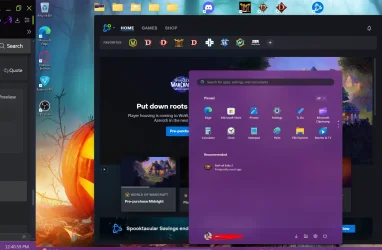
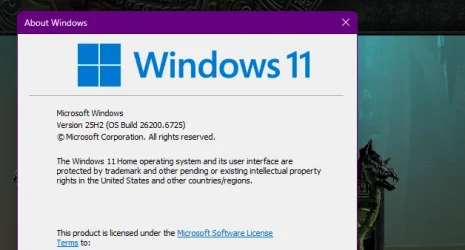
thats what i did got the enablement package, still dont see the changes in the 25h2 just the old settings
 

Attachments

  • Screenshot_1.webp
    Screenshot_1.webp
    108.8 KB · Views: 1
  • Screenshot_1.webp
    Screenshot_1.webp
    25.4 KB · Views: 1

My Computer My Computer

At a glance

11amd ryzen 5 5600xddr4nvidia
OS
11
Computer type
PC/Desktop
Manufacturer/Model
to be filled by o.e.m
CPU
amd ryzen 5 5600x
Motherboard
asrock
Memory
ddr4
Graphics Card(s)
nvidia
Monitor(s) Displays
lg
Screen Resolution
1920x1080
Hard Drives
wd blue sa510 2.5 2tb
wd blue sa510 2.5 1tb
Keyboard
razor
Antivirus
windows defender
Still on 24H2 lol, it hasn't rolled out to me yet
 

My Computer My Computer

At a glance

Windows 1115GB RAM
OS
Windows 11
Computer type
Laptop
Manufacturer/Model
HP
Memory
15GB RAM
Hard Drives
SSD 1TB
Browser
Chrome
thats what i did got the enablement package, still dont see the changes in the 25h2 just the old settings
Yeah MS have been a bit disingenuous - it turns out they are going to gradually rollout features like the new start menu and have yet to really do that yet.

The "general" belief on this forum is that those will follow in a cumulative update (hopefully not too distant future).

However, you can install some of the key new features like the new start menu (definitely an improvement) usin vivetool.
 
Last edited:

My Computer My Computer

At a glance

Windows 11 Pro + Win11 Canary VM.I9 13th gen i9-13900H 2.60 GHZ16 GB solderedIntegrated Intel Iris XE
OS
Windows 11 Pro + Win11 Canary VM.
Computer type
Laptop
Manufacturer/Model
ASUS Zenbook 14
CPU
I9 13th gen i9-13900H 2.60 GHZ
Motherboard
Yep, Laptop has one.
Memory
16 GB soldered
Graphics Card(s)
Integrated Intel Iris XE
Sound Card
Realtek built in
Monitor(s) Displays
laptop OLED screen
Screen Resolution
2880x1800 touchscreen
Hard Drives
1 TB NVME SSD (only weakness is only one slot)
PSU
Internal + 65W thunderbolt USB4 charger
Case
Yep, got one
Cooling
Stella Artois (UK pint cans - 568 ml) - extra cost.
Keyboard
Built in UK keybd
Mouse
Bluetooth , wireless dongled, wired
Internet Speed
900 mbs (ethernet), wifi 6 typical 350-450 mb/s both up and down
Browser
Edge
Antivirus
Defender
Other Info
TPM 2.0, 2xUSB4 thunderbolt, 1xUsb3 (usb a), 1xUsb-c, hdmi out, 3.5 mm audio out/in combo, ASUS backlit trackpad (inc. switchable number pad)

Macrium Reflect Home V8
Office 365 Family (6 users each 1TB onedrive space)
Hyper-V (a vm runs almost as fast as my older laptop)
Yeah MS have been a bit disingenuous - it turns out they are going to gradually rollout features like the new start menu and have yet to really do that yet.

The "general" belief on this forum is that those will follow in a cumulative update (hopefully not too distant future).

However, you can install some of the key new fesatures like the new start menu (definitely an improvement) usin vivetool.
oh ok thanks
 

My Computer My Computer

At a glance

11amd ryzen 5 5600xddr4nvidia
OS
11
Computer type
PC/Desktop
Manufacturer/Model
to be filled by o.e.m
CPU
amd ryzen 5 5600x
Motherboard
asrock
Memory
ddr4
Graphics Card(s)
nvidia
Monitor(s) Displays
lg
Screen Resolution
1920x1080
Hard Drives
wd blue sa510 2.5 2tb
wd blue sa510 2.5 1tb
Keyboard
razor
Antivirus
windows defender
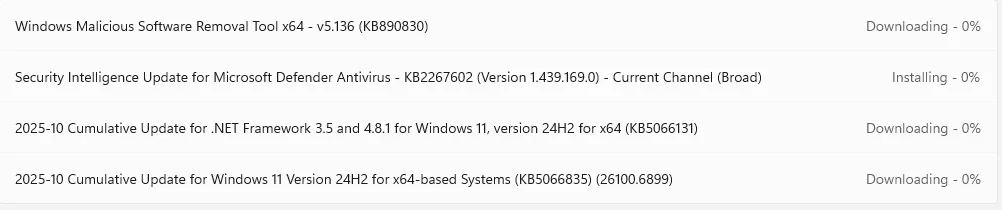
Bang on 6pm uk time, I got a new CU update for 24H2 (attn: @Brink)

1760461363921.webp

No enablement package as yet unless it is included in the above update?
 

My Computer My Computer

At a glance

Windows 11 Pro + Win11 Canary VM.I9 13th gen i9-13900H 2.60 GHZ16 GB solderedIntegrated Intel Iris XE
OS
Windows 11 Pro + Win11 Canary VM.
Computer type
Laptop
Manufacturer/Model
ASUS Zenbook 14
CPU
I9 13th gen i9-13900H 2.60 GHZ
Motherboard
Yep, Laptop has one.
Memory
16 GB soldered
Graphics Card(s)
Integrated Intel Iris XE
Sound Card
Realtek built in
Monitor(s) Displays
laptop OLED screen
Screen Resolution
2880x1800 touchscreen
Hard Drives
1 TB NVME SSD (only weakness is only one slot)
PSU
Internal + 65W thunderbolt USB4 charger
Case
Yep, got one
Cooling
Stella Artois (UK pint cans - 568 ml) - extra cost.
Keyboard
Built in UK keybd
Mouse
Bluetooth , wireless dongled, wired
Internet Speed
900 mbs (ethernet), wifi 6 typical 350-450 mb/s both up and down
Browser
Edge
Antivirus
Defender
Other Info
TPM 2.0, 2xUSB4 thunderbolt, 1xUsb3 (usb a), 1xUsb-c, hdmi out, 3.5 mm audio out/in combo, ASUS backlit trackpad (inc. switchable number pad)

Macrium Reflect Home V8
Office 365 Family (6 users each 1TB onedrive space)
Hyper-V (a vm runs almost as fast as my older laptop)
Bang on 6pm uk time, I got a new CU update for 24H2 (attn: @Brink)

View attachment 148869

No enablement package as yet unless it is included in the above update?
thats because the enablement package is on this site you gotta download and run it takes a few seconds and u got 25h2


My Computer My Computer

At a glance

11amd ryzen 5 5600xddr4nvidia
OS
11
Computer type
PC/Desktop
Manufacturer/Model
to be filled by o.e.m
CPU
amd ryzen 5 5600x
Motherboard
asrock
Memory
ddr4
Graphics Card(s)
nvidia
Monitor(s) Displays
lg
Screen Resolution
1920x1080
Hard Drives
wd blue sa510 2.5 2tb
wd blue sa510 2.5 1tb
Keyboard
razor
Antivirus
windows defender

My Computer My Computer

At a glance

Windows 11 Pro + Win11 Canary VM.I9 13th gen i9-13900H 2.60 GHZ16 GB solderedIntegrated Intel Iris XE
OS
Windows 11 Pro + Win11 Canary VM.
Computer type
Laptop
Manufacturer/Model
ASUS Zenbook 14
CPU
I9 13th gen i9-13900H 2.60 GHZ
Motherboard
Yep, Laptop has one.
Memory
16 GB soldered
Graphics Card(s)
Integrated Intel Iris XE
Sound Card
Realtek built in
Monitor(s) Displays
laptop OLED screen
Screen Resolution
2880x1800 touchscreen
Hard Drives
1 TB NVME SSD (only weakness is only one slot)
PSU
Internal + 65W thunderbolt USB4 charger
Case
Yep, got one
Cooling
Stella Artois (UK pint cans - 568 ml) - extra cost.
Keyboard
Built in UK keybd
Mouse
Bluetooth , wireless dongled, wired
Internet Speed
900 mbs (ethernet), wifi 6 typical 350-450 mb/s both up and down
Browser
Edge
Antivirus
Defender
Other Info
TPM 2.0, 2xUSB4 thunderbolt, 1xUsb3 (usb a), 1xUsb-c, hdmi out, 3.5 mm audio out/in combo, ASUS backlit trackpad (inc. switchable number pad)

Macrium Reflect Home V8
Office 365 Family (6 users each 1TB onedrive space)
Hyper-V (a vm runs almost as fast as my older laptop)
Back
Top Bottom