Windows IT Pro Blog:
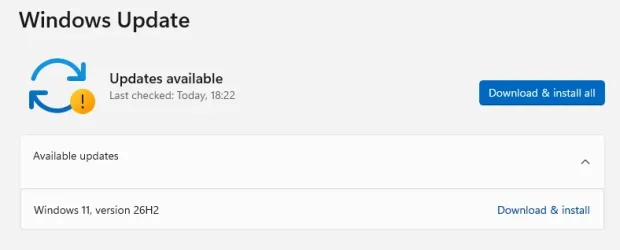
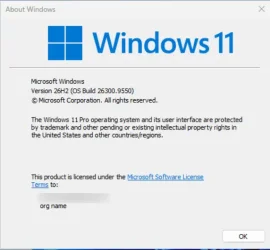
Windows 11, version 26H2 is now generally available, delivering the next annual feature update for Windows 11. Built on the same servicing foundation as Windows 11, versions 25H2 or 24H2, version 26H2 continues Microsoft focus on providing a predictable, low-disruption update experience for organizations while delivering the latest Windows innovations, security improvements, and management enhancements.
Windows 11, version 26H2 is delivered as an enablement package for eligible devices running Windows 11, versions 25H2 or 24H2. This means you can move to the latest release with minimal deployment overhead and a streamlined installation experience.
What is Windows 11, version 26H2?
Windows 11, version 26H2 is the latest annual feature update for Windows 11 and continues Microsoft annual release cadence for commercial customers.Like version 25H2, version 26H2 shares the same servicing branch and underlying code base as previous releases. New features and capabilities have been delivered to supported devices through monthly cumulative updates, with some functionality remaining dormant until activated by the version 26H2 enablement package. This approach reduces disruption while simplifying validation and deployment planning.
Why an enablement package?
Traditional Windows feature updates often required a full operating system upgrade. For eligible devices running Windows 11, versions 25H2 or 24H2, version 26H2 is activated through a lightweight enablement package.An enablement package:
- Activates features already present on the device.
- Installs similarly to a monthly quality update.
- Requires a small download.
- Typically results in faster installation times.
- Allows your organization to use existing servicing and deployment processes.
KB5121794 Enablement Package for 64-bit Windows 11 26H2
Windows11.0-KB5121794-x64.msu (174 KB)
Download
OR
KB5121794 Enablement Package for ARM64 Windows 11 26H2
Windows11.0-KB5121794-arm64.msu (174 KB)
Download
What's new in Windows 11, version 26H2
Windows 11, version 26H2 bundles features and enhancements gradually rolled out over the last year to versions 25H2 and 24H2 in the areas of security, management, accessibility, and productivity.Security improvements
Windows continues to build on Microsoft commitment to security by default and security by design.- Administrator protection provides just-in-time administrative privileges and profile separation to help harden Windows against elevation-of-privilege attacks. You can enable it through Microsoft Intune or Group Policy.

Enable or Disable Administrator Protection for Admin Approval Mode in Windows 11
This tutorial will show you how to enable or disable Administrator Protection for admin approval mode elevations in Windows 11. Starting with Windows 11 build 26100.9278 (24H2), build 26200.9278 (25H2), and build 2800.3086 (26H1), Administrator protection aims to protect free-floating admin... www.elevenforum.com
- Built-in Sysmon functionality in Windows enables you to capture system events that security tools can use for threat detection. Sysmon is off by default. You can configure it to capture the events your organization needs.
Install or Uninstall Built-in Sysmon in Windows 11
This tutorial will show you how to install or uninstall the built-in Sysmon for all users in Windows 11. System Monitor (Sysmon) is a Windows system service and device driver that, once installed on a system, remains resident across system reboots to monitor and log system activity to the...
www.elevenforum.com
- Smart App Control can now be turned on or off without requiring a clean installation of Windows, making it easier to block untrusted or potentially harmful apps.

Turn On or Off Smart App Control in Windows 11
This tutorial will show you how to manually turn on or off Smart App Control in Windows 11. Smart App Control (SAC) is a new security feature starting with Windows 11 build 22567. Smart App Control can work alongside your other security software, such as Microsoft Defender, for added...
www.elevenforum.com
- Windows Hello Enhanced Sign-in Security expands support to compatible peripheral fingerprint sensors. As such, enhanced biometric sign-in protection is available on more Windows 11 PCs.

Enable or Disable Enhanced Sign-in Security in Windows 11
This tutorial will show you how to enable or disable Enhanced Sign-in Security for all users in Windows 11. Windows Hello enables biometrics or PIN authentication, eliminating the need for a password. Biometric authentication uses facial recognition or fingerprint to prove a user's identity in...
www.elevenforum.com
- Post-quantum cryptography improvements include API support for NIST-standardized ML-KEM and ML-DSA algorithms. They include support for key exchange, signing, and decryption through CNG and .NET.
- Driver security enhancements change how the Windows kernel trusts third-party drivers. They remove default trust for cross-signed drivers while maintaining support for WHCP and designated trusted legacy drivers.
Management and deployment enhancements
Windows 11, version 26H2 introduces improvements designed to help IT administrators deploy, manage, and secure devices at scale.- Windows Autopilot device preparation supports device association. It helps organizations identify trusted devices before enrollment and enabling device-targeted policies, automatic corporate device enrollment, and additional OOBE customization.
- Windows settings backup and restore expands first sign-in restore to Microsoft Entra hybrid joined devices, Cloud PCs, and multi-user environments. Use it to restore user settings and Microsoft Store apps during device refreshes, upgrades, and migrations.
- Point-in-time restore for Windows provides another recovery option. Roll back a PC, including apps, settings, and personal files, to a recent automatic restore point.

Perform Point-in-time Restore of Windows 11
This tutorial will show you how to use the point-in-time restore feature to restore your Windows 11 PC to the exact state it was at an earlier point in time using restore points. Starting with Windows 11 build 26100.8737 (24H2), build 26200.8737 (25H2), and build 28000.2340 (26H1), Microsoft...
www.elevenforum.com
- Policy-based app removal gives organizations more flexibility to remove preinstalled Microsoft apps on Enterprise and Education devices. Just specify additional MSIX and APPX packages through Group Policy.
- RSAT on Arm64 enables IT administrators to use tools including Server Manager, Group Policy Management Tools, DNS Server Tools, DHCP Server Tools, and Active Directory management tools on Windows 11 Arm64 devices.
- App update orchestration allows participating applications to coordinate updates with Windows Update for improved scheduling and a more streamlined update experience
User experience and accessibility enhancements
Windows 11, version 26H2 continues to improve everyday productivity with enhancements across Windows experiences.- File Explorer adds productivity enhancements including AI actions for working with supported images and summarizing OneDrive and SharePoint documents. Also included are quick actions for work and school accounts, support for additional archive formats, and performance improvements.

Enable or Disable Recommended Actions from Apps in Windows 11
This tutorial will show you how to turn on or off showing recommended AI Actions from apps as contextual suggestions for your account in Windows 11. Starting with Windows 11 build 26100.3915 (24H2) Microsoft is beginning to introduce a new settings page under Settings > Apps > Actions for...
www.elevenforum.com
- Windows Search makes results easier to find and understand with previews. It better handles typos and partial app names, identifies result types clearer, and automatically indexes frequently used folders.
- Start and taskbar enhancements provide additional ways to customize the Windows workspace. Begin with new Start menu views and sizing options, additional taskbar positions, and a smaller taskbar option.
Change Start Menu Size in Windows 11
This tutorial will show you how to change the size of the Start Menu for your account in Windows 11. The Start menu in Windows 11 is comprised of three sections: Pinned, Recent, and All apps. Starting with Windows 11 build 26100.9278 (24H2), build 26200.9278 (25H2), and build 2800.3086 (26H1)...
www.elevenforum.com
Change Taskbar Position on Screen in Windows 11
This tutorial will show you how to change the taskbar position to any edge of the screen for your account in Windows 11. Starting with Windows 11 build 26100.9278 (24H2), build 26200.9278 (25H2), and build 2800.3086 (26H1), you can now change the position of taskbar on your screen. You can...
www.elevenforum.com

Change Taskbar Size in Windows 11
This tutorial will show you how to change the size of the taskbar for your account in Windows 11. Starting with Windows 11 build 26100.9278 (24H2), build 26200.9278 (25H2), and build 2800.3086 (26H1), a smaller taskbar option is now available to help maximize screen space on smaller devices...
www.elevenforum.com
- Task Manager provides greater visibility into NPU usage, including NPU utilization and memory information. You can also identify applications running in an AppContainer.

See NPU Usage Details in Windows 11
This tutorial will show you how to see NPU usage details in Windows 11. A NPU (Neural Processing Unit), or AI processor, is a specialized accelerator that handles artificial intelligence (AI) and machine learning (ML) tasks right on your PC instead of sending data to be processed in the cloud...
www.elevenforum.com
- Magnifier adds clearer screen reader announcements, more precise zoom controls, and screen tint options to improve readability.

Enable or Disable Magnifier Zoom per Display in Windows 11
This tutorial will show you how to enable or disable Magnifier to zoom each display independently for your account in Windows 11. Magnifier makes part or all of your screen bigger so you can see words and images better. You can change the Magnifier zoom level to choose how much Magnifier...
www.elevenforum.com

Enable or Disable Screen Tint in Windows 11
This tutorial will show you how to turn on or off using Screen Tint for your account in Windows 11. Starting with Windows 11 build 26100.8737 (24H2), build 26200.8737 (25H2), and build 2800.2608 (26H1), Microsoft is introducing screen tint, a new accessibility setting that applies a color...
www.elevenforum.com
- Narrator adds Braille Viewer, improves reading and navigation in Microsoft Word, and provides more control over how information about on-screen controls is announced.

Enable or Disable Braille Support for Narrator in Windows 11
This tutorial will show you how to turn on or off braille display support for Narrator for your account in Windows 11. Narrator is a screen reader included with Windows 11 that describes what's on your screen. Narrator lets you use your PC without a mouse to complete common tasks if you’re...
www.elevenforum.com
- Voice access adds natural language commanding on supported Copilot+ PCs, additional language support, and Voice Isolation to help improve recognition in environments with other speakers or background noise.

Set Up Voice Isolation in Voice Access on Windows 11
This tutorial will show you how to set up Voice isolation in Voice Access for your account in Windows 11. Voice access in Windows 11 enables everyone, including people with mobility disabilities, to control their PC and author text using their voice. For example, you can open and switch between...
www.elevenforum.com
Now enabled by default
Some features that were behind temporary commercial control in Windows 11, version 25H2 are now enabled by default in version 26H2. These include:- Windows settings backup, which helps preserve supported Windows settings and Microsoft Store app lists for recovery and device replacement scenarios. Existing administrator-configured policies are still honored.
- App-specific taskbar actions that help users access common actions directly from taskbar experiences.
- File Explorer improvements focused on improving navigation and usability within File Explorer.
For a closer look at new features and enhancements added to Windows 11 since version 25H2, please see What's new in Windows 11, version 26H2.
Servicing and support lifecycle
Windows 11, version 26H2 continues Microsoft annual Windows feature update cadence. Installing Windows 11, version 26H2 resets the support lifecycle for supported editions, as noted here:Edition | Support duration |
|---|---|
| Home | 24 months |
| Pro | 24 months |
| Enterprise | 36 months |
| Education | 36 months |
Deployment considerations
For devices currently running Windows 11, version 25H2 or version 24H2, you can use existing deployment frameworks and update rings to validate and deploy version 26H2.As with any release, we recommend that you:
- Validate version 26H2 in pilot environments.
- Test business-critical applications, representative hardware, and workflows.
- Expand deployment through existing update rings.
- Monitor deployment health and known issues.
Because this release uses servicing technology like that used for monthly cumulative updates, many organizations should experience a streamlined deployment process.
Tools and resources
Deployment, security, and management tools have been refreshed for this update. These include:- Windows 11, version 26H2 security baseline
- Administrative templates (ADMX) for Windows 11, version 26H2
- Group Policy Settings Reference for Windows 11, version 26H2
- Windows 11 Enterprise Evaluation
- Windows release health (for known and resolved issues)
- Windows 11 release information (for the release history and hotpatch calendar)
- What's new in Windows 11, version 26H2
- Windows lifecycle documentation
- Windows 11, version 26H2 update history
And, if you're looking for an easy way to keep up on what's new in the world of Windows management, tune in to my new podcast, Ctrl + Manage. The first episode debuts this Thursday, October 1, here on the Tech Community. Click here to save the date and tune in live.
Start planning for Windows 11, version 26H2
Windows 11, version 26H2 is designed to make moving to the latest version of Windows familiar and straightforward. If you're managing eligible devices on Windows 11, version 25H2 or 24H2, start by validating the update with a targeted set of devices, applications, and workflows. Then expand your deployment using the tools and processes you already have in place.As always, we want to hear from you. Drop a comment below and let us know what's working, what questions you have, and what we can do to make managing Windows easier for your organization.
Source:
An IT pro’s guide to Windows 11, version 26H2 - Windows IT Pro Blog
Explore key enhancements and resources to help you plan, validate, and deploy with confidence.
 techcommunity.microsoft.com
See also:
How to get the Windows 11 2026 version 26H2 Update
Windows Blogs: Windows powers how people around the world work, learn, create, and connect every day. Today, we’re announcing the availability of the Windows 11 2026 Update, also known as Windows 11, version 26H2. Built on the same servicing foundation as recent Windows 11 releases, version 26H2...
www.elevenforum.com

What's new in Windows 11, version 26H2 for IT pros
Learn more about what's new in Windows 11, version 26H2, including servicing updates.
learn.microsoft.com
Check Windows Updates
UUP Dump:
64-bit ISO download:

Select language for Windows 11, version 26H2 (26300.9550) amd64
Select language for Windows 11, version 26H2 (26300.9550) amd64 on UUP dump. UUP dump lets you download Unified Update Platform files, like Windows Insider updates, directly from Windows Update.
uupdump.net
ARM64 ISO download:
Select language for Windows 11, version 26H2 (26300.9550) arm64
Select language for Windows 11, version 26H2 (26300.9550) arm64 on UUP dump. UUP dump lets you download Unified Update Platform files, like Windows Insider updates, directly from Windows Update.
uupdump.net

UUP Dump - Download Windows Insider ISO
UUP Dump is the most practical and easy way to get ISO images of any Insider Windows 10 or Windows 11 version, as soon as Microsoft has released a new build. UUP Dump creates a download configuration file according to your choices, downloads necessary files directly from Microsoft servers, and...
www.elevenforum.com
Attachments
Last edited: