JavaScript is disabled. For a better experience, please enable JavaScript in your browser before proceeding.
You are using an out of date browser. It may not display this or other websites correctly.
You should upgrade or use an
alternative browser .
Windows bar notifications still showing despite being disabled
This a gaming PC with the latest windows build, i am using explorer patcher
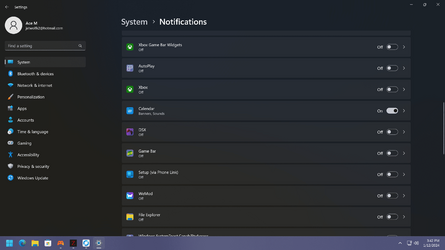
I disabled all notifications for xbox, everything related to xbox ie; gamebar as shown in screenshot
Yet i get acheivement notifications, i get notifications about points for playing gamepass pc and i get screenshot notifications when using game bar to take them
It doesnt show them in the actual notification bar but they do pop on screen for a moment and make the noise
How i get them completely disabled?
Thanks
Eleven Core i5-12600K 16GB RTX 3080 Eleven PC/Desktop Core i5-12600K PRO Z690-A DDR4 16GB RTX 3080 LG CX 4k 980 Pro
Well-known member
Member
VIP
Click on all things XBox in your screenshot above and then make sure you disable everything in the image below:
HTH
Windows 11 Pro Ryzen 9 3900X G-Skill RipjawsV F4-3600C18 (16GB x 2) Gigabyte RX 5700 XT Gaming OC Windows 11 Pro PC/Desktop Ryzen 9 3900X ASUS ROG Strix X570-E Gaming G-Skill RipjawsV F4-3600C18 (16GB x 2) Gigabyte RX 5700 XT Gaming OC Realtek ALC1220P ASUS VE278 (x 2) 1920x1080 Samsung 850 Pro 256GB Corsair HX1000 Corsair Carbide 400R AMD Wraith Prism (Stock) Logitech G213 Logitech G502 100Mbps down / 40Mbps up Firefox - Chrome - Edge Windows Defender - Clamwin
Well-known member
Power User
VIP
You could also disable all XBox whatever in Services if you don't need any or don't use XBox on your PC/notebook.
That's one of the things I do when I setup my new notebooks.
You can also toggle the Do Not Disturb button in Notifications unless you want to be notified about something.
EDIT : pls remove the email address from your screen shot. (privacy matter)
windows 11 22631.5039 Core i9 12th gen 12900HK 2.9 MHz (overcloked:... 32 Gigs DDR5-4800 nVidia RTX 3070 Ti / 8 Gigs DDR6 windows 11 22631.5039 Laptop MSI Raider GE76 Core i9 12th gen 12900HK 2.9 MHz (overcloked: 3890.48) MSI 32 Gigs DDR5-4800 nVidia RTX 3070 Ti / 8 Gigs DDR6 DYNAUDIO - Steelsries Arena 7- Sound Effects by Nahimic 3 17.3" 1920 x 1080 360 Hz 3 ms, IPS / Connected to MSI 32 inch curved @ 165 Hz 1920 x 1080 / Both Samsung 990 Pro 2TB (OS) - Solidigm P41 2TB (Storage) 280 watts MSI GE series internal Steelseries G903 Lightspeed 1000 Mbps Firefox / Opera GX- Do not like Edge Malwarebytes' just ask.
Windows 10 22H2 Intel Core i7 7820HK 2.9 Ghz 16 Gigs DDR4 2400 Mhz nVidia 1070 8GB RAM Windows 10 22H2 Laptop MSI GT73 7RE VR Titan Intel Core i7 7820HK 2.9 Ghz MSI 16 Gigs DDR4 2400 Mhz nVidia 1070 8GB RAM DYNAUDIO / Nahimic 2 IPS / 120HZ 1920x1080P Samsung NVME EVO 970 1TB / Samsung SSD (SATA) 1TB 240 watts MSI Internal Steelseries Logitech G903 Lightspeed 1 Gb/s Firefox / Vivaldi MalwareBytes' none.