Windows change output audio when back from idle state ( I disabled Sleep)


imanub

Well-known member
Member
Local time
10:37 PM
Posts
78
OS
Windows 11 Pro 25H2 - 26200.6899
Hello! I'm trying to figure out how to fix this annoying problem, but I just can't find a way.

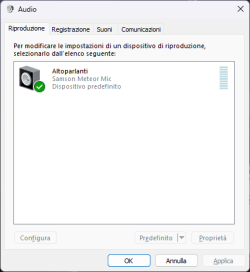
I have a SAMSON Meteor USB microphone and I have headphones connected to it. For about a couple of weeks, both with Windows 11 23H2 and with 24H2, if I leave the computer on and go to dinner for example, when I return, once I turn the monitor back on, I find the audio connected to the DisplayPort output of the Monitor. I have to go into the control panel and disable the DisplayPort, but this comes back as soon as I leave the computer on again while I'm having dinner. I repeat: this has never happened. I've always had headphones connected to it for a couple of years now and I've never encountered this annoying problem.
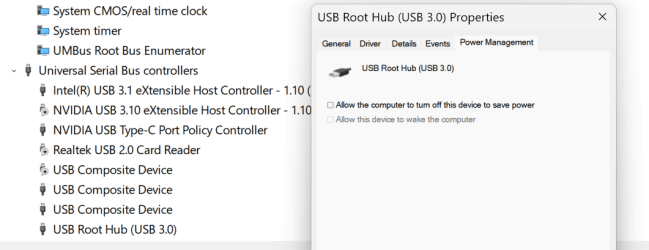
What could be causing this? I thought it might be due to USB suspend, but I have already disabled this in control panel setting and it keeps changing output (only if I leave the computer in idle for a while). I don't use Sleep mode, because I always have it disabled.

Have a nice day!
 
Windows Build/Version
(Now) Windows 11 24H2 26100.2033

My Computer My Computer

At a glance

Windows 11 Pro 25H2 - 26200.6899Intel i7-13700KF [Undervolt]Corsair VENGEANCE RGB DDR5 32GB 6000MHz C36Zotac RTX 3080 12GB AMP Holo
OS
Windows 11 Pro 25H2 - 26200.6899
Computer type
PC/Desktop
CPU
Intel i7-13700KF [Undervolt]
Motherboard
MAG Z790 TOMAHAWK WIFI
Memory
Corsair VENGEANCE RGB DDR5 32GB 6000MHz C36
Graphics Card(s)
Zotac RTX 3080 12GB AMP Holo
Sound Card
Sound BlasterX AE-5
Monitor(s) Displays
LG 27GN850
Screen Resolution
2560x1440
Hard Drives
WD_BLACK SN850X 1TB OS and GAME | WD_Black SN750 1TB GAME | 960 EVO 500GB Work | 850 EVO 500GB Storage | 850 EVO 250GB Arch Linux with Hyprland
PSU
Seasonic Prime GX-1000
Case
Corsair iCUE 5000x RGB
Cooling
EK Nucleus AIO CR360 Lux D-RGB
Keyboard
AJAZZ AK820 Pro with Gift Switch + SteelSeries QcK XXL
Mouse
Corsair M65 RGB ELITE | Razer Deathadder Elite
Browser
Chrome
Yes, it's happening to me as well on a clean install.

I do use sleep mode but quite often when it wakes, my audio , which is always supposed to have my speakers as default device randomly changes to Intel Display Audio. It doesn't happen every time, though and I am not able to make it happen by manually putting the system to sleep and waking it. It has a mind of its own.
 

My Computers My Computers

  • At a glance

    Windows 11 Pro 25H2 26200.8655i9-10900 10 core 20 threads32 gbnone-Intel UHD Graphics 630
    OS
    Windows 11 Pro 25H2 26200.8655
    Computer type
    PC/Desktop
    Manufacturer/Model
    Dell Optiplex 7080
    CPU
    i9-10900 10 core 20 threads
    Motherboard
    DELL 0J37VM
    Memory
    32 gb
    Graphics Card(s)
    none-Intel UHD Graphics 630
    Sound Card
    Integrated Realtek
    Monitor(s) Displays
    Benq 27
    Screen Resolution
    2560x1440
    Hard Drives
    2x1tb Solidigm m.2 nvme /External drives 512gb Samsung m.2 sata+2tb Kingston m2.nvme
    PSU
    500w
    Case
    MT
    Cooling
    Dell Premium
    Keyboard
    Logitech wired
    Mouse
    Logitech wireless
    Internet Speed
    so slow I'm too embarrassed to tell
    Browser
    #1 Edge #2 Firefox
    Antivirus
    Defender+MWB Premium
  • At a glance

    Windows 11 Pro 24H2 26200.8457AMD Ryzen 7 6800U32 gbintegrated
    Operating System
    Windows 11 Pro 24H2 26200.8457
    Computer type
    PC/Desktop
    Manufacturer/Model
    Beelink Mini PC SER5
    CPU
    AMD Ryzen 7 6800U
    Memory
    32 gb
    Graphics card(s)
    integrated
    Sound Card
    integrated
    Monitor(s) Displays
    Benq 27
    Screen Resolution
    2560x1440
    Hard Drives
    1TB Crucial nvme
    Keyboard
    Logitech wired
    Mouse
    Logitech wireless
    Internet Speed
    still too embarrassed to tell
    Browser
    Firefox
    Antivirus
    Defender
    Other Info
    System 3 is non compliant Dell 9020 i7-4770/24gb ram Win11 PRO 26200.8457
This is so damn annoying. I even left Diablo IV on, turned off the screen, went to eat and when I came back while using my character I noticed that I had no audio. ALT + TAB, went to the desktop and saw that the audio had changed to the DisplayPort of the LG Monitor. Damn!
 

My Computer My Computer

At a glance

Windows 11 Pro 25H2 - 26200.6899Intel i7-13700KF [Undervolt]Corsair VENGEANCE RGB DDR5 32GB 6000MHz C36Zotac RTX 3080 12GB AMP Holo
OS
Windows 11 Pro 25H2 - 26200.6899
Computer type
PC/Desktop
CPU
Intel i7-13700KF [Undervolt]
Motherboard
MAG Z790 TOMAHAWK WIFI
Memory
Corsair VENGEANCE RGB DDR5 32GB 6000MHz C36
Graphics Card(s)
Zotac RTX 3080 12GB AMP Holo
Sound Card
Sound BlasterX AE-5
Monitor(s) Displays
LG 27GN850
Screen Resolution
2560x1440
Hard Drives
WD_BLACK SN850X 1TB OS and GAME | WD_Black SN750 1TB GAME | 960 EVO 500GB Work | 850 EVO 500GB Storage | 850 EVO 250GB Arch Linux with Hyprland
PSU
Seasonic Prime GX-1000
Case
Corsair iCUE 5000x RGB
Cooling
EK Nucleus AIO CR360 Lux D-RGB
Keyboard
AJAZZ AK820 Pro with Gift Switch + SteelSeries QcK XXL
Mouse
Corsair M65 RGB ELITE | Razer Deathadder Elite
Browser
Chrome
saw that the audio had changed to the DisplayPort of the LG Monitor. Damn!

Try disabling your display audio in device manager to see if it make a difference. Then restart to see if it's even an option in sound settings any more.I would experiment myself but since mine happens so infrequently it would be a while before I could tell it would stop the switching issue..I'm thinking out loud here. I don't know if it will remove it as an option or not.
 

My Computers My Computers

  • At a glance

    Windows 11 Pro 25H2 26200.8655i9-10900 10 core 20 threads32 gbnone-Intel UHD Graphics 630
    OS
    Windows 11 Pro 25H2 26200.8655
    Computer type
    PC/Desktop
    Manufacturer/Model
    Dell Optiplex 7080
    CPU
    i9-10900 10 core 20 threads
    Motherboard
    DELL 0J37VM
    Memory
    32 gb
    Graphics Card(s)
    none-Intel UHD Graphics 630
    Sound Card
    Integrated Realtek
    Monitor(s) Displays
    Benq 27
    Screen Resolution
    2560x1440
    Hard Drives
    2x1tb Solidigm m.2 nvme /External drives 512gb Samsung m.2 sata+2tb Kingston m2.nvme
    PSU
    500w
    Case
    MT
    Cooling
    Dell Premium
    Keyboard
    Logitech wired
    Mouse
    Logitech wireless
    Internet Speed
    so slow I'm too embarrassed to tell
    Browser
    #1 Edge #2 Firefox
    Antivirus
    Defender+MWB Premium
  • At a glance

    Windows 11 Pro 24H2 26200.8457AMD Ryzen 7 6800U32 gbintegrated
    Operating System
    Windows 11 Pro 24H2 26200.8457
    Computer type
    PC/Desktop
    Manufacturer/Model
    Beelink Mini PC SER5
    CPU
    AMD Ryzen 7 6800U
    Memory
    32 gb
    Graphics card(s)
    integrated
    Sound Card
    integrated
    Monitor(s) Displays
    Benq 27
    Screen Resolution
    2560x1440
    Hard Drives
    1TB Crucial nvme
    Keyboard
    Logitech wired
    Mouse
    Logitech wireless
    Internet Speed
    still too embarrassed to tell
    Browser
    Firefox
    Antivirus
    Defender
    Other Info
    System 3 is non compliant Dell 9020 i7-4770/24gb ram Win11 PRO 26200.8457
Win Key + R write/copy command mmsys.cpl

Does that still happen - if you Disable it from Sound devices?

You could also disable it from Device Manager: Win Key + X -> Device Manager - go to Sound, video and Game Controllers and Disable Intel (R) Display Audio.
 

My Computer My Computer

At a glance

WinDOS 25H2Intel & AMDSO-DIMM SK Hynix 15.8 GB Dual-Channel DDR4-26...nVidia RTX 2060 6GB Mobile GPU (TU106M)
OS
WinDOS 25H2
Computer type
Laptop
CPU
Intel & AMD
Memory
SO-DIMM SK Hynix 15.8 GB Dual-Channel DDR4-2666 (2 x 8 GB) 1329MHz (19-19-19-43)
Graphics Card(s)
nVidia RTX 2060 6GB Mobile GPU (TU106M)
Sound Card
Onbord Realtek ALC1220
Screen Resolution
1920 x 1080
Hard Drives
1x Samsung PM981 NVMe PCIe M.2 512GB / 1x Seagate Expansion ST1000LM035 1TB
Win Key + R write/copy command mmsys.cpl

Does that still happen - if you Disable it from Sound devices?

You could also disable it from Device Manager: Win Key + X -> Device Manager - go to Sound, video and Game Controllers and Disable Intel (R) Display Audio.

rundll32_zSfTR3Zi7Y.png

You turn it off, but when you leave the computer on and idle for a while, LG Ultragear appears there too.
Let's say you disable High Definition Audio from Device Manager, the thing I don't understand is why this is happening, since I've never had this problem for two years. Could it be a Windows bug from the latest updates? Even with the updated version of Windows 23H2 (before formatting and putting in the 24H2) it did the same thing to me.
 

My Computer My Computer

At a glance

Windows 11 Pro 25H2 - 26200.6899Intel i7-13700KF [Undervolt]Corsair VENGEANCE RGB DDR5 32GB 6000MHz C36Zotac RTX 3080 12GB AMP Holo
OS
Windows 11 Pro 25H2 - 26200.6899
Computer type
PC/Desktop
CPU
Intel i7-13700KF [Undervolt]
Motherboard
MAG Z790 TOMAHAWK WIFI
Memory
Corsair VENGEANCE RGB DDR5 32GB 6000MHz C36
Graphics Card(s)
Zotac RTX 3080 12GB AMP Holo
Sound Card
Sound BlasterX AE-5
Monitor(s) Displays
LG 27GN850
Screen Resolution
2560x1440
Hard Drives
WD_BLACK SN850X 1TB OS and GAME | WD_Black SN750 1TB GAME | 960 EVO 500GB Work | 850 EVO 500GB Storage | 850 EVO 250GB Arch Linux with Hyprland
PSU
Seasonic Prime GX-1000
Case
Corsair iCUE 5000x RGB
Cooling
EK Nucleus AIO CR360 Lux D-RGB
Keyboard
AJAZZ AK820 Pro with Gift Switch + SteelSeries QcK XXL
Mouse
Corsair M65 RGB ELITE | Razer Deathadder Elite
Browser
Chrome
Thanks for this thread guys.

My next door neighbour is having the same problem with a PC he recently bought with Windows 11 installed. The sound through his connected speakers suddenly stopped working yesterday and he can't work out why.

After seeing this thread I'm betting his audio output has somehow 'magically' switched from his main speakers to the monitor speakers, he has the PC connected to the monitor with HDMI or DisplayPort, not sure which.

I'll go to see him in the morning and see if I can sort it out.

My own PC is connected to my monitor with DVI so I haven't seen this issue (the 9 year old 24 inch BenQ monitor I'm using only has DVI and D-sub and it also doesn't have it's own speakers).
 

My Computer My Computer

At a glance

Windows 11 Professional 25H212th Gen Intel(R) Core(TM) i5-12400F 2.50 GHz32GB (4x8GB) Kingston Fury RGB DDR4NVIDIA GeForce GTX 1650
OS
Windows 11 Professional 25H2
Computer type
PC/Desktop
Manufacturer/Model
Home Built
CPU
12th Gen Intel(R) Core(TM) i5-12400F 2.50 GHz
Motherboard
Gigabyte B760 DS3H AX DDR4
Memory
32GB (4x8GB) Kingston Fury RGB DDR4
Graphics Card(s)
NVIDIA GeForce GTX 1650
Sound Card
Onboard Sound
Monitor(s) Displays
BenQ GL2460 (24 inch - oldie but a goodie)
Screen Resolution
1920x1080
Hard Drives
Samsung SSD 870 EVO x 2 (250GB and 500GB) plus several external Samsung SSD's.
PSU
Corsair HX 750
Case
DeepCool
Cooling
Stock CPU cooler. 5 case fans (2 front, 2 top and 1 rear)
Keyboard
Logitech
Mouse
Logitech
Internet Speed
500/40 Fibre
Browser
Mozilla Firefox and Microsoft Edge
Antivirus
Windows Security
Thanks for this thread guys.

My next door neighbour is having the same problem with a PC he recently bought with Windows 11 installed. The sound through his connected speakers suddenly stopped working yesterday and he can't work out why.

After seeing this thread I'm betting his audio output has somehow 'magically' switched from his main speakers to the monitor speakers, he has the PC connected to the monitor with HDMI or DisplayPort, not sure which.

I'll go to see him in the morning and see if I can sort it out.

My own PC is connected to my monitor with DVI so I haven't seen this issue (the 9 year old 24 inch BenQ monitor I'm using only has DVI and D-sub and it also doesn't have it's own speakers).

This problem is so stupid! The more I think about it, the more I'm sure it was some Windows update.
 

My Computer My Computer

At a glance

Windows 11 Pro 25H2 - 26200.6899Intel i7-13700KF [Undervolt]Corsair VENGEANCE RGB DDR5 32GB 6000MHz C36Zotac RTX 3080 12GB AMP Holo
OS
Windows 11 Pro 25H2 - 26200.6899
Computer type
PC/Desktop
CPU
Intel i7-13700KF [Undervolt]
Motherboard
MAG Z790 TOMAHAWK WIFI
Memory
Corsair VENGEANCE RGB DDR5 32GB 6000MHz C36
Graphics Card(s)
Zotac RTX 3080 12GB AMP Holo
Sound Card
Sound BlasterX AE-5
Monitor(s) Displays
LG 27GN850
Screen Resolution
2560x1440
Hard Drives
WD_BLACK SN850X 1TB OS and GAME | WD_Black SN750 1TB GAME | 960 EVO 500GB Work | 850 EVO 500GB Storage | 850 EVO 250GB Arch Linux with Hyprland
PSU
Seasonic Prime GX-1000
Case
Corsair iCUE 5000x RGB
Cooling
EK Nucleus AIO CR360 Lux D-RGB
Keyboard
AJAZZ AK820 Pro with Gift Switch + SteelSeries QcK XXL
Mouse
Corsair M65 RGB ELITE | Razer Deathadder Elite
Browser
Chrome
View attachment 112874

You turn it off, but when you leave the computer on and idle for a while, LG Ultragear appears there too.
Let's say you disable High Definition Audio from Device Manager, the thing I don't understand is why this is happening, since I've never had this problem for two years. Could it be a Windows bug from the latest updates? Even with the updated version of Windows 23H2 (before formatting and putting in the 24H2) it did the same thing to me.

Quite likely some bug (obviously not a feature or intended). Truth be told - despite the blind claims of some people - that Windows has excellent Driver support. In reality, most of the times has... decent support - but with so many OEMs with their own set of drivers (usually outdated) - it's actually a big mess. Audio wise - seems tested mainly on specific OEM drivers (same ones shared by Microsoft driver data base). Using a different/updated driver - for exactly the same Chip - but updated by a different OEM - tends to cause issue. While the most common issue - is usually tied to sleep mode & waking up. Btw, do you have the latest OEM Audio drivers - apparently released just 2 days ago:


My Computer My Computer

At a glance

WinDOS 25H2Intel & AMDSO-DIMM SK Hynix 15.8 GB Dual-Channel DDR4-26...nVidia RTX 2060 6GB Mobile GPU (TU106M)
OS
WinDOS 25H2
Computer type
Laptop
CPU
Intel & AMD
Memory
SO-DIMM SK Hynix 15.8 GB Dual-Channel DDR4-2666 (2 x 8 GB) 1329MHz (19-19-19-43)
Graphics Card(s)
nVidia RTX 2060 6GB Mobile GPU (TU106M)
Sound Card
Onbord Realtek ALC1220
Screen Resolution
1920 x 1080
Hard Drives
1x Samsung PM981 NVMe PCIe M.2 512GB / 1x Seagate Expansion ST1000LM035 1TB
Quite likely some bug (obviously not a feature or intended). Truth be told - despite the blind claims of some people - that Windows has excellent Driver support. In reality, most of the times has... decent support - but with so many OEMs with their own set of drivers (usually outdated) - it's actually a big mess. Audio wise - seems tested mainly on specific OEM drivers (same ones shared by Microsoft driver data base). Using a different/updated driver - for exactly the same Chip - but updated by a different OEM - tends to cause issue. While the most common issue - is usually tied to sleep mode & waking up. Btw, do you have the latest OEM Audio drivers - apparently released just 2 days ago:

Thanks for sharing, but as I wrote in my initial post, I'm using my USB Microphone's sound card.
No sleep for me, I just turn off the monitor and go away from the computer (e.g. dinner, take the dog out, etc...) I have sleep disabled, because I've never used it and having an NVME SSD; honestly, I prefer to turn off the computer instead of sending it to sleep.
 

My Computer My Computer

At a glance

Windows 11 Pro 25H2 - 26200.6899Intel i7-13700KF [Undervolt]Corsair VENGEANCE RGB DDR5 32GB 6000MHz C36Zotac RTX 3080 12GB AMP Holo
OS
Windows 11 Pro 25H2 - 26200.6899
Computer type
PC/Desktop
CPU
Intel i7-13700KF [Undervolt]
Motherboard
MAG Z790 TOMAHAWK WIFI
Memory
Corsair VENGEANCE RGB DDR5 32GB 6000MHz C36
Graphics Card(s)
Zotac RTX 3080 12GB AMP Holo
Sound Card
Sound BlasterX AE-5
Monitor(s) Displays
LG 27GN850
Screen Resolution
2560x1440
Hard Drives
WD_BLACK SN850X 1TB OS and GAME | WD_Black SN750 1TB GAME | 960 EVO 500GB Work | 850 EVO 500GB Storage | 850 EVO 250GB Arch Linux with Hyprland
PSU
Seasonic Prime GX-1000
Case
Corsair iCUE 5000x RGB
Cooling
EK Nucleus AIO CR360 Lux D-RGB
Keyboard
AJAZZ AK820 Pro with Gift Switch + SteelSeries QcK XXL
Mouse
Corsair M65 RGB ELITE | Razer Deathadder Elite
Browser
Chrome
Thanks for sharing, but as I wrote in my initial post, I'm using my USB Microphone's sound card.
No sleep for me, I just turn off the monitor and go away from the computer (e.g. dinner, take the dog out, etc...) I have sleep disabled, because I've never used it and having an NVME SSD; honestly, I prefer to turn off the computer instead of sending it to sleep.
My bad, you said you disabled USB suspend - but did you Disabled (de-select) it from Device Manager as well? Do the same for all USB ports:

2024-10-17_202618.png
 

My Computer My Computer

At a glance

WinDOS 25H2Intel & AMDSO-DIMM SK Hynix 15.8 GB Dual-Channel DDR4-26...nVidia RTX 2060 6GB Mobile GPU (TU106M)
OS
WinDOS 25H2
Computer type
Laptop
CPU
Intel & AMD
Memory
SO-DIMM SK Hynix 15.8 GB Dual-Channel DDR4-2666 (2 x 8 GB) 1329MHz (19-19-19-43)
Graphics Card(s)
nVidia RTX 2060 6GB Mobile GPU (TU106M)
Sound Card
Onbord Realtek ALC1220
Screen Resolution
1920 x 1080
Hard Drives
1x Samsung PM981 NVMe PCIe M.2 512GB / 1x Seagate Expansion ST1000LM035 1TB

My Computer My Computer

At a glance

Windows 11 Pro 25H2 - 26200.6899Intel i7-13700KF [Undervolt]Corsair VENGEANCE RGB DDR5 32GB 6000MHz C36Zotac RTX 3080 12GB AMP Holo
OS
Windows 11 Pro 25H2 - 26200.6899
Computer type
PC/Desktop
CPU
Intel i7-13700KF [Undervolt]
Motherboard
MAG Z790 TOMAHAWK WIFI
Memory
Corsair VENGEANCE RGB DDR5 32GB 6000MHz C36
Graphics Card(s)
Zotac RTX 3080 12GB AMP Holo
Sound Card
Sound BlasterX AE-5
Monitor(s) Displays
LG 27GN850
Screen Resolution
2560x1440
Hard Drives
WD_BLACK SN850X 1TB OS and GAME | WD_Black SN750 1TB GAME | 960 EVO 500GB Work | 850 EVO 500GB Storage | 850 EVO 250GB Arch Linux with Hyprland
PSU
Seasonic Prime GX-1000
Case
Corsair iCUE 5000x RGB
Cooling
EK Nucleus AIO CR360 Lux D-RGB
Keyboard
AJAZZ AK820 Pro with Gift Switch + SteelSeries QcK XXL
Mouse
Corsair M65 RGB ELITE | Razer Deathadder Elite
Browser
Chrome
Disable the graphics audio out in Device Manager, and also disable the Audio outs that is not used, like onboard (if not disaböed via uefi) still in Device Manager, i had issue with this, it shifted between cards without me doing it, in idle, and this was long time ago, over and year. And it was the only solution.
I disabled in my case:
High Definition Audio Device
Amd Streaming Audio Device

I believe it's the same for Nvidia and Intel (and igpu aduio out also)
Try that, and i hope you don't loose the audio device when idling.
I have an Audio interface as main sound device, i had to this to stop the audio to go out via Realtek onboard and Amd's HDMI audio out, it was really annoying. And it have persisted throughout updates also, and one repair install.
 

My Computer My Computer

At a glance

Windows 11 ProAMD 5800x64GB Corsair Pro SLSapphire 5700XT
OS
Windows 11 Pro
Computer type
PC/Desktop
Manufacturer/Model
DIY
CPU
AMD 5800x
Motherboard
Rog Strix x570-E Gaming Wifi
Memory
64GB Corsair Pro SL
Graphics Card(s)
Sapphire 5700XT
Sound Card
Antelope Audio, Orio Studio Synergy Core
Monitor(s) Displays
Innocn 27M2V
Screen Resolution
3840x2160
Hard Drives
System: Sansdisk SDSSH 225GB
Storage: Toshiba HDWQ140 4TB
Storage: Samsung HD103UJ 1TB
Game Disk: Samsung 980 Pro 512GB
Game Disk 2: Samsung 980 Peo 2TB
PSU
EVGA G2 750W
Case
Chieftec Mesh Super old fulltower (20kg empty)
Cooling
Noctua D15.cgromax.black with two fans,
Keyboard
Dell RT7D40 Enhanced Multimedia Keyboard
Mouse
ell T0179 (M-RAC67B)
Internet Speed
500 / 500 Mbit
Browser
Edge Canary 64 Bit
Antivirus
None, disabled in WIndows 11 by GPO
Since it didn't do it before, I'm waiting to change as many parameters as possible, because, I repeat, I've never had to intervene on Device Manager and Control Panels. Never.
So I'm trying to understand why it started doing this.This morning, for example, I went to have breakfast and left the computer on, turning off only the monitor. I came back after about twenty minutes and the audio had not been changed; then, I had to go away for about fifteen/twenty minutes and, this time, the audio had been changed. Who knows!
 

My Computer My Computer

At a glance

Windows 11 Pro 25H2 - 26200.6899Intel i7-13700KF [Undervolt]Corsair VENGEANCE RGB DDR5 32GB 6000MHz C36Zotac RTX 3080 12GB AMP Holo
OS
Windows 11 Pro 25H2 - 26200.6899
Computer type
PC/Desktop
CPU
Intel i7-13700KF [Undervolt]
Motherboard
MAG Z790 TOMAHAWK WIFI
Memory
Corsair VENGEANCE RGB DDR5 32GB 6000MHz C36
Graphics Card(s)
Zotac RTX 3080 12GB AMP Holo
Sound Card
Sound BlasterX AE-5
Monitor(s) Displays
LG 27GN850
Screen Resolution
2560x1440
Hard Drives
WD_BLACK SN850X 1TB OS and GAME | WD_Black SN750 1TB GAME | 960 EVO 500GB Work | 850 EVO 500GB Storage | 850 EVO 250GB Arch Linux with Hyprland
PSU
Seasonic Prime GX-1000
Case
Corsair iCUE 5000x RGB
Cooling
EK Nucleus AIO CR360 Lux D-RGB
Keyboard
AJAZZ AK820 Pro with Gift Switch + SteelSeries QcK XXL
Mouse
Corsair M65 RGB ELITE | Razer Deathadder Elite
Browser
Chrome
I believe that when it looses the connection to the sound device that enters the idle state, it just start to use the next one on the list in Sound Devicrs, and i believe it's an change that happened on an update, but can't remember when. And the only soultion i have come across when i searched is the method i use, and i know it's strange that this hapoens, but MS doesn't seem to fix it neither.
Hope you will find a solution.
I gave the only method i found after digging into it. 🙂
 

My Computer My Computer

At a glance

Windows 11 ProAMD 5800x64GB Corsair Pro SLSapphire 5700XT
OS
Windows 11 Pro
Computer type
PC/Desktop
Manufacturer/Model
DIY
CPU
AMD 5800x
Motherboard
Rog Strix x570-E Gaming Wifi
Memory
64GB Corsair Pro SL
Graphics Card(s)
Sapphire 5700XT
Sound Card
Antelope Audio, Orio Studio Synergy Core
Monitor(s) Displays
Innocn 27M2V
Screen Resolution
3840x2160
Hard Drives
System: Sansdisk SDSSH 225GB
Storage: Toshiba HDWQ140 4TB
Storage: Samsung HD103UJ 1TB
Game Disk: Samsung 980 Pro 512GB
Game Disk 2: Samsung 980 Peo 2TB
PSU
EVGA G2 750W
Case
Chieftec Mesh Super old fulltower (20kg empty)
Cooling
Noctua D15.cgromax.black with two fans,
Keyboard
Dell RT7D40 Enhanced Multimedia Keyboard
Mouse
ell T0179 (M-RAC67B)
Internet Speed
500 / 500 Mbit
Browser
Edge Canary 64 Bit
Antivirus
None, disabled in WIndows 11 by GPO
I believe that when it looses the connection to the sound device that enters the idle state, it just start to use the next one on the list in Sound Devicrs, and i believe it's an change that happened on an update, but can't remember when. And the only soultion i have come across when i searched is the method i use, and i know it's strange that this hapoens, but MS doesn't seem to fix it neither.
Hope you will find a solution.
I gave the only method i found after digging into it. 🙂
Yeah! In fact, I really appreciated it and I came to you to show you this annoying problem.
 

My Computer My Computer

At a glance

Windows 11 Pro 25H2 - 26200.6899Intel i7-13700KF [Undervolt]Corsair VENGEANCE RGB DDR5 32GB 6000MHz C36Zotac RTX 3080 12GB AMP Holo
OS
Windows 11 Pro 25H2 - 26200.6899
Computer type
PC/Desktop
CPU
Intel i7-13700KF [Undervolt]
Motherboard
MAG Z790 TOMAHAWK WIFI
Memory
Corsair VENGEANCE RGB DDR5 32GB 6000MHz C36
Graphics Card(s)
Zotac RTX 3080 12GB AMP Holo
Sound Card
Sound BlasterX AE-5
Monitor(s) Displays
LG 27GN850
Screen Resolution
2560x1440
Hard Drives
WD_BLACK SN850X 1TB OS and GAME | WD_Black SN750 1TB GAME | 960 EVO 500GB Work | 850 EVO 500GB Storage | 850 EVO 250GB Arch Linux with Hyprland
PSU
Seasonic Prime GX-1000
Case
Corsair iCUE 5000x RGB
Cooling
EK Nucleus AIO CR360 Lux D-RGB
Keyboard
AJAZZ AK820 Pro with Gift Switch + SteelSeries QcK XXL
Mouse
Corsair M65 RGB ELITE | Razer Deathadder Elite
Browser
Chrome
UPDATE: I bought a male to female audio extension cable and restarted the Sound BlasterX AE-5. The audio switch continues to do so randomly. I have not had this problem for several days. This is really annoying. With Windows 11 23H2 this does not happen, ergo it is this new Windows 11 24H2.
 

My Computer My Computer

At a glance

Windows 11 Pro 25H2 - 26200.6899Intel i7-13700KF [Undervolt]Corsair VENGEANCE RGB DDR5 32GB 6000MHz C36Zotac RTX 3080 12GB AMP Holo
OS
Windows 11 Pro 25H2 - 26200.6899
Computer type
PC/Desktop
CPU
Intel i7-13700KF [Undervolt]
Motherboard
MAG Z790 TOMAHAWK WIFI
Memory
Corsair VENGEANCE RGB DDR5 32GB 6000MHz C36
Graphics Card(s)
Zotac RTX 3080 12GB AMP Holo
Sound Card
Sound BlasterX AE-5
Monitor(s) Displays
LG 27GN850
Screen Resolution
2560x1440
Hard Drives
WD_BLACK SN850X 1TB OS and GAME | WD_Black SN750 1TB GAME | 960 EVO 500GB Work | 850 EVO 500GB Storage | 850 EVO 250GB Arch Linux with Hyprland
PSU
Seasonic Prime GX-1000
Case
Corsair iCUE 5000x RGB
Cooling
EK Nucleus AIO CR360 Lux D-RGB
Keyboard
AJAZZ AK820 Pro with Gift Switch + SteelSeries QcK XXL
Mouse
Corsair M65 RGB ELITE | Razer Deathadder Elite
Browser
Chrome

Latest Support Threads

Back
Top Bottom