
Navigation
Install the app
How to install the app on iOS
Follow along with the video below to see how to install our site as a web app on your home screen.
Note: This feature may not be available in some browsers.
More options
Style variation
System
Light
Dark
You are using an out of date browser. It may not display this or other websites correctly.
You should upgrade or use an alternative browser.
You should upgrade or use an alternative browser.
windows logo in system
- Thread starter pcfreak49
- Start date
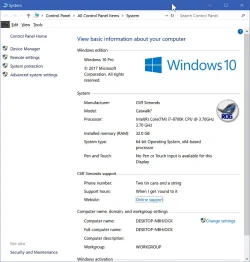

This is Windows 11 forum, please go to :I have a question how can you put the Windows logo in system

Ten Forums - Windows 10 Help and Support Forum
Windows 10 troubleshooting help and support forum, plus thousands of tutorials to help you fix, customize and get the most from Microsoft Windows 10.
 www.tenforums.com
My Computers
-
At a glance
All Branches but StableAMD Ryzen 7 7735HS 3200-4500 Mhz 8 cores x 232 GB DDR5Radeon Graphic / NVIDIA GeForce RTX 4060 8 GB...- OS
- All Branches but Stable
- Computer type
- Laptop
- Manufacturer/Model
- Acer Nitro ANV15-51
- CPU
- AMD Ryzen 7 7735HS 3200-4500 Mhz 8 cores x 2
- Motherboard
- Sportage_RBH
- Memory
- 32 GB DDR5
- Graphics Card(s)
- Radeon Graphic / NVIDIA GeForce RTX 4060 8 GB GDDR6
- Sound Card
- AMD/Realtek(R) Audio
- Monitor(s) Displays
- Integrated Monitor (15.3"vis)
- Screen Resolution
- FHD 1920X1080 16:9 144Hz
- Hard Drives
- KINGSTON OM8SEP4512Q-AA 1TB
Western Digital 256GB
- PSU
- 19V DC 6.32 A 120 W
- Cooling
- Dual Fans
- Mouse
- MS Bluetooth
- Internet Speed
- Fiber 1GB Cox -us & 1GB Orange-fr
- Browser
- Edge Canary- Firefox Nightly-Chrome Dev-Chrome Dev
- Antivirus
- Windows Defender
-
At a glance
Windows 11 BetaAMD A9-94208 GB of DDR4AMD Radeon R5- Operating System
- Windows 11 Beta
- Computer type
- Laptop
- Manufacturer/Model
- Asus X751BP
- CPU
- AMD A9-9420
- Memory
- 8 GB of DDR4
- Graphics card(s)
- AMD Radeon R5
- Screen Resolution
- 1600x900
- Hard Drives
- Seagate 1 TB
This is Windows 11 forum, please go to :
The pane you are displaying no longer exists in latest Windows 11.Ten Forums - Windows 10 Help and Support Forum
Windows 10 troubleshooting help and support forum, plus thousands of tutorials to help you fix, customize and get the most from Microsoft Windows 10.
does it still work in windows 10
My Computer
At a glance
Mac Os Windows
- OS
- Mac Os Windows
- Computer type
- Laptop
does it still work in windows 10

Customize OEM Support Information in Windows 10
How to Customize OEM Support Information in Windows 10
www.tenforums.com
My Computers
-
At a glance
All Branches but StableAMD Ryzen 7 7735HS 3200-4500 Mhz 8 cores x 232 GB DDR5Radeon Graphic / NVIDIA GeForce RTX 4060 8 GB...- OS
- All Branches but Stable
- Computer type
- Laptop
- Manufacturer/Model
- Acer Nitro ANV15-51
- CPU
- AMD Ryzen 7 7735HS 3200-4500 Mhz 8 cores x 2
- Motherboard
- Sportage_RBH
- Memory
- 32 GB DDR5
- Graphics Card(s)
- Radeon Graphic / NVIDIA GeForce RTX 4060 8 GB GDDR6
- Sound Card
- AMD/Realtek(R) Audio
- Monitor(s) Displays
- Integrated Monitor (15.3"vis)
- Screen Resolution
- FHD 1920X1080 16:9 144Hz
- Hard Drives
- KINGSTON OM8SEP4512Q-AA 1TB
Western Digital 256GB
- PSU
- 19V DC 6.32 A 120 W
- Cooling
- Dual Fans
- Mouse
- MS Bluetooth
- Internet Speed
- Fiber 1GB Cox -us & 1GB Orange-fr
- Browser
- Edge Canary- Firefox Nightly-Chrome Dev-Chrome Dev
- Antivirus
- Windows Defender
-
At a glance
Windows 11 BetaAMD A9-94208 GB of DDR4AMD Radeon R5- Operating System
- Windows 11 Beta
- Computer type
- Laptop
- Manufacturer/Model
- Asus X751BP
- CPU
- AMD A9-9420
- Memory
- 8 GB of DDR4
- Graphics card(s)
- AMD Radeon R5
- Screen Resolution
- 1600x900
- Hard Drives
- Seagate 1 TB
Customize OEM Support Information in Windows 10
How to Customize OEM Support Information in Windows 10
I don't like the Windows logo
My Computer
At a glance
Mac Os Windows
- OS
- Mac Os Windows
- Computer type
- Laptop

If you don't want to manually make the changes in the Registry you can use this program in Windows 10. OEM Configurator: Portable Utility to Customize OEM Information and Logo in System Properties of WindowsI don't like the Windows logo
My Computers
-
At a glance
Windows 11 Pro 25H2Intel Core i7-10700K16GB (8GB PC4-19200 DDR4 SDRAM x2)NVIDIA GeForce GTX 1050 TI- OS
- Windows 11 Pro 25H2
- Computer type
- PC/Desktop
- Manufacturer/Model
- PowerSpec B746
- CPU
- Intel Core i7-10700K
- Motherboard
- ASRock Z490 Phantom Gaming 4/ax
- Memory
- 16GB (8GB PC4-19200 DDR4 SDRAM x2)
- Graphics Card(s)
- NVIDIA GeForce GTX 1050 TI
- Sound Card
- Realtek Audio
- Monitor(s) Displays
- #1. LG ULTRAWIDE 34" #2. AOC Q32G2WG3 32"
- Screen Resolution
- #1. 3440 X 1440 #2. 1920 x 1080
- Hard Drives
- NVMe WDC WDS100T2B0C-00PXH0 1TB
Samsung SSD 860 EVO 1TB
- PSU
- 750 Watts (62.5A)
- Case
- PowerSpec/Lian Li ATX 205
- Keyboard
- Logitech K270
- Mouse
- Logitech M185
- Browser
- Microsoft Edge and Firefox
- Antivirus
- Webroot SecureAnywhere CE 26.1
-
At a glance
Windows 11 Canary ChannelIntel Core i5-8400 CPU @ 2.80GHz16 MB DDR 4-2666- Operating System
- Windows 11 Canary Channel
- Computer type
- PC/Desktop
- Manufacturer/Model
- PowerSpec G156
- CPU
- Intel Core i5-8400 CPU @ 2.80GHz
- Motherboard
- AsusTeK Prime B360M-A
- Memory
- 16 MB DDR 4-2666
- Monitor(s) Displays
- 23" Speptre HDMI 75Hz
- Screen Resolution
- 1920x1080
- Hard Drives
- Samsung 970 EVO 500GB NVMe
- Keyboard
- Logitek K270
- Mouse
- Logitek M185
- Browser
- Firefox, Edge and Edge Canary
- Antivirus
- Windows Defender

- Local time
- 4:56 PM
- Posts
- 18,541
- OS
- Windows 11 Pro
how can you put the Windows logo in system
I don't understand what you're asking!I don't like the Windows logo
Do you want to change this?:
My Computers
-
At a glance
Windows 11 Pro- OS
- Windows 11 Pro
- Computer type
- PC/Desktop
- Manufacturer/Model
- ASUS ROG Strix
-
At a glance
Windows 11 Pro- Operating System
- Windows 11 Pro
- Computer type
- Laptop
- Manufacturer/Model
- ASUS VivoBook
-
ASUS VivoBook 'Lite' ~ Windows 11 Home

Windows 10 is a long time ago and I remember changing the System logo to images of my PC as you did but I don't believe the Windows logo can be changed short of some serious registry hacking. Not worth it.
Last edited:
My Computers
-
At a glance
Windows 11 26H2Intel Core Ultra 9 275HX (24-Core)64GB DDR5 6400MT/sNVIDIA GeForce RTX 5080 and Intel UHD Graphics- OS
- Windows 11 26H2
- Computer type
- Laptop
- Manufacturer/Model
- Alienware 18 Area-51
- CPU
- Intel Core Ultra 9 275HX (24-Core)
- Motherboard
- Alienware
- Memory
- 64GB DDR5 6400MT/s
- Graphics Card(s)
- NVIDIA GeForce RTX 5080 and Intel UHD Graphics
- Sound Card
- Onboard, Realtek high-performance Audio chips (ALC3329 & ALC1708))
- Monitor(s) Displays
- 300HZ 18-inch QHD 500 nit Comfort View+
- Screen Resolution
- 2560 x 1600
- Hard Drives
- 2TB NVMe M.2 PCIe Gen 5 SSD
- Case
- Magnesium Alloy
- Cooling
- Advanced Cryo-Tech Quad-Fan Cooling system & large vapor chamber
- Keyboard
- Cherry MX ultra low profile mechanical keyboard with per key AlienFX RGB lighting
- Mouse
- Logitech MX Master 4
- Browser
- Vivaldi (main), Firefox, Chrome, Edge
- Antivirus
- MS Defender and Malwarebytes Free
-
At a glance
Windows 11 26H2Qualcomm Snapdragon X Elite (12 Core) ARM bas...16GB LPDDR5Qualcomm Adreno X1-85- Operating System
- Windows 11 26H2
- Computer type
- Laptop
- Manufacturer/Model
- Microsoft Surface Laptop 7
- CPU
- Qualcomm Snapdragon X Elite (12 Core) ARM based CPU
- Motherboard
- Microsoft Corp.
- Memory
- 16GB LPDDR5
- Graphics card(s)
- Qualcomm Adreno X1-85
- Sound Card
- Omnisonic speakers with Dolby Atmos spatial sound
- Monitor(s) Displays
- 120 Hz 13.8-inch 600 nit PixelSense Flow touchscreen
- Screen Resolution
- 2304x1536
- Hard Drives
- 1TB NVMe Gen 4 SSD
- Case
- Anodized Aluminum
- Cooling
- Traditional active cooling fan system
- Keyboard
- Mechanical QWERTY, backlit when in use
- Mouse
- Logitech MX Master 4 and Surface Arc Mouse
- Browser
- Vivaldi (main), Firefox, Chrome, Edge
- Antivirus
- MS Defender and Malwarebytes Free
- Local time
- 4:56 PM
- Posts
- 18,541
- OS
- Windows 11 Pro
Did it in W10 ages ago. Serious hacking for sure! Definitely not worth the p-i-t-a risk!I don't believe the Windows logo can changed short of some serious registry hacking. Not worth it.
My Computers
-
At a glance
Windows 11 Pro- OS
- Windows 11 Pro
- Computer type
- PC/Desktop
- Manufacturer/Model
- ASUS ROG Strix
-
At a glance
Windows 11 Pro- Operating System
- Windows 11 Pro
- Computer type
- Laptop
- Manufacturer/Model
- ASUS VivoBook
-
ASUS VivoBook 'Lite' ~ Windows 11 Home

I have a question how can you put the Windows logo in system
Actually it still exists, even in 24H2 - well hidden though.The pane you are displaying no longer exists in latest Windows 11.
Create a new folder on the Desktop, rename it as
System.{BB06C0E4-D293-4f75-8A90-CB05B6477EEE} then open it.I don't believe the Windows logo can be changed short of some serious registry hacking. Not worth it.
As I recall, didn't it involve resource hacking one of the system .dll files?Did it in W10 ages ago. Serious hacking for sure! Definitely not worth the p-i-t-a risk!
Anyway, MS no longer display a Windows logo any more in 24H2 (see above) so not much point....
My Computers
-
At a glance
Windows 11 HomeAMD Athlon Silver 3050U8GBRadeon Graphics- OS
- Windows 11 Home
- Computer type
- Laptop
- Manufacturer/Model
- Acer Aspire 3 A315-23-R9VY
- CPU
- AMD Athlon Silver 3050U
- Memory
- 8GB
- Graphics Card(s)
- Radeon Graphics
- Monitor(s) Displays
- laptop screen
- Screen Resolution
- 1366x768 native resolution, up to 2560x1440 with Radeon Virtual Super Resolution
- Hard Drives
- 1TB Samsung EVO 870 SSD (from April 2026: 250GB EVO 850)
- Internet Speed
- 150 Mbps
- Browser
- Edge, Firefox
- Antivirus
- Defender
- Other Info
- UPDATE - 11 April 2026: due to lid hinges starting to break up this laptop has been retired from active duty. The OS with all software and files has been migrated to my System Seven in 'Other systems' to carry on as my general purpose 'main machine'.
I've now clean installed 25H2 and used Garlin's scripts to update Secure Boot to CA 2023 and revoke the PCA 2011 certificates. It's new role is to test secure boot issues.
Info for 2021-2026:
fully 'Windows 11 ready' laptop. Windows 10 C: partition migrated from my old unsupported 'main machine' then upgraded to 11. A test migration ran Insider builds for 2 months. When 11 was released on 5th October 2021 it was re-imaged back to 10 and was offered the upgrade in Windows Update on 20th October. Windows Update offered the 22H2 Feature Update on 20th September 2022. It got the 23H2 Feature Update on 4th November 2023 through Windows Update, 24H2 on 3rd October 2024 through Windows Update by setting the Target Release Version for 24H2, and 25H2 on 30th September 2025 through Windows Update by setting the Target Release Version for 25H2.
-
At a glance
Windows 11 ProIntel® Core™ i5-520M8GB(integrated graphics) Intel HD Graphics- Operating System
- Windows 11 Pro
- Computer type
- Laptop
- Manufacturer/Model
- Dell Latitude E4310
- CPU
- Intel® Core™ i5-520M
- Motherboard
- 0T6M8G
- Memory
- 8GB
- Graphics card(s)
- (integrated graphics) Intel HD Graphics
- Screen Resolution
- 1366x768
- Hard Drives
- 500GB Crucial MX500 SSD
- Browser
- Firefox, Edge
- Antivirus
- Defender
- Other Info
- unsupported machine: Legacy bios, MBR, TPM 1.2, upgraded from W10 to W11 using W10/W11 hybrid install media workaround.
In-place upgrade to 22H2 using ISO and a workaround.
Feature Update to 23H2 by manually installing the Enablement Package.
In-place upgrade to 24H2 using hybrid 23H2/24H2 install media.
Upgraded to 25H2 by Enablement Package.
Upgraded to 26H2 by Enablement Package.
Also running Insider Experimental 263xx and 29xxx builds and Windows 10 as native boot .vhdx.
-
My SYSTEM THREE is a Dell Latitude 5410, i7-10610U, 32GB RAM, 512GB NVMe ssd, supported device running Windows 11 Pro.
My SYSTEM FOUR was a 2-in-1 convertible Lenovo Yoga 11e (1st gen) type 20DA, Celeron N2930, 8GB RAM, 256GB ssd. Unsupported device. This has now been sold. It has been replaced by my System Eight.
My SYSTEM FIVE is a Dell Latitude 3190 2-in-1, Pentium Silver N5030, 8GB RAM, 1TB NVMe ssd, supported device running Windows 11 Pro, plus Insider Beta, Experimental 263xx and 29xxx builds (and a few others) as a native boot .vhdx.
My SYSTEM SIX is a Dell Latitude 5550, Core Ultra 7 165H, 64GB RAM, 1TB NVMe SSD, supported device, Windows 11 Pro, Hyper-V host machine. Updated to 25H2 on 30th September 2025.
My SYSTEM SEVEN is a Lenovo Thinkpad T580, 1920x1080 touchscreen, Intel Core i7-8650U, 16GB RAM, 512GB NVMe SSD + 2nd 512GB NVMe SSD, a supported device for Windows 11. This is my current general purpose 'main machine'. The installed Windows 11 Home from my System One has been migrated to this machine. As its new home has an existing digital licence for Pro I've been able to upgrade the migrated OS from Home to Pro.
29 Sept. 2026 Feature Update to 26H2 through Windows Update.
My SYSTEM EIGHT is a 2-in-1 convertible Lenovo Yoga 11e (5th gen) type 20LN, Celeron N4120, 8GB RAM, 512GB NVMe ssd, a supported device for Windows 11. Currently running Windows 11 Pro, plus Insider Beta, Experimental 263xx and 29xxx builds as native boot vhdx.
- Local time
- 4:56 PM
- Posts
- 18,541
- OS
- Windows 11 Pro
Yes, the shellbrd.dll in Branding.As I recall, didn't it involve resource hacking one of the system .dll files?
Mine does!MS no longer display the Windows logo any more in 24H2
My Computers
-
At a glance
Windows 11 Pro- OS
- Windows 11 Pro
- Computer type
- PC/Desktop
- Manufacturer/Model
- ASUS ROG Strix
-
At a glance
Windows 11 Pro- Operating System
- Windows 11 Pro
- Computer type
- Laptop
- Manufacturer/Model
- ASUS VivoBook
-
ASUS VivoBook 'Lite' ~ Windows 11 Home
Maybe what MS did was just remove the logo from from the .dll for 24H2, up to 23H2 it always used to be the W10 logo anywayYes, the shellbrd.dll in Branding
Mine does!

Last edited:
My Computers
-
At a glance
Windows 11 HomeAMD Athlon Silver 3050U8GBRadeon Graphics- OS
- Windows 11 Home
- Computer type
- Laptop
- Manufacturer/Model
- Acer Aspire 3 A315-23-R9VY
- CPU
- AMD Athlon Silver 3050U
- Memory
- 8GB
- Graphics Card(s)
- Radeon Graphics
- Monitor(s) Displays
- laptop screen
- Screen Resolution
- 1366x768 native resolution, up to 2560x1440 with Radeon Virtual Super Resolution
- Hard Drives
- 1TB Samsung EVO 870 SSD (from April 2026: 250GB EVO 850)
- Internet Speed
- 150 Mbps
- Browser
- Edge, Firefox
- Antivirus
- Defender
- Other Info
- UPDATE - 11 April 2026: due to lid hinges starting to break up this laptop has been retired from active duty. The OS with all software and files has been migrated to my System Seven in 'Other systems' to carry on as my general purpose 'main machine'.
I've now clean installed 25H2 and used Garlin's scripts to update Secure Boot to CA 2023 and revoke the PCA 2011 certificates. It's new role is to test secure boot issues.
Info for 2021-2026:
fully 'Windows 11 ready' laptop. Windows 10 C: partition migrated from my old unsupported 'main machine' then upgraded to 11. A test migration ran Insider builds for 2 months. When 11 was released on 5th October 2021 it was re-imaged back to 10 and was offered the upgrade in Windows Update on 20th October. Windows Update offered the 22H2 Feature Update on 20th September 2022. It got the 23H2 Feature Update on 4th November 2023 through Windows Update, 24H2 on 3rd October 2024 through Windows Update by setting the Target Release Version for 24H2, and 25H2 on 30th September 2025 through Windows Update by setting the Target Release Version for 25H2.
-
At a glance
Windows 11 ProIntel® Core™ i5-520M8GB(integrated graphics) Intel HD Graphics- Operating System
- Windows 11 Pro
- Computer type
- Laptop
- Manufacturer/Model
- Dell Latitude E4310
- CPU
- Intel® Core™ i5-520M
- Motherboard
- 0T6M8G
- Memory
- 8GB
- Graphics card(s)
- (integrated graphics) Intel HD Graphics
- Screen Resolution
- 1366x768
- Hard Drives
- 500GB Crucial MX500 SSD
- Browser
- Firefox, Edge
- Antivirus
- Defender
- Other Info
- unsupported machine: Legacy bios, MBR, TPM 1.2, upgraded from W10 to W11 using W10/W11 hybrid install media workaround.
In-place upgrade to 22H2 using ISO and a workaround.
Feature Update to 23H2 by manually installing the Enablement Package.
In-place upgrade to 24H2 using hybrid 23H2/24H2 install media.
Upgraded to 25H2 by Enablement Package.
Upgraded to 26H2 by Enablement Package.
Also running Insider Experimental 263xx and 29xxx builds and Windows 10 as native boot .vhdx.
-
My SYSTEM THREE is a Dell Latitude 5410, i7-10610U, 32GB RAM, 512GB NVMe ssd, supported device running Windows 11 Pro.
My SYSTEM FOUR was a 2-in-1 convertible Lenovo Yoga 11e (1st gen) type 20DA, Celeron N2930, 8GB RAM, 256GB ssd. Unsupported device. This has now been sold. It has been replaced by my System Eight.
My SYSTEM FIVE is a Dell Latitude 3190 2-in-1, Pentium Silver N5030, 8GB RAM, 1TB NVMe ssd, supported device running Windows 11 Pro, plus Insider Beta, Experimental 263xx and 29xxx builds (and a few others) as a native boot .vhdx.
My SYSTEM SIX is a Dell Latitude 5550, Core Ultra 7 165H, 64GB RAM, 1TB NVMe SSD, supported device, Windows 11 Pro, Hyper-V host machine. Updated to 25H2 on 30th September 2025.
My SYSTEM SEVEN is a Lenovo Thinkpad T580, 1920x1080 touchscreen, Intel Core i7-8650U, 16GB RAM, 512GB NVMe SSD + 2nd 512GB NVMe SSD, a supported device for Windows 11. This is my current general purpose 'main machine'. The installed Windows 11 Home from my System One has been migrated to this machine. As its new home has an existing digital licence for Pro I've been able to upgrade the migrated OS from Home to Pro.
29 Sept. 2026 Feature Update to 26H2 through Windows Update.
My SYSTEM EIGHT is a 2-in-1 convertible Lenovo Yoga 11e (5th gen) type 20LN, Celeron N4120, 8GB RAM, 512GB NVMe ssd, a supported device for Windows 11. Currently running Windows 11 Pro, plus Insider Beta, Experimental 263xx and 29xxx builds as native boot vhdx.
- Local time
- 4:56 PM
- Posts
- 18,541
- OS
- Windows 11 Pro
Still is, in the shellbrd.dll,... it always used to be the W10 logo anyway
the basebrd.dll has the proper logo, but that's something else!
My Computers
-
At a glance
Windows 11 Pro- OS
- Windows 11 Pro
- Computer type
- PC/Desktop
- Manufacturer/Model
- ASUS ROG Strix
-
At a glance
Windows 11 Pro- Operating System
- Windows 11 Pro
- Computer type
- Laptop
- Manufacturer/Model
- ASUS VivoBook
-
ASUS VivoBook 'Lite' ~ Windows 11 Home
- Local time
- 4:56 PM
- Posts
- 18,541
- OS
- Windows 11 Pro
I think the logo that appears on the winver applet is from the basebrd.dll,
everything else derives from the shellbrd.dll.
I'm getting the logo in Control Panel/System with the help of StartAllBack, I'm pretty sure it pulls it from some other resource though...

everything else derives from the shellbrd.dll.
I'm getting the logo in Control Panel/System with the help of StartAllBack, I'm pretty sure it pulls it from some other resource though...
Last edited:
My Computers
-
At a glance
Windows 11 Pro- OS
- Windows 11 Pro
- Computer type
- PC/Desktop
- Manufacturer/Model
- ASUS ROG Strix
-
At a glance
Windows 11 Pro- Operating System
- Windows 11 Pro
- Computer type
- Laptop
- Manufacturer/Model
- ASUS VivoBook
-
ASUS VivoBook 'Lite' ~ Windows 11 Home
- Local time
- 4:56 PM
- Posts
- 18,541
- OS
- Windows 11 Pro
I just did it in Windows 10, still works! It's all bitmaps in the dll though..., no bitmaps involved in W11.

My Computers
-
At a glance
Windows 11 Pro- OS
- Windows 11 Pro
- Computer type
- PC/Desktop
- Manufacturer/Model
- ASUS ROG Strix
-
At a glance
Windows 11 Pro- Operating System
- Windows 11 Pro
- Computer type
- Laptop
- Manufacturer/Model
- ASUS VivoBook
-
ASUS VivoBook 'Lite' ~ Windows 11 Home
okay how can you do thisI just did it in Windows 10, still works! It's all bitmaps in the dll though..., no bitmaps involved in W11.
View attachment 140645
My Computer
At a glance
Mac Os Windows
- OS
- Mac Os Windows
- Computer type
- Laptop
Okay, how can you do this as a logo manufacturer?I think the logo that appears on the winver applet is from the basebrd.dll,
everything else derives from the shellbrd.dll.
I'm getting the logo in Control Panel/System with the help of StartAllBack, I'm pretty sure it pulls it from some other resource though...
View attachment 140644
My Computer
At a glance
Mac Os Windows
- OS
- Mac Os Windows
- Computer type
- Laptop
Similar threads

- Replies
- 4
- Views
- 456
- Replies
- 22
- Views
- 2K
- Replies
- 1
- Views
- 454


Latest Support Threads
-
Link to Windows App (Android) Getting New Power Control Options,
- Started by trevo
- Replies: 0
-
 Multi-Factor Authentication Code sent to phone does not show in windows 11
- Started by Heffy
- Replies: 2
-
-

-
Why Microsoft put so many restrictions?
- Started by Gregory
- Replies: 15
Latest Tutorials
-
 Accounts Turn On or Off Auto Adjust Screen Brightness during Face Recognition in Windows 11
- Started by Brink
- Replies: 0
-

-

-

-
