
Navigation
Install the app
How to install the app on iOS
Follow along with the video below to see how to install our site as a web app on your home screen.
Note: This feature may not be available in some browsers.
More options
Style variation
System
Light
Dark
You are using an out of date browser. It may not display this or other websites correctly.
You should upgrade or use an alternative browser.
You should upgrade or use an alternative browser.
Windows multi languages
- Thread starter pcfreak49
- Start date

For what I know, you have to do a Win 11 USB installation drive for each language.
If your Win 11 license isn't single language, you can set up Windows for multiple languages. Open the Settings app, go to Time & language > Language & region (or Language in Windows 10), click Add a language, search for and select your desired language, and click Install to download and install the language pack. After installation, sign out and sign back in to your computer for the changes to take effect.
If your Win 11 license isn't single language, you can set up Windows for multiple languages. Open the Settings app, go to Time & language > Language & region (or Language in Windows 10), click Add a language, search for and select your desired language, and click Install to download and install the language pack. After installation, sign out and sign back in to your computer for the changes to take effect.
Last edited:
My Computers
-
At a glance
Windows 11 Pro - Windows 7 HP 64 - Lubuntui5 6600K - 800MHz to 4400MHz4+4G GSkill DDR4 3000IG - Intel 530- OS
- Windows 11 Pro - Windows 7 HP 64 - Lubuntu
- Computer type
- PC/Desktop
- Manufacturer/Model
- custom build
- CPU
- i5 6600K - 800MHz to 4400MHz
- Motherboard
- GA-Z170-HD3P
- Memory
- 4+4G GSkill DDR4 3000
- Graphics Card(s)
- IG - Intel 530
- Monitor(s) Displays
- Samsung 226BW
- Screen Resolution
- 1680x1050
- Hard Drives
- (1) -1 SM951 – 128GB M.2 AHCI PCIe SSD drive for Win 11
(2) -1 WD SATA 3 - 1T for Data
(3) -1 WD SATA 3 - 1T for backup
(4) -1 BX500 SSD - 256G for Windows 7 and Lubuntu
- PSU
- Thermaltake 450W TR2 gold
- Keyboard
- Old and good Chicony mechanical keyboard
- Mouse
- Logitech mX performance - 9 buttons (had to disable some)
- Internet Speed
- 500 Mb/s
- Browser
- Firefox 64
-
At a glance
Windows 11 Proi7-4500U 800- 3000MHz(4+4)G DDR3 1600IG intel 4400 + NVIDIA GeForce GT 745M- Operating System
- Windows 11 Pro
- Computer type
- Laptop
- Manufacturer/Model
- Asus Q550LF
- CPU
- i7-4500U 800- 3000MHz
- Motherboard
- Asus Q550LF
- Memory
- (4+4)G DDR3 1600
- Graphics card(s)
- IG intel 4400 + NVIDIA GeForce GT 745M
- Sound Card
- Realtek
- Monitor(s) Displays
- LG Display LP156WF4-SPH1
- Screen Resolution
- 1920 x 1080
- Hard Drives
- BX500 120G SSD for Windows and programs
& 1T HDD for data
- Internet Speed
- 500 Mb/s
- Browser
- Firefox 64

- Local time
- 11:46 PM
- Posts
- 5,956
- Location
- Hafnarfjörður IS
- OS
- Windows XP,11 Linux Fedora Rawhide pre-release 46
You can also install any number of languages from your base install via the languages option on control panel etc. Even if the base Windows isn't supplied in many languages - you can download language packs etc for other languages. A vast number are available now - even though Windows base install doesn't have that many.For what I know, you have to do a Win 11 USB installation drive for each language.
If your Win 11 license isn't single language, you can set up Windows for multiple languages. Open the Settings app, go to Time & language > Language & region (or Language in Windows 10), click Add a language, search for and select your desired language, and click Install to download and install the language pack. After installation, sign out and sign back in to your computer for the changes to take effect.
There's no Icelandic base windows install for example -- but you can just install the Windows base language (e.g ENG Int'l, US or UK) then install the lSL language pack on top - set that as the display language and then re-boot --don't forget also to change the logon greeting menu and new accounts to use the required display language too.
I've got Windows installations with different languages installed -- multi-boot into the one with the language you want is far better than having a load of different languages installed on a single Windows instance. (Using physical VHDX files makes this process even simpler !!).
Cheers
jimbo
My Computer
At a glance
Windows XP,11 Linux Fedora Rawhide pre-releas...2 X Intel i7
- OS
- Windows XP,11 Linux Fedora Rawhide pre-release 46
- Computer type
- PC/Desktop
- CPU
- 2 X Intel i7
- Screen Resolution
- 4KUHD X 2
You can also install any number of languages from your base install via the languages option on control panel etc. Even if the base Windows isn't supplied in many languages - you can download language packs etc for other languages. A vast number are available now - even though Windows base install doesn't have that many.
There's no Icelandic base windows install for example -- but you can just install the Windows base language (e.g ENG Int'l, US or UK) then install the lSL language pack on top - set that as the display language and then re-boot --don't forget also to change the logon greeting menu and new accounts to use the required display language too.
I've got Windows installations with different languages installed -- multi-boot into the one with the language you want is far better than having a load of different languages installed on a single Windows instance. (Using physical VHDX files makes this process even simpler !!).
Cheers
jimbo
I am looking for a way to install multiple languages EN, NL, FR, DE on Windows and put it on ISO and then put it on a USB so that you only have 1 ISO file with multiple languages
My Computer
At a glance
Mac Os Windows
- OS
- Mac Os Windows
- Computer type
- Laptop

- Local time
- 5:46 PM
- Posts
- 1,276
- OS
- Linux Mint

My Computer
At a glance
Linux Mint
- OS
- Linux Mint
- Computer type
- Laptop
- Manufacturer/Model
- System76 Lemur Pro
- Local time
- 11:46 PM
- Posts
- 5,956
- Location
- Hafnarfjörður IS
- OS
- Windows XP,11 Linux Fedora Rawhide pre-release 46
I am looking for a way to install multiple languages EN, NL, FR, DE on Windows and put it on ISO and then put it on a USB so that you only have 1 ISO file with multiple languages
@pcfreak49
That will only work for base languages that Windows is available for -- if you need additional languages you will have to install language packs separately
Language packs for Windows | Microsoft Support
Learn how to download, install, and configure additional language packs for your version of Windows.
 support.microsoft.com
the Base language - the right hand column can be got via language pack ISO - the other ones are I think a "MUI" and are installed within Windows via language settings from a running Windows system.
There is an ERROR though in the documentation -- where the Base Language required is English - United states -- that's not actually correct. English International and English GB/UK also work.
Cheers
jimbo
My Computer
At a glance
Windows XP,11 Linux Fedora Rawhide pre-releas...2 X Intel i7
- OS
- Windows XP,11 Linux Fedora Rawhide pre-release 46
- Computer type
- PC/Desktop
- CPU
- 2 X Intel i7
- Screen Resolution
- 4KUHD X 2
and you can have it installed fully automatically
My Computer
At a glance
Mac Os Windows
- OS
- Mac Os Windows
- Computer type
- Laptop
- Local time
- 11:46 PM
- Posts
- 5,956
- Location
- Hafnarfjörður IS
- OS
- Windows XP,11 Linux Fedora Rawhide pre-release 46
If the language you want is via a LIP (Language Interface pack -- e.g say Icelandic or Welsh for example) then as your link says - these can't be installed via windows setup !!!!.and you can have it installed fully automatically
Your method will only apply to THESE which can also be got via download :
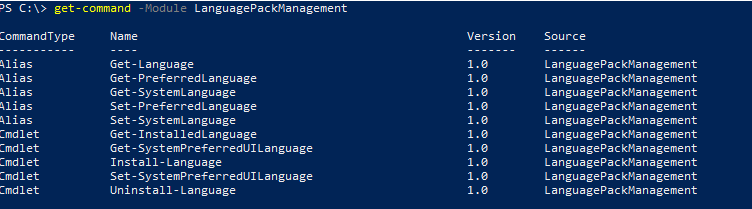
Installing Language Pack in Windows 10/11 with PowerShell | Windows OS Hub
In modern versions of Windows 11 22H2+ and Windows 10 21H2+, you can use PowerShell to install and manage language packs and language interface language packs (LIPs). In previous builds…
 woshub.com
Cheers
jimbo
My Computer
At a glance
Windows XP,11 Linux Fedora Rawhide pre-releas...2 X Intel i7
- OS
- Windows XP,11 Linux Fedora Rawhide pre-release 46
- Computer type
- PC/Desktop
- CPU
- 2 X Intel i7
- Screen Resolution
- 4KUHD X 2
If the language you want is via a LIP (Language Interface pack -- e.g say Icelandic or Welsh for example) then as your link says - these can't be installed via windows setup !!!!.
Your method will only apply to THESE which can also be got via download :
Installing Language Pack in Windows 10/11 with PowerShell | Windows OS Hub
In modern versions of Windows 11 22H2+ and Windows 10 21H2+, you can use PowerShell to install and manage language packs and language interface language packs (LIPs). In previous builds…
Cheers
jimbo
I mean you can install Windows completely automatically from a USB stick
My Computer
At a glance
Mac Os Windows
- OS
- Mac Os Windows
- Computer type
- Laptop
- Use Ventoy to create a boot able drive.I mean you can install Windows completely automatically from a USB stick
- Download all Win 11 installation iso in the language you want and save to the drive
- Boot from Ventoy and select the Win 11 installation iso in the language you want to boot from
My Computers
-
At a glance
Windows 11 Pro - Windows 7 HP 64 - Lubuntui5 6600K - 800MHz to 4400MHz4+4G GSkill DDR4 3000IG - Intel 530- OS
- Windows 11 Pro - Windows 7 HP 64 - Lubuntu
- Computer type
- PC/Desktop
- Manufacturer/Model
- custom build
- CPU
- i5 6600K - 800MHz to 4400MHz
- Motherboard
- GA-Z170-HD3P
- Memory
- 4+4G GSkill DDR4 3000
- Graphics Card(s)
- IG - Intel 530
- Monitor(s) Displays
- Samsung 226BW
- Screen Resolution
- 1680x1050
- Hard Drives
- (1) -1 SM951 – 128GB M.2 AHCI PCIe SSD drive for Win 11
(2) -1 WD SATA 3 - 1T for Data
(3) -1 WD SATA 3 - 1T for backup
(4) -1 BX500 SSD - 256G for Windows 7 and Lubuntu
- PSU
- Thermaltake 450W TR2 gold
- Keyboard
- Old and good Chicony mechanical keyboard
- Mouse
- Logitech mX performance - 9 buttons (had to disable some)
- Internet Speed
- 500 Mb/s
- Browser
- Firefox 64
-
At a glance
Windows 11 Proi7-4500U 800- 3000MHz(4+4)G DDR3 1600IG intel 4400 + NVIDIA GeForce GT 745M- Operating System
- Windows 11 Pro
- Computer type
- Laptop
- Manufacturer/Model
- Asus Q550LF
- CPU
- i7-4500U 800- 3000MHz
- Motherboard
- Asus Q550LF
- Memory
- (4+4)G DDR3 1600
- Graphics card(s)
- IG intel 4400 + NVIDIA GeForce GT 745M
- Sound Card
- Realtek
- Monitor(s) Displays
- LG Display LP156WF4-SPH1
- Screen Resolution
- 1920 x 1080
- Hard Drives
- BX500 120G SSD for Windows and programs
& 1T HDD for data
- Internet Speed
- 500 Mb/s
- Browser
- Firefox 64
For a completely automated install, the ISO needs an answer file with all of the minimum details filled out.
This includes the language/locale to be used by WinPE and the installed Windows. If you omit the language/locale details, the install will be partially automated and will stop to ask for your choices.
A Windows image with multiple Language Packs integrated will not automatically grant the user all the different languages in their profile. You have to run a post-setup script to instruct Windows which additional languages should be added to your profile.
This example adds French and German as additional languages.
You may add more languages for the LP's already integrated in the image.
This includes the language/locale to be used by WinPE and the installed Windows. If you omit the language/locale details, the install will be partially automated and will stop to ask for your choices.
A Windows image with multiple Language Packs integrated will not automatically grant the user all the different languages in their profile. You have to run a post-setup script to instruct Windows which additional languages should be added to your profile.
This example adds French and German as additional languages.
Code:
powershell -nop "$List = Get-WinUserLanguageList; $List.Add("fr-FR"); $List.Add("de-DE"); Set-WinUserLanguageList -LanguageList $List -Force"You may add more languages for the LP's already integrated in the image.
My Computer
At a glance
Windows 7
- OS
- Windows 7
For a completely automated install, the ISO needs an answer file with all of the minimum details filled out.
This includes the language/locale to be used by WinPE and the installed Windows. If you omit the language/locale details, the install will be partially automated and will stop to ask for your choices.
A Windows image with multiple Language Packs integrated will not automatically grant the user all the different languages in their profile. You have to run a post-setup script to instruct Windows which additional languages should be added to your profile.
This example adds French and German as additional languages.
Code:powershell -nop "$List = Get-WinUserLanguageList; $List.Add("fr-FR"); $List.Add("de-DE"); Set-WinUserLanguageList -LanguageList $List -Force"
You may add more languages for the LP's already integrated in the image.
is that all version or one version only
My Computer
At a glance
Mac Os Windows
- OS
- Mac Os Windows
- Computer type
- Laptop
This is a command you run on your first logon. Regardless of which Windows image is installed.
In NTLite, this is a Post-Setup (After logon) command.
In the unattended file, it's a FirstLogon command.
In NTLite, this is a Post-Setup (After logon) command.
In the unattended file, it's a FirstLogon command.
My Computer
At a glance
Windows 7
- OS
- Windows 7

Well, I don't remember the dism syntax, but you first must download the Windows 11 ISO for the languages you want to use, say Greek and US English. Then you mount the ISO (aka Open with File Explorer) and use dism to extract a specific version (say Windows 11 Pro) from the multiple versions in install.wim file of each ISO. Once you have extracted the versions you want for each language, then you use dism with a different syntax to combine the individual versions and languages into a single install.wim file. I am not sure if this is enough or you must add something to indicate which languages are available, but you get the idea. Anyone can provide the exact commands? I think GimageX can also extract and combine Windows versions into an install.wim file. It might be much easier to use this tool:

PS: If you have install.esd you must convert it to install.wim Downloading the ISO directly (third option in MS site) you get install.wim. If you use Media Creation Tool (second option) you get install.esd
PS2: I am not sure if you can do it with NT-Lite. I haven't use it since it was called nLite and was for modifying Windows XP.
 www.ntlite.com
GImageX - GUI for Windows Imaging - AutoIt Consulting
GImageX is a freeware GUI for working with imaging WIM files providing an alternative to DISM. It can be used to capture, apply, mount, export, split and delete WIM files. GImageX is provided as a 32-bit and 64-bit native application that can be run even in WinPE.
www.autoitconsulting.com
PS: If you have install.esd you must convert it to install.wim Downloading the ISO directly (third option in MS site) you get install.wim. If you use Media Creation Tool (second option) you get install.esd
PS2: I am not sure if you can do it with NT-Lite. I haven't use it since it was called nLite and was for modifying Windows XP.
NTLite - Customize and Debloat Windows ISO and Live Installs
Customize and debloat Windows ISO images or your live install: integrate updates and drivers, automate setup. Save presets, redeploy in minutes.
My Computers
-
At a glance
Windows 11 Pro 23H2 (7582), 25H2 (9445)Mobile DualCore Intel Core 2 Duo T7250, 2000 MHz4GBMobile Intel(R) GMA 4500M (Mobile 4 series)- OS
- Windows 11 Pro 23H2 (7582), 25H2 (9445)
- Computer type
- Laptop
- Manufacturer/Model
- Acer Extensa 5630EZ
- CPU
- Mobile DualCore Intel Core 2 Duo T7250, 2000 MHz
- Motherboard
- Acer Extensa 5630
- Memory
- 4GB
- Graphics Card(s)
- Mobile Intel(R) GMA 4500M (Mobile 4 series)
- Sound Card
- Realtek ALC268 @ Intel 82801IB ICH9 - High Definition Audio Controller
- Monitor(s) Displays
- 1
- Screen Resolution
- 1280x800
- Hard Drives
- Samsung SSD 850 EVO 250GB SATA Device (250 GB, SATA-III)
- Internet Speed
- 802.11g wireless 54 Mbps
- Browser
- MICROSOFT EDGE
- Antivirus
- WINDOWS DEFENDER
- Other Info
- Legacy MBR installation, no TPM, no Secure Boot, no WDDM 2.0 graphics drivers, no SSE4.2, cannot get more unsupported ;) This is only my test laptop. I had installed Windows 11 here before upgrading my main PC. For my main PC I use everyday see my 2nd system specs.
-
At a glance
Windows 11 Pro v25H2 (build 26200.9445)Intel Core-i7 3770 3.40GHz s1155 (3rd generat...2x Kingston Hyper-X Blu 8GB DDR3-1600GIGABYTE GeForce RTX 3050 WINDFORCE OC V2 6GB...- Operating System
- Windows 11 Pro v25H2 (build 26200.9445)
- Computer type
- PC/Desktop
- Manufacturer/Model
- Custom-built PC
- CPU
- Intel Core-i7 3770 3.40GHz s1155 (3rd generation)
- Motherboard
- Asus P8H61 s1155 ATX
- Memory
- 2x Kingston Hyper-X Blu 8GB DDR3-1600
- Graphics card(s)
- GIGABYTE GeForce RTX 3050 WINDFORCE OC V2 6GB (GV-N3050WF2OCV2-6GD)
- Sound Card
- Realtek HD audio (ALC887)
- Monitor(s) Displays
- Sony Bravia KDL-19L4000 19" LCD TV via VGA
- Screen Resolution
- 1440x900 32-bit 60Hz
- Hard Drives
- WD Blue SA510 2.5 1000GB SSD as system disk, Western Digital Caviar Purple 4TB SATA III (WD40PURZ) as second
- PSU
- Thermaltake Litepower RGB 550W Full Wired
- Case
- SUPERCASE MIDI-TOWER
- Cooling
- Deepcool Gamma Archer CPU cooler, 1x 8cm fan at the back
- Keyboard
- Mitsumi 101-key PS/2
- Mouse
- Microsoft Compact Optical Mouse
- Internet Speed
- 802.11ac 5GHz wireless 260Mpbs
- Browser
- Microsoft Edge, Mozilla Firefox
- Antivirus
- Microsoft Windows Defender
- Other Info
- Legacy BIOS (MBR) installation, no TPM, no Secure Boot, WDDM 3.0 graphics drivers, WEI score 7.4
This is a command you run on your first logon. Regardless of which Windows image is installed.
In NTLite, this is a Post-Setup (After logon) command.
In the unattended file, it's a FirstLogon command.
download other or is that local that he puts languages in the image
My Computer
At a glance
Mac Os Windows
- OS
- Mac Os Windows
- Computer type
- Laptop
This is a command that configures the logged on user's profile so they automatically have multiple languages assigned to their language bar. It has nothing to do with creating the install image.
My Computer
At a glance
Windows 7
- OS
- Windows 7
The process is the one I described, you first extract the Windows versions you want from the install.wim files of the respective ISOs and then you combine them into a single install.wim file. I just don't know the exact syntax of the dism command. You can add two or more (Home Pro etc or 23H2 and 24H2) versions and more than one languages, more like the OEM Windows versions that have many languages. In Windows 10 and earlier you can also combine 32-bit and 64-bit versions so you can choose which one to install. Adding versions of the same language is one step, but for different languages an additional step is required to register each language, or it might have issues. Unfortunately, I cannot help you any further. I just keep a copy of the US English ISO and of the Greek ISO and install all versions (Home, Pro) in each language. I haven't combined all versions in a single USB flash drive.
My Computers
-
At a glance
Windows 11 Pro 23H2 (7582), 25H2 (9445)Mobile DualCore Intel Core 2 Duo T7250, 2000 MHz4GBMobile Intel(R) GMA 4500M (Mobile 4 series)- OS
- Windows 11 Pro 23H2 (7582), 25H2 (9445)
- Computer type
- Laptop
- Manufacturer/Model
- Acer Extensa 5630EZ
- CPU
- Mobile DualCore Intel Core 2 Duo T7250, 2000 MHz
- Motherboard
- Acer Extensa 5630
- Memory
- 4GB
- Graphics Card(s)
- Mobile Intel(R) GMA 4500M (Mobile 4 series)
- Sound Card
- Realtek ALC268 @ Intel 82801IB ICH9 - High Definition Audio Controller
- Monitor(s) Displays
- 1
- Screen Resolution
- 1280x800
- Hard Drives
- Samsung SSD 850 EVO 250GB SATA Device (250 GB, SATA-III)
- Internet Speed
- 802.11g wireless 54 Mbps
- Browser
- MICROSOFT EDGE
- Antivirus
- WINDOWS DEFENDER
- Other Info
- Legacy MBR installation, no TPM, no Secure Boot, no WDDM 2.0 graphics drivers, no SSE4.2, cannot get more unsupported ;) This is only my test laptop. I had installed Windows 11 here before upgrading my main PC. For my main PC I use everyday see my 2nd system specs.
-
At a glance
Windows 11 Pro v25H2 (build 26200.9445)Intel Core-i7 3770 3.40GHz s1155 (3rd generat...2x Kingston Hyper-X Blu 8GB DDR3-1600GIGABYTE GeForce RTX 3050 WINDFORCE OC V2 6GB...- Operating System
- Windows 11 Pro v25H2 (build 26200.9445)
- Computer type
- PC/Desktop
- Manufacturer/Model
- Custom-built PC
- CPU
- Intel Core-i7 3770 3.40GHz s1155 (3rd generation)
- Motherboard
- Asus P8H61 s1155 ATX
- Memory
- 2x Kingston Hyper-X Blu 8GB DDR3-1600
- Graphics card(s)
- GIGABYTE GeForce RTX 3050 WINDFORCE OC V2 6GB (GV-N3050WF2OCV2-6GD)
- Sound Card
- Realtek HD audio (ALC887)
- Monitor(s) Displays
- Sony Bravia KDL-19L4000 19" LCD TV via VGA
- Screen Resolution
- 1440x900 32-bit 60Hz
- Hard Drives
- WD Blue SA510 2.5 1000GB SSD as system disk, Western Digital Caviar Purple 4TB SATA III (WD40PURZ) as second
- PSU
- Thermaltake Litepower RGB 550W Full Wired
- Case
- SUPERCASE MIDI-TOWER
- Cooling
- Deepcool Gamma Archer CPU cooler, 1x 8cm fan at the back
- Keyboard
- Mitsumi 101-key PS/2
- Mouse
- Microsoft Compact Optical Mouse
- Internet Speed
- 802.11ac 5GHz wireless 260Mpbs
- Browser
- Microsoft Edge, Mozilla Firefox
- Antivirus
- Microsoft Windows Defender
- Other Info
- Legacy BIOS (MBR) installation, no TPM, no Secure Boot, WDDM 3.0 graphics drivers, WEI score 7.4
This is a command that configures the logged on user's profile so they automatically have multiple languages assigned to their language bar. It has nothing to do with creating the install image.
okay do you also have it in all languages
My Computer
At a glance
Mac Os Windows
- OS
- Mac Os Windows
- Computer type
- Laptop
Similar threads
- Replies
- 2
- Views
- 1K
- Replies
- 10
- Views
- 2K
- Replies
- 1
- Views
- 270
- Replies
- 0
- Views
- 553
Latest Support Threads
-
-
Outlook not showing folder list in Folder Pane. It only offers a link to Groups.
- Started by Judy in Texas
- Replies: 4
-
 Thunderbird 155.0.1: Play Sound in message filters disabled?
- Started by Krakenshark
- Replies: 0
-
 [delete double post] - Phone Link needs to be reset after every reboot
- Started by Skull_Candy
- Replies: 0
-
SmartApp is my new mommy, won't let anything dirty get through - even if I want it to
- Started by JaQuille
- Replies: 1
Latest Tutorials
-
 Accessibility Change Lock View Shortcut for Magnifier Zoom on Multiple Displays in Windows 11
- Started by Brink
- Replies: 0
-
 Personalization Enable or Disable "Customize menu" Tip in Windows 11
- Started by Brink
- Replies: 0
-
 Personalization Add or Remove "Customize menu" on Context Menu in Windows 11
- Started by Brink
- Replies: 0
-
 Accessibility Enable or Disable Magnifier Zoom per Display in Windows 11
- Started by Brink
- Replies: 0
-
