
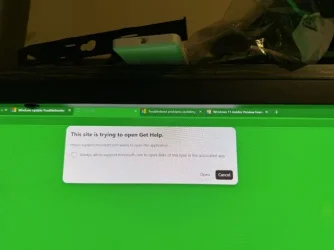
Windows nuisance pop-ups


Rinconjoe

Active member
Member
Local time
4:38 PM
Posts
5
Location
Fayetteville NC
OS
windows 11 pro 25H2
Does anyone know how to stop these and other requests from constantly popping up? I never had this issue until the latest version of Windows.
 

Attachments

  • IMG_9990.webp
    IMG_9990.webp
    24.5 KB · Views: 1

My Computer My Computer

At a glance

windows 11 pro 25H2Intel I9 14900K 14th GenGSkill 64MB DDR 5 6400Asus ROG astral 5090 0C
OS
windows 11 pro 25H2
Computer type
PC/Desktop
Manufacturer/Model
asus intel
CPU
Intel I9 14900K 14th Gen
Motherboard
Asus ROG Strix Z790-E
Memory
GSkill 64MB DDR 5 6400
Graphics Card(s)
Asus ROG astral 5090 0C
Sound Card
built in
Monitor(s) Displays
ASUS ROG Swift 32 inch UHD 4K 240Hz AMD FreeSync Premium Pro & G-Sync Compatible 0.03ms HDR500 USB-C GEN 3 OLED Gaming Computer Monitor with Height Adjustable, Swivel & Tilt Stand PG32UCDM
Screen Resolution
4K
Hard Drives
M-2 Samsung SSD 9100 Pro 4 GB
PSU
ASUS 1600 thor
Case
ROG Cronox
Cooling
ASUS ROG Ryujin III 360 ARGB Extreme
Keyboard
ASUS ROG Strix Scope II X
Mouse
Razer Viper pro V-4
Internet Speed
2.5
Answer from your friendly AI co-pilot

The Update Troubleshooter calls this protocol whenever it thinks you need help.So the solution is to disable the protocol, not the troubleshooter. 3 options.

1. Disable "get Help" protocol fom launching.
Open Regedit
HKEY_CLASSES_ROOT\ms-contact-support
Right‑click the ms-contact-support key → Permissions
Select SYSTEM → check Deny → Read
Select Users → check Deny → Read
Apply

2. Disable online help integration
  • Open Control Panel
  • Go to System and Security → Security and Maintenance
  • Click Change Security and Maintenance settings
  • Turn off:“Get help from Microsoft when I have a problem”

3. You can uninstall the "get help" app.
 

My Computers My Computers

  • At a glance

    Windows 11 Pro 25H2 26200.8655i9-10900 10 core 20 threads32 gbnone-Intel UHD Graphics 630
    OS
    Windows 11 Pro 25H2 26200.8655
    Computer type
    PC/Desktop
    Manufacturer/Model
    Dell Optiplex 7080
    CPU
    i9-10900 10 core 20 threads
    Motherboard
    DELL 0J37VM
    Memory
    32 gb
    Graphics Card(s)
    none-Intel UHD Graphics 630
    Sound Card
    Integrated Realtek
    Monitor(s) Displays
    Benq 27
    Screen Resolution
    2560x1440
    Hard Drives
    2x1tb Solidigm m.2 nvme /External drives 512gb Samsung m.2 sata+2tb Kingston m2.nvme
    PSU
    500w
    Case
    MT
    Cooling
    Dell Premium
    Keyboard
    Logitech wired
    Mouse
    Logitech wireless
    Internet Speed
    so slow I'm too embarrassed to tell
    Browser
    #1 Edge #2 Firefox
    Antivirus
    Defender+MWB Premium
  • At a glance

    Windows 11 Pro 24H2 26200.8457AMD Ryzen 7 6800U32 gbintegrated
    Operating System
    Windows 11 Pro 24H2 26200.8457
    Computer type
    PC/Desktop
    Manufacturer/Model
    Beelink Mini PC SER5
    CPU
    AMD Ryzen 7 6800U
    Memory
    32 gb
    Graphics card(s)
    integrated
    Sound Card
    integrated
    Monitor(s) Displays
    Benq 27
    Screen Resolution
    2560x1440
    Hard Drives
    1TB Crucial nvme
    Keyboard
    Logitech wired
    Mouse
    Logitech wireless
    Internet Speed
    still too embarrassed to tell
    Browser
    Firefox
    Antivirus
    Defender
    Other Info
    System 3 is non compliant Dell 9020 i7-4770/24gb ram Win11 PRO 26200.8457
Back
Top Bottom




