
Windows Security giving unusual message


wimorrison

Well-known member
Member
VIP
Local time
2:53 PM
Posts
285
OS
Win11 26100.3323
I am getting this message regularly on both my desktop PC and my laptop from Windows Security and I cannot fathom what the other program it is telling me about is.
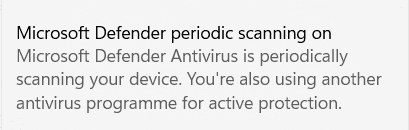
1686000289109.png

I used to use Kaspersky but haven't used that for many months, I have also scanned using Malwarebytes and I uninstalled both of these programmes.

Any suggestions how to find if there is really another program hidden somewhere? I guess the next challenge would be how to remove it, but can't do that until I know what I am trying to get rid off :)

Thanks
 
Windows Build/Version
OS Build 22631.1830

My Computer My Computer

At a glance

Win11 26100.332312th Gen Intel(R) Core(TM) i7-1270P 2.20 GHz16Gb
OS
Win11 26100.3323
Computer type
Laptop
Manufacturer/Model
Dell Latitude 7430
CPU
12th Gen Intel(R) Core(TM) i7-1270P 2.20 GHz
Motherboard
Dell
Memory
16Gb
I am getting this message regularly on both my desktop PC and my laptop from Windows Security and I cannot fathom what the other program it is telling me about is.

View attachment 61694

I used to use Kaspersky but haven't used that for many months, I have also scanned using Malwarebytes and I uninstalled both of these programmes.

Any suggestions how to find if there is really another program hidden somewhere? I guess the next challenge would be how to remove it, but can't do that until I know what I am trying to get rid off :)

Thanks


Most of the time, if you don't use the proper AV removal tool, it leaves behind... remnants.
If that's what happened, you need to reinstall those old AV programs, then use their proper removal tools to uninstall them.


My Computers My Computers

  • At a glance

    Win 11 Home ♦♦♦26200.8655 ♦♦♦♦♦♦♦25H2AMD Ryzen 7 3700XG.Skill (F4-3200C14D-16GTZKW)EVGA RTX 2070 (08G-P4-2171-KR)
    OS
    Win 11 Home ♦♦♦26200.8655 ♦♦♦♦♦♦♦25H2
    Computer type
    PC/Desktop
    Manufacturer/Model
    Built by Ghot® [May 2020]
    CPU
    AMD Ryzen 7 3700X
    Motherboard
    Asus Pro WS X570-ACE (BIOS 5302)
    Memory
    G.Skill (F4-3200C14D-16GTZKW)
    Graphics Card(s)
    EVGA RTX 2070 (08G-P4-2171-KR)
    Sound Card
    Realtek ALC1220P / ALC S1220A
    Monitor(s) Displays
    Dell U3011 30"
    Screen Resolution
    2560 x 1600
    Hard Drives
    2x Samsung 860 EVO 500GB,
    WD 4TB Black FZBX - SATA III,
    WD 8TB Black FZBX - SATA III,
    DRW-24B1ST CD/DVD Burner
    PSU
    PC Power & Cooling 750W Quad EPS12V
    Case
    Cooler Master ATCS 840 Tower
    Cooling
    CM Hyper 212 EVO (push/pull)
    Keyboard
    Ducky DK9008 Shine II Blue LED
    Mouse
    Logitech Optical M-100
    Internet Speed
    300/300
    Browser
    Firefox (latest)
    Antivirus
    Bitdefender Total Security
    Other Info
    Speakers: Klipsch Pro Media 2.1
  • At a glance

    Windows XP Pro 32bit w/SP3AMD Athlon 64 X2 5000+ (OC'd @ 3.2Ghz)TWIN2X2048-6400C4DHX (2 x 1GB, DDR2 800)EVGA 256-P2-N758-TR GeForce 8600GT SSC
    Operating System
    Windows XP Pro 32bit w/SP3
    Computer type
    PC/Desktop
    Manufacturer/Model
    Built by Ghot® (not in use)
    CPU
    AMD Athlon 64 X2 5000+ (OC'd @ 3.2Ghz)
    Motherboard
    ASUS M2N32-SLI Deluxe Wireless Edition
    Memory
    TWIN2X2048-6400C4DHX (2 x 1GB, DDR2 800)
    Graphics card(s)
    EVGA 256-P2-N758-TR GeForce 8600GT SSC
    Sound Card
    Onboard
    Monitor(s) Displays
    ViewSonic G90FB Black 19" Professional (CRT)
    Screen Resolution
    up to 2048 x 1536
    Hard Drives
    WD 36GB 10,000rpm Raptor SATA
    Seagate 80GB 7200rpm SATA
    Lite-On LTR-52246S CD/RW
    Lite-On LH-18A1P CD/DVD Burner
    PSU
    PC Power & Cooling Silencer 750 Quad EPS12V
    Case
    Generic Beige case, 80mm fans
    Cooling
    ZALMAN 9500A 92mm CPU Cooler
    Keyboard
    Logitech Classic Keybooard 200
    Mouse
    Logitech Optical M-BT96a
    Internet Speed
    300/300
    Browser
    Firefox 3.x ??
    Antivirus
    Symantec (Norton)
    Other Info
    Still assembled, still runs. Haven't turned it on for 15 years?
I found this script in some antivirus help section, probably you could try ?
Removing any antivirus traces: powershell in Admin mode:
Get-WmiObject -Namespace root\SecurityCenter2 -Class AntiVirusProduct | ForEach-Object{if($_.instanceGuid -ne “{D68DDC3A-831F-4fae-9E44-
DA132C1ACF46}“){$_.Delete()}}
 

My Computer My Computer

At a glance

Windows 11 23H2Intel i7-7700k16 GBIntel 630 onboard
OS
Windows 11 23H2
Computer type
PC/Desktop
Manufacturer/Model
Assembled
CPU
Intel i7-7700k
Motherboard
Asrock Z270 Taichi
Memory
16 GB
Graphics Card(s)
Intel 630 onboard
Sound Card
Onboard
Monitor(s) Displays
Benq 1080p
Screen Resolution
1920*1080
Hard Drives
NVMe, SSD and HDD
Case
Cooler Master
Keyboard
Asus wireless
Mouse
Asus Wireless
Internet Speed
75 Mbps
Browser
Chrome, Edge, Arc
Antivirus
Windows Defender

Latest Support Threads

Back
Top Bottom




