Windows Update fails with 0x800F0922


You said the link didnt work. It does work for me, so I'll attach the document.
I'll update you with your latest tomorrow.
 

Attachments

  • 1765472865969.webp
    1765472865969.webp
    39.7 KB · Views: 1
  • DM120925.zip
    DM120925.zip
    185.3 KB · Views: 2

My Computer My Computer

At a glance

W11Ryzen 7 8-core32gbNVidia
OS
W11
Computer type
PC/Desktop
CPU
Ryzen 7 8-core
Motherboard
ASUS Gaming
Memory
32gb
Graphics Card(s)
NVidia
Monitor(s) Displays
Samsung 24"
Screen Resolution
1920x1080
Hard Drives
SSD 1tb
Cooling
Fans!
Keyboard
HyperX
Mouse
Kensington TB
Internet Speed
400mbps
Browser
Edge
Antivirus
defender
Thanks!
Step 1 attached
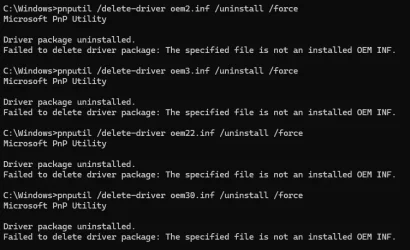
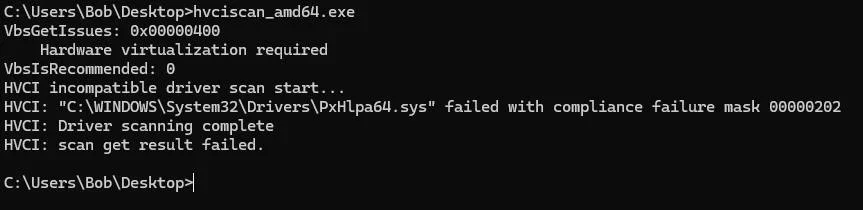
Step 2 Autoruns. The only file under drivers was pxhlpa64.sys. Attempted to delete, got: "Failed to delete 'pxhlpa64'".
Step 3 Attached
 

Attachments

  • step1.webp
    step1.webp
    47.3 KB · Views: 1
  • Step3.webp
    Step3.webp
    20.7 KB · Views: 1

My Computer My Computer

At a glance

W11Ryzen 7 8-core32gbNVidia
OS
W11
Computer type
PC/Desktop
CPU
Ryzen 7 8-core
Motherboard
ASUS Gaming
Memory
32gb
Graphics Card(s)
NVidia
Monitor(s) Displays
Samsung 24"
Screen Resolution
1920x1080
Hard Drives
SSD 1tb
Cooling
Fans!
Keyboard
HyperX
Mouse
Kensington TB
Internet Speed
400mbps
Browser
Edge
Antivirus
defender
1) Please rename the driver using administrative command prompt:

ren c:\windows\system32\drivers\pxhlpa64.sys pxhlpa64.sys.old

Post a share link


2) Open administrative command prompt and copy and paste:

cd /users /Bob /downloads

hvciscan_amd64.exe

Post a share link.


3) Open administrative command prompt and copy and paste:


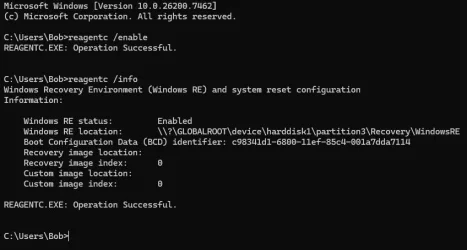
reagentc /info
reagentc /disable
reagentc /info

diskpart
sel dis 1
det dis
sel par 2
det par
shrink desired=600
sel par 3
det par
del par override
create partition primary id=de94bba4-06d1-4d40-a16a-bfd50179d6ac
gpt attributes =0x8000000000000001
format quick fs=ntfs label=”Windows RE tools”
lis vol
lis par
exit

reagentc /enable
reagentc /info


Post a share link.


4) Post a new V2 share link into the newest post


5) Perform an in-place upgrade repair using the desktop iso:


My Computer My Computer

At a glance

Windows 10Intel(R) Core(TM) i7-4800MQ CPU @ 2.70GHz16 GB Total: Manufacturer : Samsung MemoryTyp...NVIDIA Quadro K3100M; Intel(R) HD Graphics 4600
OS
Windows 10
Computer type
Laptop
Manufacturer/Model
HP
CPU
Intel(R) Core(TM) i7-4800MQ CPU @ 2.70GHz
Motherboard
Product : 190A Version : KBC Version 94.56
Memory
16 GB Total: Manufacturer : Samsung MemoryType : DDR3 FormFactor : SODIMM Capacity : 8GB Speed : 1600
Graphics Card(s)
NVIDIA Quadro K3100M; Intel(R) HD Graphics 4600
Sound Card
IDT High Definition Audio CODEC; PNP Device ID HDAUDIO\FUNC_01&VEN_111D&DEV_76E0
Hard Drives
Model Hitachi HTS727575A9E364
Antivirus
Microsoft Defender
Other Info
Mobile Workstation
Performed Steps 1-4. See attached. I'm going to be doing step 5 soon and will post results.
 

Attachments

My Computer My Computer

At a glance

W11Ryzen 7 8-core32gbNVidia
OS
W11
Computer type
PC/Desktop
CPU
Ryzen 7 8-core
Motherboard
ASUS Gaming
Memory
32gb
Graphics Card(s)
NVidia
Monitor(s) Displays
Samsung 24"
Screen Resolution
1920x1080
Hard Drives
SSD 1tb
Cooling
Fans!
Keyboard
HyperX
Mouse
Kensington TB
Internet Speed
400mbps
Browser
Edge
Antivirus
defender
1) How come the reagentc /enable command was ran as reagentc / disable:


2) Please confirm that the Avast uninstall tool was used and completed without any issues


See if this file does or does not exist:

\AVAST Software\Avast settings backup
"C:\Program Files\Common Files\AV\avast! Antivirus\backup.exe" /backup /iavs
File not found: C:\Program Files\Common Files\AV\avast! Antivirus\backup.exe


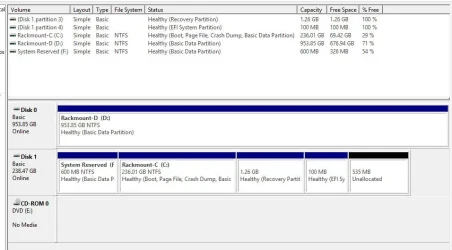
3) The recovery partition was successfully enlarged.

Please enable it:

Open administrative command prompt and copy and paste:
reagentc /enable
reagentc / info

Post a share link.


3) Open disk management > widen rows and columns > make sure that characters are not cutoff > post a share link


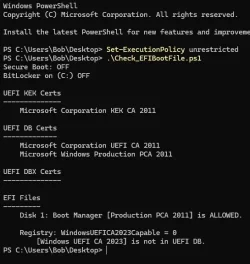
4) Secure boot needs updating > see multiple active EF threads


Code:
Event[2587]
  Log Name: System
  Source: Microsoft-Windows-TPM-WMI
  Date: 2025-12-13T12:17:15.4510000Z
  Event ID: 1796
  Task: N/A
  Level: Error
  Opcode: Info

  Keyword: N/A
  User: S-1-5-18
  User Name: NT AUTHORITY\SYSTEM
  Computer: RackMount
  Description:
The Secure Boot update failed to update a Secure Boot variable with error Secure Boot is not enabled on this machine.. For more information, please see https://go.microsoft.com/fwlink/?linkid=2169931


Code:
Event[2461]
  Log Name: System
  Source: Microsoft-Windows-TPM-WMI
  Date: 2025-12-11T12:17:15.4830000Z
  Event ID: 1801
  Task: N/A
  Level: Error
  Opcode: Info

  Keyword: N/A
  User: S-1-5-18
  User Name: NT AUTHORITY\SYSTEM
  Computer: RackMount
  Description:
Secure Boot CA/keys need to be updated. This device signature information is included here.
DeviceAttributes: BaseBoardManufacturer:ASUSTeK COMPUTER INC.;FirmwareManufacturer:American Megatrends Inc.;FirmwareVersion:3621;OEMModelBaseBoard:TUF GAMING B550-PLUS;OEMManufacturerName:ASUS;OSArchitecture:amd64;
BucketId: 9e0cca494862a2dec441819e67d80b17e91ccc62839566296ffb1502b0474db5
BucketConfidenceLevel:
UpdateType: 0
HResult: The operation completed successfully.
 
Last edited:

My Computer My Computer

At a glance

Windows 10Intel(R) Core(TM) i7-4800MQ CPU @ 2.70GHz16 GB Total: Manufacturer : Samsung MemoryTyp...NVIDIA Quadro K3100M; Intel(R) HD Graphics 4600
OS
Windows 10
Computer type
Laptop
Manufacturer/Model
HP
CPU
Intel(R) Core(TM) i7-4800MQ CPU @ 2.70GHz
Motherboard
Product : 190A Version : KBC Version 94.56
Memory
16 GB Total: Manufacturer : Samsung MemoryType : DDR3 FormFactor : SODIMM Capacity : 8GB Speed : 1600
Graphics Card(s)
NVIDIA Quadro K3100M; Intel(R) HD Graphics 4600
Sound Card
IDT High Definition Audio CODEC; PNP Device ID HDAUDIO\FUNC_01&VEN_111D&DEV_76E0
Hard Drives
Model Hitachi HTS727575A9E364
Antivirus
Microsoft Defender
Other Info
Mobile Workstation
AV file does not exist.
See attached disk mgmt.
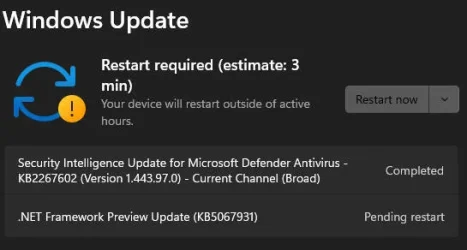
I did the repair install. I checked for updates, and it installed the attached.
 

Attachments

  • WU.webp
    WU.webp
    18.9 KB · Views: 2
  • reagentc2.webp
    reagentc2.webp
    36.6 KB · Views: 1
  • diskMgmt.webp
    diskMgmt.webp
    43.6 KB · Views: 1

My Computer My Computer

At a glance

W11Ryzen 7 8-core32gbNVidia
OS
W11
Computer type
PC/Desktop
CPU
Ryzen 7 8-core
Motherboard
ASUS Gaming
Memory
32gb
Graphics Card(s)
NVidia
Monitor(s) Displays
Samsung 24"
Screen Resolution
1920x1080
Hard Drives
SSD 1tb
Cooling
Fans!
Keyboard
HyperX
Mouse
Kensington TB
Internet Speed
400mbps
Browser
Edge
Antivirus
defender
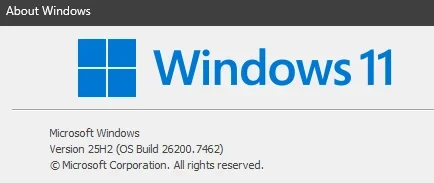
Before: Windows 11 Pro Version: 10.0.22631

After: Version: 10.0.26200.7462

Please post winver.
 
Last edited:

My Computer My Computer

At a glance

Windows 10Intel(R) Core(TM) i7-4800MQ CPU @ 2.70GHz16 GB Total: Manufacturer : Samsung MemoryTyp...NVIDIA Quadro K3100M; Intel(R) HD Graphics 4600
OS
Windows 10
Computer type
Laptop
Manufacturer/Model
HP
CPU
Intel(R) Core(TM) i7-4800MQ CPU @ 2.70GHz
Motherboard
Product : 190A Version : KBC Version 94.56
Memory
16 GB Total: Manufacturer : Samsung MemoryType : DDR3 FormFactor : SODIMM Capacity : 8GB Speed : 1600
Graphics Card(s)
NVIDIA Quadro K3100M; Intel(R) HD Graphics 4600
Sound Card
IDT High Definition Audio CODEC; PNP Device ID HDAUDIO\FUNC_01&VEN_111D&DEV_76E0
Hard Drives
Model Hitachi HTS727575A9E364
Antivirus
Microsoft Defender
Other Info
Mobile Workstation
1765719458118.webp
 

My Computer My Computer

At a glance

W11Ryzen 7 8-core32gbNVidia
OS
W11
Computer type
PC/Desktop
CPU
Ryzen 7 8-core
Motherboard
ASUS Gaming
Memory
32gb
Graphics Card(s)
NVidia
Monitor(s) Displays
Samsung 24"
Screen Resolution
1920x1080
Hard Drives
SSD 1tb
Cooling
Fans!
Keyboard
HyperX
Mouse
Kensington TB
Internet Speed
400mbps
Browser
Edge
Antivirus
defender
The secure boot has lots of time to update > see active EF threads


1796

1801


Code:
Summary
To help keep Windows devices secure, Microsoft adds vulnerable bootloader modules to the Secure Boot DBX revocation list

(maintained in the system UEFI-based firmware) to invalidate the vulnerable modules. When the updated DBX revocation list

is installed on a device, Windows checks to determine whether the system is in a state where the DBX update can be successfully

applied to the firmware and will report event log errors if an issue is detected.


More information

When one of these vulnerable modules is detected on the device, an event log entry is created warning about the situation and

includes the name of the detected module. The event log entry contains details that resemble the following:


Code:
Event ID: 1796

When the updated DBX revocation list is applied to a device, and an error occurs that is not covered by the events above, an event

is logged, and Windows will try to apply the DBX list to the firmware on the next system restart.

Event log information

Event ID 1796 occurs when an unexpected error is encountered. The event log entry will include the error code for the unexpected

error.


Code:
Event ID: 1801

This is an error event that indicates that the updated certificates have not been applied to the device’s firmware. This event gives

some details about the device, including device attributes and device bucket ID, that will help in correlating which devices still

need updating.

If the confidence level of the device’s ability to accept the updates is known, it will be included in the event. The values include

"High Confidence", "Needs More Data", "Unknown", and "Paused". The UpdateType will be either 0, or 22852 (0x5944).

The value 0x5944 corresponds to “High Confidence”.
 

My Computer My Computer

At a glance

Windows 10Intel(R) Core(TM) i7-4800MQ CPU @ 2.70GHz16 GB Total: Manufacturer : Samsung MemoryTyp...NVIDIA Quadro K3100M; Intel(R) HD Graphics 4600
OS
Windows 10
Computer type
Laptop
Manufacturer/Model
HP
CPU
Intel(R) Core(TM) i7-4800MQ CPU @ 2.70GHz
Motherboard
Product : 190A Version : KBC Version 94.56
Memory
16 GB Total: Manufacturer : Samsung MemoryType : DDR3 FormFactor : SODIMM Capacity : 8GB Speed : 1600
Graphics Card(s)
NVIDIA Quadro K3100M; Intel(R) HD Graphics 4600
Sound Card
IDT High Definition Audio CODEC; PNP Device ID HDAUDIO\FUNC_01&VEN_111D&DEV_76E0
Hard Drives
Model Hitachi HTS727575A9E364
Antivirus
Microsoft Defender
Other Info
Mobile Workstation
What do I need to do?
 

My Computer My Computer

At a glance

W11Ryzen 7 8-core32gbNVidia
OS
W11
Computer type
PC/Desktop
CPU
Ryzen 7 8-core
Motherboard
ASUS Gaming
Memory
32gb
Graphics Card(s)
NVidia
Monitor(s) Displays
Samsung 24"
Screen Resolution
1920x1080
Hard Drives
SSD 1tb
Cooling
Fans!
Keyboard
HyperX
Mouse
Kensington TB
Internet Speed
400mbps
Browser
Edge
Antivirus
defender
The secure boot updates have multiple active threads with various trial and error steps.


Last edited:

My Computer My Computer

At a glance

Windows 10Intel(R) Core(TM) i7-4800MQ CPU @ 2.70GHz16 GB Total: Manufacturer : Samsung MemoryTyp...NVIDIA Quadro K3100M; Intel(R) HD Graphics 4600
OS
Windows 10
Computer type
Laptop
Manufacturer/Model
HP
CPU
Intel(R) Core(TM) i7-4800MQ CPU @ 2.70GHz
Motherboard
Product : 190A Version : KBC Version 94.56
Memory
16 GB Total: Manufacturer : Samsung MemoryType : DDR3 FormFactor : SODIMM Capacity : 8GB Speed : 1600
Graphics Card(s)
NVIDIA Quadro K3100M; Intel(R) HD Graphics 4600
Sound Card
IDT High Definition Audio CODEC; PNP Device ID HDAUDIO\FUNC_01&VEN_111D&DEV_76E0
Hard Drives
Model Hitachi HTS727575A9E364
Antivirus
Microsoft Defender
Other Info
Mobile Workstation
I did this. It should be ok now?

Option 3: Deploy certificates using Group Policy​

Group Policy settings are available by navigating to:
Computer Configuration > Administrative Templates > Windows Components > Secure Boot.

To apply Secure Boot updates to devices using Group Policy, set the Enable Secure Boot certificate deployment policy to Enabled. This lets Windows automatically begin the certificate deployment process. This setting corresponds to the registry key AvailableUpdates.

Be sure to get the latest version of the .admx for Windows 11
 

My Computer My Computer

At a glance

W11Ryzen 7 8-core32gbNVidia
OS
W11
Computer type
PC/Desktop
CPU
Ryzen 7 8-core
Motherboard
ASUS Gaming
Memory
32gb
Graphics Card(s)
NVidia
Monitor(s) Displays
Samsung 24"
Screen Resolution
1920x1080
Hard Drives
SSD 1tb
Cooling
Fans!
Keyboard
HyperX
Mouse
Kensington TB
Internet Speed
400mbps
Browser
Edge
Antivirus
defender

My Computer My Computer

At a glance

Windows 10Intel(R) Core(TM) i7-4800MQ CPU @ 2.70GHz16 GB Total: Manufacturer : Samsung MemoryTyp...NVIDIA Quadro K3100M; Intel(R) HD Graphics 4600
OS
Windows 10
Computer type
Laptop
Manufacturer/Model
HP
CPU
Intel(R) Core(TM) i7-4800MQ CPU @ 2.70GHz
Motherboard
Product : 190A Version : KBC Version 94.56
Memory
16 GB Total: Manufacturer : Samsung MemoryType : DDR3 FormFactor : SODIMM Capacity : 8GB Speed : 1600
Graphics Card(s)
NVIDIA Quadro K3100M; Intel(R) HD Graphics 4600
Sound Card
IDT High Definition Audio CODEC; PNP Device ID HDAUDIO\FUNC_01&VEN_111D&DEV_76E0
Hard Drives
Model Hitachi HTS727575A9E364
Antivirus
Microsoft Defender
Other Info
Mobile Workstation
1765910462179.webp
 

My Computer My Computer

At a glance

W11Ryzen 7 8-core32gbNVidia
OS
W11
Computer type
PC/Desktop
CPU
Ryzen 7 8-core
Motherboard
ASUS Gaming
Memory
32gb
Graphics Card(s)
NVidia
Monitor(s) Displays
Samsung 24"
Screen Resolution
1920x1080
Hard Drives
SSD 1tb
Cooling
Fans!
Keyboard
HyperX
Mouse
Kensington TB
Internet Speed
400mbps
Browser
Edge
Antivirus
defender
1766252711797.webp
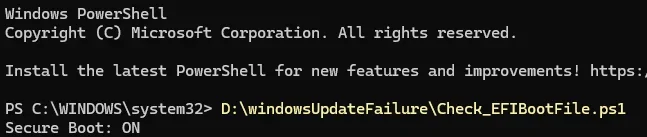
Got Secure Boot enabled.
 

My Computer My Computer

At a glance

W11Ryzen 7 8-core32gbNVidia
OS
W11
Computer type
PC/Desktop
CPU
Ryzen 7 8-core
Motherboard
ASUS Gaming
Memory
32gb
Graphics Card(s)
NVidia
Monitor(s) Displays
Samsung 24"
Screen Resolution
1920x1080
Hard Drives
SSD 1tb
Cooling
Fans!
Keyboard
HyperX
Mouse
Kensington TB
Internet Speed
400mbps
Browser
Edge
Antivirus
defender
Tomorrow or Monday please post a new V2 share link into the newest post.
 

My Computer My Computer

At a glance

Windows 10Intel(R) Core(TM) i7-4800MQ CPU @ 2.70GHz16 GB Total: Manufacturer : Samsung MemoryTyp...NVIDIA Quadro K3100M; Intel(R) HD Graphics 4600
OS
Windows 10
Computer type
Laptop
Manufacturer/Model
HP
CPU
Intel(R) Core(TM) i7-4800MQ CPU @ 2.70GHz
Motherboard
Product : 190A Version : KBC Version 94.56
Memory
16 GB Total: Manufacturer : Samsung MemoryType : DDR3 FormFactor : SODIMM Capacity : 8GB Speed : 1600
Graphics Card(s)
NVIDIA Quadro K3100M; Intel(R) HD Graphics 4600
Sound Card
IDT High Definition Audio CODEC; PNP Device ID HDAUDIO\FUNC_01&VEN_111D&DEV_76E0
Hard Drives
Model Hitachi HTS727575A9E364
Antivirus
Microsoft Defender
Other Info
Mobile Workstation
Here you go! Thanks.
 

Attachments

My Computer My Computer

At a glance

W11Ryzen 7 8-core32gbNVidia
OS
W11
Computer type
PC/Desktop
CPU
Ryzen 7 8-core
Motherboard
ASUS Gaming
Memory
32gb
Graphics Card(s)
NVidia
Monitor(s) Displays
Samsung 24"
Screen Resolution
1920x1080
Hard Drives
SSD 1tb
Cooling
Fans!
Keyboard
HyperX
Mouse
Kensington TB
Internet Speed
400mbps
Browser
Edge
Antivirus
defender
1) The last event viewer entry related to secure boot was yesterday (none today).


2) Please reset the hosts file:


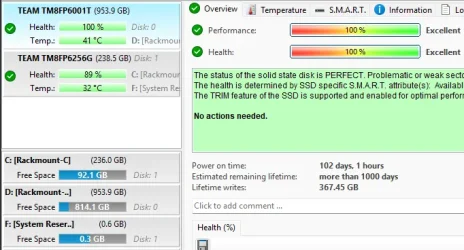
3) Run HDS > post share links displaying these tabs for each drive:
a) overview
b) temperature


Code:
Event[1601]
  Log Name: System
  Source: Microsoft-Windows-TPM-WMI
  Date: 2025-12-20T12:44:27.3230000Z
  Event ID: 1801
  Task: N/A
  Level: Error
  Opcode: Info
  Keyword: N/A
  User: S-1-5-18
  User Name: NT AUTHORITY\SYSTEM
  Computer: RackMount
  Description:
Secure Boot certificates have been updated but are not yet applied to the device firmware. Review the published guidance to complete the update and ensure full protection. This device signature information is included here.
DeviceAttributes: BaseBoardManufacturer:ASUSTeK COMPUTER INC.;FirmwareManufacturer:American Megatrends Inc.;FirmwareVersion:3621;OEMModelBaseBoard:TUF GAMING B550-PLUS;OEMManufacturerName:ASUS;OSArchitecture:amd64;
BucketId: 9e0cca494862a2dec441819e67d80b17e91ccc62839566296ffb1502b0474db5
BucketConfidenceLevel:
UpdateType:
For more information, please see https://go.microsoft.com/fwlink/?linkid=2301018.


Code:
Event[1551]
  Log Name: System
  Source: Microsoft-Windows-DNS-Client
  Date: 2025-12-20T12:39:28.5380000Z
  Event ID: 1012
  Task: N/A
  Level: Error
  Opcode: Info
  Keyword: N/A
  User: S-1-5-20
  User Name: NT AUTHORITY\NETWORK SERVICE
  Computer: RackMount
  Description:
There was an error while attempting to read the local hosts file.

Event[1552]
  Log Name: System
  Source: Microsoft-Windows-DNS-Client
  Date: 2025-12-20T12:39:28.8270000Z
  Event ID: 1012
  Task: N/A
  Level: Error
  Opcode: Info
  Keyword: N/A
  User: S-1-5-20
  User Name: NT AUTHORITY\NETWORK SERVICE
  Computer: RackMount
  Description:
There was an error while attempting to read the local hosts file.
 

My Computer My Computer

At a glance

Windows 10Intel(R) Core(TM) i7-4800MQ CPU @ 2.70GHz16 GB Total: Manufacturer : Samsung MemoryTyp...NVIDIA Quadro K3100M; Intel(R) HD Graphics 4600
OS
Windows 10
Computer type
Laptop
Manufacturer/Model
HP
CPU
Intel(R) Core(TM) i7-4800MQ CPU @ 2.70GHz
Motherboard
Product : 190A Version : KBC Version 94.56
Memory
16 GB Total: Manufacturer : Samsung MemoryType : DDR3 FormFactor : SODIMM Capacity : 8GB Speed : 1600
Graphics Card(s)
NVIDIA Quadro K3100M; Intel(R) HD Graphics 4600
Sound Card
IDT High Definition Audio CODEC; PNP Device ID HDAUDIO\FUNC_01&VEN_111D&DEV_76E0
Hard Drives
Model Hitachi HTS727575A9E364
Antivirus
Microsoft Defender
Other Info
Mobile Workstation
1. Hosts was already returned to default on 12/4, so I just sis it again.

2. 1766516516483.webp

3. 1766516698058.webp

Thanks!
 

My Computer My Computer

At a glance

W11Ryzen 7 8-core32gbNVidia
OS
W11
Computer type
PC/Desktop
CPU
Ryzen 7 8-core
Motherboard
ASUS Gaming
Memory
32gb
Graphics Card(s)
NVidia
Monitor(s) Displays
Samsung 24"
Screen Resolution
1920x1080
Hard Drives
SSD 1tb
Cooling
Fans!
Keyboard
HyperX
Mouse
Kensington TB
Internet Speed
400mbps
Browser
Edge
Antivirus
defender

Latest Support Threads

Back
Top Bottom