Windows update to 25H2 in WU is appearing while 25H2 is installed


Merennor

Well-known member
Member
Local time
6:16 AM
Posts
4
OS
Windows 11
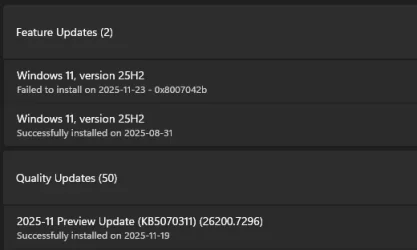
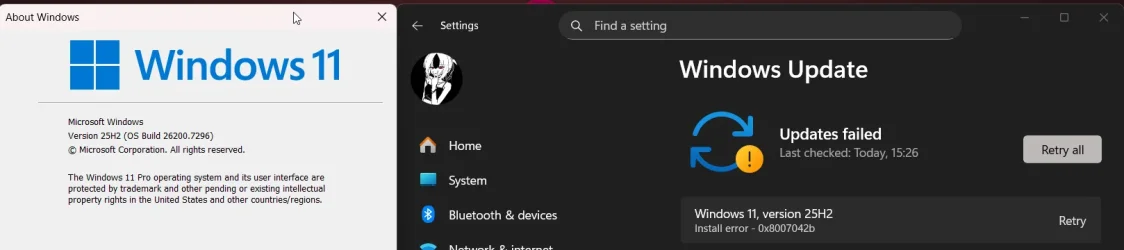
In the WU, an update to 25H2 appeared out of nowhere (even though I had already installed the enablement KB5054156 package for it), then after rebooting, something it was doing, but didn't done at all (judging by the error it gave in WU - 0x8007042B). winver version left untouched tho - 26200.7296
ApplicationFrameHost_0EpYz51dA9.webp

1763827837019.webp
 
Windows Build/Version
25H2 26200.7296

My Computer My Computer

At a glance

Windows 11Intel Core i5 10300H32GB DDR4NVIDIA GTX 1650 TI
OS
Windows 11
Computer type
Laptop
Manufacturer/Model
ASUS TUF Gaming F15 (FX506LI)
CPU
Intel Core i5 10300H
Motherboard
FX506LI
Memory
32GB DDR4
Graphics Card(s)
NVIDIA GTX 1650 TI
Screen Resolution
1920x1080
Hard Drives
SSD: WDC PC SN530 SDBPNPZ-256G-1002 (256 GB)
HDD: ST1000LM035-1RK172 (1 TB)
Internet Speed
1 GB/s
 

My Computers My Computers

  • At a glance

    All Branches but ReleaseAMD Ryzen 7 7735HS 3200-4500 Mhz 8 cores x 232 GB DDR5Radeon Graphic / NVIDIA GeForce RTX 4060 8 GB...
    OS
    All Branches but Release
    Computer type
    Laptop
    Manufacturer/Model
    Acer Nitro ANV15-51
    CPU
    AMD Ryzen 7 7735HS 3200-4500 Mhz 8 cores x 2
    Motherboard
    Sportage_RBH
    Memory
    32 GB DDR5
    Graphics Card(s)
    Radeon Graphic / NVIDIA GeForce RTX 4060 8 GB GDDR6
    Sound Card
    AMD/Realtek(R) Audio
    Monitor(s) Displays
    Integrated Monitor (15.3"vis)
    Screen Resolution
    FHD 1920X1080 16:9 144Hz
    Hard Drives
    KINGSTON OM8SEP4512Q-AA 1TB
    Western Digital 256GB
    PSU
    19V DC 6.32 A 120 W
    Cooling
    Dual Fans
    Mouse
    MS Bluetooth
    Internet Speed
    Fiber 1GB Cox -us & 1GB Orange-fr
    Browser
    Edge Canary- Firefox Nightly-Chrome Dev-Chrome Dev
    Antivirus
    Windows Defender
  • At a glance

    Windows 11 BetaAMD A9-94208 GB of DDR4AMD Radeon R5
    Operating System
    Windows 11 Beta
    Computer type
    Laptop
    Manufacturer/Model
    Asus X751BP
    CPU
    AMD A9-9420
    Memory
    8 GB of DDR4
    Graphics card(s)
    AMD Radeon R5
    Screen Resolution
    1600x900
    Hard Drives
    Seagate 1 TB
Welcome @Merennor to ElevenForum.

Here's ten points, just for filling out your computer specs. :-)


The failed update, might just be a glitch in the WU system.
 

My Computers My Computers

  • At a glance

    Win 11 Home ♦♦♦26200.8737 ♦♦♦♦♦♦♦25H2AMD Ryzen 7 3700XG.Skill (F4-3200C14D-16GTZKW)EVGA RTX 2070 (08G-P4-2171-KR)
    OS
    Win 11 Home ♦♦♦26200.8737 ♦♦♦♦♦♦♦25H2
    Computer type
    PC/Desktop
    Manufacturer/Model
    Built by Ghot® [May 2020]
    CPU
    AMD Ryzen 7 3700X
    Motherboard
    Asus Pro WS X570-ACE (BIOS 5302)
    Memory
    G.Skill (F4-3200C14D-16GTZKW)
    Graphics Card(s)
    EVGA RTX 2070 (08G-P4-2171-KR)
    Sound Card
    Realtek ALC1220P / ALC S1220A
    Monitor(s) Displays
    Dell U3011 30"
    Screen Resolution
    2560 x 1600
    Hard Drives
    2x Samsung 860 EVO 500GB,
    WD 4TB Black FZBX - SATA III,
    WD 8TB Black FZBX - SATA III,
    DRW-24B1ST CD/DVD Burner
    PSU
    PC Power & Cooling 750W Quad EPS12V
    Case
    Cooler Master ATCS 840 Tower
    Cooling
    CM Hyper 212 EVO (push/pull)
    Keyboard
    Ducky DK9008 Shine II Blue LED
    Mouse
    Logitech Optical M-100
    Internet Speed
    300/300
    Browser
    Firefox (latest)
    Antivirus
    Bitdefender Total Security
    Other Info
    Speakers: Klipsch Pro Media 2.1
  • At a glance

    Windows XP Pro 32bit w/SP3AMD Athlon 64 X2 5000+ (OC'd @ 3.2Ghz)TWIN2X2048-6400C4DHX (2 x 1GB, DDR2 800)EVGA 256-P2-N758-TR GeForce 8600GT SSC
    Operating System
    Windows XP Pro 32bit w/SP3
    Computer type
    PC/Desktop
    Manufacturer/Model
    Built by Ghot® (not in use)
    CPU
    AMD Athlon 64 X2 5000+ (OC'd @ 3.2Ghz)
    Motherboard
    ASUS M2N32-SLI Deluxe Wireless Edition
    Memory
    TWIN2X2048-6400C4DHX (2 x 1GB, DDR2 800)
    Graphics card(s)
    EVGA 256-P2-N758-TR GeForce 8600GT SSC
    Sound Card
    Onboard
    Monitor(s) Displays
    ViewSonic G90FB Black 19" Professional (CRT)
    Screen Resolution
    up to 2048 x 1536
    Hard Drives
    WD 36GB 10,000rpm Raptor SATA
    Seagate 80GB 7200rpm SATA
    Lite-On LTR-52246S CD/RW
    Lite-On LH-18A1P CD/DVD Burner
    PSU
    PC Power & Cooling Silencer 750 Quad EPS12V
    Case
    Generic Beige case, 80mm fans
    Cooling
    ZALMAN 9500A 92mm CPU Cooler
    Keyboard
    Logitech Classic Keybooard 200
    Mouse
    Logitech Optical M-BT96a
    Internet Speed
    300/300
    Browser
    Firefox 3.x ??
    Antivirus
    Symantec (Norton)
    Other Info
    Still assembled, still runs. Haven't turned it on for 15 years?
  • Like
Reactions: OAT
Please run the V2 log collector > post a share link


My Computer My Computer

At a glance

Windows 10Intel(R) Core(TM) i7-4800MQ CPU @ 2.70GHz16 GB Total: Manufacturer : Samsung MemoryTyp...NVIDIA Quadro K3100M; Intel(R) HD Graphics 4600
OS
Windows 10
Computer type
Laptop
Manufacturer/Model
HP
CPU
Intel(R) Core(TM) i7-4800MQ CPU @ 2.70GHz
Motherboard
Product : 190A Version : KBC Version 94.56
Memory
16 GB Total: Manufacturer : Samsung MemoryType : DDR3 FormFactor : SODIMM Capacity : 8GB Speed : 1600
Graphics Card(s)
NVIDIA Quadro K3100M; Intel(R) HD Graphics 4600
Sound Card
IDT High Definition Audio CODEC; PNP Device ID HDAUDIO\FUNC_01&VEN_111D&DEV_76E0
Hard Drives
Model Hitachi HTS727575A9E364
Antivirus
Microsoft Defender
Other Info
Mobile Workstation

My Computer My Computer

At a glance

Windows 11Intel Core i5 10300H32GB DDR4NVIDIA GTX 1650 TI
OS
Windows 11
Computer type
Laptop
Manufacturer/Model
ASUS TUF Gaming F15 (FX506LI)
CPU
Intel Core i5 10300H
Motherboard
FX506LI
Memory
32GB DDR4
Graphics Card(s)
NVIDIA GTX 1650 TI
Screen Resolution
1920x1080
Hard Drives
SSD: WDC PC SN530 SDBPNPZ-256G-1002 (256 GB)
HDD: ST1000LM035-1RK172 (1 TB)
Internet Speed
1 GB/s
Some findings:


a) BSODs dated today 11/22/25

Prior BSOD dated Sat Oct 4 14:38:01.420 2025 (UTC - 6:00)
caused by a misbehaving driver: AsusPTPFilter.sys

b) Microsoft Windows 11 Pro 10.0.26200
(26100.ge_release.240331-1435)

c) Windows RE disabled

d) Secure boot not enabled (update available)

e) Prior corruption C:


Please perform the following steps: (in sequence)


1) Add WMIC:

Code:
DISM /Online /Add-Capability /CapabilityName:WMIC~~~~


2) Run Tuneup plus > post a share link


3) Run Diskparinfo > post a share link


4) Run upgrade_failure_info > post a share link


5) Run getwindowsupdatelist > post a share link


6) Open disk management > widen columns and rows > make sure that characters are not cutoff > post a share link


7) Read this link on Windows Driver Verifier (WDV):

Enable and Disable Driver Verifier in Windows 10


8) Create a new restore point


9) Learn the methods to recover from BSOD caused by WDV by booting into safe mode and running one or more of these commands:

verifier /reset

verifier /bootmode resetonbootfail


(option nine and seven)


10) Plan to run the tool with various customized test settings.

a) Test all non-Microsoft drivers

b) Test no Microsoft drivers

c) For the first run of WDV select the 3 customized tests displayed in the TF tutorial


11) Whenever the WDV tool is started if there is no immediate BSOD then open administrative command prompt and copy and paste:

verifier /querysettings

Post a share link.


Customized tests will then be posted for the next run of WDV.


WDV can run continuously during the testing.


For any BSOD post a new V2 share link into the newest post.


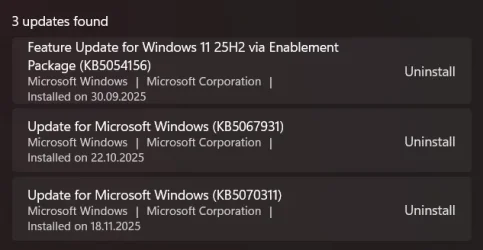
Name : Microsoft Windows 11 Pro
Version : 10.0.26200


HotFixID Description InstalledOn
-------- ----------- -----------
KB5054156 Update 30.09.2025 0:00:00
KB5067931 Update 22.10.2025 0:00:00
KB5070311 Update 18.11.2025 0:00:00
KB5071142 Update 18.11.2025 0:00:00


Windows RE status: Disabled

SecureBoot : Not Enabled


Code:
Event[17807]
  Log Name: System
  Source: Microsoft-Windows-WindowsUpdateClient
  Date: 2025-11-22T17:29:32.2850000Z
  Event ID: 20
  Task: └ухэЄ Windows Update
  Level: Error
  Opcode: ▓эёЄры Ў│
  Keyword: ▓эёЄры Ў│ ,╧юьшыър,
  User: S-1-5-18
  User Name: NT AUTHORITY\╤╚╤╥┼╠└
  Computer: DESKTOP-7PFOMPU
  Description:
╧юьшыър │эёЄры Ў│┐. ╫хЁхч яюьшыъє 0x8007042B эх тфрыюё  │эёЄры■трЄш Єръх юэютыхээ : Windows 11, version 25H2.


Code:
Event[2602]
  Log Name: System
  Source: Ntfs
  Date: 2025-10-28T19:26:34.8190000Z
  Event ID: 55
  Task: N/A
  Level: Error
  Opcode: Info
  Keyword: N/A
  User: S-1-5-18
  User Name: NT AUTHORITY\╤╚╤╥┼╠└
  Computer: DESKTOP-7PFOMPU
  Description:
A corruption was discovered in the file system structure on volume C:.

╥юўэр  яЁшЁюфр яютЁхцфхэш  эхшчтхёЄэр.  ═хюсїюфшью яЁютхЁшЄ№ ёЄЁєъЄєЁ√ Їрщыютющ ёшёЄхь√ т Ёхцшьх яюфъы■ўхэш  ъ ёхЄш.


Code:
Event[17815]
  Log Name: System
  Source: Microsoft-Windows-TPM-WMI
  Date: 2025-11-22T17:32:17.6370000Z
  Event ID: 1801
  Task: N/A
  Level: Error
  Opcode: Info
  Keyword: N/A
  User: S-1-5-18
  User Name: NT AUTHORITY\╤╚╤╥┼╠└
  Computer: DESKTOP-7PFOMPU
  Description:
Secure Boot CA/keys need to be updated. This device signature information is included here.
DeviceAttributes: BaseBoardManufacturer:ASUSTeK COMPUTER INC.;FirmwareManufacturer:American Megatrends Inc.;FirmwareVersion:FX506LI.310;OEMModelBaseBoard:FX506LI;OEMManufacturerName:ASUSTeK COMPUTER INC.;OSArchitecture:amd64;
BucketId: ed357d5f176e57cec512f7ad3287ec27bdad0a3c56ecb8cfaf2afcaf439a2978
BucketConfidenceLevel:
UpdateType: 0
HResult: The operation completed successfully.


Code:
Event[17688]
  Log Name: System
  Source: volmgr
  Date: 2025-11-22T17:27:08.9600000Z
  Event ID: 46
  Task: None
  Level: Error
  Opcode: N/A
  Keyword: Classic,
  User: N/A
  User Name: N/A
  Computer: DESKTOP-7PFOMPU
  Description:
Crash dump initialization failed!


Code:
Event[17548]
  Log Name: System
  Source: Microsoft-Windows-WindowsUpdateClient
  Date: 2025-11-22T13:16:02.2770000Z
  Event ID: 20
  Task: └ухэЄ Windows Update
  Level: Error
  Opcode: ▓эёЄры Ў│
  Keyword: ▓эёЄры Ў│ ,╧юьшыър,
  User: S-1-5-18
  User Name: NT AUTHORITY\╤╚╤╥┼╠└
  Computer: DESKTOP-7PFOMPU
  Description:
╧юьшыър │эёЄры Ў│┐. ╫хЁхч яюьшыъє 0x8007042B эх тфрыюё  │эёЄры■трЄш Єръх юэютыхээ : Windows 11, version 25H2.


Code:
Event[17425]
  Log Name: System
  Source: volmgr
  Date: 2025-11-22T13:13:35.9910000Z
  Event ID: 46
  Task: None
  Level: Error
  Opcode: N/A
  Keyword: Classic,
  User: N/A
  User Name: N/A
  Computer: DESKTOP-7PFOMPU
  Description:
Crash dump initialization failed!
 

My Computer My Computer

At a glance

Windows 10Intel(R) Core(TM) i7-4800MQ CPU @ 2.70GHz16 GB Total: Manufacturer : Samsung MemoryTyp...NVIDIA Quadro K3100M; Intel(R) HD Graphics 4600
OS
Windows 10
Computer type
Laptop
Manufacturer/Model
HP
CPU
Intel(R) Core(TM) i7-4800MQ CPU @ 2.70GHz
Motherboard
Product : 190A Version : KBC Version 94.56
Memory
16 GB Total: Manufacturer : Samsung MemoryType : DDR3 FormFactor : SODIMM Capacity : 8GB Speed : 1600
Graphics Card(s)
NVIDIA Quadro K3100M; Intel(R) HD Graphics 4600
Sound Card
IDT High Definition Audio CODEC; PNP Device ID HDAUDIO\FUNC_01&VEN_111D&DEV_76E0
Hard Drives
Model Hitachi HTS727575A9E364
Antivirus
Microsoft Defender
Other Info
Mobile Workstation
Use the Show/Hide tool to hide the update. You may have to restart the computer for the change to take effect.

Ben
 

My Computers My Computers

  • At a glance

    Windows 10 HomeIntel Core 2 Duo [email protected] GHz2 GB
    OS
    Windows 10 Home
    Computer type
    Laptop
    Manufacturer/Model
    HP Elitebook 2530p
    CPU
    Intel Core 2 Duo [email protected] GHz
    Memory
    2 GB
  • At a glance

    Windows 11 HomeIntel Core 2 Duo E75004 GB
    Operating System
    Windows 11 Home
    Computer type
    PC/Desktop
    Manufacturer/Model
    Dell Optiplex 330
    CPU
    Intel Core 2 Duo E7500
    Memory
    4 GB
In the WU, an update to 25H2 appeared out of nowhere (even though I had already installed the enablement KB5054156 package for it), then after rebooting, something it was doing, but didn't done at all (judging by the error it gave in WU - 0x8007042B). winver version left untouched tho - 26200.7296
View attachment 153918

I have the same problem. Takes a long time to load/install. Restarts then says 100% installed. Restarts. Very slowly goes to 29%. Restarts. Says removing install from computer. Restarts and then back to log on and WINVER 7296.
I have tried this update twice and after the first time did all the usual things including disk C check and repair plus Reset Windows Update Components.
 

My Computer My Computer

At a glance

Windows 11 ProIntel i9-10980XEGskill DDR4 4x8Gb 3200Mhz CL 14.14.14.34Nvidia FE 3800
OS
Windows 11 Pro
Computer type
PC/Desktop
Manufacturer/Model
Self built
CPU
Intel i9-10980XE
Motherboard
MSI X299 XPOWER GAMING AC BIOS 1.F0. Updated Network Card Intel Wi-fi 6E AX210
Memory
Gskill DDR4 4x8Gb 3200Mhz CL 14.14.14.34
Graphics Card(s)
Nvidia FE 3800
Sound Card
See other info.
Monitor(s) Displays
Dell 30" 3017
Screen Resolution
2560x1600
Hard Drives
C: WD_BLACK SN750 500GB M.2 2280 NVMe Gen 3
6 x SATA Kingston/WD
Back up Drives: Toshiba Mechanical/Intel SSD
PSU
Seasonic Prime TX-1000
Case
Silverstone Fortress FT02. Updates: Top USB ports to 3.1, AP183 PWM bottom fans, NF-A12x25 PWM chromax top fan. Mods: cut out bus slots for improved Graphics card air flow.
Cooling
CPU: Noctua D15S Chromax
Keyboard
Filco Majestouch 2 (10Keyless)
Mouse
Logitech MX Master 3
Internet Speed
275Mbps
Browser
Chrome, Firefox
Antivirus
MS Defender
Other Info
Sound: Matrix Audio Element H/USB cable/ SPDIF 2, Mogami 110 Ohm AES-EBU XLR, Adam Audio S3V Monitors.
Front Panel Bays: EZDIY-FAB 5.25in 10Gbps USB 3.1 Gen2 Hub and Type-C Port USB Hub with QC 3.0 Quick Charging. Dual Bay 3.5" + 2.5" Inch SATA III Hard Drive HDD & SSD Tray Caddy Internal Mobile Rack Enclosure Docking Station with USB 3.0 Port Hot Swap.
Logitech BRIO 4k Ultra HD USB-C Webcam

My Computer My Computer

At a glance

Windows 10Intel(R) Core(TM) i7-4800MQ CPU @ 2.70GHz16 GB Total: Manufacturer : Samsung MemoryTyp...NVIDIA Quadro K3100M; Intel(R) HD Graphics 4600
OS
Windows 10
Computer type
Laptop
Manufacturer/Model
HP
CPU
Intel(R) Core(TM) i7-4800MQ CPU @ 2.70GHz
Motherboard
Product : 190A Version : KBC Version 94.56
Memory
16 GB Total: Manufacturer : Samsung MemoryType : DDR3 FormFactor : SODIMM Capacity : 8GB Speed : 1600
Graphics Card(s)
NVIDIA Quadro K3100M; Intel(R) HD Graphics 4600
Sound Card
IDT High Definition Audio CODEC; PNP Device ID HDAUDIO\FUNC_01&VEN_111D&DEV_76E0
Hard Drives
Model Hitachi HTS727575A9E364
Antivirus
Microsoft Defender
Other Info
Mobile Workstation
Criticism accepted. Thanks for posting a good visible link.

Ben
 

My Computers My Computers

  • At a glance

    Windows 10 HomeIntel Core 2 Duo [email protected] GHz2 GB
    OS
    Windows 10 Home
    Computer type
    Laptop
    Manufacturer/Model
    HP Elitebook 2530p
    CPU
    Intel Core 2 Duo [email protected] GHz
    Memory
    2 GB
  • At a glance

    Windows 11 HomeIntel Core 2 Duo E75004 GB
    Operating System
    Windows 11 Home
    Computer type
    PC/Desktop
    Manufacturer/Model
    Dell Optiplex 330
    CPU
    Intel Core 2 Duo E7500
    Memory
    4 GB

My Computer My Computer

At a glance

Windows 10Intel(R) Core(TM) i7-4800MQ CPU @ 2.70GHz16 GB Total: Manufacturer : Samsung MemoryTyp...NVIDIA Quadro K3100M; Intel(R) HD Graphics 4600
OS
Windows 10
Computer type
Laptop
Manufacturer/Model
HP
CPU
Intel(R) Core(TM) i7-4800MQ CPU @ 2.70GHz
Motherboard
Product : 190A Version : KBC Version 94.56
Memory
16 GB Total: Manufacturer : Samsung MemoryType : DDR3 FormFactor : SODIMM Capacity : 8GB Speed : 1600
Graphics Card(s)
NVIDIA Quadro K3100M; Intel(R) HD Graphics 4600
Sound Card
IDT High Definition Audio CODEC; PNP Device ID HDAUDIO\FUNC_01&VEN_111D&DEV_76E0
Hard Drives
Model Hitachi HTS727575A9E364
Antivirus
Microsoft Defender
Other Info
Mobile Workstation
I have the same problem. Takes a long time to load/install. Restarts then says 100% installed. Restarts. Very slowly goes to 29%. Restarts. Says removing install from computer. Restarts and then back to log on and WINVER 7296.
I have tried this update twice and after the first time did all the usual things including disk C check and repair plus Reset Windows Update Components.
Same. Please update if you find a solution.
 

My Computer My Computer

At a glance

Windows 11AMD Ryzen 5300u
OS
Windows 11
Computer type
Laptop
Manufacturer/Model
hp
CPU
AMD Ryzen 5300u

My Computers My Computers

  • At a glance

    Windows 10 HomeIntel Core 2 Duo [email protected] GHz2 GB
    OS
    Windows 10 Home
    Computer type
    Laptop
    Manufacturer/Model
    HP Elitebook 2530p
    CPU
    Intel Core 2 Duo [email protected] GHz
    Memory
    2 GB
  • At a glance

    Windows 11 HomeIntel Core 2 Duo E75004 GB
    Operating System
    Windows 11 Home
    Computer type
    PC/Desktop
    Manufacturer/Model
    Dell Optiplex 330
    CPU
    Intel Core 2 Duo E7500
    Memory
    4 GB
i have the same problem. doesn't show up in show/hide tool.
 

My Computer My Computer

At a glance

Windows 11
OS
Windows 11

My Computer My Computer

At a glance

Windows 11 ProIntel i9-10980XEGskill DDR4 4x8Gb 3200Mhz CL 14.14.14.34Nvidia FE 3800
OS
Windows 11 Pro
Computer type
PC/Desktop
Manufacturer/Model
Self built
CPU
Intel i9-10980XE
Motherboard
MSI X299 XPOWER GAMING AC BIOS 1.F0. Updated Network Card Intel Wi-fi 6E AX210
Memory
Gskill DDR4 4x8Gb 3200Mhz CL 14.14.14.34
Graphics Card(s)
Nvidia FE 3800
Sound Card
See other info.
Monitor(s) Displays
Dell 30" 3017
Screen Resolution
2560x1600
Hard Drives
C: WD_BLACK SN750 500GB M.2 2280 NVMe Gen 3
6 x SATA Kingston/WD
Back up Drives: Toshiba Mechanical/Intel SSD
PSU
Seasonic Prime TX-1000
Case
Silverstone Fortress FT02. Updates: Top USB ports to 3.1, AP183 PWM bottom fans, NF-A12x25 PWM chromax top fan. Mods: cut out bus slots for improved Graphics card air flow.
Cooling
CPU: Noctua D15S Chromax
Keyboard
Filco Majestouch 2 (10Keyless)
Mouse
Logitech MX Master 3
Internet Speed
275Mbps
Browser
Chrome, Firefox
Antivirus
MS Defender
Other Info
Sound: Matrix Audio Element H/USB cable/ SPDIF 2, Mogami 110 Ohm AES-EBU XLR, Adam Audio S3V Monitors.
Front Panel Bays: EZDIY-FAB 5.25in 10Gbps USB 3.1 Gen2 Hub and Type-C Port USB Hub with QC 3.0 Quick Charging. Dual Bay 3.5" + 2.5" Inch SATA III Hard Drive HDD & SSD Tray Caddy Internal Mobile Rack Enclosure Docking Station with USB 3.0 Port Hot Swap.
Logitech BRIO 4k Ultra HD USB-C Webcam
I have looked through the Windows Insider Programme and the latest version issue is 17/11/2025 "Releasing Windows 11 Builds 26100.7296 and 26200.7296 to the Release Preview Channel" There is nothing else listed after this so I have no idea what the update on the 21/11/2015 is.
 

My Computer My Computer

At a glance

Windows 11 ProIntel i9-10980XEGskill DDR4 4x8Gb 3200Mhz CL 14.14.14.34Nvidia FE 3800
OS
Windows 11 Pro
Computer type
PC/Desktop
Manufacturer/Model
Self built
CPU
Intel i9-10980XE
Motherboard
MSI X299 XPOWER GAMING AC BIOS 1.F0. Updated Network Card Intel Wi-fi 6E AX210
Memory
Gskill DDR4 4x8Gb 3200Mhz CL 14.14.14.34
Graphics Card(s)
Nvidia FE 3800
Sound Card
See other info.
Monitor(s) Displays
Dell 30" 3017
Screen Resolution
2560x1600
Hard Drives
C: WD_BLACK SN750 500GB M.2 2280 NVMe Gen 3
6 x SATA Kingston/WD
Back up Drives: Toshiba Mechanical/Intel SSD
PSU
Seasonic Prime TX-1000
Case
Silverstone Fortress FT02. Updates: Top USB ports to 3.1, AP183 PWM bottom fans, NF-A12x25 PWM chromax top fan. Mods: cut out bus slots for improved Graphics card air flow.
Cooling
CPU: Noctua D15S Chromax
Keyboard
Filco Majestouch 2 (10Keyless)
Mouse
Logitech MX Master 3
Internet Speed
275Mbps
Browser
Chrome, Firefox
Antivirus
MS Defender
Other Info
Sound: Matrix Audio Element H/USB cable/ SPDIF 2, Mogami 110 Ohm AES-EBU XLR, Adam Audio S3V Monitors.
Front Panel Bays: EZDIY-FAB 5.25in 10Gbps USB 3.1 Gen2 Hub and Type-C Port USB Hub with QC 3.0 Quick Charging. Dual Bay 3.5" + 2.5" Inch SATA III Hard Drive HDD & SSD Tray Caddy Internal Mobile Rack Enclosure Docking Station with USB 3.0 Port Hot Swap.
Logitech BRIO 4k Ultra HD USB-C Webcam
Open an admin powershell window and paste the following into it. When the popup window appears, select the unwanted update and click "OK" to hide it. You may have to restart the computer for the change to take effect. If the unwanted update isn't shown, click "Cancel".

$Session = New-Object -ComObject Microsoft.Update.Session
$Searcher = $Session.CreateUpdateSearcher()
$Criteria = "IsInstalled=0 or IsInstalled=0 and deploymentaction='OptionalInstallation'"
$SearchResult = $Searcher.Search($Criteria)
$SearchResult.Updates | Out-GridView -passthru -title "Hide Updates" | ForEach-Object -Process {$_.ishidden=$true}
#end
 

My Computers My Computers

  • At a glance

    Windows 10 HomeIntel Core 2 Duo [email protected] GHz2 GB
    OS
    Windows 10 Home
    Computer type
    Laptop
    Manufacturer/Model
    HP Elitebook 2530p
    CPU
    Intel Core 2 Duo [email protected] GHz
    Memory
    2 GB
  • At a glance

    Windows 11 HomeIntel Core 2 Duo E75004 GB
    Operating System
    Windows 11 Home
    Computer type
    PC/Desktop
    Manufacturer/Model
    Dell Optiplex 330
    CPU
    Intel Core 2 Duo E7500
    Memory
    4 GB
there's no output.
 

My Computer My Computer

At a glance

Windows 11
OS
Windows 11
This looks to be a common error,


My Computers My Computers

  • At a glance

    Win 11 ProAMD Ryzen™ 7 7730U24GB Dual-Channel DDR4 @ 1596MHz (22-22-22-52)512MB ATI AMD Radeon Graphics (ASUStek Comput...
    OS
    Win 11 Pro
    Computer type
    Laptop
    Manufacturer/Model
    ASUS Vivobook
    CPU
    AMD Ryzen™ 7 7730U
    Motherboard
    M1605YA
    Memory
    24GB Dual-Channel DDR4 @ 1596MHz (22-22-22-52)
    Graphics Card(s)
    512MB ATI AMD Radeon Graphics (ASUStek Computer Inc)
    Monitor(s) Displays
    Generic PnP Monitor (1920x1200@60Hz) - P1 PLUS (1920x1080@59Hz)
    Screen Resolution
    1920 X 1200
    Hard Drives
    953GB Western Digital WD
    PSU
    45 Watts
    Mouse
    Lenovo Bluetooth.
    Internet Speed
    500 Mbps
    Browser
    Edge
    Antivirus
    Defender
  • At a glance

    Windows 11AMD Ryzen 7 5800H / 3.2 GHz32 GB DDR4 SDRAM 3200 MHzNVIDIA GeForce RTX 3060 6 GB GDDR6 SDRAM
    Operating System
    Windows 11
    Computer type
    Laptop
    Manufacturer/Model
    ACER NITRO
    CPU
    AMD Ryzen 7 5800H / 3.2 GHz
    Motherboard
    CZ Scala_CAS (FP6)
    Memory
    32 GB DDR4 SDRAM 3200 MHz
    Graphics card(s)
    NVIDIA GeForce RTX 3060 6 GB GDDR6 SDRAM
    Sound Card
    Realtek Audio. NVIDIA High Definition Audio
    Monitor(s) Displays
    15.6" LED backlight 1920 x 1080 (Full HD) 144 Hz
    Screen Resolution
    1920 x 1080 (Full HD)
    Hard Drives
    Samsung 970 Evo Plus 2TB NVMe M.2
    PSU
    180 Watt, 19.5 V
    Mouse
    Lenovo Bluetooth
    Internet Speed
    500 Mbps
    Browser
    Edge
    Antivirus
    Defender

Latest Support Threads

Back
Top Bottom