Windows X-Lite 24H2 Pro V4.2


OldNavy

Well-known member
Member
VIP
Local time
5:23 AM
Posts
303
Location
Biscuit Flat, South Australia
OS
Win 11 Pro
I tried installing X-Lite 24H2 from this web site..

It is very fast and looks interesting but for some reason the volume from the computer is very low.
I have sound set up as usb out to a NAD M51 DAC and then Adams * powered speakers.
All my other windows installs just requires the NAD driver and all works well.
Has anyone any ideas as to why this install has very low sound output?
Thanks
Rob
 

My Computer

System One

  • OS
    Win 11 Pro
    Computer type
    PC/Desktop
    Manufacturer/Model
    N/A
    CPU
    AMD Ryzen 7 9700X
    Motherboard
    ASUS Crosshair Viii Hero Wi Fi
    Memory
    G.Skill Trident Z5 Neo RGB 64GB Kit (2x32GB) DDR5-6000 C30
    Graphics Card(s)
    PowerColor Radeon RX 9060 XT Reaper GDDR6 16GB
    Sound Card
    USB Out NAD M51 DAC with Adams A8 powered speakers
    Monitor(s) Displays
    Dell 3219Q
    Screen Resolution
    3840 x 2160
    Hard Drives
    5 x WD_BLACK SN850x PCIe Gen4 NVMe M.2 SSD - 4TB
    PSU
    be quiet! DARK POWER 13 1000W Titanium PCIe 5.0 ATX Modular PSU
    Case
    Fractal Design Define 7 Full Tower Case (Black)
    Cooling
    Noctua NH-D15 G2 LBC - High Performance Multi-Socket PWM CPU Cooler
    Keyboard
    Razer Huntsman V2
    Mouse
    Razer Viper Ultimate
    Internet Speed
    Starlink 94Mbps down 20Mbps up
    Browser
    Brave
    Antivirus
    ESET
Try the latest version, 4.3.
 

My Computers

System One System Two

  • OS
    Windows 11 Pro 25H2 26200.8524
    Computer type
    Laptop
    Manufacturer/Model
    Acemagic LX15PRO
    CPU
    AMD Ryzen 7 5825U with Radeon Graphics
    Memory
    16GB
    Screen Resolution
    1920 x 1080
    Hard Drives
    SSD 2TB
    Internet Speed
    30 Mbps
    Browser
    Brave
    Antivirus
    Webroot Secure Anywhere
    Other Info
    System 3

    Acer Swift SF114-34 laptop
    OS Windows 11 Pro 26200.8524
    CPU Pentium Silver N6000
    RAM 4GB
    SSD Samsung 970 EVO Plus SSD 2TB (an upgrade)
  • Operating System
    Windows 11 Pro 23H2 22631.2506
    Computer type
    Laptop
    Manufacturer/Model
    HP Mini 210-1090NR PC (bought in late 2009!)
    CPU
    Atom N450 1.66GHz
    Memory
    2GB
    Browser
    Brave
    Antivirus
    Webroot
Thanks Kelper,
i had thought of that but a big hassle to backups etc just for another failure.
If i'm going to try it i'd like some possible troubleshooting tips handy should i need them.
 

My Computer

System One

  • OS
    Win 11 Pro
    Computer type
    PC/Desktop
    Manufacturer/Model
    N/A
    CPU
    AMD Ryzen 7 9700X
    Motherboard
    ASUS Crosshair Viii Hero Wi Fi
    Memory
    G.Skill Trident Z5 Neo RGB 64GB Kit (2x32GB) DDR5-6000 C30
    Graphics Card(s)
    PowerColor Radeon RX 9060 XT Reaper GDDR6 16GB
    Sound Card
    USB Out NAD M51 DAC with Adams A8 powered speakers
    Monitor(s) Displays
    Dell 3219Q
    Screen Resolution
    3840 x 2160
    Hard Drives
    5 x WD_BLACK SN850x PCIe Gen4 NVMe M.2 SSD - 4TB
    PSU
    be quiet! DARK POWER 13 1000W Titanium PCIe 5.0 ATX Modular PSU
    Case
    Fractal Design Define 7 Full Tower Case (Black)
    Cooling
    Noctua NH-D15 G2 LBC - High Performance Multi-Socket PWM CPU Cooler
    Keyboard
    Razer Huntsman V2
    Mouse
    Razer Viper Ultimate
    Internet Speed
    Starlink 94Mbps down 20Mbps up
    Browser
    Brave
    Antivirus
    ESET
Has anyone any ideas as to why this install has very low sound output?
Thanks
Rob
That's typical with the default sound driver, even with a non-custom Windows. Since Vista, IIRC.

That audio issue, annoys me so much! I'm like, "Software from the chipset manufacturer with graphic equalizer or bust!".
 

My Computers

System One System Two

  • OS
    Windows 11 Pro x64 24H2
    Computer type
    PC/Desktop
    CPU
    Ryzen 9 5900X
    Motherboard
    ASRock B550 PG Velocita (UEFI-BIOS 3.90)
    Memory
    64 GB G.Skill RipJaws V F4-3200C16D-64GVK
    Graphics Card(s)
    ASRock Steel Legend Arc B580 12 GB
    Monitor(s) Displays
    Alienware AW3423DWF OLED ultrawide
    Hard Drives
    Samsung 990 Pro 1 TB NVMe SSD
    PSU
    eVGA Supernova 750 G3
    Case
    Corsair 275R
    Internet Speed
    VTel FTTH 1 Gb down and 1 Gb up
  • Computer type
    PC/Desktop
    CPU
    Ryzen 7 5800X3D
    Motherboard
    Asus ROG Strix B550-F Gaming (UEFI-BIOS version 3607)
    Memory
    32 GB (2x16 GB G.Skill TridentZ Neo)
    Graphics card(s)
    Sapphire Nitro+ Radeon RX 6750 XT
    Hard Drives
    Samsung 970 Pro 512 GB NVMe SSD
    PSU
    Corsair RM850x
    Case
    Fractal Focus G
[Windows X-Lite] Optimum 11 24H2 Pro v4.3.iso
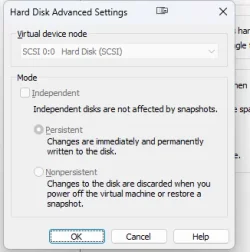
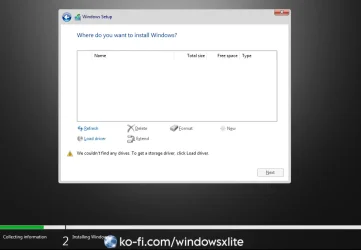
Has anyone used this under vmware workstation 17?
I can not seem to find a driver to let it see my target drive for the install.

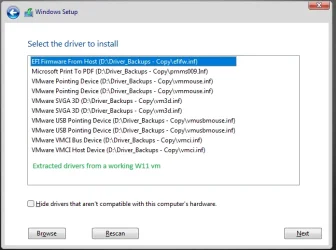
I have tried to use the drivers from the vmware tools iso but it will not recognize them.


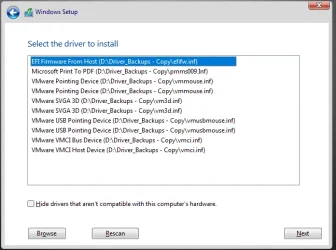
I even did a backup of all of my drivers in another win11 vm to extract pvscsi.* but the Windows installer will not find any usable driver to install for the drive.

Batch:
set dest=c:\Driver_Backups
mkdir %dest%
dism /online /export-driver /destination:%dest%


Any ideas?

1732373914873.webp1732373926249.webp
1732374225746.webp
 

Attachments

  • 1732374171030.webp
    1732374171030.webp
    36.5 KB · Views: 2

My Computer

System One

  • OS
    W11 Pro
If you think backups are "a hassle" wait until you lose some important files or Widows stops working. With a good backup program you can fix any issues in minutes. It takes me five minutes to restore all partitions.
 

My Computers

System One System Two

  • OS
    Windows 11 Pro 25H2 26200.8524
    Computer type
    Laptop
    Manufacturer/Model
    Acemagic LX15PRO
    CPU
    AMD Ryzen 7 5825U with Radeon Graphics
    Memory
    16GB
    Screen Resolution
    1920 x 1080
    Hard Drives
    SSD 2TB
    Internet Speed
    30 Mbps
    Browser
    Brave
    Antivirus
    Webroot Secure Anywhere
    Other Info
    System 3

    Acer Swift SF114-34 laptop
    OS Windows 11 Pro 26200.8524
    CPU Pentium Silver N6000
    RAM 4GB
    SSD Samsung 970 EVO Plus SSD 2TB (an upgrade)
  • Operating System
    Windows 11 Pro 23H2 22631.2506
    Computer type
    Laptop
    Manufacturer/Model
    HP Mini 210-1090NR PC (bought in late 2009!)
    CPU
    Atom N450 1.66GHz
    Memory
    2GB
    Browser
    Brave
    Antivirus
    Webroot
If you think backups are "a hassle" wait until you lose some important files or Widows stops working.
Out of compassion, they should not be working...
 

My Computers

System One System Two

  • OS
    All Branches but Release
    Computer type
    Laptop
    Manufacturer/Model
    Acer Nitro ANV15-51
    CPU
    AMD Ryzen 7 7735HS 3200-4500 Mhz 8 cores x 2
    Motherboard
    Sportage_RBH
    Memory
    32 GB DDR5
    Graphics Card(s)
    Radeon Graphic / NVIDIA GeForce RTX 4060 8 GB GDDR6
    Sound Card
    AMD/Realtek(R) Audio
    Monitor(s) Displays
    Integrated Monitor (15.3"vis)
    Screen Resolution
    FHD 1920X1080 16:9 144Hz
    Hard Drives
    KINGSTON OM8SEP4512Q-AA 1TB
    Western Digital 256GB
    PSU
    19V DC 6.32 A 120 W
    Cooling
    Dual Fans
    Mouse
    MS Bluetooth
    Internet Speed
    Fiber 1GB Cox -us & 1GB Orange-fr
    Browser
    Edge Canary- Firefox Nightly-Chrome Dev-Chrome Dev
    Antivirus
    Windows Defender
  • Operating System
    Windows 11 Beta
    Computer type
    Laptop
    Manufacturer/Model
    Asus X751BP
    CPU
    AMD A9-9420
    Memory
    8 GB of DDR4
    Graphics card(s)
    AMD Radeon R5
    Screen Resolution
    1600x900
    Hard Drives
    Seagate 1 TB
[Windows X-Lite] Optimum 11 24H2 Pro v4.3.iso
Has anyone used this under vmware workstation 17?
I can not seem to find a driver to let it see my target drive for the install.

I have tried to use the drivers from the vmware tools iso but it will not recognize them.


I even did a backup of all of my drivers in another win11 vm to extract pvscsi.* but the Windows installer will not find any usable driver to install for the drive.

Batch:
set dest=c:\Driver_Backups
mkdir %dest%
dism /online /export-driver /destination:%dest%


Any ideas?

View attachment 117341View attachment 117342
View attachment 117344

After some more trial and error , I was able to change the controller type in my VMX file and now it is working. :thumbsup:

#scsi0.virtualDev = "lsilogic"
scsi0.virtualDev = "lsisas1068"
 

My Computer

System One

  • OS
    W11 Pro
I just had another go installing V4.3 using a different download of the iso and a different USB stick and it installed fine and the sound is working as it should with my NAD M51 driver.
Not sure why but I'll take it.
 

My Computer

System One

  • OS
    Win 11 Pro
    Computer type
    PC/Desktop
    Manufacturer/Model
    N/A
    CPU
    AMD Ryzen 7 9700X
    Motherboard
    ASUS Crosshair Viii Hero Wi Fi
    Memory
    G.Skill Trident Z5 Neo RGB 64GB Kit (2x32GB) DDR5-6000 C30
    Graphics Card(s)
    PowerColor Radeon RX 9060 XT Reaper GDDR6 16GB
    Sound Card
    USB Out NAD M51 DAC with Adams A8 powered speakers
    Monitor(s) Displays
    Dell 3219Q
    Screen Resolution
    3840 x 2160
    Hard Drives
    5 x WD_BLACK SN850x PCIe Gen4 NVMe M.2 SSD - 4TB
    PSU
    be quiet! DARK POWER 13 1000W Titanium PCIe 5.0 ATX Modular PSU
    Case
    Fractal Design Define 7 Full Tower Case (Black)
    Cooling
    Noctua NH-D15 G2 LBC - High Performance Multi-Socket PWM CPU Cooler
    Keyboard
    Razer Huntsman V2
    Mouse
    Razer Viper Ultimate
    Internet Speed
    Starlink 94Mbps down 20Mbps up
    Browser
    Brave
    Antivirus
    ESET
What has been the actual user experience with Windows X-Lite Optimum 11 on real hardware and not in a VM? I'm looking to install on an older machine that does not meet the Windows 11 Hardware specifications. I want something that will be compatible with my Windows development environment and continue to receive Microsoft Security Updates.

Here's where I talk about my issue: Best way to install Win11 on this machine
 

My Computers

System One System Two

  • OS
    Win 11 Pro 25H2, Build 26200.8524
    Computer type
    PC/Desktop
    Manufacturer/Model
    Home Brew
    CPU
    Intel Core i5 14500
    Motherboard
    Gigabyte B760M G P WIFI
    Memory
    64GB DDR4
    Graphics Card(s)
    GeForce RTX 4060
    Sound Card
    Chipset Realtek
    Monitor(s) Displays
    LG 45" Ultragear, Acer 24" 1080p
    Screen Resolution
    5120x1440, 1920x1080
    Hard Drives
    Crucial P310 2TB 2280 PCIe Gen4 3D NAND NVMe M.2 SSD (O/S)
    Silicon Power 2TB US75 NVMe PCIe Gen4 M.2 2280 SSD (backup)
    Crucial BX500 2TB 3D NAND (2nd backup)
    Seagate 4TB Ironwolf, rotating HDD archive files
    External off-line backup Drives: 2 NVMe 4TB drives in external enclosures
    PSU
    Thermaltake Toughpower GF3 750W
    Case
    LIAN LI LANCOOL 216 E-ATX PC Case
    Cooling
    Lots of fans!
    Keyboard
    Microsoft Comfort Curve 2000
    Mouse
    Logitech G305
    Internet Speed
    Verizon FiOS 1GB
    Browser
    Firefox
    Antivirus
    Malware Bytes & Windows Defender Security
  • Operating System
    Win 11 Pro 25H2, Build 26200.8524
    Computer type
    PC/Desktop
    Manufacturer/Model
    Home Brew
    CPU
    Intel Core i5 14400
    Motherboard
    Gigabyte B760M DS3H AX
    Memory
    32GB DDR5
    Graphics card(s)
    Intel 700 Embedded GPU
    Sound Card
    Realtek Embedded
    Monitor(s) Displays
    27" HP 1080p
    Screen Resolution
    1920x1080
    Hard Drives
    Crucial P310 2TB 2280 PCIe Gen4 eD NAND PCIe SSD
    Samsung EVO 990 2TB NVMe Gen4 SSD
    Samsung 2TB SATA SSD
    PSU
    Thermaltake Smart BM3 650W
    Case
    Okinos Micro ATX Case
    Cooling
    Fans
    Keyboard
    Microsoft Comfort Curve 2000
    Mouse
    Logitech G305
    Internet Speed
    Verizon FiOS 1GB
    Browser
    Firefox
    Antivirus
    Malware Bytes & Windows Defender Security

Latest Support Threads

Back
Top Bottom