Winget appinstaller


Ok once I sorted a few errors on my part, integrated winget sucessfully to the latest version using this:
Code:
Dism /Image:c:\zmount /Add-ProvisionedAppxPackage /PackagePath:c:\apps\Microsoft.DesktopAppInstaller_8wekyb3d8bbwe.msixbundle /DependencyPackagePath:c:\apps\Microsoft.VCLibs.140.00_14.0.33519.0_x64.appx /DependencyPackagePath:c:\apps\Microsoft.VCLibs.140.00.UWPDesktop_14.0.33728.0_x64.appx /DependencyPackagePath:c:\apps\Microsoft.WindowsAppRuntime.1.8_8000.616.304.0_x64.appx /LicensePath=c:\apps\e53e159d00e04f729cc2180cffd1c02e_License1.xml /region=all"
I will give this a try with win 10 also, don't see a reason why it won't work.

Thank you @garlin & all posters above for the pointers.
 

My Computer My Computer

At a glance

Win 10
OS
Win 10
Computer type
PC/Desktop
Manufacturer/Model
HP
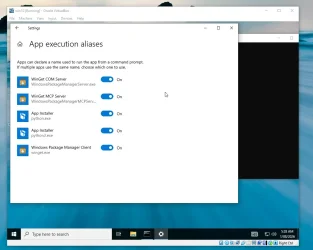
I did the same in Win 10 though finding I have to toggle all other apps off except Winget.exe to start winget from the command window.
Is there a way I can automate the App Execution Aliases config?

EDIT: Further testing should I toggle all below off & on again, winget works normally?

winget App Execution.webp
EDIT:
 
Last edited:

My Computer My Computer

At a glance

Win 10
OS
Win 10
Computer type
PC/Desktop
Manufacturer/Model
HP
The app alias should be configured for you, as part of new app provisioning. You haven't tampered by SkippingUserOOBE?
 

My Computer My Computer

At a glance

Windows 7
OS
Windows 7
The app alias should be configured for you, as part of new app provisioning. You haven't tampered by SkippingUserOOBE?
Yes I have.
Code:
 <OOBE>
                <HideEULAPage>true</HideEULAPage>
                <HideOEMRegistrationScreen>true</HideOEMRegistrationScreen>
                <HideOnlineAccountScreens>true</HideOnlineAccountScreens>
                <HideWirelessSetupInOOBE>true</HideWirelessSetupInOOBE>
                <NetworkLocation>Home</NetworkLocation>
                <SkipUserOOBE>true</SkipUserOOBE>
                <SkipMachineOOBE>true</SkipMachineOOBE>
                <ProtectYourPC>1</ProtectYourPC>
            </OOBE>
Just a matter correcting my autounattended.xml?

Edit: Just changed { <SkipUserOOBE>false</SkipUserOOBE>}
Though same result winget won't open?
 
Last edited:

My Computer My Computer

At a glance

Win 10
OS
Win 10
Computer type
PC/Desktop
Manufacturer/Model
HP

Latest Support Threads

Back
Top Bottom