WinSetView (Tool to Globally Set Explorer Folder Views)


WinSetView is a tool that will let you easily set File Explorer default folder views (including turning off grouping everywhere if so desired). It works by setting registry values that File Explorer already supports. It does not modify Explorer or add any tasks or services.

Please follow the guide on the WinSetView web page to download the app and set your initial folder view preferences. Running the app for the first time without following the guide may lead to confusion, as there are a lot of options on the screen.
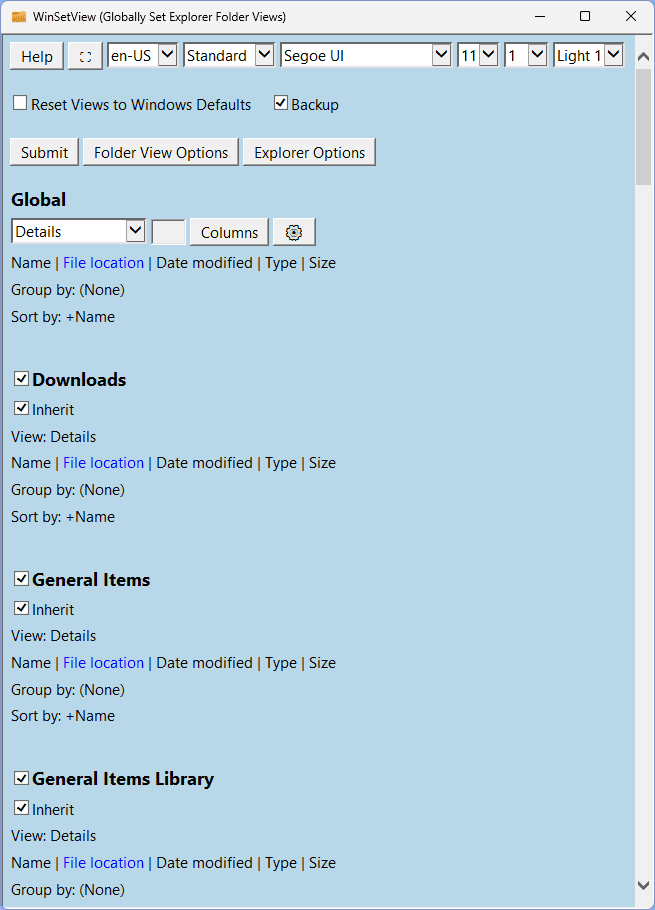
1731378491393.png

WinSetView...
  • Is a portable app. That is, it requires no installation (just unzip and run) and it saves its settings in an INI file with the app. So, you can easily run it from a flash drive or network drive to set up new computers and/or new users with consistent default views with just one click.

  • Sets default folder views for ALL folder types, not just the basic five. That is, in addition to setting the default views for General items, Documents, Pictures, Music, and Videos, it also sets the default views for Downloads, Libraries, OneDrive, Search results, Contacts, Quick Access, User files, File Open/Save dialogs, etc.

  • Sets folder views via a copy of the FolderTypes registry key which is not affected by Windows updates. A Windows repair install will remove the defaults, but then you can just run WinSetView and click Submit to re-apply your preferences.

  • Includes options to turn off Internet results in Windows search, revert the Windows 11 right-click menu to the classic layout, set a custom start folder for Explorer, disable thumbnails on folders, set the default view for phones to open in the same view you .

  • Can also be used to reset all folder views to Windows defaults.

  • Can be used via the command line (for Power users and System Administrators). See the Tools Folder section in the manual for more details.

WinSetView will correct the following conditions (when the cause is registry corruption):

1. Folder views set via File Explorer, using Apply to Folders, are not applying to all folders.
2. Folder Properties, Customize, Optimize this folder for is not working properly.
3. Folder views are reverting back to Windows defaults.

Note: Windows 11 currently has some folder view bugs in regards to setting folder type for entire folder trees on removable drives and overriding the automatically detected folder type on "Local disks". Those bugs can, for now, be eliminated by switching to the Windows 10 style Explorer.
 
Last edited:

My Computer My Computer

At a glance

Windows 11 ProIntel Core i9 12900KFCorsair 64GB DDR5 Vengeance C40 5200MhzASUS GeForce RTX 3090 ROG Strix OC 24GB
OS
Windows 11 Pro
Computer type
PC/Desktop
Manufacturer/Model
Custom Build
CPU
Intel Core i9 12900KF
Motherboard
ASUS ROG Maximus Z690 Hero
Memory
Corsair 64GB DDR5 Vengeance C40 5200Mhz
Graphics Card(s)
ASUS GeForce RTX 3090 ROG Strix OC 24GB
Sound Card
OnBoard
Monitor(s) Displays
Acer Predator XB323UGP 32" QHD G-SYNC-C 144Hz 1MS IPS LED
Screen Resolution
2560 x 1440
Hard Drives
1x Samsung 980 Pro Series Gen4 250GB M.2 NVMe
1x Samsung 980 Pro Series Gen4 500GB M.2 NVMe
2x Samsung 980 Pro Series Gen4 2TB M.2 NVMe
PSU
Corsair AX1200i 1200W 80PLUS Titanium Modular
Case
Corsair 4000D Black Case w/ Tempered Glass Side Panel
Cooling
Noctua NH-U12A Chromax Black CPU Cooler, 4x Noctua 120mm Fans
Keyboard
Logitech MK545
Mouse
Logitech MX Master 3
Internet Speed
Fixed Wireless 150mbps/75mbps
Browser
Firefox
Antivirus
Kaspersky
Other Info
Thrustmaster TS-PC RACER
Fanatec CSL Elite Pedals with the Load Cell Kit
Yamaha Amp with Bose Speakers
Your assistance is requested...

I have translated the internal VBScript code in WinSetView to JScript. I'm looking for beta testers before fully releasing this major change. I've been using the JScript version myself exclusively on my main computer, and all test VMs, for the past couple of weeks and have had no issues, so I'm very confident it's stable and correctly applies all changes, but the more testing before release, the better.

If you would like to help out, please download the beta test version and copy the files into you current WinSetView folder, letting it replace everything. It will not overwrite your settings. The main program is still WinSetView.exe (the JScript code is internal to that Exe). You will find the beta test version on the Releases page:

Background:

WinSetView is an HTML application that uses the MSHTML browser engine that's built into Windows. It started out as an HTA and was later converted into a VbsEdit HTML application, which is essentially an Exe browser object shell around the HTML/CSS/VBScript code. That eliminates the need for MSHTA.exe and provides some additional improvements over HTAs. It's a proper Exe compiled each time by Visual Studio. It's not a self extractor.

The part of WinSetView that applies the registry changes is a PowerShell script and that remains unchanged. The JScript code is only used for the interface.

If I were to write the tool today, I would write it in C# (and I may just do that some day). In the meantime, it's fine as is. However, starting in 2027, Microsoft plans to no longer include VBScript pre-installed in Windows. It will still be available as a Feature on Demand (FOD) but users will be reluctant to add it back if it's not installed to begin with.

Additionally, starting with Windows 11 24H2, VBScript is still installed, but it's now an FOD and can be uninstalled with a single click. Some users are starting to do that and, hence, the push to replace VBScript with JScript now.

Note: The term JScript refers to the older flavor of JavaScript that is included with Windows and works with the MSHTML rendering engine used by IE and HTML applications.
 

My Computer My Computer

At a glance

Windows 10/11
OS
Windows 10/11
Computer type
Laptop
Manufacturer/Model
Acer

WinSetView 3.0.2​

Bug Fix: Fixed error that caused file dialog views to not always be set for specific folder types.

Bug Fix: General items view for connected devices (such as phones) now also applies to dialog views.


My Computer My Computer

At a glance

Windows 11 ProIntel Core i9 12900KFCorsair 64GB DDR5 Vengeance C40 5200MhzASUS GeForce RTX 3090 ROG Strix OC 24GB
OS
Windows 11 Pro
Computer type
PC/Desktop
Manufacturer/Model
Custom Build
CPU
Intel Core i9 12900KF
Motherboard
ASUS ROG Maximus Z690 Hero
Memory
Corsair 64GB DDR5 Vengeance C40 5200Mhz
Graphics Card(s)
ASUS GeForce RTX 3090 ROG Strix OC 24GB
Sound Card
OnBoard
Monitor(s) Displays
Acer Predator XB323UGP 32" QHD G-SYNC-C 144Hz 1MS IPS LED
Screen Resolution
2560 x 1440
Hard Drives
1x Samsung 980 Pro Series Gen4 250GB M.2 NVMe
1x Samsung 980 Pro Series Gen4 500GB M.2 NVMe
2x Samsung 980 Pro Series Gen4 2TB M.2 NVMe
PSU
Corsair AX1200i 1200W 80PLUS Titanium Modular
Case
Corsair 4000D Black Case w/ Tempered Glass Side Panel
Cooling
Noctua NH-U12A Chromax Black CPU Cooler, 4x Noctua 120mm Fans
Keyboard
Logitech MK545
Mouse
Logitech MX Master 3
Internet Speed
Fixed Wireless 150mbps/75mbps
Browser
Firefox
Antivirus
Kaspersky
Other Info
Thrustmaster TS-PC RACER
Fanatec CSL Elite Pedals with the Load Cell Kit
Yamaha Amp with Bose Speakers
Thanks for the heads up on the update!
 

My Computer My Computer

At a glance

Windows 11 Pro x64 24H2 26100.8737Intel Core i5 9400 @ 2.90GHzDDR4 16384 MBytesIntel UHD Graphics 630
OS
Windows 11 Pro x64 24H2 26100.8737
Computer type
PC/Desktop
Manufacturer/Model
HP
CPU
Intel Core i5 9400 @ 2.90GHz
Motherboard
HP 8653 (U3E1) A (SMVB)
Memory
DDR4 16384 MBytes
Graphics Card(s)
Intel UHD Graphics 630

My Computer My Computer

At a glance

Windows 11 ProIntel Core i9 12900KFCorsair 64GB DDR5 Vengeance C40 5200MhzASUS GeForce RTX 3090 ROG Strix OC 24GB
OS
Windows 11 Pro
Computer type
PC/Desktop
Manufacturer/Model
Custom Build
CPU
Intel Core i9 12900KF
Motherboard
ASUS ROG Maximus Z690 Hero
Memory
Corsair 64GB DDR5 Vengeance C40 5200Mhz
Graphics Card(s)
ASUS GeForce RTX 3090 ROG Strix OC 24GB
Sound Card
OnBoard
Monitor(s) Displays
Acer Predator XB323UGP 32" QHD G-SYNC-C 144Hz 1MS IPS LED
Screen Resolution
2560 x 1440
Hard Drives
1x Samsung 980 Pro Series Gen4 250GB M.2 NVMe
1x Samsung 980 Pro Series Gen4 500GB M.2 NVMe
2x Samsung 980 Pro Series Gen4 2TB M.2 NVMe
PSU
Corsair AX1200i 1200W 80PLUS Titanium Modular
Case
Corsair 4000D Black Case w/ Tempered Glass Side Panel
Cooling
Noctua NH-U12A Chromax Black CPU Cooler, 4x Noctua 120mm Fans
Keyboard
Logitech MK545
Mouse
Logitech MX Master 3
Internet Speed
Fixed Wireless 150mbps/75mbps
Browser
Firefox
Antivirus
Kaspersky
Other Info
Thrustmaster TS-PC RACER
Fanatec CSL Elite Pedals with the Load Cell Kit
Yamaha Amp with Bose Speakers

My Computer My Computer

At a glance

Windows 11 Pro x64 24H2 26100.8737Intel Core i5 9400 @ 2.90GHzDDR4 16384 MBytesIntel UHD Graphics 630
OS
Windows 11 Pro x64 24H2 26100.8737
Computer type
PC/Desktop
Manufacturer/Model
HP
CPU
Intel Core i5 9400 @ 2.90GHz
Motherboard
HP 8653 (U3E1) A (SMVB)
Memory
DDR4 16384 MBytes
Graphics Card(s)
Intel UHD Graphics 630
again, thank you!
And my apologies for another release so soon. Obscure bugs, Ugh. This should be the last release in the 3.0.x series (which uses VBScript code internally).

The next release uses JScript code internally and is currently available as a beta. It also adds a new feature that allows you to have MTP devices, such as phones, display with the same Details column settings as your General Items view (restricted to columns allowed by the MTP device). In the current release, only the view mode (Details, List, Icons, etc.) is replicated from General Items to phones.
 

My Computer My Computer

At a glance

Windows 10/11
OS
Windows 10/11
Computer type
Laptop
Manufacturer/Model
Acer

WinSetView 3.1.2​

3.01.2​

Bug Fix: Fixed label click for “Remove Home in Windows 11” and “Remove Gallery in Windows 11”

3.01.1​

Feature added: General items column settings can now be applied to MTP devices such as phones.

Feature added: “Remove Home in Windows 11” and “Remove Gallery in Windows 11” options added.

Feature added: “Auto arrange” and “Align to grid” defaults added for “Windows XP/Vista view mode”.

Feature added: Added “Detect current settings” button to Folder View Options page.

Enhancement: Checkbox labels in the main and options pages are now clickable.

Enhancement: Now runs on MSHTML 8 through 11. This allows it to run on a basic Windows 7 SP1 build without having to install IE 11.

Change: VBScript code replaced with JScript code.

Change: Removed check for new version on startup. This could cause startup delays depending on network settings. There is now a button to check for a new version.

Change: Renamed option “Legacy row and icon spacing” to “Windows XP/Vista view mode”

Change: “Disable folder thumbnails” moved from “Explorer Options” to “Folder View Options”


My Computer My Computer

At a glance

Windows 11 ProIntel Core i9 12900KFCorsair 64GB DDR5 Vengeance C40 5200MhzASUS GeForce RTX 3090 ROG Strix OC 24GB
OS
Windows 11 Pro
Computer type
PC/Desktop
Manufacturer/Model
Custom Build
CPU
Intel Core i9 12900KF
Motherboard
ASUS ROG Maximus Z690 Hero
Memory
Corsair 64GB DDR5 Vengeance C40 5200Mhz
Graphics Card(s)
ASUS GeForce RTX 3090 ROG Strix OC 24GB
Sound Card
OnBoard
Monitor(s) Displays
Acer Predator XB323UGP 32" QHD G-SYNC-C 144Hz 1MS IPS LED
Screen Resolution
2560 x 1440
Hard Drives
1x Samsung 980 Pro Series Gen4 250GB M.2 NVMe
1x Samsung 980 Pro Series Gen4 500GB M.2 NVMe
2x Samsung 980 Pro Series Gen4 2TB M.2 NVMe
PSU
Corsair AX1200i 1200W 80PLUS Titanium Modular
Case
Corsair 4000D Black Case w/ Tempered Glass Side Panel
Cooling
Noctua NH-U12A Chromax Black CPU Cooler, 4x Noctua 120mm Fans
Keyboard
Logitech MK545
Mouse
Logitech MX Master 3
Internet Speed
Fixed Wireless 150mbps/75mbps
Browser
Firefox
Antivirus
Kaspersky
Other Info
Thrustmaster TS-PC RACER
Fanatec CSL Elite Pedals with the Load Cell Kit
Yamaha Amp with Bose Speakers
WinSetView 3.1.3
Enhancement: Improved/added warning and error messages


My Computer My Computer

At a glance

Windows 11 ProIntel Core i9 12900KFCorsair 64GB DDR5 Vengeance C40 5200MhzASUS GeForce RTX 3090 ROG Strix OC 24GB
OS
Windows 11 Pro
Computer type
PC/Desktop
Manufacturer/Model
Custom Build
CPU
Intel Core i9 12900KF
Motherboard
ASUS ROG Maximus Z690 Hero
Memory
Corsair 64GB DDR5 Vengeance C40 5200Mhz
Graphics Card(s)
ASUS GeForce RTX 3090 ROG Strix OC 24GB
Sound Card
OnBoard
Monitor(s) Displays
Acer Predator XB323UGP 32" QHD G-SYNC-C 144Hz 1MS IPS LED
Screen Resolution
2560 x 1440
Hard Drives
1x Samsung 980 Pro Series Gen4 250GB M.2 NVMe
1x Samsung 980 Pro Series Gen4 500GB M.2 NVMe
2x Samsung 980 Pro Series Gen4 2TB M.2 NVMe
PSU
Corsair AX1200i 1200W 80PLUS Titanium Modular
Case
Corsair 4000D Black Case w/ Tempered Glass Side Panel
Cooling
Noctua NH-U12A Chromax Black CPU Cooler, 4x Noctua 120mm Fans
Keyboard
Logitech MK545
Mouse
Logitech MX Master 3
Internet Speed
Fixed Wireless 150mbps/75mbps
Browser
Firefox
Antivirus
Kaspersky
Other Info
Thrustmaster TS-PC RACER
Fanatec CSL Elite Pedals with the Load Cell Kit
Yamaha Amp with Bose Speakers

My Computer My Computer

At a glance

Windows 11 Pro x64 24H2 26100.8737Intel Core i5 9400 @ 2.90GHzDDR4 16384 MBytesIntel UHD Graphics 630
OS
Windows 11 Pro x64 24H2 26100.8737
Computer type
PC/Desktop
Manufacturer/Model
HP
CPU
Intel Core i5 9400 @ 2.90GHz
Motherboard
HP 8653 (U3E1) A (SMVB)
Memory
DDR4 16384 MBytes
Graphics Card(s)
Intel UHD Graphics 630
WinSetView v3.1.4
Enhancement: Added “ResetWindowMetrics.cmd” script.
Enhancement: New human-translated Italian language files (thanks to GitHub user topoldo).
Enhancement: Many other language files improved via contextual AI translation.
Bug Fix: Fixed error that occurred when using “Detect current settings” in “Explorer Options” when a default starting folder for Explorer has never been set.


My Computer My Computer

At a glance

Windows 11 ProIntel Core i9 12900KFCorsair 64GB DDR5 Vengeance C40 5200MhzASUS GeForce RTX 3090 ROG Strix OC 24GB
OS
Windows 11 Pro
Computer type
PC/Desktop
Manufacturer/Model
Custom Build
CPU
Intel Core i9 12900KF
Motherboard
ASUS ROG Maximus Z690 Hero
Memory
Corsair 64GB DDR5 Vengeance C40 5200Mhz
Graphics Card(s)
ASUS GeForce RTX 3090 ROG Strix OC 24GB
Sound Card
OnBoard
Monitor(s) Displays
Acer Predator XB323UGP 32" QHD G-SYNC-C 144Hz 1MS IPS LED
Screen Resolution
2560 x 1440
Hard Drives
1x Samsung 980 Pro Series Gen4 250GB M.2 NVMe
1x Samsung 980 Pro Series Gen4 500GB M.2 NVMe
2x Samsung 980 Pro Series Gen4 2TB M.2 NVMe
PSU
Corsair AX1200i 1200W 80PLUS Titanium Modular
Case
Corsair 4000D Black Case w/ Tempered Glass Side Panel
Cooling
Noctua NH-U12A Chromax Black CPU Cooler, 4x Noctua 120mm Fans
Keyboard
Logitech MK545
Mouse
Logitech MX Master 3
Internet Speed
Fixed Wireless 150mbps/75mbps
Browser
Firefox
Antivirus
Kaspersky
Other Info
Thrustmaster TS-PC RACER
Fanatec CSL Elite Pedals with the Load Cell Kit
Yamaha Amp with Bose Speakers
WinSetView v3.1.4
Enhancement: Added “ResetWindowMetrics.cmd” script.
Enhancement: New human-translated Italian language files (thanks to GitHub user topoldo).
Enhancement: Many other language files improved via contextual AI translation.
Bug Fix: Fixed error that occurred when using “Detect current settings” in “Explorer Options” when a default starting folder for Explorer has never been set.

appreciated!
 

My Computer My Computer

At a glance

Windows 11 Pro x64 24H2 26100.8737Intel Core i5 9400 @ 2.90GHzDDR4 16384 MBytesIntel UHD Graphics 630
OS
Windows 11 Pro x64 24H2 26100.8737
Computer type
PC/Desktop
Manufacturer/Model
HP
CPU
Intel Core i5 9400 @ 2.90GHz
Motherboard
HP 8653 (U3E1) A (SMVB)
Memory
DDR4 16384 MBytes
Graphics Card(s)
Intel UHD Graphics 630
Lesferch, this is one fab tool. As far as I can tell, everything is working for me. I've got the old context-menu back and search looks exactly the way I want across all folder types! It's incredible. I thought the sole exception was auto-arrange, but then I realized that I hadn't restarted the system and I'd better do that before reaching a hasty conclusion. And then upon reboot, Auto-arranging was no longer happening. Excellent job and a big thank you!
 

My Computer My Computer

At a glance

Windows 11Intel i7-13620H 10-Core32GB DDR5GeForce RTX 4070
OS
Windows 11
Computer type
Laptop
Manufacturer/Model
ASUS
CPU
Intel i7-13620H 10-Core
Motherboard
ASUS TUF FX507
Memory
32GB DDR5
Graphics Card(s)
GeForce RTX 4070
Sound Card
onboard
Monitor(s) Displays
laptop screen or Dell U3223QE
Screen Resolution
1980 or 2160, depending on laptop screen or desktop monitor
Hard Drives
SSD
PSU
laptop
Case
laptop
Cooling
laptop
Keyboard
laptop
Mouse
logitech M525
Internet Speed
5g
Browser
Firefox
I thought the sole exception was auto-arrange, but then I realized that I hadn't restarted the system and I'd better do that before reaching a hasty conclusion. And then upon reboot, Auto-arranging was no longer happening. Excellent job and a big thank you!
The XP/Vista view mode (i.e disable auto-arrange) allows freely arranging icons or details rows in folders, but your arrangement will only stick (after closing the folder) with older Windows versions (details in manual). So, for Windows 11, it's only useful for temporary arrangements while in a folder.
 

My Computer My Computer

At a glance

Windows 10/11
OS
Windows 10/11
Computer type
Laptop
Manufacturer/Model
Acer
That's totally OK. I count on that and name my files accordingly in alphanumeric order, using leading zeroes if order is really an issue. The important thing is that while I'm working in a folder, the files don't jump around willy-nilly every time I rename one and then click on another.
 

My Computer My Computer

At a glance

Windows 11Intel i7-13620H 10-Core32GB DDR5GeForce RTX 4070
OS
Windows 11
Computer type
Laptop
Manufacturer/Model
ASUS
CPU
Intel i7-13620H 10-Core
Motherboard
ASUS TUF FX507
Memory
32GB DDR5
Graphics Card(s)
GeForce RTX 4070
Sound Card
onboard
Monitor(s) Displays
laptop screen or Dell U3223QE
Screen Resolution
1980 or 2160, depending on laptop screen or desktop monitor
Hard Drives
SSD
PSU
laptop
Case
laptop
Cooling
laptop
Keyboard
laptop
Mouse
logitech M525
Internet Speed
5g
Browser
Firefox

WinSetView 3.1.5​

Enhancement: German translation correction (“Licht” to “Hell”). Thanks to Jannik Fah.

Bug Fix: Icaros extensions now properly detected when installed 64 bit only.


My Computer My Computer

At a glance

Windows 11 ProIntel Core i9 12900KFCorsair 64GB DDR5 Vengeance C40 5200MhzASUS GeForce RTX 3090 ROG Strix OC 24GB
OS
Windows 11 Pro
Computer type
PC/Desktop
Manufacturer/Model
Custom Build
CPU
Intel Core i9 12900KF
Motherboard
ASUS ROG Maximus Z690 Hero
Memory
Corsair 64GB DDR5 Vengeance C40 5200Mhz
Graphics Card(s)
ASUS GeForce RTX 3090 ROG Strix OC 24GB
Sound Card
OnBoard
Monitor(s) Displays
Acer Predator XB323UGP 32" QHD G-SYNC-C 144Hz 1MS IPS LED
Screen Resolution
2560 x 1440
Hard Drives
1x Samsung 980 Pro Series Gen4 250GB M.2 NVMe
1x Samsung 980 Pro Series Gen4 500GB M.2 NVMe
2x Samsung 980 Pro Series Gen4 2TB M.2 NVMe
PSU
Corsair AX1200i 1200W 80PLUS Titanium Modular
Case
Corsair 4000D Black Case w/ Tempered Glass Side Panel
Cooling
Noctua NH-U12A Chromax Black CPU Cooler, 4x Noctua 120mm Fans
Keyboard
Logitech MK545
Mouse
Logitech MX Master 3
Internet Speed
Fixed Wireless 150mbps/75mbps
Browser
Firefox
Antivirus
Kaspersky
Other Info
Thrustmaster TS-PC RACER
Fanatec CSL Elite Pedals with the Load Cell Kit
Yamaha Amp with Bose Speakers
Defender AV flags WinSetView.zip as "possible Hosts file hijack".

I always manually scan files that I download, immediately upon download. I think that this is the first that Defender ever has flagged.
 

My Computer My Computer

At a glance

Win11 Pro 23H2
OS
Win11 Pro 23H2
Defender AV flags WinSetView.zip as "possible Hosts file hijack".
I cannot replicate that result. I get "No current threats". Tested with "Security intelligence version" 1.433.130.0.
 

My Computer My Computer

At a glance

Windows 10/11
OS
Windows 10/11
Computer type
Laptop
Manufacturer/Model
Acer

Latest Support Threads

Back
Top Bottom