WinSetView (Tool to Globally Set Explorer Folder Views)


WinSetView is a tool that will let you easily set File Explorer default folder views (including turning off grouping everywhere if so desired). It works by setting registry values that File Explorer already supports. It does not modify Explorer or add any tasks or services.

Please follow the guide on the WinSetView web page to download the app and set your initial folder view preferences. Running the app for the first time without following the guide may lead to confusion, as there are a lot of options on the screen.
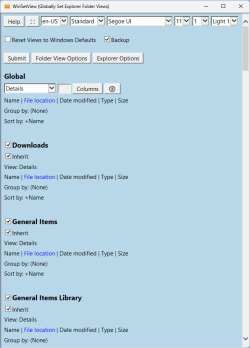
1731378491393.png

WinSetView...
  • Is a portable app. That is, it requires no installation (just unzip and run) and it saves its settings in an INI file with the app. So, you can easily run it from a flash drive or network drive to set up new computers and/or new users with consistent default views with just one click.

  • Sets default folder views for ALL folder types, not just the basic five. That is, in addition to setting the default views for General items, Documents, Pictures, Music, and Videos, it also sets the default views for Downloads, Libraries, OneDrive, Search results, Contacts, Quick Access, User files, File Open/Save dialogs, etc.

  • Sets folder views via a copy of the FolderTypes registry key which is not affected by Windows updates. A Windows repair install will remove the defaults, but then you can just run WinSetView and click Submit to re-apply your preferences.

  • Includes options to turn off Internet results in Windows search, revert the Windows 11 right-click menu to the classic layout, set a custom start folder for Explorer, disable thumbnails on folders, set the default view for phones to open in the same view you .

  • Can also be used to reset all folder views to Windows defaults.

  • Can be used via the command line (for Power users and System Administrators). See the Tools Folder section in the manual for more details.

WinSetView will correct the following conditions (when the cause is registry corruption):

1. Folder views set via File Explorer, using Apply to Folders, are not applying to all folders.
2. Folder Properties, Customize, Optimize this folder for is not working properly.
3. Folder views are reverting back to Windows defaults.

Note: Windows 11 currently has some folder view bugs in regards to setting folder type for entire folder trees on removable drives and overriding the automatically detected folder type on "Local disks". Those bugs can, for now, be eliminated by switching to the Windows 10 style Explorer.
 
Last edited:
Yours clicked my thought to scan some other files already in Downloads.
Hah ! Defender has taken to flag everything with that same "possible... hijack" warning.

Well, another fix to do.

Thanks.
 

My Computer

System One

  • OS
    Win11 Pro 23H2
Yours clicked my thought to scan some other files already in Downloads.
Hah ! Defender has taken to flag everything with that same "possible... hijack" warning.

Well, another fix to do.
Try clearing the Defender history:

It's also an option in this tool package:
 

My Computer

System One

  • OS
    Windows 10/11
    Computer type
    Laptop
    Manufacturer/Model
    Acer
Thank you very much. I ran ClearDefenderHistory, will restart later, will report in a few hours.
 

My Computer

System One

  • OS
    Win11 Pro 23H2
Ok, I restarted Windows, again scanned WinSetView.zip (and another), good now. ClearDefenderHistory did the fix. Neat.
 

My Computer

System One

  • OS
    Win11 Pro 23H2
Information for readers :
"possible... hijack" (any file that I scan) returned.
Again snuffed it with the ClearDefenderHistory.
 

My Computer

System One

  • OS
    Win11 Pro 23H2
I made a mess. Would appreciate some help, thanks. More details:


My Computer

System One

  • OS
    Windows 11 Pro
    Computer type
    PC/Desktop
I made a mess. Would appreciate some help, thanks. More details:

It seems this has been covered in your duplicate post elsewhere.
 

My Computers

System One System Two

  • OS
    Windows 11 Enterprise 25H2 26200 7462
    Computer type
    PC/Desktop
    Manufacturer/Model
    Custom Build
    CPU
    Intel XEON E5-2699 v3
    Motherboard
    ASUS X99-A
    Memory
    64GB Teamgroup UD4-3600
    Graphics Card(s)
    NVIDIA GeForce GTX 1080 Ti
    Sound Card
    Integrated
    Monitor(s) Displays
    ACER X34 Predator
    Screen Resolution
    3440 x 1440
    Hard Drives
    Crucial CT1000P 3P SSD8 1TB
    Crucial CT1000 BX500 SSD 1TB
    PSU
    GameMax Pro
    Case
    Fractal Design
    Cooling
    Corsair H110iGT + 6 140mm Fans
    Keyboard
    Corsair K4
    Mouse
    G-Skill G502
    Internet Speed
    300MBs
    Browser
    Chrome
    Antivirus
    OEM
    Other Info
    ASUS RT-AC87U Router
  • Operating System
    25H2 26200.5074
    Computer type
    Laptop
    Manufacturer/Model
    ASUS X555LA
    Memory
    8GB
    Browser
    Chrome
    Antivirus
    OEM
WinSetView 3.1.6

Bug Fix: Fixed minor bug in Folder View Options Detect current settings.


My Computer

System One

  • OS
    Windows 11 Pro
    Computer type
    PC/Desktop
    Manufacturer/Model
    Custom Build
    CPU
    Intel Core i9 12900KF
    Motherboard
    ASUS ROG Maximus Z690 Hero
    Memory
    Corsair 64GB DDR5 Vengeance C40 5200Mhz
    Graphics Card(s)
    ASUS GeForce RTX 3090 ROG Strix OC 24GB
    Sound Card
    OnBoard
    Monitor(s) Displays
    Acer Predator XB323UGP 32" QHD G-SYNC-C 144Hz 1MS IPS LED
    Screen Resolution
    2560 x 1440
    Hard Drives
    1x Samsung 980 Pro Series Gen4 250GB M.2 NVMe
    1x Samsung 980 Pro Series Gen4 500GB M.2 NVMe
    2x Samsung 980 Pro Series Gen4 2TB M.2 NVMe
    PSU
    Corsair AX1200i 1200W 80PLUS Titanium Modular
    Case
    Corsair 4000D Black Case w/ Tempered Glass Side Panel
    Cooling
    Noctua NH-U12A Chromax Black CPU Cooler, 4x Noctua 120mm Fans
    Keyboard
    Logitech MK545
    Mouse
    Logitech MX Master 3
    Internet Speed
    Fixed Wireless 150mbps/75mbps
    Browser
    Firefox
    Antivirus
    Kaspersky
    Other Info
    Thrustmaster TS-PC RACER
    Fanatec CSL Elite Pedals with the Load Cell Kit
    Yamaha Amp with Bose Speakers
WinSetView 3.1.7

Enhancement: Path properties added to right-click pick list for Downloads folder. See “Show paths in search results only” section in manual for details.
Bug Fix: Explorer Options > Detect Current Settings now correctly detects all Windows 11 options.
Bug Fix: Path properties blue highlight corrected on app startup when “Show paths in search results only” is unchecked.


My Computer

System One

  • OS
    Windows 11 Pro
    Computer type
    PC/Desktop
    Manufacturer/Model
    Custom Build
    CPU
    Intel Core i9 12900KF
    Motherboard
    ASUS ROG Maximus Z690 Hero
    Memory
    Corsair 64GB DDR5 Vengeance C40 5200Mhz
    Graphics Card(s)
    ASUS GeForce RTX 3090 ROG Strix OC 24GB
    Sound Card
    OnBoard
    Monitor(s) Displays
    Acer Predator XB323UGP 32" QHD G-SYNC-C 144Hz 1MS IPS LED
    Screen Resolution
    2560 x 1440
    Hard Drives
    1x Samsung 980 Pro Series Gen4 250GB M.2 NVMe
    1x Samsung 980 Pro Series Gen4 500GB M.2 NVMe
    2x Samsung 980 Pro Series Gen4 2TB M.2 NVMe
    PSU
    Corsair AX1200i 1200W 80PLUS Titanium Modular
    Case
    Corsair 4000D Black Case w/ Tempered Glass Side Panel
    Cooling
    Noctua NH-U12A Chromax Black CPU Cooler, 4x Noctua 120mm Fans
    Keyboard
    Logitech MK545
    Mouse
    Logitech MX Master 3
    Internet Speed
    Fixed Wireless 150mbps/75mbps
    Browser
    Firefox
    Antivirus
    Kaspersky
    Other Info
    Thrustmaster TS-PC RACER
    Fanatec CSL Elite Pedals with the Load Cell Kit
    Yamaha Amp with Bose Speakers
Hi,

thanks to Les (& others) for WinSetView, very useful tool :-)!

All the best from Germany

Stefan
 

My Computer

System One

  • OS
    Microsoft Windows 11 Home 64-bit
    Computer type
    Laptop
    Manufacturer/Model
    Medion Akoya-S17405
    CPU
    8 Core 2,4 GHz Unknown Family 6, Model 8C
    Memory
    16126 MB
    Screen Resolution
    1920 x 1080
    Browser
    Vivaldi 7.8
    Antivirus
    Windows Defender
I take the general inactivity of this thread as a sign of how well Winsetview does its job, and I'm loathe to disturb the still waters. But I've had an annoying issue for quite a while and am not sure what might be the culprit. Curiously, I've had a similar issue before, though not on the same machine. Anyway, I have Winsetview set to XP mode in List view with Auto Arrange unchecked. However, Windows 11 ignores the latter.

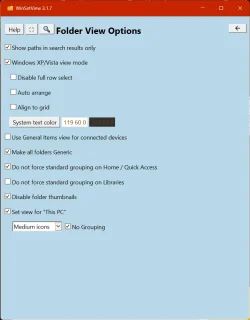
Below is a screenshot of my Winsetview settings, so you can see that I have indeed unchecked auto-arrange:

winsetviewSettings.webp

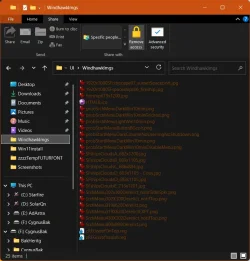
I recall being told during my previous problem with this issue that maybe XP mode wasn't even on, and I could check that by changing to dark mode, in which case I would see dark text. Or, rather, not see it because it would blend in with the dark background. Well, maybe that's my problem, because here's a sample window in dark mode, and as you can see my Windows-controlled text is all white (the names of files in the window are a dark rust because that part of Winsetview is working--consult the "System text color" setting in first screenshot).

darkModeWindow.webp

So if I have XP mode chosen in Winsetview but it's not actually on, what can I do about that? I have Windhawk installed but it is currently off, so that's not interfering. I have done a fair bit of registry hacking but mainly by way of Brink's tuts, such as turning off the 'drop tray', the annoying popdown tab that appears at the top of a screen when a file is dragged, but I can't see how any of the things I've done would interfere with Winsetview being able to inject XP mode into Windows 11. And I've not taken a hammer to my system with Hibit or Revo. I want to do that soon but for a couple of months RL has been too insistent to allow for serious experimentation and troubleshooting, so I've been putting it off. I have a little window right now, though, so I'd like to get this niggling auto-arrange issue resolved if possible, then take an image I can fall back on, and then start wielding the hammer.
 
Last edited:

My Computer

System One

  • OS
    Windows 11
    Computer type
    Laptop
    Manufacturer/Model
    ASUS
    CPU
    Intel i7-13620H 10-Core
    Motherboard
    ASUS TUF FX507
    Memory
    32GB DDR5
    Graphics Card(s)
    GeForce RTX 4070
    Sound Card
    onboard
    Monitor(s) Displays
    laptop screen or Dell U3223QE
    Screen Resolution
    1980 or 2160, depending on laptop screen or desktop monitor
    Hard Drives
    SSD
    PSU
    laptop
    Case
    laptop
    Cooling
    laptop
    Keyboard
    laptop
    Mouse
    logitech M525
    Internet Speed
    5g
    Browser
    Firefox
I have Winsetview set to XP mode in List view with Auto Arrange unchecked. However, Windows 11 ignores the latter.

With XP/Vista mode enabled you should be able to freely arrange items in Details and Icon views. However, those arrangements will not stick in Windows 11.

This is mentioned in the manual:

Windows XP/Vista view mode

when this option is enabled, you can freely rearrange files and folders in Details and Icon views, but those arrangements will be forgotten when the folder is closed, unless you are running Windows 7, Windows 8.x, or a Windows 10 build that is lower than 1703.


Since manual arrangements do not stick in Windows 11, setting Autoarrange off only ensures that while you're in a folder and add or remove files, it will not re-sort them. Once you close and re-open the folder it will always be sorted.
 

My Computer

System One

  • OS
    Windows 10/11
    Computer type
    Laptop
    Manufacturer/Model
    Acer
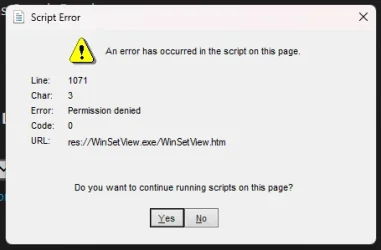
I've tried this utility, but there's a window that asks me if I want to execute an script from an HTML file (this app) when I click submit, I say yes, nothing happens. Neither reset windows defaults, set views, anything. I've tried even installing Java (I assumed this used Java) but same thing happens. Any idea what I need to do in order to use this utility? I''d like to see if I can solve an issue with Libraries I'm having since I updated to April 30th cumulative update.
 

My Computers

System One System Two

  • OS
    Windows 11 Pro 25H2
    Computer type
    PC/Desktop
    Manufacturer/Model
    Built PC
    CPU
    AMD Ryzen 5 5600G @ 3.9/4.4Ghz
    Motherboard
    MSI B550M-PRO-WiFi Ver. 1.4
    Memory
    2 x 16 GB DDR4 Kingston Fury Beast 3200 Mhz
    Graphics Card(s)
    AMD Radeon RX 6600 XT MSI Mech 2X OC Edition 8 GB
    Sound Card
    Realtek High Definition Audio (Integrated)
    Monitor(s) Displays
    Samsung C50Rx 27" LED / HP S2031 20" LCD
    Screen Resolution
    1920 x 1080 px / 1600 x 900 px
    Hard Drives
    WD Blue SN570 NVME M.2 SSD [1 TB] -- External Drives: - WD Scorpion Blue 250 GB 5400 RPM (Data Backup) - Hitachi 500 GB 5400 RPM (Software / ISOs Backup) - Toshiba MQ01ABD100 1 TB 5400 RPM (OS Images) - HGST TravelStar 7K1000 1 TB, 7200 RPM USB 3.0 - ADATA SU800 2TB SSD USB 3.0
    PSU
    Corsair RM750e 750W Fully Modular
    Case
    Naceb Hydra NA-1602
    Cooling
    Naceb Orpheus x 3 (Front) + Naceb Cepheus 1200 RPM Max (Rear) + ThemalRight Assasin X 90 SE (CPU)
    Keyboard
    Logitech MK470 Wireless
    Mouse
    Logitech MK470 Wireless
    Internet Speed
    120 MB Symetrical
    Browser
    Firefox / Brave / Edge
    Antivirus
    Windows Defender
    Other Info
    - VMs: WMware Player - Windows 8.1 Pro x64 / Windows 11 Pro
    - Wacom Intuos Pro Small Tablet PTH-460
  • Operating System
    Windows 11 Pro 25H2
    Computer type
    Laptop
    Manufacturer/Model
    HP Pavilion 15-eh3000la (80M53LA)
    CPU
    AMD Ryzen 7 7730U @ 2.0/4.5 Ghz
    Motherboard
    HP 8BC7
    Memory
    2 x 16 GB Kingston Fury Impact DDR4 3200 Mhz
    Graphics card(s)
    Radeon (tm) Graphics Vega 8 (512 MB)
    Sound Card
    Realtek High Definition Audio (Integrated)
    Monitor(s) Displays
    AU Optronics
    Screen Resolution
    1920 x 1080 px (125% size)
    Hard Drives
    WD Blue SN570 1TB NVME M.2 Drive
    PSU
    45 Watt Charger
    Cooling
    Laptop Cooling Pad
    Keyboard
    Free Wolf Foldable Portable Keyboard
    Mouse
    Free Wolf Wireless Mouse
    Internet Speed
    120 MB Symetrical
    Browser
    Firefox / Brave / Edge
    Antivirus
    Windows Defender
    Other Info
    - 41mWh battery.
    - Wacom Intuos Pro Small Tablet PTH-460
It doesn't use Java. It uses JScript which is built into Windows. Windows does not have an option to remove JScript, but it can be removed with third party tools such as NTLite.

Please post a screenshot of the error message.
 

My Computer

System One

  • OS
    Windows 10/11
    Computer type
    Laptop
    Manufacturer/Model
    Acer
It doesn't use Java. It uses JScript which is built into Windows. Windows does not have an option to remove JScript, but it can be removed with third party tools such as NTLite.

Please post a screenshot of the error message.
Right away!

Screenshot 2026-05-20 222735.webp

Click yes or no, nothing happens either way... 👀
 

My Computers

System One System Two

  • OS
    Windows 11 Pro 25H2
    Computer type
    PC/Desktop
    Manufacturer/Model
    Built PC
    CPU
    AMD Ryzen 5 5600G @ 3.9/4.4Ghz
    Motherboard
    MSI B550M-PRO-WiFi Ver. 1.4
    Memory
    2 x 16 GB DDR4 Kingston Fury Beast 3200 Mhz
    Graphics Card(s)
    AMD Radeon RX 6600 XT MSI Mech 2X OC Edition 8 GB
    Sound Card
    Realtek High Definition Audio (Integrated)
    Monitor(s) Displays
    Samsung C50Rx 27" LED / HP S2031 20" LCD
    Screen Resolution
    1920 x 1080 px / 1600 x 900 px
    Hard Drives
    WD Blue SN570 NVME M.2 SSD [1 TB] -- External Drives: - WD Scorpion Blue 250 GB 5400 RPM (Data Backup) - Hitachi 500 GB 5400 RPM (Software / ISOs Backup) - Toshiba MQ01ABD100 1 TB 5400 RPM (OS Images) - HGST TravelStar 7K1000 1 TB, 7200 RPM USB 3.0 - ADATA SU800 2TB SSD USB 3.0
    PSU
    Corsair RM750e 750W Fully Modular
    Case
    Naceb Hydra NA-1602
    Cooling
    Naceb Orpheus x 3 (Front) + Naceb Cepheus 1200 RPM Max (Rear) + ThemalRight Assasin X 90 SE (CPU)
    Keyboard
    Logitech MK470 Wireless
    Mouse
    Logitech MK470 Wireless
    Internet Speed
    120 MB Symetrical
    Browser
    Firefox / Brave / Edge
    Antivirus
    Windows Defender
    Other Info
    - VMs: WMware Player - Windows 8.1 Pro x64 / Windows 11 Pro
    - Wacom Intuos Pro Small Tablet PTH-460
  • Operating System
    Windows 11 Pro 25H2
    Computer type
    Laptop
    Manufacturer/Model
    HP Pavilion 15-eh3000la (80M53LA)
    CPU
    AMD Ryzen 7 7730U @ 2.0/4.5 Ghz
    Motherboard
    HP 8BC7
    Memory
    2 x 16 GB Kingston Fury Impact DDR4 3200 Mhz
    Graphics card(s)
    Radeon (tm) Graphics Vega 8 (512 MB)
    Sound Card
    Realtek High Definition Audio (Integrated)
    Monitor(s) Displays
    AU Optronics
    Screen Resolution
    1920 x 1080 px (125% size)
    Hard Drives
    WD Blue SN570 1TB NVME M.2 Drive
    PSU
    45 Watt Charger
    Cooling
    Laptop Cooling Pad
    Keyboard
    Free Wolf Foldable Portable Keyboard
    Mouse
    Free Wolf Wireless Mouse
    Internet Speed
    120 MB Symetrical
    Browser
    Firefox / Brave / Edge
    Antivirus
    Windows Defender
    Other Info
    - 41mWh battery.
    - Wacom Intuos Pro Small Tablet PTH-460
Right away!

View attachment 172147

Click yes or no, nothing happens either way... 👀

That corresponds to where it tries to save your preferences. If you're running from a writable location, it should save that data to an "AppData" folder within the WinSetView folder. If you're running from a location that is read-only (without elevating as admin), such as Program Files (x86), then it should write that data to your AppData folder (%AppData%\WinSetView).

Maybe your AV software is blocking it. Do you have Ransomware Protection (aka Controlled Folder Access) enabled? Where are you running WinSetView from (i.e. portable install or installed using exe)?
 

My Computer

System One

  • OS
    Windows 10/11
    Computer type
    Laptop
    Manufacturer/Model
    Acer
It's portable version (ZIP file), running from the desktop. Supposedly, I should have permissions there, I've tried moving it to C, or documents folder, but same thing happens. AV is disabled because this is a VM (To try things I always disable Defender in there since Defender in my host detects stuff inside the VM)
 

My Computers

System One System Two

  • OS
    Windows 11 Pro 25H2
    Computer type
    PC/Desktop
    Manufacturer/Model
    Built PC
    CPU
    AMD Ryzen 5 5600G @ 3.9/4.4Ghz
    Motherboard
    MSI B550M-PRO-WiFi Ver. 1.4
    Memory
    2 x 16 GB DDR4 Kingston Fury Beast 3200 Mhz
    Graphics Card(s)
    AMD Radeon RX 6600 XT MSI Mech 2X OC Edition 8 GB
    Sound Card
    Realtek High Definition Audio (Integrated)
    Monitor(s) Displays
    Samsung C50Rx 27" LED / HP S2031 20" LCD
    Screen Resolution
    1920 x 1080 px / 1600 x 900 px
    Hard Drives
    WD Blue SN570 NVME M.2 SSD [1 TB] -- External Drives: - WD Scorpion Blue 250 GB 5400 RPM (Data Backup) - Hitachi 500 GB 5400 RPM (Software / ISOs Backup) - Toshiba MQ01ABD100 1 TB 5400 RPM (OS Images) - HGST TravelStar 7K1000 1 TB, 7200 RPM USB 3.0 - ADATA SU800 2TB SSD USB 3.0
    PSU
    Corsair RM750e 750W Fully Modular
    Case
    Naceb Hydra NA-1602
    Cooling
    Naceb Orpheus x 3 (Front) + Naceb Cepheus 1200 RPM Max (Rear) + ThemalRight Assasin X 90 SE (CPU)
    Keyboard
    Logitech MK470 Wireless
    Mouse
    Logitech MK470 Wireless
    Internet Speed
    120 MB Symetrical
    Browser
    Firefox / Brave / Edge
    Antivirus
    Windows Defender
    Other Info
    - VMs: WMware Player - Windows 8.1 Pro x64 / Windows 11 Pro
    - Wacom Intuos Pro Small Tablet PTH-460
  • Operating System
    Windows 11 Pro 25H2
    Computer type
    Laptop
    Manufacturer/Model
    HP Pavilion 15-eh3000la (80M53LA)
    CPU
    AMD Ryzen 7 7730U @ 2.0/4.5 Ghz
    Motherboard
    HP 8BC7
    Memory
    2 x 16 GB Kingston Fury Impact DDR4 3200 Mhz
    Graphics card(s)
    Radeon (tm) Graphics Vega 8 (512 MB)
    Sound Card
    Realtek High Definition Audio (Integrated)
    Monitor(s) Displays
    AU Optronics
    Screen Resolution
    1920 x 1080 px (125% size)
    Hard Drives
    WD Blue SN570 1TB NVME M.2 Drive
    PSU
    45 Watt Charger
    Cooling
    Laptop Cooling Pad
    Keyboard
    Free Wolf Foldable Portable Keyboard
    Mouse
    Free Wolf Wireless Mouse
    Internet Speed
    120 MB Symetrical
    Browser
    Firefox / Brave / Edge
    Antivirus
    Windows Defender
    Other Info
    - 41mWh battery.
    - Wacom Intuos Pro Small Tablet PTH-460
That sounds like it should work. Let's see if you can run any JScript script. Try this:

LaunchIE.js​

Code:
oIE = new
ActiveXObject("InternetExplorer.Application");
oIE.Visible = true;
oIE.Navigate("example.com");
 

My Computer

System One

  • OS
    Windows 10/11
    Computer type
    Laptop
    Manufacturer/Model
    Acer
This script launched an IE window, no errors

EDIT: I don't know what happened... I just redownloaded the app... all is working.
Probably something corrupted or whatever when I copied the app folder from another location.

Ignore my dumbassery lol
 
Last edited:

My Computers

System One System Two

  • OS
    Windows 11 Pro 25H2
    Computer type
    PC/Desktop
    Manufacturer/Model
    Built PC
    CPU
    AMD Ryzen 5 5600G @ 3.9/4.4Ghz
    Motherboard
    MSI B550M-PRO-WiFi Ver. 1.4
    Memory
    2 x 16 GB DDR4 Kingston Fury Beast 3200 Mhz
    Graphics Card(s)
    AMD Radeon RX 6600 XT MSI Mech 2X OC Edition 8 GB
    Sound Card
    Realtek High Definition Audio (Integrated)
    Monitor(s) Displays
    Samsung C50Rx 27" LED / HP S2031 20" LCD
    Screen Resolution
    1920 x 1080 px / 1600 x 900 px
    Hard Drives
    WD Blue SN570 NVME M.2 SSD [1 TB] -- External Drives: - WD Scorpion Blue 250 GB 5400 RPM (Data Backup) - Hitachi 500 GB 5400 RPM (Software / ISOs Backup) - Toshiba MQ01ABD100 1 TB 5400 RPM (OS Images) - HGST TravelStar 7K1000 1 TB, 7200 RPM USB 3.0 - ADATA SU800 2TB SSD USB 3.0
    PSU
    Corsair RM750e 750W Fully Modular
    Case
    Naceb Hydra NA-1602
    Cooling
    Naceb Orpheus x 3 (Front) + Naceb Cepheus 1200 RPM Max (Rear) + ThemalRight Assasin X 90 SE (CPU)
    Keyboard
    Logitech MK470 Wireless
    Mouse
    Logitech MK470 Wireless
    Internet Speed
    120 MB Symetrical
    Browser
    Firefox / Brave / Edge
    Antivirus
    Windows Defender
    Other Info
    - VMs: WMware Player - Windows 8.1 Pro x64 / Windows 11 Pro
    - Wacom Intuos Pro Small Tablet PTH-460
  • Operating System
    Windows 11 Pro 25H2
    Computer type
    Laptop
    Manufacturer/Model
    HP Pavilion 15-eh3000la (80M53LA)
    CPU
    AMD Ryzen 7 7730U @ 2.0/4.5 Ghz
    Motherboard
    HP 8BC7
    Memory
    2 x 16 GB Kingston Fury Impact DDR4 3200 Mhz
    Graphics card(s)
    Radeon (tm) Graphics Vega 8 (512 MB)
    Sound Card
    Realtek High Definition Audio (Integrated)
    Monitor(s) Displays
    AU Optronics
    Screen Resolution
    1920 x 1080 px (125% size)
    Hard Drives
    WD Blue SN570 1TB NVME M.2 Drive
    PSU
    45 Watt Charger
    Cooling
    Laptop Cooling Pad
    Keyboard
    Free Wolf Foldable Portable Keyboard
    Mouse
    Free Wolf Wireless Mouse
    Internet Speed
    120 MB Symetrical
    Browser
    Firefox / Brave / Edge
    Antivirus
    Windows Defender
    Other Info
    - 41mWh battery.
    - Wacom Intuos Pro Small Tablet PTH-460

Latest Support Threads

Back
Top Bottom