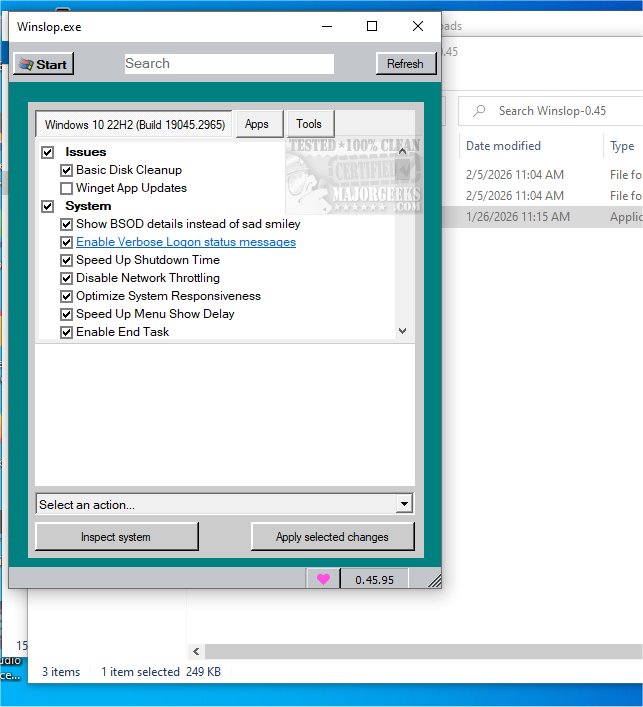
Winslopr


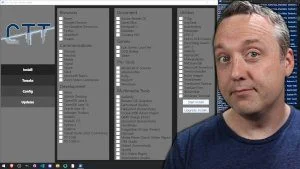
Chris Titus does something similar

I agree with you concerning the chris titus ultimate windows cleaner, it has a lot of great features.
 

My Computer

System One

  • OS
    Windows11Pro (x64)
    Computer type
    PC/Desktop
    Manufacturer/Model
    HP/HP8300EliteSFF
    CPU
    Intel(R) Core(TM) i5-3470 CPU @ 3.20GHz 3.20 GHz
    Memory
    8.00 GB (7.88 GB usable)

Winslop 26.03.211​

Changelog:

WinUI 3 Update – Streamlined, Fast, Content-Focused


Winslop has migrated from WinForms to WinUI 3, delivering a fully reworked interface optimized for efficiency:
  • Navigation & Layout: Sidebar removed; bottom navigation prioritizes content. Pages load instantly with minimal transitions.
  • Search & Settings: Search integrated into main UI; settings accessible from the title bar.
  • Status & Actions: Visual status indicators highlight attention items. Action buttons (Inspect, Apply, Restore) are compact, consistent, and follow system accent colors. Actions menu simplified to reduce UI clutter.
  • Theming: Full light/dark mode support; UI elements update instantly without requiring an app restart.
 
Last edited:

My Computer

System One

  • OS
    Windows 11 Pro
    Computer type
    PC/Desktop
    Manufacturer/Model
    Custom Build
    CPU
    Intel Core i9 12900KF
    Motherboard
    ASUS ROG Maximus Z690 Hero
    Memory
    Corsair 64GB DDR5 Vengeance C40 5200Mhz
    Graphics Card(s)
    ASUS GeForce RTX 3090 ROG Strix OC 24GB
    Sound Card
    OnBoard
    Monitor(s) Displays
    Acer Predator XB323UGP 32" QHD G-SYNC-C 144Hz 1MS IPS LED
    Screen Resolution
    2560 x 1440
    Hard Drives
    1x Samsung 980 Pro Series Gen4 250GB M.2 NVMe
    1x Samsung 980 Pro Series Gen4 500GB M.2 NVMe
    2x Samsung 980 Pro Series Gen4 2TB M.2 NVMe
    PSU
    Corsair AX1200i 1200W 80PLUS Titanium Modular
    Case
    Corsair 4000D Black Case w/ Tempered Glass Side Panel
    Cooling
    Noctua NH-U12A Chromax Black CPU Cooler, 4x Noctua 120mm Fans
    Keyboard
    Logitech MK545
    Mouse
    Logitech MX Master 3
    Internet Speed
    Fixed Wireless 150mbps/75mbps
    Browser
    Firefox
    Antivirus
    Kaspersky
    Other Info
    Thrustmaster TS-PC RACER
    Fanatec CSL Elite Pedals with the Load Cell Kit
    Yamaha Amp with Bose Speakers
Winslopr 26.03.222

Changelog:


Winslop is now Winslopr—same app, same mission, new name that finally belongs to the cleanup hero rather than the Windows chaos.

Reasoning
  • Winslop was originally a clever nod to “Windows + Slop,” reflecting the app’s mission to clean up junk in Windows. Over time, the term “Winslop” became widely used online as a slang for Windows itself—memes, rants, and frustrated posts now dominate search results, burying the app in the noise. To reclaim its identity and clarify its purpose, the team opted for a new name that’s both recognizable and descriptive.
What’s new with the name
  • Winslopr now stands for Windows Slop Remover—clear, mission-driven, and still playful. Close enough to the original for continuity, but distinct enough to own the brand. The app remains the same under the hood: same debloating tools, same mission, just with a name that points to the solution rather than the problem.
Context
  • Microsoft’s recent Windows updates have continued to introduce unwanted features—ads, forced Copilot integrations, Recall, and aggressive update cycles—but Winslopr continues to fight the clutter at user speed. The rebrand is part of a broader effort to differentiate the app from the internet’s use of “Winslop” while reinforcing its identity as a cleanup tool, not just a meme.
 

My Computer

System One

  • OS
    Windows 11 Pro
    Computer type
    PC/Desktop
    Manufacturer/Model
    Custom Build
    CPU
    Intel Core i9 12900KF
    Motherboard
    ASUS ROG Maximus Z690 Hero
    Memory
    Corsair 64GB DDR5 Vengeance C40 5200Mhz
    Graphics Card(s)
    ASUS GeForce RTX 3090 ROG Strix OC 24GB
    Sound Card
    OnBoard
    Monitor(s) Displays
    Acer Predator XB323UGP 32" QHD G-SYNC-C 144Hz 1MS IPS LED
    Screen Resolution
    2560 x 1440
    Hard Drives
    1x Samsung 980 Pro Series Gen4 250GB M.2 NVMe
    1x Samsung 980 Pro Series Gen4 500GB M.2 NVMe
    2x Samsung 980 Pro Series Gen4 2TB M.2 NVMe
    PSU
    Corsair AX1200i 1200W 80PLUS Titanium Modular
    Case
    Corsair 4000D Black Case w/ Tempered Glass Side Panel
    Cooling
    Noctua NH-U12A Chromax Black CPU Cooler, 4x Noctua 120mm Fans
    Keyboard
    Logitech MK545
    Mouse
    Logitech MX Master 3
    Internet Speed
    Fixed Wireless 150mbps/75mbps
    Browser
    Firefox
    Antivirus
    Kaspersky
    Other Info
    Thrustmaster TS-PC RACER
    Fanatec CSL Elite Pedals with the Load Cell Kit
    Yamaha Amp with Bose Speakers

Winslopr - 26.03.230​

[New] Windows 11 25H2 (Build 26200) support verified
[New] Fresh app icon with a cleaner, more on-brand look
[New] Close (X) button on the Settings panel
[New] Pairs well with tools like Chris Titus Tech, W11Debloat or Microsoft PC Manager. If a feature isn't in Winslopr yet, chances are it's already available as a plugin or script. Focused scope by design. Winslopr does less on purpose, so it fits into any existing setup
[Improved] Undo and restore is more reliable
[Improved] Replaced the Settings SplitView pane with a simpler right-side overlay panel
[Improved] Settings panel no longer causes the app layout to shift or clip controls when opening, resizing or moving the window
[Improved] Settings panel has its own glass look
[Improved] Filter chips and action buttons share one toolbar row on every page
[Improved] Reduced resize-related UI glitches that could cause controls and inner cards to get clipped.
[Improved] Search bar is more compact
[Improved] Debloater in the Apps page with better bloatware detection and faster scan
[Improved] Reduced memory usage and smaller executable size
[Improved] Better support for external scripts including W11Debloater and similar tools
[FIX] Actions menu button no longer gets cut off on narrow windows
[FIX] Status messages and extension count no longer overwrite each other in the Tools page
[Updated] Translation es_ES #73
[Updated] Translation zh-CN #68
[Added] Translation Portuguese (Brazil) #67


My Computer

System One

  • OS
    Windows 11 Pro
    Computer type
    PC/Desktop
    Manufacturer/Model
    Custom Build
    CPU
    Intel Core i9 12900KF
    Motherboard
    ASUS ROG Maximus Z690 Hero
    Memory
    Corsair 64GB DDR5 Vengeance C40 5200Mhz
    Graphics Card(s)
    ASUS GeForce RTX 3090 ROG Strix OC 24GB
    Sound Card
    OnBoard
    Monitor(s) Displays
    Acer Predator XB323UGP 32" QHD G-SYNC-C 144Hz 1MS IPS LED
    Screen Resolution
    2560 x 1440
    Hard Drives
    1x Samsung 980 Pro Series Gen4 250GB M.2 NVMe
    1x Samsung 980 Pro Series Gen4 500GB M.2 NVMe
    2x Samsung 980 Pro Series Gen4 2TB M.2 NVMe
    PSU
    Corsair AX1200i 1200W 80PLUS Titanium Modular
    Case
    Corsair 4000D Black Case w/ Tempered Glass Side Panel
    Cooling
    Noctua NH-U12A Chromax Black CPU Cooler, 4x Noctua 120mm Fans
    Keyboard
    Logitech MK545
    Mouse
    Logitech MX Master 3
    Internet Speed
    Fixed Wireless 150mbps/75mbps
    Browser
    Firefox
    Antivirus
    Kaspersky
    Other Info
    Thrustmaster TS-PC RACER
    Fanatec CSL Elite Pedals with the Load Cell Kit
    Yamaha Amp with Bose Speakers

Winslopr 26.04.02​

  • [NEW] Compact Spacing Mode. Because WinUI 3 has a talent for turning pixels into margins, Winslopr now brings back a denser, more compact layout, especially nice for users coming from the old WinForms version. Same modern WinUI 3 base, less UI bloat
  • [New] Friendly Tools Detection Winslopr now checks your Plugins / Scripts folders on startup and greets any familiar faces, W11Debloat, Chris Titus WinUtil, and more. They play well together. Winslopr doesn't try to do everything. For the gaps, these tools have your back
  • [Improved] Works best on Windows 11 25H2 Verified and tested. Older builds still work, but 25H2 is where it shines
  • [Fix] Icons missing on Windows 10 Segoe Fluent Icons is a Windows 11 exclusive. On Windows 10 all icons showed up as empty boxes, not great. Fixed with a proper font fallback to Segoe MDL2 Assets #75
  • [Improved] Cleaner UI layout Toolbar controls (filters, profile picker) are now inside the content Card where they belong
  • [Added] Turkish language support tr-TR is now part of the family. Settings > Language.


My Computer

System One

  • OS
    Windows 11 Pro
    Computer type
    PC/Desktop
    Manufacturer/Model
    Custom Build
    CPU
    Intel Core i9 12900KF
    Motherboard
    ASUS ROG Maximus Z690 Hero
    Memory
    Corsair 64GB DDR5 Vengeance C40 5200Mhz
    Graphics Card(s)
    ASUS GeForce RTX 3090 ROG Strix OC 24GB
    Sound Card
    OnBoard
    Monitor(s) Displays
    Acer Predator XB323UGP 32" QHD G-SYNC-C 144Hz 1MS IPS LED
    Screen Resolution
    2560 x 1440
    Hard Drives
    1x Samsung 980 Pro Series Gen4 250GB M.2 NVMe
    1x Samsung 980 Pro Series Gen4 500GB M.2 NVMe
    2x Samsung 980 Pro Series Gen4 2TB M.2 NVMe
    PSU
    Corsair AX1200i 1200W 80PLUS Titanium Modular
    Case
    Corsair 4000D Black Case w/ Tempered Glass Side Panel
    Cooling
    Noctua NH-U12A Chromax Black CPU Cooler, 4x Noctua 120mm Fans
    Keyboard
    Logitech MK545
    Mouse
    Logitech MX Master 3
    Internet Speed
    Fixed Wireless 150mbps/75mbps
    Browser
    Firefox
    Antivirus
    Kaspersky
    Other Info
    Thrustmaster TS-PC RACER
    Fanatec CSL Elite Pedals with the Load Cell Kit
    Yamaha Amp with Bose Speakers

Winslopr 26.04.04​

Changelog:
  • [New] Unified Plugins & Scripts management: Plugins and Tool Scripts are now managed in a single dialog (PluginsDialog) instead of two separate places (Plugins and Scripts/Extensions). Routing is based on the manifest type= field: type=tool --> Scripts/ folder, Default --> Plugins/ Folder
  • [Improved] Reduced unnecessary resource usage and made the app feel smoother in daily use, which is saying something given that WinUI 3 still behaves like a small monster now and then
  • [Fix;Critical] Fix winget source agreements on fresh Windows installs. winget list and winget upgrade now run with --accept-source-agreements --disable-interactivity, so the Install tab works out of the box without needing a prior manual winget interaction in the terminal #77
  • [Improved] UI has been refined across the app to feel lighter, cleaner, and more modern
  • [Added] "Plugins" entry to the settings flyout which opens Plugins dialog directly
  • [Improved] Per-entry folder-aware installed state detection via File.Exists(targetDir + fileName). This fixes false positives where same-named files in different folders were incorrectly shown as installed
  • [Removed] ThirdPartyDetector as third-party tools are now discoverable and installable directly via the Plugins dialog
  • [Removed] Share feature from the settings dropdown (redundant)
  • [Removed] Cleaned up obsolete Localization keys: Settings_ToolScripts, Settings_OpenToolsPage, MenuShare
  • [Updated] Localization es-ES; zh-CN


My Computer

System One

  • OS
    Windows 11 Pro
    Computer type
    PC/Desktop
    Manufacturer/Model
    Custom Build
    CPU
    Intel Core i9 12900KF
    Motherboard
    ASUS ROG Maximus Z690 Hero
    Memory
    Corsair 64GB DDR5 Vengeance C40 5200Mhz
    Graphics Card(s)
    ASUS GeForce RTX 3090 ROG Strix OC 24GB
    Sound Card
    OnBoard
    Monitor(s) Displays
    Acer Predator XB323UGP 32" QHD G-SYNC-C 144Hz 1MS IPS LED
    Screen Resolution
    2560 x 1440
    Hard Drives
    1x Samsung 980 Pro Series Gen4 250GB M.2 NVMe
    1x Samsung 980 Pro Series Gen4 500GB M.2 NVMe
    2x Samsung 980 Pro Series Gen4 2TB M.2 NVMe
    PSU
    Corsair AX1200i 1200W 80PLUS Titanium Modular
    Case
    Corsair 4000D Black Case w/ Tempered Glass Side Panel
    Cooling
    Noctua NH-U12A Chromax Black CPU Cooler, 4x Noctua 120mm Fans
    Keyboard
    Logitech MK545
    Mouse
    Logitech MX Master 3
    Internet Speed
    Fixed Wireless 150mbps/75mbps
    Browser
    Firefox
    Antivirus
    Kaspersky
    Other Info
    Thrustmaster TS-PC RACER
    Fanatec CSL Elite Pedals with the Load Cell Kit
    Yamaha Amp with Bose Speakers
Back
Top Bottom