- Local time
- 2:17 PM
- Posts
- 3,200
- OS
- Windows 11 Pro
The Reddit user claims he had comments censored from the Winaero Tweaker developer's website.Winaero Tweaker's 'Reset to Defaults' setting is corrupting Windows 11 systems
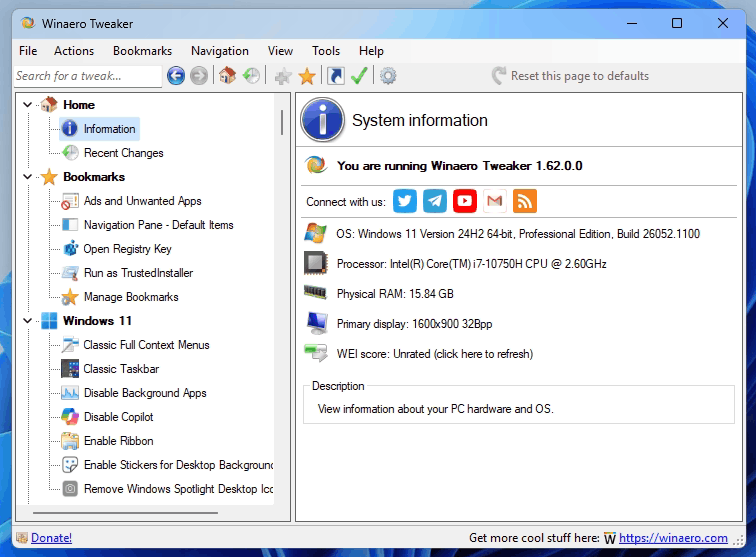
If you use the Winaero Tweaker app, a Reddit user, RemarkableOil451, has put out a warning about using the software on Windows 11 over dangerous Reset to Defaults settings that can cause system corruption on Microsoft's newest OS. According to the Redditor, pressing the "Reset this page to defaults" button in the Advanced Appearance module executes an immediate, persistent registry write without asking the user for confirmation.
The reset function in Winaero Tweaker injects legacy binary values (static 9pt Segoe UI) into the Windows 11 Registry Keys. This legacy data conflicts with Windows 11's native Accessibility subsystem by overriding the Text Size scaling and rendering the UI illegible on high-DPI displays.
If you manage to muck up your system settings, the Redditor reports that manually deleting the injected registry values does not fully resolve the issue, with the font face bring broken entirely, forcing a system-wide fallback to Arial. While unconfirmed, the Redditor thinks that the app might inject hidden dependencies elsewhere, perhaps FontSubstitutes, that survive cleanup.
To restore their Windows 11 back to a fully normal state, RemarkableOil451 had to perform a full system restore. While the OP didn't realize it at the time, as it was later mentioned in the comments, there is a way to fix the issue without a full system restore. Apparently, you can do the following steps to get your system back to normal:
Delete the HKEY_CURRENT_USER\Control Panel\Desktop\WindowMetrics key via Registry Editor.
If you are using Winaero Tweaker then, be sure not to restore the defaults as you'll end up with extra work on your hands, though, it's not as catastrophic as needing to do a system restore. To be honest though, if you are not happy with your system screwing up, perhaps using a tweaker to make unofficial changes isn't the best idea.
- Go into Windows Settings, Display, and set the scaling to an arbitrary value (e.g., 175%).
- Sign out and sign back in to force the OS to "recompute" the default values.
- Then restore the original scaling.
Where do I find the Winaero Tweaker comments?
My Computers
-
At a glance
Windows 11 ProIntel Core i9-10900XCorsair 64 GB (4 x 16 GB) CMW64GX4M4C3000C15 ...GIGABYTE GeForce GTX 1660 Super Mini ITX 6 GB OC- OS
- Windows 11 Pro
- Computer type
- PC/Desktop
- Manufacturer/Model
- Stigg's Build
- CPU
- Intel Core i9-10900X
- Motherboard
- GIGABYTE X299X DESIGNARE 10G
- Memory
- Corsair 64 GB (4 x 16 GB) CMW64GX4M4C3000C15 Vengeance RGB Pro 3000Mhz DDR4
- Graphics Card(s)
- GIGABYTE GeForce GTX 1660 Super Mini ITX 6 GB OC
- Sound Card
- Realtek ALC1220
- Monitor(s) Displays
- Samsung 27" FHD LED FreeSync Gaming Monitor (LS27F350FHEXXY)
- Screen Resolution
- 1920 x 1080
- Hard Drives
- Samsung 970 Pro Series 1TB M.2 2280 NVMe SSD
Western Digital Red Pro WD8003FFBX-68B9AN0 8 TB, 7200 RPM, SATA-III
Western Digital Red Pro WD8003FFBX-68B9AN0 8 TB, 7200 RPM, SATA-III
- PSU
- Corsair HX1200 1200W 80 Plus Platinum
- Case
- Fractal Design Define 7 Black Solid Case
- Cooling
- Noctua NH-D15 Chromax Black
- Keyboard
- Razer Ornata V2
- Mouse
- Razer DeathAdder Essential
- Internet Speed
- FTTN 100Mbps / 40Mbps
- Browser
- Mozilla Firefox
- Antivirus
- N/A
- Other Info
- Logitech BRIO 4k Ultra HD USB-C Webcam
-
At a glance
Windows 10 ProCore i7-8750HSK Hynix 32 GB (2 x 16 GB) HMA82GS6CJR8N-VK 1...NVIDIA GeForce GTX 1070- Operating System
- Windows 10 Pro
- Computer type
- Laptop
- Manufacturer/Model
- ASUS ROG Zephyrus M GM501GS
- CPU
- Core i7-8750H
- Motherboard
- Zephyrus M GM501GS
- Memory
- SK Hynix 32 GB (2 x 16 GB) HMA82GS6CJR8N-VK 16 GB DDR4-2666 DDR4 SDRAM
- Graphics card(s)
- NVIDIA GeForce GTX 1070
- Sound Card
- Realtek ALC294
- Monitor(s) Displays
- AU Optronics B156HAN07.1 [15.6" LCD]
- Screen Resolution
- 1920 x 1080
- Hard Drives
- Samsung MZVKW512HMJP-00000 512 GB, PCI-E 3.0 x4
Samsung SSD 860 QVO 4TB 4 TB, SATA-III
- PSU
- N/A
- Case
- N/A
- Cooling
- N/A
- Keyboard
- PC/AT Enhanced PS2 Keyboard (101/102-Key)
- Mouse
- Razer DeathAdder Essential
- Internet Speed
- FTTN 100Mbps / 40Mbps
- Browser
- Mozilla Firefox
- Antivirus
- N/A
- Other Info
- USB2.0 HD UVC Webcam