
WinUpdate - Win as in «To win» -updater!


NalleBerg

Member
Member
Local time
7:55 PM
Posts
21
OS
Windows 11 Home
I have made this WinUpdate -app. It lives in your sys-tray (if you want it to). It uses winget, that is on Windows 10 and Windows 11 computers.
It checks for updates for over 11,000 apps, both Windows own apps and from a huge number of other developeers and notify you if any of them that's on your PC has any updates.
It has 3 modes:
Manual - You start it, it scans and you install the updates you want
Windows Startup - It scans for updates when you (re)start windows and stay out of the way until it finds an update. Then the app openes, so you can install it.
SysTray mode - It lives in your SysTray an polls for updates, stays out of the way until it finds an update to one of your apps. Then it notifies you through the Windows notification system.

It is at present in Norwegian (NB), Swedish and English (UK).

WinUpdate homepage
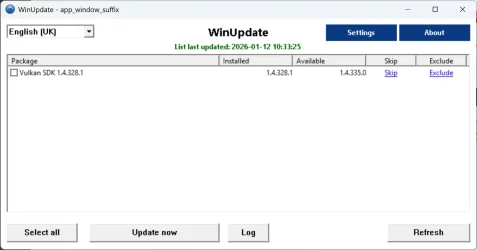
WinUpdateIUK.webpWinUpdate homepage
 

My Computer

System One

  • OS
    Windows 11 Home
    Computer type
    Laptop
    Manufacturer/Model
    MSI
    CPU
    I9
    Motherboard
    MSI
    Memory
    16GB

My Computers

System One System Two

  • OS
    Windows 11 Pro 25H2 Build 26200.8524
    Computer type
    PC/Desktop
    Manufacturer/Model
    Sin-built 2013
    CPU
    Intel(R) Core(TM) i7-4770K CPU @ 3.50GHz
    Motherboard
    ASUS ROG Maximus VI Formula
    Memory
    32.0 GB of I forget and the box is in storage.
    Graphics Card(s)
    Gigabyte nVidia GeForce GTX 1660 Super OC 6GB
    Sound Card
    Onboard thingy
    Monitor(s) Displays
    5 x LG 25MS500-B - 1 x 24MK430H-B - 1 x Wacom Pro 22" Touch Screen Tablet
    Screen Resolution
    All over the place
    Hard Drives
    Too many to list.
    OS on Samsung 1TB 870 QVO SATA
    PSU
    Silverstone 1500
    Case
    NZXT Phantom 820 Full-Tower Case
    Cooling
    Noctua NH-D15 Elite Class Dual Tower CPU Cooler / 6 x EziDIY 120mm / 2 x Corsair 140mm somethings / 1 x 140mm Thermaltake something / 2 x 200mm Corsair.
    Keyboard
    Corsair K95 / Logitech diNovo Edge Wireless
    Mouse
    Logitech: G402 / G502 / Mx Masters / Mx Air Cordless
    Internet Speed
    2000/500Mbps
    Browser
    All sorts
    Antivirus
    Kaspersky Premium
    Other Info
    ㅤㅤㅤㅤㅤㅤㅤㅤㅤㅤㅤㅤㅤㅤㅤㅤㅤㅤㅤㅤㅤㅤㅤㅤㅤㅤㅤㅤㅤㅤㅤㅤㅤㅤㅤㅤㅤㅤㅤㅤ⠀⠀⠀⠀⠀⠀⠀⠀⠀⠀
    TP-Link BE9300 WiFi 7 Bluetooth 5.4 (Archer TBE550E)
    TP-Link TX201 V1 2.5GB Lan

    Grandstream HT812 - VoIP
    ASUS DSL-AX82U - Mesh
    ASUS RT-AC68U - Mesh
    ASUS RT-BE88U Router

    Brother MFC-L2880DW Printer

    I’m on a horse.
  • Operating System
    Windows 11 Pro 25H2 Build 26200.8524
    Computer type
    Laptop
    Manufacturer/Model
    LENOVO Yoga 7 14IRL8 - 7i EVO OLED 14" Touchscreen i5 12 Core 16GB/512GB
    CPU
    Intel Core 12th Gen i5-1240P Processor (1.7 - 4.4GHz)
    Memory
    16GB LPDDR5 RAM
    Graphics card(s)
    Intel Iris Xe Graphics Processor
    Sound Card
    Optimized with Dolby Atmos®
    Screen Resolution
    QHD 2880 x 1800 OLED
    Hard Drives
    M.2 512GB
    Antivirus
    Defender / Malwarebytes
    Other Info
    …still on a horse.
Will look at it. Right now I am using UniGetUI (formerly WingetUI) which uses Winget and others like chocolatey as sources and has a decent interface. Any comparison you can do of features?

Cheers

 
Last edited:

My Computers

System One System Two

  • OS
    Windows 11 Pro x64
    Computer type
    PC/Desktop
    Manufacturer/Model
    📷🔈🎧 🪛 DIY Photoshop/Audio/Game/tinker
    CPU
    i9 14900K P/E 5.8/4.5 GHz, cache 5.0 GHz
    Motherboard
    Asus ROG Maximus Z790 Dark Hero
    Memory
    🐏 96GB (2x48) G.skill Ripjaws 6800 MT/s
    Graphics Card(s)
    Asus ROG Strix 4070 Ti OC
    Sound Card
    🔊Bowers & Wilkins 606 S3 speakers; Audiolabs 7000a integrated amp; RSL 10S Mk2 sub; Creative Pebble Pro Minimilist
    Monitor(s) Displays
    🖥️🖥️ Eizo CG2730 ColorEdge, ViewSonic VP2768
    Screen Resolution
    🖥️🖥️ 2560 x 1440p x 2
    Hard Drives
    💾 WDC SN850X 4TB nvme, SN850 1TB nvme, SK-Hynix 2 TB P41 nvme,. Sabrent USB-C DS-SC5B 5-bay docking station: 6TB WDC Black, 6TB Ironwolf Pro; 2x 2TB WDC Black HDD
    PSU
    ⚡️ 850W Seasonic Vertex PX-850 ATX 3.0/PCI-E 5.0
    Case
    Fractal Design North XL Mesh, Black Walnut
    Cooling
    ❄️ EK Nucleus black 360 AIO w/Phanteks T30-120 fans, 2 Noctua NF-A14 Chromax case fan, 1 T30-120 fan cooling memory
    Keyboard
    ⌨️ Keychron Q3 Max TKL with custom GMK Redsuns Red Samuri keycaps, TX Stabs
    Mouse
    🖱️ Logitech G305 wireless gaming
    Internet Speed
    ⬇️ 500 Mb/s ⬆️ 12 Mb/s
    Browser
    🔥🦊 Firefox
    Antivirus
    🦺 Defender, Macrium Reflect X 🏆
    Other Info
    Phangkey Amaterasu V2 Desk Mat
  • Computer type
    Laptop
    Manufacturer/Model
    💻 Apple 13" Macbook Pro 2020 (m1)
    CPU
    Apple M1
    Screen Resolution
    2560x1600
    Browser
    Firefox
Very interesting....

I ran it on my Win11 Pro system which is as up to date as I can get it. The MSI installer file is locked, so to run it I had to first Unlock it. Then it installed OK.

This is what WinUpdate found:

1.webp
For comparison neither PatchMyPC nor UNiGetUI found anything to update. I checked Thunderbird and it says it is already at Ver. 146.01. I don't know how to check the status of Win Desktop Runtime .

I have MS Edge but never use it. (I deleted it once some time ago but then ran into some problem that required it to be reinstalled, which I did.) Since I don't use it I did not bother to update it.

I do like the program's UI so I think I'll keep it around and try it again in a week or so.
 

My Computer

System One

  • OS
    Win11 Pro
    Computer type
    PC/Desktop
    Manufacturer/Model
    BeeLink SER Mini
    CPU
    AMD Ryzen 5 5500U
    Motherboard
    BeeLink SER
    Memory
    16 GB
    Graphics Card(s)
    Radeon 2100
    Sound Card
    none
    Monitor(s) Displays
    Primary: Phillips 4K; Secondary: LG 4K
    Screen Resolution
    Both 3860 x 2160
    Hard Drives
    C: NVme 500 GB Windows only
    D: 128 GB NVme User data + Windows Temp via Junction Link
    PSU
    External
    Case
    Mini
    Cooling
    Internal fan
    Keyboard
    Logitech Wireless Lighted
    Mouse
    Kensington ExpertMouse wireless trackball
    Internet Speed
    500/500
    Browser
    Brave
    Antivirus
    Windows Defender
I have made this WinUpdate -app. It lives in your sys-tray (if you want it to). It uses winget, that is on Windows 10 and Windows 11 computers.
Thank you for offering this but I, too, use UnigetUI for the reasons previously posted and the widget incorporation.
 

My Computers

System One System Two

  • OS
    All Branches but Release
    Computer type
    Laptop
    Manufacturer/Model
    Acer Nitro ANV15-51
    CPU
    AMD Ryzen 7 7735HS 3200-4500 Mhz 8 cores x 2
    Motherboard
    Sportage_RBH
    Memory
    32 GB DDR5
    Graphics Card(s)
    Radeon Graphic / NVIDIA GeForce RTX 4060 8 GB GDDR6
    Sound Card
    AMD/Realtek(R) Audio
    Monitor(s) Displays
    Integrated Monitor (15.3"vis)
    Screen Resolution
    FHD 1920X1080 16:9 144Hz
    Hard Drives
    KINGSTON OM8SEP4512Q-AA 1TB
    Western Digital 256GB
    PSU
    19V DC 6.32 A 120 W
    Cooling
    Dual Fans
    Mouse
    MS Bluetooth
    Internet Speed
    Fiber 1GB Cox -us & 1GB Orange-fr
    Browser
    Edge Canary- Firefox Nightly-Chrome Dev-Chrome Dev
    Antivirus
    Windows Defender
  • Operating System
    Windows 11 Beta
    Computer type
    Laptop
    Manufacturer/Model
    Asus X751BP
    CPU
    AMD A9-9420
    Memory
    8 GB of DDR4
    Graphics card(s)
    AMD Radeon R5
    Screen Resolution
    1600x900
    Hard Drives
    Seagate 1 TB
Will look at it. Right now I am using UniGetUI (formerly WingetUI) which uses Winget and others like chocolatey as sources and has a decent interface. Any comparison you can do of features?

Cheers

I am not familiar with that package, but I will try and tell you the features I have added that winget itself do not provide.
  • Skip
    If you can't or won't install a version of an app, you can skip it and thet skipping will undo itself when the next version comes.
  • Exclude
    I have noticed that some apps won't install because it is supposed to be handeled by e.g. Microsoft Store. They can be excluded and will not appear in the list if you dont Unexclude it.
  • Error handling
    The different error messages (numeric values) are analyzed and a reccomendation is in the install window's text to inform you about the beas action.
  • Log
    You have a log of the last install, so you can look through it. Very good if you saw some error and don't remember what was recommended.
  • 3 modes:
    Manual
    You run it as a normal app, when you want to
    At startup
    It scans for updates every time you start or restart your computer, but stays out of the way until an update is found.
    In SysTray
    It stays in systray, and scns at intervals you set and stays out of the way until it finds some update.

    In all modes you can still run it as manual.
This is actually the first part of a program suite. I am now working on a program manager - a GUI for installing and browsing winget's apps. I am now beginning on that part. But to scan every time there is not possible as a scan for all apps and all metainformation takes more than 24 hours (well, making the database from a ps1 script takes that, at least). So right noe I am making that database, so it only need to be updated, not made from scratc at the user's PC.

Then I will start makeing WinProgramManager - Again «Win» as in victory! So I am waiting for the database to finish, then iI will massage it a bit to make it categorize as good as possible with the info I get from winget. And then i start making the manager, and updater of the database.

Nalle Berg
 

My Computer

System One

  • OS
    Windows 11 Home
    Computer type
    Laptop
    Manufacturer/Model
    MSI
    CPU
    I9
    Motherboard
    MSI
    Memory
    16GB
Thank you for offering this but I, too, use UnigetUI for the reasons previously posted and the widget incorporation.
As should you! I do not want you to choose my system if you got a system you are used to and that you think is better. I just want to offer this app to those who like and want to use it. I am also glad that there is a version you can love and use.

But if you look at another answer I gave to a user, you will see what I think is the advantages of the way I have made it. If you don't find those functions useful, then use the updater you like. You are not my target group then, and you are satisfied with what you got. Good for you! ;-)
 

My Computer

System One

  • OS
    Windows 11 Home
    Computer type
    Laptop
    Manufacturer/Model
    MSI
    CPU
    I9
    Motherboard
    MSI
    Memory
    16GB
Will look at it. Right now I am using UniGetUI (formerly WingetUI) which uses Winget and others like chocolatey as sources and has a decent interface. Any comparison you can do of features?

Cheers

Chocolatey looks interresting. I might add support for that when I am done making the GUI program manager (see more in another post), but I must finish first pass on my suite first. Thanks for the idea.
 

My Computer

System One

  • OS
    Windows 11 Home
    Computer type
    Laptop
    Manufacturer/Model
    MSI
    CPU
    I9
    Motherboard
    MSI
    Memory
    16GB
Very interesting....

I ran it on my Win11 Pro system which is as up to date as I can get it. The MSI installer file is locked, so to run it I had to first Unlock it. Then it installed OK.

This is what WinUpdate found:

View attachment 159770
For comparison neither PatchMyPC nor UNiGetUI found anything to update. I checked Thunderbird and it says it is already at Ver. 146.01. I don't know how to check the status of Win Desktop Runtime .

I have MS Edge but never use it. (I deleted it once some time ago but then ran into some problem that required it to be reinstalled, which I did.) Since I don't use it I did not bother to update it.

I do like the program's UI so I think I'll keep it around and try it again in a week or so.
Hm, a false update - could that be an error in the registry? Could Thunderbird report an older version to winget than it really is? Weird, that one.
 

My Computer

System One

  • OS
    Windows 11 Home
    Computer type
    Laptop
    Manufacturer/Model
    MSI
    CPU
    I9
    Motherboard
    MSI
    Memory
    16GB

Latest Support Threads

Back
Top Bottom


