- Local time
- 8:43 PM
- Posts
- 37
- OS
- Windows 11 Professional (x64) Version 24H2 (build 26100.4061)
So currerently using an older pc as the other wont start.
What ive tried so far.
Removing H/D,connecting them to different ports,power connectors.put the H/D in other pc and scan disk says they are fine.
Removed RAM reinserted swapped and put them in individually.
Took Comos battery out and put in a new battery.
Removed and reinserted BIOS power connector and replugged back in.
Started with just monitor all peripherals removed..
im now thinking the motherboard is kaput?
any other ideas would be great.
What ive tried so far.
Removing H/D,connecting them to different ports,power connectors.put the H/D in other pc and scan disk says they are fine.
Removed RAM reinserted swapped and put them in individually.
Took Comos battery out and put in a new battery.
Removed and reinserted BIOS power connector and replugged back in.
Started with just monitor all peripherals removed..
im now thinking the motherboard is kaput?
any other ideas would be great.
My Computer
At a glance
Windows 11 Professional (x64) Version 24H2 (b...3.40 gigahertz Intel Core i7-6700 256 kilobyt...16GBDisplay Intel(R) HD Graphics 530 [Display ada...
- OS
- Windows 11 Professional (x64) Version 24H2 (build 26100.4061)
- Computer type
- PC/Desktop
- CPU
- 3.40 gigahertz Intel Core i7-6700 256 kilobyte primary
- Motherboard
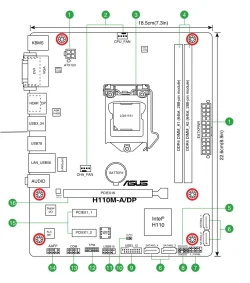
- Board: ASUSTeK COMPUTER INC. H110M-A/DP Rev X.0x
- Memory
- 16GB
- Graphics Card(s)
- Display Intel(R) HD Graphics 530 [Display adapter] NVIDIA GeForce RTX 3060 [Display adapter]
- Sound Card
- High Definition Audio Device Intel(R) Display Audio NVIDIA High Definition Audio
- Monitor(s) Displays
- Intel(R) HD Graphics 530 [Display adapter] NVIDIA GeForce RTX 3060 [Display adapter] LG 42LC46 [Monitor] (31.5"vis, February 2007)
- Screen Resolution
- 1920x1080
- Hard Drives
- (NTFS on drive 0) * 2.00 TB 1.66 TB free
d: (NTFS on drive 2) 1.00 TB 926.90 GB free
f: (NTFS on drive 1) 497.94 GB 379.74 GB free