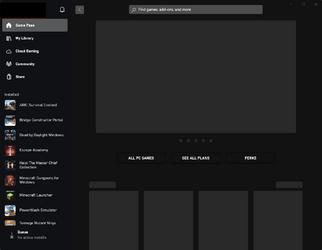
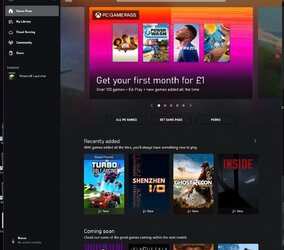
Xbox app is very, very slow.


Hulky

Active member
Local time
6:14 AM
Posts
20
OS
Windows 11.
This is an issue I've had even since Windows 10. These are the issues I have with it:

- Xbox app launches but shows pulsing Xbox logo for 30 seconds or longer.
- Xbox app launches, but everything is stuck on a gray background as if my PC is extremely slow, or it's downloading the metadata of the icons in the background.
- Xbox app launches, but I can't click anything. Everything on screen looks normal, but I can't click them. If I hover over them, it can take up to a minute for it to register I'm hovering over something. Normally, if this happens, the app just crashes after me waiting for a few minutes.

I've looked online to see if others have these issues and while I see people are saying the app is bad, they don't go into detail as to what issues they're facing.

I've disabled services in the past I felt weren't needed in the background 24/7, so it could very well be I disabled something the Xbox app relies on. The services I've seen the Xbox app need are:

- AppX - Manual (Trigger Start) - I believe this only effects Microsoft Store, no?
- Gaming Services - There are 2 Gaming Services services. One is set to Automatic, the other Automatic (Trigger Start).
- IP Helper - Automatic.
- Storage Service - Automatic (Delayed Start, Triggered Start).
- Xbox Accessory Management Service - Manual.
- Xbox Live Auth Manager - Manual.
- Xbox Live Game Save - Manual.
- Xbox Live Networking Service - Manual.
- Windows Time - Automatic (Trigger Start) - time is automatically adjusting within Windows Settings.

All services above enabled, of course.

Are there any services I'm missing that the Xbox app relies on that I might have disabled?
 
Windows Build/Version
22H2

My Computer My Computer

At a glance

Windows 11.Intel i7-8700K.CORSAIR VENGEANCE RGB PRO 32GB (4x8GB), DDR4,...ZOTAC GeForce GTX 1080 Ti Mini 11GB/
OS
Windows 11.
Computer type
PC/Desktop
CPU
Intel i7-8700K.
Motherboard
ASRock Z370 Killer SLI/ac.
Memory
CORSAIR VENGEANCE RGB PRO 32GB (4x8GB), DDR4, 3600MHz, C18.
Graphics Card(s)
ZOTAC GeForce GTX 1080 Ti Mini 11GB/
Monitor(s) Displays
1x AOC CQ32G1 31.5".
Screen Resolution
1440p.
PSU
EVGA 500 W1, 80+ WHITE 500W.

This is an issue I've had even since Windows 10. These are the issues I have with it:

- Xbox app launches but shows pulsing Xbox logo for 30 seconds or longer.
- Xbox app launches, but everything is stuck on a gray background as if my PC is extremely slow, or it's downloading the metadata of the icons in the background.
- Xbox app launches, but I can't click anything. Everything on screen looks normal, but I can't click them. If I hover over them, it can take up to a minute for it to register I'm hovering over something. Normally, if this happens, the app just crashes after me waiting for a few minutes.

I've looked online to see if others have these issues and while I see people are saying the app is bad, they don't go into detail as to what issues they're facing.

I've disabled services in the past I felt weren't needed in the background 24/7, so it could very well be I disabled something the Xbox app relies on. The services I've seen the Xbox app need are:

- AppX - Manual (Trigger Start) - I believe this only effects Microsoft Store, no?
- Gaming Services - There are 2 Gaming Services services. One is set to Automatic, the other Automatic (Trigger Start).
- IP Helper - Automatic.
- Storage Service - Automatic (Delayed Start, Triggered Start).
- Xbox Accessory Management Service - Manual.
- Xbox Live Auth Manager - Manual.
- Xbox Live Game Save - Manual.
- Xbox Live Networking Service - Manual.
- Windows Time - Automatic (Trigger Start) - time is automatically adjusting within Windows Settings.

All services above enabled, of course.

Are there any services I'm missing that the Xbox app relies on that I might have disabled?
Similar problem here, I just think the app is buggy and/or has issues downloading from the server. Unfortunately the app is needed for installing games or I'd get rid of it.
 

My Computer My Computer

At a glance

Windows 11 Pro 25H2 (RP channel)AMD Ryzen 7 9800X3D 8-core64GB Corsair Titanium 6000/CL30MSI Suprim 5080 SOC
OS
Windows 11 Pro 25H2 (RP channel)
Computer type
PC/Desktop
Manufacturer/Model
MSI
CPU
AMD Ryzen 7 9800X3D 8-core
Motherboard
MEG X870E Godlike
Memory
64GB Corsair Titanium 6000/CL30
Graphics Card(s)
MSI Suprim 5080 SOC
Sound Card
Soundblaster AE-9
Monitor(s) Displays
ASUS TUF Gaming VG289Q
Screen Resolution
3840x2160
Hard Drives
Samsung 9100 Pro 4TB (gen 5 x4, system drive/games)
Samsung 990 Pro 2TB
Samsung 980 Pro 2TB
Samsung 870 Evo 4TB
Samsung 870 Evo 2TB
Samsung T9 4TB
PSU
Seasonic PX-2200
Case
Bequiet! Dark Base Pro 901
Cooling
Noctua NH-D15S Chromax black
Keyboard
Logitech G915 X (wired)
Mouse
Logitech G903 with PowerPlay charger
Internet Speed
900Mb/sec
Browser
Microsoft Edge
Antivirus
Windows Defender
Similar problem here, I just think the app is buggy and/or has issues downloading from the server. Unfortunately the app is needed for installing games or I'd get rid of it.
Sadly, yes.

Another issue with the Xbox app is that it's required to view game clips or shared post within messages. If you try viewing them from within Xbox Game Bar, you receive a This message contains unknown content error. So, each time someone messages me sharing their content, I'm forced to open the app.

You used to be able to use the Xbox Companion App to view messages. I never had issues with that app. Now, if you try to view messages from within the app, it tells you to use the Xbox app for that content.
 

My Computer My Computer

At a glance

Windows 11.Intel i7-8700K.CORSAIR VENGEANCE RGB PRO 32GB (4x8GB), DDR4,...ZOTAC GeForce GTX 1080 Ti Mini 11GB/
OS
Windows 11.
Computer type
PC/Desktop
CPU
Intel i7-8700K.
Motherboard
ASRock Z370 Killer SLI/ac.
Memory
CORSAIR VENGEANCE RGB PRO 32GB (4x8GB), DDR4, 3600MHz, C18.
Graphics Card(s)
ZOTAC GeForce GTX 1080 Ti Mini 11GB/
Monitor(s) Displays
1x AOC CQ32G1 31.5".
Screen Resolution
1440p.
PSU
EVGA 500 W1, 80+ WHITE 500W.
Never used the app myself until just now, it started and pulsed the XBox logo 3 times, updated (took maybe 10 seconds, then opened to my account choice page. Closed the app down then re opened it, logo pulsed 3 times and opened to account choice page, no delay.
Windows 11 21H2 build 22000.832.
 

My Computer My Computer

At a glance

Windows 11 Pro 22H2, build: 22621.521Intel i7-12700K 3.6GHz Base (5.0GHz Turbo)64GB DDR 3600MhzAsus Tuff RTX 3080 10GB OC
OS
Windows 11 Pro 22H2, build: 22621.521
Computer type
PC/Desktop
Manufacturer/Model
Scan 3XS Custom 1700
CPU
Intel i7-12700K 3.6GHz Base (5.0GHz Turbo)
Motherboard
Asus ProArt Creator B660 D4
Memory
64GB DDR 3600Mhz
Graphics Card(s)
Asus Tuff RTX 3080 10GB OC
Sound Card
Onboard Realtek
Monitor(s) Displays
Gigabyte G32QC 32inch 16:9 curved @2560 x 1440p 165Hz Freesync Premium Pro/ Dell SE2422H 24inch 16:9 1920 x 1080p 75Hz Freesync
Screen Resolution
2560 x 1440p & 1920 x 1080p
Hard Drives
WD SN570 1TB NVME (Boot), Samsung 870QVO 1TB (SSD), SanDisk 3D Ultra 500Gb (SSD) x2, Seagate 3Tb Expansion Desk (Ext HDD), 2x Toshiba 1Tb P300 (Ext HDD)
PSU
Corsair RM1000X Modular
Case
Corsair 4000D Airflow Desktop
Cooling
Corsair Hydro H150i RGB Pro XT 360mm Liquid Cooler, 3 x 120mm fans, 1x Exhaust
Keyboard
Microsoft Ergonomic
Mouse
Logitech G402
Internet Speed
800Mbs
Browser
Edge Chromium
Antivirus
Defender, Malwarebytes
Never used the app myself until just now, it started and pulsed the XBox logo 3 times, updated (took maybe 10 seconds, then opened to my account choice page. Closed the app down then re opened it, logo pulsed 3 times and opened to account choice page, no delay.
Windows 11 21H2 build 22000.832.
Thank you for testing. You made me remember something I forgot to mention in my post.

Out of 10 launches, about 2-3 of them are normal. Decent speeds, everything loads as it should.

I can close the app fully (either task tray or Task Manager) and it may load fine again. Most times, though, it doesn't.

EDIT: Do you have Game Mode and Hardware-Accelerated GPU Scheduling enabled within your Windows Settings? HAGS doesn't seem like it'd matter, but I'd like to know. Thanks!
 

My Computer My Computer

At a glance

Windows 11.Intel i7-8700K.CORSAIR VENGEANCE RGB PRO 32GB (4x8GB), DDR4,...ZOTAC GeForce GTX 1080 Ti Mini 11GB/
OS
Windows 11.
Computer type
PC/Desktop
CPU
Intel i7-8700K.
Motherboard
ASRock Z370 Killer SLI/ac.
Memory
CORSAIR VENGEANCE RGB PRO 32GB (4x8GB), DDR4, 3600MHz, C18.
Graphics Card(s)
ZOTAC GeForce GTX 1080 Ti Mini 11GB/
Monitor(s) Displays
1x AOC CQ32G1 31.5".
Screen Resolution
1440p.
PSU
EVGA 500 W1, 80+ WHITE 500W.
Sure, I have game mode disabled (Windows Settings), HAGS works differently on Win11 I believe, instead of a global setting it can be applied per app, ReBAR is also enabled in BIOS.
Not sure if ReBAR makes any difference to how Windows processes graphics calls, I know it is designed for games to bypass CPU for texture loading (if coded to take advantage of it), whether Windows can or does make use of it in any capacity I don't know.
Is it possible the XBox app has been suspended when you encounter slow response? Or maybe paged out?
 

My Computer My Computer

At a glance

Windows 11 Pro 22H2, build: 22621.521Intel i7-12700K 3.6GHz Base (5.0GHz Turbo)64GB DDR 3600MhzAsus Tuff RTX 3080 10GB OC
OS
Windows 11 Pro 22H2, build: 22621.521
Computer type
PC/Desktop
Manufacturer/Model
Scan 3XS Custom 1700
CPU
Intel i7-12700K 3.6GHz Base (5.0GHz Turbo)
Motherboard
Asus ProArt Creator B660 D4
Memory
64GB DDR 3600Mhz
Graphics Card(s)
Asus Tuff RTX 3080 10GB OC
Sound Card
Onboard Realtek
Monitor(s) Displays
Gigabyte G32QC 32inch 16:9 curved @2560 x 1440p 165Hz Freesync Premium Pro/ Dell SE2422H 24inch 16:9 1920 x 1080p 75Hz Freesync
Screen Resolution
2560 x 1440p & 1920 x 1080p
Hard Drives
WD SN570 1TB NVME (Boot), Samsung 870QVO 1TB (SSD), SanDisk 3D Ultra 500Gb (SSD) x2, Seagate 3Tb Expansion Desk (Ext HDD), 2x Toshiba 1Tb P300 (Ext HDD)
PSU
Corsair RM1000X Modular
Case
Corsair 4000D Airflow Desktop
Cooling
Corsair Hydro H150i RGB Pro XT 360mm Liquid Cooler, 3 x 120mm fans, 1x Exhaust
Keyboard
Microsoft Ergonomic
Mouse
Logitech G402
Internet Speed
800Mbs
Browser
Edge Chromium
Antivirus
Defender, Malwarebytes
Sure, I have game mode disabled (Windows Settings), HAGS works differently on Win11 I believe, instead of a global setting it can be applied per app, ReBAR is also enabled in BIOS.
Not sure if ReBAR makes any difference to how Windows processes graphics calls, I know it is designed for games to bypass CPU for texture loading (if coded to take advantage of it), whether Windows can or does make use of it in any capacity I don't know.
Is it possible the XBox app has been suspended when you encounter slow response? Or maybe paged out?
I'll have to see if my BIOS allows rebar.

I checked how many times the logo pulsed when opening the app after closing it when it was working, and I counted about 25 times. Memory usage stayed a constant 48.7MB, and jumped to 108MB when load.

This is what I've seen for the last 3 minutes of the tool being opened: 1659865632946.png
 

My Computer My Computer

At a glance

Windows 11.Intel i7-8700K.CORSAIR VENGEANCE RGB PRO 32GB (4x8GB), DDR4,...ZOTAC GeForce GTX 1080 Ti Mini 11GB/
OS
Windows 11.
Computer type
PC/Desktop
CPU
Intel i7-8700K.
Motherboard
ASRock Z370 Killer SLI/ac.
Memory
CORSAIR VENGEANCE RGB PRO 32GB (4x8GB), DDR4, 3600MHz, C18.
Graphics Card(s)
ZOTAC GeForce GTX 1080 Ti Mini 11GB/
Monitor(s) Displays
1x AOC CQ32G1 31.5".
Screen Resolution
1440p.
PSU
EVGA 500 W1, 80+ WHITE 500W.
My app starts instantly, logo pulsed maybe twice, was very quick, then it auto logged into my XBox account and displayed lists of games etc, again almost instantly.
I have a feeling that unless you have a 3rd party anti virus or a VPN getting in the way then you need to possibly reset the app and/ or fix corrupt system files using SFC.

XB01.jpg
 

My Computer My Computer

At a glance

Windows 11 Pro 22H2, build: 22621.521Intel i7-12700K 3.6GHz Base (5.0GHz Turbo)64GB DDR 3600MhzAsus Tuff RTX 3080 10GB OC
OS
Windows 11 Pro 22H2, build: 22621.521
Computer type
PC/Desktop
Manufacturer/Model
Scan 3XS Custom 1700
CPU
Intel i7-12700K 3.6GHz Base (5.0GHz Turbo)
Motherboard
Asus ProArt Creator B660 D4
Memory
64GB DDR 3600Mhz
Graphics Card(s)
Asus Tuff RTX 3080 10GB OC
Sound Card
Onboard Realtek
Monitor(s) Displays
Gigabyte G32QC 32inch 16:9 curved @2560 x 1440p 165Hz Freesync Premium Pro/ Dell SE2422H 24inch 16:9 1920 x 1080p 75Hz Freesync
Screen Resolution
2560 x 1440p & 1920 x 1080p
Hard Drives
WD SN570 1TB NVME (Boot), Samsung 870QVO 1TB (SSD), SanDisk 3D Ultra 500Gb (SSD) x2, Seagate 3Tb Expansion Desk (Ext HDD), 2x Toshiba 1Tb P300 (Ext HDD)
PSU
Corsair RM1000X Modular
Case
Corsair 4000D Airflow Desktop
Cooling
Corsair Hydro H150i RGB Pro XT 360mm Liquid Cooler, 3 x 120mm fans, 1x Exhaust
Keyboard
Microsoft Ergonomic
Mouse
Logitech G402
Internet Speed
800Mbs
Browser
Edge Chromium
Antivirus
Defender, Malwarebytes
My app starts instantly, logo pulsed maybe twice, was very quick, then it auto logged into my XBox account and displayed lists of games etc, again almost instantly.
I have a feeling that unless you have a 3rd party anti virus or a VPN getting in the way then you need to possibly reset the app and/ or fix corrupt system files using SFC.
Not sure if this is testing variation but I disabled my DNS protection along with my adblocker (AdGaurd) and it seems it launched in under 5 pulses.

If that is the problem, I don't know how I'll bypass that without disabling DNS protection. I'll see how it goes without DNS protection for speed. Thank you for allowing me to think outside the box. I appreciate it! Stops me from always blaming Microsoft.
 

My Computer My Computer

At a glance

Windows 11.Intel i7-8700K.CORSAIR VENGEANCE RGB PRO 32GB (4x8GB), DDR4,...ZOTAC GeForce GTX 1080 Ti Mini 11GB/
OS
Windows 11.
Computer type
PC/Desktop
CPU
Intel i7-8700K.
Motherboard
ASRock Z370 Killer SLI/ac.
Memory
CORSAIR VENGEANCE RGB PRO 32GB (4x8GB), DDR4, 3600MHz, C18.
Graphics Card(s)
ZOTAC GeForce GTX 1080 Ti Mini 11GB/
Monitor(s) Displays
1x AOC CQ32G1 31.5".
Screen Resolution
1440p.
PSU
EVGA 500 W1, 80+ WHITE 500W.
Well I would assume that anything getting between the app and the server would necessarily add some form of delay, in your case it is delaying the login authentication and then causing extreme delay fetching graphics which your adblocker could possibly see as adverts, which in a way they are.
 

My Computer My Computer

At a glance

Windows 11 Pro 22H2, build: 22621.521Intel i7-12700K 3.6GHz Base (5.0GHz Turbo)64GB DDR 3600MhzAsus Tuff RTX 3080 10GB OC
OS
Windows 11 Pro 22H2, build: 22621.521
Computer type
PC/Desktop
Manufacturer/Model
Scan 3XS Custom 1700
CPU
Intel i7-12700K 3.6GHz Base (5.0GHz Turbo)
Motherboard
Asus ProArt Creator B660 D4
Memory
64GB DDR 3600Mhz
Graphics Card(s)
Asus Tuff RTX 3080 10GB OC
Sound Card
Onboard Realtek
Monitor(s) Displays
Gigabyte G32QC 32inch 16:9 curved @2560 x 1440p 165Hz Freesync Premium Pro/ Dell SE2422H 24inch 16:9 1920 x 1080p 75Hz Freesync
Screen Resolution
2560 x 1440p & 1920 x 1080p
Hard Drives
WD SN570 1TB NVME (Boot), Samsung 870QVO 1TB (SSD), SanDisk 3D Ultra 500Gb (SSD) x2, Seagate 3Tb Expansion Desk (Ext HDD), 2x Toshiba 1Tb P300 (Ext HDD)
PSU
Corsair RM1000X Modular
Case
Corsair 4000D Airflow Desktop
Cooling
Corsair Hydro H150i RGB Pro XT 360mm Liquid Cooler, 3 x 120mm fans, 1x Exhaust
Keyboard
Microsoft Ergonomic
Mouse
Logitech G402
Internet Speed
800Mbs
Browser
Edge Chromium
Antivirus
Defender, Malwarebytes
Not sure if this is testing variation but I disabled my DNS protection along with my adblocker (AdGaurd) and it seems it launched in under 5 pulses.

If that is the problem, I don't know how I'll bypass that without disabling DNS protection. I'll see how it goes without DNS protection for speed. Thank you for allowing me to think outside the box. I appreciate it! Stops me from always blaming Microsoft.
I only use the default Windows Defender and I have the same problem as you. Sometimes it will load quick, other times it takes ages.
 

My Computer My Computer

At a glance

Windows 11 Pro 25H2 (RP channel)AMD Ryzen 7 9800X3D 8-core64GB Corsair Titanium 6000/CL30MSI Suprim 5080 SOC
OS
Windows 11 Pro 25H2 (RP channel)
Computer type
PC/Desktop
Manufacturer/Model
MSI
CPU
AMD Ryzen 7 9800X3D 8-core
Motherboard
MEG X870E Godlike
Memory
64GB Corsair Titanium 6000/CL30
Graphics Card(s)
MSI Suprim 5080 SOC
Sound Card
Soundblaster AE-9
Monitor(s) Displays
ASUS TUF Gaming VG289Q
Screen Resolution
3840x2160
Hard Drives
Samsung 9100 Pro 4TB (gen 5 x4, system drive/games)
Samsung 990 Pro 2TB
Samsung 980 Pro 2TB
Samsung 870 Evo 4TB
Samsung 870 Evo 2TB
Samsung T9 4TB
PSU
Seasonic PX-2200
Case
Bequiet! Dark Base Pro 901
Cooling
Noctua NH-D15S Chromax black
Keyboard
Logitech G915 X (wired)
Mouse
Logitech G903 with PowerPlay charger
Internet Speed
900Mb/sec
Browser
Microsoft Edge
Antivirus
Windows Defender

Latest Support Threads

Back
Top Bottom