
Solved Has MS wiped Office 2010 Home and Student off our PC?


I installed build 26300.9550 and Office worked fine, but now it found a lot of Office 2010 updates. For the worst case scenario I will install them all and see if Office 2010 still works and if the copy/paste functionality is affected as discussed on another thread. I will post back later, it will take much time to finish.

OK, it finished, it installed every single Microsoft Office 2010 update, nothing newer found. As you can see on the screenshot below Microsoft Office 2010 still works fine on Windows 11 26H2 build 26300.9550 and all the available Office 2010 updates installed. So there must be something else that deleted Microsoft Office in OP's case. Probably there was some prompt to download Office 365 or he accidentally loaded Office 365 and downloaded it. That would explain removing Office 2010 because like I said you cannot mix two versions. You either have Office 365 or a standalone version. You must remove one to install the other.
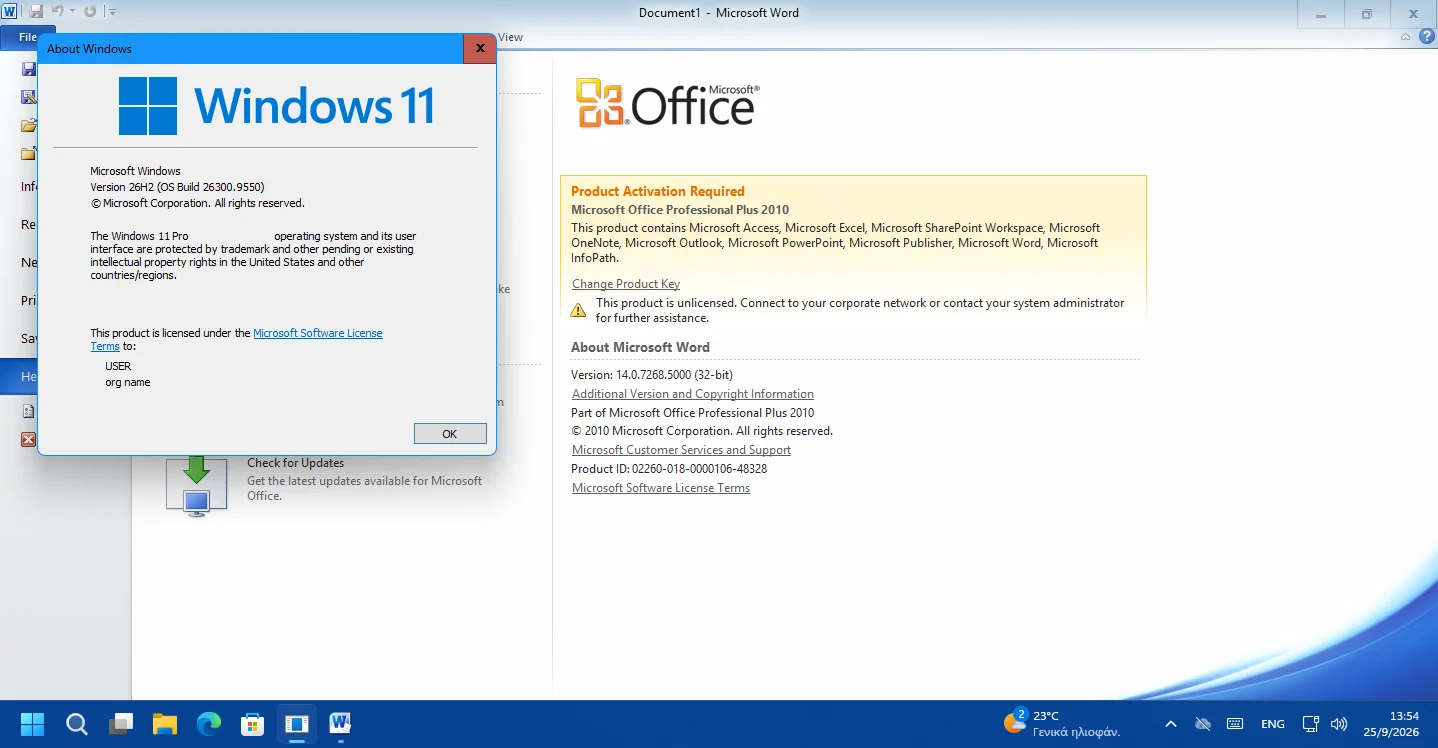
Running Office 2010 in Windows 11 26H2 after all updates.webp


Conclusion: Whatever happened in OP's case and Microsoft Office was removed, the cure is to remove everything related to standalone version and Office 365, even individual applications from the Installed Apps list. Make sure there is nothing left, not even the Office one-click. Then restart the computer and reinstall the desired standalone version. Make sure to right-click on Setup and Run as Administrator for best compatibility.
 
Last edited:

My Computers My Computers

  • At a glance

    Windows 11 Pro 23H2 (7584), 26H2 (9711)Mobile DualCore Intel Core 2 Duo T7250, 2000 MHz4GBMobile Intel(R) GMA 4500M (Mobile 4 series)
    OS
    Windows 11 Pro 23H2 (7584), 26H2 (9711)
    Computer type
    Laptop
    Manufacturer/Model
    Acer Extensa 5630EZ
    CPU
    Mobile DualCore Intel Core 2 Duo T7250, 2000 MHz
    Motherboard
    Acer Extensa 5630
    Memory
    4GB
    Graphics Card(s)
    Mobile Intel(R) GMA 4500M (Mobile 4 series)
    Sound Card
    Realtek ALC268 @ Intel 82801IB ICH9 - High Definition Audio Controller
    Monitor(s) Displays
    1
    Screen Resolution
    1280x800
    Hard Drives
    Samsung SSD 850 EVO 250GB SATA Device (250 GB, SATA-III)
    Internet Speed
    802.11g wireless 54 Mbps
    Browser
    MICROSOFT EDGE
    Antivirus
    WINDOWS DEFENDER
    Other Info
    Legacy MBR installation, no TPM, no Secure Boot, no WDDM 2.0 graphics drivers, no SSE4.2, cannot get more unsupported ;) This is only my test laptop. I had installed Windows 11 here before upgrading my main PC. For my main PC I use everyday see my 2nd system specs.
  • At a glance

    Windows 11 Pro 26H2 (build 26300.9711)Intel Core-i7 3770 3.40GHz s1155 (3rd generat...2x Kingston Hyper-X Blu 8GB DDR3-1600GIGABYTE GeForce RTX 3050 WINDFORCE OC V2 6GB...
    Operating System
    Windows 11 Pro 26H2 (build 26300.9711)
    Computer type
    PC/Desktop
    Manufacturer/Model
    Custom-built PC
    CPU
    Intel Core-i7 3770 3.40GHz s1155 (3rd generation)
    Motherboard
    Asus P8H61 s1155 ATX
    Memory
    2x Kingston Hyper-X Blu 8GB DDR3-1600
    Graphics card(s)
    GIGABYTE GeForce RTX 3050 WINDFORCE OC V2 6GB (GV-N3050WF2OCV2-6GD)
    Sound Card
    Realtek HD audio (ALC887)
    Monitor(s) Displays
    Sony Bravia KDL-19L4000 19" LCD TV via VGA
    Screen Resolution
    1440x900 32-bit 60Hz
    Hard Drives
    WD Blue SA510 2.5 1000GB SSD as system disk, Western Digital Caviar Purple 4TB SATA III (WD40PURZ) as second
    PSU
    Thermaltake Litepower RGB 550W Full Wired
    Case
    SUPERCASE MIDI-TOWER
    Cooling
    Deepcool Gamma Archer CPU cooler, 1x 8cm fan at the back
    Keyboard
    Mitsumi 101-key PS/2
    Mouse
    Microsoft Compact Optical Mouse
    Internet Speed
    802.11ac 5GHz wireless 260Mpbs
    Browser
    Microsoft Edge, Mozilla Firefox
    Antivirus
    Microsoft Windows Defender
    Other Info
    Legacy BIOS (MBR) installation, no TPM, no Secure Boot, WDDM 3.0 graphics drivers, WEI score 7.4
I installed build 26300.9550 and Office worked fine, but now it found a lot of Office 2010 updates. For the worst case scenario I will install them all and see if Office 2010 still works and if the copy/paste functionality is affected as discussed on another thread. I will post back later, it will take much time to finish.

OK, it finished, it installed every single Microsoft Office 2010 update, nothing newer found. As you can see on the screenshot below Microsoft Office 2010 still works fine on Windows 11 26H2 build 26300.9550 and all the available Office 2010 updates installed. So there must be something else that deleted Microsoft Office in OP's case. Probably there was some prompt to download Office 365 or he accidentally loaded Office 365 and downloaded it. That would explain removing Office 2010 because like I said you cannot mix two versions. You either have Office 365 or a standalone version. You must remove one to install the other.

View attachment 184055


Conclusion: Whatever happened in OP's case and Microsoft Office was removed, the cure is to remove everything related to standalone version and Office 365, even individual applications from the Installed Apps list. Make sure there is nothing left, not even the Office one-click. Then restart the computer and reinstall the desired standalone version. Make sure to right-click on Setup and Run as Administrator for best compatibility.
Where would one find the stand alone version for MS Office Professional Plus 2016 I don't have a cd drive in this pc so my install disc is not going to work (and it is the original backup media disc from when I purchased the software in November 2015.
 

My Computers My Computers

  • At a glance

    windows 11 Pro11th Gen Intel Core i7-11390H (4 Cores, 8 Thr...32GB dual channel (DDR4)Intel® Iris® Xe
    OS
    windows 11 Pro
    Computer type
    PC/Desktop
    Manufacturer/Model
    geekom mini IT11
    CPU
    11th Gen Intel Core i7-11390H (4 Cores, 8 Threads, 12M
    Memory
    32GB dual channel (DDR4)
    Graphics Card(s)
    Intel® Iris® Xe
    Monitor(s) Displays
    HP S2031
    Hard Drives
    1TB SSD
  • At a glance

    Windows 11 ProIntel Core i7-13620HDDR4: SO-DIMM 32GB
    Operating System
    Windows 11 Pro
    Computer type
    PC/Desktop
    Manufacturer/Model
    Geekom Mini PC XT13 Pro
    CPU
    Intel Core i7-13620H
    Memory
    DDR4: SO-DIMM 32GB
    Monitor(s) Displays
    HPS2031
    Hard Drives
    M.2 1TB

My Computer My Computer

At a glance

Windows 11 Pro 26H2
OS
Windows 11 Pro 26H2
Computer type
Laptop
Manufacturer/Model
Toshiba
Antivirus
Defender
This happened to me on my W10 pro machine. Was using MS Office Pro Plus 2016, now showing unlicensed. Can I just use a later version?? Just want to keep it going until W10 support really ends.
 

My Computers My Computers

  • At a glance

    W11 25H2 26200.8457AMD RYZEN 5-56002x8 GBMSI NVIDIA GeForce 710
    OS
    W11 25H2 26200.8457
    Computer type
    PC/Desktop
    Manufacturer/Model
    Self
    CPU
    AMD RYZEN 5-5600
    Motherboard
    ASUS B 550-F
    Memory
    2x8 GB
    Graphics Card(s)
    MSI NVIDIA GeForce 710
    Sound Card
    On Board
    Monitor(s) Displays
    TCL 4k 43" TV
    Screen Resolution
    3840x2160
    Hard Drives
    Samsung 990 Pro 2TB and WD 2TB
    PSU
    800 W
    Case
    Fractal Design Focus Mid-Tower Case (RED)
    Cooling
    3 120 mm Fan
    Keyboard
    Logitech MK320
    Mouse
    Logitech
    Internet Speed
    2 Mbps/2 Mbps
    Browser
    FF
    Antivirus
    MS Defender, MWB
  • At a glance

    W11 22621.1194 / Linux Mint/Chrome OSAMD a8-5545m2x4GBGTX 550 Ti
    Operating System
    W11 22621.1194 / Linux Mint/Chrome OS
    Computer type
    PC/Desktop
    Manufacturer/Model
    SELF
    CPU
    AMD a8-5545m
    Motherboard
    Biostar A68N-5545
    Memory
    2x4GB
    Graphics card(s)
    GTX 550 Ti
    Sound Card
    Internal
    Monitor(s) Displays
    2 ASUS 27"
    Screen Resolution
    1920x1080
    Hard Drives
    ADATA SU655
    PSU
    800W
    Case
    Cooler Master
    Cooling
    2 120mm Fan
    Keyboard
    LOGITEC
    Mouse
    lOGITEC
    Internet Speed
    940/940
    Browser
    FF
    Antivirus
    MS -MWB
Just for further information, I am running a HP laptop with Windows 11 Home, 25H2, 26200.9550 and I have MS Office 2007 installed. My last system update was on 9/24/2026. Nothing on my system seems to be changed. MS Office 2007 still exists and is operational. I also have a Windows 10 desktop with the latest updates and MS Office 2007 is installed. So far, I have not noticed any changes.
 

My Computers My Computers

  • At a glance

    Windows 11 Home, 26H2, OS Build 26300.9550Intel(R) Core(TM) i3-8145U CPU @ 2.10GHz 2.30...8GB
    OS
    Windows 11 Home, 26H2, OS Build 26300.9550
    Computer type
    Laptop
    Manufacturer/Model
    HP 15-dw0xx
    CPU
    Intel(R) Core(TM) i3-8145U CPU @ 2.10GHz 2.30 GHz
    Memory
    8GB
    Screen Resolution
    1366 x 768
    Hard Drives
    930 GB
    Keyboard
    Built In
    Mouse
    Wireless Logitech M325S
    Browser
    Chrome 154.0.8037.58
    Antivirus
    Windows Defender
    Other Info
    Cygwin64
  • At a glance

    Windows 10 Home, Version 22H2, Build19045.3693AMD E-300 with Radeon HD Graphics 1.30 GHz10GBRadeon HD Graphics 1.30 GHz
    Operating System
    Windows 10 Home, Version 22H2, Build19045.3693
    Computer type
    PC/Desktop
    Manufacturer/Model
    HP Pavilion
    CPU
    AMD E-300 with Radeon HD Graphics 1.30 GHz
    Memory
    10GB
    Graphics card(s)
    Radeon HD Graphics 1.30 GHz
    Sound Card
    Realtek
    Monitor(s) Displays
    15"
    Screen Resolution
    1280 x 1024
    Hard Drives
    700 GB
    Keyboard
    Wireless
    Mouse
    Wireless
    Browser
    Chrome
    Antivirus
    Windows Defender
    Other Info
    This computer is connected to my IC-735 radio.
Just for further information, I am running a HP laptop with Windows 11 Home, 25H2, 26200.9550 and I have MS Office 2007 installed. My last system update was on 9/24/2026. Nothing on my system seems to be changed. MS Office 2007 still exists and is operational. I also have a Windows 10 desktop with the latest updates and MS Office 2007 is installed. So far, I have not noticed any changes.

Just checked my W11 machine and MS Office 2024 is still there. :O)
 
Last edited:

My Computers My Computers

  • At a glance

    W11 25H2 26200.8457AMD RYZEN 5-56002x8 GBMSI NVIDIA GeForce 710
    OS
    W11 25H2 26200.8457
    Computer type
    PC/Desktop
    Manufacturer/Model
    Self
    CPU
    AMD RYZEN 5-5600
    Motherboard
    ASUS B 550-F
    Memory
    2x8 GB
    Graphics Card(s)
    MSI NVIDIA GeForce 710
    Sound Card
    On Board
    Monitor(s) Displays
    TCL 4k 43" TV
    Screen Resolution
    3840x2160
    Hard Drives
    Samsung 990 Pro 2TB and WD 2TB
    PSU
    800 W
    Case
    Fractal Design Focus Mid-Tower Case (RED)
    Cooling
    3 120 mm Fan
    Keyboard
    Logitech MK320
    Mouse
    Logitech
    Internet Speed
    2 Mbps/2 Mbps
    Browser
    FF
    Antivirus
    MS Defender, MWB
  • At a glance

    W11 22621.1194 / Linux Mint/Chrome OSAMD a8-5545m2x4GBGTX 550 Ti
    Operating System
    W11 22621.1194 / Linux Mint/Chrome OS
    Computer type
    PC/Desktop
    Manufacturer/Model
    SELF
    CPU
    AMD a8-5545m
    Motherboard
    Biostar A68N-5545
    Memory
    2x4GB
    Graphics card(s)
    GTX 550 Ti
    Sound Card
    Internal
    Monitor(s) Displays
    2 ASUS 27"
    Screen Resolution
    1920x1080
    Hard Drives
    ADATA SU655
    PSU
    800W
    Case
    Cooler Master
    Cooling
    2 120mm Fan
    Keyboard
    LOGITEC
    Mouse
    lOGITEC
    Internet Speed
    940/940
    Browser
    FF
    Antivirus
    MS -MWB
Where would one find the stand alone version for MS Office Professional Plus 2016 I don't have a cd drive in this pc so my install disc is not going to work (and it is the original backup media disc from when I purchased the software in November 2015.
Use an old computer with DVD drive to copy all the contents of the Office 2016 DVD to a USB flash drive. Then connect the USB flash drive to your target computer and run Setup from there. Alternatively you can use an external DVD drive directly on the target computer if you have one or can borrow one.
 

My Computers My Computers

  • At a glance

    Windows 11 Pro 23H2 (7584), 26H2 (9711)Mobile DualCore Intel Core 2 Duo T7250, 2000 MHz4GBMobile Intel(R) GMA 4500M (Mobile 4 series)
    OS
    Windows 11 Pro 23H2 (7584), 26H2 (9711)
    Computer type
    Laptop
    Manufacturer/Model
    Acer Extensa 5630EZ
    CPU
    Mobile DualCore Intel Core 2 Duo T7250, 2000 MHz
    Motherboard
    Acer Extensa 5630
    Memory
    4GB
    Graphics Card(s)
    Mobile Intel(R) GMA 4500M (Mobile 4 series)
    Sound Card
    Realtek ALC268 @ Intel 82801IB ICH9 - High Definition Audio Controller
    Monitor(s) Displays
    1
    Screen Resolution
    1280x800
    Hard Drives
    Samsung SSD 850 EVO 250GB SATA Device (250 GB, SATA-III)
    Internet Speed
    802.11g wireless 54 Mbps
    Browser
    MICROSOFT EDGE
    Antivirus
    WINDOWS DEFENDER
    Other Info
    Legacy MBR installation, no TPM, no Secure Boot, no WDDM 2.0 graphics drivers, no SSE4.2, cannot get more unsupported ;) This is only my test laptop. I had installed Windows 11 here before upgrading my main PC. For my main PC I use everyday see my 2nd system specs.
  • At a glance

    Windows 11 Pro 26H2 (build 26300.9711)Intel Core-i7 3770 3.40GHz s1155 (3rd generat...2x Kingston Hyper-X Blu 8GB DDR3-1600GIGABYTE GeForce RTX 3050 WINDFORCE OC V2 6GB...
    Operating System
    Windows 11 Pro 26H2 (build 26300.9711)
    Computer type
    PC/Desktop
    Manufacturer/Model
    Custom-built PC
    CPU
    Intel Core-i7 3770 3.40GHz s1155 (3rd generation)
    Motherboard
    Asus P8H61 s1155 ATX
    Memory
    2x Kingston Hyper-X Blu 8GB DDR3-1600
    Graphics card(s)
    GIGABYTE GeForce RTX 3050 WINDFORCE OC V2 6GB (GV-N3050WF2OCV2-6GD)
    Sound Card
    Realtek HD audio (ALC887)
    Monitor(s) Displays
    Sony Bravia KDL-19L4000 19" LCD TV via VGA
    Screen Resolution
    1440x900 32-bit 60Hz
    Hard Drives
    WD Blue SA510 2.5 1000GB SSD as system disk, Western Digital Caviar Purple 4TB SATA III (WD40PURZ) as second
    PSU
    Thermaltake Litepower RGB 550W Full Wired
    Case
    SUPERCASE MIDI-TOWER
    Cooling
    Deepcool Gamma Archer CPU cooler, 1x 8cm fan at the back
    Keyboard
    Mitsumi 101-key PS/2
    Mouse
    Microsoft Compact Optical Mouse
    Internet Speed
    802.11ac 5GHz wireless 260Mpbs
    Browser
    Microsoft Edge, Mozilla Firefox
    Antivirus
    Microsoft Windows Defender
    Other Info
    Legacy BIOS (MBR) installation, no TPM, no Secure Boot, WDDM 3.0 graphics drivers, WEI score 7.4

My Computer My Computer

At a glance

Windows 11 Pro 24H2i7 Ultra16GBIntel
OS
Windows 11 Pro 24H2
Computer type
Laptop
Manufacturer/Model
LG
CPU
i7 Ultra
Memory
16GB
Graphics Card(s)
Intel
Sound Card
Intel Realtek
Monitor(s) Displays
Laptop 17" & TB4 Dell 27" QHD Ultrasharp w/integral TB4 hub
Screen Resolution
2560x1600
Hard Drives
1TB SSD, 5 external WDs
Mouse
Logitech Master MX 3S
Browser
Vivaldi
Antivirus
Kaspersky Premium Suite
No need to buy a new version. Just remove everything related to Office, restart and reinstall the version you already have.
 

My Computers My Computers

  • At a glance

    Windows 11 Pro 23H2 (7584), 26H2 (9711)Mobile DualCore Intel Core 2 Duo T7250, 2000 MHz4GBMobile Intel(R) GMA 4500M (Mobile 4 series)
    OS
    Windows 11 Pro 23H2 (7584), 26H2 (9711)
    Computer type
    Laptop
    Manufacturer/Model
    Acer Extensa 5630EZ
    CPU
    Mobile DualCore Intel Core 2 Duo T7250, 2000 MHz
    Motherboard
    Acer Extensa 5630
    Memory
    4GB
    Graphics Card(s)
    Mobile Intel(R) GMA 4500M (Mobile 4 series)
    Sound Card
    Realtek ALC268 @ Intel 82801IB ICH9 - High Definition Audio Controller
    Monitor(s) Displays
    1
    Screen Resolution
    1280x800
    Hard Drives
    Samsung SSD 850 EVO 250GB SATA Device (250 GB, SATA-III)
    Internet Speed
    802.11g wireless 54 Mbps
    Browser
    MICROSOFT EDGE
    Antivirus
    WINDOWS DEFENDER
    Other Info
    Legacy MBR installation, no TPM, no Secure Boot, no WDDM 2.0 graphics drivers, no SSE4.2, cannot get more unsupported ;) This is only my test laptop. I had installed Windows 11 here before upgrading my main PC. For my main PC I use everyday see my 2nd system specs.
  • At a glance

    Windows 11 Pro 26H2 (build 26300.9711)Intel Core-i7 3770 3.40GHz s1155 (3rd generat...2x Kingston Hyper-X Blu 8GB DDR3-1600GIGABYTE GeForce RTX 3050 WINDFORCE OC V2 6GB...
    Operating System
    Windows 11 Pro 26H2 (build 26300.9711)
    Computer type
    PC/Desktop
    Manufacturer/Model
    Custom-built PC
    CPU
    Intel Core-i7 3770 3.40GHz s1155 (3rd generation)
    Motherboard
    Asus P8H61 s1155 ATX
    Memory
    2x Kingston Hyper-X Blu 8GB DDR3-1600
    Graphics card(s)
    GIGABYTE GeForce RTX 3050 WINDFORCE OC V2 6GB (GV-N3050WF2OCV2-6GD)
    Sound Card
    Realtek HD audio (ALC887)
    Monitor(s) Displays
    Sony Bravia KDL-19L4000 19" LCD TV via VGA
    Screen Resolution
    1440x900 32-bit 60Hz
    Hard Drives
    WD Blue SA510 2.5 1000GB SSD as system disk, Western Digital Caviar Purple 4TB SATA III (WD40PURZ) as second
    PSU
    Thermaltake Litepower RGB 550W Full Wired
    Case
    SUPERCASE MIDI-TOWER
    Cooling
    Deepcool Gamma Archer CPU cooler, 1x 8cm fan at the back
    Keyboard
    Mitsumi 101-key PS/2
    Mouse
    Microsoft Compact Optical Mouse
    Internet Speed
    802.11ac 5GHz wireless 260Mpbs
    Browser
    Microsoft Edge, Mozilla Firefox
    Antivirus
    Microsoft Windows Defender
    Other Info
    Legacy BIOS (MBR) installation, no TPM, no Secure Boot, WDDM 3.0 graphics drivers, WEI score 7.4
I have replied to this thread with an update on what happened with the repair shop and the reason for the Office 2010 failure. I got a message saying that a Mod' had marked my thread as having a solution. I've gone right through this thread and cannot see any of my posts after the original post! Lots of good comments here but as said we are both non tech OAP's my wife can just about switch it on and select the Excel icon. Learning a new program is not an option! Most updates or upgrades indicate more tech, more to learn, more problems to solve, more to understand.
The guy in the repair shop found something that stopped the Office loading and anything else on her PC. Seems there were two C++ (Forgot the name) files and one was corrupted. He then replaced said C++ and all was well again.
 

My Computer My Computer

At a glance

Win 11Pro 24H2AMD Ryzensets 5 7600X32GBGforce RTX 360
OS
Win 11Pro 24H2
Computer type
PC/Desktop
Manufacturer/Model
Self Build 2025
CPU
AMD Ryzensets 5 7600X
Motherboard
MSI Pro B850-P WIFI
Memory
32GB
Graphics Card(s)
Gforce RTX 360
Sound Card
On Board
Monitor(s) Displays
AOC 2460 [Monitor] (24.0"vis, October 2019)
Hard Drives
1 Internal 5 External
PSU
ENERMAX REvolution 850W
Case
Be quiet Pure Base 600
Cooling
Thermalright Assassin X 120R
Keyboard
Logi K540
Mouse
Logi M310
Browser
Firefox
Antivirus
Bitdefender
I got it. Probably there was an update of visual C++ runtime library (aka vcredist) which did not install properly and affected Microsoft Office and other applications. Installing it properly made Office and everything else work again.
 

My Computers My Computers

  • At a glance

    Windows 11 Pro 23H2 (7584), 26H2 (9711)Mobile DualCore Intel Core 2 Duo T7250, 2000 MHz4GBMobile Intel(R) GMA 4500M (Mobile 4 series)
    OS
    Windows 11 Pro 23H2 (7584), 26H2 (9711)
    Computer type
    Laptop
    Manufacturer/Model
    Acer Extensa 5630EZ
    CPU
    Mobile DualCore Intel Core 2 Duo T7250, 2000 MHz
    Motherboard
    Acer Extensa 5630
    Memory
    4GB
    Graphics Card(s)
    Mobile Intel(R) GMA 4500M (Mobile 4 series)
    Sound Card
    Realtek ALC268 @ Intel 82801IB ICH9 - High Definition Audio Controller
    Monitor(s) Displays
    1
    Screen Resolution
    1280x800
    Hard Drives
    Samsung SSD 850 EVO 250GB SATA Device (250 GB, SATA-III)
    Internet Speed
    802.11g wireless 54 Mbps
    Browser
    MICROSOFT EDGE
    Antivirus
    WINDOWS DEFENDER
    Other Info
    Legacy MBR installation, no TPM, no Secure Boot, no WDDM 2.0 graphics drivers, no SSE4.2, cannot get more unsupported ;) This is only my test laptop. I had installed Windows 11 here before upgrading my main PC. For my main PC I use everyday see my 2nd system specs.
  • At a glance

    Windows 11 Pro 26H2 (build 26300.9711)Intel Core-i7 3770 3.40GHz s1155 (3rd generat...2x Kingston Hyper-X Blu 8GB DDR3-1600GIGABYTE GeForce RTX 3050 WINDFORCE OC V2 6GB...
    Operating System
    Windows 11 Pro 26H2 (build 26300.9711)
    Computer type
    PC/Desktop
    Manufacturer/Model
    Custom-built PC
    CPU
    Intel Core-i7 3770 3.40GHz s1155 (3rd generation)
    Motherboard
    Asus P8H61 s1155 ATX
    Memory
    2x Kingston Hyper-X Blu 8GB DDR3-1600
    Graphics card(s)
    GIGABYTE GeForce RTX 3050 WINDFORCE OC V2 6GB (GV-N3050WF2OCV2-6GD)
    Sound Card
    Realtek HD audio (ALC887)
    Monitor(s) Displays
    Sony Bravia KDL-19L4000 19" LCD TV via VGA
    Screen Resolution
    1440x900 32-bit 60Hz
    Hard Drives
    WD Blue SA510 2.5 1000GB SSD as system disk, Western Digital Caviar Purple 4TB SATA III (WD40PURZ) as second
    PSU
    Thermaltake Litepower RGB 550W Full Wired
    Case
    SUPERCASE MIDI-TOWER
    Cooling
    Deepcool Gamma Archer CPU cooler, 1x 8cm fan at the back
    Keyboard
    Mitsumi 101-key PS/2
    Mouse
    Microsoft Compact Optical Mouse
    Internet Speed
    802.11ac 5GHz wireless 260Mpbs
    Browser
    Microsoft Edge, Mozilla Firefox
    Antivirus
    Microsoft Windows Defender
    Other Info
    Legacy BIOS (MBR) installation, no TPM, no Secure Boot, WDDM 3.0 graphics drivers, WEI score 7.4
I see that Microsoft is attributing the disappearing Office problem to something called "Click-to-run Update Support." I do see this in my installation history on the same day my Office apps disappeared, so the culprit was probably not the KB5124010 (26200.9550) that I initially suspected. What a crazy bug!
 

My Computer My Computer

At a glance

Windows 11 Pro
OS
Windows 11 Pro
Computer type
PC/Desktop
Manufacturer/Model
Dell

My Computer My Computer

At a glance

Windows 11 Home x64 Version 26H2 Build 26300....
OS
Windows 11 Home x64 Version 26H2 Build 26300.9457
Still using 2007 and no issues after the latest update.

Screenshot 2026-09-27 081717.webp
 

My Computer My Computer

At a glance

Windows 11 Pro
OS
Windows 11 Pro
Next challenge, use Microsoft Office 97 on Windows 11. Just kidding, but I might try it anyway on my virtual machine just out of curiosity...

Well, since my Windows 11 26H2 virtual machine already had Office 2010 installed, I decided to try installing Microsoft Office 97 on my Windows 11 26H1 virtual machine. I right-click Setup and Run as Administrator to maximize compatibility. Office was installing fine except for a couple compatibility errors resulting in the start menu Microsoft Office folder not having all the Office 97 applications. It doesn't matter, the applications are available to load individually from the Show All list. I then loaded Microsoft Word 97 which seems to work fine, even though Setup gave me a warning that Office wasn't installed properly.

Conclusion: If I can make even the ancient Microsoft Office 97 install and work in Windows 11, then every newer version should work fine. Don't hesitate to install your old version of Microsoft Office on Windows 11 and don't believe any BS that it won't work because is old. Yes, it DOES work. If Office 97 works fine, all newer versions should work fine too. Just run Setup as Administrator and, if necessary, modify the Office shortcuts to also run as Administrator.

See the screenshots and believe your own eyes, not any BS you read online:

Installing Office 97 in Windows 11 26H1.webp


Running Office 97 in Windows 11 26H1.webp
 
Last edited:

My Computers My Computers

  • At a glance

    Windows 11 Pro 23H2 (7584), 26H2 (9711)Mobile DualCore Intel Core 2 Duo T7250, 2000 MHz4GBMobile Intel(R) GMA 4500M (Mobile 4 series)
    OS
    Windows 11 Pro 23H2 (7584), 26H2 (9711)
    Computer type
    Laptop
    Manufacturer/Model
    Acer Extensa 5630EZ
    CPU
    Mobile DualCore Intel Core 2 Duo T7250, 2000 MHz
    Motherboard
    Acer Extensa 5630
    Memory
    4GB
    Graphics Card(s)
    Mobile Intel(R) GMA 4500M (Mobile 4 series)
    Sound Card
    Realtek ALC268 @ Intel 82801IB ICH9 - High Definition Audio Controller
    Monitor(s) Displays
    1
    Screen Resolution
    1280x800
    Hard Drives
    Samsung SSD 850 EVO 250GB SATA Device (250 GB, SATA-III)
    Internet Speed
    802.11g wireless 54 Mbps
    Browser
    MICROSOFT EDGE
    Antivirus
    WINDOWS DEFENDER
    Other Info
    Legacy MBR installation, no TPM, no Secure Boot, no WDDM 2.0 graphics drivers, no SSE4.2, cannot get more unsupported ;) This is only my test laptop. I had installed Windows 11 here before upgrading my main PC. For my main PC I use everyday see my 2nd system specs.
  • At a glance

    Windows 11 Pro 26H2 (build 26300.9711)Intel Core-i7 3770 3.40GHz s1155 (3rd generat...2x Kingston Hyper-X Blu 8GB DDR3-1600GIGABYTE GeForce RTX 3050 WINDFORCE OC V2 6GB...
    Operating System
    Windows 11 Pro 26H2 (build 26300.9711)
    Computer type
    PC/Desktop
    Manufacturer/Model
    Custom-built PC
    CPU
    Intel Core-i7 3770 3.40GHz s1155 (3rd generation)
    Motherboard
    Asus P8H61 s1155 ATX
    Memory
    2x Kingston Hyper-X Blu 8GB DDR3-1600
    Graphics card(s)
    GIGABYTE GeForce RTX 3050 WINDFORCE OC V2 6GB (GV-N3050WF2OCV2-6GD)
    Sound Card
    Realtek HD audio (ALC887)
    Monitor(s) Displays
    Sony Bravia KDL-19L4000 19" LCD TV via VGA
    Screen Resolution
    1440x900 32-bit 60Hz
    Hard Drives
    WD Blue SA510 2.5 1000GB SSD as system disk, Western Digital Caviar Purple 4TB SATA III (WD40PURZ) as second
    PSU
    Thermaltake Litepower RGB 550W Full Wired
    Case
    SUPERCASE MIDI-TOWER
    Cooling
    Deepcool Gamma Archer CPU cooler, 1x 8cm fan at the back
    Keyboard
    Mitsumi 101-key PS/2
    Mouse
    Microsoft Compact Optical Mouse
    Internet Speed
    802.11ac 5GHz wireless 260Mpbs
    Browser
    Microsoft Edge, Mozilla Firefox
    Antivirus
    Microsoft Windows Defender
    Other Info
    Legacy BIOS (MBR) installation, no TPM, no Secure Boot, WDDM 3.0 graphics drivers, WEI score 7.4
Next challenge, use Microsoft Office 97 on Windows 11. Just kidding, but I might try it anyway on my virtual machine just out of curiosity...
Office 97 works on Windows 11
after installing Office 97 you have to open Word, or one of the other programs, as Administrator to except the agreement
once you have done that the once it wont ask for you to keep agreeing with the agreement.

i had Office 97 with Word updated to Word 2003
and everything was running just fine

but the whole household has now switched to and uses LibreOffice now.
best of luck Steve ..
 

My Computers My Computers

  • At a glance

    Windows 11 HomeRyzen 7 5825u64GB DDR4 3200Ryzen 7 5825u
    OS
    Windows 11 Home
    Computer type
    PC/Desktop
    Manufacturer/Model
    HP 24" AiO
    CPU
    Ryzen 7 5825u
    Motherboard
    HP
    Memory
    64GB DDR4 3200
    Graphics Card(s)
    Ryzen 7 5825u
    Sound Card
    Realtek External 5w speaker bar.
    Monitor(s) Displays
    24" HP AiO
    Screen Resolution
    1920 x 1080 @60 Hz
    Hard Drives
    1TB WD Blue SN580 M2 SSD Partitioned C:/D: drives.
    2x 1TB USB HDD External Backup/Storage.
    all VeraCrypt encrypted.
    PSU
    90W external power brick
    Case
    24" All in One
    Cooling
    Default Air Cooling
    Keyboard
    Dell WiFi UK extended
    Mouse
    Dell WiFi 3 Button
    Internet Speed
    1GB full fibre
    Browser
    Vivaldi Browser/Email/Calendar
    Antivirus
    AVG Internet Security/Windows Defender
    Other Info
    Mainly Open Source Software
  • At a glance

    Ubuntu 22.04.5 LTSi5 7200u16GB DDR4Intel
    Operating System
    Ubuntu 22.04.5 LTS
    Computer type
    Laptop
    Manufacturer/Model
    Dell 13" Latitude 2017
    CPU
    i5 7200u
    Motherboard
    Dell
    Memory
    16GB DDR4
    Graphics card(s)
    Intel
    Sound Card
    Intel
    Monitor(s) Displays
    13" Dell Laptop
    Hard Drives
    250GB Crucial 2.5" SSD
    Mouse
    Generic WiFi 3 button
    Internet Speed
    WiFi only
    Browser
    Firefox
    Antivirus
    ClamAV TK
    Other Info
    Mainly Open Source Software
Office 97 works on Windows 11
after installing Office 97 you have to open Word, or one of the other programs, as Administrator to except the agreement
once you have done that the once it wont ask for you to keep agreeing with the agreement.

i had Office 97 with Word updated to Word 2003
and everything was running just fine

but the whole household has now switched to and uses LibreOffice now.
best of luck Steve ..
Don't forget to install the Office Compatibility Pack in Office 2003 so it can read modern .docx, .xlsx and .pptx Office 2007+ files. It can't save to these formats but better than cannot even open them.
 

My Computers My Computers

  • At a glance

    Windows 11 Pro 23H2 (7584), 26H2 (9711)Mobile DualCore Intel Core 2 Duo T7250, 2000 MHz4GBMobile Intel(R) GMA 4500M (Mobile 4 series)
    OS
    Windows 11 Pro 23H2 (7584), 26H2 (9711)
    Computer type
    Laptop
    Manufacturer/Model
    Acer Extensa 5630EZ
    CPU
    Mobile DualCore Intel Core 2 Duo T7250, 2000 MHz
    Motherboard
    Acer Extensa 5630
    Memory
    4GB
    Graphics Card(s)
    Mobile Intel(R) GMA 4500M (Mobile 4 series)
    Sound Card
    Realtek ALC268 @ Intel 82801IB ICH9 - High Definition Audio Controller
    Monitor(s) Displays
    1
    Screen Resolution
    1280x800
    Hard Drives
    Samsung SSD 850 EVO 250GB SATA Device (250 GB, SATA-III)
    Internet Speed
    802.11g wireless 54 Mbps
    Browser
    MICROSOFT EDGE
    Antivirus
    WINDOWS DEFENDER
    Other Info
    Legacy MBR installation, no TPM, no Secure Boot, no WDDM 2.0 graphics drivers, no SSE4.2, cannot get more unsupported ;) This is only my test laptop. I had installed Windows 11 here before upgrading my main PC. For my main PC I use everyday see my 2nd system specs.
  • At a glance

    Windows 11 Pro 26H2 (build 26300.9711)Intel Core-i7 3770 3.40GHz s1155 (3rd generat...2x Kingston Hyper-X Blu 8GB DDR3-1600GIGABYTE GeForce RTX 3050 WINDFORCE OC V2 6GB...
    Operating System
    Windows 11 Pro 26H2 (build 26300.9711)
    Computer type
    PC/Desktop
    Manufacturer/Model
    Custom-built PC
    CPU
    Intel Core-i7 3770 3.40GHz s1155 (3rd generation)
    Motherboard
    Asus P8H61 s1155 ATX
    Memory
    2x Kingston Hyper-X Blu 8GB DDR3-1600
    Graphics card(s)
    GIGABYTE GeForce RTX 3050 WINDFORCE OC V2 6GB (GV-N3050WF2OCV2-6GD)
    Sound Card
    Realtek HD audio (ALC887)
    Monitor(s) Displays
    Sony Bravia KDL-19L4000 19" LCD TV via VGA
    Screen Resolution
    1440x900 32-bit 60Hz
    Hard Drives
    WD Blue SA510 2.5 1000GB SSD as system disk, Western Digital Caviar Purple 4TB SATA III (WD40PURZ) as second
    PSU
    Thermaltake Litepower RGB 550W Full Wired
    Case
    SUPERCASE MIDI-TOWER
    Cooling
    Deepcool Gamma Archer CPU cooler, 1x 8cm fan at the back
    Keyboard
    Mitsumi 101-key PS/2
    Mouse
    Microsoft Compact Optical Mouse
    Internet Speed
    802.11ac 5GHz wireless 260Mpbs
    Browser
    Microsoft Edge, Mozilla Firefox
    Antivirus
    Microsoft Windows Defender
    Other Info
    Legacy BIOS (MBR) installation, no TPM, no Secure Boot, WDDM 3.0 graphics drivers, WEI score 7.4
Don't forget to install the Office Compatibility Pack in Office 2003 so it can read modern .docx, .xlsx and .pptx Office 2007+ files. It can't save to these formats but better than cannot even open them.

beleive it or not Window Update still updates Office 97 with the security patches that are available
and yes the compatibility pack i have in the install folder on my backup drive, along with Word 2003 which is on the Works 9 DVD
as i transferred the contents of the CD/DVD to a folder on that backup drive.

i have everything set to save in .doc 1997/2003 format even on LibreOffice
best of luck Steve ..
 

My Computers My Computers

  • At a glance

    Windows 11 HomeRyzen 7 5825u64GB DDR4 3200Ryzen 7 5825u
    OS
    Windows 11 Home
    Computer type
    PC/Desktop
    Manufacturer/Model
    HP 24" AiO
    CPU
    Ryzen 7 5825u
    Motherboard
    HP
    Memory
    64GB DDR4 3200
    Graphics Card(s)
    Ryzen 7 5825u
    Sound Card
    Realtek External 5w speaker bar.
    Monitor(s) Displays
    24" HP AiO
    Screen Resolution
    1920 x 1080 @60 Hz
    Hard Drives
    1TB WD Blue SN580 M2 SSD Partitioned C:/D: drives.
    2x 1TB USB HDD External Backup/Storage.
    all VeraCrypt encrypted.
    PSU
    90W external power brick
    Case
    24" All in One
    Cooling
    Default Air Cooling
    Keyboard
    Dell WiFi UK extended
    Mouse
    Dell WiFi 3 Button
    Internet Speed
    1GB full fibre
    Browser
    Vivaldi Browser/Email/Calendar
    Antivirus
    AVG Internet Security/Windows Defender
    Other Info
    Mainly Open Source Software
  • At a glance

    Ubuntu 22.04.5 LTSi5 7200u16GB DDR4Intel
    Operating System
    Ubuntu 22.04.5 LTS
    Computer type
    Laptop
    Manufacturer/Model
    Dell 13" Latitude 2017
    CPU
    i5 7200u
    Motherboard
    Dell
    Memory
    16GB DDR4
    Graphics card(s)
    Intel
    Sound Card
    Intel
    Monitor(s) Displays
    13" Dell Laptop
    Hard Drives
    250GB Crucial 2.5" SSD
    Mouse
    Generic WiFi 3 button
    Internet Speed
    WiFi only
    Browser
    Firefox
    Antivirus
    ClamAV TK
    Other Info
    Mainly Open Source Software
Microsoft says you miss some compatibility and features when saving to the good old Office 97-2003 format. I never seen anything missing or misaligned or with wrong colors if I save to Word/Excel 97-2003 instead of the modern format. Or at least I never used any features that would be affected by saving to the old format.
 

My Computers My Computers

  • At a glance

    Windows 11 Pro 23H2 (7584), 26H2 (9711)Mobile DualCore Intel Core 2 Duo T7250, 2000 MHz4GBMobile Intel(R) GMA 4500M (Mobile 4 series)
    OS
    Windows 11 Pro 23H2 (7584), 26H2 (9711)
    Computer type
    Laptop
    Manufacturer/Model
    Acer Extensa 5630EZ
    CPU
    Mobile DualCore Intel Core 2 Duo T7250, 2000 MHz
    Motherboard
    Acer Extensa 5630
    Memory
    4GB
    Graphics Card(s)
    Mobile Intel(R) GMA 4500M (Mobile 4 series)
    Sound Card
    Realtek ALC268 @ Intel 82801IB ICH9 - High Definition Audio Controller
    Monitor(s) Displays
    1
    Screen Resolution
    1280x800
    Hard Drives
    Samsung SSD 850 EVO 250GB SATA Device (250 GB, SATA-III)
    Internet Speed
    802.11g wireless 54 Mbps
    Browser
    MICROSOFT EDGE
    Antivirus
    WINDOWS DEFENDER
    Other Info
    Legacy MBR installation, no TPM, no Secure Boot, no WDDM 2.0 graphics drivers, no SSE4.2, cannot get more unsupported ;) This is only my test laptop. I had installed Windows 11 here before upgrading my main PC. For my main PC I use everyday see my 2nd system specs.
  • At a glance

    Windows 11 Pro 26H2 (build 26300.9711)Intel Core-i7 3770 3.40GHz s1155 (3rd generat...2x Kingston Hyper-X Blu 8GB DDR3-1600GIGABYTE GeForce RTX 3050 WINDFORCE OC V2 6GB...
    Operating System
    Windows 11 Pro 26H2 (build 26300.9711)
    Computer type
    PC/Desktop
    Manufacturer/Model
    Custom-built PC
    CPU
    Intel Core-i7 3770 3.40GHz s1155 (3rd generation)
    Motherboard
    Asus P8H61 s1155 ATX
    Memory
    2x Kingston Hyper-X Blu 8GB DDR3-1600
    Graphics card(s)
    GIGABYTE GeForce RTX 3050 WINDFORCE OC V2 6GB (GV-N3050WF2OCV2-6GD)
    Sound Card
    Realtek HD audio (ALC887)
    Monitor(s) Displays
    Sony Bravia KDL-19L4000 19" LCD TV via VGA
    Screen Resolution
    1440x900 32-bit 60Hz
    Hard Drives
    WD Blue SA510 2.5 1000GB SSD as system disk, Western Digital Caviar Purple 4TB SATA III (WD40PURZ) as second
    PSU
    Thermaltake Litepower RGB 550W Full Wired
    Case
    SUPERCASE MIDI-TOWER
    Cooling
    Deepcool Gamma Archer CPU cooler, 1x 8cm fan at the back
    Keyboard
    Mitsumi 101-key PS/2
    Mouse
    Microsoft Compact Optical Mouse
    Internet Speed
    802.11ac 5GHz wireless 260Mpbs
    Browser
    Microsoft Edge, Mozilla Firefox
    Antivirus
    Microsoft Windows Defender
    Other Info
    Legacy BIOS (MBR) installation, no TPM, no Secure Boot, WDDM 3.0 graphics drivers, WEI score 7.4
Personally, I've never understood the logic of using software that's well over a decade old and no longer supported and undoubtedly full of security holes when you can buy a perfectly working licence key for say MS Office 2021 for just US six dollars.
I rarely buy software just for security, there is a lot of fear now days from quite minor niche security issues that wont be a practical problem for most people.

So it could be rephrased as "Why would I buy new software when the one I has work fine", it might not even be about money, "Why would I buy the new software which has more bloat, cuts features I rely on because the vendor thinks they obsolete, when I am happy with what I have". This is likely the mindset when a lot of these decisions get made.

There is entities that will use really old OS builds, just so they can carry on using 20 year old software that wont run on a new OS.

Also a quick google, imitating your average novice user, shows Office for sale at around £122 A lot more than 6 USD. So I think thats your answer.

I did update from Office 2009 to Office 365 when I went from 8.1 to 10 about 5 years ago, but it was the one drive space that sealed that change. I needed online storage, upgrading Office was a bonus. As it turns out Outlook from Office 365 runs way faster than Outlook 2009, so I was happy with the change, but I wouldnt have known that benefit pre purchase. Talking about security though, Office 365 still doesnt support TLS 1.3.
 

My Computer My Computer

At a glance

Windows 11 24H213700k32 Gig 3200CL12Nvidia 4800 Super RTX
OS
Windows 11 24H2
Computer type
PC/Desktop
CPU
13700k
Motherboard
Asrock Steel Legend D4 Z690
Memory
32 Gig 3200CL12
Graphics Card(s)
Nvidia 4800 Super RTX
Sound Card
Creative AE9
Monitor(s) Displays
LG 27GL850
Screen Resolution
2560x1440
Hard Drives
980 PRO 1TB
SN850X 2TB
SN850X 4TB
DC P4600 2TB
860 EVO 1TB
WD SA510 4TB
3 x 3TB WD Red
1 x 4TB WD Red
PSU
Antec HCG 750 Gold
Case
Fractal Define R4
Cooling
Noctua NH-D15S
Internet Speed
1200/1200
Browser
Firefox
Antivirus
Windows Defender
Back
Top Bottom




