0x800f0915 DISM Error


Thanks. Picked up a copy of the smbwmiv2.mfl file in the attachment and tried to place it in that \r directory but I have not enough rights as Admin
You can use the following commands to replace files manually into the components store. If it's not working you can use the attached SFCFix.zip.

Code:
icacls "%systemroot%\WinSxS\amd64_microsoft-windows-s..rver-apis.resources_31bf3856ad364e35_10.0.26100.2161_nl-nl_b443d00bdbef7989" /save "%userprofile%\desktop\perms.acl" /t
takeown /f "%systemroot%\WinSxS\amd64_microsoft-windows-s..rver-apis.resources_31bf3856ad364e35_10.0.26100.2161_nl-nl_b443d00bdbef7989" /r
icacls "%systemroot%\WinSxS\amd64_microsoft-windows-s..rver-apis.resources_31bf3856ad364e35_10.0.26100.2161_nl-nl_b443d00bdbef7989" /grant administrators:(F) /t

Copy files>>

icacls "%systemroot%\WinSxS\amd64_microsoft-windows-s..rver-apis.resources_31bf3856ad364e35_10.0.26100.2161_nl-nl_b443d00bdbef7989" /setowner "NT SERVICE\TrustedInstaller" /t
icacls "%systemroot%\WinSxS" /restore "%userprofile%\desktop\perms.acl" /t

Download
67139f7e69a58-SFCFix-ico.PNG
SFCFix and save it to your desktop.

Warning: This fix was written specifically for this system. Do not run this fix on another system.
  • Save any work you have open, and close all programs.
  • Download the attachment SFCFix.zip and save it to your desktop.
  • Drag the SFCFix.zip file over the SFCFix.exe executable and release it.
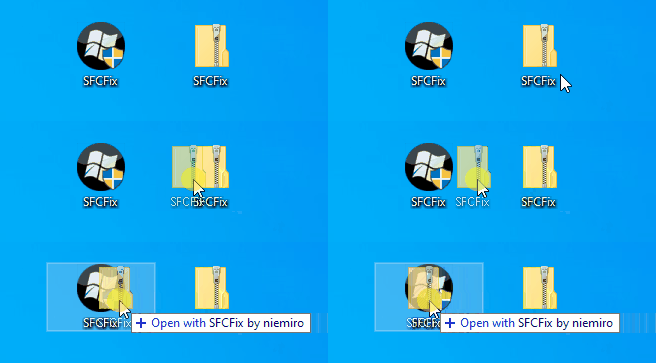
67139f52b3c1e-SFCFix-Zip-Eng.gif

  • SFCFix will launch, let it complete.
  • Once done, a file will appear on your desktop, called SFCFix.txt.
  • Post the logfile (SFCFix.txt) as attachment in your next reply.
 

Attachments

My Computer

System One

  • OS
    Windows 10
You can use the following commands to replace files manually into the components store. If it's not working you can use the attached SFCFix.zip.
Thanks. I ran into SFCFix also recently. I did not had a Fix file (SFCFix.zip) that I can drop onto that SFCFix program. (Seen one but that was a fix for a different problem) Just a normal run says that there are no issues. So why does it not see that there is something that is needed to fix (that was the purpose of this program) It examines the CBS.log and CBS.persist.log and found no issues;

Code:
Welcome to SFCFix by niemiro and sysnative.com.

Checking for updates . . .
No new update is available at this time.

Processing directive 1 of 1 (AutoAnalysis::)
Checking store directories . . .
Checking CBS.log . . .
Checking CBS.persist.log . . .
Checking CheckSUR.log . . .
Checking CheckSUR.persist.log . . .

SUMMARY:
   CBS & SFC total detected corruption count:     0
   CBS & SFC total unimportant corruption count:  0
   CBS & SFC total fixed corruption count:        0
   SURT total detected corruption count:          0
   SURT total unimportant corruption count:       0
   SURT total fixed corruption count:             0

Press any key to continue to explanation of summary . . .

As this program is still under development I rather not use it on my real system. Looked inside the zip file; understand what it's want to transfer. The location is visible and the directory what's needed to be replaced there with enough rights. As this is a MS update issue I rather prefer that the update proces fixing this issue, not a third party product.

I transferred the files to my VM and tested if the issue could be fixed. (Test environment) On that VM it detected issues and used RestoreHealth(*) to fix it also. ((*) The same long stuck at 62,3% was occurring, just as a normal /RestoreHealth already did)

Code:
Checking for updates . . .
No new update is available at this time.

Processing directive 1 of 1 (AutoAnalysis::)
Checking store directories . . .
Checking CBS.log . . .
Checking CheckSUR.log . . .
Checking CheckSUR.persist.log . . .

Attempting repair . . .
Stage 1
Stage 2
Stage 3

Due to the nature of your corruptions, scan times have been extended by
approximately 15-20 minutes. Please be patient and allow the operation to
complete.

Deployment Image Servicing and Management tool
Version: 10.0.26100.5074

Image Version: 10.0.26200.8457

[====================       35.5%                          ]

Find it strange that it detected issues on my VM but on my real system not. The only difference is the version. 8457 on VM, 8524 on my system. They have both the same issues; that missing file. Watching the CBS; I saw the same message go by like the normal /RestoreHealth also was showing. It ended the same as RestoreHealth did but SFCFix was not closing. It could and say: "Press a key to end the program" It kept open. While the TrustedInstaller was finished and stopt it's service after it timed-out.

Code:
Deployment Image Servicing and Management tool
Version: 10.0.26100.5074

Image Version: 10.0.26200.8457

[==========================100.0%==========================]
Error: 0x800f0915

The repair content could not be found anywhere.
Check the internet connectivity or use the "Source" option to specify the location of the files that are required to restore the image. For more information on specifying a source location, see https://go.microsoft.com/fwlink/?LinkId=243077.

The DISM log file can be found at C:\WINDOWS\Logs\DISM\dism.log

DISM found issues but when I pressed a key after a while SFCFix reported:

Code:
SFCFix version 3.0.2.1 by niemiro.
Start time: 2026-06-05 15:54:10.853
Microsoft Windows 10 Build 26200 - amd64
Not using a script file.

AutoAnalysis::
SUMMARY: No corruptions were detected.
AutoAnalysis:: directive completed successfully.

Successfully processed all directives.
SFCFix version 3.0.2.1 by niemiro has completed.
Currently storing 0 datablocks.
Finish time: 2026-06-05 16:22:08.717
----------------------EOF-----------------------

I then dropped the SFCFix.zip file onto SFCFix and it reacted as expected; It replaced the content on that location.
Ran DISM /RestoreHealth again to see if it again falls over this file...... It seemed to fixed the issue; It reported as normal [HRESULT = 0x00000000 - S_OK]

Now I updated this VM 8457 version to 8524 and check if the issue is still occurring..... It resulted in succes. Find it strange that after the update it found 826 corrupted files and repaired them all. (It took also a long time) An other run; reported 0 corrupted files and ended successful (Same message as above) Why did it took 2 runs to fix issues?.....

Now I understand why an inplace-installment of 26200.8457 went wrong after a while. It had also this problem. In my case (NL) the issue was present also with the previous update. I came at the surface after the 26200.8524 update but was not the cause of it. It was already there. I am now gonna fix my real system also as it seems to solve this issue. I am not very confident that the next update will fix this issue because it was there also with the previous official update. MS just did not noticed it. A worrisome detail. Will on a later date install Win11 v2.ISO on a VM and update it to the next update to check if MS addressed this issue. Non NL users may have other issues and perhaps the US users have no issues at all or other issues.
 

My Computer

System One

  • OS
    Win 11 Pro "25H2" Build 26200.8655, Zorin OS Pro
    Computer type
    PC/Desktop
    Manufacturer/Model
    Self built
    CPU
    Intel® Core™ i7-12700KF 12th Gen.
    Motherboard
    ASUS Prime Z690-A, BIOS v4505
    Memory
    32GB DDR5 5600-36 Vengeance
    Graphics Card(s)
    PCIe4.0 Asus NVIDIA RTX3060Ti
    Sound Card
    Onboard; Realtek
    Monitor(s) Displays
    34" LG 34UC79G-B Curved 21:9 144Hz
    Screen Resolution
    2560x1080 (No HDR)
    Hard Drives
    250Gb Samsung 870PRO NVMe (Win 11 Pro)
    1Tb Samsung 980PRO NVMe
    1Tb Samsung 970EVO NVMe
    2Tb Samsung 990PRO NVMe with heatsink.
    4Tb WDC WD40EZRZ Blue SATA (Int.)
    4Tb WDC WD40EZRZ Blue SATA (Int.)
    3Tb WDC WD30EFRZ Red SATA (Int.)
    256Gb Samsung 840PRO SSD (RHEL 9,5)
    256Gb Samsung 850PRO SSD (Zorin OS Pro 18)
    PSU
    Coolermaster 850W V2 Gold with internal 12cm exaust fan
    Case
    Be-Quiet Pure Base 600.
    Cooling
    3x Be-Quiet! 12/14cm "Silent Wings 4" casefans, 1x Arctic Freezer i35 CPU towerblock with fan.
    Keyboard
    Steelseries APEX 7 keyboard.
    Mouse
    Logitech G-502 Hero
    Internet Speed
    1Gb
    Browser
    Brave
    Antivirus
    F-Secure
    Other Info
    No Noise system.
    256Gb Kingston Travler USB 3.0 drive.
    64Gb Sandisk USB 3.2 drive. (Ventoy)
    8Gb Philips USB 3.0 drive. (Win. Inst.)
    8Gb Philips USB 3.0 drive. (Rescue disk)
    2Tb WD USB 3.0 Passport drive.
    USB Ext. 500Gb WD SATA drive.
    External USB 3.0 C.A. CD/DVD* burner.
I am now gonna fix my real system also as it seems to solve this issue.....

Just did this and yes, no errors. But I have to keep in mind that once this error occurs it fixes nothing! (It is an exeptional situation not seen before) Now it was in a good state it repaired also some additional 279 other files among others some efi boot files..... A second run; it found no corrupted files anymore.

It resulted in [HRESULT = 0x00000000 - S_OK] as it should be.
 
Last edited:

My Computer

System One

  • OS
    Win 11 Pro "25H2" Build 26200.8655, Zorin OS Pro
    Computer type
    PC/Desktop
    Manufacturer/Model
    Self built
    CPU
    Intel® Core™ i7-12700KF 12th Gen.
    Motherboard
    ASUS Prime Z690-A, BIOS v4505
    Memory
    32GB DDR5 5600-36 Vengeance
    Graphics Card(s)
    PCIe4.0 Asus NVIDIA RTX3060Ti
    Sound Card
    Onboard; Realtek
    Monitor(s) Displays
    34" LG 34UC79G-B Curved 21:9 144Hz
    Screen Resolution
    2560x1080 (No HDR)
    Hard Drives
    250Gb Samsung 870PRO NVMe (Win 11 Pro)
    1Tb Samsung 980PRO NVMe
    1Tb Samsung 970EVO NVMe
    2Tb Samsung 990PRO NVMe with heatsink.
    4Tb WDC WD40EZRZ Blue SATA (Int.)
    4Tb WDC WD40EZRZ Blue SATA (Int.)
    3Tb WDC WD30EFRZ Red SATA (Int.)
    256Gb Samsung 840PRO SSD (RHEL 9,5)
    256Gb Samsung 850PRO SSD (Zorin OS Pro 18)
    PSU
    Coolermaster 850W V2 Gold with internal 12cm exaust fan
    Case
    Be-Quiet Pure Base 600.
    Cooling
    3x Be-Quiet! 12/14cm "Silent Wings 4" casefans, 1x Arctic Freezer i35 CPU towerblock with fan.
    Keyboard
    Steelseries APEX 7 keyboard.
    Mouse
    Logitech G-502 Hero
    Internet Speed
    1Gb
    Browser
    Brave
    Antivirus
    F-Secure
    Other Info
    No Noise system.
    256Gb Kingston Travler USB 3.0 drive.
    64Gb Sandisk USB 3.2 drive. (Ventoy)
    8Gb Philips USB 3.0 drive. (Win. Inst.)
    8Gb Philips USB 3.0 drive. (Rescue disk)
    2Tb WD USB 3.0 Passport drive.
    USB Ext. 500Gb WD SATA drive.
    External USB 3.0 C.A. CD/DVD* burner.
Download an ISO for whatever version of widows you have installed.
Open the ISO by clicking on it.
Use this command to directly point to the source. Replace G with the drive letter your ISO is mounted on. Replace ESD with WIM if you're not using ESD compression. Basically match whatever is in the /sources/install.xxx file. example if sources/install.esd is in the iso then that is what you'd change it to.
the number 2 in the example below is the index number of the version of windows (home or pro or others) you have installed.

dism /online /cleanup-image /restorehealth /Source:ESD:G:\sources\Install.esd:2 /limitaccess <----need windows installation media for this

To find the index number do this:
Mount the ISO to a drive, locate the install.wim or install.esd file inside the sources folder, and use the DISM tool in an elevated Command Prompt to query the exact edition mapped to each index number. [1, 2]
  1. Mount the ISO: Right-click the Windows ISO file and select Mount (or double-click it). Take note of its assigned drive letter (e.g., D: or F:). [1, 2]
  2. Open Command Prompt: Search for cmd in the taskbar, right-click Command Prompt, and select Run as administrator. [1, 2, 3]
  3. Run the DISM Command: Based on whether your sources folder contains an install.wim or install.esd file, run the corresponding command (replace X with your mounted drive letter): [1, 2, 3]
For install.wim:
dism /Get-WimInfo /WimFile:X:\sources\install.wim /index:1 [1]
For install.esd:
dism /Get-WimInfo /WimFile:X:\sources\install.esd /index:1 [1]
  1. Review Indices: The command will output information for index 1, such as Windows 11 Home, Pro, or Education. Change the /index: number in the command (e.g., /index:2, /index:3, etc.) to view the versions corresponding to the other images in the ISO.
 

My Computer

System One

  • OS
    Windows 11 25H2
    Computer type
    PC/Desktop
    Manufacturer/Model
    N/A
    CPU
    AMD 9950X3d2
    Motherboard
    Asus x870E Extreme
    Memory
    64GB Corsair vengeance DDR5 (6000 MHz) CL30
    Graphics Card(s)
    AMD 9070XT
    Sound Card
    Realtek
    Monitor(s) Displays
    N/A
    Screen Resolution
    1440p
    PSU
    Thermaltake 1200w
    Case
    Asus View 71 TG RGB
    Cooling
    Custom Cooling loop With an Alphacool 13339 VPP Apex Pump and EK Quantum surface radiator
    Internet Speed
    Xfinity 2300 mbps
    Antivirus
    Norton
Did anyone tried to patch build 26200.8655 over this error?
Did not patch anything , updated and " DISM /Online /Cleanup-Image /RestoreHealth " took a very long time , ended with " no errors found "
Then made a disk-cleanup , again " DISM /Online /Cleanup-Image /RestoreHealth " , no errors again !
So , seems this error 0x800f0915 has been solved............... :giggle:

Still dont understand WHY (??) this " DISM /Online /Cleanup-Image /RestoreHealth " needs such a loooong (!) time to finish ( no errors found ).
Everytime again...........!! 🛠️
 
Last edited:

My Computer

System One

  • OS
    Windows11 Pro 25H2
    Computer type
    PC/Desktop
    Manufacturer/Model
    Asus
    CPU
    i7
    Motherboard
    z97k
    Memory
    32GB
    Graphics Card(s)
    nVidia
    Sound Card
    Realtek
    Hard Drives
    3
    Cooling
    air
    Browser
    Edge
    Antivirus
    ESET
I updated fine to build 10.0.26200.8655. I downloaded a patch from Windows Catalogue and then run a dism command to add new update.

"sfc /scannow" passed
Running now "DISM.exe /Online /Cleanup-image /Restorehealth"

Prior to that I did run "Dism /Online /Cleanup-Image /StartComponentCleanup /ResetBase" and "chkdsk C: /f /r /x".

Funk yeah. :D

Code:
C:\Windows\System32>DISM.exe /Online /Cleanup-image /Restorehealth

Deployment Image Servicing and Management tool
Version: 10.0.26100.8521

Image Version: 10.0.26200.8655

[==========================100.0%==========================] The restore operation completed successfully.
The operation completed successfully.
 
Last edited:

My Computer

System One

  • OS
    Windows 11
I updated fine to build 10.0.26200.8655. I downloaded a patch from Windows Catalogue and then run a dism command to add new update.

"sfc /scannow" passed
Runming now "DISM.exe /Online /Cleanup-image /Restorehealth"

Prior to that I did run "Dism /Online /Cleanup-Image /StartComponentCleanup /ResetBase" and "chkdsk C: /f /r /x".
Did you need so much time as I did ( "DISM.exe /Online /Cleanup-image /Restorehealth" )..............??
 

My Computer

System One

  • OS
    Windows11 Pro 25H2
    Computer type
    PC/Desktop
    Manufacturer/Model
    Asus
    CPU
    i7
    Motherboard
    z97k
    Memory
    32GB
    Graphics Card(s)
    nVidia
    Sound Card
    Realtek
    Hard Drives
    3
    Cooling
    air
    Browser
    Edge
    Antivirus
    ESET
Did you need so much time as I did ( "DISM.exe /Online /Cleanup-image /Restorehealth" )..............??

Yes, it took around 15 minutes. Dism first stopped around 62% and got really slow. It stopped a few times more till till 70%, then I just left it be and when returned to PC, Dism was completed with OK status.

The log is kinda weird though.

Code:
Info                  CBS    Repr: Finished repairing CSI store.
Info                  CBS    FLOW: Entering stage: RemoveStagedPackages
Info                  CBS   
Info                  CBS    =================================
Info                  CBS    Checking System Update Readiness.
Info                  CBS   
Info                  CBS    Summary:
Info                  CBS    Operation: Detect and Repair
Info                  CBS    Operation result: 0x0
Info                  CBS    Last Successful Step: Remove staged packages completes.
Info                  CBS    Total Detected Corruption:    581
Info                  CBS        CBS Manifest Corruption:    0
Info                  CBS        CBS Metadata Corruption:    0
Info                  CBS        CSI Manifest Corruption:    0
Info                  CBS        CSI Metadata Corruption:    0
Info                  CBS        CSI Payload Corruption:    0
Info                  CBS        CSI FileFlags Corrupt:    581
Info                  CBS    Total Repaired Corruption:    581
Info                  CBS        CBS Manifest Repaired:    0
Info                  CBS        CSI Manifest Repaired:    0
Info                  CBS        CSI Payload Repaired:    0
Info                  CBS        CSI FileFlags Repaired:    581
Info                  CBS        CSI Registry Metadata refreshed:    False
Info                  CBS        CSI Store Metadata refreshed:    True
Info                  CBS    Staged Packages:
Info                  CBS        CBS Staged packages:    0
Info                  CBS        CBS Staged packages removed:    0
Info                  CBS   
Info                  CBS    Total Operation Time: 835 seconds.
Info                  CBS    Ensure CBS corruption flag is clear
Info                  CBS    All WCP store corruptions were fixed
Info                  CBS    Ensure WCP corruption flag is clear
Info                  CBS    CheckSur: hrStatus: 0x0 [S_OK], download results: Client.OS.rs2.amd64_history_cix:0x0;Client.OS.rs2.amd64:0x0;
 

My Computer

System One

  • OS
    Windows 11
I do not believe it!!! After facing this dism restore health error again, I ran dism startcomponentcleanup and restarted my PC!! Then I reran dism restore health and finished PERFECTLY!
 

My Computer

System One

  • OS
    win 11 pro 25 h2
    Computer type
    PC/Desktop
I updated fine to build 10.0.26200.8655. I downloaded a patch from Windows Catalogue and then run a dism command to add new update.

"sfc /scannow" passed
Running now "DISM.exe /Online /Cleanup-image /Restorehealth"

Prior to that I did run "Dism /Online /Cleanup-Image /StartComponentCleanup /ResetBase" and "chkdsk C: /f /r /x".

Funk yeah. :D

Code:
C:\Windows\System32>DISM.exe /Online /Cleanup-image /Restorehealth

Deployment Image Servicing and Management tool
Version: 10.0.26100.8521

Image Version: 10.0.26200.8655

[==========================100.0%==========================] The restore operation completed successfully.
The operation completed successfully.
What do you mean regarding downloaded patches? Which patches? Do you mean that after installing the today's update, you just ran dism reset base and check disk and then then sfc scannow and dism restore health?
Please write us exactly what you did to face this error, in case it will reappear!! Thanks in advance!
 

My Computer

System One

  • OS
    win 11 pro 25 h2
    Computer type
    PC/Desktop
I do not believe it!!! After facing this dism restore health error again, I ran dism startcomponentcleanup and restarted my PC!! Then I reran dism restore health and finished PERFECTLY!
I have to try that tomorrow. I got the same error too.
 

My Computer

System One

  • OS
    Windows 11 25H2 Pro
    Computer type
    Laptop
    Manufacturer/Model
    HP
    CPU
    AMD Ryzen 5 4600H
    Memory
    32 GB
    Graphics Card(s)
    NVIDIA GTX 1650
    Sound Card
    Realtek Audio
    Monitor(s) Displays
    AMD Radeon (TM) Graphics
    Hard Drives
    INTEL SSD
    Mouse
    Rival 5
i run Dism /Online /Cleanup-Image /StartComponentCleanup then rebbot and run again restorehealth and works!!!

Thanks
 

My Computer

System One

  • OS
    Windows 11
    Computer type
    PC/Desktop
    Manufacturer/Model
    Asus
    CPU
    inte core i7 13th generation
    Motherboard
    PRIME Z790M-PLUS
    Memory
    12 GB
    Graphics Card(s)
    nvidia rtx 3600
    Sound Card
    REaltek integrated
    Monitor(s) Displays
    LG 4k 27''
    Screen Resolution
    3840*2160
    Hard Drives
    ssd nve kigntom 2 TB
What do you mean regarding downloaded patches? Which patches? Do you mean that after installing the today's update, you just ran dism reset base and check disk and then then sfc scannow and dism restore health?
Please write us exactly what you did to face this error, in case it will reappear!! Thanks in advance!


Yes, pretty much what you said. On build 26200.8524 I got always the 0x800f0915 error with DISM, so I didn't try to run it again today.

I thought I will patch the Windows first and then rerun DISM.

So what I did (probably not all steps are needed)

1) sfc /scannow

2) Download patch from Win Catalog (chose proper version for x64 and 25h2 - 26200 ).


In CMD terminal ran as Admin (to patch windows):

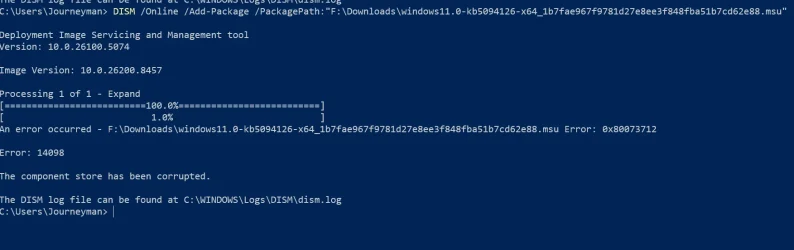
DISM /Online /Add-Package /PackagePath:C:\Win_26200.8655_update\windows11.0-kb5094126-x64_1b7fae967f9781d27e8ee3f848fba51b7cd62e88.msu

3) Rebooted PC when asked for.

4) Run again "sfc /scannow"

5) Run "Dism /Online /Cleanup-Image /StartComponentCleanup /ResetBase". Should reset component database.

6) Run "chkdsk C: /f /r /x" to check and fix C: drive errors and rebooted ( This can be long - 15 minutes or longer).

7) Run "DISM.exe /Online /Cleanup-image /Restorehealth"
 

My Computer

System One

  • OS
    Windows 11
Yes, pretty much what you said. On build 26200.8524 I got always the 0x800f0915 error with DISM, so I didn't try to run it again today.

I thought I will patch the Windows first and then rerun DISM.

So what I did (probably not all steps are needed)

1) sfc /scannow

2) Download patch from Win Catalog (chose proper version for x64 and 25h2 - 26200 ).


In CMD terminal ran as Admin (to patch windows):

DISM /Online /Add-Package /PackagePath:C:\Win_26200.8655_update\windows11.0-kb5094126-x64_1b7fae967f9781d27e8ee3f848fba51b7cd62e88.msu

3) Rebooted PC when asked for.

4) Run again "sfc /scannow"

5) Run "Dism /Online /Cleanup-Image /StartComponentCleanup /ResetBase". Should reset component database.

6) Run "chkdsk C: /f /r /x" to check and fix C: drive errors and rebooted ( This can be long - 15 minutes or longer).

7) Run "DISM.exe /Online /Cleanup-image /Restorehealth"
thank you!!! Fortunately I just ran Dism /Online /Cleanup-Image /StartComponentCleanup, then sfc /scannow and restarted my PC. Restore health worked fine!!!
 

My Computer

System One

  • OS
    win 11 pro 25 h2
    Computer type
    PC/Desktop
I do not believe it!!! After facing this dism restore health error again, I ran dism startcomponentcleanup and restarted my PC!! Then I reran dism restore health and finished PERFECTLY!
Thank you, that was very helpful.
 

My Computer

System One

  • OS
    Windows 11 25H2 Pro
    Computer type
    Laptop
    Manufacturer/Model
    HP
    CPU
    AMD Ryzen 5 4600H
    Memory
    32 GB
    Graphics Card(s)
    NVIDIA GTX 1650
    Sound Card
    Realtek Audio
    Monitor(s) Displays
    AMD Radeon (TM) Graphics
    Hard Drives
    INTEL SSD
    Mouse
    Rival 5
Yes, pretty much what you said. On build 26200.8524 I got always the 0x800f0915 error with DISM, so I didn't try to run it again today.

I thought I will patch the Windows first and then rerun DISM.

So what I did (probably not all steps are needed)

1) sfc /scannow

2) Download patch from Win Catalog (chose proper version for x64 and 25h2 - 26200 ).


In CMD terminal ran as Admin (to patch windows):

DISM /Online /Add-Package /PackagePath:C:\Win_26200.8655_update\windows11.0-kb5094126-x64_1b7fae967f9781d27e8ee3f848fba51b7cd62e88.msu

3) Rebooted PC when asked for.

4) Run again "sfc /scannow"

5) Run "Dism /Online /Cleanup-Image /StartComponentCleanup /ResetBase". Should reset component database.

6) Run "chkdsk C: /f /r /x" to check and fix C: drive errors and rebooted ( This can be long - 15 minutes or longer).

7) Run "DISM.exe /Online /Cleanup-image /Restorehealth"
Since I have already run DISM (the 3 basic commands) and sfc /scannow, can I also perform steps 5 and 6?

I didn’t install the updates manually; I only used Windows Update.
 

My Computer

System One

  • OS
    Windows 11 25H2 Pro
    Computer type
    Laptop
    Manufacturer/Model
    HP
    CPU
    AMD Ryzen 5 4600H
    Memory
    32 GB
    Graphics Card(s)
    NVIDIA GTX 1650
    Sound Card
    Realtek Audio
    Monitor(s) Displays
    AMD Radeon (TM) Graphics
    Hard Drives
    INTEL SSD
    Mouse
    Rival 5
Did not updated from previous ( buggy) preview , updated to stable 8655-version .
Checked DISM , all items , no errors anymore...........
Nothing patched , only the "
DISM /Online /Cleanup-Image /RestoreHealth " takes an awfull loooong time , before the message "no errors found " ............... 🛠️
 

My Computer

System One

  • OS
    Windows11 Pro 25H2
    Computer type
    PC/Desktop
    Manufacturer/Model
    Asus
    CPU
    i7
    Motherboard
    z97k
    Memory
    32GB
    Graphics Card(s)
    nVidia
    Sound Card
    Realtek
    Hard Drives
    3
    Cooling
    air
    Browser
    Edge
    Antivirus
    ESET

Latest Support Threads

Back
Top Bottom