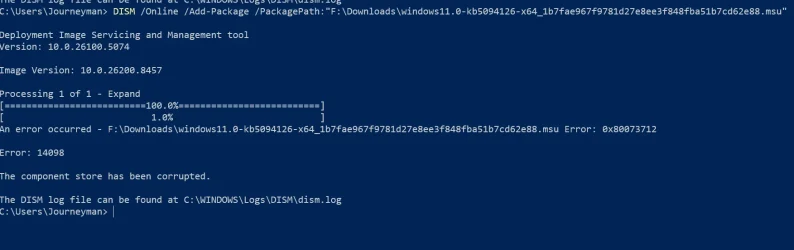
You can use the following commands to replace files manually into the components store. If it's not working you can use the attached SFCFix.zip.Thanks. Picked up a copy of the smbwmiv2.mfl file in the attachment and tried to place it in that \r directory but I have not enough rights as Admin
Code:
icacls "%systemroot%\WinSxS\amd64_microsoft-windows-s..rver-apis.resources_31bf3856ad364e35_10.0.26100.2161_nl-nl_b443d00bdbef7989" /save "%userprofile%\desktop\perms.acl" /t
takeown /f "%systemroot%\WinSxS\amd64_microsoft-windows-s..rver-apis.resources_31bf3856ad364e35_10.0.26100.2161_nl-nl_b443d00bdbef7989" /r
icacls "%systemroot%\WinSxS\amd64_microsoft-windows-s..rver-apis.resources_31bf3856ad364e35_10.0.26100.2161_nl-nl_b443d00bdbef7989" /grant administrators:(F) /t

Copy files>>

icacls "%systemroot%\WinSxS\amd64_microsoft-windows-s..rver-apis.resources_31bf3856ad364e35_10.0.26100.2161_nl-nl_b443d00bdbef7989" /setowner "NT SERVICE\TrustedInstaller" /t
icacls "%systemroot%\WinSxS" /restore "%userprofile%\desktop\perms.acl" /t
Download

Warning: This fix was written specifically for this system. Do not run this fix on another system.
- Save any work you have open, and close all programs.
- Download the attachment SFCFix.zip and save it to your desktop.
- Drag the SFCFix.zip file over the SFCFix.exe executable and release it.
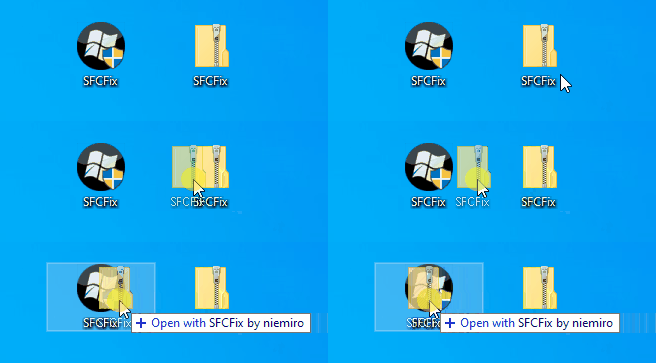
- SFCFix will launch, let it complete.
- Once done, a file will appear on your desktop, called SFCFix.txt.
- Post the logfile (SFCFix.txt) as attachment in your next reply.
Attachments
My Computer
At a glance
Windows 10
- OS
- Windows 10