Hi Chaps,
Just upgraded my 23H2 system to 25H2. Mostly went well, aside from some unexpected Windows shares issues (wouldn't be an upgraded if it didn't stuff-up sharing!).
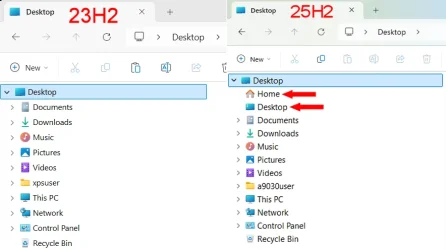
Anyway, to the meat of the issue. Since the upgrade I've noticed that the "Desktop" and "Home" icons have reappeared in the navigation-pane in Windows Explorer. (see attached).
There have been no changes made to the settings or configuration of Explorer. I've tried the previously working registry patches to remove them with no luck.
Any suggestions on what to try next?
Cheers,
Mike.
Just upgraded my 23H2 system to 25H2. Mostly went well, aside from some unexpected Windows shares issues (wouldn't be an upgraded if it didn't stuff-up sharing!).
Anyway, to the meat of the issue. Since the upgrade I've noticed that the "Desktop" and "Home" icons have reappeared in the navigation-pane in Windows Explorer. (see attached).
There have been no changes made to the settings or configuration of Explorer. I've tried the previously working registry patches to remove them with no luck.
Any suggestions on what to try next?
Cheers,
Mike.
Attachments
My Computer
At a glance
Windows 11
- OS
- Windows 11