.3mf files quit showing thumbnails


Steverc1572

Member
Local time
5:40 PM
Posts
7
OS
Windows 11
For some reason the over the last 2 weeks my thumbnails for .3mf files quit showing the stl and obj still show their thumbnails. I have tried Powertoys, 3D viewer and STL-thumbs and none of them helped. I think it started when I updated to 25H2 version.
 

My Computer

System One

  • OS
    Windows 11
    Computer type
    PC/Desktop
    Manufacturer/Model
    User Built
    CPU
    I7-8700
    Motherboard
    Gigabyte Z370 HD3P
    Memory
    16GB
    Graphics Card(s)
    GeForce GTX 750Ti
    Monitor(s) Displays
    Asus MX 279
    Hard Drives
    Western Digital WDS100T2B0B used for Windows 11 OS
    another Western Digital WDS100T2B0B used for Storage
    Seagate BarraCuda ST8000DMZ04/004 used for Storage
    Seagate BarraCuda ST3000DM008 used for Storage
    Internet Speed
    1 Gbps Fiber optic cable
 

My Computers

System One System Two

  • OS
    Windows 11 Pro 25H2
    Computer type
    PC/Desktop
    Manufacturer/Model
    Dell Optiplex 7080
    CPU
    i9-10900 10 core 20 threads
    Motherboard
    DELL 0J37VM
    Memory
    32 gb
    Graphics Card(s)
    none-Intel UHD Graphics 630
    Sound Card
    Integrated Realtek
    Monitor(s) Displays
    Benq 27
    Screen Resolution
    2560x1440
    Hard Drives
    2x1tb Solidigm m.2 nvme /External drives 512gb Samsung m.2 sata+2tb Kingston m2.nvme
    PSU
    500w
    Case
    MT
    Cooling
    Dell Premium
    Keyboard
    Logitech wired
    Mouse
    Logitech wireless
    Internet Speed
    so slow I'm too embarrassed to tell
    Browser
    #1 Edge #2 Firefox
    Antivirus
    Defender+MWB Premium
  • Operating System
    Windows 11 Pro 24H2 26200.8457
    Computer type
    PC/Desktop
    Manufacturer/Model
    Beelink Mini PC SER5
    CPU
    AMD Ryzen 7 6800U
    Memory
    32 gb
    Graphics card(s)
    integrated
    Sound Card
    integrated
    Monitor(s) Displays
    Benq 27
    Screen Resolution
    2560x1440
    Hard Drives
    1TB Crucial nvme
    Keyboard
    Logitech wired
    Mouse
    Logitech wireless
    Internet Speed
    still too embarrassed to tell
    Browser
    Firefox
    Antivirus
    Defender
    Other Info
    System 3 is non compliant Dell 9020 i7-4770/24gb ram Win11 PRO 26200.8457
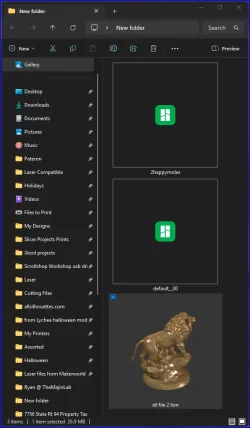
Ok I have tried resetting the cache by disk cleanup numerous times and reinstalling and uninstalling the above software plus several others.
and I all get is this . I have used every 3D slicer that I have and associated it with the file also. (IdeaMaker, Cura, FlashPrint, Bamboo Studio, Ocra Slicer, ChituBox, Lychee, Prusa Slicer, ELEGOO SatelLite, NovaMaker etc.
 

Attachments

  • Screenshot 2025-10-22 140857.webp
    Screenshot 2025-10-22 140857.webp
    35.7 KB · Views: 2

My Computer

System One

  • OS
    Windows 11
    Computer type
    PC/Desktop
    Manufacturer/Model
    User Built
    CPU
    I7-8700
    Motherboard
    Gigabyte Z370 HD3P
    Memory
    16GB
    Graphics Card(s)
    GeForce GTX 750Ti
    Monitor(s) Displays
    Asus MX 279
    Hard Drives
    Western Digital WDS100T2B0B used for Windows 11 OS
    another Western Digital WDS100T2B0B used for Storage
    Seagate BarraCuda ST8000DMZ04/004 used for Storage
    Seagate BarraCuda ST3000DM008 used for Storage
    Internet Speed
    1 Gbps Fiber optic cable
Mentions something about an app called: Papa's Best STL Thumbnails
I think it might support other extensions, I'm not sure. Check the video out:


My Computer

System One

  • OS
    Windows 11
    Computer type
    PC/Desktop
    Manufacturer/Model
    Custom Built
Ok I have tried resetting the cache by disk cleanup numerous times and reinstalling and uninstalling the above software plus several others.
and I all get is this . I have used every 3D slicer that I have and associated it with the file also. (IdeaMaker, Cura, FlashPrint, Bamboo Studio, Ocra Slicer, ChituBox, Lychee, Prusa Slicer, ELEGOO SatelLite, NovaMaker etc.
skim this thread


My Computer

System One

  • OS
    Windows 11 Pro
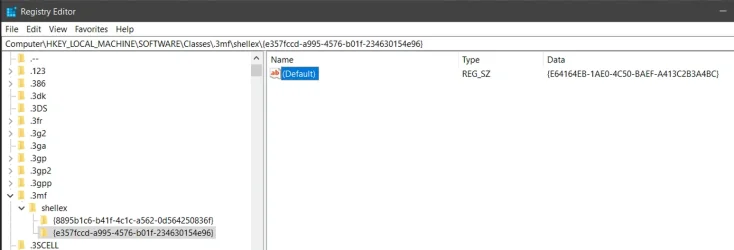
I already tried Papa's Best Stl Thumbnails and it did not work, not sure if it supports .3mf anyways. dacrone I seen that in the 10 forum but was afraid the registry entries may be different in 11. Mine does not have the shellex folder with the keys like the 2nd picture, it only has the .3mf folder under Classes like the 1st picture.1761164270264.webp1761164036123.webp
 

My Computer

System One

  • OS
    Windows 11
    Computer type
    PC/Desktop
    Manufacturer/Model
    User Built
    CPU
    I7-8700
    Motherboard
    Gigabyte Z370 HD3P
    Memory
    16GB
    Graphics Card(s)
    GeForce GTX 750Ti
    Monitor(s) Displays
    Asus MX 279
    Hard Drives
    Western Digital WDS100T2B0B used for Windows 11 OS
    another Western Digital WDS100T2B0B used for Storage
    Seagate BarraCuda ST8000DMZ04/004 used for Storage
    Seagate BarraCuda ST3000DM008 used for Storage
    Internet Speed
    1 Gbps Fiber optic cable
just create whatever keys you need to. you can always just delete them if it does nothing to fix the issue
 

My Computer

System One

  • OS
    Windows 11 Pro
Not sure how he actually inserted them into the registry?
 

My Computer

System One

  • OS
    Windows 11
    Computer type
    PC/Desktop
    Manufacturer/Model
    User Built
    CPU
    I7-8700
    Motherboard
    Gigabyte Z370 HD3P
    Memory
    16GB
    Graphics Card(s)
    GeForce GTX 750Ti
    Monitor(s) Displays
    Asus MX 279
    Hard Drives
    Western Digital WDS100T2B0B used for Windows 11 OS
    another Western Digital WDS100T2B0B used for Storage
    Seagate BarraCuda ST8000DMZ04/004 used for Storage
    Seagate BarraCuda ST3000DM008 used for Storage
    Internet Speed
    1 Gbps Fiber optic cable
Inserted all the info that was in that post and it made no difference at all. I still have stl and obj 3D files showing thumbnails but no .3mf files.1761172732688.webp
 

My Computer

System One

  • OS
    Windows 11
    Computer type
    PC/Desktop
    Manufacturer/Model
    User Built
    CPU
    I7-8700
    Motherboard
    Gigabyte Z370 HD3P
    Memory
    16GB
    Graphics Card(s)
    GeForce GTX 750Ti
    Monitor(s) Displays
    Asus MX 279
    Hard Drives
    Western Digital WDS100T2B0B used for Windows 11 OS
    another Western Digital WDS100T2B0B used for Storage
    Seagate BarraCuda ST8000DMZ04/004 used for Storage
    Seagate BarraCuda ST3000DM008 used for Storage
    Internet Speed
    1 Gbps Fiber optic cable

Wish I knew what happen but all of a sudden they started working again. Not sure if they started regenerating the thumbnails from a different drive first ( I have 5 different ones) and it finally got around to the one I had open for testing or what. Thanks for all the help. Admin you can delete this whole thread if you like.
 

My Computer

System One

  • OS
    Windows 11
    Computer type
    PC/Desktop
    Manufacturer/Model
    User Built
    CPU
    I7-8700
    Motherboard
    Gigabyte Z370 HD3P
    Memory
    16GB
    Graphics Card(s)
    GeForce GTX 750Ti
    Monitor(s) Displays
    Asus MX 279
    Hard Drives
    Western Digital WDS100T2B0B used for Windows 11 OS
    another Western Digital WDS100T2B0B used for Storage
    Seagate BarraCuda ST8000DMZ04/004 used for Storage
    Seagate BarraCuda ST3000DM008 used for Storage
    Internet Speed
    1 Gbps Fiber optic cable
Wish I knew what happen but all of a sudden they started working again. Not sure if they started regenerating the thumbnails from a different drive first ( I have 5 different ones) and it finally got around to the one I had open for testing or what. Thanks for all the help. Admin you can delete this whole thread if you like.
if you created the reg keys, that is what did it. glad it worked
 

My Computer

System One

  • OS
    Windows 11 Pro

Latest Support Threads

Back
Top Bottom