Solved A driver cannot load on this device


churin

Member
Local time
9:25 AM
Posts
29
Location
San Jose, CA
OS
Windows 11 Pro
The W11 Pro machine, which was just in-place upgraded from Windows 10, displays the above message when it boots.
Suggestions are appreciated. Note that the W10 machine met the W11 requirements.
A driver cannot load on this deviceX.webp
 

Attachments

  • A driver cannot load on this device.webp
    A driver cannot load on this device.webp
    43 KB · Views: 1

My Computer

System One

  • OS
    Windows 11 Pro
    Computer type
    PC/Desktop
    Manufacturer/Model
    Self made
    CPU
    AMD Ryzen 5600X
    Motherboard
    Gigabyte X570 AORUS Ultra 1.1/1.2 BIOS F35d
    Memory
    32GB DDR4 3600 G.Skill Ripjaws V series
    Graphics Card(s)
    Radeon RX 6500 XT
    Sound Card
    Built-in
    Monitor(s) Displays
    Dell UP2720Q
    Screen Resolution
    3860 x 2160
    Hard Drives
    1TB SATA SSD(OS) SSung 870EVO, 1TB M.2 NVMe SSD9OS SSung 970
    PSU
    Corsair RM650 650W
    Case
    Fractal Design Focus G Black ATX Mid Tower FD-CA-FOCUS-BK-W
    Cooling
    Cooler Master Master Liquid Lite 120 AIO Liquid Cooler
    Keyboard
    DURGOD TAURUS K320
    Mouse
    Microsoft Model 1049
    Internet Speed
    900Mbps/25Mbps
    Browser
    Firefox/Chrome
    Antivirus
    Microsoft Defender
    Other Info
    ICY DOCK 4 x 2.5 SSD to 5.25 Drive Bay - ExpressCage MR324SP-B ICY DOCK M.2 NVMe Mobile Rack for External 3.5" Bay - MB834M2K-B
It looks like this discussion may have a possible resolution:


My Computers

System One System Two

  • OS
    Win11 Pro 25H2 (RTM+)
    Computer type
    PC/Desktop
    Manufacturer/Model
    Acemagic
    CPU
    Intel i7-14650HX
    Memory
    32 GB
    Graphics Card(s)
    No GPU - Built-in Intel Graphics
    Sound Card
    Integrated
    Monitor(s) Displays
    Varies as machine will often be moved to locations with different monitors
    Screen Resolution
    Varies
    Hard Drives
    1 x 1TB Gen 4 NVMe SSD
    PSU
    120W Power Brick
    Keyboard
    Corsair K70 Max RGB Magnetic Keyboard
    Mouse
    Logitech MX Master 3
    Internet Speed
    1Gb Up / 1 Gb Down
    Browser
    Edge
    Antivirus
    Windows Defender
  • Operating System
    Win11 Pro 25H2 (RTM+)
    Computer type
    Laptop
    Manufacturer/Model
    Lenovo ThinkBook 13x Gen 2
    CPU
    Intel i7-1255U
    Memory
    16 GB
    Graphics card(s)
    Intel Iris Xe Graphics
    Sound Card
    Realtek® ALC3306-CG codec
    Monitor(s) Displays
    13.3-inch IPS Display
    Screen Resolution
    WQXGA (2560 x 1600)
    Hard Drives
    2 TB 4 x 4 NVMe SSD
    PSU
    USB-C / Thunderbolt 4 Power / Charging
    Keyboard
    Backlit, spill resistant keyboard
    Mouse
    Buttonless Glass Precision Touchpad
    Internet Speed
    1Gb Up / 1Gb Down
    Browser
    Edge
    Antivirus
    Windows Defender
    Other Info
    WiFi 6e / Bluetooth 5.1 / Facial Recognition / Fingerprint Sensor / ToF (Time of Flight) Human Presence Sensor
iqvw64.sys versions 1.4.0.21 and below are banned.
Code:
    <FileAttrib ID="ID_FILEATTRIB_IQVW64" FriendlyName="IQVW64.sys FileAttribute" FileName="iQVW64.SYS" MinimumFileVersion="0.0.0.0" MaximumFileVersion="1.4.0.21" />

Fortunately, it's only used for network diagnostics so you're not missing any real functionality. You should not re-enable it, because it has a known security hole. Which is why Windows banned it.
 

My Computer

System One

  • OS
    Windows 7
Please run > post share links


a) V2 log collector


b) Administrative command prompt:

dism /online /get-drivers /format:table >c:\drivers.txt
 

My Computer

System One

  • OS
    Windows 10
    Computer type
    Laptop
    Manufacturer/Model
    HP
    CPU
    Intel(R) Core(TM) i7-4800MQ CPU @ 2.70GHz
    Motherboard
    Product : 190A Version : KBC Version 94.56
    Memory
    16 GB Total: Manufacturer : Samsung MemoryType : DDR3 FormFactor : SODIMM Capacity : 8GB Speed : 1600
    Graphics Card(s)
    NVIDIA Quadro K3100M; Intel(R) HD Graphics 4600
    Sound Card
    IDT High Definition Audio CODEC; PNP Device ID HDAUDIO\FUNC_01&VEN_111D&DEV_76E0
    Hard Drives
    Model Hitachi HTS727575A9E364
    Antivirus
    Microsoft Defender
    Other Info
    Mobile Workstation
iqvw64.sys versions 1.4.0.21 and below are banned.
Code:
    <FileAttrib ID="ID_FILEATTRIB_IQVW64" FriendlyName="IQVW64.sys FileAttribute" FileName="iQVW64.SYS" MinimumFileVersion="0.0.0.0" MaximumFileVersion="1.4.0.21" />

Fortunately, it's only used for network diagnostics so you're not missing any real functionality. You should not re-enable it, because it has a known security hole. Which is why Windows banned it.
Does this mean I can just ignore it? I can suppress the message by checking the box for "Don't show this message again."
 

My Computer

System One

  • OS
    Windows 11 Pro
    Computer type
    PC/Desktop
    Manufacturer/Model
    Self made
    CPU
    AMD Ryzen 5600X
    Motherboard
    Gigabyte X570 AORUS Ultra 1.1/1.2 BIOS F35d
    Memory
    32GB DDR4 3600 G.Skill Ripjaws V series
    Graphics Card(s)
    Radeon RX 6500 XT
    Sound Card
    Built-in
    Monitor(s) Displays
    Dell UP2720Q
    Screen Resolution
    3860 x 2160
    Hard Drives
    1TB SATA SSD(OS) SSung 870EVO, 1TB M.2 NVMe SSD9OS SSung 970
    PSU
    Corsair RM650 650W
    Case
    Fractal Design Focus G Black ATX Mid Tower FD-CA-FOCUS-BK-W
    Cooling
    Cooler Master Master Liquid Lite 120 AIO Liquid Cooler
    Keyboard
    DURGOD TAURUS K320
    Mouse
    Microsoft Model 1049
    Internet Speed
    900Mbps/25Mbps
    Browser
    Firefox/Chrome
    Antivirus
    Microsoft Defender
    Other Info
    ICY DOCK 4 x 2.5 SSD to 5.25 Drive Bay - ExpressCage MR324SP-B ICY DOCK M.2 NVMe Mobile Rack for External 3.5" Bay - MB834M2K-B

You can do that. Or look in Settings App for installed programs, and see if the Intel diagnostics is a separate app that can be uninstalled.
 

My Computer

System One

  • OS
    Windows 7
You can do that. Or look in Settings App for installed programs, and see if the Intel diagnostics is a separate app that can be uninstalled.
The following is the only Intel program found. This is not it, so I just ignore the message. Thank you for your help, as well as to everyone else who participated in my thread.
Screenshot 2025-10-03 211247.webp
 

My Computer

System One

  • OS
    Windows 11 Pro
    Computer type
    PC/Desktop
    Manufacturer/Model
    Self made
    CPU
    AMD Ryzen 5600X
    Motherboard
    Gigabyte X570 AORUS Ultra 1.1/1.2 BIOS F35d
    Memory
    32GB DDR4 3600 G.Skill Ripjaws V series
    Graphics Card(s)
    Radeon RX 6500 XT
    Sound Card
    Built-in
    Monitor(s) Displays
    Dell UP2720Q
    Screen Resolution
    3860 x 2160
    Hard Drives
    1TB SATA SSD(OS) SSung 870EVO, 1TB M.2 NVMe SSD9OS SSung 970
    PSU
    Corsair RM650 650W
    Case
    Fractal Design Focus G Black ATX Mid Tower FD-CA-FOCUS-BK-W
    Cooling
    Cooler Master Master Liquid Lite 120 AIO Liquid Cooler
    Keyboard
    DURGOD TAURUS K320
    Mouse
    Microsoft Model 1049
    Internet Speed
    900Mbps/25Mbps
    Browser
    Firefox/Chrome
    Antivirus
    Microsoft Defender
    Other Info
    ICY DOCK 4 x 2.5 SSD to 5.25 Drive Bay - ExpressCage MR324SP-B ICY DOCK M.2 NVMe Mobile Rack for External 3.5" Bay - MB834M2K-B

The log files can be checked.

Please update the progress with post #5.
 

My Computer

System One

  • OS
    Windows 10
    Computer type
    Laptop
    Manufacturer/Model
    HP
    CPU
    Intel(R) Core(TM) i7-4800MQ CPU @ 2.70GHz
    Motherboard
    Product : 190A Version : KBC Version 94.56
    Memory
    16 GB Total: Manufacturer : Samsung MemoryType : DDR3 FormFactor : SODIMM Capacity : 8GB Speed : 1600
    Graphics Card(s)
    NVIDIA Quadro K3100M; Intel(R) HD Graphics 4600
    Sound Card
    IDT High Definition Audio CODEC; PNP Device ID HDAUDIO\FUNC_01&VEN_111D&DEV_76E0
    Hard Drives
    Model Hitachi HTS727575A9E364
    Antivirus
    Microsoft Defender
    Other Info
    Mobile Workstation
Intel Network adapter driver.

Not sure what version you have but here is the latest.

Sorry for the late reply. I updated the drivers, but still no luck. I did not check the drivers' version before updating. The driver version is now 14.1.22.0, dated April 8, 2025. I do not know why it is not 30.4.
 

My Computer

System One

  • OS
    Windows 11 Pro
    Computer type
    PC/Desktop
    Manufacturer/Model
    Self made
    CPU
    AMD Ryzen 5600X
    Motherboard
    Gigabyte X570 AORUS Ultra 1.1/1.2 BIOS F35d
    Memory
    32GB DDR4 3600 G.Skill Ripjaws V series
    Graphics Card(s)
    Radeon RX 6500 XT
    Sound Card
    Built-in
    Monitor(s) Displays
    Dell UP2720Q
    Screen Resolution
    3860 x 2160
    Hard Drives
    1TB SATA SSD(OS) SSung 870EVO, 1TB M.2 NVMe SSD9OS SSung 970
    PSU
    Corsair RM650 650W
    Case
    Fractal Design Focus G Black ATX Mid Tower FD-CA-FOCUS-BK-W
    Cooling
    Cooler Master Master Liquid Lite 120 AIO Liquid Cooler
    Keyboard
    DURGOD TAURUS K320
    Mouse
    Microsoft Model 1049
    Internet Speed
    900Mbps/25Mbps
    Browser
    Firefox/Chrome
    Antivirus
    Microsoft Defender
    Other Info
    ICY DOCK 4 x 2.5 SSD to 5.25 Drive Bay - ExpressCage MR324SP-B ICY DOCK M.2 NVMe Mobile Rack for External 3.5" Bay - MB834M2K-B
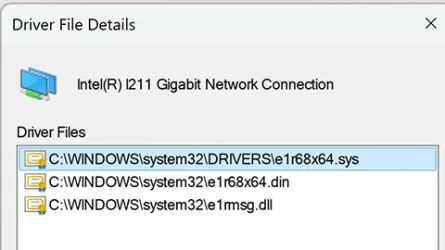
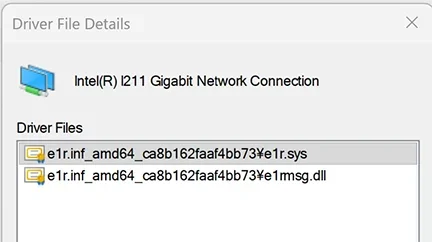
If you look in Device Manager, select the network device and look at Properties. What is the name of the actual network driver file (not iqvw64.sys, but the other driver)?
 

My Computer

System One

  • OS
    Windows 7
Does this mean I can just ignore it? I can suppress the message by checking the box for "Don't show this message again."
If your not having any problems then the answer is yes. I get the same error message only it's a different driver every time the Canary build on my old desktop gets updated. I have tried deleting the driver and also renaming the driver but every update reloads the driver. Now I just click on the Don't Show this message every time the Canary build gets updated.
 

My Computers

System One System Two

  • OS
    Windows 11 Pro 25H2
    Computer type
    PC/Desktop
    Manufacturer/Model
    PowerSpec B746
    CPU
    Intel Core i7-10700K
    Motherboard
    ASRock Z490 Phantom Gaming 4/ax
    Memory
    16GB (8GB PC4-19200 DDR4 SDRAM x2)
    Graphics Card(s)
    NVIDIA GeForce GTX 1050 TI
    Sound Card
    Realtek Audio
    Monitor(s) Displays
    #1. LG ULTRAWIDE 34" #2. AOC Q32G2WG3 32"
    Screen Resolution
    #1. 3440 X 1440 #2. 1920 x 1080
    Hard Drives
    NVMe WDC WDS100T2B0C-00PXH0 1TB
    Samsung SSD 860 EVO 1TB
    PSU
    750 Watts (62.5A)
    Case
    PowerSpec/Lian Li ATX 205
    Keyboard
    Logitech K270
    Mouse
    Logitech M185
    Browser
    Microsoft Edge and Firefox
    Antivirus
    Webroot SecureAnywhere CE 26.1
  • Operating System
    Windows 11 Canary Channel
    Computer type
    PC/Desktop
    Manufacturer/Model
    PowerSpec G156
    CPU
    Intel Core i5-8400 CPU @ 2.80GHz
    Motherboard
    AsusTeK Prime B360M-A
    Memory
    16 MB DDR 4-2666
    Monitor(s) Displays
    23" Speptre HDMI 75Hz
    Screen Resolution
    1920x1080
    Hard Drives
    Samsung 970 EVO 500GB NVMe
    Keyboard
    Logitek K270
    Mouse
    Logitek M185
    Browser
    Firefox, Edge and Edge Canary
    Antivirus
    Windows Defender
Driver tab -> Details

Need to know what your current driver filename is, in order to see if there's a newer driver installer for it.
 

My Computer

System One

  • OS
    Windows 7
The W11 Pro machine, which was just in-place upgraded from Windows 10, displays the above message when it boots.
Suggestions are appreciated. Note that the W10 machine met the W11 requirements.
View attachment 147510
Correction of my post: Question asked by @garline is the file name. The screenshot below shows the names.
ITL NTW DRV Files.webp
The above is from the wrong machine. The file names from the machine with the problem, as stated in my original post, are as follows:
ITL NTW DRV FileName.webp
Just for reference information: The above two machines are identical in hardware and OS.
 
Last edited:

My Computer

System One

  • OS
    Windows 11 Pro
    Computer type
    PC/Desktop
    Manufacturer/Model
    Self made
    CPU
    AMD Ryzen 5600X
    Motherboard
    Gigabyte X570 AORUS Ultra 1.1/1.2 BIOS F35d
    Memory
    32GB DDR4 3600 G.Skill Ripjaws V series
    Graphics Card(s)
    Radeon RX 6500 XT
    Sound Card
    Built-in
    Monitor(s) Displays
    Dell UP2720Q
    Screen Resolution
    3860 x 2160
    Hard Drives
    1TB SATA SSD(OS) SSung 870EVO, 1TB M.2 NVMe SSD9OS SSung 970
    PSU
    Corsair RM650 650W
    Case
    Fractal Design Focus G Black ATX Mid Tower FD-CA-FOCUS-BK-W
    Cooling
    Cooler Master Master Liquid Lite 120 AIO Liquid Cooler
    Keyboard
    DURGOD TAURUS K320
    Mouse
    Microsoft Model 1049
    Internet Speed
    900Mbps/25Mbps
    Browser
    Firefox/Chrome
    Antivirus
    Microsoft Defender
    Other Info
    ICY DOCK 4 x 2.5 SSD to 5.25 Drive Bay - ExpressCage MR324SP-B ICY DOCK M.2 NVMe Mobile Rack for External 3.5" Bay - MB834M2K-B

Intel has a version 30.4 driver set for W11:
Intel® Network Adapter Driver for Microsoft Windows 11*

This includes driver 14.0.7.0 of e1r68x64.sys, but doesn't included the dreaded iqvw64.sys.

You should make a backup. Download this driver package. Uninstall your current driver set, and replace it with this one.
I updated the driver as stated in #10 above. This time, I first uninstalled it and reinstalled it.
The driver file names stay the same. The error message still shows up at boot time.
 

My Computer

System One

  • OS
    Windows 11 Pro
    Computer type
    PC/Desktop
    Manufacturer/Model
    Self made
    CPU
    AMD Ryzen 5600X
    Motherboard
    Gigabyte X570 AORUS Ultra 1.1/1.2 BIOS F35d
    Memory
    32GB DDR4 3600 G.Skill Ripjaws V series
    Graphics Card(s)
    Radeon RX 6500 XT
    Sound Card
    Built-in
    Monitor(s) Displays
    Dell UP2720Q
    Screen Resolution
    3860 x 2160
    Hard Drives
    1TB SATA SSD(OS) SSung 870EVO, 1TB M.2 NVMe SSD9OS SSung 970
    PSU
    Corsair RM650 650W
    Case
    Fractal Design Focus G Black ATX Mid Tower FD-CA-FOCUS-BK-W
    Cooling
    Cooler Master Master Liquid Lite 120 AIO Liquid Cooler
    Keyboard
    DURGOD TAURUS K320
    Mouse
    Microsoft Model 1049
    Internet Speed
    900Mbps/25Mbps
    Browser
    Firefox/Chrome
    Antivirus
    Microsoft Defender
    Other Info
    ICY DOCK 4 x 2.5 SSD to 5.25 Drive Bay - ExpressCage MR324SP-B ICY DOCK M.2 NVMe Mobile Rack for External 3.5" Bay - MB834M2K-B
The log files can be checked.

Please update the progress with post #5.
Sorry for my oversight and late reply. The drivers.txt is attached. I would appreciate it if you would let me know of your findings.
 

Attachments

My Computer

System One

  • OS
    Windows 11 Pro
    Computer type
    PC/Desktop
    Manufacturer/Model
    Self made
    CPU
    AMD Ryzen 5600X
    Motherboard
    Gigabyte X570 AORUS Ultra 1.1/1.2 BIOS F35d
    Memory
    32GB DDR4 3600 G.Skill Ripjaws V series
    Graphics Card(s)
    Radeon RX 6500 XT
    Sound Card
    Built-in
    Monitor(s) Displays
    Dell UP2720Q
    Screen Resolution
    3860 x 2160
    Hard Drives
    1TB SATA SSD(OS) SSung 870EVO, 1TB M.2 NVMe SSD9OS SSung 970
    PSU
    Corsair RM650 650W
    Case
    Fractal Design Focus G Black ATX Mid Tower FD-CA-FOCUS-BK-W
    Cooling
    Cooler Master Master Liquid Lite 120 AIO Liquid Cooler
    Keyboard
    DURGOD TAURUS K320
    Mouse
    Microsoft Model 1049
    Internet Speed
    900Mbps/25Mbps
    Browser
    Firefox/Chrome
    Antivirus
    Microsoft Defender
    Other Info
    ICY DOCK 4 x 2.5 SSD to 5.25 Drive Bay - ExpressCage MR324SP-B ICY DOCK M.2 NVMe Mobile Rack for External 3.5" Bay - MB834M2K-B

Please run the V2 log collector > post a share link into the newest post


My Computer

System One

  • OS
    Windows 10
    Computer type
    Laptop
    Manufacturer/Model
    HP
    CPU
    Intel(R) Core(TM) i7-4800MQ CPU @ 2.70GHz
    Motherboard
    Product : 190A Version : KBC Version 94.56
    Memory
    16 GB Total: Manufacturer : Samsung MemoryType : DDR3 FormFactor : SODIMM Capacity : 8GB Speed : 1600
    Graphics Card(s)
    NVIDIA Quadro K3100M; Intel(R) HD Graphics 4600
    Sound Card
    IDT High Definition Audio CODEC; PNP Device ID HDAUDIO\FUNC_01&VEN_111D&DEV_76E0
    Hard Drives
    Model Hitachi HTS727575A9E364
    Antivirus
    Microsoft Defender
    Other Info
    Mobile Workstation
@zbook:
Please let me know how to proceed with the suggestion you made.
 

My Computer

System One

  • OS
    Windows 11 Pro
    Computer type
    PC/Desktop
    Manufacturer/Model
    Self made
    CPU
    AMD Ryzen 5600X
    Motherboard
    Gigabyte X570 AORUS Ultra 1.1/1.2 BIOS F35d
    Memory
    32GB DDR4 3600 G.Skill Ripjaws V series
    Graphics Card(s)
    Radeon RX 6500 XT
    Sound Card
    Built-in
    Monitor(s) Displays
    Dell UP2720Q
    Screen Resolution
    3860 x 2160
    Hard Drives
    1TB SATA SSD(OS) SSung 870EVO, 1TB M.2 NVMe SSD9OS SSung 970
    PSU
    Corsair RM650 650W
    Case
    Fractal Design Focus G Black ATX Mid Tower FD-CA-FOCUS-BK-W
    Cooling
    Cooler Master Master Liquid Lite 120 AIO Liquid Cooler
    Keyboard
    DURGOD TAURUS K320
    Mouse
    Microsoft Model 1049
    Internet Speed
    900Mbps/25Mbps
    Browser
    Firefox/Chrome
    Antivirus
    Microsoft Defender
    Other Info
    ICY DOCK 4 x 2.5 SSD to 5.25 Drive Bay - ExpressCage MR324SP-B ICY DOCK M.2 NVMe Mobile Rack for External 3.5" Bay - MB834M2K-B
Why not read the instructions?


My Computer

System One

  • OS
    Windows 10
    Computer type
    Laptop
    Manufacturer/Model
    HP
    CPU
    Intel(R) Core(TM) i7-4800MQ CPU @ 2.70GHz
    Motherboard
    Product : 190A Version : KBC Version 94.56
    Memory
    16 GB Total: Manufacturer : Samsung MemoryType : DDR3 FormFactor : SODIMM Capacity : 8GB Speed : 1600
    Graphics Card(s)
    NVIDIA Quadro K3100M; Intel(R) HD Graphics 4600
    Sound Card
    IDT High Definition Audio CODEC; PNP Device ID HDAUDIO\FUNC_01&VEN_111D&DEV_76E0
    Hard Drives
    Model Hitachi HTS727575A9E364
    Antivirus
    Microsoft Defender
    Other Info
    Mobile Workstation

Latest Support Threads

Back
Top Bottom