Solved A file is 'stuck' in quarantine


1704112608103.png
 

My Computer My Computer

At a glance

Windows 11
OS
Windows 11
Computer type
PC/Desktop
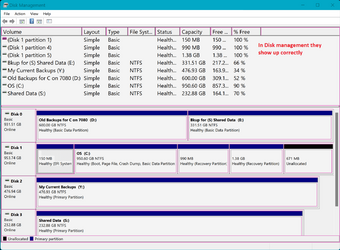
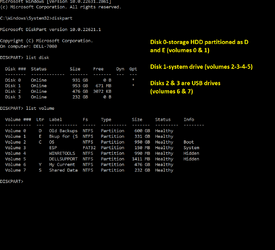
When in diskpart use command list disk to see disk level, Use list volume to look at partition level.. Disk Management is what's important. If your system partition is showing up in disk management as D: rather than C: the registry changes in the MS article will straighten it out.

Your screenshot shows Drive letter E: assigned to what appears to be a recovery partition. These partitions are not usually assigned a drive letter. Did you manually assign E: to this partition? If you did, this may be when your letter assignment configuration got messed up. That MS articles says "It may happen when you break a mirror volume or there's a drive configuration change."
Here's my screenshots comparing diskpart with disk management.

 

Attachments

  • Screenshot 2024-01-01 061919.png
    Screenshot 2024-01-01 061919.png
    89.2 KB · Views: 1
  • Screenshot 2024-01-01 060323.png
    Screenshot 2024-01-01 060323.png
    28.5 KB · Views: 1

My Computers My Computers

  • At a glance

    Windows 11 Pro 25H2 26200.8655i9-10900 10 core 20 threads32 gbnone-Intel UHD Graphics 630
    OS
    Windows 11 Pro 25H2 26200.8655
    Computer type
    PC/Desktop
    Manufacturer/Model
    Dell Optiplex 7080
    CPU
    i9-10900 10 core 20 threads
    Motherboard
    DELL 0J37VM
    Memory
    32 gb
    Graphics Card(s)
    none-Intel UHD Graphics 630
    Sound Card
    Integrated Realtek
    Monitor(s) Displays
    Benq 27
    Screen Resolution
    2560x1440
    Hard Drives
    2x1tb Solidigm m.2 nvme /External drives 512gb Samsung m.2 sata+2tb Kingston m2.nvme
    PSU
    500w
    Case
    MT
    Cooling
    Dell Premium
    Keyboard
    Logitech wired
    Mouse
    Logitech wireless
    Internet Speed
    so slow I'm too embarrassed to tell
    Browser
    #1 Edge #2 Firefox
    Antivirus
    Defender+MWB Premium
  • At a glance

    Windows 11 Pro 24H2 26200.8457AMD Ryzen 7 6800U32 gbintegrated
    Operating System
    Windows 11 Pro 24H2 26200.8457
    Computer type
    PC/Desktop
    Manufacturer/Model
    Beelink Mini PC SER5
    CPU
    AMD Ryzen 7 6800U
    Memory
    32 gb
    Graphics card(s)
    integrated
    Sound Card
    integrated
    Monitor(s) Displays
    Benq 27
    Screen Resolution
    2560x1440
    Hard Drives
    1TB Crucial nvme
    Keyboard
    Logitech wired
    Mouse
    Logitech wireless
    Internet Speed
    still too embarrassed to tell
    Browser
    Firefox
    Antivirus
    Defender
    Other Info
    System 3 is non compliant Dell 9020 i7-4770/24gb ram Win11 PRO 26200.8457
This is what it looks like when in windows:
1704117377237.png

This blurry pic i took when i was in Command Prompt at Boot
1704117444007.png


It seems that in Windows everything appears to be correct, BUT the letters are reversed only in Command Prompt at Boot, and don't know why/how this could be the case.

I did not assign letters to recovery partitions (see in Disk Management, the 633 MB partition does not have a letter)
 

My Computer My Computer

At a glance

Windows 11
OS
Windows 11
Computer type
PC/Desktop
Went back in Command Prompt at Boot and ran disk part then list volumes and got the same incorrect volume and letters to the drives.
But I noticed also that a DIFFERENT computer name appeared: MININT-T8M... etc
A bit of googling revealed that it's a Minimum Windows NT - It is a preinstallation name used by things like WinPE (Windows PE) or even BartPE.

Going into the OS selection, I have another: Macrium Reflect System Recovery. This was made when i started using the software to create full drive images for backup purposes.

Also, in Command Prompt at Boot i couldn't change the drive, ie. cd C: and reverted to X:


This is what the drives look like in Macrium Reflect
1704118620059.png


Could there be a mismatch caused by Macrium?
 

My Computer My Computer

At a glance

Windows 11
OS
Windows 11
Computer type
PC/Desktop
I wouldn't worry about the drive letters. It's common for them to not always be the same at boot vs in Windows.
 

My Computers My Computers

  • At a glance

    Windows 11 Pro for WorkstationsIntel i7-8700K 5 GHz64 GB (4x16GB) G.SKILL TridentZ RGB DDR4 3600...ASUS ROG-STRIX-GTX1080TI-O11G-GAMING (11GB GD...
    OS
    Windows 11 Pro for Workstations
    Computer type
    PC/Desktop
    Manufacturer/Model
    Custom self build
    CPU
    Intel i7-8700K 5 GHz
    Motherboard
    ASUS ROG Maximus XI Formula Z390
    Memory
    64 GB (4x16GB) G.SKILL TridentZ RGB DDR4 3600 MHz (F4-3600C18D-32GTZR)
    Graphics Card(s)
    ASUS ROG-STRIX-GTX1080TI-O11G-GAMING (11GB GDDR5X)
    Sound Card
    Integrated Digital Audio (S/PDIF)
    Monitor(s) Displays
    2 x Samsung Odyssey G75 27"
    Screen Resolution
    2560x1440
    Hard Drives
    1TB Samsung 990 PRO M.2,
    4TB Samsung 990 PRO M.2,
    TerraMaster F8 SSD Plus NAS
    PSU
    Seasonic Prime Titanium 850W
    Case
    Thermaltake Core P3 wall mounted
    Cooling
    Corsair Hydro H115i
    Keyboard
    Amazon Basics Wired Full Keyboard MD005
    Mouse
    Logitech MX Master 4
    Internet Speed
    2 Gbps Download and 100 Mbps Upload
    Browser
    Chrome and Edge
    Antivirus
    Microsoft Defender
    Other Info
    Logitech Z625 speaker system,
    Logitech BRIO 4K Pro webcam,
    HP Color LaserJet Pro MFP M477fdn,
    CyberPower CP1500PFCLCD
    Galaxy S23 Plus phone
  • At a glance

    Windows 11 ProSnapdragon X Elite (12 core) 3.42 GHz16 GB LPDDR5x-7467 MHz
    Operating System
    Windows 11 Pro
    Computer type
    Laptop
    Manufacturer/Model
    Surface Laptop 7 Copilot+ PC
    CPU
    Snapdragon X Elite (12 core) 3.42 GHz
    Memory
    16 GB LPDDR5x-7467 MHz
    Monitor(s) Displays
    15" HDR
    Screen Resolution
    2496 x 1664
    Hard Drives
    1 TB SSD
    Internet Speed
    Wi-Fi 7 and Bluetooth 5.4
    Browser
    Chrome and Edge
    Antivirus
    Microsoft Defender
I wouldn't worry about the drive letters. It's common for them to not always be the same at boot vs in Windows.
Thanks Brink! Then I won't go through the hassle and risk of changing them
 

My Computer My Computer

At a glance

Windows 11
OS
Windows 11
Computer type
PC/Desktop
To identify the partition drive letter open administrative command prompt:

Type:

bcdedit | find "osdevice"

(make note of the partition drive letter)
 

My Computer My Computer

At a glance

Windows 10Intel(R) Core(TM) i7-4800MQ CPU @ 2.70GHz16 GB Total: Manufacturer : Samsung MemoryTyp...NVIDIA Quadro K3100M; Intel(R) HD Graphics 4600
OS
Windows 10
Computer type
Laptop
Manufacturer/Model
HP
CPU
Intel(R) Core(TM) i7-4800MQ CPU @ 2.70GHz
Motherboard
Product : 190A Version : KBC Version 94.56
Memory
16 GB Total: Manufacturer : Samsung MemoryType : DDR3 FormFactor : SODIMM Capacity : 8GB Speed : 1600
Graphics Card(s)
NVIDIA Quadro K3100M; Intel(R) HD Graphics 4600
Sound Card
IDT High Definition Audio CODEC; PNP Device ID HDAUDIO\FUNC_01&VEN_111D&DEV_76E0
Hard Drives
Model Hitachi HTS727575A9E364
Antivirus
Microsoft Defender
Other Info
Mobile Workstation
To identify the partition drive letter open administrative command prompt:

Type:

bcdedit | find "osdevice"

(make note of the partition drive letter)
The partition with the OS is pretty clear - visible in My computer, among other things.

But I ran it nonetheless and got an additional piece of interesting info:
osdevice ramdisk=[C:]\boot\macrium\WinREFiles\media\sources\boot.wim,{ramdiskoptions}

Seems that's a special type of partition made by macrium to boot into recovery mode or to use when restoring a drive image
 

My Computer My Computer

At a glance

Windows 11
OS
Windows 11
Computer type
PC/Desktop

Latest Support Threads

Back
Top Bottom