- Local time
- 10:06 AM
- Posts
- 128
- OS
- Windows 11
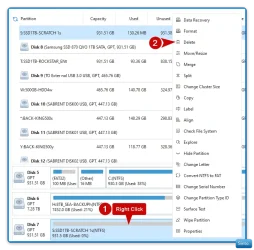
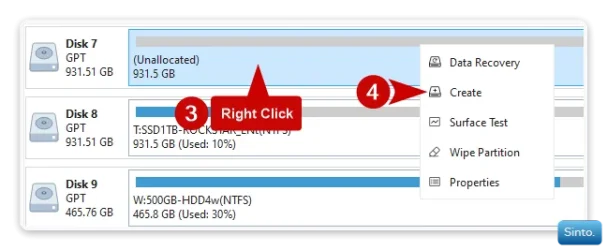
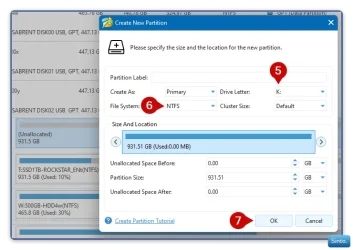
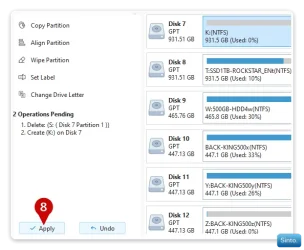
My Dell XPS 8950 computer has a problem with a drive that I don't know how to fix. The drive's properties say it's working fine but when I run a scan anyway it says it can't be scanned. So I tried chkdsk on the drive and it says it's in RAW format and can't be scanned. That explains why I've had so much trouble copying files to that drive lately. They fail and the message is "copying to a drive that doesn't exist". Since it's used for nothing but backups I decided I could bite the bullet and just reformat it to NTFS; however I can't find a way to do that. There is nothing in the device manager that formats drives and nothing in properties/tools either. I think it can be formatted with DOS but I don't know that either. Help requested.
- Windows Build/Version
- 11 Home 24H2 26100.6584
My Computer
At a glance
Windows 1112th Gen Intel(R) Core(TM) i9-12900K 3.20 GHz65262 Megabytes Usable Installed MemoryNVIDIA GeForce RTX 3070
- OS
- Windows 11
- Computer type
- PC/Desktop
- Manufacturer/Model
- Dell 8950
- CPU
- 12th Gen Intel(R) Core(TM) i9-12900K 3.20 GHz
- Motherboard
- 0DYKKV A00
- Memory
- 65262 Megabytes Usable Installed Memory
- Graphics Card(s)
- NVIDIA GeForce RTX 3070
- Sound Card
- Multimedia Intel(R) Display Audio NVIDIA High Definition Audio NVIDIA Virtual Audio Device (Wave Extensible) (WDM) Realtek(R) Audio WsAudio_Device
- Monitor(s) Displays
- Dell
- Mouse
- Logitech
- Internet Speed
- D/L 120 mbps
- Browser
- Firefox
- Antivirus
- Malwarebytes