- Local time
- 3:50 PM
- Posts
- 21
- OS
- Windows 11 Home
IPGui
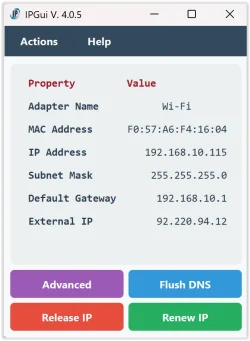
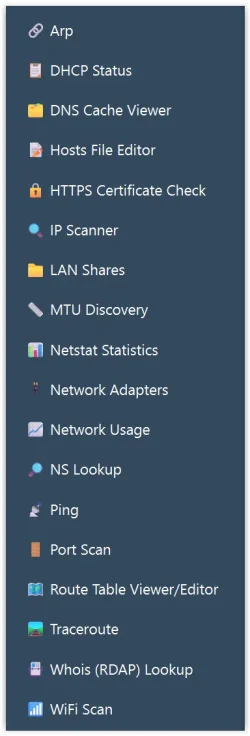
This app was ment to be a replacement of winipcfg, but as I worked with it it turned out as so much more.When you look at it it just looks like a colorful vedrsion of winipcfg. But Under the Action -> NetTools in the menu you have the follrowing functions )screenshots below):
- Ping
A simple interface for pinging hosts. - IP scanner
To scan for devices on the local network.
With directly link to Port scanner and Shares scanner for the chosen IP. - NS Lookup
To query Domain Name System (DNS) servers. - Traceroute
To trace the route to a host. - PortScan
It's a simple port-scanner to see which ports are open on your system or other hosts. - DHCP Status.
- Netwok usage
This function is very enhnced with tools to do your own measurement over a set time.
To accomplish that, there are two lines of usage monitoring. One counts from you started the computer.
The other one start from zero. You can reset the counter to zero and even set the time you want
the counter to collect info. It would be nice to know how much data is used (both ways) when
you are using Youtube one hour? Well with this you can.
Made human readable while using tooltip to please the geeks with 8 decimals and raw bytes. - Arp (Address Resolution Protocol) fuctionality.
- WiFi Scanner
- Network adapter discovery tool.
- HTTPS Certificate check
This tool can see what certificate a web site has and even delete a locally stored certificate, if needed. - MTU Discovery, to set your MTU (Maximum Transmission Unit).
- Hosts File Editor.
- Netstat statistics.
Quickly spot network issues:
High error, discard, or failure counts may indicate hardware problems, bad cables, driver issues, or misconfiguration. - DNS Cache Viewer
DNS cache entries show which hostnames your system has recently resolved and what IP addresses they mapped to. - Whois (RDAP) lookup.
Works like whois, but uses a more modern protocol, Registration Data Access Protocol. - LAN Shares
Will find all shares in your network or the range you set.
If you want to have a look at it, and maybe install it on the PC-s you want (It's open source, Licanse GPLv2), you can find it's homepage here.
My Computer
At a glance
Windows 11 HomeI916GB
- OS
- Windows 11 Home
- Computer type
- Laptop
- Manufacturer/Model
- MSI
- CPU
- I9
- Motherboard
- MSI
- Memory
- 16GB