Acronis (True Image)


winjer

Member
Local time
11:58 AM
Posts
28
OS
Windows 11
I own several years of licenses for ATI. I was under the impression that the latest (newest) version, Acronis Cyber Protection, supported Win 11. So, I bought it, installed it, and tried to run a backup, but there were problems.
First, it took forever to do the backup. Second, When I tried to open the backup to check some files, it took forever, too.

So I contacted Acronis Chat. I was told the none of the Acronis apps have been tested with Windows 11. They said the version I just bought was just a version of one I already owned and what I bought was just a new build. I would have to buy another new version (of ATI) for Windows 11. She had no idea when it would be released.

What backup supports Windows 11 Now? Today?
Thanks.

Win 11 10.0.22000 Build 22000
 
Windows Build/Version
Win 11 10.0.22000 Build 22000

My Computer My Computer

At a glance

Windows 11
OS
Windows 11
I ditched ATI last year after many years but that was due to the new subscription system, switch to Macrium Reflect 8 and never looked back
 

My Computer My Computer

At a glance

Windows 11 Pro Beta, 11 Dev, W11 CanaryAMD Ryzen™ 9 5900HX32GBNVIDIA® GeForce RTX™ 3070 8GB GDDR6
OS
Windows 11 Pro Beta, 11 Dev, W11 Canary
Computer type
Laptop
Manufacturer/Model
Dell Alienware M15 Ryzen Edition R6
CPU
AMD Ryzen™ 9 5900HX
Memory
32GB
Graphics Card(s)
NVIDIA® GeForce RTX™ 3070 8GB GDDR6
Hard Drives
1 x Samsung 980 Pro 1TB
1 x Samsung 970 Evo Plus 1TB
I own several years of licenses for ATI. I was under the impression that the latest (newest) version, Acronis Cyber Protection, supported Win 11. So, I bought it, installed it, and tried to run a backup, but there were problems.
First, it took forever to do the backup. Second, When I tried to open the backup to check some files, it took forever, too.

So I contacted Acronis Chat. I was told the none of the Acronis apps have been tested with Windows 11. They said the version I just bought was just a version of one I already owned and what I bought was just a new build. I would have to buy another new version (of ATI) for Windows 11. She had no idea when it would be released.

What backup supports Windows 11 Now? Today?
Thanks.

Win 11 10.0.22000 Build 22000
That is utterly untrue!!.

I have been using the 2021 version 25.8.1_39216 of Acronis and it works flawlessly. I have been going from 10-11 many times without issues.

Backup speeds depend on many factors but mostly disk size and computer speed.
 

My Computer My Computer

At a glance

Windows 11 EducationIntel® Core™ i9-13900K Desktop Processor 16 (...G.Skill Ripjaws V Series 32gb (2x16gb) DDR4 3...Asus Dual Geforce Rtx™ 3060 TI Edition 8gb Gddr6
OS
Windows 11 Education
Computer type
PC/Desktop
CPU
Intel® Core™ i9-13900K Desktop Processor 16 (8P+8E)
Motherboard
Asus TUF Gaming Z790-PLUS WIFI D4
Memory
G.Skill Ripjaws V Series 32gb (2x16gb) DDR4 3600mhz
Graphics Card(s)
Asus Dual Geforce Rtx™ 3060 TI Edition 8gb Gddr6
Monitor(s) Displays
BenQ EW3270U 31.5” 3840x2160 UHD 16:9 HDR LED 4K LG 27UK850-W 27'' 4K UHD IPS LED Monitor with HDR10
Screen Resolution
3840x2160
Hard Drives
Samsung 990 with heatsink PRO PCIe 4.0 Gen 4 NVMe® SSD 1TB
WD_BLACK SN850X NVMe M.2 2280 1TB PCI-Express 4.0
Crucial T500 2TB Gen4
Samsung 970 Evo M.2 2280 2tb Pcie Gen3. X4
PSU
Corsair AXi Series AX860i Digital 860W 80 PLUS PSU
Case
Fractal Meshify C ATX Mid Tower Case
Keyboard
Logi MX Keys
Mouse
Logi M705
Internet Speed
400 mbs
Browser
Firefox
Antivirus
Eset NOD32
Other Info
Love fast boots
Mind you, I am not encouraging anyone to buy ATI because as of this year perpetual licenses are gone and I hope a lot of people ditch ATI just for this ridiculous move on their part.

I can however say that I use TI with the Cyber protection disabled fully and I am quite happy with it.

If you have a Sabrent or WD SSD the TI version is free.

Also, many older version of TI work with Win 10 and even 11, Acronis just won't admit it because it's not a good sales practice. :rolleyes:
 

My Computer My Computer

At a glance

Windows 11 EducationIntel® Core™ i9-13900K Desktop Processor 16 (...G.Skill Ripjaws V Series 32gb (2x16gb) DDR4 3...Asus Dual Geforce Rtx™ 3060 TI Edition 8gb Gddr6
OS
Windows 11 Education
Computer type
PC/Desktop
CPU
Intel® Core™ i9-13900K Desktop Processor 16 (8P+8E)
Motherboard
Asus TUF Gaming Z790-PLUS WIFI D4
Memory
G.Skill Ripjaws V Series 32gb (2x16gb) DDR4 3600mhz
Graphics Card(s)
Asus Dual Geforce Rtx™ 3060 TI Edition 8gb Gddr6
Monitor(s) Displays
BenQ EW3270U 31.5” 3840x2160 UHD 16:9 HDR LED 4K LG 27UK850-W 27'' 4K UHD IPS LED Monitor with HDR10
Screen Resolution
3840x2160
Hard Drives
Samsung 990 with heatsink PRO PCIe 4.0 Gen 4 NVMe® SSD 1TB
WD_BLACK SN850X NVMe M.2 2280 1TB PCI-Express 4.0
Crucial T500 2TB Gen4
Samsung 970 Evo M.2 2280 2tb Pcie Gen3. X4
PSU
Corsair AXi Series AX860i Digital 860W 80 PLUS PSU
Case
Fractal Meshify C ATX Mid Tower Case
Keyboard
Logi MX Keys
Mouse
Logi M705
Internet Speed
400 mbs
Browser
Firefox
Antivirus
Eset NOD32
Other Info
Love fast boots
I guess I'll try ATI 2021 with protection disabled since I already own that. Can't be any worse than this new build they have out now. Why has ATI added all this protection stuff? It just makes it more expensive. I turned it off right away.

I tried AOMEI and it was a disaster. I see Macrium supports Windows 11. Maybe I'll just go there.
Thanks
 

My Computer My Computer

At a glance

Windows 11
OS
Windows 11
Here is a tutorial on how to disable ATI 2021 Cyber protect.
Start Acronis and stop the cyber protect mode and close Acronis

You cannot disable the cyber protect services while in Windows (use safe mode)

USE AT YOUR OWN RISK!!

Code:
What I did (Add A ~ to exectutables)
C:\Program Files (x86)\Acronis\Agent\bin
ADD A ~ TO ALL .EXE FILES
Exp: adp-agent.~exe
C:\Program Files (x86)\Acronis\TrueImageHome
ADD A ~ TO
ga_antimalware_gatherer.exe
ga_service.exe
resume_protection.exe
ga_antimalware_gatherer.exe
C:\Program Files\Acronis\CyberProtect
ADD A ~ TO
cyber-protect-service.exe
C:\Program Files (x86)\Common Files\Acronis\ActiveProtection
ADD A ~ TO
anti_ransomware_service.exe
--------------------------------------------

    Services Altered: (disable only what you need)
    I disabled all except the Acronis scheduler. I don't use online backup
use powershell command in admin mode
Get-Service mmsminisrv | Stop-Service -PassThru | Set-Service -StartupType disabled
Get-Service mobile_backup_server | Stop-Service -PassThru | Set-Service -StartupType disabled
Get-Service mobile_backup_status_server | Stop-Service -PassThru | Set-Service -StartupType disabled

These 2 services will disappear because you disabled them
Get-Service AcronisCyberProtectionService | Stop-Service -PassThru | Set-Service -StartupType disabled
Get-Service AcronisActiveProtectionService | Stop-Service -PassThru | Set-Service -StartupType disabled
-----------------------------------------

To get a list of scheduled tasks with Acronis scheduler (Download from Acronis) management:

get list

To delete all scheduled tasks:
task zap

To run a task:
task run

To delete a single task:
task [task number]
task delete

For example:
task 1-12
task delete
 

My Computer My Computer

At a glance

Windows 11 EducationIntel® Core™ i9-13900K Desktop Processor 16 (...G.Skill Ripjaws V Series 32gb (2x16gb) DDR4 3...Asus Dual Geforce Rtx™ 3060 TI Edition 8gb Gddr6
OS
Windows 11 Education
Computer type
PC/Desktop
CPU
Intel® Core™ i9-13900K Desktop Processor 16 (8P+8E)
Motherboard
Asus TUF Gaming Z790-PLUS WIFI D4
Memory
G.Skill Ripjaws V Series 32gb (2x16gb) DDR4 3600mhz
Graphics Card(s)
Asus Dual Geforce Rtx™ 3060 TI Edition 8gb Gddr6
Monitor(s) Displays
BenQ EW3270U 31.5” 3840x2160 UHD 16:9 HDR LED 4K LG 27UK850-W 27'' 4K UHD IPS LED Monitor with HDR10
Screen Resolution
3840x2160
Hard Drives
Samsung 990 with heatsink PRO PCIe 4.0 Gen 4 NVMe® SSD 1TB
WD_BLACK SN850X NVMe M.2 2280 1TB PCI-Express 4.0
Crucial T500 2TB Gen4
Samsung 970 Evo M.2 2280 2tb Pcie Gen3. X4
PSU
Corsair AXi Series AX860i Digital 860W 80 PLUS PSU
Case
Fractal Meshify C ATX Mid Tower Case
Keyboard
Logi MX Keys
Mouse
Logi M705
Internet Speed
400 mbs
Browser
Firefox
Antivirus
Eset NOD32
Other Info
Love fast boots
Any help here?
If you read my posts 3 or 4 posts back, I had the ATI upgrade installed for a few hours. Many problems. Then I learned it doesn't work with Win 11. So I contacted Acronis Chat. I was told I would get a full refund since it was within the first 30 days. The OP took care of initiating the refund and verified that I would get a full refund.
A few hours later I get an email from Cleverbridge that they can cancel my subscription, but they wouldn't give me a refund. That is just not right any way you look at it.
 

My Computer My Computer

At a glance

Windows 11
OS
Windows 11
Never mind. I sent them back a copy of the Acronis Chat and they just refunded my $.
 

My Computer My Computer

At a glance

Windows 11
OS
Windows 11
What backup supports Windows 11 Now? Today?
I've been using Acronis True Image with my Windows 11 and have not had any problems with it at all.

Denis
 

My Computer My Computer

At a glance

Windows 11 Home x64 Version 25H2 Build 26200....
OS
Windows 11 Home x64 Version 25H2 Build 26200.8037
I'm using AOMEI Backupper Pro and it all seems good so far. The free version omits a few features like incremental backup and some advanced tools but ultimately for me it just works seamlessly.

I used to use Acronis many many moons ago but found it became more and more buggy and buried itself deep in the operating system causing problems.
 

My Computer My Computer

At a glance

W11 Pro x64 ongoing Canary 29500 latest buildsIntel i58GbIntel HD Graphics
OS
W11 Pro x64 ongoing Canary 29500 latest builds
Computer type
Laptop
Manufacturer/Model
Dell 7760 Mobile Precision 17"
CPU
Intel i5
Motherboard
Unknown
Memory
8Gb
Graphics Card(s)
Intel HD Graphics
Sound Card
Realtek
Monitor(s) Displays
Internal
Hard Drives
2 x 256Gb SSD
PSU
Dell 240 watt
Mouse
Dell Premier Bluetooth
Internet Speed
50Mbps
Browser
Edge
Antivirus
Default Microsoft Security
Any ideas why I am having problems with ATI and AOMEI?
I've been using ATI for years, until Win 11. I tried ATI's new build and it ran for an hour or so. On other versions of Windows, it ran about 20 minutes. When I tried to look at the backed-up files, it took 25 minutes to view any files. That's when I chatted with Acronis. They said ATI does NOT work with Win 11. They are working on a Win 11 version and that would be an upgrade, not an update.

AOMEI kept giving me errors and never finished. I emailed their support and they sent me a work-around for those errors, but that didn't work either. I couldn't even uninstall it. I had to go into the safe mode to get rid of it.
On the other hand, I have had no problems with Win 11 or any other apps, except with these backups apps.
 

My Computer My Computer

At a glance

Windows 11
OS
Windows 11
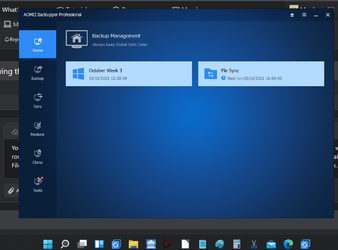
You mention file backups rather than disk image backups. With AOMEI I do both disk imaging and also use 'File Sync' which is a file backup routine that can automated. Both work fine. Disk images complete in about 4 minutes and consequent incrementals take a couple of minutes. File sync takes under a minute when it runs and only takes about 3 or 4 minutes to do a first run when setting the task.

1634301925384.png
 

My Computer My Computer

At a glance

W11 Pro x64 ongoing Canary 29500 latest buildsIntel i58GbIntel HD Graphics
OS
W11 Pro x64 ongoing Canary 29500 latest builds
Computer type
Laptop
Manufacturer/Model
Dell 7760 Mobile Precision 17"
CPU
Intel i5
Motherboard
Unknown
Memory
8Gb
Graphics Card(s)
Intel HD Graphics
Sound Card
Realtek
Monitor(s) Displays
Internal
Hard Drives
2 x 256Gb SSD
PSU
Dell 240 watt
Mouse
Dell Premier Bluetooth
Internet Speed
50Mbps
Browser
Edge
Antivirus
Default Microsoft Security
So I contacted Acronis Chat. I was told the none of the Acronis apps have been tested with Windows 11. They said the version I just bought was just a version of one I already owned and what I bought was just a new build. I would have to buy another new version (of ATI) for Windows 11. She had no idea when it would be released.

Acronis is just trying steer people into purchasing their latest cloud version by claiming there "may" be issues with Windows 11 and older versions.

That said, I'll say this and move on....

Many here prefer Macrium so that's were you'll be steered. With that, I'm actually running Acronis True Image 2018 (latest is 2021) on Windows 11 RTM (22000.258) and just used it the other day to restore some backup files and folders after clean installing Windows 11. It worked without fuss or issue.

So yeah, Acronis DOES work under Windows 11 as my old version shows.

Good luck.
 

My Computers My Computers

  • At a glance

    Windows 11 Pro 24H2 (Build 26100.4770)Intel Core 9 Ultra 285K64G (4x16) DDR5 Corsair RGB Dominator Platinu...Radeon (XFX Mercury) RX 9070XT OC (with Magne...
    OS
    Windows 11 Pro 24H2 (Build 26100.4770)
    Computer type
    PC/Desktop
    Manufacturer/Model
    Custom built
    CPU
    Intel Core 9 Ultra 285K
    Motherboard
    Gigabyte Aorus Z890 Xtreme AI Top
    Memory
    64G (4x16) DDR5 Corsair RGB Dominator Platinum (6400Mhz)
    Graphics Card(s)
    Radeon (XFX Mercury) RX 9070XT OC (with Magnetic Fans)
    Sound Card
    Onboard (DTS:X® Ultra Audio: ESS ES9280A DAC)
    Monitor(s) Displays
    27-inch Eizo Color Edge - CG2700X
    Screen Resolution
    3840 x 2160
    Hard Drives
    4 Samsung NVM 990 Pro drives: 1TB (OS), 2TB, 2 X 4TB.
    PSU
    Seasonic TX-1300 (1300 Watts)
    Case
    Cooler Master H500M
    Cooling
    Corsair Link Titan 280 RX RGB
    Keyboard
    Logitech Craft
    Mouse
    Logitech MX Master 3S
    Internet Speed
    1TB Download. 512mb Upload
    Browser
    Microsoft Edge Chromium
    Antivirus
    Windows Security
    Other Info
    System used for gaming, photography, music, school.
  • At a glance

    Windows 11 Pro 24H2 (Build 26100.4061)Intel Core i9-9900K32gig (4 x 8) Corsair Dominator Platinum DDR4...Radeon XFX Merc 7900XT (20gig)
    Operating System
    Windows 11 Pro 24H2 (Build 26100.4061)
    Computer type
    PC/Desktop
    Manufacturer/Model
    Custom built
    CPU
    Intel Core i9-9900K
    Motherboard
    Gigabyte Z390 Aorus Xtreme
    Memory
    32gig (4 x 8) Corsair Dominator Platinum DDR4 3600Mhz (B-Die)
    Graphics card(s)
    Radeon XFX Merc 7900XT (20gig)
    Sound Card
    Onboard
    Monitor(s) Displays
    24-Inch NEC PA242W
    Screen Resolution
    2880 x 1800
    Hard Drives
    2 X NVME, 1 X SATA SSD
    PSU
    EVGA Super Nova 1000 P2 (1000 Watt)
    Case
    Phantek Enthoo Luxe
    Cooling
    Corsair H115i Elite AIO Cooler
    Keyboard
    Logitech Keys
    Mouse
    Logitech MX Master 3
    Internet Speed
    1TB Download. 512mb Upload
    Browser
    Microsoft Edge Chromium
    Antivirus
    Windows Security
    Other Info
    Backup System
Macrium Reflect 8 works on Windows 11. Been using it for since I upgraded to Windows 11 on 10/5.
 

My Computers My Computers

  • At a glance

    Windows 11 Pro Version 24H2 OS build 26100.672513th Gen Intel Core i7-13700 2.10 GHz32 GBIntel UHD Graphics 770 / NVIDIA GeForce RTX 3060
    OS
    Windows 11 Pro Version 24H2 OS build 26100.6725
    Computer type
    PC/Desktop
    Manufacturer/Model
    Dell XPS 8960
    CPU
    13th Gen Intel Core i7-13700 2.10 GHz
    Memory
    32 GB
    Graphics Card(s)
    Intel UHD Graphics 770 / NVIDIA GeForce RTX 3060
    Monitor(s) Displays
    Dell S2421H / Dell SE2222H
    Screen Resolution
    1920x1080
    Hard Drives
    C: Crucial CT1000P5PSSD8
    D: Seagate ST2000DM008
    E: Seagate ST4000DX005
    Keyboard
    Logitech K650
    Mouse
    Logitech M650L
    Internet Speed
    200 Mbps
    Browser
    Firefox/Edge
    Antivirus
    Windows Security
  • At a glance

    Windows 11 Pro 23H2 Build 22631.454110th Gen Intel(R) Core(TM) i5-10400 CPU @ 2.9...24 GB
    Operating System
    Windows 11 Pro 23H2 Build 22631.4541
    Computer type
    PC/Desktop
    Manufacturer/Model
    Dell Inspiron 3880
    CPU
    10th Gen Intel(R) Core(TM) i5-10400 CPU @ 2.90GHz
    Memory
    24 GB
    Monitor(s) Displays
    Dell S2421H
    Screen Resolution
    1920x1080
    Hard Drives
    C:\ - Crucial 1 TB NVME SSD
Hi,
Reflect winpe recovery media from win-10 1909 works on win-11 too lol
 

My Computer My Computer

At a glance

Win-7-10-11Pro's10900k & 9940x & 5930kTrident-Z Royal 4000c16 2x16gb & Trident-Z 36...Titan Xp & 1080ti FTW3 & evga 980ti gaming
OS
Win-7-10-11Pro's
Computer type
PC/Desktop
Manufacturer/Model
Acer 17" Nitro 7840sn/ 2x16gb 5600c40/ 4060/ stock 1tb-os/ 4tb sn850x
CPU
10900k & 9940x & 5930k
Motherboard
z490-Apex & x299-Apex & x99-Sabertooth
Memory
Trident-Z Royal 4000c16 2x16gb & Trident-Z 3600c16 4x8gb & 3200c14 4x8gb
Graphics Card(s)
Titan Xp & 1080ti FTW3 & evga 980ti gaming
Sound Card
Onboard Realtek x3
Monitor(s) Displays
1-AOC G2460PG 24"G-Sync 144Hz/ 2nd 1-ASUS VG248QE 24"/ 3rd LG 43" series
Screen Resolution
1920-1080 not sure what the t.v is besides 43" class scales from 1920-1080 perfectly
Hard Drives
2-WD-sn850x 4tb/ 970evo+500gb/ 980 pro 2tb.
PSU
1000p2 & 1200p2 & 850p2
Case
D450 x2 & 1 Test bench in cherry Entertainment center
Cooling
Custom water loops x3 with 2x mora 360mm rads only 980ti gaming air cooled
Keyboard
G710+x3
Mouse
Redragon x3
Internet Speed
xfinity gigabyte
Browser
Firefox
Antivirus
mbam pro
Installed Macrium Reflect 8. Works fine. No problems.
 

My Computer My Computer

At a glance

Windows 11
OS
Windows 11
I've just started using Ease US free version - seemed very simple to do a system image.
 

My Computers My Computers

  • At a glance

    Windows 11 Home 25H2Core i5-1035G132gb
    OS
    Windows 11 Home 25H2
    Computer type
    Laptop
    Manufacturer/Model
    HP Pavilion 14-ce3606sa
    CPU
    Core i5-1035G1
    Memory
    32gb
    Hard Drives
    Samsung 870 evo sata ssd
    Cooling
    Could be better
    Internet Speed
    50 mbps Starlink
    Browser
    Firefox
    Other Info
    Originally came installed with a 500gb H10 Optane ssd
  • At a glance

    Windows 11 HomeIntel Core i5-1035G116gb
    Operating System
    Windows 11 Home
    Computer type
    Laptop
    Manufacturer/Model
    HP Pavilion ce3606sa
    CPU
    Intel Core i5-1035G1
    Memory
    16gb
    Hard Drives
    Hynix Gold P31 2TB
    Internet Speed
    200mbps Starlink
    Browser
    Firefox
    Antivirus
    Defender
Installed Macrium Reflect 8. Works fine. No problems.
You made a good choice.
Life for you should be simpler with Reflect.
And support (official and non-official) for it is very good.
 

My Computers My Computers

  • At a glance

    Windows 11 ProIntel Core i9-10900XCorsair 64 GB (4 x 16 GB) CMW64GX4M4C3000C15 ...GIGABYTE GeForce GTX 1660 Super Mini ITX 6 GB OC
    OS
    Windows 11 Pro
    Computer type
    PC/Desktop
    Manufacturer/Model
    Stigg's Build
    CPU
    Intel Core i9-10900X
    Motherboard
    GIGABYTE X299X DESIGNARE 10G
    Memory
    Corsair 64 GB (4 x 16 GB) CMW64GX4M4C3000C15 Vengeance RGB Pro 3000Mhz DDR4
    Graphics Card(s)
    GIGABYTE GeForce GTX 1660 Super Mini ITX 6 GB OC
    Sound Card
    Realtek ALC1220
    Monitor(s) Displays
    Samsung 27" FHD LED FreeSync Gaming Monitor (LS27F350FHEXXY)
    Screen Resolution
    1920 x 1080
    Hard Drives
    Samsung 970 Pro Series 1TB M.2 2280 NVMe SSD
    Western Digital Red Pro WD8003FFBX-68B9AN0 8 TB, 7200 RPM, SATA-III
    Western Digital Red Pro WD8003FFBX-68B9AN0 8 TB, 7200 RPM, SATA-III
    PSU
    Corsair HX1200 1200W 80 Plus Platinum
    Case
    Fractal Design Define 7 Black Solid Case
    Cooling
    Noctua NH-D15 Chromax Black
    Keyboard
    Razer Ornata V2
    Mouse
    Razer DeathAdder Essential
    Internet Speed
    FTTN 100Mbps / 40Mbps
    Browser
    Mozilla Firefox
    Antivirus
    N/A
    Other Info
    Logitech BRIO 4k Ultra HD USB-C Webcam
  • At a glance

    Windows 10 ProCore i7-8750HSK Hynix 32 GB (2 x 16 GB) HMA82GS6CJR8N-VK 1...NVIDIA GeForce GTX 1070
    Operating System
    Windows 10 Pro
    Computer type
    Laptop
    Manufacturer/Model
    ASUS ROG Zephyrus M GM501GS
    CPU
    Core i7-8750H
    Motherboard
    Zephyrus M GM501GS
    Memory
    SK Hynix 32 GB (2 x 16 GB) HMA82GS6CJR8N-VK 16 GB DDR4-2666 DDR4 SDRAM
    Graphics card(s)
    NVIDIA GeForce GTX 1070
    Sound Card
    Realtek ALC294
    Monitor(s) Displays
    AU Optronics B156HAN07.1 [15.6" LCD]
    Screen Resolution
    1920 x 1080
    Hard Drives
    Samsung MZVKW512HMJP-00000 512 GB, PCI-E 3.0 x4
    Samsung SSD 860 QVO 4TB 4 TB, SATA-III
    PSU
    N/A
    Case
    N/A
    Cooling
    N/A
    Keyboard
    PC/AT Enhanced PS2 Keyboard (101/102-Key)
    Mouse
    Razer DeathAdder Essential
    Internet Speed
    FTTN 100Mbps / 40Mbps
    Browser
    Mozilla Firefox
    Antivirus
    N/A
    Other Info
    USB2.0 HD UVC Webcam
I have a Seagate 4TB USB backup, and I just found it works flawlessly with Win11 backup. I have some of the other products mentioned. EaseUS is always having asale, they have demos, and montly, yearly and lifetime subscriptions. it looks like they are changing their pricing with so many other companies offerings and having to be more competitive. Only problem that can arise with any type of backup, you do not know what happens until the day comes when you need it.
 

My Computer My Computer

At a glance

Win11i9-1390064 GBNvidia RTX 5070 TI OC
OS
Win11
Computer type
PC/Desktop
Manufacturer/Model
Asus Home built
CPU
i9-13900
Motherboard
ASUS Strix Z790-H
Memory
64 GB
Graphics Card(s)
Nvidia RTX 5070 TI OC
Monitor(s) Displays
Sony 55"
Hard Drives
SSD
PSU
850 watt EVGA
Case
Cooler Master Haf 932
Cooling
CoolerMaster
Keyboard
RedDragon
Mouse
CoolerMaster
Internet Speed
300/300
Antivirus
Defender
Other Info
VR, Virtual Reality
I have a Seagate 4TB USB backup, and I just found it works flawlessly with Win11 backup. I have some of the other products mentioned. EaseUS is always having asale, they have demos, and montly, yearly and lifetime subscriptions. it looks like they are changing their pricing with so many other companies offerings and having to be more competitive. Only problem that can arise with any type of backup, you do not know what happens until the day comes when you need it.
This is why I immediately do a real test of whole system backup recovery after installing the system (windows 10 and now 11), perfectly successful, both with Acronis True Image 2021 and with Easeus Todo backup Home.
Now I use Acronis with satisfaction and it has never given me any problems, and importantly, I feel very safe!

I do not want to open conflicts, I just say what is my situation, everyone is free to use the software they want, as long as it gives them security guarantees for safe and fast restores (keeping the backup file on another SSD the recovery times are really a few minutes).

Take care.
 

My Computer My Computer

At a glance

Windows 11 pro 64bitAMD AM3+ FX-8370G.Skill 16GB DDR3-2400Zotac GeForce GTX 970 Scheda grafica, 4GB (3....
OS
Windows 11 pro 64bit
Computer type
PC/Desktop
Manufacturer/Model
Home made
CPU
AMD AM3+ FX-8370
Motherboard
Gigabyte GA-990FXA-UD3 R5
Memory
G.Skill 16GB DDR3-2400
Graphics Card(s)
Zotac GeForce GTX 970 Scheda grafica, 4GB (3.5GB+0.5GB) , DDR5, 256 Bit
Back
Top Bottom