Solved Add an Unallocated Partition to Primary Partition


Ricks_Radio

New member
Local time
4:53 PM
Posts
4
OS
Windows 11
I have just upgraded my Win 10 Pro machine to Win 11 (Version 24H2). This required a new motherboard, CPU and memory. I finally have everything working as I feel it should but I have an issue with the partitions on Disk 0. The shop that did the upgrade/transition to Win11 seem to have given me a 501MB unallocated partition on Drive 0? In the grand scheme of things it's only 501 MB but it's not right!

Using the Win11 Disk Management tool I'm unable to incorporate this space into my C drive?

1754158151210.webp

I'm not sure how to proceed to gain back the unallocated area? If I make it into a "New Simple Volume" can that then be used to expand my C: drive?

Thoughts appreciated. Thanks,

Rick
 
Windows Build/Version
Version: 24H2 & build: 26100.4652

My Computer

System One

  • OS
    Windows 11
    Computer type
    PC/Desktop
    Manufacturer/Model
    Home Build
    CPU
    Intel i3-12100
    Motherboard
    MSI PRO H610-G WiFi DDR4
    Memory
    16GB
    Hard Drives
    1 TB SSD
    500 GB HDD
    PSU
    Antec
    Case
    Antec
    Cooling
    Intel
Hi Ricks_Radio and welcome to the forum!

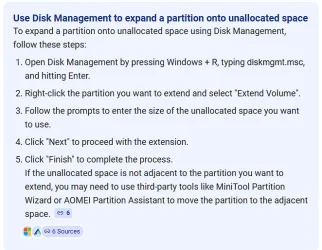
A quick search on the Internet came up with the following:

1754159532593.webp
 

My Computer

System One

  • OS
    Windows 11 Pro 26200.8457
    Computer type
    PC/Desktop
    Manufacturer/Model
    Home Built
    CPU
    Ryzen 5 5600G
    Motherboard
    ASUS X470 Prime Pro
    Memory
    24GB
    Monitor(s) Displays
    Alienware 2518HF
    Screen Resolution
    1920 x 1080
    Hard Drives
    Boot: NVME WDC WDS500G; ASUS M.2 Riser card with 3 additional NVME drives
    Various Internal SDD (Samsung and WDC) and HDD drives mostly Western Digital
    PSU
    Seasonic Focus Gold 650W
    Case
    Corsair 200R
    Cooling
    Noctua PWM fans x 3
    Keyboard
    Corsair K60 SE Pro
    Mouse
    Corsair Dark Core RGB Pro SE
    Internet Speed
    500/500
    Browser
    MS Edge
    Antivirus
    Malwarebytes Premium
Thanks for the quick reply.

Unfortunately, "Extend Volume" is not available when I right-click on the C partition. I was wondering if I need to make the unallocated space "New Simple Volume" first?

I will explore MiniTool, it seems to be highly praised on this forum.
 

My Computer

System One

  • OS
    Windows 11
    Computer type
    PC/Desktop
    Manufacturer/Model
    Home Build
    CPU
    Intel i3-12100
    Motherboard
    MSI PRO H610-G WiFi DDR4
    Memory
    16GB
    Hard Drives
    1 TB SSD
    500 GB HDD
    PSU
    Antec
    Case
    Antec
    Cooling
    Intel
Hi Ricks_Radio and welcome to the forum!

A quick search on the Internet came up with the following:
View attachment 141189
Windows can't extend partitions to the left of the existing one, only to unallocated space on the right
You'll need a 3rd-party partition tool to do this

If you make an image of the C: partition using Macrium (for example) you should be able to restore the image to the start of the drive and then extend it

The EFI partition should really be at the start of the drive
 

My Computer

System One

  • OS
    Windows 11 Pro 25H2 (RP channel)
    Computer type
    PC/Desktop
    Manufacturer/Model
    MSI
    CPU
    AMD Ryzen 7 9800X3D 8-core
    Motherboard
    MEG X870E Godlike
    Memory
    64GB Corsair Titanium 6000/CL30
    Graphics Card(s)
    MSI Suprim 5080 SOC
    Sound Card
    Soundblaster AE-9
    Monitor(s) Displays
    ASUS TUF Gaming VG289Q
    Screen Resolution
    3840x2160
    Hard Drives
    Samsung 9100 Pro 4TB (gen 5 x4, system drive/games)
    Samsung 990 Pro 2TB
    Samsung 980 Pro 2TB
    Samsung 870 Evo 4TB
    Samsung 870 Evo 2TB
    Samsung T9 4TB
    PSU
    Seasonic PX-2200
    Case
    Bequiet! Dark Base Pro 901
    Cooling
    Noctua NH-D15S Chromax black
    Keyboard
    Logitech G915 X (wired)
    Mouse
    Logitech G903 with PowerPlay charger
    Internet Speed
    900Mb/sec
    Browser
    Microsoft Edge
    Antivirus
    Windows Defender
Many thanks Brian. Hopefully MiniTool will come to my rescue.

Rick
 

My Computer

System One

  • OS
    Windows 11
    Computer type
    PC/Desktop
    Manufacturer/Model
    Home Build
    CPU
    Intel i3-12100
    Motherboard
    MSI PRO H610-G WiFi DDR4
    Memory
    16GB
    Hard Drives
    1 TB SSD
    500 GB HDD
    PSU
    Antec
    Case
    Antec
    Cooling
    Intel
Use MiniTool free. Use the sliders to incorporate space either behind or in front of the partition your wanting to use.


My Computer

System One

  • OS
    Win 10 Pro 19045.6937 Win 11 25H2 VM
    Computer type
    Laptop
    Manufacturer/Model
    Dell Precicion 15 Workstation
    CPU
    Xeon W-10885M
    Motherboard
    Dell
    Memory
    64GB ECC DDR4 128GB max
    Graphics Card(s)
    Intel 1080p + Quadro RTX 5000 Max-Q 16GB 4K
    Sound Card
    onboard Realtec
    Monitor(s) Displays
    NA
    Screen Resolution
    1080p to 4k
    Hard Drives
    1 TB Samsung 9100 M2 SSD main
    2 TB Samsung 9100 M2 SSD storage
    500 GB Corsair T500 storage M2 SSD (6 TB max)
    PSU
    NA
    Case
    NA
    Cooling
    NA
    Keyboard
    backlit
    Mouse
    Logitec M720 Bluetooth Free scroll
    Internet Speed
    slow
    Browser
    Pale Moon 33.9.x.x - x64 AVX2 build
    Antivirus
    Windows Defender
I agree. Minitool let's you add partitions to either side of an existing partions, including C: Very nice tool an d the free version has lots of the functionality of the paid.

FWIW, I have used this tool to do what you want at least a couple of times.
 

My Computers

System One System Two

  • OS
    Windows 11 Pro x64
    Computer type
    PC/Desktop
    Manufacturer/Model
    📷🔈🎧 🪛 DIY Photoshop/Audio/Game/tinker
    CPU
    i9 14900K P/E 5.8/4.5 GHz, cache 5.0 GHz
    Motherboard
    Asus ROG Maximus Z790 Dark Hero
    Memory
    🐏 96GB (2x48) G.skill Ripjaws 6800 MT/s
    Graphics Card(s)
    Asus ROG Strix 4070 Ti OC
    Sound Card
    🔊Bowers & Wilkins 606 S3 speakers; Audiolabs 7000a integrated amp; RSL 10S Mk2 sub; Creative Pebble Pro Minimilist
    Monitor(s) Displays
    🖥️🖥️ Eizo CG2730 ColorEdge, ViewSonic VP2768
    Screen Resolution
    🖥️🖥️ 2560 x 1440p x 2
    Hard Drives
    💾 WDC SN850X 4TB nvme, SN850 1TB nvme, SK-Hynix 2 TB P41 nvme,. Sabrent USB-C DS-SC5B 5-bay docking station: 6TB WDC Black, 6TB Ironwolf Pro; 2x 2TB WDC Black HDD
    PSU
    ⚡️ 850W Seasonic Vertex PX-850 ATX 3.0/PCI-E 5.0
    Case
    Fractal Design North XL Mesh, Black Walnut
    Cooling
    ❄️ EK Nucleus black 360 AIO w/Phanteks T30-120 fans, 2 Noctua NF-A14 Chromax case fan, 1 T30-120 fan cooling memory
    Keyboard
    ⌨️ Keychron Q3 Max TKL with custom GMK Redsuns Red Samuri keycaps, TX Stabs
    Mouse
    🖱️ Logitech G305 wireless gaming
    Internet Speed
    ⬇️ 500 Mb/s ⬆️ 12 Mb/s
    Browser
    🔥🦊 Firefox
    Antivirus
    🦺 Defender, Macrium Reflect X 🏆
    Other Info
    Phangkey Amaterasu V2 Desk Mat
  • Computer type
    Laptop
    Manufacturer/Model
    💻 Apple 13" Macbook Pro 2020 (m1)
    CPU
    Apple M1
    Screen Resolution
    2560x1600
    Browser
    Firefox
MiniTool to the rescue! It sure is a sphincter pucker few minutes while it does it's thing to Drive C: BUT it worked perfectly.

1754161444958.webp

Thanks to all for the quick help!

Rick
 

My Computer

System One

  • OS
    Windows 11
    Computer type
    PC/Desktop
    Manufacturer/Model
    Home Build
    CPU
    Intel i3-12100
    Motherboard
    MSI PRO H610-G WiFi DDR4
    Memory
    16GB
    Hard Drives
    1 TB SSD
    500 GB HDD
    PSU
    Antec
    Case
    Antec
    Cooling
    Intel

Latest Support Threads

Back
Top Bottom