
Solved Adding old profile to newly installed Firefox


PhilB

Well-known member
Power User
VIP
Local time
12:33 PM
Posts
848
Location
Western USA
OS
Windows 11 2H25
Firefox 153.0 (64-bit), Newly installed and I want to restore the profile I backed up from before I did a clean install of Win 11 2H25.

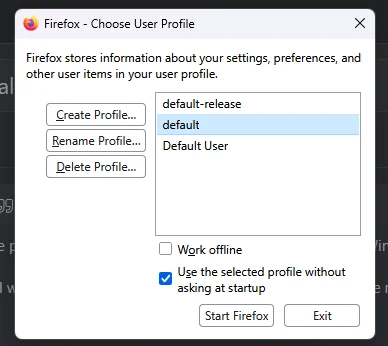
So I ran firefox.exe -P to bring up the profile manager, that will work when Firefox is shut down. Here is what the profile manager shows me
1784867094716.webp


However, in the Appdata folder for Mozilla/Firefox I have these profiles. The highlighted profile is the one I want to install. How do I get the FF Choose User Profile to see this profile so I can use it for all future FF use?

1784867521364.webp
 

My Computer My Computer

At a glance

Windows 11 2H25AMD 9900X64 GBAMD 9070 XT
OS
Windows 11 2H25
Computer type
PC/Desktop
Manufacturer/Model
DIY
CPU
AMD 9900X
Motherboard
MSI X870E Carbon
Memory
64 GB
Graphics Card(s)
AMD 9070 XT
Sound Card
built-in
Monitor(s) Displays
Dell 24"
Hard Drives
Sabrent 1 TB NVMe, 4 x SSD (need to check models), 4 x 3.5" HDD, 8-16 TB, all WD
PSU
Seasonic 850
Case
Fractal Design North XL (which I likw)
Cooling
Corsair AIO for CPU, fans for case
Keyboard
Das Keyboard 4
Mouse
Corsair M65 (white)
Internet Speed
1 TB download
Browser
Firefox
Antivirus
Bitdefender
Other Info
Also have Lenovo T14S laptop (me) and Lenovo Slim 71 (wife)
To back up and restore Mozilla Firefox completely, the most reliable method is copying your profile folder, which holds all your personal data, settings, extensions, and bookmarks. Alternatively, you can use built-in settings for automated backups or sync your data via a Mozilla Account.


My Computer My Computer

At a glance

Windows 11AMD Ryzen 7 5700GMicron Technology DDR4-3200 16GBNVIDIA GeForce RTX 3060
OS
Windows 11
Computer type
PC/Desktop
Manufacturer/Model
HP Pavilion
CPU
AMD Ryzen 7 5700G
Motherboard
Erica6
Memory
Micron Technology DDR4-3200 16GB
Graphics Card(s)
NVIDIA GeForce RTX 3060
Sound Card
Realtek ALC671
Monitor(s) Displays
Samsung SyncMaster U28E590
Screen Resolution
3840 x 2160
Hard Drives
SAMSUNG MZVLQ1T0HALB-000H1
Hamberger icon (3 vertical lines)>Profiles>Manage Profiles
Check box to choose a profile when firefox opens

If only one person uses your device in appdata have only two profiles, default and yours
Screenshot 2026-07-24 004344.webp

I do this-If you create a firefox account, sign in to FF and sync your data, you don't have to mess with copying/backing up profiles, etc. FF will automatically bring your data over when you sign into FF on a new device or when you have to re-install FF.
 

My Computers My Computers

  • At a glance

    Windows 11 Pro 25H2 26200.9168i9-10900 10 core 20 threads32 gbnone-Intel UHD Graphics 630
    OS
    Windows 11 Pro 25H2 26200.9168
    Computer type
    PC/Desktop
    Manufacturer/Model
    Dell Optiplex 7080
    CPU
    i9-10900 10 core 20 threads
    Motherboard
    DELL 0J37VM
    Memory
    32 gb
    Graphics Card(s)
    none-Intel UHD Graphics 630
    Sound Card
    Integrated Realtek
    Monitor(s) Displays
    Benq 27
    Screen Resolution
    2560x1440
    Hard Drives
    2x1tb Solidigm m.2 nvme /External drives 512gb Samsung m.2 sata+2tb Kingston m2.nvme
    PSU
    500w
    Case
    MT
    Cooling
    Dell Premium
    Keyboard
    Logitech wired
    Mouse
    Logitech wireless
    Internet Speed
    so slow I'm too embarrassed to tell
    Browser
    #1 Edge #2 Firefox
    Antivirus
    Defender+MWB Premium
  • At a glance

    Windows 11 Pro 24H2 26200.9168AMD Ryzen 7 6800U32 gbintegrated
    Operating System
    Windows 11 Pro 24H2 26200.9168
    Computer type
    PC/Desktop
    Manufacturer/Model
    Beelink Mini PC SER5
    CPU
    AMD Ryzen 7 6800U
    Memory
    32 gb
    Graphics card(s)
    integrated
    Sound Card
    integrated
    Monitor(s) Displays
    Benq 27
    Screen Resolution
    2560x1440
    Hard Drives
    1TB Crucial nvme
    Keyboard
    Logitech wired
    Mouse
    Logitech wireless
    Internet Speed
    still too embarrassed to tell
    Browser
    Firefox
    Antivirus
    Defender
  • System 3 is non compliant Dell 9020 i7-4770/24gb ram Win11 PRO 26200.9168
Just delete the second profile in your list (with the ending "-release", i.e. nsmq9.... in your case) or drag and drop the corresponding AppData-folder to your desktop or elsewhere (to keep it in case of ...).
I use Moz Backup to backup my profile (oldie but goody); you can chose the elements of your profile you want to keep and those you don't. Always chose the profile with the ending"- release", the default profile cannot be backed up.

Edit: there are two profiles folders (ech one containing at least two profiles) in App Data, one in AppData\Roaming and one in AppData\Local.
 
Last edited:

My Computer My Computer

At a glance

Windows 11Intel Core i3 12 100 12th generationKingston DDR4-3200 16 GBytesIntel UHD 730
OS
Windows 11
Computer type
PC/Desktop
Manufacturer/Model
Gigabyte H610M H V2
CPU
Intel Core i3 12 100 12th generation
Motherboard
American Megatrend F35
Memory
Kingston DDR4-3200 16 GBytes
Graphics Card(s)
Intel UHD 730
I haven't used the profile tool, but when I take a backup in order to clean install Windows, I always make sure I copy all the Mozilla folders from Program Files, ProgramData and my user folder. If I paste them at the respective locations after Windows installation BEFORE installing Firefox, the installer thinks I already have Firefox and offers to upgrade (this works even if it is the same version). I select upgrade and when Firefox is installed I have my settings, my bookmarks and many more. This also works in Google Chrome and Microsoft Edge and probably for some non-browser applications. Good for keeping your game progress by copying your game data.
 

My Computers My Computers

  • At a glance

    Windows 11 Pro 23H2 (5699), 25H2 (9168)Mobile DualCore Intel Core 2 Duo T7250, 2000 MHz4GBMobile Intel(R) GMA 4500M (Mobile 4 series)
    OS
    Windows 11 Pro 23H2 (5699), 25H2 (9168)
    Computer type
    Laptop
    Manufacturer/Model
    Acer Extensa 5630EZ
    CPU
    Mobile DualCore Intel Core 2 Duo T7250, 2000 MHz
    Motherboard
    Acer Extensa 5630
    Memory
    4GB
    Graphics Card(s)
    Mobile Intel(R) GMA 4500M (Mobile 4 series)
    Sound Card
    Realtek ALC268 @ Intel 82801IB ICH9 - High Definition Audio Controller
    Monitor(s) Displays
    1
    Screen Resolution
    1280x800
    Hard Drives
    Samsung SSD 850 EVO 250GB SATA Device (250 GB, SATA-III)
    Internet Speed
    802.11g wireless 54 Mbps
    Browser
    MICROSOFT EDGE
    Antivirus
    WINDOWS DEFENDER
    Other Info
    Legacy MBR installation, no TPM, no Secure Boot, no WDDM 2.0 graphics drivers, no SSE4.2, cannot get more unsupported ;) This is only my test laptop. I had installed Windows 11 here before upgrading my main PC. For my main PC I use everyday see my 2nd system specs.
  • At a glance

    Windows 11 Pro v25H2 (build 26200.9168)Intel Core-i7 3770 3.40GHz s1155 (3rd generat...2x Kingston Hyper-X Blu 8GB DDR3-1600GIGABYTE GeForce RTX 3050 WINDFORCE OC V2 6GB...
    Operating System
    Windows 11 Pro v25H2 (build 26200.9168)
    Computer type
    PC/Desktop
    Manufacturer/Model
    Custom-built PC
    CPU
    Intel Core-i7 3770 3.40GHz s1155 (3rd generation)
    Motherboard
    Asus P8H61 s1155 ATX
    Memory
    2x Kingston Hyper-X Blu 8GB DDR3-1600
    Graphics card(s)
    GIGABYTE GeForce RTX 3050 WINDFORCE OC V2 6GB (GV-N3050WF2OCV2-6GD)
    Sound Card
    Realtek HD audio (ALC887)
    Monitor(s) Displays
    Sony Bravia KDL-19L4000 19" LCD TV via VGA
    Screen Resolution
    1440x900 32-bit 60Hz
    Hard Drives
    WD Blue SA510 2.5 1000GB SSD as system disk, Western Digital Caviar Purple 4TB SATA III (WD40PURZ) as second
    PSU
    Thermaltake Litepower RGB 550W Full Wired
    Case
    SUPERCASE MIDI-TOWER
    Cooling
    Deepcool Gamma Archer CPU cooler, 1x 8cm fan at the back
    Keyboard
    Mitsumi 101-key PS/2
    Mouse
    Microsoft Compact Optical Mouse
    Internet Speed
    802.11ac 5GHz wireless 260Mpbs
    Browser
    Microsoft Edge, Mozilla Firefox
    Antivirus
    Microsoft Windows Defender
    Other Info
    Legacy BIOS (MBR) installation, no TPM, no Secure Boot, WDDM 3.0 graphics drivers, WEI score 7.4
I haven't bothered to backup my Firefox profile, I do a full backup of my Windows partition every week. However, I do regularly backup the much larger and more complex Mozilla Thunderbird profile. I just shut down Thunderbird and then copy the whole profile. I'm pretty sure that backing up Firefox profiles are just as simple.
 

My Computers My Computers

  • At a glance

    Win 11 Pro 25H2, Build 26200.9168Intel Core i5 14500, 14th Generation64GB DDR4GeForce RTX 4060
    OS
    Win 11 Pro 25H2, Build 26200.9168
    Computer type
    PC/Desktop
    Manufacturer/Model
    Home Brew
    CPU
    Intel Core i5 14500, 14th Generation
    Motherboard
    Gigabyte B760M G P WIFI
    Memory
    64GB DDR4
    Graphics Card(s)
    GeForce RTX 4060
    Sound Card
    Chipset Realtek
    Monitor(s) Displays
    LG 45" Ultragear & Acer 24" 1080p
    Screen Resolution
    5120x1440 & 1920x1080
    Hard Drives
    Crucial P310 2TB 2280 PCIe Gen4 3D NAND NVMe M.2 SSD (O/S)
    Silicon Power 2TB US75 NVMe PCIe Gen4 M.2 2280 SSD (backup)
    Crucial BX500 2TB 3D NAND (2nd backup)
    Seagate 4TB Ironwolf, rotating HDD archive files
    External off-line backup Drives: 2 NVMe 4TB drives in external enclosures
    PSU
    Thermaltake Toughpower GF3 750W
    Case
    LIAN LI LANCOOL 216 E-ATX PC Case
    Cooling
    Lots of fans!
    Keyboard
    Microsoft Comfort Curve 2000
    Mouse
    Logitech G305
    Internet Speed
    Verizon FiOS 1GB
    Browser
    Firefox
    Antivirus
    Malware Bytes & Windows Defender Security
  • At a glance

    Win 11 Pro 25H2, Build 26200.9168Intel Core i5 1440032GB DDR5Intel 700 Embedded GPU
    Operating System
    Win 11 Pro 25H2, Build 26200.9168
    Computer type
    PC/Desktop
    Manufacturer/Model
    Home Brew
    CPU
    Intel Core i5 14400
    Motherboard
    Gigabyte B760M DS3H AX
    Memory
    32GB DDR5
    Graphics card(s)
    Intel 700 Embedded GPU
    Sound Card
    Realtek Embedded
    Monitor(s) Displays
    27" HP 1080p
    Screen Resolution
    1920x1080
    Hard Drives
    Crucial P310 2TB 2280 PCIe Gen4 eD NAND PCIe SSD
    Samsung EVO 990 2TB NVMe Gen4 SSD
    Samsung 2TB SATA SSD
    PSU
    Thermaltake Smart BM3 650W
    Case
    Okinos Micro ATX Case
    Cooling
    Fans
    Keyboard
    Microsoft Comfort Curve 2000
    Mouse
    Logitech G305
    Internet Speed
    Verizon FiOS 1GB
    Browser
    Firefox
    Antivirus
    Malware Bytes & Windows Defender Security
  • Nimo N171 17" Laptop, (Intel i3-1215U, 16GB RAM, 2TB NVMe, Win11 Pro)
    Acemagic Vista Mini PC V1 (Intel N150, 16GB RAM, 1TB NVMe, Win11 Pro)
    HP ENVY h8-1540t, (24GB RAM, 2TB SSD, 2TB HDD, Win11 Pro)
How do I get the FF Choose User Profile to see this profile so I can use it for all future FF use?

This is why when you backup Firefox you want to include the installs.ini and profiles.ini that are located back in appdata/roaming/Mozilla/Firefox folder.

Those contain the names of the folders and profiles used.

Screenshot 2026-07-24 082518.webp
 

My Computer My Computer

At a glance

Windows 11 Pro
OS
Windows 11 Pro
Firefox ... Newly installed and I want to restore the profile I backed up

I use this procedure successfully on my four computers.
How-to guide - Backup and restore Firefox settings - TenForums
Sometimes I have to close & reopen Firefox a couple of times before the restored profile takes effect.

However, in the Appdata folder for Mozilla/Firefox I have these profiles. The highlighted profile is the one I want to install. How do I get the FF Choose User Profile to see this profile so I can use it for all future FF use?
My procedure avoids that problem by [backing up then] deleting all the unwanted Firefox profiles on all my computers.


Denis
 

My Computer My Computer

At a glance

Windows 11 Home x64 Version 25H2 Build 26200....
OS
Windows 11 Home x64 Version 25H2 Build 26200.9168
My procedure avoids that problem by [backing up then] deleting all the unwanted Firefox profiles on all my computers.

I just rename the profile folder then change the installs.ini and profiles.ini to point to this folder.

I have just one profile and one folder so I just backup appdata/roaming/mozilla/firefox folder.

This way it is just drag and drop to restore my profile as installs.ini and profiles.ini point to the correct folder.

1.webp

2.webp


3.webp
 

My Computer My Computer

At a glance

Windows 11 Pro
OS
Windows 11 Pro
I just rename the profile folder then change the installs.ini and profiles.ini to point to this folder.
...
I just backup appdata/roaming/mozilla/firefox folder
I just copy in the desired profile folder from my main computer and do not need to change anything else.
I don't know that there is much significant difference between what we are both doing:-
- I change what's in my profile folder, whilst
- you copy in a new profile folder then change those ini files to match the new folder path.


All the best,
Denis
 

My Computer My Computer

At a glance

Windows 11 Home x64 Version 25H2 Build 26200....
OS
Windows 11 Home x64 Version 25H2 Build 26200.9168
you copy in a new profile folder then change those ini files to match the new folder path.

No I don't change anything.

My current profile folder is Dude and has been for years.

My installs.ini and profiles.ini have always had this folder name in them.

All I do is install Firefox then go to appdata/roaming/Mozilla and delete the Firefox folder.

Then just drop my Firefox folder in appdata/roaming/Mozilla and done everything works.
 

My Computer My Computer

At a glance

Windows 11 Pro
OS
Windows 11 Pro
delete the Firefox folder.

Then just drop my Firefox folder in appdata/roaming/Mozilla
So, in fact, you & I do the same thing.


Denis
 

My Computer My Computer

At a glance

Windows 11 Home x64 Version 25H2 Build 26200....
OS
Windows 11 Home x64 Version 25H2 Build 26200.9168
So, in fact, you & I do the same thing.

I do not have to use profile manager at all like your 10 forum threads refers to.
 

My Computer My Computer

At a glance

Windows 11 Pro
OS
Windows 11 Pro
I do not have to use profile manager at all like your 10 forum threads refers to.
I used the Profile manager once. OK so that is a difference between our methods.


Denis
 

My Computer My Computer

At a glance

Windows 11 Home x64 Version 25H2 Build 26200....
OS
Windows 11 Home x64 Version 25H2 Build 26200.9168
If you have a copy of your C:\Users\<YourUsername>\AppData\Roaming\Mozilla\Firefox\Profiles\
profile in a folder backed up, all you need to do is type about:profiles in firefox address bar and choose "Create a New Profile", title the profile name and select the folder you have backed up. Then make the "new" profile your default and reboot firefox. Open about:profiles again and delete the junk you don't want eg. empty profiles leftover.

This profile folder can be located on secondary storages as well as long as they are connected to the PC.

If you are running multiple profiles, "C:\Program Files\Mozilla Firefox\firefox.exe" -p "ProfileNameHere" in each shortcut on the desktop to access them directly.
 

My Computer My Computer

At a glance

Windows 11 Pro 25H2i7 12700k64GB DDR5 [CMK64GX5M2B5200C40]MSI 4060 2x Ventus 8G
OS
Windows 11 Pro 25H2
Computer type
PC/Desktop
Manufacturer/Model
DIY
CPU
i7 12700k
Motherboard
7E07vM9 [Z790 Pro Max Wifi]
Memory
64GB DDR5 [CMK64GX5M2B5200C40]
Graphics Card(s)
MSI 4060 2x Ventus 8G
Sound Card
Realtek® ALC4080 Codec
Monitor(s) Displays
ASUS VA24DQSB
Screen Resolution
1920x1080 @ 75hz
Hard Drives
Samsung 980 Pro 1TB (OS Drive)
Samsung 980 Pro 2TB (Secondary Drive)
Samsung 980 Pro 1TB (Other)
Samsung 860 Pro 512 (Other)
WD6400AAKS (Other)
PSU
Corsair 850x
Cooling
Noctua NH-D15
Mouse
G502 X Lightspeed
Browser
Chrome, Firefox
Antivirus
Malwarebytes Premium, Defender
Hey everyone.

SUCCESS :giggle:

I got sidetracked with "life happening" but today I got back to working on this problem. I re-read the entire thread and then I did the following:

Went to both Appdata/Roaming and Appdate/Local. I moved all the profitless to a new folder WASProfiles. Then I copied the entire Firefox profiles I had backed i[ before I did a c;;lean install of Win 11.) And Sahzamm (y), it all worked, including my numerous bookmarks whiich I use to go to sites I visit daily.
 
Last edited:

My Computer My Computer

At a glance

Windows 11 2H25AMD 9900X64 GBAMD 9070 XT
OS
Windows 11 2H25
Computer type
PC/Desktop
Manufacturer/Model
DIY
CPU
AMD 9900X
Motherboard
MSI X870E Carbon
Memory
64 GB
Graphics Card(s)
AMD 9070 XT
Sound Card
built-in
Monitor(s) Displays
Dell 24"
Hard Drives
Sabrent 1 TB NVMe, 4 x SSD (need to check models), 4 x 3.5" HDD, 8-16 TB, all WD
PSU
Seasonic 850
Case
Fractal Design North XL (which I likw)
Cooling
Corsair AIO for CPU, fans for case
Keyboard
Das Keyboard 4
Mouse
Corsair M65 (white)
Internet Speed
1 TB download
Browser
Firefox
Antivirus
Bitdefender
Other Info
Also have Lenovo T14S laptop (me) and Lenovo Slim 71 (wife)
Been there done that. I share my experience.
 

My Computers My Computers

  • At a glance

    Windows 11 Pro 23H2 (5699), 25H2 (9168)Mobile DualCore Intel Core 2 Duo T7250, 2000 MHz4GBMobile Intel(R) GMA 4500M (Mobile 4 series)
    OS
    Windows 11 Pro 23H2 (5699), 25H2 (9168)
    Computer type
    Laptop
    Manufacturer/Model
    Acer Extensa 5630EZ
    CPU
    Mobile DualCore Intel Core 2 Duo T7250, 2000 MHz
    Motherboard
    Acer Extensa 5630
    Memory
    4GB
    Graphics Card(s)
    Mobile Intel(R) GMA 4500M (Mobile 4 series)
    Sound Card
    Realtek ALC268 @ Intel 82801IB ICH9 - High Definition Audio Controller
    Monitor(s) Displays
    1
    Screen Resolution
    1280x800
    Hard Drives
    Samsung SSD 850 EVO 250GB SATA Device (250 GB, SATA-III)
    Internet Speed
    802.11g wireless 54 Mbps
    Browser
    MICROSOFT EDGE
    Antivirus
    WINDOWS DEFENDER
    Other Info
    Legacy MBR installation, no TPM, no Secure Boot, no WDDM 2.0 graphics drivers, no SSE4.2, cannot get more unsupported ;) This is only my test laptop. I had installed Windows 11 here before upgrading my main PC. For my main PC I use everyday see my 2nd system specs.
  • At a glance

    Windows 11 Pro v25H2 (build 26200.9168)Intel Core-i7 3770 3.40GHz s1155 (3rd generat...2x Kingston Hyper-X Blu 8GB DDR3-1600GIGABYTE GeForce RTX 3050 WINDFORCE OC V2 6GB...
    Operating System
    Windows 11 Pro v25H2 (build 26200.9168)
    Computer type
    PC/Desktop
    Manufacturer/Model
    Custom-built PC
    CPU
    Intel Core-i7 3770 3.40GHz s1155 (3rd generation)
    Motherboard
    Asus P8H61 s1155 ATX
    Memory
    2x Kingston Hyper-X Blu 8GB DDR3-1600
    Graphics card(s)
    GIGABYTE GeForce RTX 3050 WINDFORCE OC V2 6GB (GV-N3050WF2OCV2-6GD)
    Sound Card
    Realtek HD audio (ALC887)
    Monitor(s) Displays
    Sony Bravia KDL-19L4000 19" LCD TV via VGA
    Screen Resolution
    1440x900 32-bit 60Hz
    Hard Drives
    WD Blue SA510 2.5 1000GB SSD as system disk, Western Digital Caviar Purple 4TB SATA III (WD40PURZ) as second
    PSU
    Thermaltake Litepower RGB 550W Full Wired
    Case
    SUPERCASE MIDI-TOWER
    Cooling
    Deepcool Gamma Archer CPU cooler, 1x 8cm fan at the back
    Keyboard
    Mitsumi 101-key PS/2
    Mouse
    Microsoft Compact Optical Mouse
    Internet Speed
    802.11ac 5GHz wireless 260Mpbs
    Browser
    Microsoft Edge, Mozilla Firefox
    Antivirus
    Microsoft Windows Defender
    Other Info
    Legacy BIOS (MBR) installation, no TPM, no Secure Boot, WDDM 3.0 graphics drivers, WEI score 7.4
Back
Top Bottom




