Adobe Acrobat Reader menu text too small


Snugglebugs

Well-known member
Member
VIP
Local time
11:23 AM
Posts
60
Location
Vormark, Fyn, Denmark
OS
Win 11 Pro 64
Windows version 25 H2

Some weeks ago Acrobat was updated and the menu GUI text sizes became very small. I need to about double the size to get back to something I can read without using a magnifier - I have not had this problem before in any version of Windows.

I have spent a lot of time searching for an answer and most of the posts elsewhere refer to Win 10 and their suggestions do nothing to solve the problem for me. But most of them seem to assume that the cause as a compatibility issue.

I think that i have read an answer in earlier posts or tutorials here but so far I haven't found any.
 

My Computers

System One System Two

  • OS
    Win 11 Pro 64
    Computer type
    PC/Desktop
    Manufacturer/Model
    Acer Aspire TC-886
    CPU
    Intel
    Motherboard
    Acer for Intel
    Memory
    8 GB
    Graphics Card(s)
    Nvidea
    Sound Card
    Realtek
    Monitor(s) Displays
    Iiyama G-Master GB3466WQSU
    Screen Resolution
    3440 x 1440
    Hard Drives
    Samsung SDD 1TB
    PSU
    Inbuilt
    Case
    Tower
    Cooling
    Inbuilt
    Keyboard
    Logitech Wireless K520 connected via Mouse without borders to other desktops.
    Mouse
    Now using Re-Go Vertical Mouse, left handed. As remote alternative - Logitech Wireless M310 connected via Mouse without borders to other desktops.
    Internet Speed
    200 MB
    Browser
    Edge
    Antivirus
    Defender + Malwarebytes
    Other Info
    Backup external Seagate Plus 4 TB from AOMEI Backupper
  • Operating System
    Win 10 Pro 64 unsuitable for Win 11
    Computer type
    PC/Desktop
    Manufacturer/Model
    Lenovo H30-05
    Other Info
    Kept up to date as a Win 10 backup
    System three is another Acer from 2008 with HDD x 2 carrying Win 7 Pro upgraded from XP. Useful to have for some old programmes.
Windows version 25 H2

Some weeks ago Acrobat was updated and the menu GUI text sizes became very small. I need to about double the size to get back to something I can read without using a magnifier - I have not had this problem before in any version of Windows.

I have spent a lot of time searching for an answer and most of the posts elsewhere refer to Win 10 and their suggestions do nothing to solve the problem for me. But most of them seem to assume that the cause as a compatibility issue.

I think that i have read an answer in earlier posts or tutorials here but so far I haven't found any.
can you share a screenshot of the menu you are referring to so we can inform you how to change its size? thanks.
 

My Computer

System One

  • OS
    Windows 11 Pro
I attach a screenshot where I have overlaid Acrobat over my email layout. You can see that the pdf lile listing and the left hand menu bar has very small text whereas the text in similar positions on the email screen is much better in size. The latter can be adjusted but Acrobat stubbornly resists!
 

Attachments

  • Screenshot 2025-10-28 165306.webp
    Screenshot 2025-10-28 165306.webp
    187.9 KB · Views: 2

My Computers

System One System Two

  • OS
    Win 11 Pro 64
    Computer type
    PC/Desktop
    Manufacturer/Model
    Acer Aspire TC-886
    CPU
    Intel
    Motherboard
    Acer for Intel
    Memory
    8 GB
    Graphics Card(s)
    Nvidea
    Sound Card
    Realtek
    Monitor(s) Displays
    Iiyama G-Master GB3466WQSU
    Screen Resolution
    3440 x 1440
    Hard Drives
    Samsung SDD 1TB
    PSU
    Inbuilt
    Case
    Tower
    Cooling
    Inbuilt
    Keyboard
    Logitech Wireless K520 connected via Mouse without borders to other desktops.
    Mouse
    Now using Re-Go Vertical Mouse, left handed. As remote alternative - Logitech Wireless M310 connected via Mouse without borders to other desktops.
    Internet Speed
    200 MB
    Browser
    Edge
    Antivirus
    Defender + Malwarebytes
    Other Info
    Backup external Seagate Plus 4 TB from AOMEI Backupper
  • Operating System
    Win 10 Pro 64 unsuitable for Win 11
    Computer type
    PC/Desktop
    Manufacturer/Model
    Lenovo H30-05
    Other Info
    Kept up to date as a Win 10 backup
    System three is another Acer from 2008 with HDD x 2 carrying Win 7 Pro upgraded from XP. Useful to have for some old programmes.
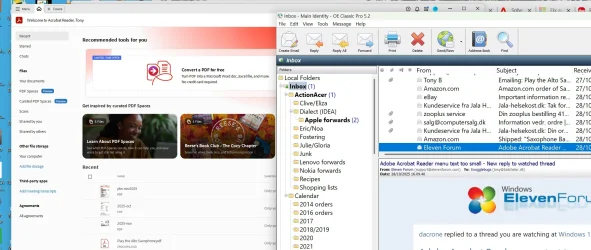
I attach a screenshot where I have overlaid Acrobat over my email layout. You can see that the pdf lile listing and the left hand menu bar has very small text whereas the text in similar positions on the email screen is much better in size. The latter can be adjusted but Acrobat stubbornly resists!
Go to Menu > View > Display Size > Large

is that what you are looking to do? if you want to edit it more precise, we can delve into registry editing.
 

My Computer

System One

  • OS
    Windows 11 Pro
Back
Top Bottom