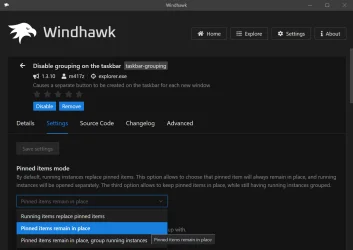
Another annoying taskbar issue


Murby

Member
Local time
4:43 PM
Posts
65
OS
Windows 11 Home
My taskbar is set to the left side of my screen, blended in with the windows icon. I have several shortcuts to files there, plus a few apps like calculator and notepad.

When I open a file, the taskbar button opens to the right side of the icons.. (that's good)
But when I open an app, the taskbar button opens in place and pushes the other icons over to the right to make room for it. (that's bad)

How do I stop this annoying behavior? I do not ever want my taskbar icons to move. Jeez, who designed this? Could you imagine having the keys on your keyboard move around as you use them?
 

My Computer

System One

  • OS
    Windows 11 Home
    Computer type
    PC/Desktop
    CPU
    AMD RYZEN 5 3600
    Motherboard
    ASUS B450M DS3H WIFI
    Memory
    32 Gb 3200MT
    Graphics Card(s)
    GeForce GTX
    Monitor(s) Displays
    YES
    Screen Resolution
    Enough
    Hard Drives
    SAMSUNG 990 PRO SSD 1TB NVMe
    PSU
    YES
    Case
    Thermaltake
    Cooling
    YES
    Keyboard
    Logitech K120
    Mouse
    Logitech
    Internet Speed
    200 Mb/s - 1 Gbs
    Browser
    Firefox
    Antivirus
    Windows Defender
are you stating that when you open an app the current instance is stacked where the icon is pinned?

if so, Settings > Personalization > Taskbar
Set Combine to Never

1761942798613.webp
 

My Computer

System One

  • OS
    Windows 11 Pro
are you stating that when you open an app the current instance is stacked where the icon is pinned?

if so, Settings > Personalization > Taskbar
Set Combine to Never

View attachment 151152
That is exactly what I'm talking about.. But I set it to NEVER the day I installed Win11. Both settings are set to NEVER.
The behavior is strange. If I open one of the shortcuts I created, the shortcut to whatever file it is will open to the right of the taskbar icons. But if the icon is a program/app, then it opens in place and pushes the other icons to the right.

Here's a screenshot. I opened the calculator app and it pushed the other icons to the right.


taskbar.webp
 

My Computer

System One

  • OS
    Windows 11 Home
    Computer type
    PC/Desktop
    CPU
    AMD RYZEN 5 3600
    Motherboard
    ASUS B450M DS3H WIFI
    Memory
    32 Gb 3200MT
    Graphics Card(s)
    GeForce GTX
    Monitor(s) Displays
    YES
    Screen Resolution
    Enough
    Hard Drives
    SAMSUNG 990 PRO SSD 1TB NVMe
    PSU
    YES
    Case
    Thermaltake
    Cooling
    YES
    Keyboard
    Logitech K120
    Mouse
    Logitech
    Internet Speed
    200 Mb/s - 1 Gbs
    Browser
    Firefox
    Antivirus
    Windows Defender
doesnt work for uwp (that i am aware of). if you want, i can make AHK scripts to launch whatever uwp apps you want and make them EXEs with the right Icons. you can pin those and then when the uwp launches it will be to the right like everything else...
 

My Computer

System One

  • OS
    Windows 11 Pro
Combine and Hide Labels not an option?
 

My Computers

System One System Two

  • OS
    Windows 11 Pro
    Computer type
    PC/Desktop
    Manufacturer/Model
    ASUS ROG Strix
  • Operating System
    Windows 11 Pro
    Computer type
    Laptop
    Manufacturer/Model
    ASUS VivoBook
When I open a file, the taskbar button opens to the right side of the icons.. (that's good)
But when I open an app, the taskbar button opens in place and pushes the other icons over to the right to make room for it. (that's bad)
This has been reported before.
I do not think there is a solution.

My own experiments have shown me that the two different behaviours when
1 opening files, and
2 opening apps
are due to idiosyncratic, undeclared behaviour of the individual applications / Windows components involved.
There is no consistent pattern to the differences in behaviour that might steer you towards a solution.
For example,
- I click on a Taskbar icon for one particular Excel file and the icon expands into the wide running-application Taskbar indicator yet remains in the same position.
- I click on a Taskbar icon for a different Excel file and the icon remains the same whilst the wide running-application Taskbar indicator is to the right of all others.


All the best,
Denis
 

My Computer

System One

  • OS
    Windows 11 Home x64 Version 25H2 Build 26200.8037
Try Combine taskbar buttons and hide labels to always. That's what works here.
 

My Computers

System One System Two

  • OS
    Win 11 Pro
    Computer type
    Laptop
    Manufacturer/Model
    ASUS Vivobook
    CPU
    AMD Ryzen™ 7 7730U
    Motherboard
    M1605YA
    Memory
    24GB Dual-Channel DDR4 @ 1596MHz (22-22-22-52)
    Graphics Card(s)
    512MB ATI AMD Radeon Graphics (ASUStek Computer Inc)
    Monitor(s) Displays
    Generic PnP Monitor (1920x1200@60Hz) - P1 PLUS (1920x1080@59Hz)
    Screen Resolution
    1920 X 1200
    Hard Drives
    953GB Western Digital WD
    PSU
    45 Watts
    Mouse
    Lenovo Bluetooth.
    Internet Speed
    500 Mbps
    Browser
    Edge
    Antivirus
    Defender
  • Operating System
    Windows 11
    Computer type
    Laptop
    Manufacturer/Model
    ACER NITRO
    CPU
    AMD Ryzen 7 5800H / 3.2 GHz
    Motherboard
    CZ Scala_CAS (FP6)
    Memory
    32 GB DDR4 SDRAM 3200 MHz
    Graphics card(s)
    NVIDIA GeForce RTX 3060 6 GB GDDR6 SDRAM
    Sound Card
    Realtek Audio. NVIDIA High Definition Audio
    Monitor(s) Displays
    15.6" LED backlight 1920 x 1080 (Full HD) 144 Hz
    Screen Resolution
    1920 x 1080 (Full HD)
    Hard Drives
    Samsung 970 Evo Plus 2TB NVMe M.2
    PSU
    180 Watt, 19.5 V
    Mouse
    Lenovo Bluetooth
    Internet Speed
    500 Mbps
    Browser
    Edge
    Antivirus
    Defender
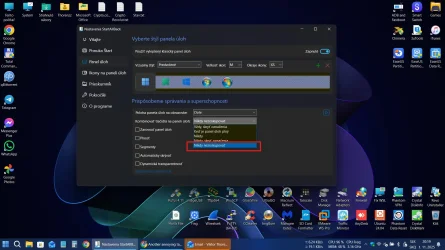
I had exactly same issue. Only option what worked was using StartAllBack: Taskbar settings -> combine options -> use last option. ;-)

Snímka obrazovky 2025-11-01 201905.webp
 

My Computer

System One

  • OS
    Win 11 Pro Insider Beta (26220.8370), Kali Linux
    Computer type
    Laptop
    Manufacturer/Model
    HP Victus 15
    CPU
    AMD Ryzen 5 5600H
    Memory
    16GB (2x8GB) Dual Channel
    Graphics Card(s)
    Nvidia RTX 3050
    Monitor(s) Displays
    1080p IPS 144Hz (Laptop Screen) + 3x 1080p 60Hz screens
    Screen Resolution
    4x 1920x1080 monitors
    Hard Drives
    M.2 NVMe 512GB Samsung - PCIe 4.0x4 - Main system drive

    USB-A and USB-C M.2 NVMe Enclosure with NVMe SSSTC 256GB - NVM Express 1.3 - Ventoy with all install files and all ISO images i use.

    USB External SSD Kingston XS100 1TB - USB 3.2 Gen 2 - WindowsToGo (Clone of my existing Sytem), and all games I play.

    USB External SSHD Seagate FireCuda 2TB - USB 3.0 - For Macrium system images, data, photos, stays always safe at home
    PSU
    200W
    Cooling
    Zalman ZM-NC3 Cooling pad
    Keyboard
    Dell KM7120W
    Mouse
    Dell KM7120W
    Internet Speed
    1Gb/s down / 500Mb/s up
    Browser
    Chrome
    Antivirus
    Windows Defender
Last edited:

My Computers

System One System Two

  • OS
    11 Home
    Computer type
    Laptop
    Manufacturer/Model
    Asus TUF Gaming F16 (2024)
    CPU
    i7 13650HX
    Memory
    16GB DDR5
    Graphics Card(s)
    GeForce RTX 4060 Mobile
    Sound Card
    Eastern Electric MiniMax DAC Supreme; Emotiva UMC-200; Astell & Kern AK240
    Monitor(s) Displays
    Sony Bravia XR-55X90J
    Screen Resolution
    3840×2160
    Hard Drives
    512GB SSD internal
    37TB external
    PSU
    Li-ion
    Cooling
    2× Arc Flow Fans, 4× exhaust vents, 5× heatpipes
    Keyboard
    Logitech K800
    Mouse
    Logitech G402
    Internet Speed
    30Mbit/s up, 500Mbit/s down
    Browser
    FF
    Antivirus
    What's an antivirus?
  • Operating System
    11 Home
    Computer type
    Laptop
    Manufacturer/Model
    Medion S15450
    CPU
    i5 1135G7
    Memory
    16GB DDR4
    Graphics card(s)
    Intel Iris Xe
    Sound Card
    Eastern Electric MiniMax DAC Supreme; Emotiva UMC-200; Astell & Kern AK240
    Monitor(s) Displays
    Sony Bravia XR-55X90J
    Screen Resolution
    3840×2160
    Hard Drives
    2TB SSD internal
    37TB external
    PSU
    Li-ion
    Keyboard
    Logitech K800
    Mouse
    Logitech G402
    Internet Speed
    30Mbit/s up, 500Mbit/s down
    Browser
    FF

Latest Support Threads

Back
Top Bottom